
Last updated: September 2026
Wix eCommerce helps stores not just sell their products and services but expand their capabilities online. Featuring over 500 professional templates, a user-friendly drag-and-drop editor, and seamless payment integration, Wix simplifies the creation of customized online stores. Its centralized platform allows for efficient management across multiple sales channels, including social media and marketplaces, ensuring streamlined operations. With built-in marketing and SEO tools, businesses can effectively attract and retain customers. In this Wix eCommerce review we'll look at the features, pricing, ease of use and business value offered by this e-commerce web builder.
Plans & Pricing
- 5 collaborators
- 50 GB storage space
- Basic marketing suite
- Free domain for 1 year
- Basic site analytics
- Accept payments
- Basic eCommerce
- 10 collaborators
- 100 GB storage space
- Standard marketing suite
- Free domain for 1 year
- Standard site analytics
- Accept payments
- Standard eCommerce
- 15 collaborators
- Unlimited storage space
- Advanced marketing suite
- Free domain for 1 year
- Advanced site analytics
- Accept payments
- Advanced eCommerce
- Advanced developer platform
* Featured prices can be updated and free offers may include additional terms.
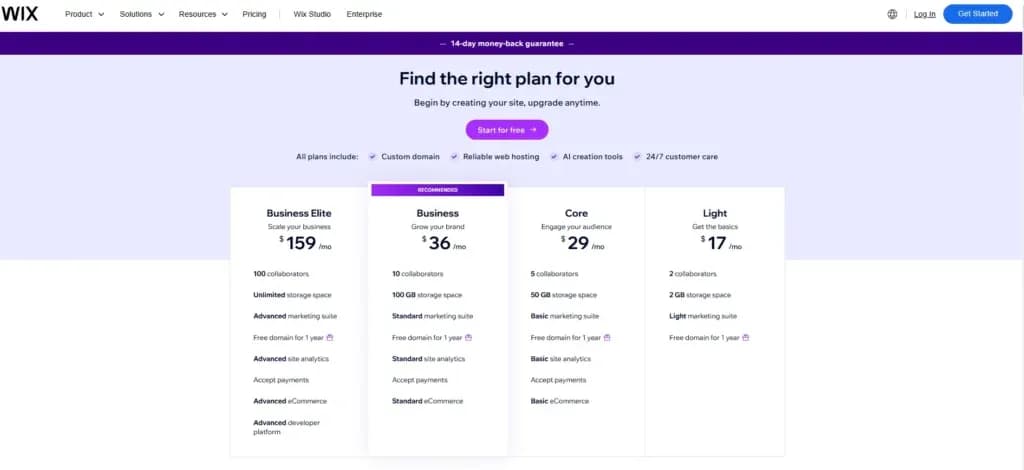
To sell online with Wix, you must bypass the “Free” and “Light” plans entirely, as they do not support payment processing,. The entry point for any online store is the Core plan.
Core Plan (Entry-Level Ecommerce)
- Price: Approximately $29/month (billed annually)
- What It Includes:
- Ecommerce Functionality: Full ability to accept secure online payments and sell up to 50,000 products
- Storage: 50GB, which is sufficient for most small to medium catalogs
- Collaborators: Up to 5 staff accounts.
- Marketing & Sales: Includes abandoned cart recovery emails, selling on social channels/marketplaces, and basic site analytics
- Dropshipping: Access to 25 products via Modalyst
- Bookings: Includes tools for scheduling appointments, events, and restaurant orders
Best For: Small Stores & Startups.
Why: This is the “Best Value” plan if you are just launching. It provides every essential tool needed to transact (payments, inventory, bookings) without the higher costs of advanced automation tools you likely won’t need yet
Business Plan (Scaling Ecommerce)
- Price: Approximately 36–39/month (billed annually)
- What It Includes (Everything in Core, Plus):
- Storage: Doubled to 100GB
- Collaborators: Up to 10 staff accounts
- International Sales: Supports selling in multiple currencies
- Automation: Automated sales tax calculations for up to 100 transactions per month
- Advanced Shipping: More robust shipping settings and end-to-end fulfillment tracking
- Dropshipping: Increased limit to 250 products via Modalyst
- Reviews: Ability to collect and display up to 1,000 customer reviews via KudoBuzz
Best For: Growing Brands & International Sellers.
Why: You should upgrade to this plan if your sales volume is increasing enough that manual tax calculations become a burden, or if you need to sell to customers in different countries using their local currency
Business Elite Plan (High-Volume Retail)
- Price: Approximately $159/month (billed annually)
- What It Includes (Everything in Business, Plus):
- Storage: Unlimited. This is the only plan that removes the storage cap entirely
- Support: Priority/VIP support (skip the line for phone and customer care), which is critical for high-volume stores that cannot afford downtime
- Collaborators: Up to 15 (some sources indicate up to 100) accounts
- Advanced Analytics: Custom reports to track data and strategy deeply
- Automation: Automated sales tax for up to 500 transactions per month.
- Dropshipping: Unlimited products via Modalyst
Best For: High-Volume Retailers.
Why: This is designed for established businesses generating significant revenue where “unlimited” resources and immediate technical support are required to maintain operations.
Business Stage | Recommended Plan | Why? |
New / Small Store | Core ($29/mo) | It unlocks the checkout. You get 50GB of storage (plenty for thousands of images) and abandoned cart recovery. There is no need to pay more until you need tax automation. |
Mid-Sized / Scaling | Business ($36/mo) | Essential if you need Automated Sales Tax (up to 100 transactions) or need to display prices in multiple currencies for international buyers. |
Large / Enterprise | Business Elite ($159/mo) | The choice if you need Unlimited Storage for massive media assets or Priority Support to ensure technical issues don’t stop sales. |
Hidden Ecommerce Costs to Budget For
Even with the right plan, be aware of these additional fees found in the 2026 analysis:
- Transaction Fees: Wix Payments charges 2.9% + $0.30 per transaction (US)
- Domain Renewal: Free for year 1, but costs ~14.95–16/year afterward
- POS Hardware: If selling in person, hardware kits cost around $1,495
- Third-Party Apps: Advanced features (like complex dropshipping or accounting) may require apps costing 3–500/month
Wix AI website builder review
When I tried Wix, I decided to use the AI website builder feature to see if it lived up to the hype. The setup was incredibly straightforward: the platform asked me a series of questions, such as the name of the site, its purpose, and my preferred color scheme. From there, the system began building everything automatically.
However, I did encounter one technical hiccup. The loading screen stayed active for much longer than expected – I waited about 30 minutes before realizing the screen had simply frozen. After refreshing the page, I was relieved to find that the site had actually been generated successfully. It was fully populated with the necessary elements and structure.

While the resulting site was fairly basic, it is perfectly suited for a business just starting out. I was able to make changes to fit my brand easily because the AI had already handled the heavy lifting—creating the most important pages and layouts for me. I didn’t have to worry about choosing templates or page types from scratch; I just had to refine what was already there.

The most impressive part was the eCommerce integration. Wix doesn’t just give you a shell; it provides full eCommerce capabilities out of the gate, complete with demo products. This is an incredible game-changer because it allows you to see exactly how your store looks, feels, and functions before you even upload your first real SKU. While the resulting site was fairly basic, it is perfectly suited for a business just starting out. I was able to make changes to fit my brand easily because the AI had already handled the heavy lifting—creating the most important pages and layouts for me.
Expert Score
Pros
- You can integrate directly with social platforms
- Built-in email marketing and cart abandonment workflows
- Dozens of payment processors options
- In-depth product listing options
Cons
- Templates aren’t interchangeable
- Some elements can’t be fully customized
Customer Support
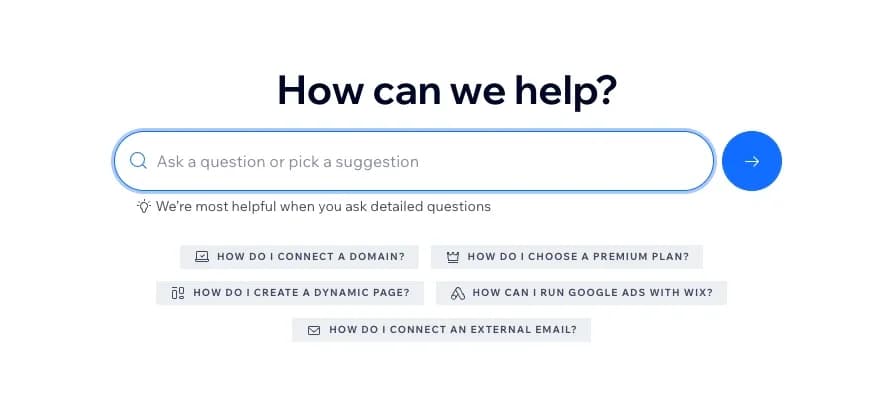
Wix Help Center and Knowledge Base
I found Wix’s e-commerce platform Help Center to be comprehensive, covering everything from store setup to advanced customization. The knowledge base provides detailed guides and step-by-step instructions, making it easy to find answers without needing direct support.
Phone and Live Chat Support
For more complex issues, Wix offers 24/7 customer support via phone and live chat. I played with the callback system and found response times reasonable. Support reps were knowledgeable and able to resolve issues efficiently, ensuring smooth e-commerce website management.
Community Forums and Peer Support
Wix also provides community forums dedicated to specific features and integrations. Users can exchange tips and troubleshooting solutions, making it a valuable resource for businesses learning to sell online.
Blog and Educational Resources
The Wix blog shares general marketing insights, e-commerce trends, and platform updates. I found this resource useful for businesses looking to optimize their online store with SEO features and promotional strategies.

Ease of Use
When I tested Wix’s e-commerce platform, I found that its extensive feature set requires a time investment to master. Setting up payment processors, shipping integrations, and product variants necessitates careful configuration.
However, the intuitive drag-and-drop interface simplifies the process, making it manageable even for those new to online store builders. I played with adding products and customizing the storefront, and the e-commerce website builder provided clear guidance throughout.
While the learning curve is present due to the platform’s comprehensive capabilities, Wix remains an affordable e-commerce solution with mobile-responsive design and SEO features, suitable for businesses aiming to sell online effectively.
Wix stands out as an e-commerce website builder with drag-and-drop customization, built-in SEO tools, and seamless social media integration. Unlike many top e-commerce platforms, it combines simplicity with flexibility, making it one of the best e-commerce platforms for small businesses.
Performance
Speed and Reliability
I found that the Wix e-commerce platform’s cloud-based infrastructure ensures reliable uptime. For small to medium businesses, page load speeds are generally smooth, but for larger online stores, performance can slow down, especially with high-resolution images or extensive product catalogs.
Optimization Tools for Better Performance
I played with Wix’s performance enhancement tools, including image optimization, caching, and mobile-responsive design. These features help improve e-commerce website speed, but businesses selling online should monitor performance to ensure fast-loading pages.
Scalability Considerations
Wix works well for affordable e-commerce solutions, but for businesses planning to scale rapidly, I found that inventory management and advanced customization options are more limited compared to other top e-commerce platforms. If high traffic and complex store operations are expected, businesses should evaluate whether Wix meets long-term needs.
Features & Functionality
Wix is a comprehensive and flexible choice for businesses looking to create and grow their online presence effectively. The website builder offers a wide set of features, which I’ve listed below:
Top product and service features of Wix e-commerce:
- Advanced online storefront customization
- Product listing & inventory management
- Multichannel sales capabilities
- Extensive app market
- Integrated payment solutions
- Dynamic shipping and tax tools
- Mobile optimization and app
- SEO and marketing tools
- Event and ticket sales
- Subscription and recurring payments
- Live chat and customer engagement tools
- Abandoned cart recovery
- Multiple sales channels
- Dropshipping options
- Payment options
- Safety
- Product listing & inventory management
I’ll explore these features in more detail below:
Advanced Online Storefront Customization
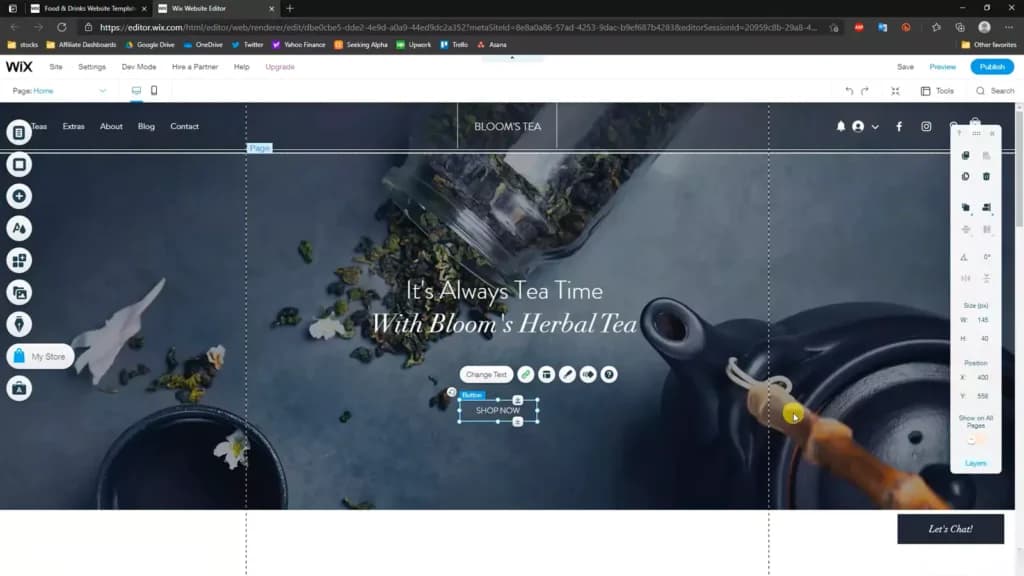
The Wix website builder provides a versatile drag-and-drop editor that allows users to tailor their online stores extensively, with a variety of templates and customization options available to create a unique shopping experience.
Product listing & inventory management
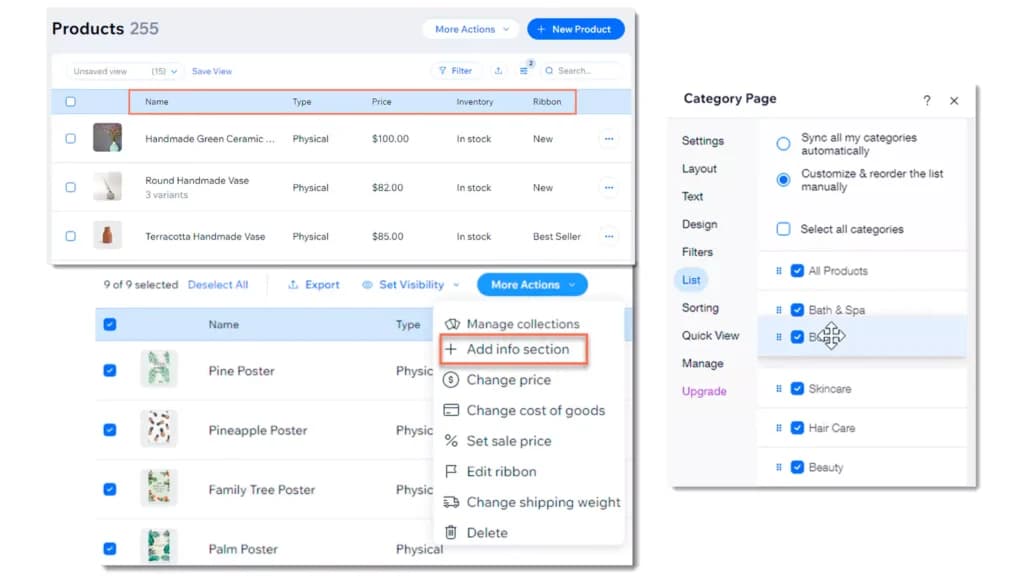
The CMS enables you to sell digital and physical products alone or as discounted bundles. You can also list variants of the same product according to size, color, and custom factors. For each product variant, you can display a different image and even a video.
Through your admin panel, you can view your customers' past purchases, addresses, and personal information. Inventory management includes adding tracking numbers, marketing orders as fulfilled, automatically counting inventory levels, updating multiple orders at once, and more. Many of the functions are automated, but they can all be performed manually in case of an issue.
Multichannel Sales Capabilities
The Wix website builder supports selling online across multiple channels, such as social media platforms and online marketplaces, providing a unified management dashboard for all sales activities.
Extensive App Market
The Wix App Market offers a wide range of applications that extend the functionality of online stores, from enhancing SEO to improving customer service and adding review capabilities.
Integrated Payment Solutions
Wix offers its own payment platform, Wix Payments, which supports a variety of payment methods, including credit cards, PayPal, and other digital wallets, facilitating seamless checkout experiences.
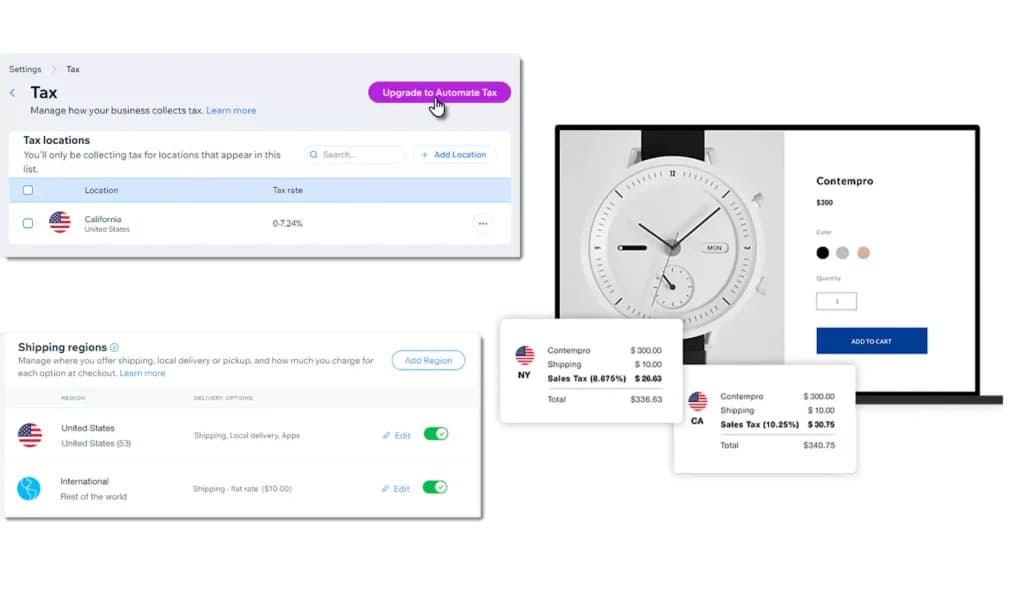
Dynamic Shipping and Tax Tools
Wix provides tools to manage shipping options and automate tax calculations, which help streamline the purchase process and ensure compliance with local tax regulations.
Mobile Optimization and App
Wix stores are optimized for mobile devices, and the Wix mobile app allows for on-the-go management of your store, enhancing the flexibility for business owners.
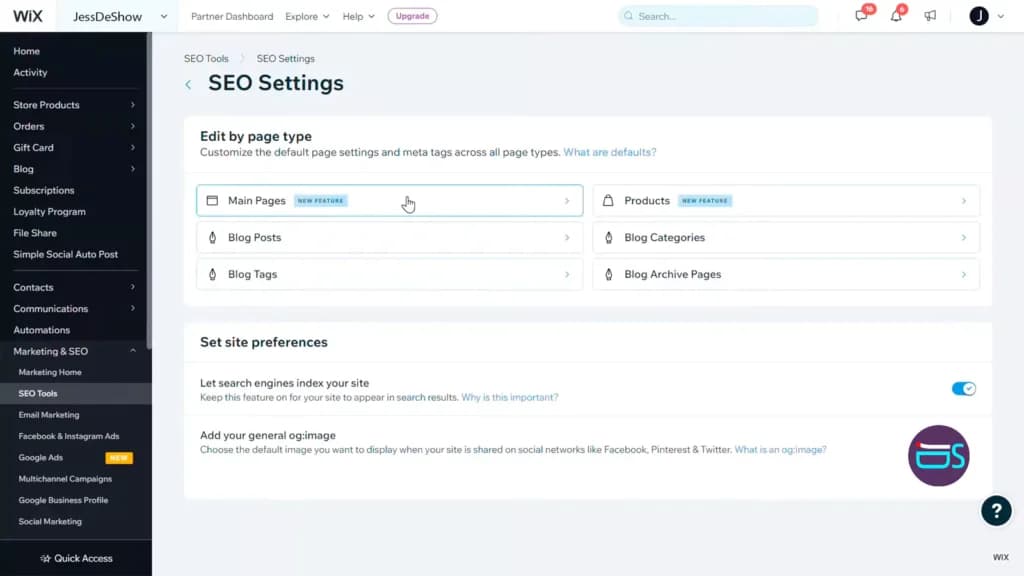
SEO and Marketing Tools
Wix includes built-in SEO tools and integrated marketing solutions, such as email campaigns and social media advertising, to help increase store visibility and drive sales.
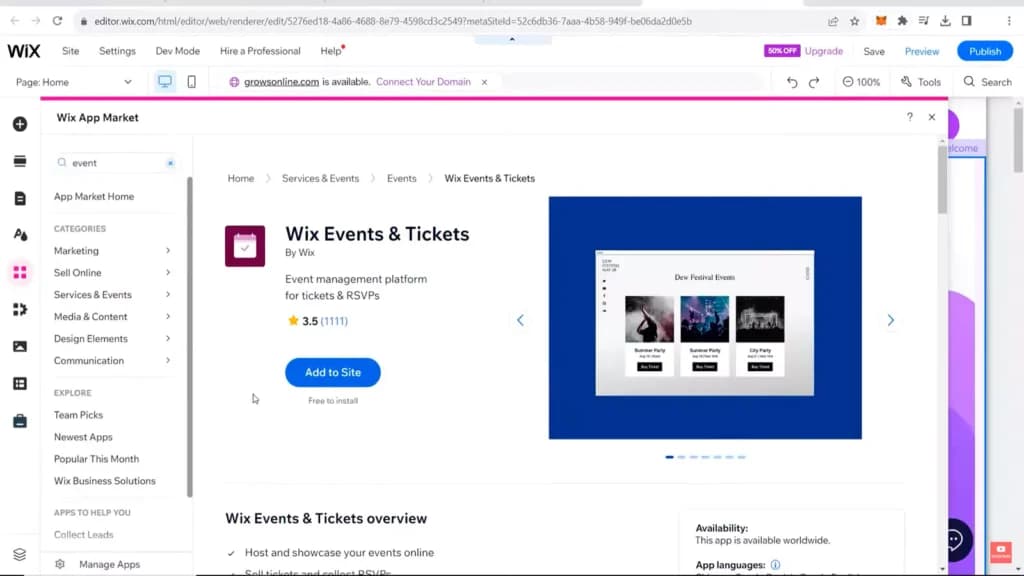
Event and Ticket Sales
Wix uniquely supports businesses that deal with event and ticket sales, offering tools for creating and managing events, bookings, and ticket sales directly from the store.
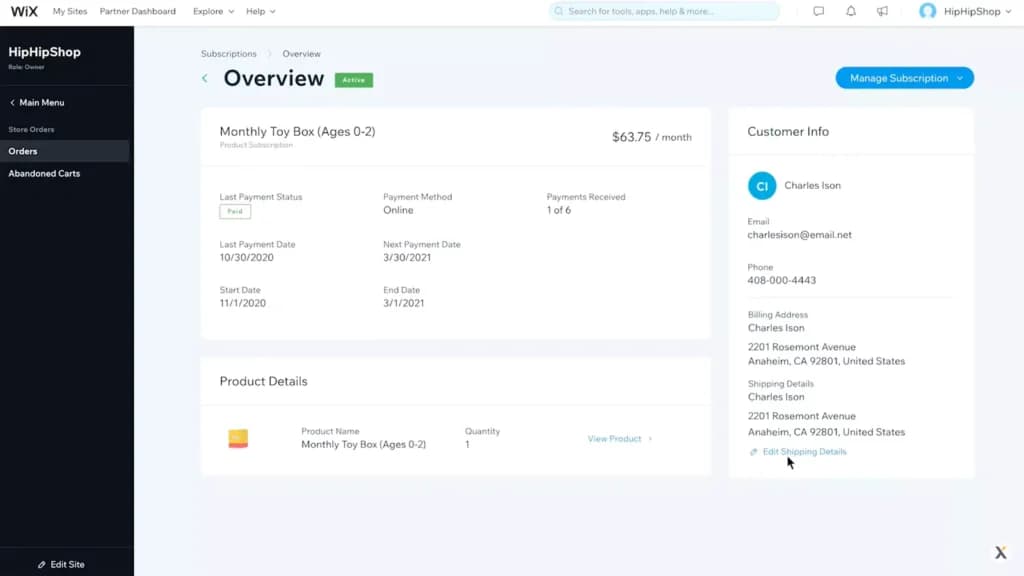
Subscription and Recurring Payments
For businesses that offer subscription-based products or services, Wix supports the setup of recurring payments, enhancing customer retention and streamlining revenue collection.
Create recurring subscriptions for things like a physical box of products or digital products. You control the payment terms, frequency, and everything in between.
Live Chat and Customer Engagement Tools
Wix includes features like live chat, which can significantly enhance customer service and increase sales by providing immediate assistance to shoppers on your site.
Abandoned cart recovery
Through email marketing, the platform allows you to set up automated workflows to bring back a large percentage of sales that would otherwise be lost.
Multiple sales channels
You’re not only limited to selling on your website. Instead, Wix eCommerce has a direct integration with social platforms like Facebook and Instagram to help you reach a wider audience and make the purchase process easier for prospects.
Dropshipping options
Dropshipping has become popular over the years. Wix integrates with multiple platforms such as Modalyst, Spocket, Printful, and Printify to automate order requests and free up your time to market your business.
Payment options
There’s a large number of payment providers which include but aren’t limited to Wix Payments, 2Checkout, Braintree, Fat Zebra, DPO Group, PayPal, Paystack, Stripe, Square, etc. Some providers are only available in specific countries and Wix will show those based on your location. PayPal, credit, debit, cash, and even POS payments are possible.
Safety
Wix eCommerce is compliant with regulations such as GDPR and CCPA. If a customer requests their data, you can easily forward them a file that shows them all the information you’ve gathered. If they request, you can delete their personal data which includes contact details, activities, orders, card details, and invoices.
In addition to the above, Wix eCommerce are all secured by HTTPS/STL encryption which creates a secure link from your customer’s device and the web servers. It has also made a commitment to only work with payment processors who adhere to the highest level of security – PCC DSS level 1.
Wix eCommerce comes with over 100 professional-looking templates to design your online shop. During the creation process, you can choose any of them, change the colors, rearrange the layout, and add over a dozen product images for customers to interact with. It has a bit of a learning curve because of all the options that need to be set up such as payment processors, inventory tracking, sales tax, etc. That doesn’t mean it’s difficult, it’ll just take more time and energy than a standard website.
Automate the integration and management of multimedia content to enhance customer engagement.
Wix eCommerce has built-in email marketing tools which allow you to stay connected with your customers, improve loyalty, and drive revenue over time. The platform also has a video maker, SEO Wiz, social post tools, and marketing automation. It also integrates with popular marketing tools like Hotjar for visitor recordings, Google & Facebook Ads, and Privy for email capture.
Reliable hosting solutions to support your eCommerce needs.
How We Test Wix E-commerce
Wix stands out as an e-commerce website builder with drag-and-drop customization, built-in SEO tools, and seamless social media integration. Unlike many top e-commerce platforms, it combines simplicity with flexibility, making it one of the best e-commerce platforms for small businesses.
To provide an authentic 2026 review, we don’t just read feature lists; we get our hands dirty. Our testing process for Wix eCommerce is built on a “Store-First” methodology:
- The 60-Minute AI Sprint: We start every test by using the Wix AI chatbot to generate a store from scratch. We measure how long it takes to go from a blank screen to a “ready-to-edit” storefront with a functional checkout.
- The Demo Data Stress Test: We leverage Wix’s built-in demo products to test the inventory management system. This allows us to simulate high-volume scenarios—adjusting variants, setting up tax rules, and testing “Out of Stock” triggers—without needing to manually input dozens of items first.
- Checkout & Payment Simulation: We test the buyer’s journey by enabling the Manual Payment method. This allows us to walk through the entire checkout flow—from the “Add to Cart” button to the final confirmation page—ensuring the tax and shipping calculations we configured actually appear correctly for the end user.
- Performance Benchmarking: Once the AI generates the site, we run it through speed tests. We specifically look at how the site handles high-resolution product images and video backgrounds to see if the cloud-based infrastructure maintains a smooth experience under load.
- Support Response Time: We “break” a small feature (like a shipping rule or a discount code) and reach out via the 24/7 Live Chat and callback system to see how fast a real human agent can get us back on track.
Features
- Number of templates
- Drag & Drop Editor
- Free Stock Photos
- SEO Tools
- Social Media Integration
- Visitor statistics
- Third-party apps
- Data Security
- Multi-lingual website
- Inventory Management
Verdict
Wix eCommerce is a complete solution to manage your eCommerce shop. It has a wide range of features such as marketing tools, email marketing and abandoned cart workflows, the ability to collect recurring payments, support for multiple sales channels, and much more. It’s compliant with major regulations in different markets such as GDPR and CCPA. It also provides secure websites to protect customer data.
There are multiple pricing plans to meet your needs but keep in mind that it’s not easy to change a template once selected. Unless you have custom needs or enterprise-level functionality, Wix eCommerce is a great solution to launch and grow your online brand.
Wix e-commerce suits a store that is part of a wider site rather than the whole business. If selling is the whole business, the platforms built for that do inventory, tax and multichannel better, and the gap widens with volume. The best ecommerce platforms for small business comparison is the place to check that before you commit a catalogue to one platform.
Wix E-commerce Alternatives

Starting from: $29/month
Core
$29
seat/month
Pros
- You can integrate directly with social platforms
- Built-in email marketing and cart abandonment workflows
- Dozens of payment processors options
- In-depth product listing options
Cons
- Templates aren’t interchangeable
- Some elements can’t be fully customized

Starting from: $29/month
Basic
$29
seat/month
Pros
- Large suite of marketing tools to grow your website
- You’re able to sell online, offline, and through multiple marketplaces
- It has a built-in payment processor
- Supports unlimited products on every plan
Cons
- It charges you for third party payment processors
- The basic plan doesn’t have access to pro reports

Starting from: $29/month
Core
$29
seat/month
Pros
- Can use HTML and CSS for deep design flexibility
- Large ecosystem of third-party integration
- 24/7 support for all customers
- Even on the entry-level plan, you get many advanced features
Cons
- Pricing plans are tied to your yearly sales volume
- Difficult to edit orders after they’ve been placed
Frequently asked questions
What is Wix eCommerce and how does it work?
How much does Wix eCommerce cost?
Does Wix charge transaction fees?
Can I switch templates after launching my Wix store?
Is Wix good for large online stores?
How does Wix handle SEO for online stores?
What are the main limitations of Wix eCommerce?
Can I do dropshipping on Wix?
How do I track analytics and performance?
Can I connect Wix to social media or marketplaces?
Users Reviews
Be the first to write a review
Share your experience with Wix E-commerce and help others choose the right software.
Related Articles


