Canva vs Figma: Which is better for small business graphic design in 2026?


Trying to decide between Canva vs Figma for your business’s graphic design needs? You’re not alone, but it’s like comparing a paintbrush to a power drill. Both are fantastic tools, but they are built to solve fundamentally different problems.
Canva is a graphic design powerhouse for everyone. It’s a template-first platform designed to help non-designers, marketers, and small business owners create a huge range of beautiful assets—from social media posts to print flyers—in minutes.
Figma is a professional, collaborative design tool built for digital products. It’s a vector-based platform where UI/UX (User Interface/User Experience) designers build apps, websites, and complex design systems from a blank canvas, with pixel-perfect precision.
So, are you looking to quickly create marketing materials, or are you designing a custom app from scratch? The answer to that question will tell you everything you need to know. This data-driven comparison will break down the key differences in features, pricing, and ease of use to help you choose the right tool for your specific business.
Key points (quick summary)
- Canva is best for… Marketers, social media managers, and SMB owners who need to quickly create a wide variety of marketing assets (social posts, presentations, flyers) using templates.
- Figma is stronger in… Professional UI/UX design, app and website mockups, and creating original, scalable vector graphics from scratch.
- The main difference in pricing is… Canva’s paid plans (Pro/Teams) unlock a massive library of premium templates, stock photos, and AI tools. Figma’s paid plans unlock advanced collaboration features, like team libraries and version control.
- The key feature that separates them is… Canva’s template library vs. Figma’s vector-based blank canvas and prototyping tools.
- The ideal audience for Canva is… Non-designers and marketing teams who prioritize speed, ease of use, and brand consistency.
- The ideal audience for Figma is… Professional designers and product teams (even a team of one) who are building custom digital products and need granular control.
Head-to-head comparison
Here is a high-level summary of the key differences before we dive into the detailed breakdown.
| Canva | Figma | |
|
Primary use case |
Marketing & social media graphics, print, presentations. |
UI/UX design, app/web mockups, digital product design. |
|
Best for |
Non-designers & marketers. Speed and ease of use. |
Professional designers & product teams. Precision and power. |
|
Starting point |
Template-driven. Choose from millions of layouts. |
Canvas-driven. Start with a blank frame. |
|
Core tools |
Drag-and-drop, photo filters, AI content generation. |
Pen tool, vector networks, auto-layout, components. |
|
Collaboration |
Commenting, sharing, real-time edits (for teams). |
Co-designing (multiple cursors), version history, developer handoff. |
|
Pricing model |
Free plan is very generous. Paid plans unlock assets & AI. |
Free plan is very powerful. Paid plans unlock team features. |
Market position & ideal use cases
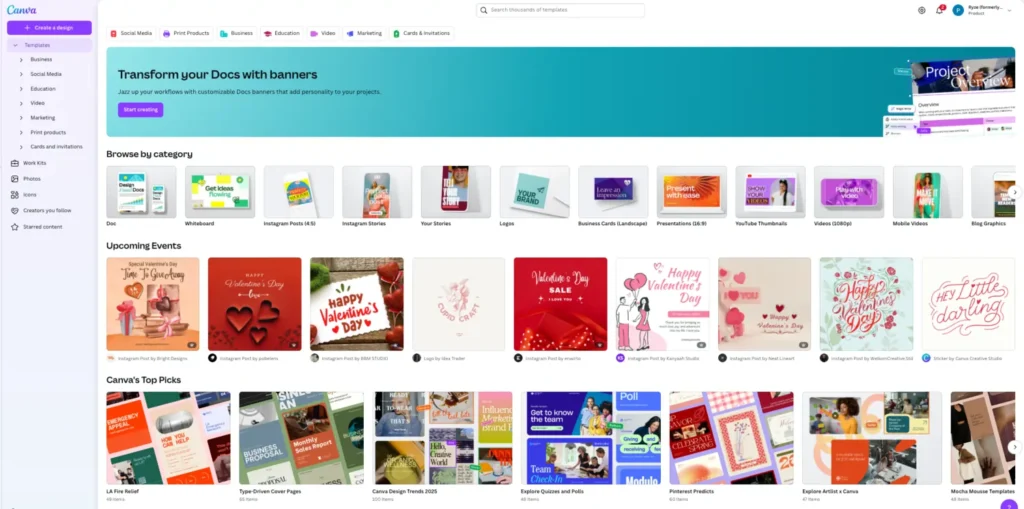
Canva is the undisputed king of design accessibility. Its philosophy is to “empower the world to design” by removing the steep learning curve of professional tools. It’s built for marketing and brand assets. If you need to make a “Happy Holidays” Instagram post, a sales presentation, or a new business card, Canva is your go-to. Its ideal user is a marketer, a small business owner, or anyone who needs to create something beautiful fast, without being a designer.
Figma‘s philosophy is “making design accessible to all” in a different context: collaborative product design. It’s a professional tool built for teams to design, prototype, and hand off digital products to developers. It’s built for systems. If you are designing the user interface for a new mobile app, a complex website, or a scalable “design system” (a library of reusable buttons, icons, etc.), Figma is the industry standard.
Platform & ecosystem: Templates vs. tools
This is not a hardware comparison, but a platform one.
- Canva is an all-in-one content creation ecosystem. Its platform is built around its massive library. You get templates, 140M+ stock photos, videos, and graphics, a photo editor, and even AI tools all in one place. Its “Brand Kit” feature (on paid plans) lets you store your logos, fonts, and colors for easy access, ensuring brand consistency.
- Figma is a design and prototyping ecosystem. Its platform is built around its powerful toolset. You get a precise vector-editing pen tool, “auto-layout” for creating responsive designs, and “components” (reusable assets). Its ecosystem includes FigJam, a separate digital whiteboarding tool for brainstorming, and Figma Buzz, a brand and marketing workspace with built-in templates, video-trimming, and design-system-linked layouts that help teams create on-brand assets faster. Figma also features a vast library of community-made plugins that expand its functionality even further.
Core features & capabilities: Speed vs. precision
|
Feature |
Canva |
Figma |
|
Design approach |
Template-based. Drag and drop elements. |
Vector-based. Draw shapes and paths with a pen tool. |
|
Ease of use |
Extremely easy. Built for non-designers. |
Steep learning curve. Built for professionals. |
|
Prototyping |
Basic animations (e.g., for presentations or social posts). |
Advanced. Create interactive, clickable prototypes of apps and websites. |
|
Print design |
Excellent. Built-in templates for flyers, posters, etc., with CMYK export. |
Not ideal. It’s a digital-first (RGB) tool. Print is possible but clunky. |
|
Stock assets |
Massive built-in library of photos, videos, and graphics. |
None built-in. You must use plugins or import your own assets. |
Reporting, analytics & insights
This section is less about data reporting and more about collaboration and asset management.
Canva (on the Teams plan) offers team folders, permissions, and approval workflows. A manager can lock parts of a template so a team member can only change the text or image, ensuring brand consistency. It’s about managing your brand.
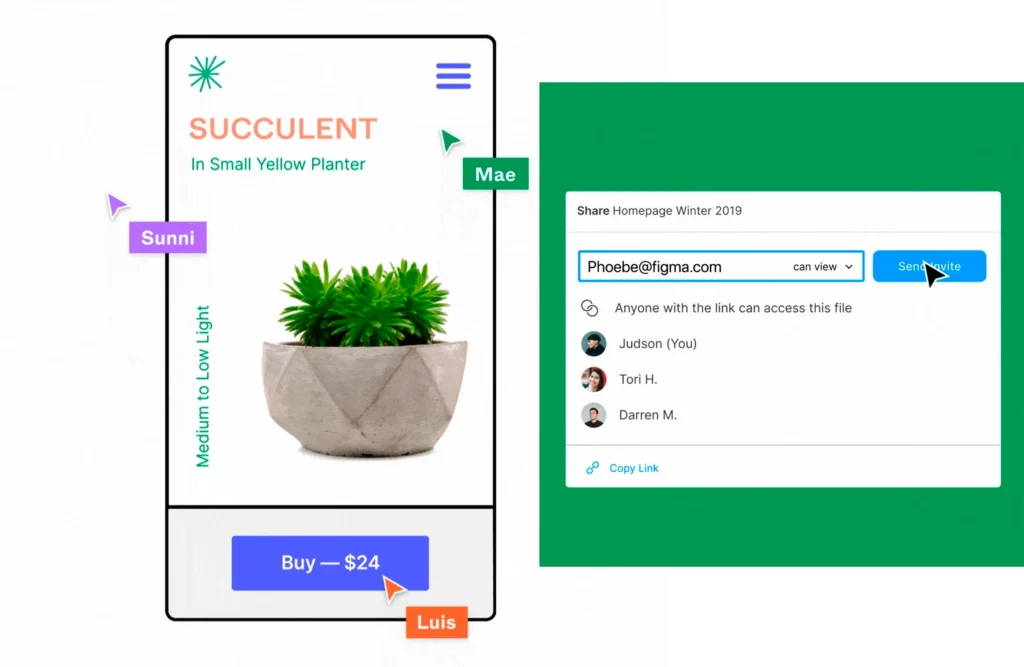
Figma is built for real-time collaborative design. You and your team (including developers and product managers) can be in the same file at the same time, moving things around and leaving comments. Its “Developer Mode” and “version history” are critical, allowing you to see every change made and giving developers the exact code snippets (CSS, Swift, etc.) they need to build the design. It’s about managing the product workflow.
Integrations & connected tools
Canva has a large app marketplace focused on marketing and content.
- Social media: Directly connect and schedule posts to Instagram, Facebook, LinkedIn, etc., from the editor.
- Cloud storage: Pull in assets from Google Drive, Dropbox, and more.
- Productivity: Integrations with Mailchimp, Slack, and other marketing tools.
Figma‘s integrations (called “plugins”) are focused on design and development.
- Design Tools: Plugins for finding free icons (Iconify), stock photos (Unsplash), and managing text.
- Development: Integrates with Jira, Slack, and other dev tools for seamless handoff.
- Prototyping: Connects to other tools like Maze for user testing.
AI, automation & smart features
Canva has gone all-in on AI with its “Magic Studio” (available on paid plans). This is a huge advantage for SMBs. Features include:
- Magic Write: An AI text generator.
- Magic Design: Generate entire designs from a text prompt.
- Magic Eraser/Expand: AI-powered photo editing.
- Text to Image: Create custom images from a description.
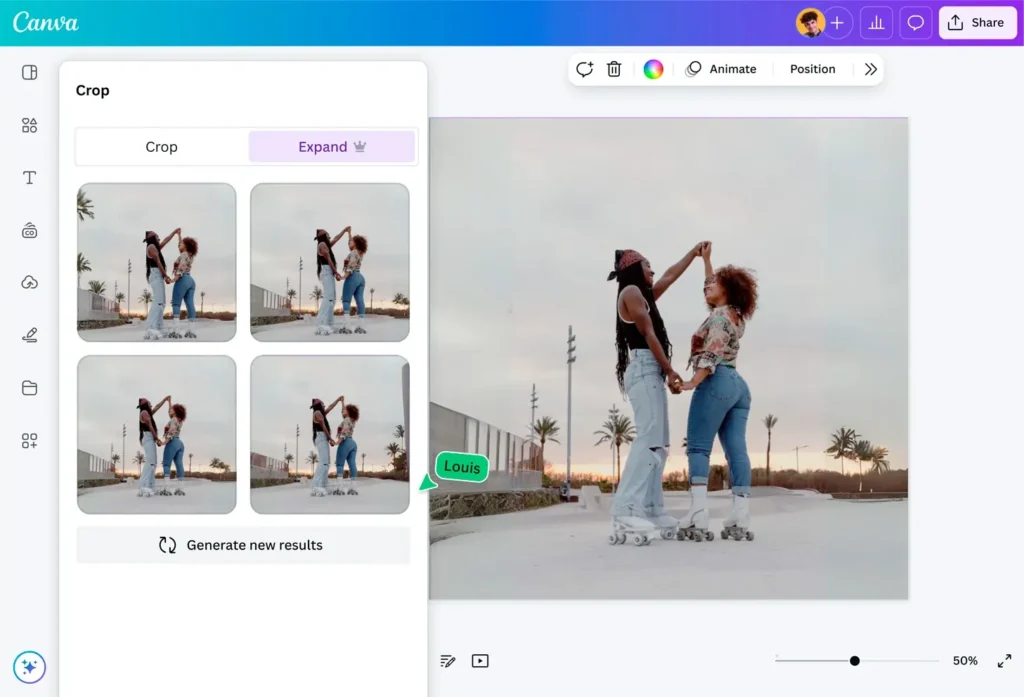
Figma‘s AI is newer and more focused on designer productivity. It has its own AI features and many AI plugins that can help with tasks like generating UI copy, creating design systems, or turning a design into code, but it’s less of a content-generation tool and more of a co-pilot for designers.
Pricing & fee comparison
Both platforms offer excellent free tiers, but their paid models are for different things.
Canva pricing:
- Free: Very generous. Millions of templates and assets, 5GB of storage.
- Pro ($15/mo/user): The sweet spot for solo users. Unlocks all premium templates and 140M+ stock assets, Magic Studio (AI tools), Brand Kits, and 1TB of storage.
- Teams ($10/mo/user, min 3 users): Adds team folders, brand controls, and approval workflows. (Source: Canva official website, 2025)
Figma pricing:
- Free: Incredibly powerful. You get unlimited files, unlimited collaborators, and most of the core design features.
- Professional ($20/mo/user): Unlocks team libraries (reusable assets), advanced prototyping, and version history.
- Organization ($55/mo/user): Adds advanced design system management, analytics, and security. (Source: Figma official website, 2025)
Summary: You pay for Canva to get assets and AI. You pay for Figma to get advanced team features. For a solo designer, Figma’s free plan is often more powerful than Canva’s, but for a marketer, Canva’s Pro plan offers far more value.
Support, reliability & customer experience
Canva offers 24/7 support for its Pro and Teams users. As a massive, web-based platform, it’s very reliable. Its user experience is its main selling point—it’s famously intuitive.
Figma also offers priority support for paid plans. Its reliability is legendary; it’s known for handling massive, complex files in-browser with multiple users without crashing. The user experience is considered best-in-class by designers, but it is not intuitive for a beginner.
Scalability & growth potential
Canva scales perfectly for marketing teams. As your business grows, you move to the Teams plan, lock down your brand templates, and can have your entire company (from sales to marketing) creating on-brand assets without hiring a new designer for every request.
Figma scales perfectly for product teams. As your startup grows from one designer to a full product team, you move to the Professional plan to create a shared “team library” of buttons and icons. When you’re a large company, you use the Organization plan to manage multiple design systems.
Real-world scenarios / use case analysis
Example 1: The local real estate agent
- Need: Daily Instagram posts, new property flyers (for print), and a monthly email newsletter.
- Better Choice: Canva
- Reason: This is 100% Canva’s sweet spot. The agent can use a “real estate” template for Instagram, a “flyer” template for print (and export a print-ready PDF), and a “newsletter” template for their email. They can do it all themselves in an hour. Using Figma for this would be like using a sledgehammer to hang a picture.
Example 2: The tech startup founder
- Need: A high-fidelity, clickable prototype of a new mobile app to show investors. They also need to hand this design to a freelance developer to build.
- Better Choice: Figma
- Reason: This is what Figma was born to do. The founder (or their designer) can design every screen, link them together into a clickable prototype that feels like a real app, and then share a single link with the developer, who can use “Dev Mode” to get all the assets and code they need.
Final verdict & recommendation table
| Best choice | Reason | |
|
Ease of use (for non-designers) |
Canva |
It’s built for beginners. You can get a professional result in minutes. |
|
Feature depth (for designers) |
Figma |
It’s a professional tool with vector editing, auto-layout, and prototyping. |
|
Best for marketing & social media |
Canva |
The massive template and stock asset library is unmatched for this. |
|
Best for app & web design |
Figma |
This is its core function. The prototyping and developer handoff are essential. |
|
Pricing value |
Tie |
Their free plans are both amazing. Paid plans offer different value: Canva for assets, Figma for team features. |
|
AI & smart features |
Canva |
“Magic Studio” is a powerful content-generation tool for marketers. |
|
Best for brand consistency |
Canva |
The “Brand Kit” and template-locking features are better for marketing teams. |
|
Best for product consistency |
Figma |
“Team Libraries” and “Components” are superior for building a scalable design system. |
FAQ: Canva vs Figma
- Can I use Figma for graphic design like logos or social media? Yes, you can, but it’s not its primary purpose. Figma is a powerful vector tool, so it’s excellent for creating logos from scratch. But it has no templates or stock photos, so you’d have to import everything yourself, making it much slower than Canva for social media posts.
- Which is cheaper, Canva or Figma? Their paid plans start at similar price points, but they offer different things. Canva’s Pro plan ($15/mo) is a better value for a solo marketer because it includes millions of stock photos and AI tools. Figma’s free plan is arguably the best value in all of software for a solo product designer.
- Is Figma or Canva easier to learn? Canva is infinitely easier to learn. It’s designed for absolute beginners. Figma has a steep learning curve and is intended for users who want to learn professional design principles.
- What is the main difference between Canva and Figma? The main difference is the starting point. Canva is template-first: you pick a design and modify it. Figma is canvas-first: you start with a blank frame and build a design from scratch.
- Can I use Canva for UI/UX design? You can lay out website or app screens in Canva, but it is not recommended. It lacks the prototyping, responsive “auto-layout,” and developer handoff features that are essential for modern UI/UX design.
- Does Figma have templates like Canva? Yes, but they are different. Figma has a “Community” where designers share files, including UI kits, wireframes, and design systems. These are design-starter-kits for other designers, not marketing templates for non-designers.
- Can I edit photos in Figma? Not really. Figma is a vector tool. You can crop and mask images, but it has no photo editing tools (like filters, brightness, or background removal). Canva has a full, built-in photo editor.
- Which is better for print (flyers, business cards)? Canva is significantly better for print. It has thousands of print-specific templates and allows you to export a print-ready PDF (with CMYK color), which is the file type printers require. Figma works in RGB (for screens) and is not built for print.