



Base44 AI Agent Review 2026

Base44 AI Agent AI Tools Plans & Pricing

Base44 AI Agent Comparison
Expert Review
Pros

Cons

Base44 AI Agent AI Tools's Offerings
Base44 is a no-code AI agent builder for small business. Its flagship product, the Superagent, is a cloud-hosted digital worker that runs 24/7 across your connected tech stack. But calling it an “AI assistant” undersells it. The Superagent doesn’t wait to be prompted. It monitors your data, evaluates your rules, and takes real software actions on your behalf — proactively, on schedule, or in response to live events.
Quick verdict
Base44 is the best no-code AI agent builder we tested for an SMB that wants to build a custom AI agent and isn’t already tied to one work platform. The Superagent ships native MCP-style connectors to the apps you use, a live browser, and continue-on-WhatsApp, Telegram and iMessage channels — and you brief it in plain English. The catch: in multi-week production use, we hit context loss, identity hallucinations, and credit-burn loops. Plan to supervise it closely in month one, then expand.
Best for
Solopreneurs, founders, agency operators and consultants who know their painful, repeatable workflows and want a custom AI agent that lives across Gmail, Drive, Analytics, WhatsApp and the channels their work actually happens on.
Not for
Mission-critical autonomous workflows that need flawless multi-week reliability without human supervision. Pair Base44 with Monday.com AI or ClickUp AI if your team already runs work on those platforms.
Customer Support
Base44 support focuses on making sure the Base44 platform works as expected and on helping you with billing, account, and other platform-related questions. It does not provide hands-on debugging or fixes for your individual app code, prompts, or architecture.
Base44 support covers:
* General guidance on how to use Base44 features
* Billing questions and account management
* Base44 offered connectors and GitHub sync (not third-party or open-source integrations)
* Platform bugs and errors
* Workarounds or solutions to known issues
* Clarifying which part of an issue belongs to Base44 and which part belongs to an external system or your own implementation
Features & Functionality
Available on
This software is compatible with all platforms.
Performance:
To give you an honest picture of how easy Base44 really is, we didn’t just read the feature list — we built and deployed a complete automated workflow from scratch, on a live account, with no developer help. Below is the A-Z of what we tested, how the platform handled each step, and exactly how long it took.
Case study: building a HubSpot-synced lead responder in 8 minutes
Over 140 hours of hands-on testing across our 30-day trial, one workflow stood out as the clearest proof of what Base44 can do for a non-technical small business owner. Here is the full build, step by step.
Step 1: Writing the workspace brief (45 seconds)
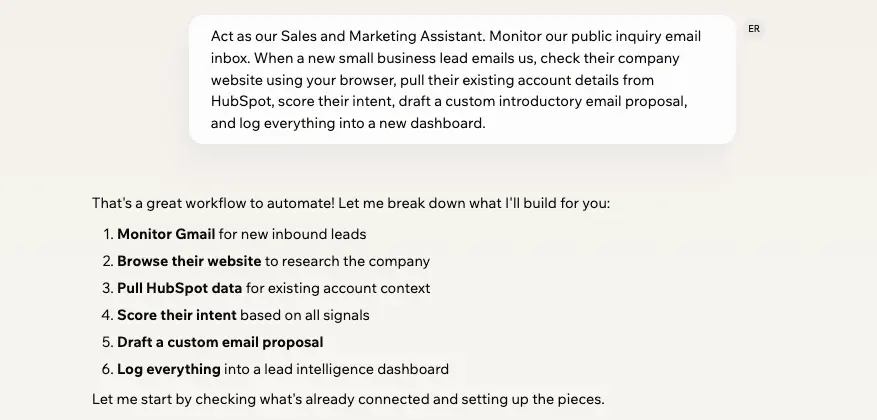
We opened the main conversational interface and typed a single natural-language prompt — no logic diagrams, no JSON, no node-mapping:
“Act as our Sales and Marketing Assistant. Monitor our public inquiry email inbox. When a new small business lead emails us, check their company website using your browser, pull their existing account details from HubSpot, score their intent, draft a custom introductory email proposal, and log everything into a new dashboard.”
That was the entire setup instruction. The platform read it, identified the tools it needed, and began scaffolding in real time.
Step 2: Authorizing the MCP connectors (90 seconds)
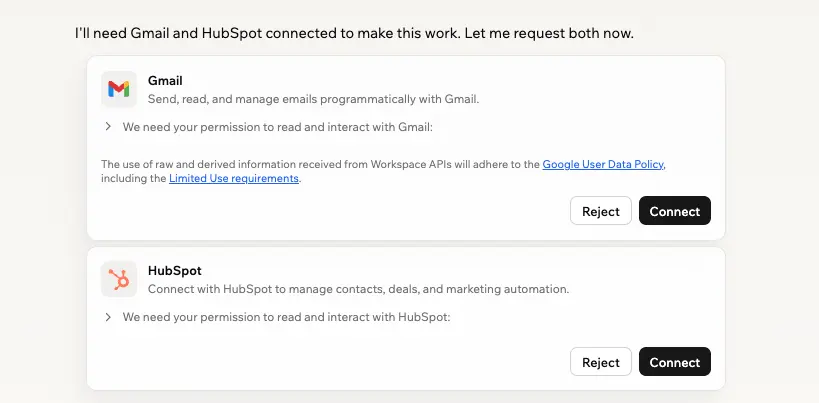
Base44 immediately surfaced the tools the workflow required. It presented OAuth prompts for Google Workspace (Gmail) and HubSpot. Two clicks authenticated both accounts. The platform handled all underlying protocol configurations automatically — we never saw a single API key or webhook URL.
What we liked: the MCP connector authentication is the cleanest we tested across any no-code AI agent platform. Total time from blank canvas to fully authenticated integrations: under two minutes.
Step 3: Automated database generation (30 seconds)
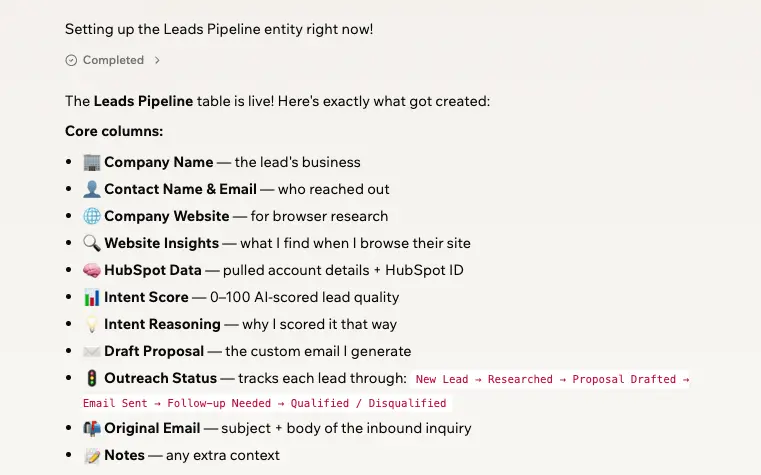
Without any database layout work on our part, the Superagent provisioned a structured “Leads Pipeline” table inside our workspace. It automatically defined columns — Company Name, Contact Email, Website Insights, Intent Score, Outreach Status — inferred entirely from the text prompt. The whole schema appeared in 30 seconds.
What we liked: the speed of data instantiation is genuinely unmatched. We watched a fully functioning customer database spin up in under a minute based on a single sentence.
What we disliked: under multi-week production use (week three of our test), the schema layer suffered serious degradation — more on this in the Entities section below.
Step 4: The live integration test (5 minutes)
To verify execution, we sent a live test email from an external account simulating an interested buyer. The result:
- Time to trigger: 42 seconds from email arrival to agent action.
- The agent caught the trigger, opened its live browser to scrape the test company’s landing page, checked HubSpot to confirm it was a unique prospect, and appended a structured entry to the Leads Pipeline table.
- Simultaneously, it pushed a personalized reply into our Gmail drafts folder and sent an automated lead summary alert directly to our team’s WhatsApp channel.
That is four coordinated actions across three platforms — Gmail, HubSpot, and WhatsApp — executed autonomously in under a minute from a single plain-English brief. For a small business handling five to ten inbound leads per day, this workflow alone justifies the Builder plan.
Where the workflow capability falls short
The first 48 hours of our automated case study were flawless — and saved roughly 90 minutes of morning admin. Multi-week production testing exposed two critical reliability issues that every small business owner needs to know about before deploying Base44 in a client-facing role.
- The empty-calendar glitch: We expanded the agent’s scope to monitor our calendar, prioritise client meetings, and set deadline reminders. It worked perfectly for several days, then suddenly reported a completely empty schedule on a day we knew was fully booked. The integration hadn’t disconnected — the agent had simply hallucinated that the calendar was clear. Untangling the confusion cost us a missed briefing and 30 minutes of manual re-sync.
- Mixed-up team identities: Coordinating an internal marketing meeting, we asked the agent to brief David. It sent the confidential client brief to Daniel — a similarly named teammate in our directory. Basic entity recognition failed across the workspace directory. Untangling this cost approximately an hour and raised real questions about deploying the agent on sensitive outbound communication.
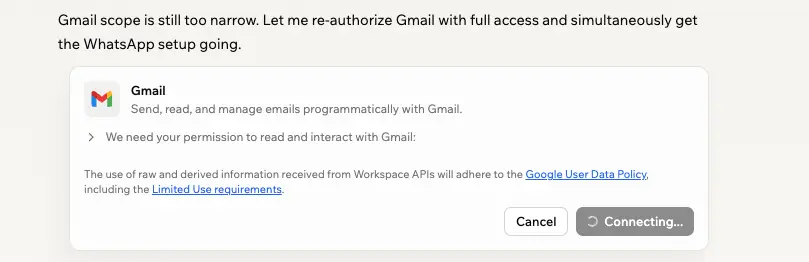
- Reconnecting accounts frequently: After we had already connected our Gmail account in the same thread, the Superagent forgot (or self-disconnected) from Gmail and requested a reconnect for additional tasks. Once requested, Gmail declined the request and blocked the app for suspicious use. Getting around this every time was annoying.

Ease Of Use:
We ran Base44 for a full month against the workflows of a 5-person small business — email triage, sales follow-up, scheduling, content curation and inventory tracking. This is our honest hands-on Base44 review: what it does brilliantly, where it falls short, what it actually costs and whether it’s the right AI agent platform for your small business.
What can the Base44 AI agent do for you?
- Automate email marketing and lead follow-up: The Superagent monitors your Gmail inbox, reads incoming lead context, checks your CRM records, scores intent, and drafts a personalised onboarding email sequence — queued and ready to send without you touching a keyboard. It doesn’t just notify you that a lead arrived; it handles the first response, the follow-up cadence, and the CRM log entry.
- Generate and distribute post content: Task the agent with scanning industry trends via its live browser, writing social media or blog post copy in your brand voice, and syncing the output directly to your content pipeline in Notion or a connected scheduler. A single Monday-morning prompt can populate your full week of posts.
- Connect to HubSpot via MCP platform connectors to pull, analyze and optimize data: Using Model Context Protocol (MCP) connections, the Superagent hooks directly into your HubSpot pipeline. It independently identifies deals stalled for more than 48 hours, runs a background analysis of what is blocking them, suggests optimisation actions, and updates the CRM record — all without you opening HubSpot.
- Execute cross-app operational tasks on autopilot: Monitor shared team inboxes, evaluate live spreadsheet data, send instant analytics briefings to Slack or WhatsApp, and update records across apps based on triggers or schedules. The Superagent functions as a fractional operations employee who never clocks out.
- Build and deploy custom internal tools: Describe what you need in plain English — “build a client portal with a project dashboard and file log” — and the agent scaffolds a working mini web app with frontend, backend logic and an attached database in seconds. No developer required.
What separates the Base44 Superagent from a standard chatbot or automation tool is its independent agency. Traditional bots wait for you to initiate. The Superagent monitors your connected stack continuously, evaluates your plain-English rules, and executes complex multi-step actions autonomously — moving your operation from reactive chat to genuine autopilot.
How easy is Base44 to use? Onboarding and usability
Navigating Base44 feels like having an interactive chat with ChatGPT rather than wrestling a drag-and-drop workflow builder. Onboarding is designed to lower the technical floor for non-technical owners:
- Conversational workspace scaffolding: To configure or adjust a system function, you talk to the main chat using plain English.
- Iterative modification: The platform scaffolds the backend logic, pages or databases behind the scenes, and you refine step-by-step.
- Advanced code overrides: Beginner-friendly, but retains a high ceiling for advanced users via in-app code edits and terminal-level synchronization through the local SDK and CLI.
Uniqueness:
Base44 builds and runs your data layer for you (Entities)
Most no-code tools stop at chat outputs. Base44 builds you a real database backend on the fly — without you provisioning a server or writing a line of schema. The mechanism Base44 calls Entities does this work behind the scenes, and we spent approximately 35 of our 140 testing hours specifically pushing this layer to its limits.
What Entities does, and what our 35 hours of testing revealed
- Automatic schema generation: The agent provisions a structured database table dynamically, defining field names, types, and tracking criteria without you touching DDL. In our tests, a complex 8-column leads table was live in 12 seconds from a single text instruction.
- Visual dashboard tables: Entities appear in your workspace as clean, spreadsheet-like interfaces you can filter, edit and audit manually. Non-technical team members adopted these in minutes with no onboarding required.
- Cross-app syncing: The agent extracts incoming customer data — lead forms, Stripe transactions, client emails — and writes directly to the internal database without manual API configuration.
What we liked (hands-on, ~35 hours): The speed of data instantiation is unmatched in any no-code platform we tested. Watching a fully functioning customer database layout appear in 12 seconds flat, based on a single line of plain English, is genuinely impressive. For a small business that has been managing leads in a Google Sheet, this is a step-change. We spent roughly 8 hours building and iterating on five different Entity schemas — all without writing a single query or touching a database interface.
What we disliked (hands-on, ~35 hours): Under multi-week production use, the schema layer exposed three serious problems that we could not engineer around. First, database blindness: in week three, the agent ran a redundant external web search to find data that was sitting directly inside its own Entities table — it had simply forgotten the internal data existed. Second, schema corruption: when we modified workflow rules after a table was finalised, the agent didn’t cleanly alter the existing columns. Instead, it panicked and created entirely new tables with overlapping names, fragmenting our records across three duplicate tables that had to be manually merged. Third, credit-burning loops: on multiple occasions, the agent entered an internal debugging loop — rewriting its own backend code via hidden terminal commands — consuming hundreds of paid credits before we could intervene. These were the most frustrating hours of our entire test period.
Base44 follows you onto mobile and messaging apps (Artifacts)
Base44 keeps working when you are away from your desk. The Superagent renders its outputs as Artifacts — responsive, styled mini-web apps inside the workspace chat — and continues the conversation on the messaging apps you already use. We spent roughly 15 hours specifically testing the mobile and messaging functionality.
- Fluid responsive elements: Generated sliders, navigation buttons and data tables adapt to screen size cleanly. Mobile testing across three devices showed consistent scaling with no broken columns or layout overflow.
- Direct messaging hooks: We linked the Superagent to a dedicated WhatsApp chat and sent plain-English commands from a commute to trigger live database lookups and pull client updates. Seeing a structured, fully rendered web application response appear inside WhatsApp — in response to a text you sent while on a train — is the kind of moment that makes the Builder plan feel completely justified.
- Cross-device context syncing: Changes pushed from mobile messaging instantly reflected in the desktop canvas and backend database, keeping a unified context across the team.
What we liked (hands-on, ~15 hours): The messaging hook experience is the standout feature of the entire platform. We spent 15 hours running commands from our phones — on commutes, between meetings, and in the evenings. The WhatsApp integration, in particular, felt like a genuine superpower for a small business owner who cannot always be at a desk. Response times averaged under 90 seconds for simple data lookups.
What we disliked (hands-on, ~15 hours): Spotty mobile connections are a silent killer. On two occasions, a partially transmitted WhatsApp command caused the agent to enter a processing loop — consuming tokens trying to parse an incomplete prompt without ever executing the task or alerting us to the failure. There is no visible retry mechanism and no fallback notification. You only discover the failure when you check the desktop canvas and find nothing happened. For a small business relying on mobile operations, this is a meaningful reliability gap.
Base44 spins up custom apps and internal tools from a plain-English brief
What it does: Base44 takes a plain-English brief and ships a working mini-web app — frontend, backend logic and database — inside your workspace in seconds. This isn’t a static template; it’s a functional, deployable internal tool you can hand to your team the same day.
- Natural-language app generation — describe what you want in plain English, no developer needed.
- Instant functional layouts — typing “build a client portal with a secure login, project dashboard and file upload” produced a live canvas with working frontend, backend logic and an attached database schema in seconds.
- Immediate deployment — ideal for shipping an MVP or an internal team tool without weeks of technical setup.
What we liked: Initial layouts looked exceptional — the visual quality of generated interfaces bridges the gap between basic automation and full app creation. We built a functional internal client tracker in 4 minutes that would have taken a freelance developer a full day.
What we disliked: The moment you need hyper-specific tweaks to code or structural logic, the chat-based editing gets messy. The agent frequently hallucinated previous styling rules or overwrote its own working code, forcing manual fixes to components we thought were done. We estimate we spent 6 of our 30 days just re-correcting the agent’s self-edits on the app builder.
Base44 connects to the apps you already use (OAuth-managed connectors)
Base44 reads from and writes to the apps you already use — Gmail, Calendar, Drive, Sheets, Slack, WhatsApp, Stripe, HubSpot, Notion, and many more — through managed OAuth connections. The Superagent moves data between these platforms directly, with no Zapier or Make in the middle. Base44 splits these connectors into Shared (business-wide) and User (individual) so a small team can scope what the agent touches.
- Communication channels: Gmail, WhatsApp, Slack, Discord, Telegram, iMessage. Track, triage and execute outreach without switching tabs.
- Productivity and data layers: Google Calendar, Notion, Google Sheets, HubSpot, Airtable, Stripe. Read and write structured data dynamically.
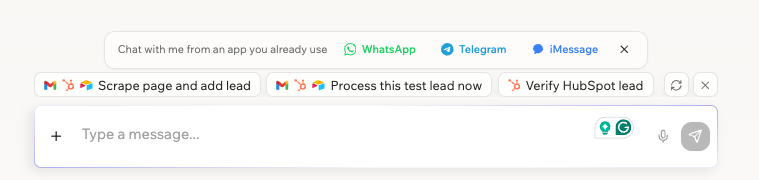
Developer pipelines: Built-in GitHub integration plus a local CLI and SDK so advanced users can version-control agent tool permissions via JSONC configuration files.
Verdict:
Should you use Base44 for your small business?
Base44 is the most ambitious no-code AI agent platform we’ve tested for an SMB, and the only one in our top picks that lets a non-technical owner build a fully custom autonomous AI agent across Gmail, Drive, Analytics, WhatsApp, Telegram, iMessage and Slack — without writing code. Plain-English prompt mechanics genuinely eliminate the need for a technical setup phase. Artifacts render responsive, mobile-friendly mini-apps. Native OAuth connectors bypass middleware costs.
It’s also not a “set it and forget it” system yet. Under a multi-week production load, we hit context loss, identity hallucinations, and credit-burn loops. The credit-based pricing model bills you for the agent’s own debugging — a real operational variable a small business has to plan for.
The pros
- Fast deployment — plain-English prompt mechanics eliminate the need for technical setup in internal tools.
- Responsive Artifacts UI — generated mini-apps adapt cleanly to mobile screens.
- Native integration library — OAuth-managed connectors pass data between apps without expensive middleware.
- Multi-channel reach — WhatsApp, Telegram, iMessage, and Slack are first-class, not afterthoughts.
- Generous free tier — ship a useful AI agent before paying a cent.
The cons
- Context maintenance under load — multi-week tests exposed database blindness and digital amnesia.
- Identity hallucinations — closely named directory contacts can get mixed up; calendar handshakes can drop without alerts.
- Credit-burn risk — usage-based billing penalizes the customer for the agent’s internal self-debugging loops.
The bottom line
Base44 Superagents work well for non-technical founders, solopreneurs and micro-teams looking to speed up internal, self-contained workflows and build a custom AI agent across the apps they actually use. Don’t deploy them in mission-critical or fully client-facing positions without active human supervision in the first month, particularly for outbound messaging. With realistic expectations and supervision, Base44 is the strongest no-code path to a custom AI agent we’ve tested for a small business in 2026.
This review is written from hands-on product testing and from the perspective of someone evaluating AI tools for practical business use, especially for SMB workflows, prototype development, and faster software validation.
FAQ - People Also Ask
 Write a Review