Gusto Review 2025
Gusto HR Plans & Pricing

Gusto Comparison
Expert Review
Pros

Cons

Gusto HR's Offerings
Gusto is a cloud-based HR and payroll platform founded in 2011 to help businesses manage employee payroll, benefits administration, compliance, and HR tasks all in one place. With a focus on simplicity and automation, Gusto human resources tools are designed to serve small and growing businesses looking for a user-friendly solution to handle employee management efficiently.
With over 300,000 businesses using its platform, Gusto services include payroll processing, benefits administration, tax compliance, and employee onboarding, offering an all-in-one solution to meet HR needs.
Gusto Plans and Pricing: How Much Does Gusto Cost?
How much does Gusto cost? Gusto software offers multiple pricing plans to accommodate different business needs. The cost of Gusto HR software depends on the plan you choose, with options for small startups to larger businesses with more complex HR requirements.
| Plan | Cost (Per Month) | Best For | Features Included |
| Simple Plan | $40 + $6 per employee | Small businesses and startups | Full-service payroll, benefits, and hiring |
| Plus Plan | $60 + $9 per employee | Growing businesses | Advanced HR tools, PTO tracking, time tracking |
| Premium Plan | $135 + $16.50 per employee | Large companies needing HR support | Dedicated support, compliance alerts, HR advice |
Who Should Use Gusto Software?
Gusto software is best suited for:
- Small businesses needing an affordable and easy-to-use HR and payroll solution.
- Startups looking to scale their workforce with automated HR tools.
- Medium-sized businesses that require advanced reporting, compliance support, and benefits management.
- Businesses using contractors that need seamless contractor payments and 1099 management.
Industry Benchmark
- Average Payroll Cost: Most providers charge a base fee of $20–$100/mo + $4–$15 per employee.
- In-House Cost: Hiring a payroll specialist costs avg. $65k/year. Gusto replaces this role for a fraction of the price.
The Plus Plan offers the best value for most small businesses. It unlocks multi-state payroll (crucial for remote teams) and time tracking, so you don’t need to pay for a separate time app. The Simple plan is great if everyone works in one office.
How We Review: Our Trust & Methodology
At Reviews, we want you to be confident in your software choice. To give you a clear and honest picture, we follow a simple review process:
- Hands-On Testing: We are testing the software and exploring each feature with a team of five members from a small to medium-sized business (SMB).
- Deep Research: We analyzed Gusto’s latest 2025 feature releases, including their new AI-driven break suggestions and ‘Gusto Global’ contractor tools.
- Real User Feedback: We reviewed and analyzed hundreds of reviews from various trusted websites. This helps us spot common problems like support wait times that you’d only see after months of use.
This process lets us give you a complete, trustworthy review, so you can pick the right tool for your business.
Customer Support
Gusto offers email, phone, and chat support Monday to Friday during office hours. Their customer support has been rated as one of their key features over the past few years.
Features & Functionality
General Features
We tested the most important features for a small business. Here’s how they performed.
Gusto offers a wide range of features designed to simplify HR tasks and ensure compliance with labor laws. Some of the core functionalities include:
1. Payroll Management
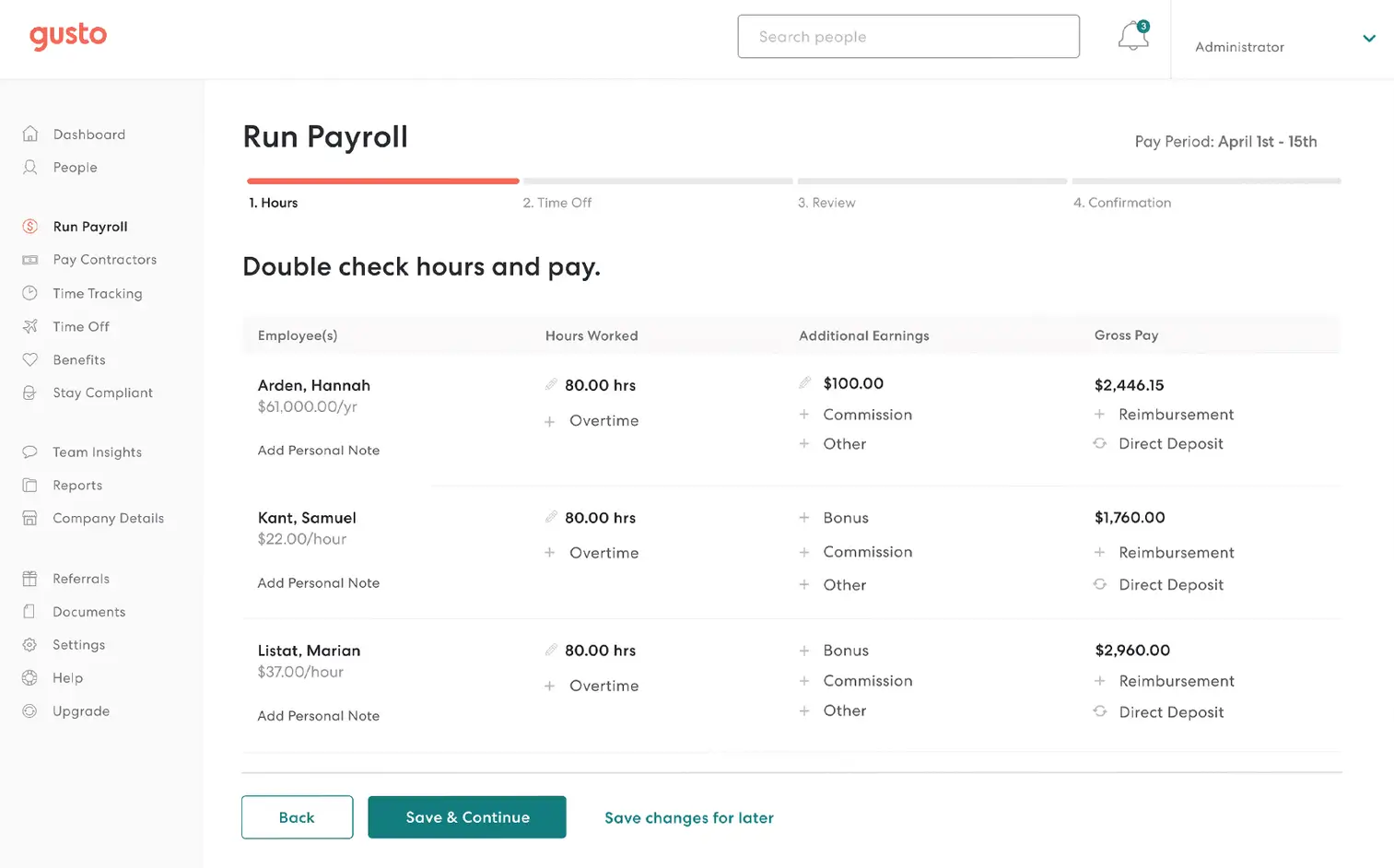
- Automated payroll processing for salaried and hourly employees.
- Direct deposit and tax filings with federal, state, and local agencies.
- Integration with accounting software like QuickBooks and Xero.
- Contractor payments and multi-state payroll support.
2. HR and Employee Management
- Customizable onboarding checklists to streamline new hire processes.
- Automated record-keeping and document management.
- Employee self-service portal to access pay stubs and tax documents.
- Compliance support, including labor law updates and workplace policies.
3. Benefits Administration
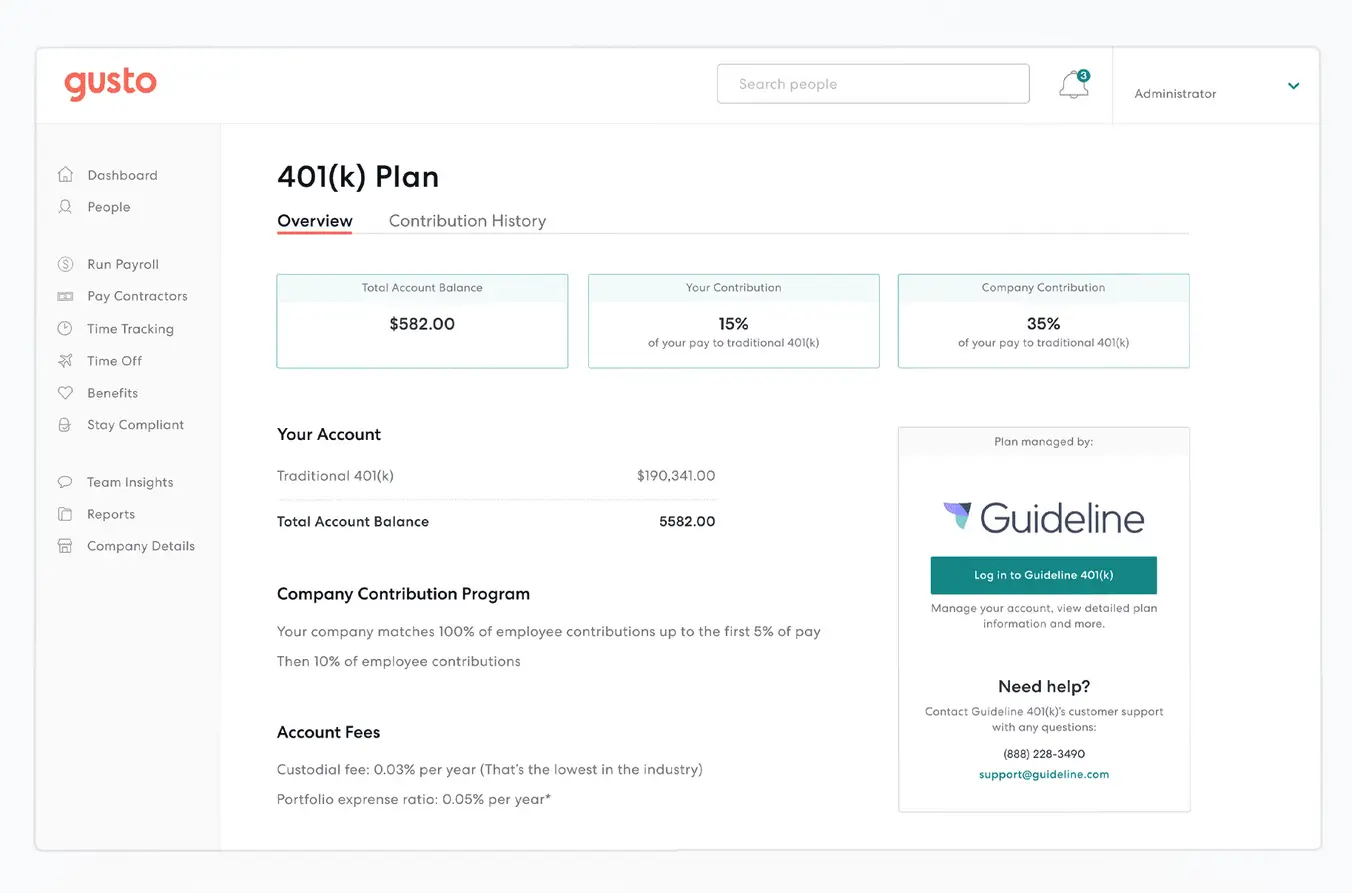
- Health insurance plans, retirement savings (401k), and workers’ compensation.
- PTO tracking and time-off management.
- Wellness programs and financial planning tools.
4. Hiring and Onboarding
- Job posting integrations with hiring platforms.
- Offer letter templates and e-signature capabilities.
- Background checks and candidate tracking.
5. Gusto Free Tools and Resources
Gusto offers various free resources, such as payroll calculators, compliance checklists, and HR guides to help businesses navigate their workforce needs. While a completely Gusto free plan is not available, these resources can help small businesses understand their HR requirements before subscribing.
Gusto AI capabilities
The AI in Gusto is a practical helper, not just a buzzword. We found it very useful for compliance:
- Automated Break Suggestions: The AI analyzes your team’s shifts and local labor laws to suggest exactly when breaks should happen. This protects you from compliance fines.
- Smart Categorization: For accountants, the AI now suggests how to map payroll costs to your bookkeeping chart of accounts, saving hours of manual data entry.
Gusto HR tool integrations
Gusto connects with the tools you already use to keep your finance data synced. Key connections include:
- Accounting: QuickBooks Online, Xero, and FreshBooks (syncs every payroll run automatically).
- Time Tracking: TSheets, Deputy, and Homebase (imports hours directly into payroll).
- Collaboration: Slack (sends payday notifications to the team).
Attendance Tracking
Monitor and manage employee attendance accurately.
Pricing Model
Flexible pricing options to suit diverse HR needs.
Deployment
Implement HR tools across various environments with ease.
Performance:
- Speed: The web app is very fast. We loaded the ‘Reports’ section with a year’s worth of data, and it generated the PDF in seconds.
- Stability: We did not experience any crashes or errors during our testing. It feels stable for daily work.
- Mobile App: The ‘Gusto Wallet’ app is great for employees. They can see pay stubs, request time off, and clock in. However, for admins, the mobile options are limited—you’ll want a computer to run full payroll.
Ease Of Use:
A tool is only good if people use it. Here’s what it feels like to get started with Gusto.
-
Getting Started: Sign-up was fast. An on-screen checklist (with confetti animations!) walked us through entering our company address and tax ID. We were ready to run payroll in about 20 minutes.
-
The Dashboard: The layout is very clean. . You won’t find cluttered menus here. Important buttons like ‘Run Payroll’ are huge and easy to find.
-
Learning Curve: This is the best part. Gusto is perfect for non-technical users. You don’t need to watch hours of training videos. It explains difficult tax concepts in simple English as you go.
Uniqueness:
In a market full of stiff, corporate payroll tools, what makes Gusto special?
Its key difference is its Human-Centric Design.
Some tools (like ADP) are very powerful but feel like using a spreadsheet from 1999. Other tools (like QuickBooks Payroll) are convenient but can feel clunky if you don’t know accounting.
Gusto fits right in the middle. It gives you powerful tax compliance but in a package that sends your employees a cheerful email on payday. This ‘Friendly Factor’ is what makes it unique for small businesses who want to build a good company culture.
About Gusto: What Is It and Who Uses It?
Gusto is a cloud-based Payroll and HR software designed to help businesses manage their team’s pay, benefits, and happiness without the headache.
Founded in 2011 (originally as ZenPayroll), it’s now used by over 300,000 customers, ranging from local coffee shops to growing tech startups. Its main goal is to make the complex world of payroll, taxes, and HR feel human and simple.
It connects to key platforms like:
- Accounting: QuickBooks Online, Xero, FreshBooks
- Time Tracking: TSheets, Homebase, Deputy
- Expense Management: Expensify, Receipt Bank
Verdict:
Gusto software is a powerful, all-in-one HR solution that simplifies payroll, benefits, and workforce management for businesses of all sizes. Whether you’re a small startup or an established company, Gusto’s flexible pricing and robust feature set make it an excellent choice.
Overall, Gusto offers great value for money spent on payroll software. It includes all the key features to easily operate the payroll process for your small or medium-sized business. Over 100,000 users across the US now use Gusto, and it has received outstanding customer reviews. Whether you are a business owner or responsible for running your organization’s payroll, Gusto payroll software should be on the top of your list.
If you’re looking for a reliable Gusto HR and payroll solution with intuitive features and transparent pricing, it’s worth trying Gusto’s free trial to explore its capabilities.
After a full review of its features, performance, and real user feedback for 2025, we found Gusto is a fantastic choice for modern small businesses and startups. Its biggest strengths are its incredibly easy-to-use interface and automated tax filing.
However, large enterprises or businesses with complex, old-school reporting needs might find its simplicity is not the best fit.
| Feature | Summary |
| Overall Rating | The gold standard for modern, friendly payroll. |
| Ease of Use | Almost zero learning curve. It’s actually fun to use. |
| Features | Excellent core payroll; HR features are good but basic. |
| Performance | Fast web app. Mobile app is handy for employees. |
| Support | Helpful, but no weekend support can be tricky. |
| Pricing | Transparent and fair, though costs grow with your team. |
Who Is Gusto For (And Who Should Skip It)?
You will love Gusto if:
- You are a modern SMB or Startup who needs to pay employees quickly.
- You value ease of use and want a beautiful, simple interface.
- You want to manage benefits and payroll in one place without paperwork.
You should skip Gusto if:
- You are a large enterprise (500+ employees) that needs custom ERP integrations.
- You need 24/7 phone support because you run payroll on weekends.
- You are looking for the absolute cheapest option (Gusto is fair, but not the cheapest on the market).
Top Alternatives & Comparisons

Simple
Pros
- Accurate tax calculations & free tax filings
- Easy integrations
- Easy to use interface with simple time tracking
Cons
- No mobile app
- No annual plan, lifetime plan or money back guarantee

Starting
Pros
- All-in-one HR solution
- User friendly, easy processes
- Great for small-midsize businesses
Cons
- Technical issues
- Poor report generating & customizing

ADP
Pros
- Easy to use
- Great level of customer support
- Many powerful use cases
Cons
- No transparent pricing
 Write a Review