
Leonardo.AI Image Generator Review 2025
Leonardo.AI Image Generator AI Tools Plans & Pricing

Leonardo.AI Image Generator Comparison
Expert Review
Pros

Cons

Leonardo.AI Image Generator AI Tools's Offerings
Leonardo follows a token-based pricing system. For every image you create, you’re charged a certain number of tokens. In the free tier, you get 150 tokens daily, which is enough for basic usage since each image generation typically costs 5-8 tokens. Once you exhaust your daily limit, you need to upgrade to a paid plan. Plans start from $10 per month (if paid yearly).
Leonardo.AI uses a credit-based pricing model.
Free plan
Limited credits per month, access to standard models, queue-based generation. Good for basic testing but not enough for daily business use.
Paid plans (Common tiers range approximately from 12 to 48 per month, depending on credits and features.)
Paid plans include faster generation, more credits, priority servers, and access to advanced features like custom model training, higher resolution outputs, and commercial usage permissions.
There are no long-term contracts. Pricing is predictable for SMBs since you pay only for the credits you use.
Customer Support
Leonardo.AI provides knowledge base guides, community support, email assistance, and active Discord channels. Response times vary depending on plan type. Users on paid plans usually receive faster and more direct service. While there is no phone support, the platform’s community forum often solves issues quickly with shared tips and prompt settings. Documentation is clear, but more step-by-step tutorials for SMB use cases would be useful.
Features & Functionality
Image Generating Features
Leonardo.ai image-generating tool has five core features. These are:
- Image Generation
- Realtime Canvas
- Canvas Editor
- Realtime Generation
- Universal Upscaler
Here’s a deeper look at the features.
Image Generation
The ability to generate a variety of images from text is core to Leonardo.ai. You can tweak the style and format and generate several variations of an image based on the same prompt, allowing you to explore different creative directions and pick the best fit. The clarity and vibrancy of the images are top-notch.
But as I found out, the magic in Leonardo.ai begins when you play around with its diverse pre-trained models. A total of 7 models cater to various artistic styles:
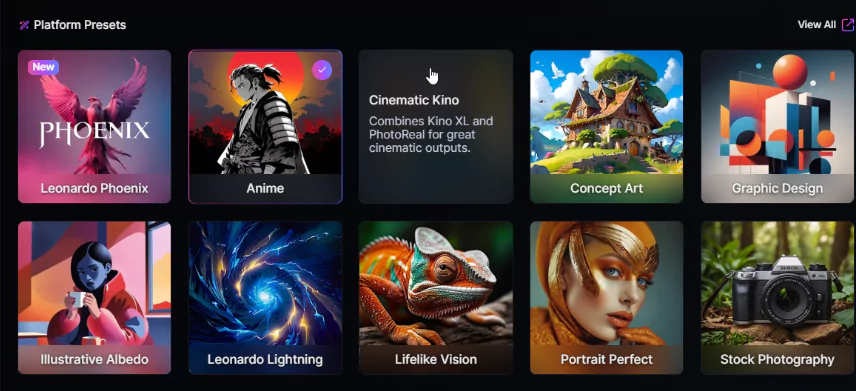
In my case, I chose Anime. Then, I further configured the settings to my preferences. Here are the options available:
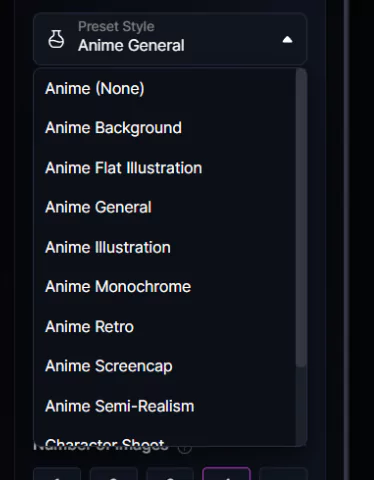
I opted for the Anime Semi-Realism, and here were the results for the prompt “A Japanese Ninja meditating in front of a monastery:
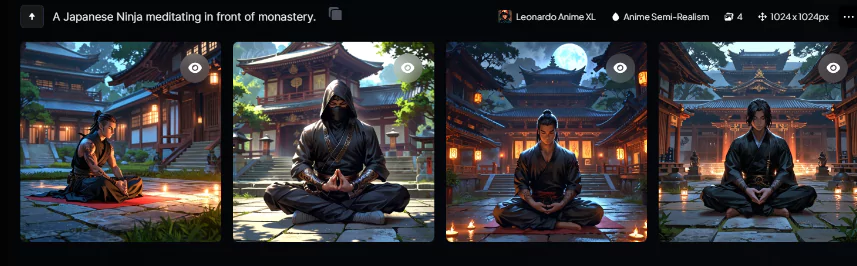
That’s pretty accurate and realistic. It took me less than 2 minutes to generate this engaging image and use it for my projects. However, there were some issues when I tried to tweak my prompt. For example, I asked for a monk draped in a black gown in front of a Buddhist temple. This time, the results were less than desirable. In that regard, I’d say it’s still a work in progress.
But for artists who want to bring their ideas to life, Leonardo.ai is perhaps the fastest and most simplistic AI tool.
Realtime Canvas
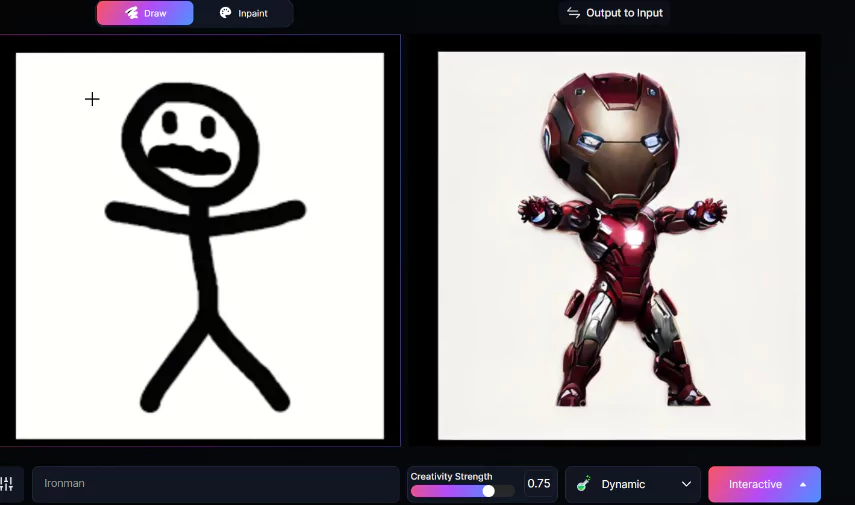
Think of Realtime Canvas as an AI-assisted painting on a canvas. You draw art manually on one side, and the AI enhances them on the adjacent screen in real time. This enables you to create a better, more refined sketch with minimal effort. It takes a bit of a learning curve, but it is a game changer for artists, especially those who love working on canvas.
Alternatively, you can upload an image and edit it with prompts. The AI will beautify the picture for you in real time. Here’s the pic I uploaded and prompted “Ironman”:
Canvas Editor
The Canvas Editor in Leonardo.ai builds upon the foundation of the Realtime Canvas, offering a more comprehensive suite of tools for detailed image manipulation. It goes beyond basic drawing and masking and offers functionalities like selection tools, erasing, inpainting, and outpainting for precise adjustments to your AI-generated images.
The interface is quite exhaustive, and you have a lot of options to work with. I was able to refine specific aspects of my image, such as removing unwanted elements, adjusting object positions, or enhancing details. This level of control allows for a more polished and professional final output.
Realtime Generation
Realtime Generation is more like the text-to-image feature. But with this, you can see your image come to life as you type your prompt, fostering a highly interactive and iterative creative process. You can witness near-instantaneous changes to your image as you modify your text prompt. This allows for real-time experimentation and fine-tuning of your desired outcome.
Universal Upscaler
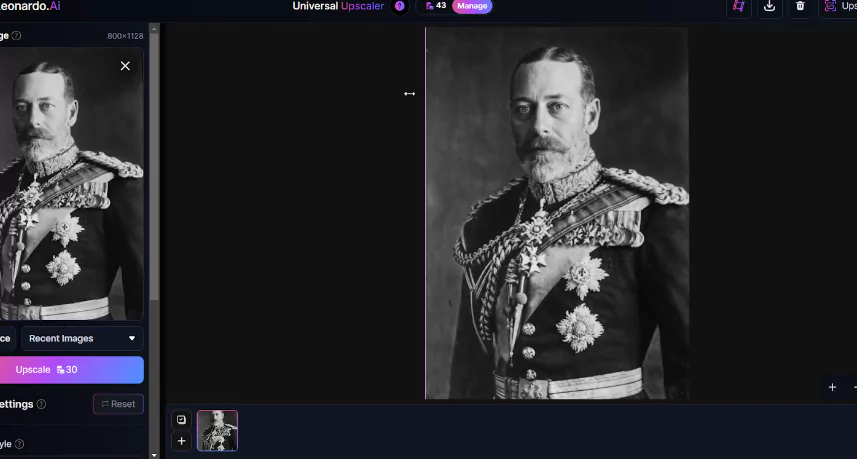
The Universal Upscaler allows you to bring your great-grandma to life. You can go from the black-and-white photo frame to the Marvel Cinematic Universe in a few clicks. The core function is to increase the resolution of an image, making it appear sharper and with more detail. This is particularly useful for low-resolution images that you want to use for printing, presentations, or other purposes where higher quality is required.
Here, I enhanced King Charles V’s pic from the 1900s with a single click:
Video Generator
There are also video-generating capabilities.
The Image2Motion tool is its video generator, which turns static images into cinematic shots. While still at the basic stage, you can certainly bring images to life. Here’s my Ninja in deep meditative action: It gives you a glimpse of what’s coming in the future.
Available on
Accessible on multiple platforms for versatile use.
Performance:
Performance is consistently strong. Image generation is fast, usually taking a few seconds. Upscaling, background removal, and editing tools feel responsive, even during peak hours. Larger batches take longer but still return results quickly compared to other AI creative tools. The platform’s cloud infrastructure handles dozens of prompts or variations without slowing down. There are occasional queue delays on the free plan.
The quality of the outputs from Leonardo.ai heavily depends on the chosen presets. The platform offers ten distinct presets, each tailored for different creative needs:
- Leonardo Phoenix: The foundational model suitable for a broad range of uses.
- Anime: Specifically designed for creating anime-style art.
- Cinematic Kino: Ideal for producing cinematic visuals.
- Concept Art: Used primarily for conceptual and ideational purposes.
- Graphic Design: For professional-grade graphics and artwork.
- Illustrative Albedo: Best for detailed illustrations.
- Leonardo Lightning: Focused on achieving photorealistic results.
- Lifelike Vision: Aims for hyperrealistic image quality.
- Portrait Perfect: Specialized in generating portrait images.
- Stock Photography: Tailored to create stock photos that meet industry standards.
I particularly tested the ‘Cinematic Kino’ preset with the prompt “A Bollywood actress posing in front of the Eiffel Tower.” The results were impressive, showcasing the preset’s capability to render detailed and contextually appropriate imagery.
Ease Of Use:
The standout feature of Leonardo is its user-friendly AI tool that makes creating images and videos straightforward. If you can envision it, you can likely create it with this tool.
The interface’s simplicity is immediately apparent upon login. All the tools you need are conveniently located at the top of your account page, making it easy to start creating right away. This intuitive design helps streamline the creative process, allowing users to focus more on their artistic vision and less on navigating the software.
Once you log into your account, you’re presented with all the available tools at the top:
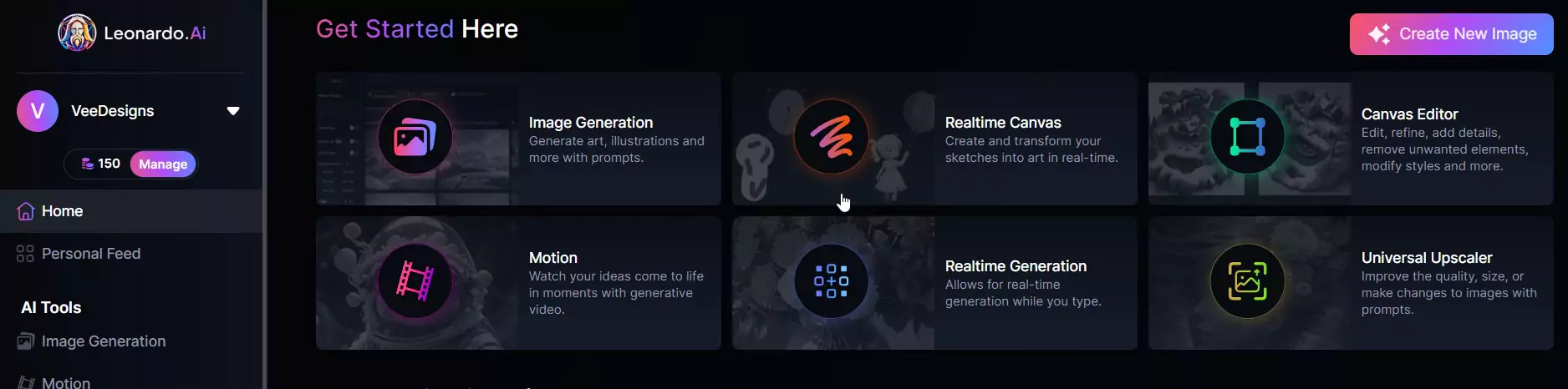
To begin creating, simply click on one of the six options presented. I selected “Image Generation” to produce AI-generated images. The interface was straightforward, featuring all necessary settings on the left and a central prompt box, making it accessible even for those without technical expertise.
The advanced settings are also minimalist, enhancing ease of use.
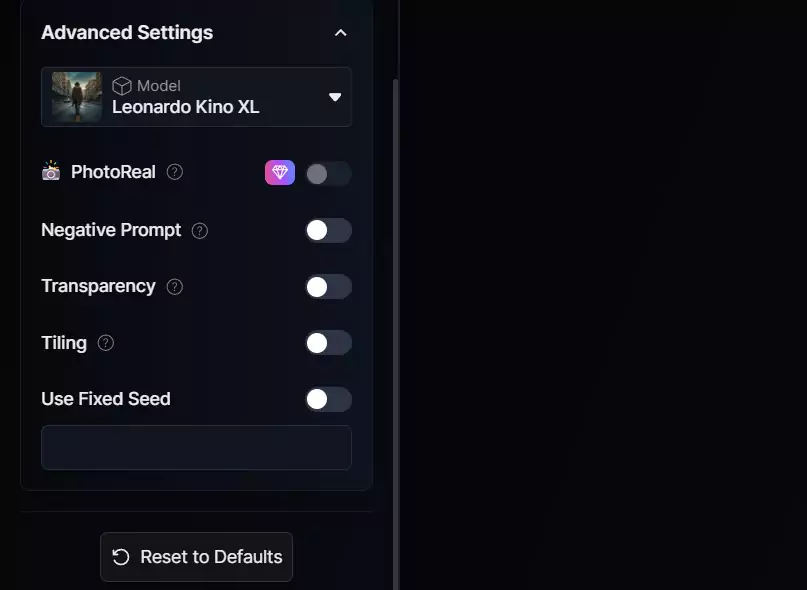
The minimalist design ensures easy access to customization options without overwhelming users, a feature consistent across all of Leonardo’s AI tools.
While Gen AI is still a relatively new technology, the limited options available might still feel overwhelming for some users. To address this, Leonardo AI’s image creator prominently displays community-generated artworks on the homepage. By clicking on these images, users can view the specific prompts and settings used, offering a practical, real-world understanding of the tool’s capabilities.
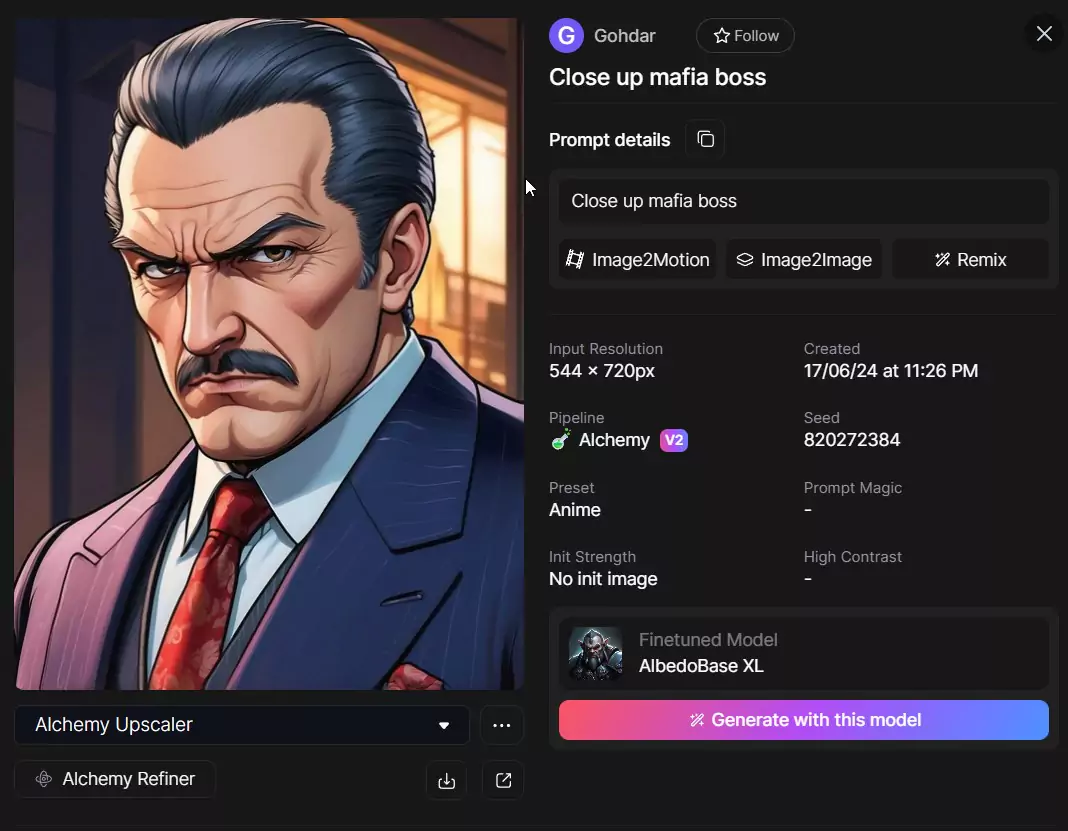
This feature helps you understand which settings, resolutions, and models might work best for your needs. Like other text-to-image AI tools, the precision of images generated by Leonardo.ai hinges largely on the clarity and detail of your prompts.
The platform includes a mini-guide on crafting effective prompts, providing a useful starting point for new users to familiarize themselves with the tool’s capabilities.
Uniqueness:
Leonardo.AI stands out because of its balanced mix of speed, quality, and creative control. Unlike simple prompt-based tools, Leonardo lets users train custom styles, upload reference images, and build branded visual templates. It also includes image-to-image workflows, canvas editing, and consistent character generation. The platform positions itself between lightweight generators and heavy professional design suites, giving SMBs a middle-ground tool with strong creative output at a low cost.
Integrations
Leonardo.AI is not an all-in-one design suite, so integrations play an important role for small and mid-sized businesses that need to move images into their daily tools. While the platform keeps its core focus on image generation and editing, it works smoothly with most popular creative, ecommerce, and marketing software. This flexibility makes it easier for teams to plug AI-generated visuals into their existing workflows without learning new systems.
Design and creative tools
Most SMBs use Leonardo.AI as the starting point for visual creation, then finish the layout or branding in their design tool of choice. Leonardo supports direct exports in common file formats (PNG, JPEG, WebP), which means users can move assets into:
- Canva
Ideal for social content, flyers, menus, ads, presentations, and simple brand templates. Many SMBs use Leonardo for images, then Canva to add text, borders, or brand colors. - Figma
Helpful for product mockups, UI concepts, wireframes, and design system work. Agencies and SaaS teams often generate concept art in Leonardo and refine it further inside Figma. - Adobe Photoshop and Illustrator
Designers who need pixel-level editing, layering, or advanced compositing can take AI-generated images into Adobe tools with no quality issues. This is especially useful for print materials, banners, and detailed branding. - Affinity Photo
A common budget-friendly Photoshop alternative for SMBs that want local editing tools without a subscription.
Social media and marketing platforms
Although Leonardo.AI does not have native publishing buttons, its export formats and aspect ratio options are built to match major marketing tools. Businesses can quickly upload assets into:
- Meta Business Suite (Facebook and Instagram)
- TikTok Ads Manager
- LinkedIn Campaign Manager
- Google Ads
- Mailchimp and other email marketing tools
This makes it easy for teams to generate ad variations, product images, and branded social templates without hiring a designer.
Ecommerce and product management tools
Leonardo.AI is especially useful for online stores that need clean product photos or lifestyle images. Generated assets can be uploaded seamlessly into:
- Shopify
- WooCommerce
- BigCommerce
- Etsy
- Amazon Seller Central
SMBs often use background removal and upscaling tools inside Leonardo, then upload the finished images directly to their product listings, ads, and landing pages.
Website builders
Images created in Leonardo.AI can be added without limitations into almost any website builder, including:
- Wix
- WordPress
- Squarespace
- Webflow
This is helpful for banners, hero sections, blog headers, and category images.
Collaboration and project tools
Teams that work visually often move Leonardo assets into shared folders or task management systems. The tool works smoothly with:
- Google Drive
- Dropbox
- Notion
- ClickUp
- Asana
This keeps creative work centralized and easy to share during approval cycles.
API and developer integrations
One of Leonardo.AI’s strongest integration points is its API, which gives technical teams the ability to automate image generation or include AI visuals inside their products. API access allows businesses to:
- Build AI image workflows inside ecommerce platforms
- Automate ad creative variations
- Generate onboarding graphics or banners on-demand
- Create custom product mockup engines
- Integrate image generation into mobile apps or SaaS products
Developers commonly connect the API with tools like:
- Zapier and Make for automation
- n8n for no-code workflows
- Airtable for asset management
- Bubble for app building
- Custom CMS systems, especially in agencies and media businesses
Why this matters for SMBs
For small teams with limited design resources, Leonardo.AI fits naturally into their workflow instead of forcing them to switch platforms. It delivers the core image creation power, then hands off assets to tools they already use for publishing, editing, and storage. This reduces friction, saves money, and keeps content creation fast and simple.
Verdict:
Leonardo.ai’s core users are artists and creators who want to create realistic images with minimal effort. Its history as a gaming-focused startup has helped Leonardo maintain a lead in photorealism. You can design characters and environments and generate concept art for your projects. Powerful text-based image generation with capabilities with advanced features like Image Guidance, Negative Prompts, and Realtime Canvas lists Leonardo.ai among the top players. But there’s significant room for improvement in the video generation space. With Leonardo.ai pricing on the affordable side, design-focused creators should surely give Leonardo.ai a try.
Leonardo.AI Image Generator FAQ
Q: What is Leonardo.AI?
A: Leonardo.AI is a web-based generative AI platform that creates digital images from text prompts. It also supports image-to-image editing, a real-time canvas editor, upscaling and custom model training — giving you tools to quickly generate or edit visuals, illustrations, mockups or stylized art.
Q: Can I use images generated by Leonardo.AI for commercial purposes?
A: Yes. Images you generate using Leonardo.AI can be used commercially, even if you are on the free plan.
Q: Who owns the rights to the images I generate? If I stop my paid plan, do I lose ownership?
A: According to Leonardo’s terms, when you generate content as a paid subscriber, all rights, titles and interests in the generated outputs belong to you — and that does not change if you later switch to a free account.
Q: Is there a free plan? What are its limitations?
A: Yes. Leonardo.AI offers a free plan. For example, free users get a limited number of daily tokens. Free-plan users will face slower generation queues, restricted output counts, and some advanced features are unavailable (like model training or priority rendering).
Q: What subscription or pricing plans are available for paid users?
A: Leonardo.AI uses a token-based subscription model. Paid plans give more tokens, higher output limits, access to advanced features (like custom model training, faster generation, canvas tools, upscaling, and private image mode).
Q: Can I control the privacy or visibility of images I generate?
A: Yes. Paid subscribers have a “Private Mode” toggle. When enabled, images are private and visible only to you. If Private Mode is off, generated images may be visible to other users.
Q: What kinds of files or exports does Leonardo.AI support? Can I use generated images in other tools (ecommerce, web builder, design)?
A: Yes. Leonardo.AI produces standard image outputs (PNG, JPG, WebP, etc.), which you can download and upload to design tools (like layout editors, website builders), ecommerce platforms, social-media management tools, or marketing tools. This makes it easy to integrate into existing workflows such as product catalogs, ads, websites or social media.
Q: Can developers integrate Leonardo.AI into custom workflows or apps?
A: Yes. Leonardo.AI offers API access. That allows teams to automate image generation, connect the service to websites, ecommerce stores or content workflows, and generate visuals programmatically (for example, for large e-commerce catalogs or on-demand graphic assets).
Q: Are there limits to quality, complexity or number of images?
A: Yes. For complex or high-resolution outputs, the free plan’s daily token limit and queue delays may make the process slow or insufficient at scale. Heavy users are often better served by a paid plan for faster rendering, higher resolution, and batch generation.
Q: Do I need a powerful computer to use Leonardo.AI?
A: No. Since Leonardo.AI runs in the cloud and users interact through a web interface, you only need a modern web browser and stable internet connection. The heavy processing happens on Leonardo’s servers.
Q: What types of projects or use-cases is Leonardo.AI best suited for?
A: Leonardo.AI works well for many use-cases: marketing materials, social media visuals, product photos for ecommerce, concept art or mockups, illustration, game asset previews, and any context where you need stylized or photorealistic images quickly.
 Write a Review