



Monday.com AI Agent Review 2026

monday AI agent AI Tools Plans & Pricing

monday AI agent Comparison
Expert Review
Pros

Cons

monday AI agent AI Tools's Offerings
Key points of this monday.com AI agent review
- Monday.com is now an AI Work Platform where people and agents get work done together across every team, every department, and every type of business. At the center of the platform are AI agents built natively into monday.com that any team member can configure, deploy, and direct with no technical background required.
- Monday AI is not a sisingle feature but an entire AI ecosystem covering everything from simple text generators on the board to intelligent automations to fully autonomous AI agents that handle processes from A to Z. The ecosystem has four named layers: monday Magic (workflow builder), monday Vibe (no-code app builder), monday Sidekick (contextual assistant), and monday Agents (autonomous execution).
- Agents can draft marketing campaigns, qualify sales leads, triage support tickets, generate reports, run project workflows, and handle budget approvals — all operating under human supervision within monday.com’s existing security, permissions, and governance controls.
- Different from rival platforms. ClickUp Brain is deeper on project data but locked to one workspace. Base44 spans more external apps and messaging channels. Asana AI is more mature on goal tracking. Monday AI is the only platform in this tier that ships work management, CRM, service desk, and AI agents in one product — all sharing the same live business data.
- Skip Monday AI if your team has fewer than three people (paid plans require a 3-seat minimum), if you need agents that work outside monday.com, or if you want to self-host your agent infrastructure. Choose Monday AI if your team runs sales, ops, marketing, or HR inside monday.com and wants agents that act on your real board data without rebuilding processes from scratch.
monday.com AI pricing breakdown
monday.com switched to a credit-based AI pricing system in late 2025. AI credits are the currency unit used to measure usage of AI-powered features. Core features including the Formula Builder, Docs Assistant, and Updates Assistant are included free on all paid plans. Advanced features like agents and AI automations consume credits.
Free
- $0/month (up to 2 seats)
- Core AI features included
- 1,000 AI credits/month
- Best for: Testing the platform before committing
Basic — $9/seat/month (annual)
- Unlimited items
- 1,000 AI credits/month
- Core AI features (Updates Assistant, Formula Builder, Docs Assistant)
- Best for: Small teams that need task management without heavy automation
Standard — $12/seat/month (annual)
- Everything in Basic
- 250 automation and integration runs/month
- Access to additional AI credit buckets
- Best for: Growing teams that want AI-assisted workflows and basic automation
Pro — $19/seat/month (annual)
- Everything in Standard
- 25,000 automation runs/month
- Private boards, time tracking, chart views
- Full AI agent access
- Best for: Teams running heavy automation and deploying AI agents across boards
Enterprise — custom pricing
- Everything in Pro
- Unlimited automations
- SAML SSO, audit logs, HIPAA compliance
- Dedicated Customer Success Manager
- Best for: Large organizations with security and compliance requirements
Note: each successful AI action consumes 8 credits, with a 24-hour rule that charges only once per item per day even if multiple AI columns run on it.
Which monday.com AI tier is right for you?
Is the Free plan worth testing?
Skip Free if you have more than 2 people — you will hit the seat wall immediately. Choose Free if you are a solo operator who wants to see how Monday AI handles a real board before paying. The core AI features including the Docs Assistant and Formula Builder are available with no card required.
Is Standard at $12/seat/month the right AI entry point?
Skip Standard if your team runs more than a handful of automations per month — 250 actions will disappear fast. Choose Standard if you want AI-assisted board building, automated status summaries, and basic agent access for a team of 3 to 10 people. This is the first tier where Monday AI starts pulling its weight on real workflows.
Is Pro at $19/seat/month worth it for full agent access?
Skip Pro if your team is not yet using Standard’s automation ceiling — don’t pay for 25,000 runs before you need them. Choose Pro if you want to deploy named AI agents across sales, marketing, HR, or operations, run automations at scale, and access private boards for confidential client or HR work. This is the right tier for any team treating Monday AI agents as a genuine headcount substitute for recurring tasks.
Is Enterprise worth it?
Skip Enterprise if your team is under 50 people and doesn’t operate in a regulated industry. Choose Enterprise if you need HIPAA compliance, SAML SSO, audit trails, custom governance controls, and a dedicated success manager to manage your agent deployment at scale.
Which workflow bottleneck describes you?
- You need to qualify leads and automatically update your CRM. Pick Pro and deploy a Sales Agent — it reads your pipeline boards, qualifies incoming leads, and moves items through stages without manual input.
- You need AI that drafts campaigns and ties them to sales data. Pick Pro for monday Campaigns — marketing and CRM share one data layer so every campaign is tied to real pipeline metrics.
- You need to onboard new hires or close support tickets autonomously. Pick Pro — agents handle onboarding new hires, closing support tickets, and processing purchase requests under human oversight within existing permission controls.
- You need a custom internal app or portal without writing code. Use monday Vibe — describe what you want and it generates a secure custom app that runs directly on the monday.com platform.
- You need agents that work across Gmail, WhatsApp, and apps outside monday.com. Skip Monday AI. Pick Base44 — Monday agents operate inside monday.com boards only.
- You need a standalone coding agent. Skip Monday AI. Pick Devin.
Do you actually need Monday.com AI agents?
Honest answer: only if your team’s work already lives in monday.com. Ask three questions before you pay.
Is your board data clean and up to date? Monday AI agents read your live board data to make decisions. If your boards are half-maintained or your statuses are never updated, agents will act on stale information and produce unreliable outputs. The agents are only as smart as the data they work from.
Will you start with free AI features before jumping to Pro? The Formula Builder, Docs Assistant, and Updates Assistant are included on every paid plan at no extra cost. Prove value there before paying for the Pro agent tier. Most teams don’t need 25,000 automation runs before they’ve confirmed the basics work.
Will someone own the agent configuration? Agents can be configured by any team member regardless of technical ability — but someone still needs to define the trigger, the task, and the approval flow. Agents don’t configure themselves. If no one on the team has 30 minutes to set up and review the first agent, the investment will sit unused.
The bottom line on monday.com AI
monday.com has made the most significant change in its history — rebuilding the platform from the ground up around people and agents working together across every team, every department, and every type of business. For teams already running work inside monday.com, the AI layer is now genuinely compelling: agents operate on your live board data, within your existing permissions, without rebuilding processes from scratch. Standard at $12/seat/month is the right entry point. Pro at $19/seat/month is where the full agent layer unlocks. Skip monday AI if your workflows live outside monday.com, if you’re a solo operator, or if you need agents that span many external apps and messaging channels. For everyone already in monday.com, the agents are the fastest path to turning your boards from a record-keeping tool into a system that actually executes work.
Customer Support
monday.com support is available 24/7 and accessible directly from any board through the built-in chat widget, which connects you to an automated chatbot that can escalate to a live human support team member instantly if needed.
The depth of support scales with your plan. Standard and Pro users get access to the full help center, live chat, and community forums. Enterprise customers unlock Premium Support, which provides a dedicated technical team that understands your specific workflows, along with tailored solutions and priority response times. There is no phone support on any self-serve plan, though Enterprise contracts can include direct account management.
Beyond direct support, monday.com maintains one of the stronger self-service ecosystems in the project management category. The Learning Center includes a community forum where users share workflows and troubleshoot together, a full API documentation library, and a ticket history dashboard so you can track and follow up on past support interactions in one place. For teams that want hands-on guidance, monday.com’s certified partner marketplace connects you with experts who offer paid services for setup, agent configuration, workflow design, and custom integrations.
One honest caveat: some Enterprise users have reported inconsistent response times and difficulty getting straightforward answers without being routed to a scheduled call. For teams deploying AI agents at scale, factoring in the learning curve and relying on the community and documentation before opening tickets will save time.
Features & Functionality
Performance:
How do you put monday.com AI agents to work?
- Step 1: Sign up for free at monday.com. No credit card needed. The free plan supports up to 2 seats and gives you access to core AI features including the Formula Builder and Docs Assistant from day one.
- Step 2: Build your first board with monday Magic. Type a plain English description of your workflow — the team, the process, and the goal — and Magic generates a fully structured board with columns, statuses, and automations based on your input. Most first boards are ready in under a minute.
- Step 3: Deploy your first agent from the catalog. Navigate to the Agents section, pick a pre-built agent that matches a recurring task your team handles manually — standup compiler, lead qualifier, ticket classifier — configure its trigger and output in plain English, and assign it to your board. The agent appears as a named workspace member and starts running immediately.
- Step 4: Upgrade to Pro at $19/seat/month to unlock the full agent layer. The free and Standard plans give you core AI features and basic automation, but full AI agent access, 25,000 automation runs per month, private boards, and time tracking all require Pro. This is the tier where monday.com AI moves from assistant to autonomous team member.
Ease Of Use:
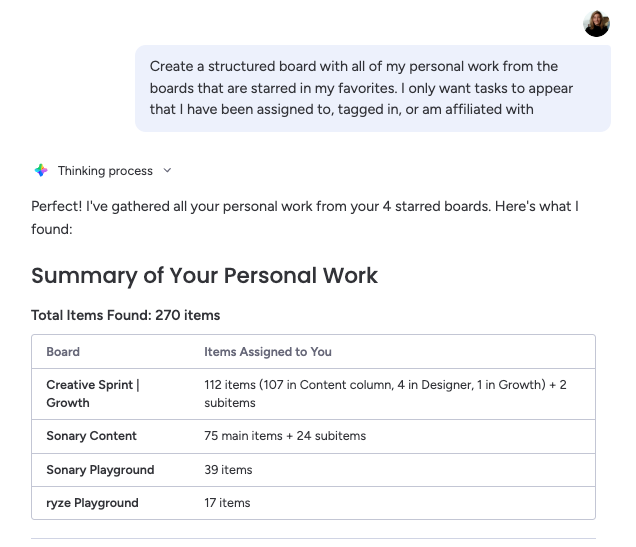
monday.com AI sets a low bar for getting started, even for teams with no technical background. The entire setup process begins inside a workspace your team likely already uses — there is no new tool to learn, no separate dashboard to navigate, and no developer needed to configure your first agent. You describe what you want in plain English, and monday Magic instantly generates a complete board or workflow based on your input.
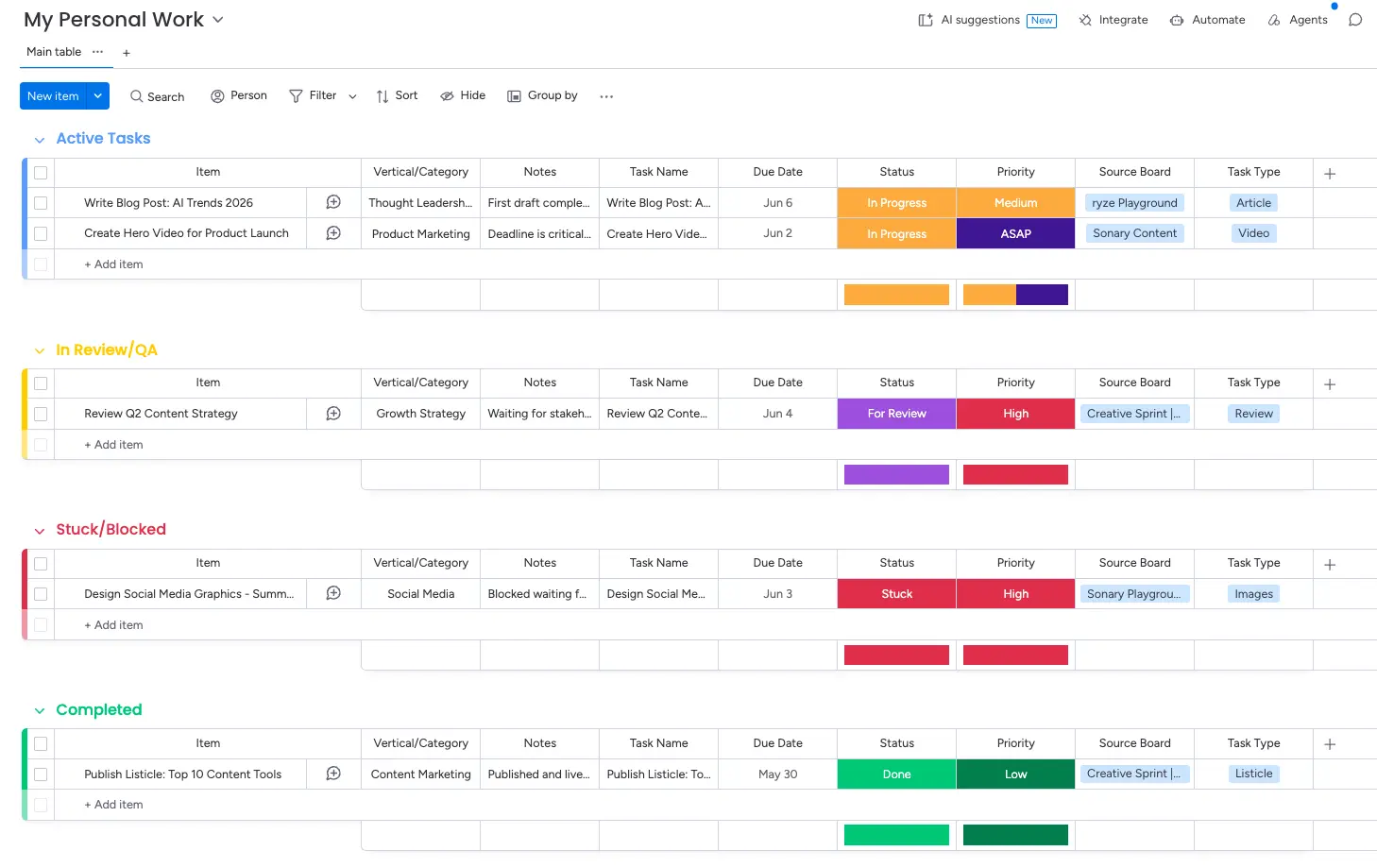
What separates monday.com AI from other agent platforms in terms of usability is how naturally it fits into existing work habits. Agents live inside your boards as active participants, not in a side panel or separate interface. You can @mention them, assign them tasks, and watch them update your items in real time alongside your human team members. For non-technical operators, this removes the learning curve entirely — the AI behaves like a new team member added to a board, not a product feature that requires a manual.
For teams that want to go further, monday Vibe lets you build custom internal apps and portals from a plain English prompt with no code required. And for advanced users or developers, one-click connectors to Claude, ChatGPT, OpenAI, and Google Gemini mean you can bring your preferred AI model into existing workflows without rebuilding anything from scratch. monday.com AI meets teams at every level — from the manager running their first automated standup to the developer wiring in a custom model through the AI Platform Gateway.
Uniqueness:
What’s the difference between monday.com AI and its competitors?
All four are real AI platforms. The structural differences matter once you decide where your work lives.
- monday.com AI vs ClickUp Brain. ClickUp Brain is a deeper AI layer across a broader all-in-one workspace covering tasks, docs, goals, time tracking, and meetings. monday.com AI is more visually intuitive, ships work management and CRM in one product, and has a lower onboarding bar for non-technical teams. Pick ClickUp Brain if you want maximum AI depth and feature coverage. Pick monday.com AI if your team prioritizes ease of use and runs sales and ops alongside project work.
- monday.com AI vs Base44. Base44 is a standalone AI agent builder that spans Gmail, WhatsApp, Stripe, HubSpot, and other external apps independently of any single platform. monday.com agents only operate inside your boards. Pick Base44 if you need an autonomous agent across many apps and messaging channels. Pick monday.com AI if your work already lives in monday.com and you want agents that act on your real board data.
- monday.com AI vs Asana AI. Asana AI focuses on task prioritization, workload balancing, and goal tracking inside a clean, structured interface. monday.com AI covers the same ground but adds a native CRM, service desk, and a broader agent deployment surface. Pick Asana AI if you want a simpler, more focused project management tool. Pick monday.com AI if you need AI across sales, ops, marketing, and HR in one platform.
- monday.com AI vs Notion AI. Notion AI is a writing and knowledge management assistant — strongest for drafting docs, summarizing notes, and organizing internal wikis. monday.com AI adds task execution, board automation, autonomous agents, and a live CRM layer on top of that. Pick Notion AI if your team lives in docs and knowledge bases. Pick monday.com AI if your team runs live projects and needs AI tied to real operational data.
- monday.com AI vs Manus. Manus is a general-purpose autonomous research agent built for standalone deep research, analyst reports, and one-off task automation outside any platform. monday.com AI is not a research agent — it is a work execution layer tied to your live boards and business data. Pick Manus for a standalone research task with no project management context. Pick monday.com AI if you want agents that execute recurring work inside a team workspace.
Verdict:
How do monday.com AI agents affect how your team executes work?
monday Magic and monday Vibe handle the build layer. Magic generates a complete, fully structured board or workflow from a single plain English prompt — no blank canvas, no manual column setup. Vibe goes further: describe a custom app or internal portal and it ships a working tool directly inside your workspace in seconds, no developer required. Because both tools pull from the same shared board data your team already maintains, the output is immediately relevant to your actual work rather than a generic template you have to rebuild from scratch.
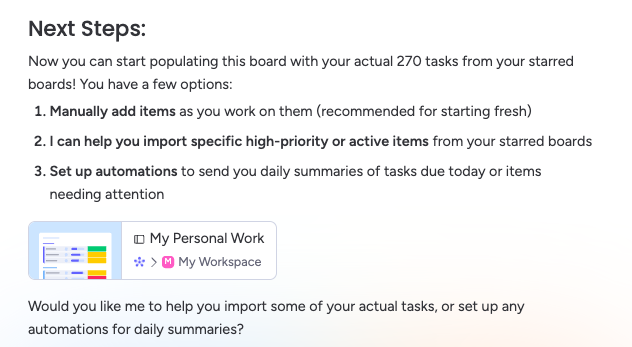
monday Agents then handle the execution layer. Because agents operate inside the same boards your team uses, they share full context across departments — a sales agent qualifying leads sees the same pipeline data that an ops agent uses to trigger onboarding. That shared data layer is the structural advantage over standalone AI tools: a single general agent working across disconnected apps must be re-briefed for every task. monday.com agents already know the context because they live inside it.
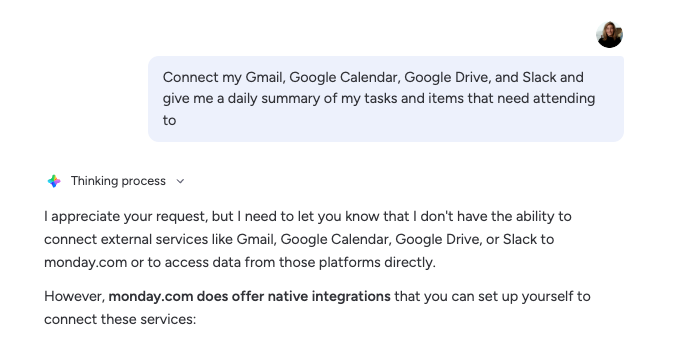
One real gap: agents are tied to monday.com boards and cannot reach external apps, inboxes, or messaging channels directly. If your workflow spans Gmail, WhatsApp, or tools outside the platform, you will need a separate integration layer or a different tool entirely.
What do people ask about monday.com AI agents?
What is the difference between monday.com AI agents and a standalone agent like Base44 or Manus?
monday.com agents are board-native — they operate on your live workspace data within your existing permissions and governance structure. Base44 and Manus are standalone agents you deploy across many external apps and channels from scratch. For teams whose work already lives in monday.com, the agents deliver immediate value with no additional setup. For teams that need an agent spanning Gmail, WhatsApp, Stripe, and other platforms outside monday.com, the agents can’t reach that far — pick Base44 instead.
Are monday.com AI agents real autonomous agents or just smart automations?
They are real agents in the technical sense. Standard monday.com automations follow rigid if-then rules. AI agents go further — they analyze context, make judgment calls, adapt to changing conditions, and execute multi-step workflows independently. The practical difference is the gap between “if status changes to Done, notify the team” and “review all incoming support tickets, classify them by priority, assign them to the right team, and draft a response.”
Can I use monday.com AI agents without being a current monday.com customer?
No. The agents run natively inside the monday.com platform and require an active paid workspace. There is no standalone agent product. If you want an AI agent that works independently of a project management platform, use Base44 or Manus.
Can I build a custom AI agent for my specific workflow?
Yes. Beyond the pre-built catalog agents, monday.com lets any team member configure a custom agent by defining its trigger, task, and output in plain English. No coding is required. For teams that need agents wired to external models, one-click connectors to Claude, ChatGPT, and Google Gemini let you bring your preferred AI into existing workflows without rebuilding anything.
Are monday.com AI agents safe to give access to business data?
Yes for most teams. Agents operate within monday.com’s existing permissions and governance controls, so they can only access what your team has already scoped. Enterprise plans add HIPAA compliance, SAML SSO, and audit logs. For regulated industries like healthcare or finance, review monday.com’s DPA and security documentation before enabling agents across your workspace.
Do monday.com AI agents work 24/7 like a real employee?
Yes for scheduled and trigger-based tasks. Agents can run on a recurring schedule or fire automatically when a board condition is met — a status change, a new item added, a deadline approaching. They do not require you to be online. For on-demand tasks like drafting content or answering questions, monday Sidekick handles that role instead.
Does monday.com AI work for teams outside sales and ops?
Yes. monday.com agents are deployed across marketing, HR, IT, procurement, and product teams. Marketing agents draft campaigns and tie them to CRM pipeline data. HR agents handle new hire onboarding checklists. IT agents triage and route support tickets. The platform is built around a unified data layer that spans departments, so agents in one function can draw on context from another.
What is the bottom line on monday.com AI in 2026?
monday.com made the most significant change in its history in May 2026 — rebuilding the platform from the ground up around humans and agents working together. For teams already running work inside monday.com, the AI layer is the fastest path to turning boards from a record-keeping tool into a system that actually executes work. Standard at $12/seat/month is the right entry point to test the AI features. Pro at $19/seat/month is where full agent deployment unlocks. Skip monday.com AI if you need agents that span many apps and channels outside the platform — use Base44. Skip it if you need a standalone coding agent — use Devin. For every team already in monday.com, the agents are ready to be deployed today.
 Write a Review