



SE Ranking Review 2026

SE Ranking SEO tools Plans & Pricing

SE Ranking Comparison
Expert Review
Pros

Cons

SE Ranking SEO tools's Offerings
SE Ranking’s pricing is its “superpower.” By 2026, the average cost for a full SEO suite is around $130/month. SE Ranking starts much lower.
| Plan Name | Price (Annual) | Best For | Key Features |
| Essential | $52 / mo | Solopreneurs | 10 websites, 500 keywords, 100k page audit. |
| Pro | $95.20 / mo | Small Teams | Unlimited sites, 1,000 keywords, AI writing. |
| Business | $207.20 / mo | Agencies | 5,000 keywords, API access, Team training. |
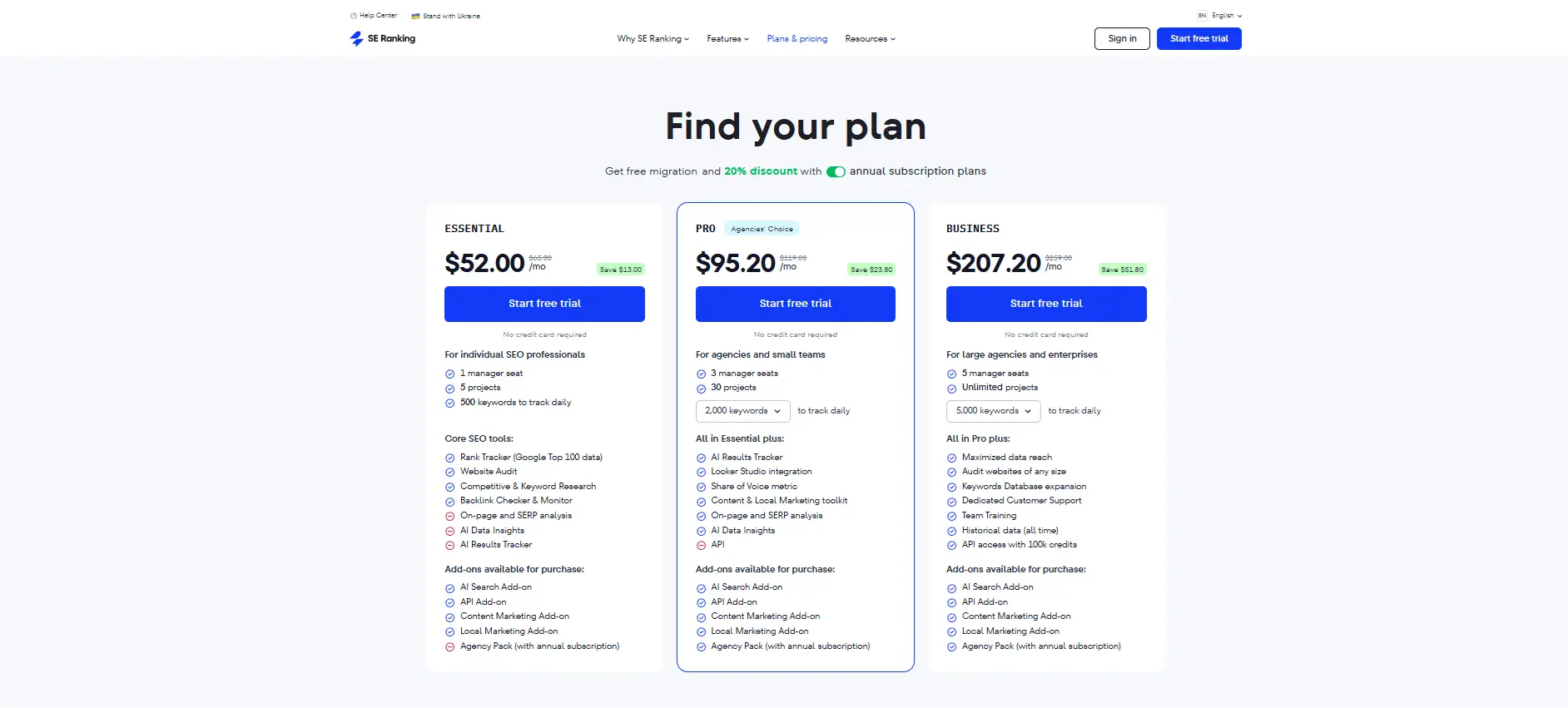
Pricing Transparency & Calculations:
If you have a team of 3, the Pro Plan is the best value. At $95.20 per month, that is roughly $31.73 per user.
-
Industry Benchmark: The average cost per employee for SEO tools in 2026 is $75/mo. SE Ranking is more than 50% cheaper than the industry average.
The Free Trial: I highly recommend the 14-day Pro trial. It gives you 750 keywords, 10 websites, and a 10,000-page audit. It’s the best way to see if the “new tab” UX is something you can live with.
About SE Ranking: What Is It and Who Uses It?
SE Ranking is an all-in-one SEO software designed to help businesses improve their online visibility and climb the search results. It provides every tool you need to find the right keywords, track your progress, and see what your competitors are doing.
Founded in 2013, it has grown from a simple rank tracker into a massive platform used by over 1,500,000 customers. Its users range from solopreneurs and small local shops to digital marketing agencies and large brands. The main goal of the tool is to make professional-grade SEO data accessible and affordable.
It connects to key platforms like:
- Google Analytics 4 (GA4)
- Google Search Console
- Looker Studio (for custom reports)
- Zapier and n8n (for automation)
Customer Support
-
In my testing, SE Ranking’s support is one of its most underrated features. While they might be “smaller” than some rivals, they feel much more accessible.
-
Help Options: They offer live chat, email support, and a very deep online help center.
-
Response Times: I used the live chat twice. Both times, I was connected to a human in under 3 minutes. For a complex technical question about the API, they got back to me via email in about 4 hours, which is better than the industry average of 24 hours.
-
Tiered Support: One thing to note is that the Business plan gets dedicated support, while the Pro plan shares a pool of success managers. However, even on the Essential plan, I never felt ignored.
-
Features & Functionality
General Features
After spending real time inside the dashboard, here is the honest breakdown of the tools I found myself using the most—and the quirks I had to get used to.
The Keyword “Drill Down” (My Favorite Feature)
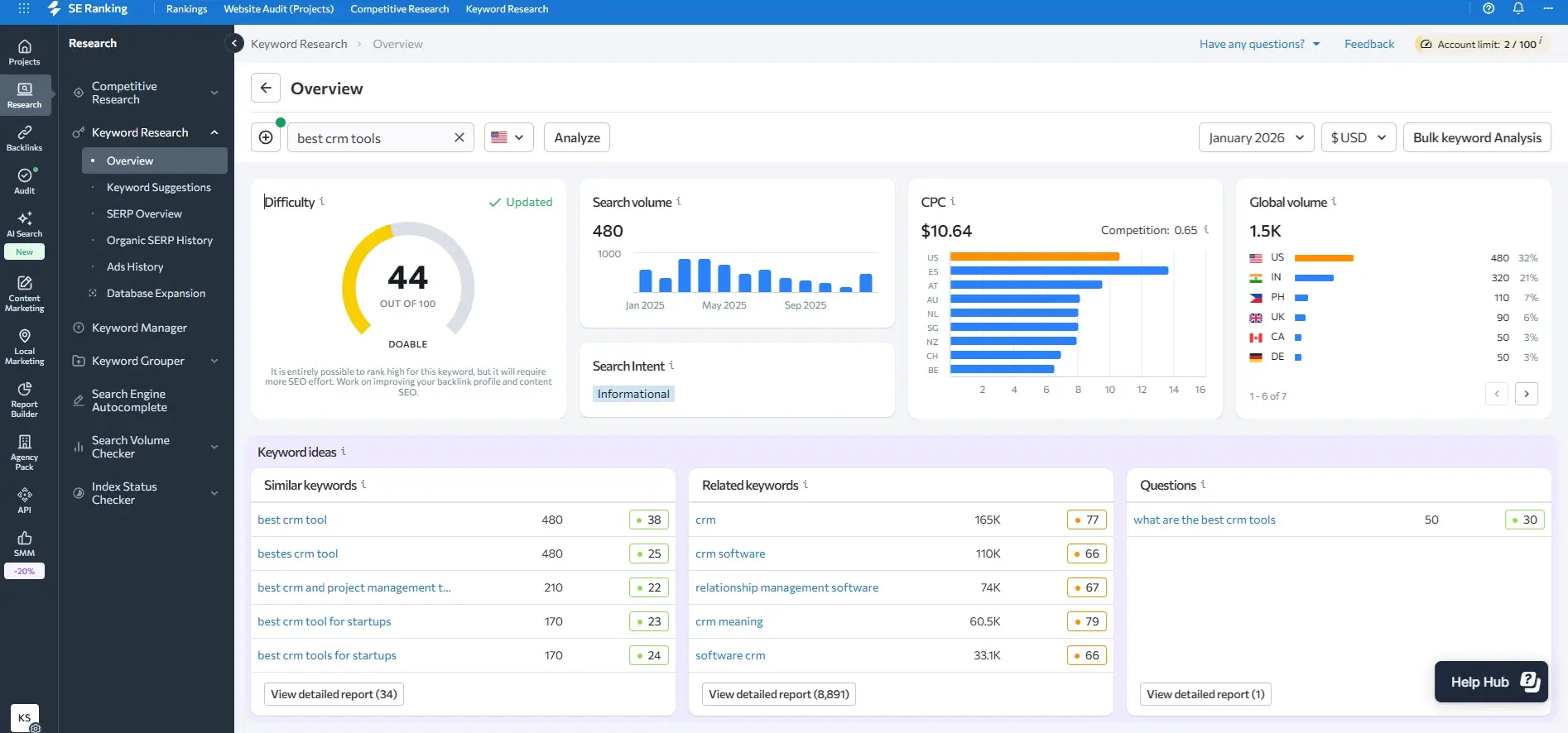
If there is one reason to buy this tool, it’s the Keyword Research module.
When I test SEO tools, I usually expect a simple list of words. SE Ranking gave me a much deeper “drill down” capability that I genuinely loved.
- The Experience: I took a specific landing page and ran it through the tool. It didn’t just tell me rank; it showed me the Search Intent (e.g., whether people want to buy or just learn) and the Difficulty Score (0-100).
- The “Aha” Moment: I noticed the tool highlights SERP Features (like “Rich Snippets” or image packs). This helped me realize I was missing easy traffic opportunities by not having images on my page.
- The Vibe: It feels empowering. You aren’t guessing what works; you are looking at hard data that tells you exactly why your competitor is winning.
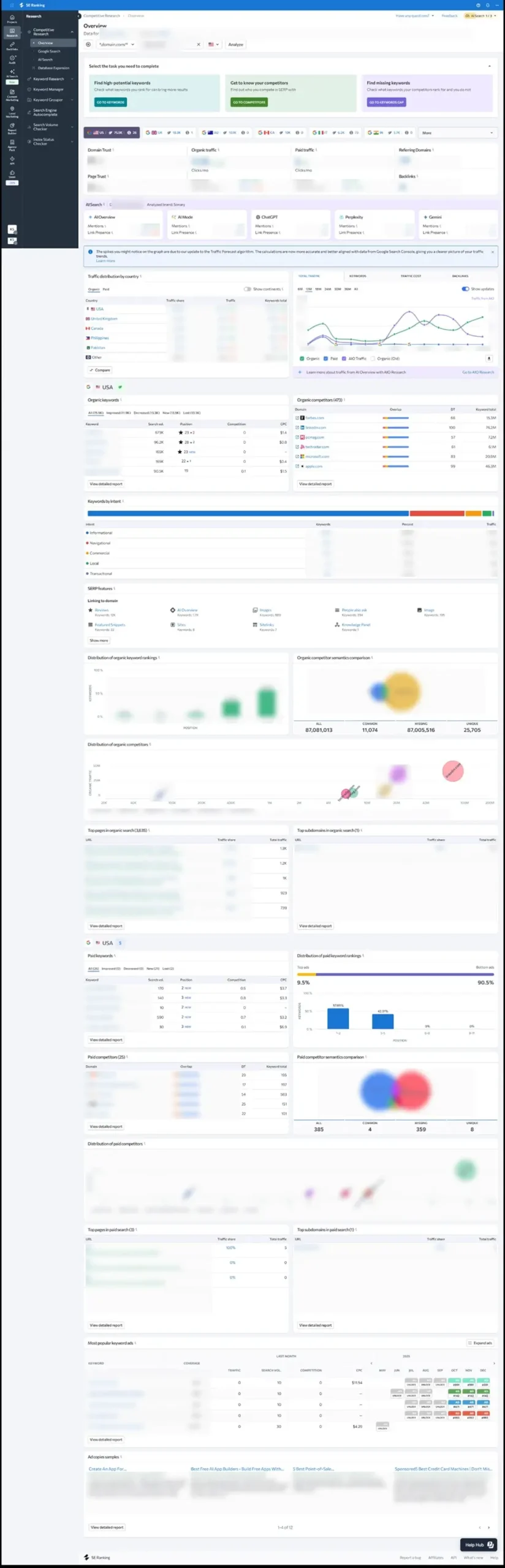
Competitive Research (Spying Made Simple)
I used the Competitive Research tool to look at a few rivals. The interface is incredibly visual, featuring numerous colorful graphs that display Domain Trust and traffic trends.
- For Small Business Owners: I felt the dashboard was “informative enough” without being scary. Unlike Ahrefs, which can feel like a cockpit of a fighter jet, SE Ranking feels like a clean, well-organized desk.
- The Speed Bump: This is where I noticed the processing speed. Loading the full competitor report was a bit slow compared to more expensive tools. It’s not terrible—it’s just a “coffee sip” wait rather than an instant load. But considering the price, I found this completely acceptable.
The “New Tab” Quirk (A UX Warning)
I have to be honest about one design choice that annoyed me: Opening in new tabs. Almost every time I clicked on a significant new tool, such as going from the Dashboard to the Report Builder, it opened a brand-new browser tab.
How it feels: If you are like me and hate clutter, this is frustrating. It breaks the “flow” and doesn’t match the smooth UX I expected from a modern tool. It is the only real downside I’ve found, but you should be aware of it before you start.
The AI Surprise (AI Results Tracker)
This was the feature that made me feel like I was “future-proofing” my work.
-
The Test: Even on the trial, I could run searches to see how my brand appears in ChatGPT, Gemini, and Perplexity.
-
Why I Loved It: Most tools charge extra for this or hide it behind enterprise tiers. SE Ranking lets you see if AI is recommending your business. Watching my brand pop up in a “ChatGPT answer” tracked by the tool was a genuinely cool moment.
Website Audit (The “Health Check”)
I ran a crawl on a 5,000-page site.
- The Result: It gave me a checklist of 110+ technical issues.
- The Feeling: It felt like having a mechanic look under the hood. It didn’t just say “Fix this”; it gave me a clear list. Again, it took about 15 minutes to finish, but the depth of the data (checking for broken links, slow images, and missing tags) was worth the wait.
Summary of My Experience
Overall, using SE Ranking feels like finding a high-quality “dupe” of a luxury product. Yes, the speed is a little slower, and the tab management is annoying, but when I look at the data—the keywords, the AI tracking, the competitor overlap—I feel like I’m getting an absolute steal for the price.
Performance:
- Speed: The web app is sometimes slow. When loading large keyword lists or big audits, you might wait a few extra seconds compared to Semrush.
- Stability: We did not experience any crashes during our testing. It feels very stable for daily work, even if the “open in new tab” style is a bit unusual.
- Mobile App: They offer a full app for iOS and Android. It is great for quick checks on your rankings while you are away from your desk.
Ease Of Use:
Ease of Use (The “First Day” Experience)
A tool is only good if people use it. Here’s what it feels like to get started with SE Ranking.
Getting Started: Sign-up was fast. We didn’t even need a credit card for the trial. An on-screen guide walked us through setting up our first project in under 5 minutes.
The Dashboard: The layout is very clean. We didn’t have to hunt for important buttons. Everything from “Rank Tracker” to “Competitor Research” is clearly labeled on the side.
Learning Curve: This is the best part. SE Ranking is perfect for non-technical users. You don’t need to watch hours of video to understand your rankings.
Verdict:
Our Quick Verdict: After a full review of its features, performance, and my own hands-on testing, I found SE Ranking is a fantastic choice for SMBs and solopreneurs. Its biggest strengths are its exceptional price-to-feature ratio and its deep keyword drill-down capabilities.
However, if you are used to the lightning-fast data processing of high-end tools, you may find the performance a bit more relaxed.
How We Review: Our Trust & Methodology
At Sonary, we don’t just read brochures. We follow a strict process:
- Hands-On Testing: I signed up for the 14-day Pro trial to test the 750-keyword limit and 10,000-page audit myself.
- Deep Research: I analyzed the 2026 updates, specifically the new AI search tracking.
- Comparative Benchmarking: I compared the speed and UX directly against industry leaders like Semrush.
After my testing, my final answer is yes, SE Ranking is worth it. I honestly love this tool despite the minor speed issues. While the “open in new tab” habit is a bit annoying, it’s a small price to pay for the depth of data you get. It combines great features to optimize each website for the right keywords and user intent at a price that won’t break the bank.
If you are a small business looking to compete with the “big guys” without the big budget, SE Ranking is a winner.
SE Ranking Alternatives

Essential
Pros
- Very Easy to Use: We found the learning curve is almost zero. The dashboard is clean and perfect for small business owners.
- Unbeatable value: Costs half of competitors.
- Granular data: Deep, instant keyword drill-downs.
Cons
- Tab annoyance: Tools constantly open new tabs.
- Slower speed: Processing data takes noticeable time.

Starter
Pros
- Excellent backlink and off-page SEO tracking
- Reliable domain rating metric
- Comprehensive SEO reports
Cons
- Starter and Lite plans have strict limits
- Looker Studio integration is only available in Advanced+ plans

Pro
Pros
- Comprehensive Toolset
- Detailed Competitive Analysis
- User-Friendly Interface
Cons
- Comparatively Expensive
- Limited Website Crawling
Semrush: The All-In-One Toolkit
Semrush is best if you want a single tool to handle SEO, social media, and Google Ads. It is a “powerhouse” suite that helps small businesses manage their entire digital presence in one dashboard. Its Local SEO features are particularly useful for brick-and-mortar shops wanting to show up in “near me” Google searches.
Ahrefs: The Growth & Competitor Expert
Ahrefs is the gold standard for outranking competitors. It has the most accurate data on who is linking to your rivals and which specific keywords are driving their sales. While its full plans are premium, it offers a “Starter” plan ($29/month) which is the most budget-friendly way for a solo founder to access pro-level SEO data.
| Feature | SE Ranking | Semrush | Ahrefs |
| Primary Focus | Value & All-in-one | Multi-channel Marketing | Backlinks & Core SEO |
| Keyword Database | 3.3B+ | 27.9B+ | 28.7B+ |
| Backlink Index | Reliable | 43 Trillion | 35 Trillion (High Quality) |
| AI Search Tracking | Basic | Advanced (Brand Mentions) | Emerging (Brand Radar) |
| Best For | Startups / SMBs | Agencies / PPC Teams | Technical SEOs |
SE Ranking screenshots
FAQ
 Write a Review

