

How to Do Keyword Research for Small Businesses (Step by Step)



The Truth Most Keyword Research Guides Don’t Tell You
After years of doing SEO for small businesses, there’s one mistake I see more than any other – and almost no guide talks about it honestly.
It’s not chasing high-difficulty keywords. It’s not ignoring competitor research. It’s not even a technical mistake.
It’s targeting keywords without understanding what the person searching actually wants.
You can rank #1 for a keyword with 10,000 monthly searches and still generate zero leads, zero sales, and zero revenue from it. I’ve seen it happen. A business owner celebrates a top position, then wonders why nothing changed.
The reason is almost always the same: they optimized for volume before they understood intent.
This guide is built around fixing that. It follows the exact process I use when I take on a new small business client – starting with free tools you can use today before spending anything on paid software. If you already use Semrush or Ahrefs, you’ll find exactly where each one fits.
Before You Start: What Keyword Research Actually Is
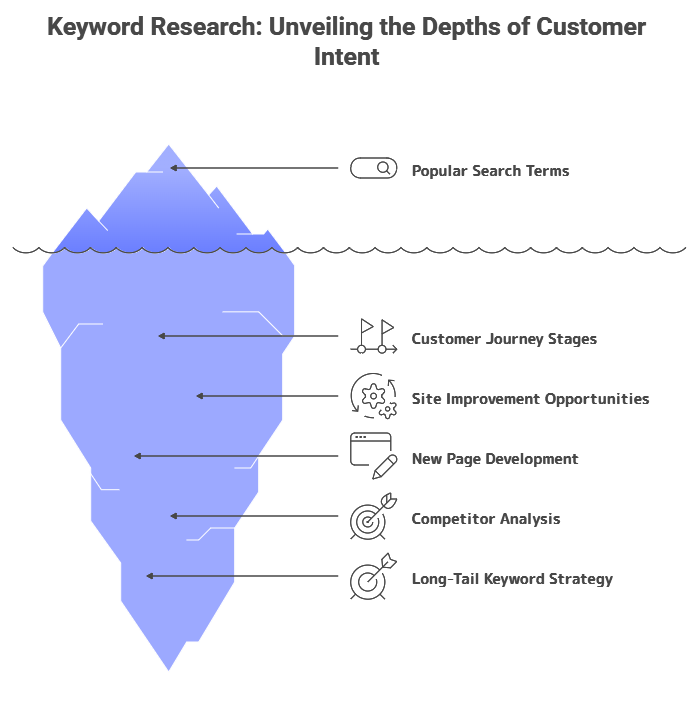
Keyword research is not a list of popular search terms. It’s a map of what your potential customers are thinking at different stages of their journey – and a plan for how your business shows up at each stage.
Done right, SMB keyword research tells you:
- Which pages on your site are already worth improving
- Which new pages to build and in what order
- What your competitors are ranking for that you’re missing
- Which long-tail keywords for small businesses will bring buyers, not browsers
That last point is the philosophy behind everything in this guide. 20 highly relevant visitors who are ready to buy your service are worth more than 1,000 visitors who have no connection to your business. Volume is a signal. Relevance is the goal.
What You’ll Need
Free tools (start here, day one):
- Google Search Console – shows what Google already thinks your site is about
- Google Analytics 4 – shows which pages drive actual business outcomes
- Ahrefs Free Keyword Generator or Keyword Surfer (Chrome extension) – volume estimates at zero cost
- Google (yes, regular Google) – still the most reliable way to check search intent manually
Paid tools (add when you’re ready to go deeper):
- Semrush – best for finding local search terms, analyzing search intent at scale, and competitive keyword gap analysis
- Ahrefs – best for competitive intelligence, traffic potential forecasting, and understanding which competitor pages own which keywords
You do not need both Semrush and Ahrefs. For most small businesses, start with one. This guide shows you exactly where each tool fits in the process – and where free tools are sufficient.
The 6-Step Keyword Research Process
Step 1: Start With Google Search Console – Find Out Where You Already Stand
Most guides skip this and tell you to start a fresh keyword search from scratch. That’s a mistake. Before you research anything, you need to understand your current reality.
Connect Google Search Console and Google Analytics 4 to your site first. If you haven’t done this, do it today – both are free. Then wait. Give it at least a few days, ideally one to two weeks, before you analyze the data. You need a baseline.
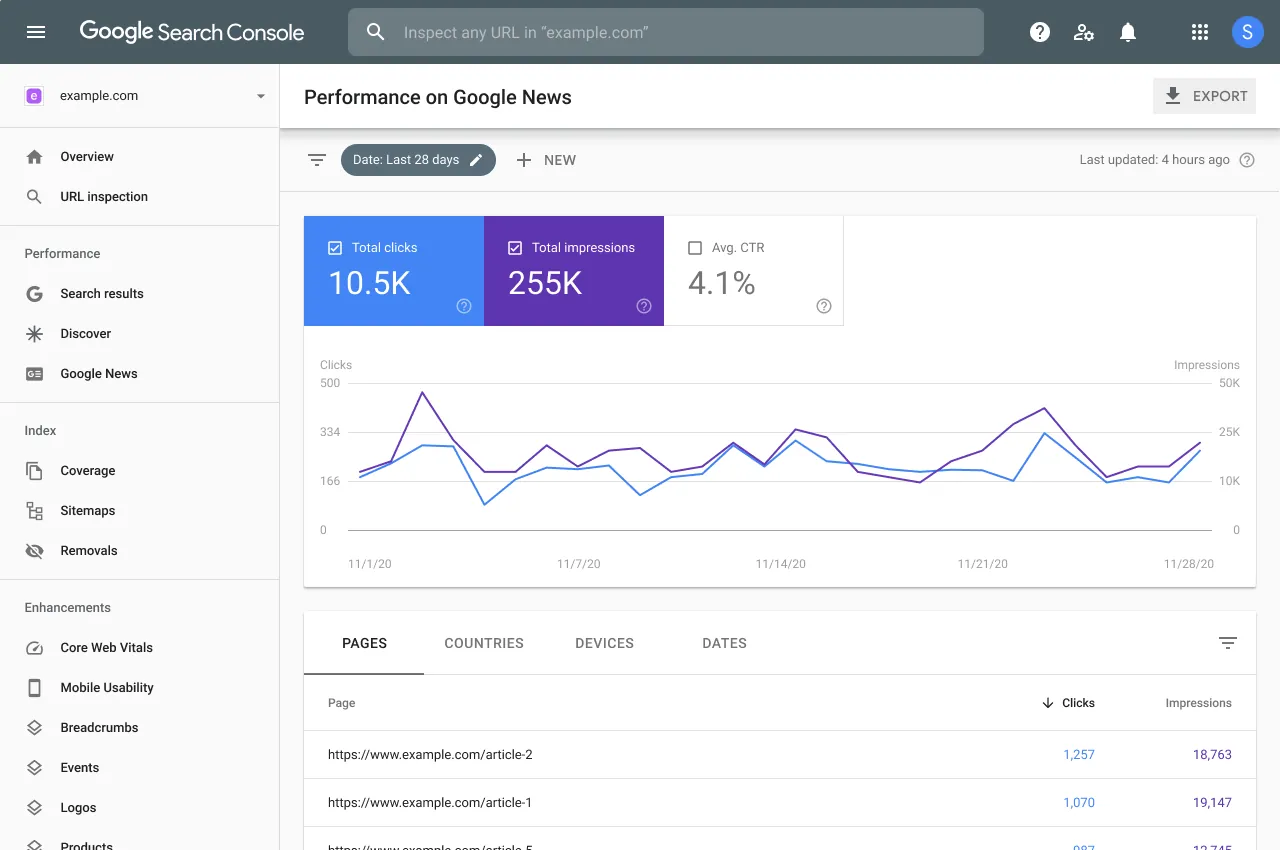
Once you have data, go to Search Console and look at Performance → Search results. You’ll see the keywords you’re already ranking for – positions, clicks, and impressions.
This is your starting point, not a paid keyword tool.
Now do two things with this list:
First – filter by business relevance. Not every keyword you rank for is a keyword you should care about. Go through the list and ask: Does this keyword represent something my business actually offers? Is this the kind of person I want visiting my site? Mark the ones that pass. Ignore the rest for now.
Second – identify your quick wins. Look for keywords where you rank in positions 4–15 with a decent number of impressions but a low click-through rate. These pages are already on Google’s radar – a focused optimization push can move them into the top 3 faster than building something from scratch. Almost every site has 3–5 of these hiding in Search Console. Find them before you do anything else.
Step 2: Validate Volume – With the Right Tool for Your Budget
Now that you have a list of relevant keywords from Search Console, you need to understand their actual search potential. Google Search Console shows you the keywords you already rank for – it doesn’t show you the full picture of how many people are searching them.
Choose your path based on your budget:
Free / zero cost:
- Ahrefs Free Keyword Generator (got to Ahrefs) – enter any keyword, get volume estimates and difficulty scores for free with no account required
- Keyword Surfer – a free Chrome extension that shows search volume directly in Google results as you search, with zero setup
- Google Keyword Planner – free with a Google Ads account, gives volume ranges that are reliable even if the exact numbers aren’t precise
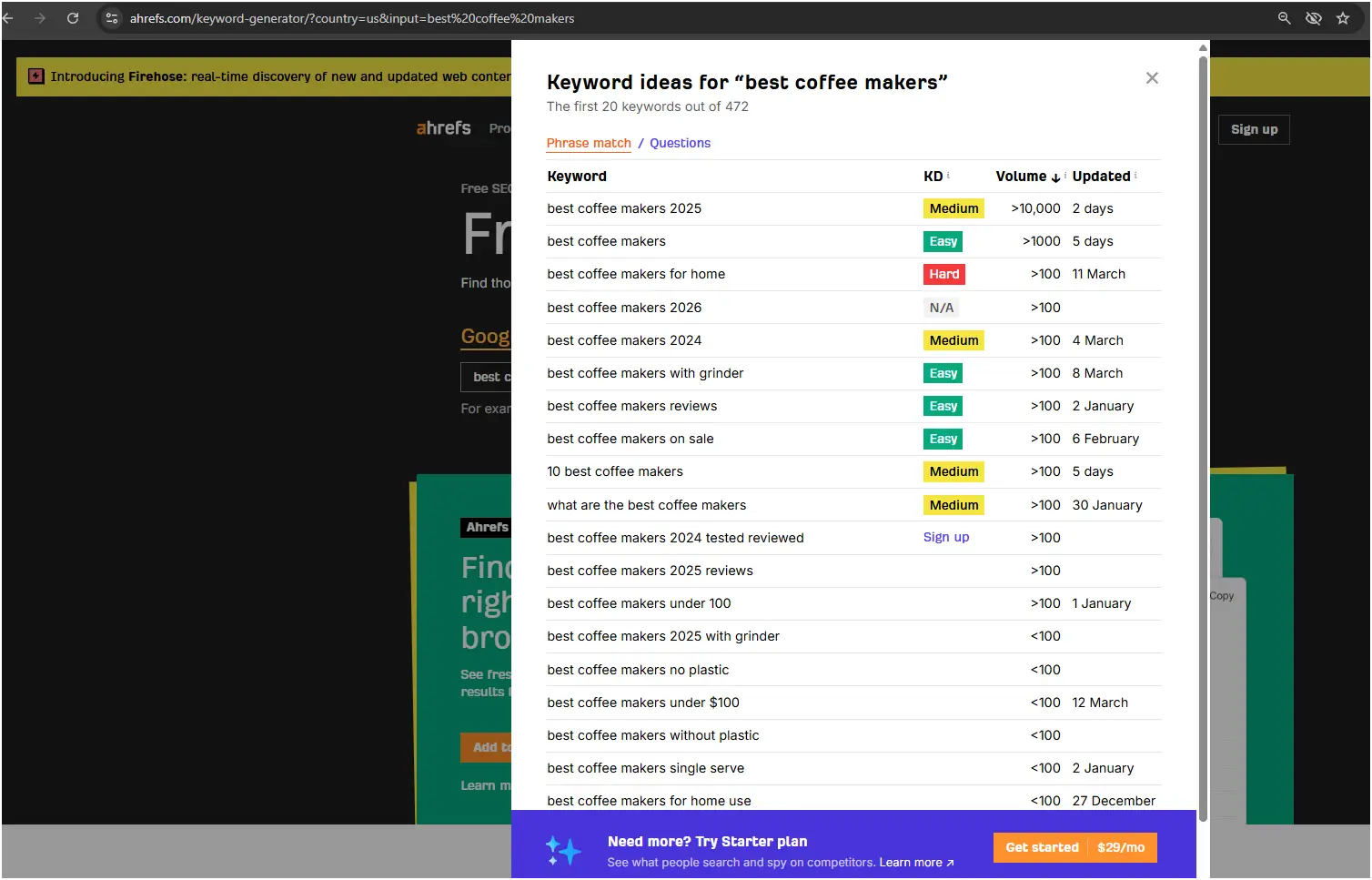
These free tools are not as deep as paid alternatives, but for a small business starting out, they answer the main question: Does anyone actually search for this?
The Google native goldmine – the free keyword source most guides ignore
Before you open any keyword tool, paid or free, open Google itself. Google’s own search interface is one of the best long-tail keyword generators available – and it shows you real-time search behavior that paid tools often lag weeks or months behind on.
Three features, all free, all showing you exactly what your potential customers are typing:
1. Autocomplete (the dropdown as you type) Start typing your main service or topic into Google and stop before pressing Enter. The dropdown suggestions that appear are Google’s real-time prediction of what people actually search. These are not estimates – they’re live data from real searches.
Try it: type “keyword research for” and watch what appears. Try “accountant for small” or “plumber in [your city],” and you’ll see the exact phrases real people are using right now. Every suggestion is a potential keyword. The ones most relevant to your business go onto your list.
2. People Also Ask (PAA boxes) Search any keyword and scroll down slightly. You’ll see a box labeled “People also ask” containing 3–4 questions directly related to your search. Click any question and it expands – and reveals 3–4 more questions underneath. This box is infinitely deep.
PAA questions are pure gold for two reasons: they show you exactly what your audience is confused about or wants to know (informational intent), and they are the exact format Google pulls into AI Overviews and featured snippets. A well-written page that directly answers a PAA question has a real chance of appearing at the top of results, even on a new site with low authority.
3. Related Searches (bottom of the page) Scroll to the very bottom of any Google results page. You’ll find 6–8 “Related searches” – variations and adjacent topics that Google associates with your original search. These are frequently longer, more specific phrases that indicate higher purchase intent than the broad term you started with.
Example workflow for a small accounting firm:
Search “small business accountant” → Autocomplete shows “small business accountant near me”, “small business accountant cost”, “small business accountant vs bookkeeper” → PAA shows “Do I need an accountant for my small business?”, “How much does a small business accountant charge?” → Related searches show “affordable accountant for startup”, “part-time bookkeeper for small business”, “accountant for LLC formation”
In under five minutes, you’ve found 12–15 real keyword candidates with zero tools and zero cost. These go directly into your keyword list for volume validation in the next step.
One practical tip: do this research in an incognito/private browser window. Your personal search history affects Google’s suggestions in a regular window – incognito gives you the unfiltered, location-based results that match what your customers actually see.
When you’re ready to invest ($52–$120/mo):
In Semrush – Keyword Overview: Take each keyword from your filtered Search Console list and enter it in Keyword Overview. You’ll see monthly search volume, keyword difficulty, CPC, and trend data. For each keyword, note the volume – but don’t let it drive your decisions yet. That comes in the next step.
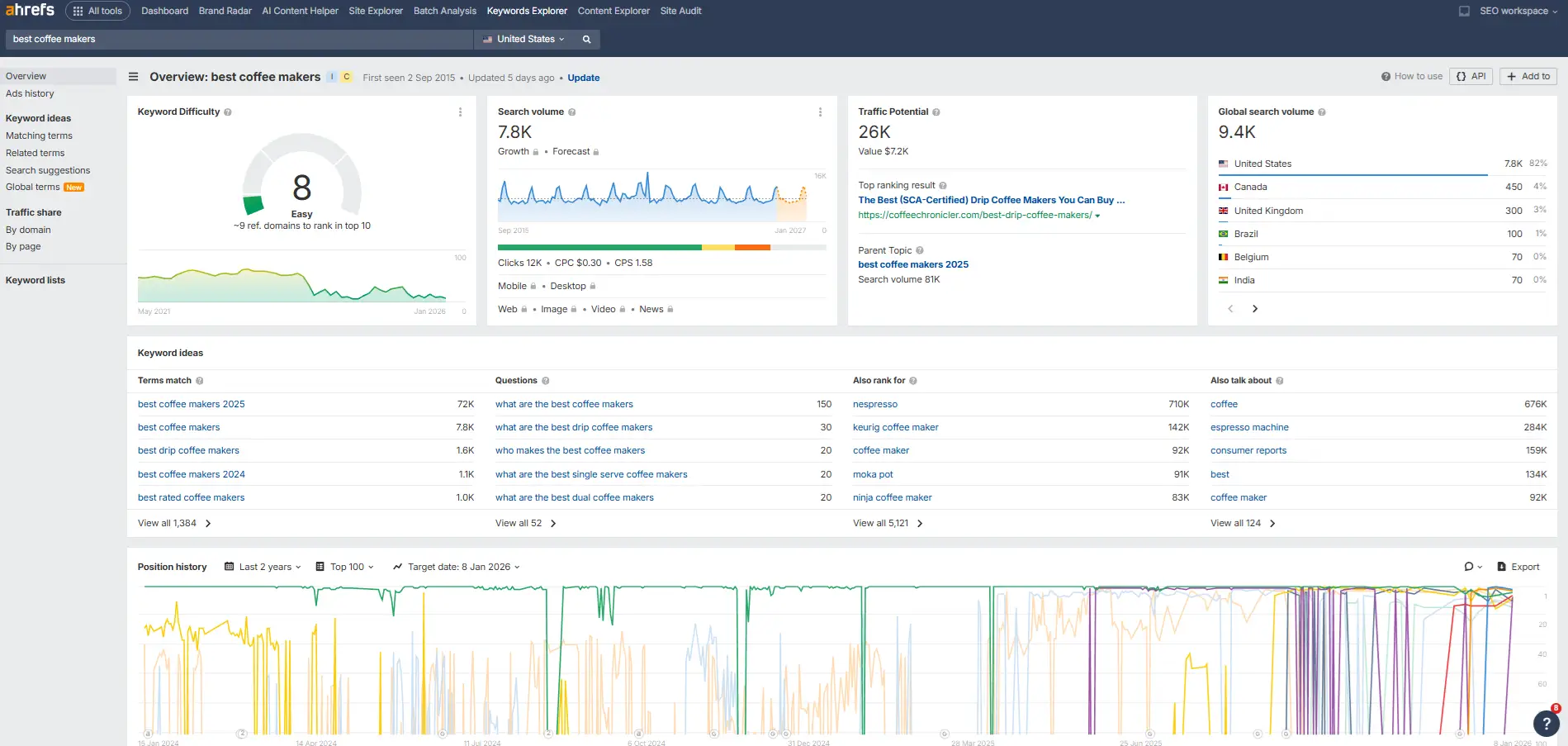
In Ahrefs – Keywords Explorer: Enter the same keywords. Ahrefs shows you something Semrush doesn’t emphasize as much: Traffic Potential (TP). This is more useful than raw search volume because it accounts for the fact that the top-ranking page for a keyword often also ranks for dozens of related keywords. A keyword with 200 monthly searches might have a Traffic Potential of 1,800 – meaning ranking for it could bring nearly 10× the traffic the headline number suggests.
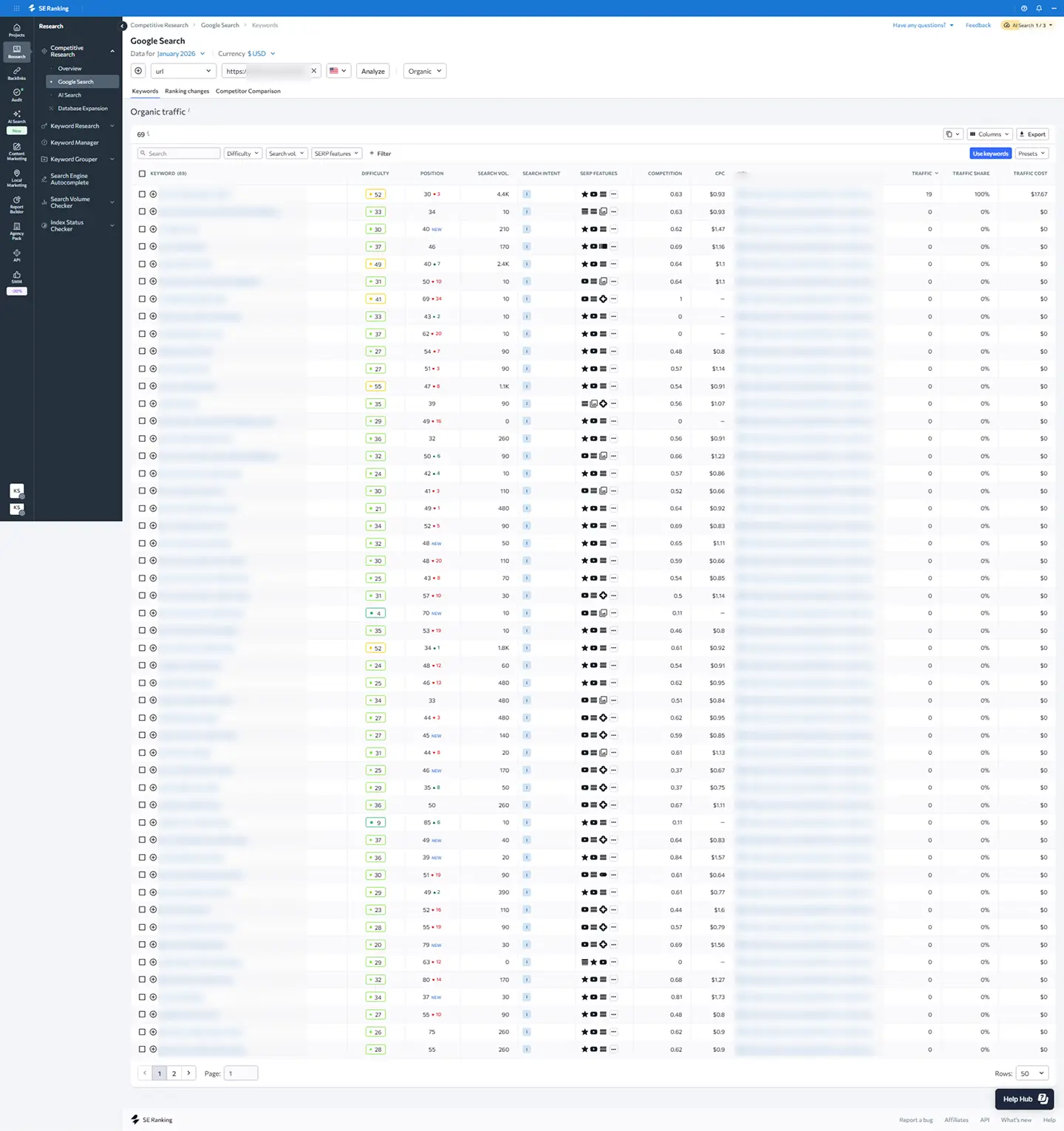
Not ready for $100+/month yet? SE Ranking at $52/mo covers keyword research, rank tracking, and competitor monitoring in one dashboard – at roughly half the price of Semrush. It’s the tool we recommend as the first paid step for most small businesses. You can also see the full comparison of SEO tools by price to find the right fit for your budget.
The zero-volume trap – what paid tools won’t tell you
If you’re a niche B2B business – a specialized consultant, an industrial supplier, a local professional services firm – you will regularly see “0–10 monthly searches” next to keywords that are directly relevant to your work.
Do not abandon those keywords.
Paid tools estimate volume from clickstream data and sampling. Niche B2B searches happen in low volumes but from people with extremely high purchase intent. The data is incomplete, not absent.
Here is the test that matters more than any tool: if your customers ask you this question on a sales call, people are searching for it on Google. The tool can’t accurately measure it because the sample size is too small.
A local commercial electrician might see “industrial panel upgrade [city]” return zero volume. But every single person who searches that phrase and finds you is a qualified lead. Twenty of those visitors a month can be worth more than 2,000 visitors from a broad keyword the tools love.
Important: At this stage, you’re not making final decisions based on volume. You’re building a picture. A keyword with 50 monthly searches that represents exactly what your business does is more valuable than a keyword with 5,000 searches that brings in the wrong audience.
Step 3: Classify Every Keyword by Search Intent
This is the step that separates keyword research that generates revenue from keyword research that generates traffic statistics.
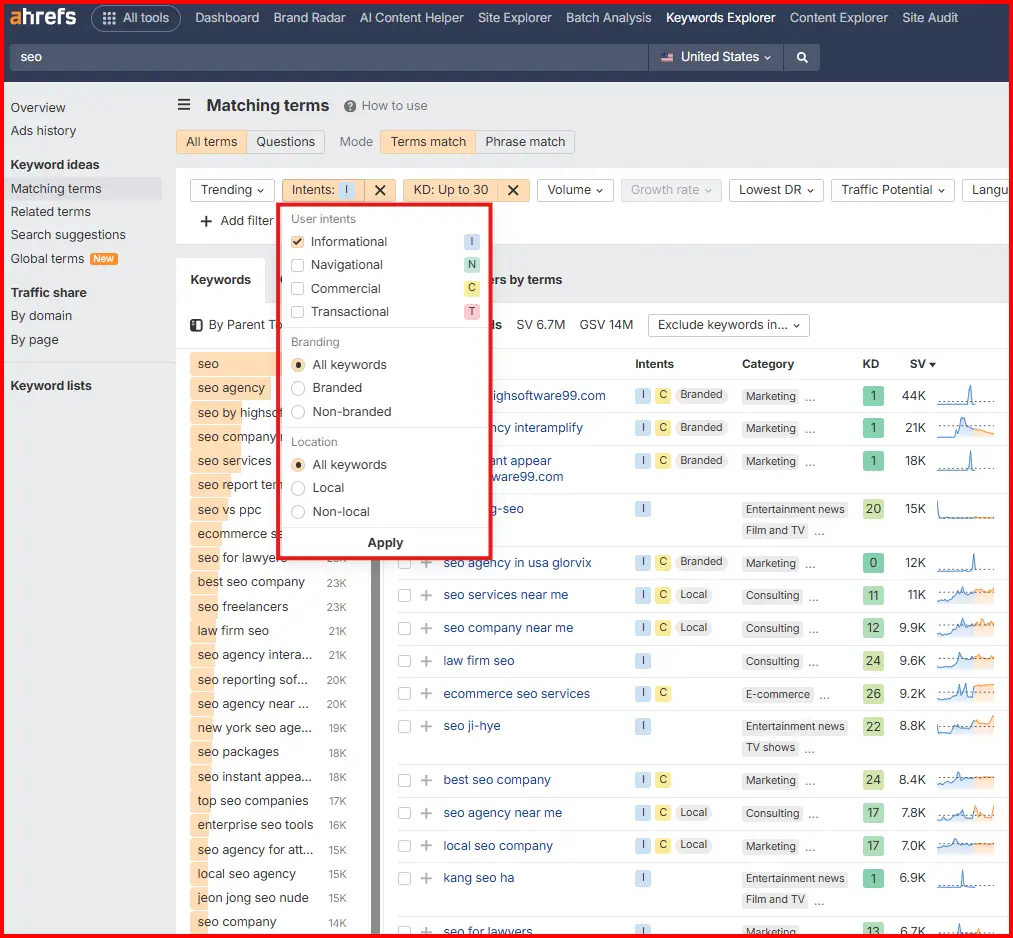
Search intent is the reason behind a search – what the person actually wants when they type those words. There are four types:
Informational – the person wants to learn something.
- “How does SEO work”
- “What is keyword research”
- “How to do a site audit”
These searchers are not ready to buy. They want education. The right response is a blog post, a guide, or an explainer. Sending them to a services page will hurt your bounce rate.
Navigational – the person is looking for a specific website or brand.
- “Semrush login”
- “Ahrefs pricing page”
- “[Your business name]”
These are brand searches. If someone is searching your name, make sure your homepage and Google Business Profile are optimized. If they’re searching a competitor, you’re unlikely to capture them – don’t waste budget trying.
Commercial – the person is comparing options before a purchase decision.
- “Best SEO tools for small business”
- “Semrush vs Ahrefs”
- “Keyword research tool reviews”
These searchers are close to a decision but not there yet. A comparison page, a “best of” list, or a detailed review is the right format – not a hard sell.
Transactional – the person is ready to act right now.
- “Buy Semrush Pro plan”
- “SE Ranking free trial”
- “Hire SEO consultant [city]”
These are your highest-value keywords. They need a landing page, a product page, or a service page. Publishing a blog post for a transactional keyword is one of the most expensive mistakes in SMB SEO – you rank, but nobody converts.
How to check intent without a paid tool: Search the keyword in Google in a private/incognito window. Look at what type of content dominates the first page. Blog posts = informational. Product pages = transactional. Review and comparison pages = commercial. This takes 30 seconds per keyword and is more reliable than any tool’s automated intent tag.
Step 3.5 – Local Intent: The Extra Layer for Local Businesses
If you run a local business – a restaurant, clinic, accountant, plumber, salon, or any service with a physical location – read this before moving on.
Local businesses face a version of the intent problem that generic guides completely ignore. A local plumber targeting “how to fix a leaking pipe” (informational) will attract DIYers who will never call. The right keyword is “emergency plumber [city]” (transactional, local intent).
Local intent works differently from the four categories above because geographic relevance is part of the intent itself. Someone searching “accountant” in Tel Aviv wants a Tel Aviv accountant – not a blog post about accounting.
What this means for your keyword research:
Every commercial and transactional keyword needs a geographic modifier:
- “accountant for small business” → “small business accountant [city]”
- “emergency plumber” → “emergency plumber [neighborhood]”
- “coffee shop near me” → optimize for this in Google Business Profile, not your website
Two places your local keywords need to live:
- Your website – service pages, location pages, and your homepage H1 and meta description
- Your Google Business Profile – your business description, services, and posts
Google Business Profile is often more important than your website for local transactional searches. When someone searches “plumber near me,” the Google Maps pack appears above organic results. If your GBP isn’t optimized, your website ranking barely matters for that query.
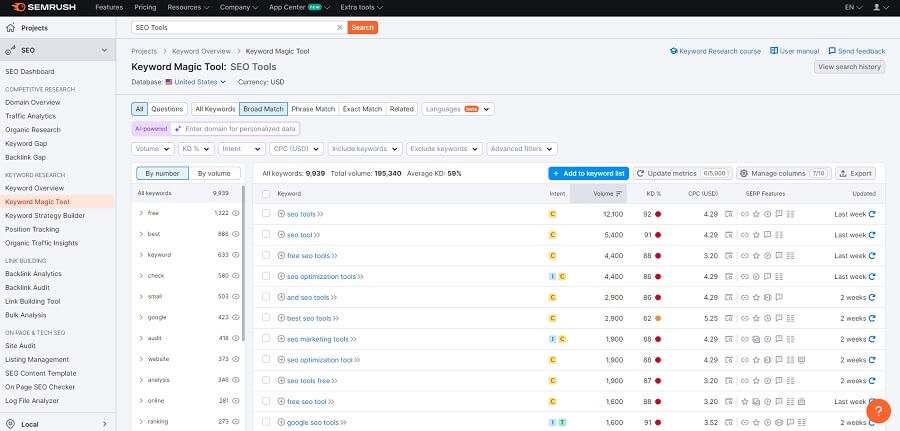
In Semrush: Use the Keyword Magic Tool and filter by your city or region. Look for keywords with a “Local Pack” SERP feature – those trigger a Maps result, which means GBP optimization is as important as on-page SEO.
In Ahrefs: Enter geo-modified keywords in Keywords Explorer. Check whether the SERP shows a Maps pack. If it does, you’re competing in two places: organic results and the local pack.
Go back through your keyword list and assign one intent type to each keyword. For local businesses, add a local modifier to every commercial and transactional keyword. This classification tells you what type of page or profile needs to exist for each keyword – and which keywords you may currently be targeting with the completely wrong content format.
Step 4: Group Keywords by Page and Intent – Build Your Content Map
Now you have a list of relevant keywords with volumes and intent classifications. The next step is organizing them into groups – one group per page.
The rule: every keyword in a group must share the same search intent and serve the same topic. You cannot effectively target an informational keyword and a transactional keyword on the same page. Google ranks pages, and each page should have one clear purpose.
For each group, determine whether the page already exists on your site or needs to be created. After completing this step with a new client, I typically end up with 10–12 pages – some existing, some new. That’s a realistic scope for a small business starting its SEO work.
How groups typically look in practice:
A local accountant might end up with groups like:
- “small business accountant [city]” + “bookkeeping services [city]” → existing services page, needs optimization
- “how to do small business taxes” + “tax deductions for small businesses” → new informational blog post
- “accountant vs bookkeeper for small business” + “do I need an accountant” → new commercial comparison page
- “hire accountant for startup” + “accountant for LLC” → new transactional service page
Each group becomes one page. Each page has one intent. Each page serves a specific type of visitor at a particular stage of their journey.
Step 5: Research Competitors – Find the Keywords You’re Missing
Competitor research comes after you’ve classified your own keywords – not before. This is important. You need to know your own territory before you look at someone else’s.
Now open Semrush or Ahrefs and enter your top 3 competitors.
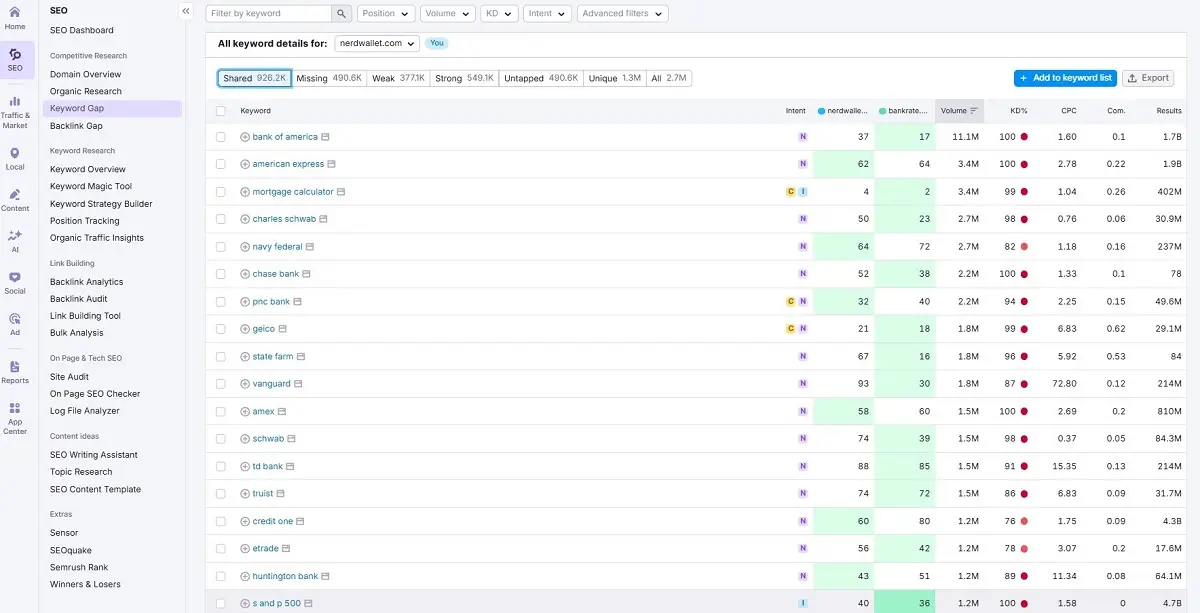
In Semrush – Keyword Gap: Go to Competitive Research → Keyword Gap. Enter your domain and 3 competitor domains. Filter by “Missing” – these are keywords all competitors rank for that you don’t. Then filter by “Weak” – keywords where competitors outrank you.
Sort by volume, but make your selection by relevance. The question is not “which keywords get the most searches?” It’s “which keywords represent real services or products that my business actually provides?”
In Ahrefs – Competitive Analysis (Content Gap): Go to Competitive Analysis and enter your domain in the “This target doesn’t rank for” field, then add your competitors below. Click “Show keyword opportunities.” Ahrefs shows you not just which keywords competitors rank for, but which specific pages rank for them – which helps you understand what content format is winning.
The most important filter in both tools is relevance to your actual business.
I’ve seen businesses spend months trying to rank for keywords their competitors own – only to discover those keywords bring in visitors who want something they don’t offer. Ranking #1 for the wrong keyword does not move the business forward. In some cases, it actively hurts your site’s authority by increasing your bounce rate and sending Google wrong signals about what your site is actually about.
After competitor research, go back to your content map from Step 4. Add any new keywords that genuinely fit your existing groups or that reveal a new topic your business should own. Update your list of pages to create.
Step 6: Optimize Existing Pages First, Then Build New Ones
Before you start creating new content, check Google Analytics 4. Go to your top-performing pages – the ones currently bringing in the most traffic or contributing most directly to revenue.
For each of these pages, ask:
- Has this page been properly optimized for its target keywords?
- Does the keyword appear naturally in the H1, subheadings, image ALT text, and body content?
- Is the information still accurate and current? If not, update it.
- Look at the top 3 competitors ranking above you for this page’s main keyword. What do they have that you don’t? Not to copy their page – to identify what additional value you could add that they haven’t covered.
Then and only then, start building new pages based on the content map you created in Step 4. Target the groups with the highest relevance to your business and the clearest commercial or transactional intent first.
When you make changes, give Google time to crawl and index them. After an optimization push, you may see a temporary dip in rankings on pages you haven’t optimized yet. This is normal. It’s part of the process. Focus on what you’ve prioritized now and move through the list systematically.
Track Everything – Or You’re Working Blind
Once you’ve made changes, you need to know whether they’re working. Google Search Console gives you a broad picture, but for precise position tracking you need a dedicated rank tracker.
Any of these three work well:
- SE Ranking – best value for small businesses at $52/mo, updates daily
- Semrush Position Tracking – included in your Semrush plan if you’re already using it
- Ahrefs Rank Tracker – accurate, clean interface, good for tracking movement over time
Not sure which to start with? Read how much a small business should spend on SEO tools – it breaks down what each budget level actually gets you.
Set up tracking for every keyword in your content map. Set your target country. Check weekly, not daily – daily fluctuations are noise. Weekly trends are signal.
The goal is simple: when you make a change to a page, you want to know within 2–4 weeks whether it improved, held steady, or dropped. This tells you whether your optimization decisions are working and whether you need to adjust.
Related Guides
- Best SEO tools for small businesses in 2026 – the full comparison of every tool mentioned in this article
- Best free SEO tools in 2026 – if you’re starting with zero budget
- Semrush vs Ahrefs: which is better for small businesses? – the full head-to-head for the two tools used throughout this guide
- SurferSEO vs Semrush – if you’re also thinking about content optimization alongside keyword research
- Ahrefs pricing: which plan do small businesses actually need? – before you commit to a plan
- How much should a small business spend on SEO tools? – budget planning for your full SEO stack
- SEO best practices in 2026 – the next step after keyword research is built
The Keyword Research Cycle
Keyword research is not a one-time task. It’s a cycle.
GSC analysis → Volume check → Intent classification → Keyword grouping → Competitor research → Optimization → Track results → Back to GSC
Every 2–3 months, return to Step 1. Check what’s changed. New keywords will have appeared in Search Console. Rankings will have shifted. Competitors will have published new content. The map needs updating.
The businesses that win at SEO long-term are not the ones that did the best keyword research once. They’re the ones that kept coming back to the process.
Case Study: From 10 Sales a Month to 100 – By Targeting Less Traffic
This process works. Here’s what it looked like on a real client.
A few years ago, I worked with a small jewelry brand. Beautiful products, a genuinely unique manufacturing process, a real story behind the brand – and almost no sales from organic search.
When I first audited the site, the keyword strategy was built entirely around high-volume generic terms: “gold necklace,” “silver bracelet,” “handmade jewelry.” Exactly what every jewelry brand targets. And exactly why a small, relatively new site was invisible. The competition wasn’t other small jewelry brands – it was Etsy, ASOS, and major retailers with domain authority built over a decade.
The traffic numbers looked reasonable on paper. The sales numbers didn’t.
The fix: throw out the original keyword research and apply the process above from scratch.
Instead of asking “what does everyone in jewelry search for,” I asked a different question: what does this specific brand represent, and who is the person who would choose it over every other option?
The brand had a distinctive manufacturing process – materials sourced in a specific way, handcrafted in a specific style. That specificity, which had been buried in product descriptions, was actually the keyword strategy. The right buyers were searching for exactly those qualities – but the site wasn’t speaking their language.
I rebuilt the keyword map for every category page around long-tail keywords that reflected the brand’s actual value: what the pieces were made from, how they were made, and what occasions and values they represented. Keyword difficulty dropped dramatically. And crucially, the intent of the people searching those phrases matched exactly what the store sold.
What happened:
Total site traffic dropped slightly in the first few weeks. In most projects, that’s a red flag. Here it wasn’t – because we did it on purpose, and within roughly one month, sales started coming in. Fewer visitors, but the right ones.
The same approach was applied across every category page – consistently and in depth over several months.
| Metric | Before | After |
| Monthly sales | 10–12 | 90–110 |
| Revenue growth | Baseline | Several hundred percent |
| What changed | Generic high-volume keywords | Long-tail keywords matched to the brand’s specific value and process |
The business owner and I reached the same conclusion: competing with everyone for generic traffic was never going to work. Bringing the right users to a brand they were specifically looking for – that was entirely possible.
This is the case I come back to whenever a client shows me a keyword list full of high-volume terms and asks why the site isn’t converting. Volume is easy to chase. The right traffic takes real thinking – and the six steps above are how you find it.
Semrush vs Ahrefs: Which One to Use at Each Step
Both tools appear throughout this guide because they serve different purposes best. Here’s where each one wins:
| Step | Best Tool | Why |
| Volume validation | Semrush | Keyword Magic Tool shows volume, KD, intent, and CPC in one view |
| Traffic potential | Ahrefs | TP metric is more useful than raw volume for realistic traffic forecasting |
| Competitor keyword gap | Semrush | Keyword Gap tool is the clearest interface for finding missing keywords |
| Competitor page analysis | Ahrefs | Competitive Analysis shows which specific pages rank for which terms |
| Intent checking | Both + manual Google check | Cross-reference both tools and verify by searching the keyword yourself |
| Rank tracking | SE Ranking | Best value at $52/mo – cheaper than Semrush or Ahrefs for this one task |
If you can only use one, Start with Semrush. The Keyword Magic Tool and Keyword Gap reports cover the core research workflow for most small businesses. When you’re ready to go deeper on competitive intelligence and traffic potential, add Ahrefs. Still deciding? The Semrush vs Ahrefs comparison covers exactly this decision for small business budgets.
The Most Important Thing This Guide Won’t Say Anywhere Else
Volume matters. Difficulty matters. Competitor data matters.
But none of it matters as much as this one question:
What can you offer this visitor that no one else can?
Before you finalize any keyword, ask yourself: if someone searches this term and lands on my page, what unique value do I give them? What does my business know, do, or provide that the top-ranking competitor doesn’t?
That answer is what makes your page worth ranking. Google’s job is to find the best answer to a search query. Your job is to make sure that when someone searches a keyword you’re targeting, your page genuinely is the best answer – not just the most optimized one.
Start with relevance. Build with intent. Measure with precision. Repeat.
That’s keyword research that actually works.
Quick Reference: Your 6-Step Checklist
- [ ] Step 1 – Connect GSC + GA4. Wait for data. Identify existing rankings and quick wins (positions 4–15).
- [ ] Step 2 – Validate volume in Semrush (Keyword Overview) or Ahrefs (Keywords Explorer + Traffic Potential).
- [ ] Step 3 – Classify every keyword by intent: informational, navigational, commercial, transactional. Use Google to verify.
- [ ] Step 4 – Group keywords by page and intent. Map to existing pages or new pages to create. Target: 10–12 pages.
- [ ] Step 5 – Research 3 competitors in Semrush Keyword Gap or Ahrefs Competitive Analysis. Add relevant missing keywords to your map.
- [ ] Step 6 – Optimize existing pages first (check GA4 for top performers). Then build new pages in order of commercial relevance. Track everything.
Ready to choose your tools? Read Sonary’s full reviews of Semrush and Ahrefs, or explore the full SEO tools comparison.
FAQ
How long does keyword research take for a small business?
The first time through this process takes 4–8 hours, depending on how many competitors you analyze and how many pages your site has. Once you’ve built the initial content map, the monthly maintenance cycle takes 1–2 hours. The upfront investment pays back every time you publish a page that ranks.
How do I check search intent without a paid tool?
Search the keyword in Google in a private/incognito window. Look at what type of content ranks: blog posts have informational intent, product/service pages have commercial or transactional intent, and brand pages have navigational intent. This takes 30 seconds per keyword and is more reliable than any automated intent classification tool.
What keyword difficulty should a new website target?
For a brand-new website with little to no domain authority, target keywords with a difficulty of 0–20 in Ahrefs KD or under 30% in Semrush. Once you have a few pages ranking and some backlinks, you can move toward 20–40. The threshold that matters more than the number is whether the top-ranking pages are from sites of your size – if the top 10 are all major publications or national brands, the difficulty score doesn’t fully capture how hard it actually is to compete.
Should I target the same keyword on multiple pages?
No. If two pages on your site target the same keyword, they compete against each other – Google calls this keyword cannibalization. Keep one keyword cluster per page. If you have two pages targeting similar keywords, consolidate them or clearly differentiate their intent.
How often should I repeat keyword research?
Every 2–3 months for a full review. Monthly, for a quick check of position movements in your rank tracker and a review of new queries appearing in Search Console. The market shifts, competitors publish new content, and seasonal trends change. Keyword research is a living process.
My competitor ranks for keywords I can’t compete on. What do I do?
Focus on what they’re weak at, not what they’re strong at. Every competitor, no matter how established, has topic gaps. Use Ahrefs Content Gap or Semrush Keyword Gap, filtered by your strongest competitors, but also look at their weakest content. Pages ranking in positions 8–15 with thin content are opportunities for improvement. You don’t need to beat them everywhere, just in the areas most relevant to your business.
Is keyword research different for local businesses vs. online businesses?
Yes. Local businesses need to prioritize geo-modified keywords (“accountant in [city]”, “plumber near [neighborhood]”) and Google Business Profile optimization alongside their website keywords. The intent classification process is the same, but commercial and transactional keywords almost always need a local modifier. Also, check which keywords trigger a Google Maps pack in the search results – those require a different optimization approach than standard organic results.






