

HubSpot CRM and ChatGPT integration: Can you really automate your sales workflow?



For most Small and Medium-sized Businesses (SMBs), the CRM is a place where information goes to be forgotten rather than a tool for growth. A HubSpot CRM and ChatGPT integration bridges this gap by turning your static database into a conversational partner. By connecting these platforms, you can automate contact summarization, identify at-risk deals through deep research, and generate high-level strategy reports in natural language rather than complex spreadsheets. This shift allows sales teams to stop acting like data entry clerks and start acting like strategic advisors.
In the following guide, I will share my personal experience setting up this connection and how it changes the daily rhythm of sales operations.
Key takeaways
- Fast setup: Connecting the two platforms takes about 30 seconds and feels as simple as logging into a social media app.
- Conversational logic: Unlike traditional integrations, ChatGPT asks clarifying questions to ensure your CRM reports are accurate.
- Deep analysis: The “Deep Research” mode allows the AI to spend 6 to 9 minutes reading through records to provide verified, cited insights.
- Safety first: For Team and Enterprise users, your confidential sales data is not used to train OpenAI models by default.
- Read-only boundary: The current native integration allows for analysis and link-sharing but does not yet permit writing or updating data directly in HubSpot.
|
Feature |
Benefit for SMBs |
|
Instant setup |
No IT team or developer required. |
|
Deal doctor |
Automatically finds “stalled” deals over a certain value. |
|
White space analysis |
Identifies upsell opportunities in minutes. |
|
Privacy guardrails |
Secure connection that respects HubSpot user permissions. |
|
Citations |
Every answer includes a blue link directly to the HubSpot record. |
Setting up the connection: It really is that simple
When I first sat down to connect these tools, I expected a long afternoon of API keys, technical documentation, and perhaps a call to an IT consultant. I was totally wrong. The experience was surprisingly smooth and felt more like installing a new app on my phone than configuring enterprise-grade software.
To get started, you need a paid ChatGPT account (Plus, Team, or Enterprise). Once you are in the web version, you click on “Tools” next to the text prompt bar and select “Deep Research.” From there, you click “Connect More” or find the HubSpot icon. A standard login window pops up. You choose your account, hit “Connect App,” and that is it.
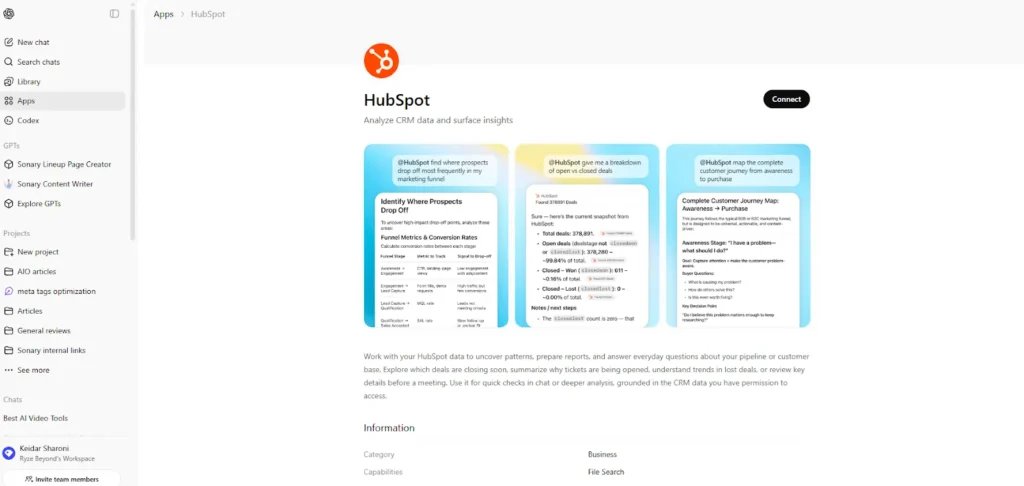
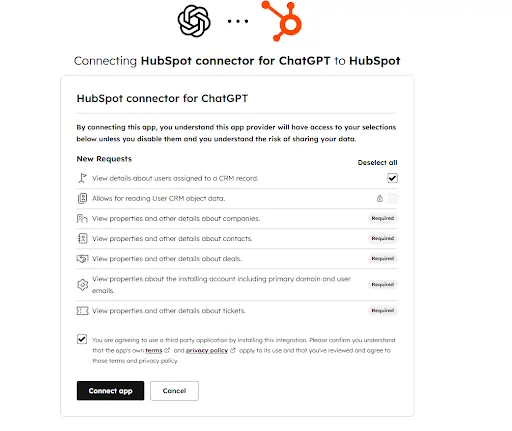
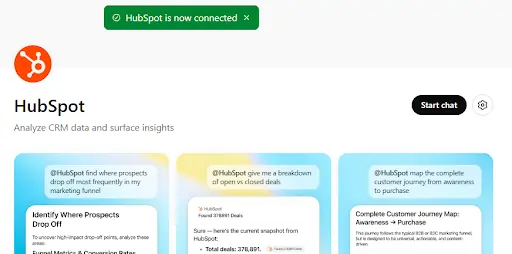
I noticed a crucial nuance immediately: if you manage multiple HubSpot portals (for example, if you run an agency), you can only connect to one portal at a time. If you want to switch, you have to go into settings, disconnect, and reconnect the other one. Most importantly, ChatGPT respects specific permissions. If I am a sales rep who is not allowed to see “Enterprise Deals” in HubSpot, ChatGPT will not show them to me either. This level of security gave me peace of mind right from the start.
If you are still deciding which CRM is right for your growth, you can compare options here.
Why does it feel like briefing a human analyst?
Once the HubSpot CRM and ChatGPT integration is live, the way you interact with your data changes. You are no longer shouting commands into a void. It feels like briefing a human analyst.
When I ask a broad question, the AI doesn’t just guess. It pauses to ask me clarifying questions to ensure the report is accurate. For instance, if I type, “Analyze my sales pipeline and tell me the revenue closed monthly,” ChatGPT might reply: “Should I include all closed-won deals? Are there specific deal owners or time ranges you want to focus on?”
Once I provide those details, it enters a “Deep Research” mode. On my screen, I see a progress indicator showing that it is querying my data in real time. Note that it’s not instant; it can take 6 to 9 minutes because it is literally reading through my CRM records. I found that this “wait time” is actually a relief. It tells me the AI is doing the work I used to do manually, such as opening dozens of tabs and cross-referencing notes.
For more on how AI is changing the sales environment, visit here
What are the new world capabilities of this integration?
Now that I am connected, I have found three specific “powers” that I did not have before. These capabilities solve the most common pain points for small business owners who are drowning in CRM data.
The “Deal Doctor” (Risk and pipeline analysis)
Instead of staring at a Kanban board, wondering why a deal hasn’t moved, I ask ChatGPT to be my auditor. I might ask it to “Analyze my pipeline for deals over $10,000 that haven’t moved stages recently and identify missing stakeholders.”
The result is a list of specific “at-risk” deals. It tells me exactly why they are flagging: “This deal hasn’t had activity in 3 weeks.” The best part is that the response includes clickable citations. If I click a blue link in the chat, it opens that exact Deal record inside HubSpot in a new tab, so I can take action immediately.
The “Instant Strategist” (Territory and expansion)
Territory planning used to take me hours of exporting data to Excel and making pivot tables. Now, it takes minutes. I can ask it to “Segment my companies by revenue, industry, and tech stack to find enterprise expansion opportunities.”
It produces a ranked list of companies in my CRM that are prime candidates for upsells. It breaks them down by geography or industry. I can walk into a sales meeting with a full “White Space” analysis report that was generated while I was grabbing a coffee.
The “System Auditor” (Platform health)
I often worry that I’m paying for HubSpot features I am not using. This tool acts as a consultant to fix that. I can ask, “Review my HubSpot setup and tell me which tools are underused.” It scans my portal and might tell me, “You have the Marketing Hub but aren’t utilizing A/B testing on your landing pages,” giving me a roadmap to get more value out of my subscription.
Comparison: Manual reporting vs. ChatGPT integration
|
Task |
Traditional HubSpot reporting |
ChatGPT integration (Deep Research) |
|
Setup time |
10 to 30 minutes per report |
30 seconds (natural language) |
|
Complexity |
High (Requires knowledge of filters) |
Low (Just ask a question) |
|
Insight depth |
Static numbers and charts |
Contextual analysis and suggestions |
|
Risk identification |
Manual spot-checking |
Automated “at risk” detection |
|
Actionability |
Requires manual lookup |
Clickable links to records |
What are the current limitations of the HubSpot ChatGPT connector?
While I’m excited about this technology, I know I also need to be realistic. This is currently a “Look but don’t touch” relationship.
The reality is that this integration is read-only. I can ask it to find a deal, analyze an email, or draft a reply (which gives me text to copy and paste). However, I cannot yet say, “Move this deal to Closed-Won” or “Update this contact’s phone number.” It cannot write changes back into the CRM database yet. Experts predict this capability is coming soon, but for now, it remains a high-level research tool.
Also, it is important to remember the latency. If you are in a rush and need a single phone number, it is faster to search HubSpot directly. Use the ChatGPT integration for the heavy lifting, such as “Summarize the last six months of interaction with this client.”
Is your confidential sales data safe with OpenAI?
My biggest fear was: “Is OpenAI going to use my confidential sales data to train their public model?” This is a valid concern for any business.
The sources and my personal research confirm that, by default, data is not used to train OpenAI’s models for Enterprise and Team users. It establishes a private, secure connection just for your session. I also went into my ChatGPT settings and explicitly opted out of data sharing to be double-sure. The integration respects the permission structure of your HubSpot portal. If you cannot see it in HubSpot, the AI cannot see it either.
The “Head Librarian” analogy: Why this matters for your business
Before this HubSpot CRM and ChatGPT integration, using a CRM was like using an old library card catalog. I had to know exactly where to look, walk to the shelf (the report builder), and pull the book myself. It was manual, tedious, and prone to human error.
Now, it feels like I have hired a Head Librarian. I just walk up to the desk and say, “Find me every book about ‘Manufacturing Leads’ that we haven’t checked out in six months.” The librarian goes and does the work, returning with a stack of books and a summary of their contents. This allows me to focus on the high-level strategy while the AI handles the retrieval.
For SMBs, this means you can compete with larger companies that have massive sales operations teams. You have the same analytical power at a fraction of the cost.
Conclusion
The HubSpot CRM and ChatGPT integration is a significant step forward for sales efficiency. It transforms the CRM from a chore into a competitive advantage. By automating the analysis of your pipeline and the summarization of your contacts, you free up your team to do what they do best: build relationships and close deals.
If you are ready to stop digging through data and start using it, your next step is simple.
FAQ: What users are asking about HubSpot and ChatGPT
Q: Does ChatGPT keep a copy of my HubSpot data?
A: No. When using the “Deep Research” connector, ChatGPT queries your data in real-time. For Team and Enterprise accounts, this data is not stored or used to train future models.
Q: Can I connect more than one HubSpot portal?
A: Yes, but you can only have one active portal connection at a time. If you work across multiple accounts, you must disconnect and reconnect when switching portals.
Q: How do I fix a “Connection Failed” error during setup?
A: Most connection issues are due to permissions. Ensure you are a “Super Admin” in HubSpot or have “App Marketplace” permissions enabled before trying to link the accounts.
Q: Does this integration work with the free version of HubSpot?
A: Yes, the integration can read data from free HubSpot accounts, but you must have a paid version of ChatGPT (Plus, Team, or Enterprise) to access the connector tools.
Q: Can ChatGPT send emails on my behalf through HubSpot?
A: Not directly through the native connector. It can draft the email for you to review and send, but it does not have “write” permissions to trigger the send action within HubSpot itself. For that level of automation, a tool like Zapier is required.
Q: How long does the “Deep Research” take?
A: Depending on the volume of data and the complexity of your question, it usually takes between 6 and 9 minutes. The AI is meticulously checking records to provide cited, accurate answers.




