HubSpot Marketing Studio: Why the new campaign workspace is a game changer for CMOs


Managing a marketing department often feels like trying to assemble a puzzle whose pieces are scattered across 10 different rooms. From my experience, the biggest bottleneck for any Chief Marketing Officer (CMO) isn’t a lack of ideas. Still, the time is wasted jumping between tools to see if those ideas are actually working.
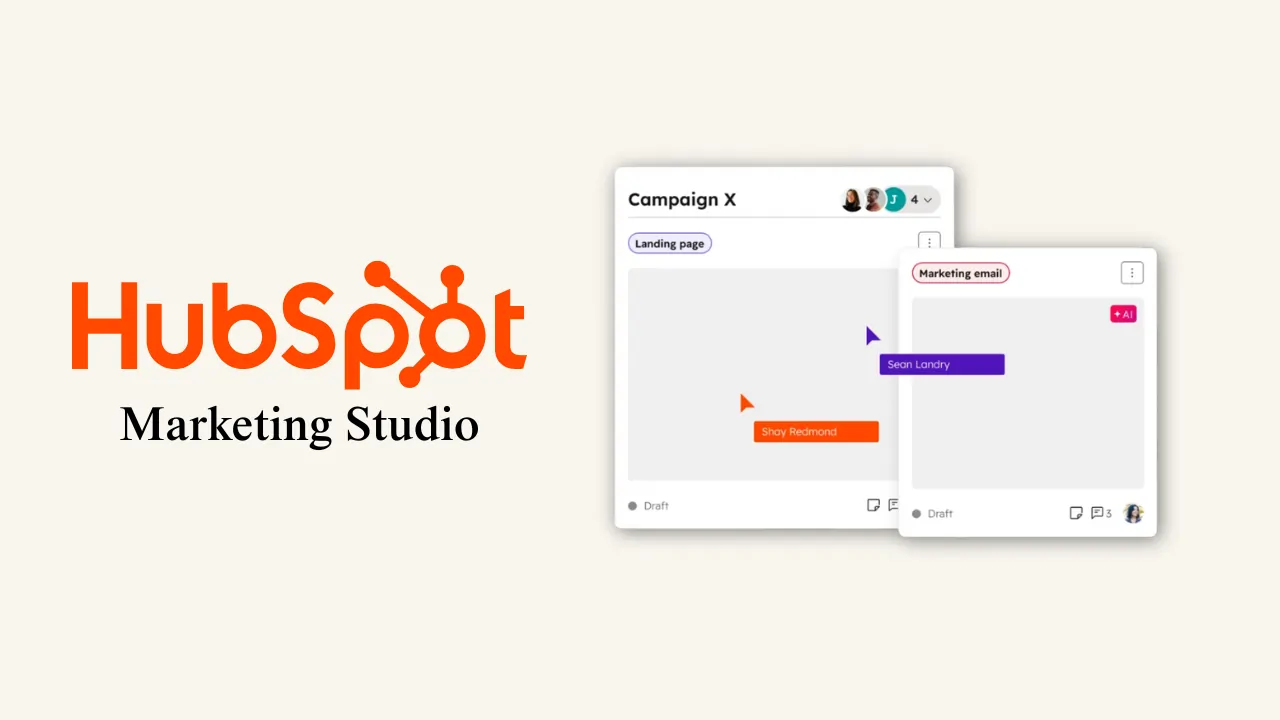
HubSpot Marketing Studio is a centralized, visual campaign workspace that lets you build marketing activities using drag-and-drop templates and track every result in a single, high-level dashboard. Bringing email creation, AI assistance, and advanced reporting into one “command center” eliminates the friction of tool-switching and provides instant visibility into your total campaign ROI.
I’ve spent a lot of time testing the HubSpot Marketing Studio, and I want to share exactly why I see this tool as a game changer for someone who wants to send high-impact marketing and see real results without the technical headache.
Key takeaways (TL;DR)
- Visual centralization: You can plan and execute entire campaigns from a single “Canvas” view instead of clicking through dozens of tabs.
- Rapid creation: It takes only a few seconds to pick a drag-and-drop template and a few more minutes to finalize the content.
- AI as a strategist: The built-in Breeze AI doesn’t just write copy; it suggests the best structure for your goals, such as promoting new articles.
- CMO oversight: A unified table allows leaders to see all campaign results in one place with advanced filtering for deep dives.
- Precision sending: Simplified inclusion and exclusion logic ensures you only reach the right audience, protecting your brand reputation.
My experience with the ‘visibility gap’ and how this tool solves it
Over the last couple of decades working in marketing, I’ve seen numerous CMOs struggle with what I refer to as the “Visibility Gap” – when you have a great strategy, but you can’t tell which part of the execution is failing because the data is siloed.
HubSpot Marketing Studio allows anyone to create email marketing activities with drag and drop templates and optimize them for specific needs like newsletters, e-commerce, and events. I’ve found that this tool is incredibly powerful for someone who just wants to send email marketing with a great dashboard to see all results. You don’t have to guess if a campaign is performing; you can see it in real time.
Why drag-and-drop is the foundation of efficiency
The flow is fast and straightforward. When I use the Studio, I don’t start with a blank page. I start with a proven framework.
What this shows: This is the template selection screen, where you can see categories like Ecommerce, Newsletters, and Events.
My experience: I picked the E-commerce category here because it has 18 pre-built options. Instead of hiring a designer, I can simply grab a template that is already optimized for sales and start rearranging the blocks. It saves me hours of back-and-forth with a creative team.
For more insights on how these templates compare to other major players, you can explore Sonary’s CRM software reviews or our deep dive into email marketing platforms.
How does HubSpot Marketing Studio simplify high-level management?
One of the real user pain points I hear most often from CMOs is that they feel “locked out” of their own data because the reporting tools are too complex. They want to see the big picture without needing a degree in data science.
I’m focusing on high-level management here because the dashboard is remarkably simple. It uses a table format that any CMO can read at a glance to see all campaign results in one place. We can add advanced filters or create a specific filter for what I need, such as campaigns targeting a specific region or product line.
The power of advanced filtering
In my own workflow, I use these filters to check the “health” of our automated systems. I don’t want to see a wall of noise; I want to see specific trends. HubSpot’s advanced filtering capabilities allow CMOs to isolate specific campaign segments.
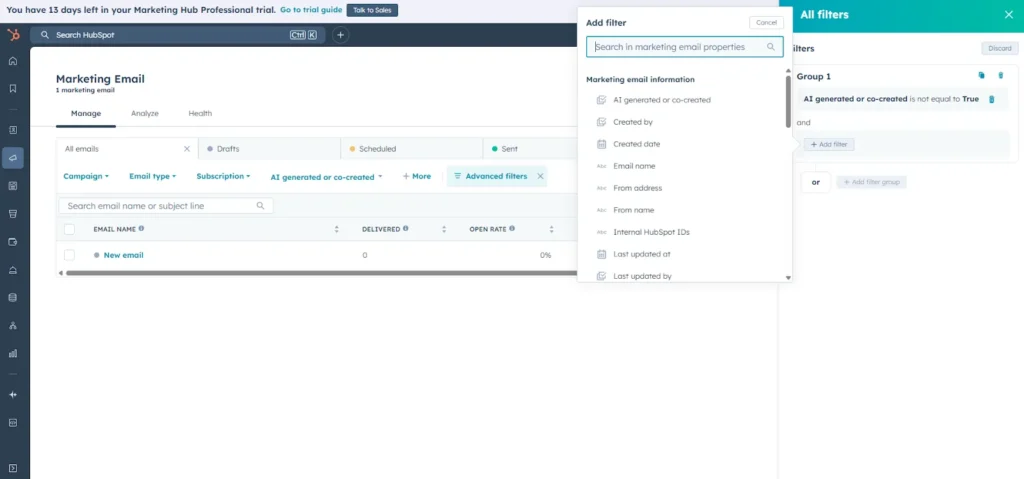
What this shows: This is the “Advanced filters” interface.
My experience: I created a filter group here where “AI-generated or co-created is not equal to True.” Why? Because I want to see how my team’s manual work is performing compared to our AI-optimized campaigns. This level of transparency is exactly what a CMO needs to make smart staffing and budget decisions.
My proof: Using Breeze AI to build massive campaigns fast
The “Blank Page Problem” can be a major struggle for SMBs. You know you need to send a newsletter, but you don’t have the time to draft three different article teasers.
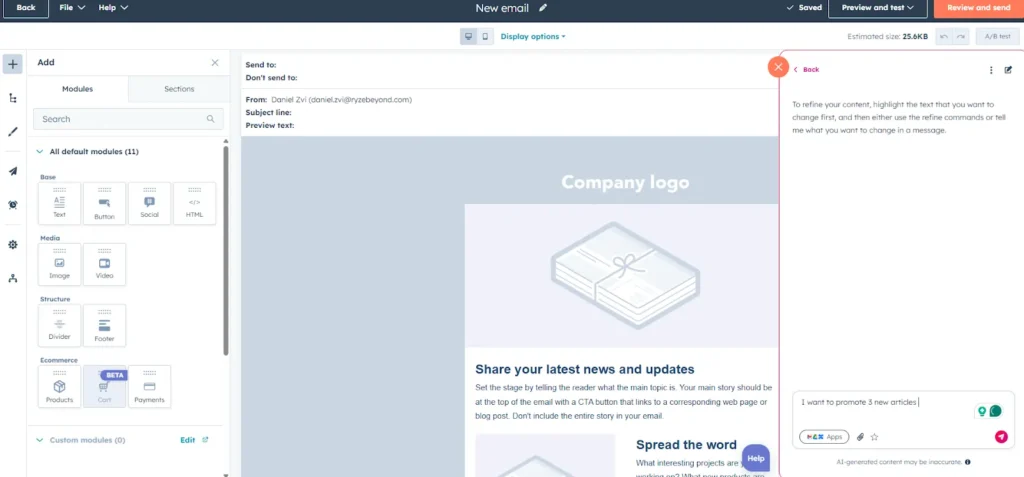
HubSpot has a built-in AI assistant to improve the content, structure, and even the strategic approach for Chief Marketing Officers. With this tool, anyone can build massive email marketing campaigns in just a few simple steps for different goals.
What this shows: The Breeze AI assistant during a content generation task.
My experience: I told the AI, “I want to promote 3 new articles.” In 7 seconds, it analyzed the request and provided me with a “Direct Answer” in the form of a perfectly structured email. It didn’t just generate copy; it gave me a subject line and a layout with headers for each article. This is how I launch campaigns in minutes, not days.
To see how this AI-driven approach stacks up against the competition, check out this HubSpot vs. Salesforce comparison.
Protecting your brand with precision audience logic
I’ve learned the hard way that sending the wrong email to the wrong person is the fastest way to kill your sender reputation. HubSpot simplifies audience targeting by replacing complex list-building with intuitive include-and-exclude logic. We don’t need to build complex “Active Lists” with 50 rules
The flow is simple: I pick a list of who I want to send to (the groups), and then, most importantly, I pick which I don’t want to send to (the exclude audiences).
The ‘exclude’ advantage
I use the exclude feature to ensure I am not bothering people who are already in a different sales cycle or who haven’t opened an email in months.
[IMAGE PLACEHOLDER: image_2f3a4c.png]
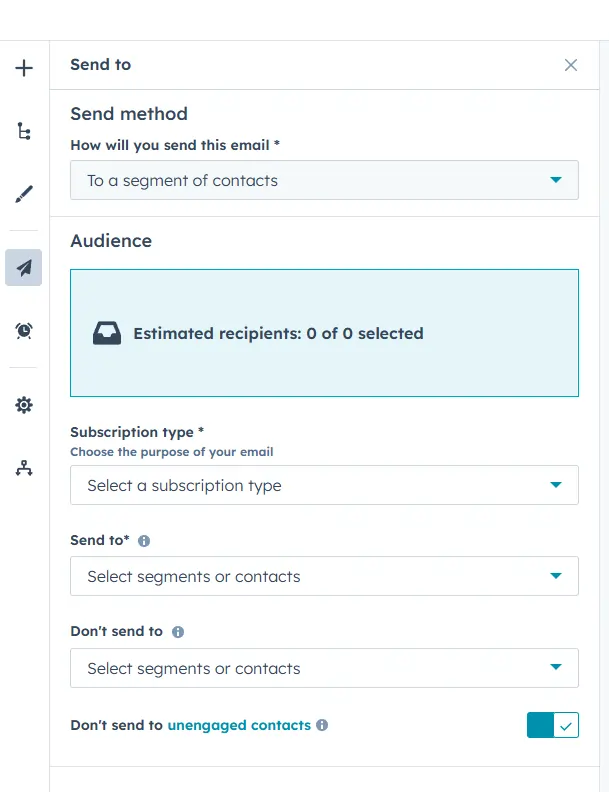
What this shows: The “Send to” audience configuration screen.
My experience: You can see the “Don’t send to” section at the bottom. I always toggle on the “Don’t send to unengaged contacts” switch. This one little button is my insurance policy against landing in the spam folder. It’s a “set it and forget it” feature that saves my brand’s deliverability.
The ‘inbox experience’: From subject line to results
When I’m in the “Edit” mode, I see exactly what the user sees. I don’t want to guess how the subject line looks on a phone. The Studio consolidates all these controls into a single sidebar.
Optimizing for open rates
Using HubSpot’s personalization tokens is the easiest way to get someone to click your email. I can add the recipient’s first name or company name directly into the subject line in seconds.
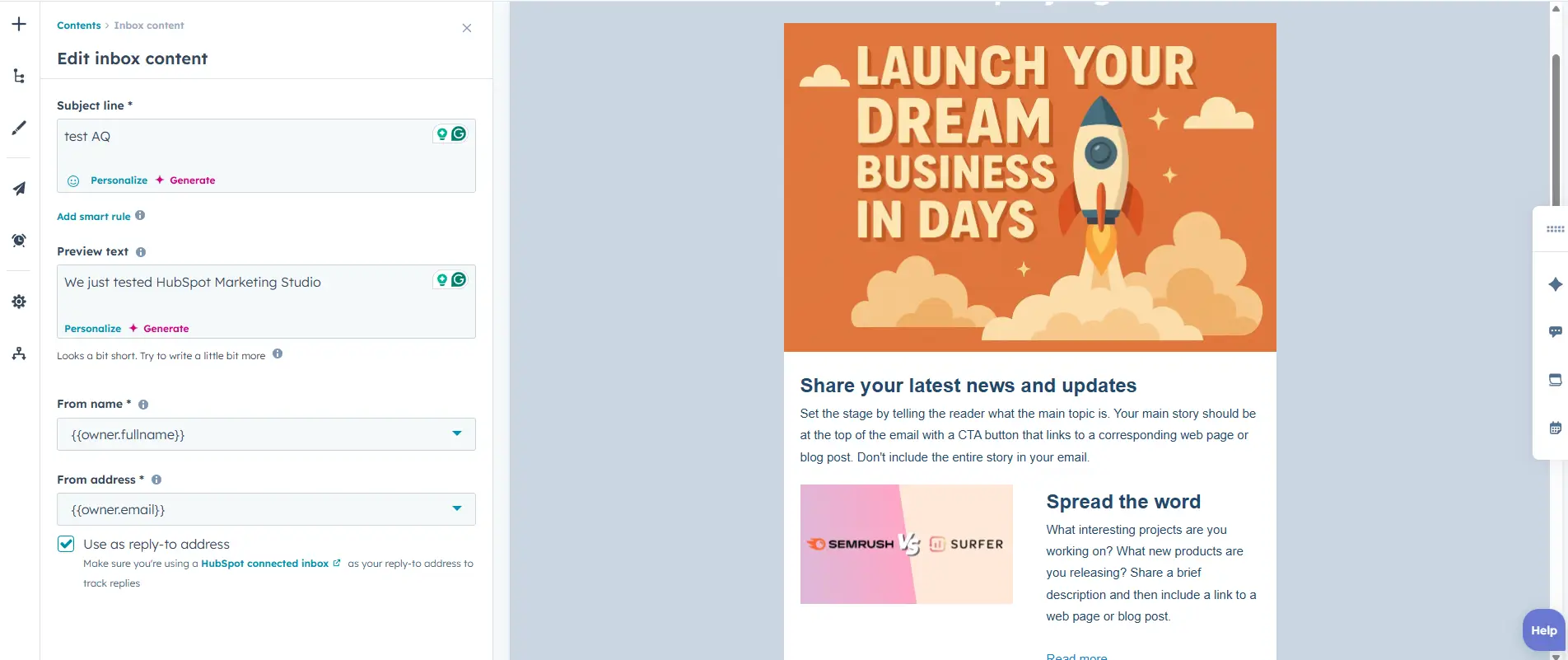
What this shows: The “Edit inbox content” sidebar.
My experience: I named this one “test AQ” for my own internal tracking. I use the “Personalize” link to pull in CRM data and the “Generate” button to let the AI suggest 5 different subject lines. It takes the guesswork out of “what works” because the AI is analyzing millions of data points to identify what drives opens.
Verifying success: The results table
Once a campaign is live, I want to see the “proof” that it worked. I don’t want a 50-page PDF report; I want a clean table.

What this shows: The final “Manage” table with campaign metrics.
My experience: This is where I go to see the “New email” results. I can see the “Delivered,” “Open Rate,” and “Click Rate” all on a single horizontal line. I can also see exactly when it was last updated and by whom (in this case, “Daniel Zvi”). This table is where my “gut feeling” is replaced by hard data.
How to scale your marketing without scaling your stress
Based on my testing, here is the most efficient way to use the HubSpot Marketing Studio as a CMO:
- Define the goal: Are you promoting articles, a sale, or an event?
- Pick the blueprint: Choose your drag-and-drop template from the category list.
- Let AI draft: Use the Breeze AI agent to structure your message. Don’t write from scratch.
- Set the rules: Include your target audience and exclude your unengaged contacts.
- Schedule for impact: Use the recipient’s time zone feature to ensure delivery when they are awake.
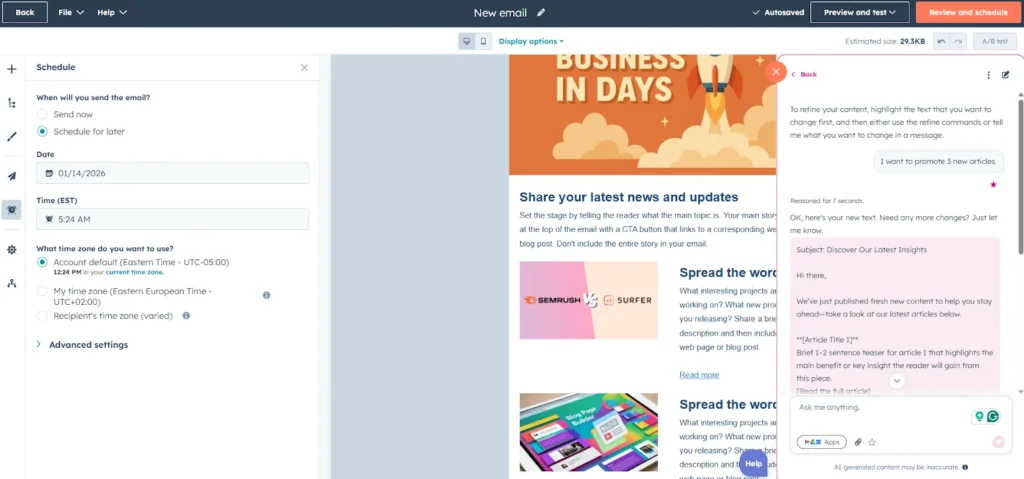
What this shows: The scheduling interface with time zone options.
My experience: I scheduled this for January 14, 2026. I always pick “Account default” for my home base, but for global campaigns, I switch to “Recipient’s time zone.” This is a huge efficiency win for my team because we don’t have to calculate send times for different countries manually.
Comparing the old workflow to my new visual experience
|
Workflow phase |
How I used to do it (The Hard Way) |
How I do it now (Marketing Studio) |
|
Strategy |
Whiteboards and messy Google Docs |
Visual “Canvas” in HubSpot |
|
Email design |
Waiting for a designer to send a mockup |
Drag-and-drop templates in minutes |
|
Copywriting |
Staring at a blank screen for an hour |
Breeze AI drafts the structure in 7 seconds |
|
Audience |
Complex, multi-layered list filters |
Simple Include/Exclude toggles |
|
Reporting |
Asking my manager for a CSV export |
Real-time Table View on my dashboard |
Conclusion
HubSpot Marketing Studio isn’t just a new set of buttons; it is a new way of thinking about marketing management. It is the only tool that truly respects a CMO’s time. It gives you the speed of a drag-and-drop builder, the brain of an AI strategist, and the clarity of a unified results dashboard.
If you are tired of clicking through 10 different screens to check whether your campaign is profitable, it is time to switch to a visual workspace. It will allow you to focus on the big ideas while the Studio handles the technical heavy lifting.
What real users want to know (my expert answers)
Why is the visual “Canvas” better than just a list of emails?
When you look at a list of emails, you can’t see how they relate to each other. In the Marketing Studio “Canvas,” you see the whole journey. I’ve found this is vital for catching mistakes, like forgetting a “Thank You” email or a follow-up social post. It turns a list of tasks into a visual story.
Does the AI assistant replace my copywriter?
In my opinion, it shouldn’t replace them, but rather turn them into a “Super Copywriter.” I use the AI to do the heavy lifting—drafting the structure and the first 80% of the copy. This allows my creative team to focus on the “hook” and brand personality rather than formatting article teasers.
How do I stop my emails from going to the “Promotions” tab or Spam?
This is where the inclusion/exclusion logic is your best friend. From my experience, the most significant cause of landing in “Spam” is sending to people who don’t want your mail. By using the “Exclude unengaged contacts” toggle and focusing on targeted groups, you send fewer emails, but you get higher engagement. Gmail and Outlook see this and reward you with a better inbox position.
Is the dashboard customizable for different business goals?
Yes, and this is where I spend most of my management time. I don’t just use the standard view; I use the “Edit columns” feature to show only the metrics that matter for my current goal. If I’m running a brand awareness campaign, I look at Open Rates. If I’m running a sale, I add a column for “Revenue.”
Can I really build a campaign in minutes?
I was skeptical too, until I tried it. Because the templates are already “locked” to your brand colors and fonts, and because the AI understands your goal (like promoting 3 articles), you aren’t “building”—you are “curating.” It takes me only a few minutes to review what the AI built, swap one or two images, and hit schedule.
FAQ section
Q: Is HubSpot Marketing Studio included in the Free CRM?
A: No. The advanced visual workspace and Breeze AI features are typically part of the Marketing Hub Professional and Enterprise tiers, as they require advanced automation and multi-channel reporting capabilities.
Q: How does the AI know my brand voice?
A: HubSpot allows you to set up “Brand Voice” guidelines in your account settings. Once configured, the Breeze AI will automatically apply your preferred tone (e.g., Professional, Witty, or Educational) to all generated copy.
Q: Can I use the drag-and-drop editor for SMS marketing too?
A: Yes. The Marketing Studio supports multi-channel campaigns, meaning you can use similar drag-and-drop logic to build and coordinate SMS messages alongside your emails.
Q: What is the benefit of the “Canvas View” over the “List View”?
A: The Canvas View allows you to see the logical flow of your campaign. It’s a visual map that shows you if you’ve forgotten a step, such as a follow-up email or a thank-you page.
Q: Can I integrate my Shopify or WooCommerce data into these templates?
A: Absolutely. If your e-commerce store is connected to HubSpot, you can drag and drop product blocks directly into your emails, and the Studio will automatically pull in images, prices, and links from your store.