HubSpot Sales Hub vs. Pipedrive: Which Delivers Better AI-Driven Sales Forecasting?



Introduction
I recommend HubSpot as the best AI-driven sales forecasting platform. Its AI forecasts start out strong and the system learns as it goes to boost accuracy over time. Meanwhile, calling Pipedrive “AI-powered” feels like a stretch. It’s a solid CRM, but I had to squint to find traces of AI in its revenue projections.
Knowing how much revenue your business is going to generate this year is key to planning supply chains, investments, and headcount. But trying to predict future sales based on what’s currently in your deal pipeline feels like a cross between a complex math problem and gazing into a crystal ball.
The good news is this is exactly the type of predictive challenge that AI-powered CRM software is built to solve. So I tested HubSpot Sales Hub and Pipedrive to find out which one offers better AI sales forecasts.
Here’s a closer look at my experience with HubSpot Sales Hub vs. Pipedrive AI sales forecasting.
Key takeaways
- HubSpot is best for medium to enterprise-scale businesses. It’s expensive and its AI-powered sales forecasting is most helpful if you have multiple product lines or complex deals.
- Pipedrive is best for small businesses on a budget. It’s inexpensive and you don’t need a dedicated sales department to get a lot out of this CRM.
- If you want the best sales forecasts, I recommend HubSpot. HubSpot actually uses AI models to generate sales forecasts, whereas Pipedrive mainly uses AI as a chat-based assistant.
- If you want simplicity, I recommend Pipedrive. Pipedrive is very beginner-friendly and doesn’t go overboard with AI. HubSpot has a ton of powerful features, but also a steeper learning curve.
HubSpot Sales Hub vs. Pipedrive: A 10,000-foot view
Before I dive into HubSpot and Pipedrives’ AI sales forecasting tools, it’s worth talking about what these CRMs offer more broadly.
I’ve used both HubSpot Sales Hub and Pipedrive extensively, and I like them both—but for completely different use cases.
HubSpot Sales Hub is an all-in-one CRM, data management, and AI agents platform. It has some incredibly powerful tools I haven’t seen anywhere else, like an AI-powered CPQ (configure, price, quote) system and digital playbooks to help your reps close sales.
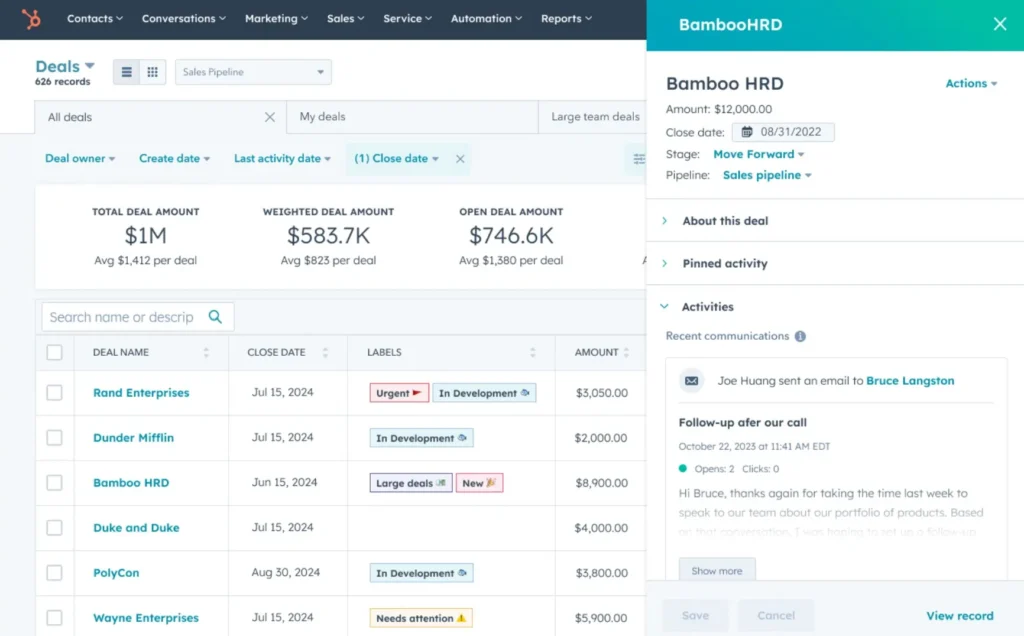
However, getting access to advanced tools also means navigating a steep learning curve. It took me a while to figure out my way around HubSpot when I first started using the platform. Even then, it felt like I needed to be managing a whole sales department in order to make some of the tools worthwhile.
Because of this, I recommend HubSpot for businesses looking to make the jump from “small” to “medium” in a hurry. You’ll get the most out of the software if you have at least a handful of sales reps already and a big database of prospects to experiment on with different sales strategies.
Pipedrive is a sales and marketing CRM with a much narrower purview. I think of it as a slick, small-business friendly implementation of the classic CRM. It helps you manage leads, track deals, and send emails without requiring you to have a whole sales department.
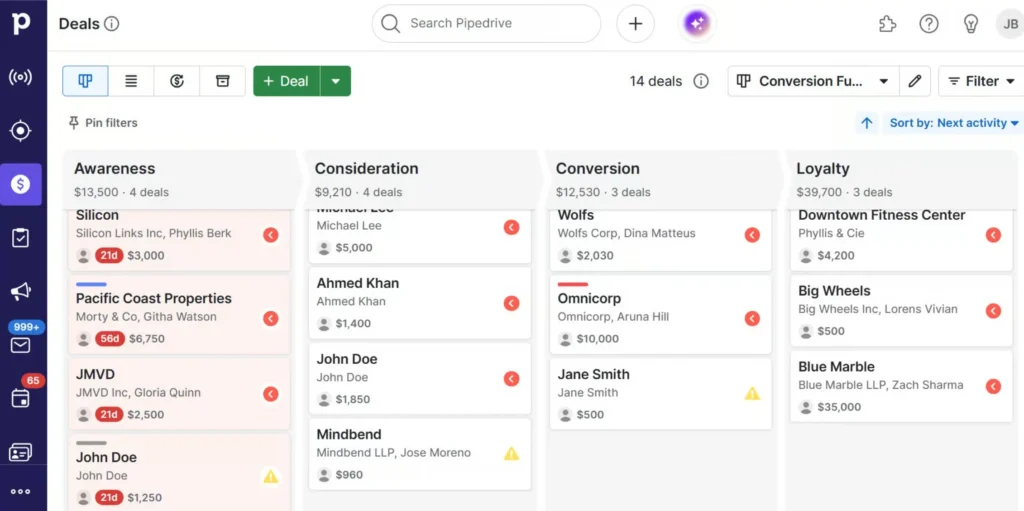
Pipedrive falls short for me in the opposite way of HubSpot. It’s refreshingly easy to use, but I also felt limited by the platform’s rigidity. The lack of project management tools makes it difficult to coordinate sales reps and the marketing features were pretty underwhelming. Pipedrive offers a lot of integrations to scale the platform with your business, but that gets expensive fast.
Considering this, I recommend Pipedrive for small businesses looking for their first CRM. You’ll likely grow out of it eventually (or pay a ton for integrations), but it’ll serve you extremely well as you build up your customer base.
What I want from an AI sales forecasting tool
Every software company is slapping the “AI” label on its product these days. So it’s important to make sure you’re not just getting a standard revenue forecast rebranded as “AI-powered.”
There are four main criteria I look for when testing AI-powered CRM forecasting tools:
- True machine learning: I want a forecast that’s more than just each deal’s value multiplied by its likelihood of closing. I want a complex model based on historical win rates, email activity, time in stage, and rep behavior—and I want that model to improve over time.
- Accuracy: This almost goes without saying, but it’s absolutely critical that AI-powered sales forecasts are accurate. If I want overly optimistic sales numbers, I’ll ask my sales reps for their estimates. I’m using AI because I want numbers I can actually plan around.
- Simplicity: Some AI tools I’ve used in the past have left me feeling like I’m getting riddles, not answers. Sales forecasts should be easily understandable and trustworthy. It should be easy to go back and compare predicted numbers against actual results so I can make sure the AI is doing what it’s supposed to.
- Data security: AI ingests a ton of sensitive business data. I want to be sure my sales data is staying inside my company, not being recycled into the AI “brain” and potentially leaked to competitors.
With that in mind, let’s dive into HubSpot CRM vs. Pipedrive sales forecasting.
HubSpot Sales Hub: AI-powered sales forecasts I can actually use
HubSpot Sales Hub offers an AI assistant called Breeze AI that’s built right into the sales forecasting dashboard. It uses data about your closed and won deals from the past three months to calculate a forecast range for future revenue. You get low, high, and “most likely” estimates.
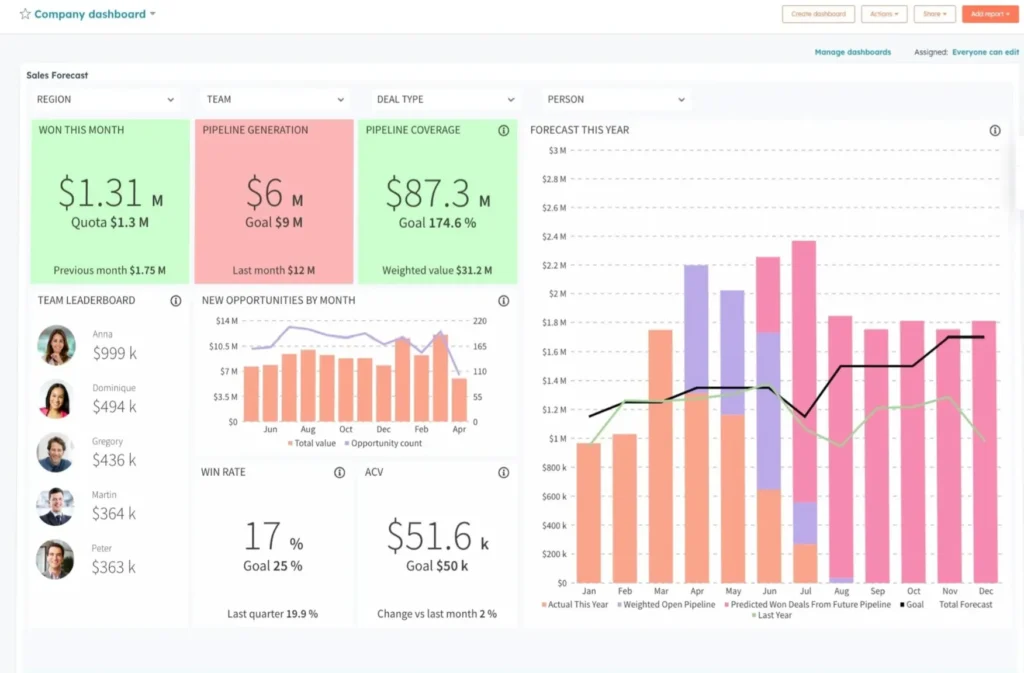
My take: This is the real deal. It’s an AI in CRM software that builds an internal model, plugs in your historical sales data, and gives you a forecast range rather than a single number with no context. Still, I’d like to see the Breeze agent use more data in its model, like deal velocity and prospect engagement, rather than just historical win rate.
My experience: I was impressed with Breeze AI’s forecasting. It doesn’t just give you a sales number and call it quits. I got an updated forecast five times over the course of each month, plus a report showing how the forecast changed over time and how accurate each previous forecast turned out to be. The updates honestly felt a little too frequent during months when my sales pipeline was slow, but that’s a pretty good problem to have.
Pipedrive: AI as an assistant, not a forecaster
Pipedrive has a similar AI assistant called Sales Assistant, but it’s more of a generative AI assistant. It’s great at crafting emails and it can build sales reports for you, but it doesn’t actually use machine learning to predict future revenue.
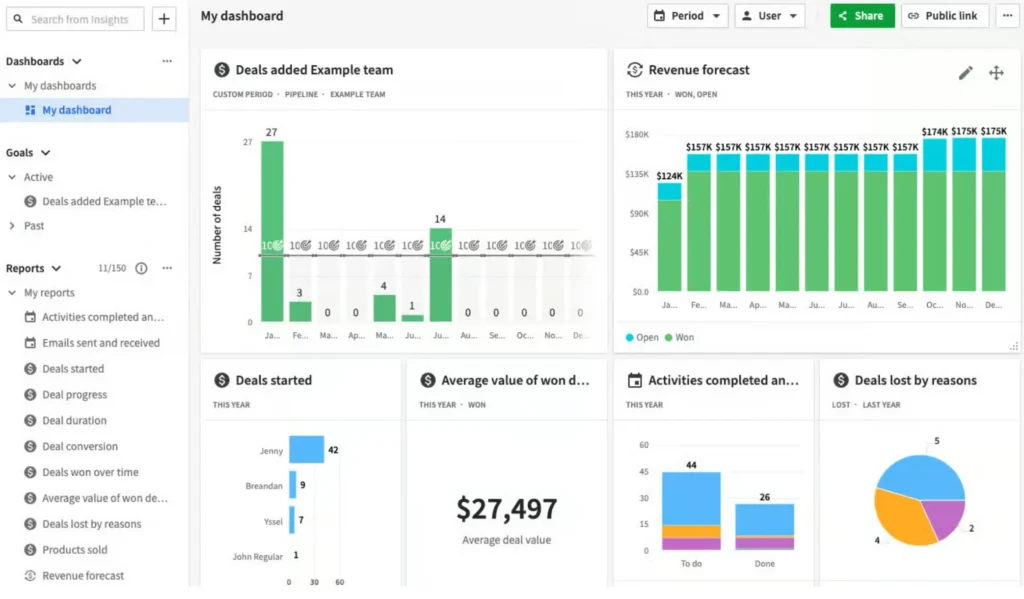
My take: After using Breeze AI, Sales Assistant was….disappointing. Sales Assistant can predict the probability of winning any individual deal currently in your pipeline. But Pipedrive is mum about what this prediction is based on, and the numbers I got came with no confidence intervals and no context. They also didn’t update unless a deal moved into another stage in my pipeline.
My experience: In practice, I found Sales Assistant’s predictions to be at least in the ballpark of being correct. For example, I had six deals in my pipeline and Sales Assistant predicted probabilities ranging from roughly 40% to 85%. The four deals with the highest probabilities (all over 60%) were the ones that came through.
Still, it wasn’t particularly easy to turn this data into a sales forecast. I had to manually update each deal’s win probability in Pipedrive’s forecasting tool to match Sales Assistant’s prediction. The forecast I got wasn’t AI-powered at all. It just multiplied each deal’s probability by its value to give me an estimate. The forecast wasn’t too far off ($300,000 predicted vs. $280,000 actual), but I felt a lot less confident in the numbers than I did when using HubSpot.
The fine print: What do these AI tools do with your data?
HubSpot may have won handily in technical forecasting capabilities, but Pipedrive redeemed itself somewhat with its data-handling practices.
HubSpot Breeze AI
HubSpot’s Breeze AI is powered by a combination of several large language models (LLMs), including models from OpenAI, StabilityAI, and Anthropic.
As I’d expect, HubSpot promises that it won’t share your data with these providers.
But concerningly, HubSpot will hoover up your business’s data to train its own internal AI models. That means your data is being fed to Breeze AI. So it could be regurgitated to other HubSpot customers in the future, potentially putting your business’s sales at risk.
The bright spot is that administrators control what data Breeze AI can access within your account. But restricting too much data runs the risk of compromising your sales forecasts.
My take: This would make me think twice about HubSpot Sales Hub if I were in a cutthroat industry like software or banking where competitors could potentially poach your customers.
Pipedrive Sales Assistant
Pipedrive’s Sales Assistant is powered by OpenAI, which makes sense since it feels an awful lot like ChatGPT for CRM.
Crucially, Pipedrive doesn’t share your data with OpenAI or use your data itself. Your data remains yours.
My take: Pipedrive’s AI might not be particularly powerful, but at least I feel safe using it.
The catch: HubSpot’s AI isn’t cheap
Remember when I said earlier that HubSpot AI is built for growing businesses? Well, it’s priced like your business has endless prospects knocking on your door.
HubSpot Sales Hub
HubSpot Sales Hub’s pricing looks attractive at first glance. There’s a free plan and a Starter plan from just $9/user/month. These both provide excellent value since you get access to all of HubSpot’s core CRM features.
But look more closely, and you’ll find that AI-driven predictive sales analytics is only available with a Professional plan or higher. That plan starts at an eye-watering $90/user/month and requires a $1,500 onboarding fee.
You get a lot with this plan, including enterprise-scale features like automated marketing sequences, AI-powered sales coaching, and an AI prospecting agent. So I think it’s worthwhile if you have a fast-growing sales team or if your business is expanding aggressively.
But for a lot of small businesses just looking for better sales forecasts, that kind of spend is completely out of the question.
Pipedrive
Pipedrive’s pricing looks much more reasonable in comparison. The platform starts at only $14/user/month, while sales forecasting requires just the Growth plan or higher. So you can spend as little as $39/user/month.
To be sure, you don’t get nearly as much with a Pipedrive Growth subscription as you do with a HubSpot Professional subscription. But for less than half the cost and no onboarding fee, Pipedrive offers a solid CRM with automated sequencing. For small businesses that don’t mind possibly having to switch platforms later as you grow, this is a pretty good deal.
HubSpot vs. Pipedrive head-to-head
Here’s a recap of how HubSpot Sales Hub and Pipedrive stack up.
|
HubSpot Sales Hub |
Pipedrive |
|
|
CRM type |
All-in-one |
Sales + marketing |
|
AI tools |
Breeze AI assistant, customizable AI agents |
AI Sales Assistant |
|
AI sales forecasting |
AI-powered forecasts that improve over time |
AI predictions for individual deals, no context or improvement |
|
Data security |
Uses your data for model training |
Won’t use your data |
|
Cost for sales forecasting |
$90/user/month + $1,500 onboarding fee |
$39/user/month |
|
Target business size |
Small to enterprise |
Micro to small |
Pipedrive vs. HubSpot: Which AI-powered CRM should you choose?
After testing out AI sales forecasting in both HubSpot Sales Hub and Pipedrive, here’s what I recommend.
Choose HubSpot if: You want reliable sales forecasts that get better over time. I especially recommend HubSpot if you have a large sales team and a large volume of prospects.
DON’T choose HubSpot if: You’re on a tight budget, only have a few sales reps, or want to hit the ground running with little to no learning curve.
Choose Pipedrive if: You just need basic sales forecasting and don’t really care if AI is involved or not. I especially recommend Pipedrive for small businesses that need a trustworthy, simple, and affordable CRM.
DON’T choose Pipedrive if: You need highly accurate and transparent sales forecasts or are trying to rapidly scale your sales team.
FAQs
Can I switch from Pipedrive to HubSpot later?
Yes, you can switch from Pipedrive to HubSpot at any time. HubSpot can automatically import data directly from Pipedrive. It also has a dedicated support team that can help you make the move.
Are AI sales forecasts accurate?
The accuracy of AI sales forecasts depends a lot on the quality of your CRM. AI forecasts are most accurate when you have high-quality data about current and past deals and when stalled deals are removed from your pipeline.
What’s the difference between a weighted pipeline and AI sales forecast?
A weighted pipeline involves assigning a win probability to each deal, then multiplying that by the deal’s value to predict sales. AI sales forecasts use machine learning to predict what deals will close and when based on factors like your historic win rate and prospect engagement.
How hard is it to set up sales forecasting in HubSpot and Pipedrive?
HubSpot generates sales forecasts automatically using its Breeze AI tool. Pipedrive requires you to enter a win probability for each deal, then ask its AI Sales Assistant to create a forecast.
How much data do I need to get AI sales forecasts?
HubSpot Sales Hub requires you to have at least three months’ worth of sales data to generate an AI sales forecast. Pipedrive only requires a few weeks of data, although it is more accurate with at least a few months’ worth.
How can I tell if an AI sales forecast is accurate?
The best way to find out if your sales forecasts are accurate is to track the predictions and your actual sales over time. HubSpot Sales Hub does this automatically, but you have to do it manually in Pipedrive.
Is there a limit to how many AI sales forecasts I can generate?
No. HubSpot includes unlimited AI sales forecasts with a Sales Hub Professional plan. Pipedrive doesn’t limit your use of its AI Sales Assistant.
Why is HubSpot’s AI sales forecasting so expensive?
HubSpot requires you to upgrade to the Sales Hub Professional plan to get access to sales forecasting. That plan also includes enterprise-scale features like an AI prospecting agent, automated marketing sequences, and AI-powered coaching.
Can I integrate Pipedrive with a third-party sales forecasting tool?
Yes. Pipedrive has built-in integrations for predictive sales analytics like Gong AI and RevenueGrid. Keep in mind these platforms have their own software costs.
Are AI sales forecasts better than human sales forecasts?
Not necessarily. Your sales reps know your customers well, so they can sometimes be more accurate than AI at predicting whether a deal will go through. AI insights in your CRM are another data point for you to consider.