

How to Build a CRM Without Code: A Step-by-Step Guide (in One Afternoon)



If you want to know how to build a CRM without paying $1,200 a year for software you barely use, this guide is for you. Until recently, the answer was “hire a developer or settle for Salesforce.” That changed in 2026: with AI app builders like Base44, you can now build a custom CRM in one afternoon, in plain English, for around $20 a month.
In this step-by-step guide, I’ll show you exactly how to build a CRM from scratch, no coding, no Zapier duct tape, including the prompts I used, the database setup, the Slack automation, and the security rules. By the end, you’ll have a working CRM with a Kanban pipeline, a client database, tasks, and document storage. If you can describe your sales process in English, you can build the tool.
If you run a small business, you probably know the “Client Chaos” dance. It usually looks like this: A lead comes in via email, you write their name on a sticky note, you track the project status in a Google Sheet (that three different people are editing at once), and you invoice them through… well, hopefully, you remember to invoice them.
We’ve seen this a thousand times. You don’t need an enterprise beast like Salesforce. But you also can’t keep running a business on sticky notes and “mental reminders.”
Enter Base44.


 Automatically sets up the backend for you
Build with words. No coding needed
Automatically sets up the backend for you
Build with words. No coding needed We’ve been testing their latest update, and honestly, it’s shifting how we think about “building” versus “buying” software. They call it “vibe coding”, which is just a fancy way of saying: You tell the AI what you want in plain English, and it builds the software for you. It’s not just dragging blocks around anymore; it’s a conversation.
I wanted to see if it was actually that simple, or just marketing fluff. So, I sat down to build a custom CRM for a theoretical boutique marketing agency.
Here is exactly how I did it, step-by-step, including the exact prompts I used so you can copy-paste and edit them.
Step 1: Plan your CRM – pipeline, contacts, tasks, documents
The biggest mistake people make with AI builders is being too vague. If you just say “Make me a CRM,” you’ll get something generic and useless—like a digital rolodex. Base44 works best when you give it a “Top-Down” structure. You need to define the “rooms” in your house before you ask for furniture.
I started by defining exactly what I needed: a dashboard, a way to track leads through a pipeline, and a place to store client documents.
My input: “Build a CRM for a boutique marketing agency. I need a dashboard that looks professional (use blue and white tones, clean layout).
It needs these specific tabs:
- Leads pipeline: A Kanban-style board to track potential clients. The columns should be: Status: New, Contacted, Proposal Sent, Closed-Won, Closed-Lost.
- Clients: A database of active clients with their contact info and assigned account manager.
- Tasks: A to-do list linked to specific clients.
- Documents: A place to upload PDFs for contracts.”
The result: The AI took about 90 seconds. What came back wasn’t just a wireframe; it was a functional shell. It had the navigation bar, the color scheme I asked for, and the basic tables set up. It “vibe coded” the aesthetic to be professional and minimal, as requested.
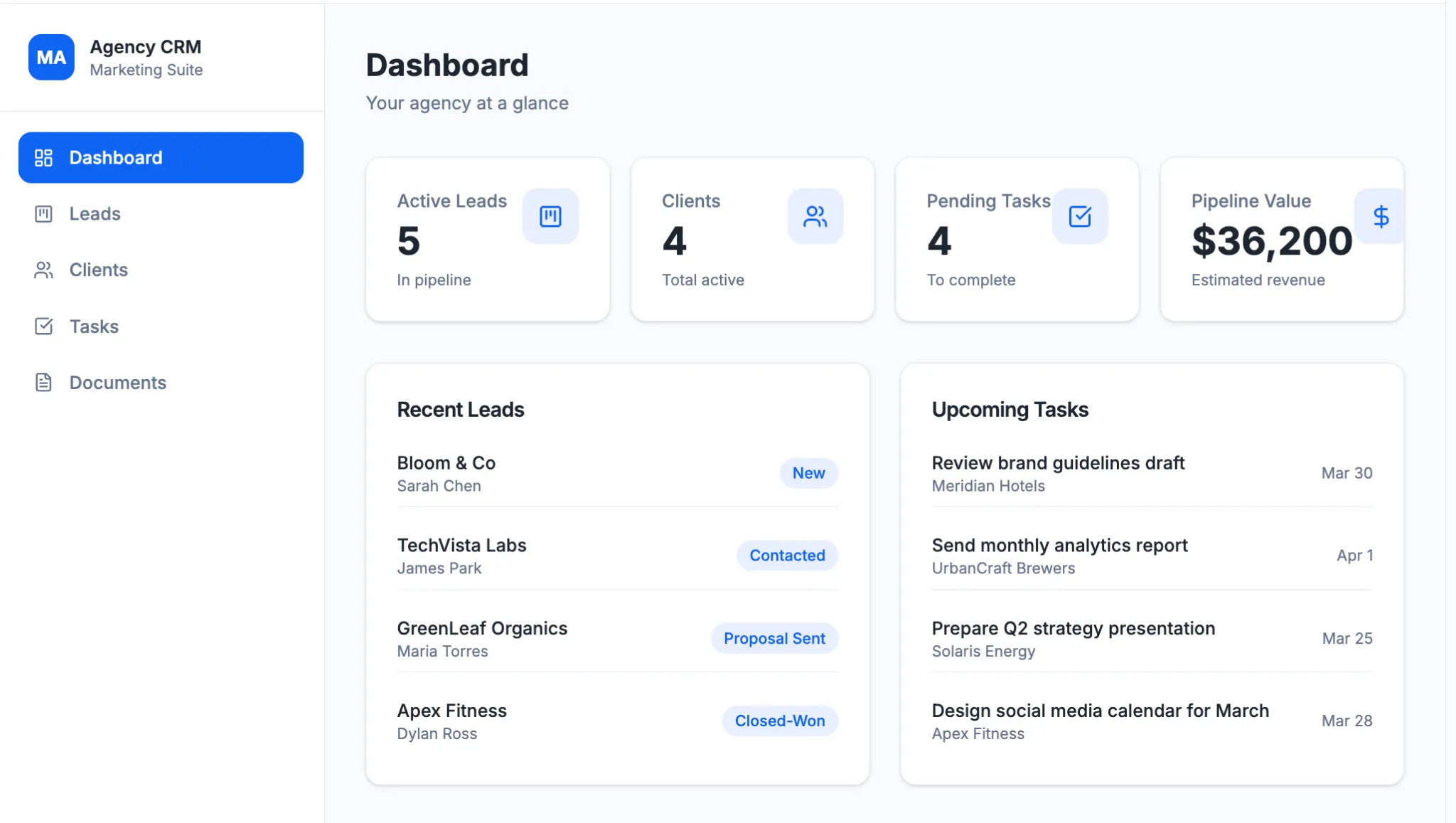
Why this works: The new Gemini 3 model powering Base44 allows it to understand complex, multi-step instructions without needing you to break them down into twenty different messages. It understood that a “Kanban board” implies a specific visual layout, not just a list.
Step 2: Build your CRM database (and make it persistent)
Here is the catch that tripped me up at first. By default, Base44 might build you a “frontend” that looks pretty but forgets everything once you close the tab. It’s like a movie set—it looks like a house, but there’s nothing behind the doors.
To make this a real business tool, you need persistent data. You need a database that remembers that “Client A” owes you money even after you log out. This requires the “Builder” plan ($40/month), which gives you backend database support and the ability to connect a custom domain.
I had to tell the AI to ensure the backend was connected properly so my data wouldn’t vanish.
My input: “Enable backend database support for this project. I need the ‘Leads’ and ‘Clients’ tables to be persistent so I can save real data. Please link the ‘Tasks’ table to the ‘Clients’ table so I can assign a task to a specific client.”
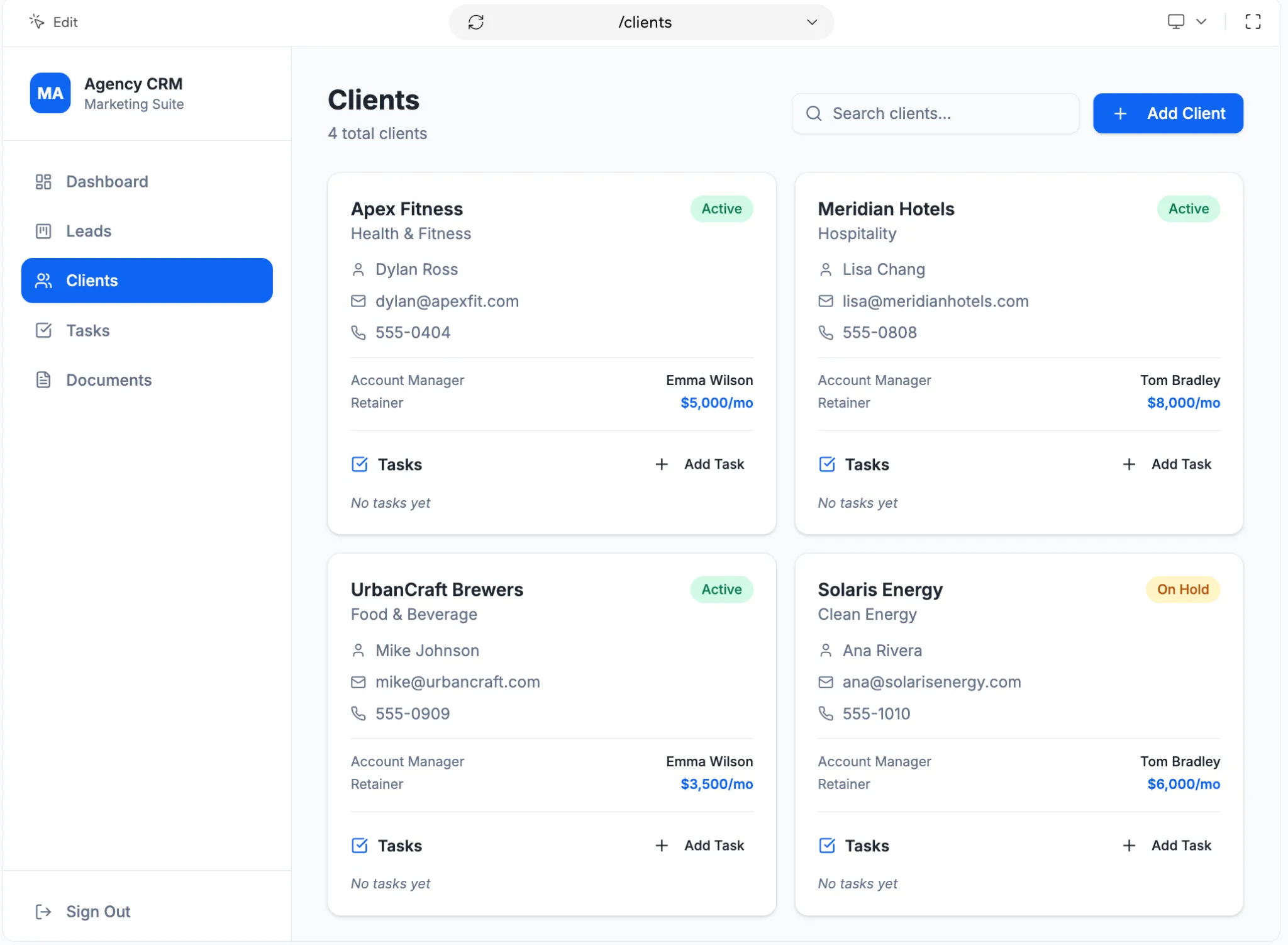
The result: The system automatically generated the SQL schema in the background. It created a “One-to-Many” relationship between Clients and Tasks (one client can have many tasks) without me ever having to touch a line of code or know what a “primary key” is.
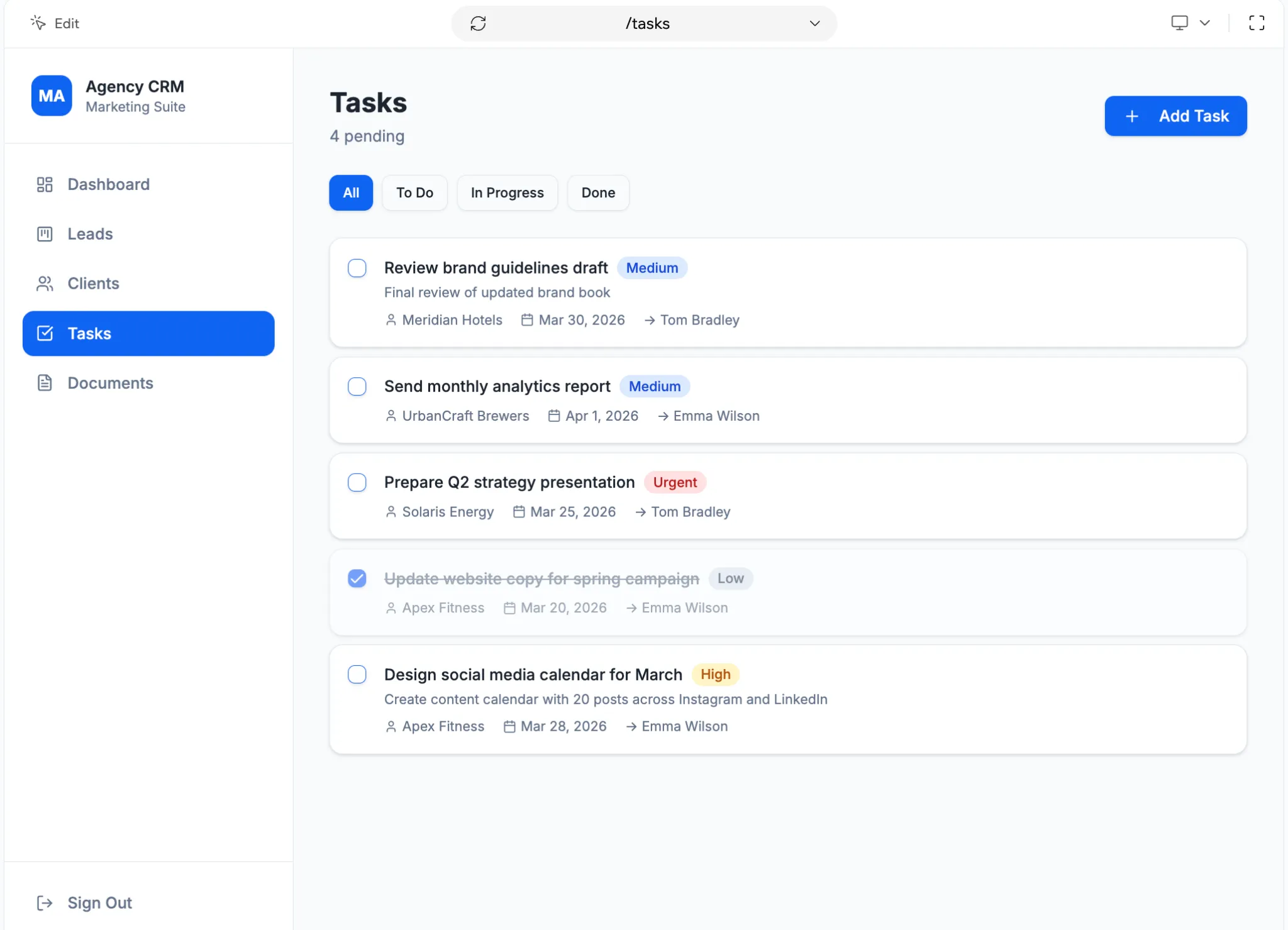
Step 3: Connect your CRM to Slack and email (no API keys)
A CRM that doesn’t talk to your other tools is just a lonely island. In the past, connecting a no-code app to Slack or email meant wrestling with API keys or setting up a fragile Zapier chain that broke frequently.
Base44’s November 2025 update introduced “One-Click Connectors,” which fundamentally changes this. The premise is “no keys, no code.” I wanted to be notified in Slack whenever my team closed a deal.
My input: “When a lead in the Pipeline is dragged to the ‘Closed-Won’ column, I want two things to happen:
- Update the record status.
- Send a celebratory message to the Slack channel #sales-wins that says: ‘Boom! We just signed [Client Name].'”
The result: Instead of asking me for a webhook URL, Base44 just asked me to log into Slack once to authenticate. It then wrote the logic trigger itself. Now, when I drag a card on the screen, my Slack channel pings instantly. This automation is what turns a simple list into an actual operating system for your business.
Step 4: Customize the CRM interface (without burning AI credits)
The first version of any app is rarely perfect. My initial dashboard was functional, but the buttons were tiny, and the “Urgent” tasks looked the same as the low-priority ones.
This is where you have two choices: You can keep burning AI credits by typing “make the buttons bigger,” OR you can use the new Visual Edit Bar.
My action (No prompt needed): I clicked on the “Add New Lead” button, opened the Visual Edit panel, and changed the background color to a bright “Call to Action” blue. I also rounded the corners to 8px.
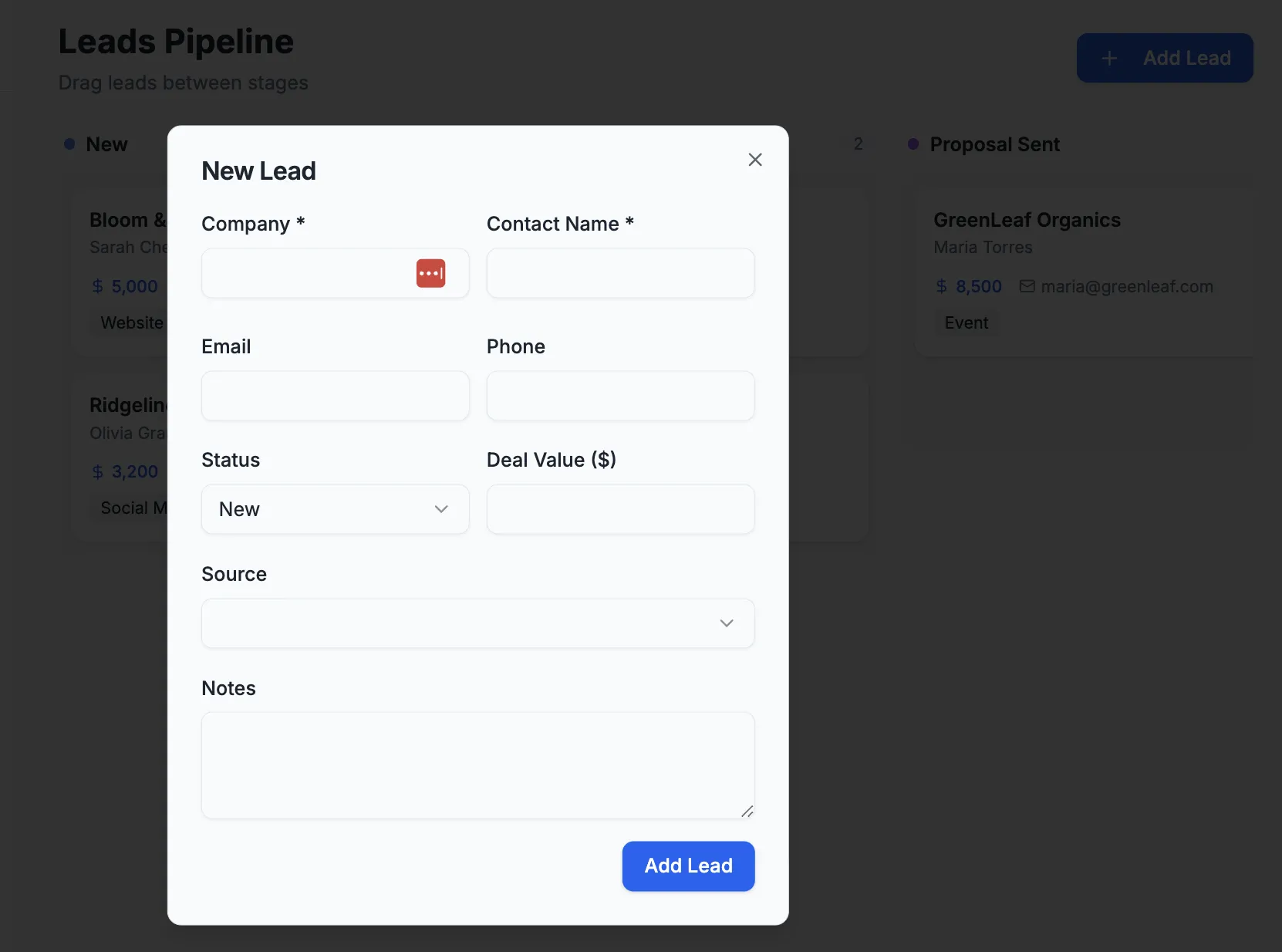
Why do this? Speed is the currency of development. Using the visual editor for small tweaks saves your “Message Credits” for the heavy lifting (like logic and database work). It also allows you to make “Global Edits”—like changing the font size on every button at once—saving you from clicking twenty different elements.
Step 5: Lock down your CRM with role-based access
We talk a lot about trust at Sonary. You cannot have a CRM where the summer intern can accidentally delete your entire client list.
Base44 has a “Security Dashboard” where you can set permissions. But again, I didn’t want to configure it manually. I asked the AI to lock it down using “Role-Based Access Control” (RBAC).
My input: “Set up user roles. Create an ‘Admin’ role that can do everything. Create a ‘Staff’ role that has ‘Read’ and ‘Create’ access but cannot ‘Delete’ any records. Apply these rules to the Clients and Leads tables.”
The result: The AI configured the CRUD (Create, Read, Update, Delete) rules instantly. Now, if a “Staff” user tries to find the delete button, it simply doesn’t exist for them. This moves security from complex coding to “plain English configuration”.
Step 6: Turn your custom CRM into a product (optional)
Here is where things get interesting. I built this CRM for my agency, but I realized about halfway through: “Wait, every marketing agency needs this.”
Base44’s new Template Marketplace allows you to take the tool you just built and sell it. I can now “productize” my internal tool. I could list this “AgencyOS CRM” on their marketplace for $50.
If 10 other agencies buy it, I’ve not only covered my software costs for the year, but I’ve also turned a profit. This feature turns Base44 from a tool you pay for into a platform you can earn from. It’s the shift from “Utility” to “Business”.
Automatically sets up the backend for you
Build with words. No coding needed Step 7: Troubleshoot when the AI gets stuck
I’m going to be honest with you: this tool isn’t magic. It has limits. We call this the Ceiling of Complexity.
During my build, I tried to ask it to generate a complex “Invoice PDF” with dynamic tax calculations based on five different zip codes. The AI got confused and started “hallucinating” features that didn’t work.
My fix: The agentic workflow
When the AI gets stuck, don’t keep yelling at it. I copied the broken code from the “Code View” tab, pasted it into an external model (like standard ChatGPT or Claude), asked it to “Fix this specific tax calculation function,” and then pasted the fixed code back into Base44.
Expert tip: Base44 uses Gemini 3, which is excellent at reasoning, but sometimes you need to break a massive request into smaller chunks to keep it from choking.
Build vs. buy: Should you build a CRM or buy one?
If you are currently paying for a massive CRM that you only use 5% of, or if you are drowning in spreadsheets: Yes.
The “Builder” plan gives you the database persistence and custom domain you actually need to run a business.
|
Feature |
Free plan |
Builder plan ($40/mo) |
|
Data storage |
Temporary/Local |
Persistent backend database |
|
Custom domain |
No |
Yes (Free for 1 year) |
|
Code access |
View Only |
In-app edits & GitHub Sync |
|
Best for |
Prototyping |
Running a business |
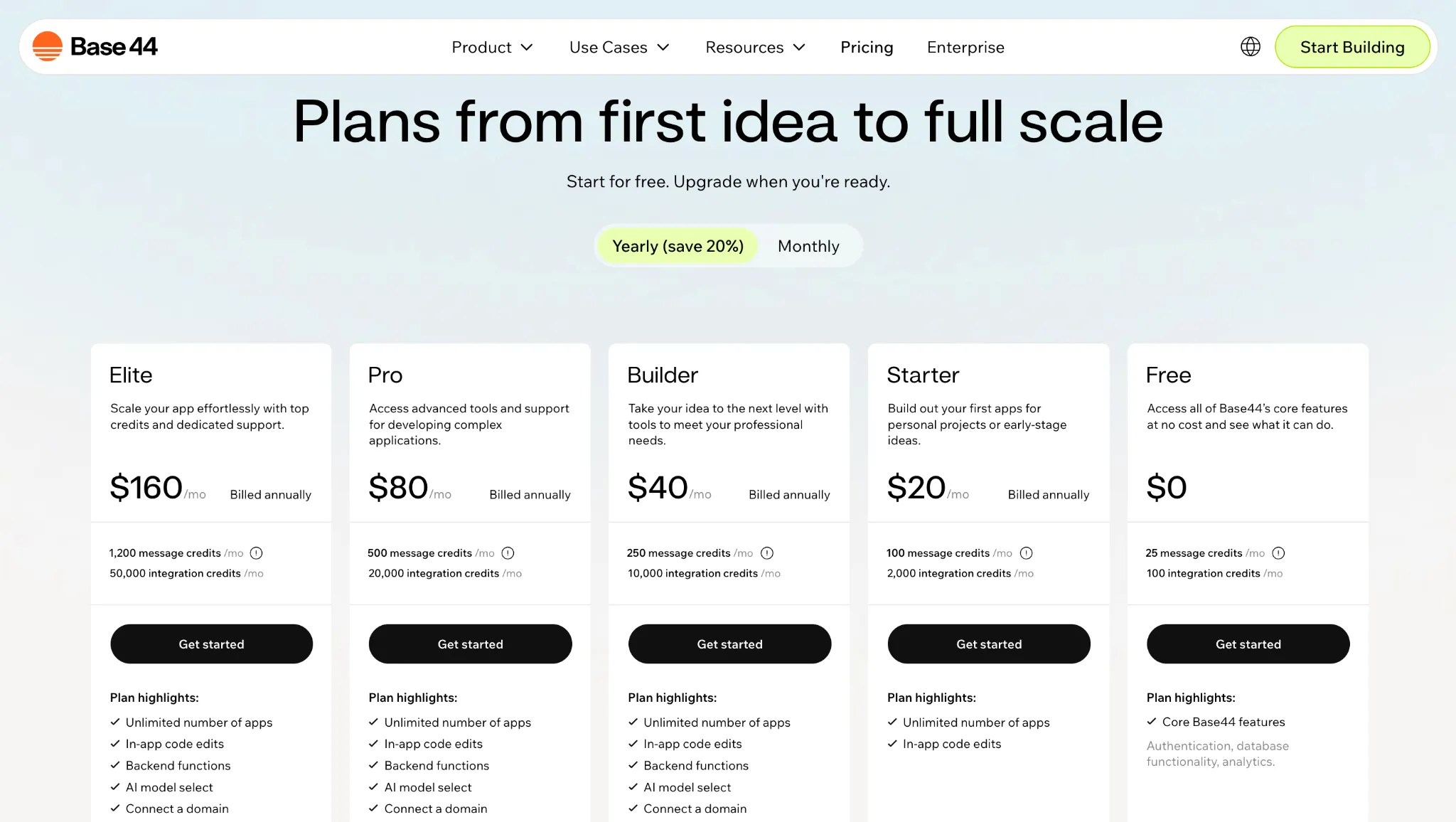
How long does it take to build a CRM?
It depends entirely on how you build it. With an AI app builder, you can have a working CRM live in a single afternoon- typically two to four hours from blank screen to a real, persistent system with a pipeline, contact database, and Slack alerts. Hire a developer to build a custom CRM from scratch and you’re looking at four to twelve weeks. Here’s how the four realistic paths compare:
| Approach | Time to a working CRM | Best for | Trade-off |
| AI app builder (Base44, Lovable, Replit Agent) | 2–4 hours | Solo founders and small teams who want a custom CRM without code | Has a “ceiling of complexity” on edge-case logic |
| No-code platform (Airtable, Notion, Softr) | 1–3 days | Teams that already live in a spreadsheet workflow | More configuration, fewer automations out of the box |
| Off-the-shelf SaaS (HubSpot, Pipedrive) | 1–4 hours to set up, 1–2 weeks to fully migrate | Teams that want zero build time and don’t need anything custom | $50–$150/user/month forever, plus features you’ll never use |
| Custom build with developers | 4–12 months | Companies with very specific compliance, integration, or scale needs | Longer time to market, and $25k–$150k upfront and ongoing maintenance |
A realistic timeline for the AI-builder path I walked through above looks like this:
- Minutes 0–30- Plan. Sketch your pipeline stages, fields, and which tools the CRM has to talk to (Slack, Gmail, calendar). The clearer your prompt, the less time you’ll spend re-prompting.
- Minutes 30–90- Build the shell. One detailed prompt produces the navigation, tables, and Kanban pipeline. Enable persistent backend storage so your data survives a logout.
- Minutes 90–150- Wire the automations. Add the Slack connector, link tasks to clients, and set up role-based access for staff vs. admin.
- Minutes 150–210- Polish and stress-test. Use the visual editor for UI tweaks, import a sample list of leads, and click through every workflow before going live.
If you’re starting from sticky notes and a spreadsheet, give yourself one rainy afternoon. The longest part isn’t the building- it’s deciding what you actually want your CRM to do.
The bottom line: Your business, your rules
For years, the choice for small business owners was either “buy a massive CRM you don’t understand” or “suffer with a spreadsheet.” Base44 and this new era of “vibe coding” have officially deleted that dilemma.
Related articles




The takeaway is simple:
- The price of entry is gone: You can build a professional, secure, and automated operating system in the time it takes to watch a football game.
- Logic is the new code: You don’t need to know Python; you just need to know how your business works. If you can describe your process, you can build your tool.
- Efficiency is a profit center: Whether you save $200 a month on software seats or sell your custom template to other agencies, this isn’t just “admin work”—it’s a competitive advantage.
Stop fighting with tools that weren’t built for you. If you’re drowning in sticky notes, spend your next rainy Tuesday afternoon building a life raft. The technology has finally caught up to your ambition.
Frequently asked questions about building a CRM
How long does it take to build a CRM?
With an AI app builder like Base44, you can build a working CRM in one afternoon- typically 2 to 4 hours including database setup, Slack automation, and a basic permissions layer. A traditional custom build with developers takes 4 to 12 weeks.
Is it cheaper to build your own CRM than to buy one?
For most small businesses, yes. A built-from-scratch CRM on Base44’s Builder plan costs about $40/month, versus $50–$150/user/month for tools like Salesforce, HubSpot Sales Hub, or Pipedrive. The payback hits roughly the second user.
Can I build a CRM without coding?
Yes. AI app builders (“vibe coding” platforms) let you describe your CRM in plain English and the model writes the front end, database schema, and integrations. You don’t need to know SQL, JavaScript, or Python.
How do I build a CRM in Excel or Google Sheets?
You can mock up a basic CRM in Excel/Sheets with sheets for Leads, Clients, and Activities, plus pivot tables for the pipeline view. It’s a good MVP for under 20 contacts, but it breaks down at scale and has no automation- which is why most teams move to a no-code or AI-built CRM.
What features should a custom CRM include?
At minimum: a contact/lead database, a pipeline (Kanban or list), tasks linked to clients, document storage, and basic reporting. Power features to add later: email integration, Slack notifications on stage changes, role-based permissions, and a customer-portal view.
Is it safe to build a CRM with AI?
Yes- if you configure permissions and back up your data. Modern AI builders generate the same database technologies (Postgres, Supabase) used by SaaS CRMs. The risks are operational: lock down role-based access, enable audit logs, and avoid storing payment data unless the platform is PCI-compliant.