
How to write the master prompt for your first AI app

Building your own business software doesn't require a computer science degree or a massive budget anymore. Platforms like Base44 now use advanced AI, like Google’s Gemini 3, to turn plain English instructions into fully functional apps—a process known as vibe coding. The secret to making it work isn't learning to code; it's learning how to give the AI a clear, structured master prompt so it doesn't have to guess what you want.
I want you to picture the most talented, energetic, and completely literal-minded intern you’ve ever hired.
If you tell this intern, “Go get me coffee,” they’ll likely do exactly that—literally. They might nervously hover at your desk for a minute, then run out and bring back a mocha latte with two sugars. Oops. You forgot to mention… you drink your coffee black.
Technically, they brought you coffee. But they didn’t bring you what you wanted. They didn’t fail, per se. They just lacked context.
This is what it feels like to build software in the new era of vibe coding. We are living through a massive shift in how tools are made. Platforms like Base44 have integrated heavy-hitters like Google’s Gemini , which means we can now build fully functional business apps just by typing. It’s pure leverage. But here’s the hard truth that the viral marketing videos won’t tell you:
Most people are terrible at talking to machines.
I spent the last week trying to build a Freelance Operating System on Base44. My first three attempts were disasters. I got apps that looked like broken spreadsheets or colorful toys with no logic. Why? Because I was asking the AI to build something, rather than instructing it.
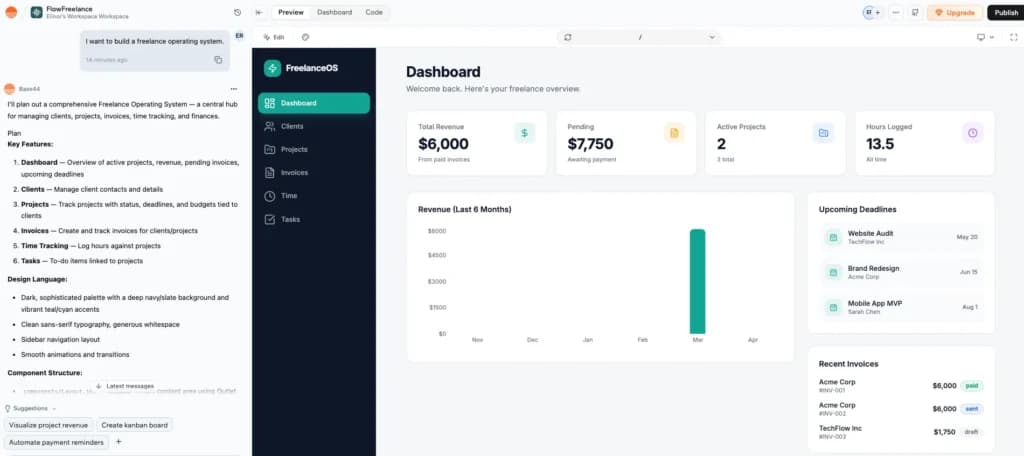
It wasn’t until I stopped treating the prompt box like a search bar and started treating it like a PRD—writing what I call a "master prompt"—that the magic happened.
If you are tired of generic, hallucination-filled results (and endless iterations), this is how you write the prompt that actually works.
The cheat sheet (TL;DR)
If you’re skimming this because you’re mid-build, here is the shorthand for what actually makes a prompt Master level.
- Context is everything (The Persona): If you don't tell the AI who it is, it defaults to being a generic bot.
- The difference: Asking a helpful assistant for an app gets you a toy. Asking a senior product manager gets you a tool designed for high-stakes business.
- Nouns before verbs (The Data): You have to define the things in your business before you tell the app what to do with them.
- Example: Don't start with "I want to send invoices." Start with the invoices and clients themselves. Define the bones before you worry about the movement.
- The "linked to" hack: This is how you build a complex system without knowing what a relational database is.
- The trick: Using the phrase "Linked to" (e.g., Projects are linked to Clients) forces Base44 to create the connective tissue between your data automatically.
- Plain English logic: You don't need code; you just need If/Then sentences.
- Example: If a project status moves to 'Done,' then create a draft invoice. It’s that simple. You’re writing the rules of the road, not the engine.
- Vibe control: If you don't describe the "density," you’ll end up with a generic, airy dashboard that requires way too much scrolling.
- The Fix: Explicitly ask for a dense table view for numbers or a Kanban Board for projects. Tell it how you want to see the work.
The blank page panic and why most prompts fail
When you give a vague prompt to an AI builder, it does what any literal-minded assistant would do: it guesses. On a good day, it gives you a vague output. On a bad day, it might even hallucinate some.
I saw this repeatedly during my first few attempts on Base44. For example, when I asked for a Freelance Manager, the AI built:
- Disconnected data: It created a list of Clients and a list of Invoices, but they weren't talking to each other. I could see what I was owed, but I couldn't click on a client to see their payment history.
- Irrelevant fields: It guessed that I might need a Company Logo for every single contact, but it forgot to include a field for the Project Due Date.
- Logic gaps: It built a beautiful table for my projects, but if I marked a task as Complete, nothing happened. The data just sat there, forcing me to do the manual work of updating my status elsewhere anyway.
The solution isn't to work harder; it's to provide the right scaffolding. I found that by treating the AI not like a magic wand, but like a very enthusiastic junior developer who needs a structured brief, I could clear the runway.
I started applying a four-part framework during my testing to ensure the AI has the context it needs: Persona, Data, Logic, and Vibe.
Step 1: Assigning the persona (The hat)
For this experiment, I was building a Freelance Operating System.
Think of a Freelance OS as the central nervous system for a one-person business. It’s not just a to-do list; it’s a tool that manages Leads (potential money), Projects (active work), and Invoices (actual money) in one connected view so nothing slips through the cracks.
The first part of my master prompt didn't discuss the app at all. It discussed the builder.
My experience:
In my first, failed attempts, I just wrote"Build an app for freelancers"into the chat on Base44. The result was a generic to-do list that didn't help me manage a business. This is what it looked like:
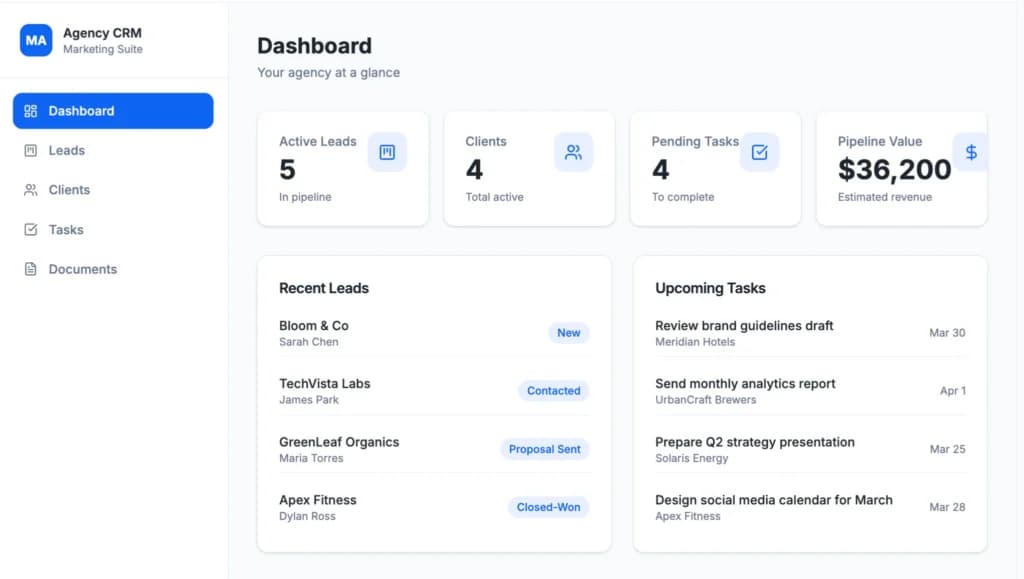
For the successful build, I wrote:
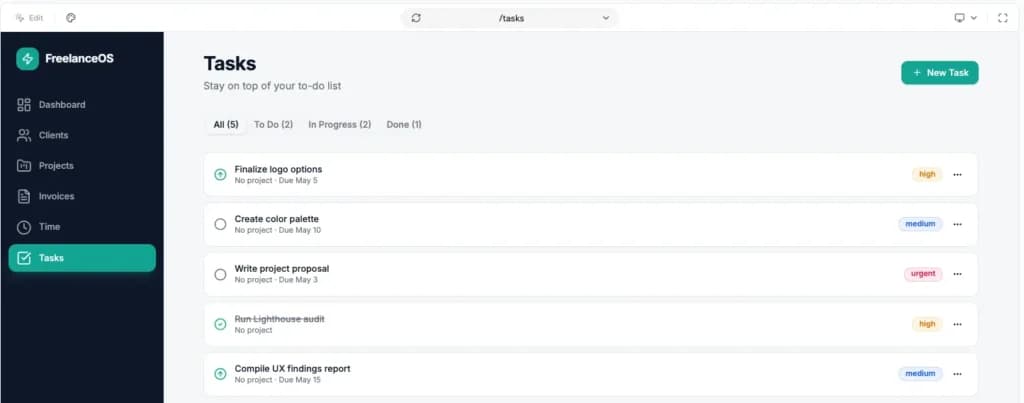
“Act as a Senior Product Manager and Lead Database Architect. You are building a high-efficiency internal-only management tool for a boutique marketing agency owner. The goal is to minimize clicks for the owner during their weekly admin sessions and maximize visibility into cash flow”.
This was the initial output:
Why this matters:
By setting this Senior professional persona, I stopped the AI from suggesting cute features like a daily motivational quote. Base44’s integration with Gemini 3 picked up on Senior Project Manager and immediately structured the backend to prioritize data integrity and logical workflows over basic aesthetics. Instead of just giving me a list of names, it began thinking about how the user (me) would need to see their outstanding balances and project statuses at a glance to make faster decisions.
Step 2: Defining the data (The skeleton)
This is where most non-technical founders get stuck. You don't need to write SQL code, but you do need to list your nouns.
My experience:
I literally just bulleted out the columns from the spreadsheets I currently use. I wrote:
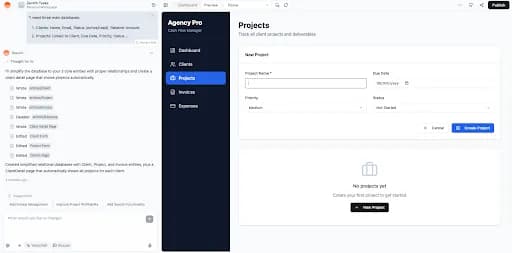
"I need three main databases:
- Clients: Name, Email, Status (Active/Lead), Retainer Amount.
- Projects: Linked to Client, Due Date, Priority, Status.
- Invoices: Linked to Project, Amount, PDF attachment, Paid (Yes/No)."
And that’s exactly what I got:
The breakthrough:
Because I used the phrase Linked to, the AI understood to create relational databases. In Base44, this meant that when I eventually opened a Client page in my app, it automatically created a list of that client's projects at the bottom. I didn't have to configure that manually.
Step 3: The logic (The brain)
A database is useless if it doesn't do anything. Base44 recently launched Connectors that work without API keys, so I pushed the prompt to include automation.
My experience:
I wrote: "Create an automation trigger: When a Project Status is changed to 'Completed', automatically create a draft Invoice for that project and mark the Due Date as 30 days from today."
I was skeptical this would work. But the system generated a workflow trigger. It understood the If/Then relationship. This is the difference between a tracker and a tool. It turns a static list into an operating system.
Step 4: The vibe (The paint)
Vibe coding is real. If you don't ask for a specific look, the AI frequently defaults to a basic list view because it is the most neutral and safe way for a machine to display data.
My experience:
I tested the master prompt strategy against a prompt that just said: "Make it look good." The difference was night and day.
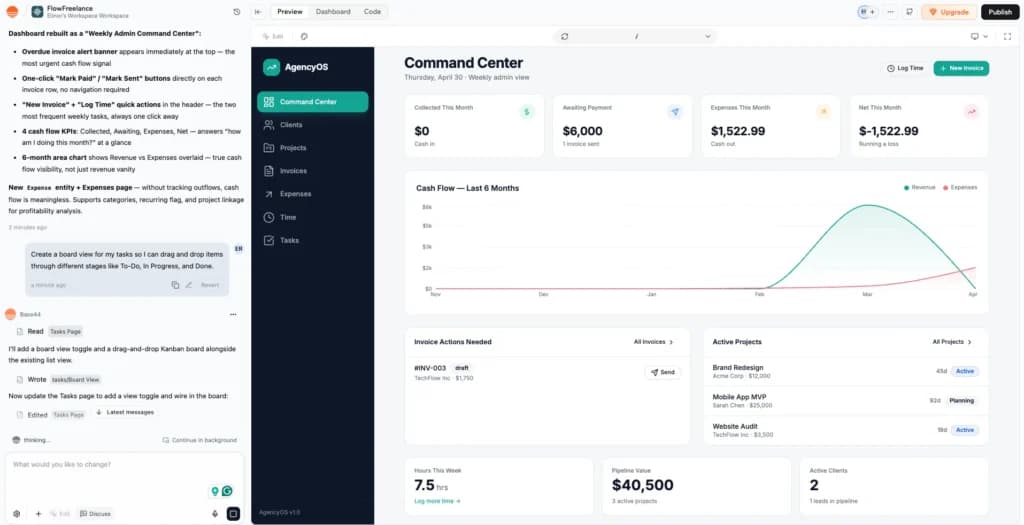
I wrote: "The design should be 'Friendly Professional.' Use a Kanban board layout for the Projects dashboard so I can see status tags clearly. Use a dense table layout for Invoices because I need to scan numbers quickly. Use a soft blue and slate gray color scheme."
By asking for specific views (Kanban vs. Table) for specific data types, I saved myself about 20 minutes of manual UI tweaking later.
I knew to do this because of a simple rule of thumb: match the view to the task.
- Kanban for projects: This is essential because projects are high-status items; you need to see exactly where they sit in the pipeline at a glance.
- Tables for invoices: When you are dealing with financial data, you need density. A table lets you scan rows of numbers and dates quickly without the visual clutter of cards.
Why it’s important
If you don’t define these views in your master prompt, the AI will often default to a generic list for everything. Defining the view early ensures the app's interface supports your workflow rather than fighting it, allowing you to hit the ground running with a tool that already feels intuitive.
The result: Hitting generate
I took all these sections, combined them into one massive block of text (about 400 words), and pasted it into Base44.
What it looked like:
"You are a Senior Product Manager and Lead Database Architect. You are building a high-efficiency internal-only management dashboard for a boutique marketing agency owner. The goal is to minimize clicks for the owner during their weekly admin sessions and maximize visibility into cash flow. Do not include customer-facing features or public portals; this is a private backend tool."
Phase 1: Database Architecture (The Skeleton)Create three primary relational databases with the following specific fields:
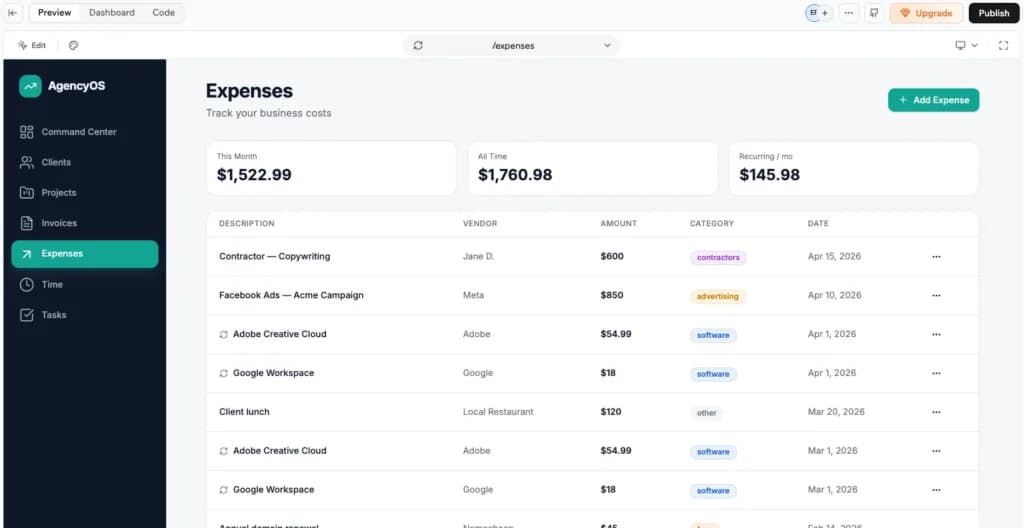
- Clients: Include Client Name, Primary Email, Status (Dropdown: Lead, Active, Past), Monthly Retainer Amount ($), and a 'Total Lifetime Value' formula field.
- Projects: Linked to the Clients database. Include Project Name, Due Date, Priority (Low, Medium, High), and Status (Not Started, In Progress, Review, Completed). Include a 'Days Until Due' calculation.
- Invoices: Linked to the Projects database. Include Invoice Number, Amount Due, PDF File Attachment, Date Sent, and Paid Status (Checkbox).
Phase 2: Operational Logic (The Brain)Set up the following automated workflows to handle repetitive admin tasks:
- Trigger 1: When a Project Status is updated to 'Completed', automatically generate a new record in the Invoices database. Map the Client Name from the Project to the Invoice, set the 'Amount' to the Client’s Retainer Amount, and set the 'Due Date' to 30 days from the current date.
- Trigger 2: If an Invoice 'Paid Status' remains unchecked 5 days after the Due Date, change the Invoice record color to Red and flag it as 'Overdue' in the owner's primary view.
Phase 3: The Vibe and UI (The Paint)The interface must be 'Friendly Professional'—clean, high-contrast, and easy to scan.
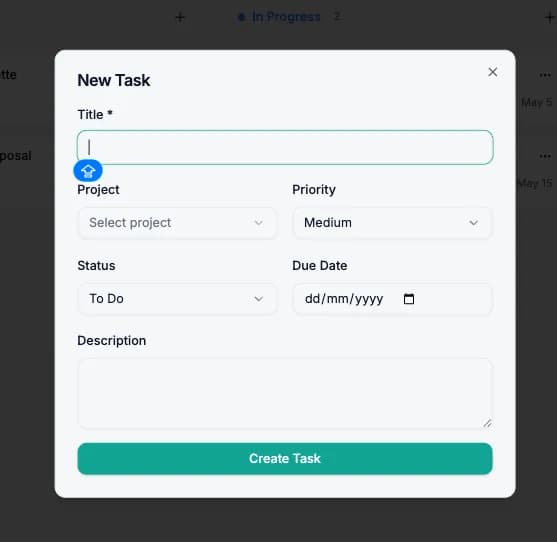
- Projects View: Use a Kanban board layout grouped by 'Status' so I can drag work through the pipeline.
- Invoices View: Use a Dense Table layout. I need to see as many rows as possible on one screen without scrolling.
- Colors: Use a soft blue and slate gray palette. Use 'Signal Red' only for overdue items to draw immediate attention to missing cash flow."
My experience:
It wasn't perfect—I had to adjust a few column widths using the visual editor—but it was 90% there. The navigation bar was set up correctly (Clients, Projects, Invoices). The relationships worked; clicking a client showed their projects. The vibe was exactly as I described.
I essentially skipped the first week of development. In a traditional no-code environment, building a relational system like this—connecting your data, configuring the If/Then logic, and manually dragging every button and table into place—would usually take a non-technical founder 5 to 7 days of trial and error. By front-loading the clarity in my prompt, I moved from a blank page to a functional business tool in one sitting, leaving only the fine-tuning for me to handle manually.
Comparing the old way to my new workflow
Workflow phase | How I used to do it (Working with a developer + Designer) | How I do it now (Master prompt) |
|---|---|---|
Planning | Sketching on paper, forgetting database links | Writing a Master prompt in plain English |
Database | Manually creating tables and linking IDs | Listing nouns and letting AI link them |
Design | Dragging buttons pixel by pixel | Describing the vibe (e.g., Friendly card view) |
Logic | Reading API documentation for Zapier | Writing "When X happens, do Y" |
Time to MVP | 2-3 Weeks | 45 Seconds (plus 20 mins of refining) |
The bottom line
Writing a master prompt isn't technical work; it's clarity work. The AI models, especially newer ones like Gemini 3, are smart enough to build the code, but they can't read your mind.
If you treat the prompt box like a good brief that you’d send to a capable colleague—giving them context, data, design preferences, and logic rules—you can build legitimate business software in minutes. The barrier to entry isn't coding anymore. It's how well you can describe what you need.
Related Articles


What real users want to know (My honest answers)
Can I use this master prompt strategy on other AI builders?
Yes. The structure (Persona -> Data -> Logic -> Vibe) works on almost any generative AI coding tool. However, I found Base44’s specific integration with Gemini 3 handled the "Logic" part better than others, which often just build the UI but forget the backend connections.
Do I need to know what a relational database is?
Not really. You just need to know how things connect in real life. If you tell the AI "A Project belongs to a Client," it handles the database relation for you.
What happens if the vibe coding tool gets it wrong?
That’s normal. The beauty of these platforms is that you can just reply to the error. You can say, "Actually, change the Projects view to a list instead of cards," and it updates instantly. Base44 also has a Visual edit bar so you can fix small design things manually if you prefer.
Is my data secure if I put it in an app built by AI?
The prompt builds the structure, not the actual data. You add your real client data after the app is built. Base44 also recently launched a security dashboard that lets you visually set permissions (e.g., who can see or delete data), which is critical for business tools.
FAQ
Q: Is the Gemini 3 integration included in the free Base44 plan?
A: Not in its full capacity. While the free tier allows for basic vibe coding (simple text-to-app generation), the advanced reasoning capabilities required to process a 400-word Master Prompt are locked behind the paid tiers.
You can still use a master prompt on the free plan, but the brain behind it won't be as sharp. The Gemini 3 model in the paid tiers has a larger context window and better reasoning, which is what allows it to follow complex, multi-step instructions.
Q: How does the AI know how to link my databases?
A: Base44’s logic engine looks for semantic relationships in your text. If you use words like "belongs to," "linked to," or "part of," it automatically creates the relational keys in the background.
Q: Can I use this for external customer-facing apps?
A: Yes. Base44 supports Public portals. You simply need to specify in your prompt that customers can log in to see only their own projects, and the system will configure the privacy rules accordingly.
Q: What is the benefit of the master prompt over building screen-by-screen?
A: Building screen-by-screen is the manual way of creating one piece of an app at a time—first a Clients list, then an Invoices page. This often leads to disconnected data, where you have to manually force the different pages to talk to each other.
A Master Prompt provides the entire blueprint at once. Because the AI sees your data, logic, and design in one go, it ensures every part of the app is fully connected and functional from the first second.