
HubSpot Service Hub vs. Zendesk: A Deep Dive into Omnichannel Support and Ticketing Efficiency

When comparing HubSpot Service Hub vs. Zendesk, the biggest differentiator is whether you want a support tool built directly on top of your CRM or a standalone platform specialized for high-volume ticketing.
I recommend HubSpot Service Hub if your sales team doubles as your customer service department or you only have a few service agents. I recommend Zendesk if you have a dedicated customer service team or need customizable workflows to deliver support at scale.
Providing fast and helpful customer support is crucial to building loyalty and driving repeat business. But reaching customers across multiple channels, coordinating your support agents, and managing growing ticket volumes is a daunting task unless you have the right software to help.
Two of the most widely used platforms for delivering customer service at scale are HubSpot Service Hub and Zendesk. So I tested out both to find out which one is better for omnichannel support and ticketing efficiency.
Overall, I think Zendesk is far more capable, especially for growing customer service teams. HubSpot Service Hub is suitable mostly if you’re looking for a customer service add-on to HubSpot’s sales CRM.
Here’s a closer look at my experience to help you decide between HubSpot Service Hub vs. Zendesk for your support team.
Key takeaways
- HubSpot is best for small dual-hat sales and support teams. It puts customer data and support tickets in one place and doesn’t require an extensive customer service background to use effectively.
- Zendesk is best for dedicated, fast-growing support teams. It has a steeper learning curve, but far more features for connecting with customers and ensuring nothing falls through the cracks.
- If you want the most capable customer service platform, I recommend Zendesk. It beats HubSpot on supported channels, workforce management features, AI capabilities, and customizability.
- If you’re on a budget, I recommend HubSpot. HubSpot offers a free plan for two users and an inexpensive Starter plan ($9 per user per month) that includes essential support channels.
- If neither platform fits, the strongest alternatives in the customer service software market are Intercom, Freshdesk, Help Scout, Front, and Salesforce Service Cloud - covered later in this comparison.
What is HubSpot Service Hub?
HubSpot Service Hub is the customer service module of HubSpot's all-in-one CRM platform, designed to keep support tickets, conversations, and customer data inside a single unified contact record. Within the broader customer service software category, it occupies the niche for SMB teams that want a customer support platform tightly integrated with their sales and marketing CRM rather than running a separate, standalone help desk.
What is Zendesk?
Zendesk is a dedicated, standalone customer service platform built around a ticket-centric workflow and engineered to handle high support volumes across many channels.It is consistently treated as the reference standard in customer service software comparisons and is the platform most other customer support tools benchmark themselves against when positioning their own products.
HubSpot vs. Zendesk: A high-level overview
HubSpot Service Hub layers on to an existing sales-and-marketing CRM, while Zendesk is a purpose-built customer service platform that treats the ticket-not the contact record-as the center of gravity. Choose HubSpot if support is one job among many for your team; choose Zendesk if support is the job.
To understand the difference between HubSpot Service Hub and Zendesk, it helps to know a bit about how these two platforms approach customer service.
HubSpot Service Hub
HubSpot Service Hub is one of several “hubs” within the HubSpot CRM platform. HubSpot started out as a sales and marketing CRM, and its approach to Service Hub reflects that. Tickets, support responses, and notes are displayed within a customer’s sales and marketing profile rather than the other way around.
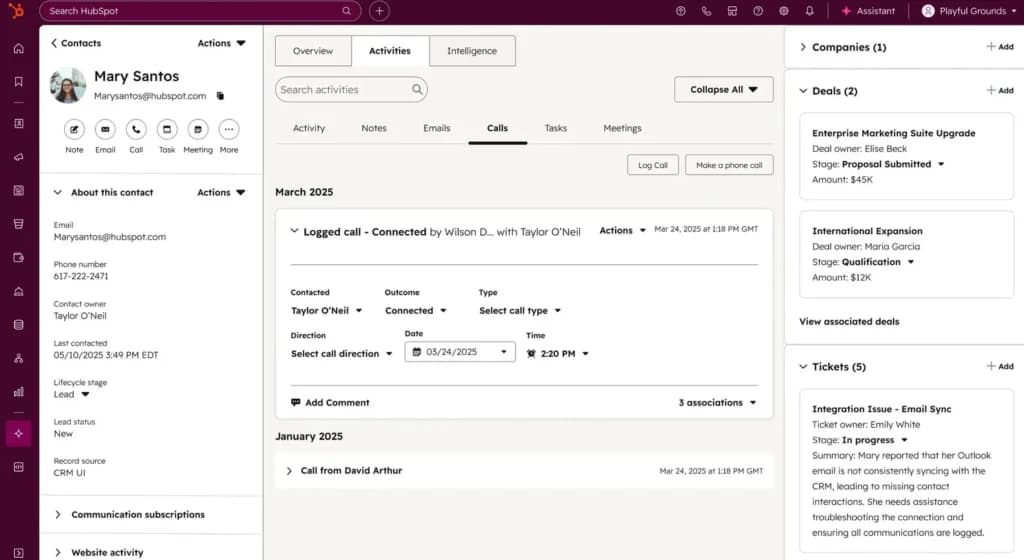
To me, Service Hub felt like an extension of HubSpot Sales Hub rather than a totally standalone customer service platform. Sure you can use Service Hub on its own, but you’ll miss out on that rich customer context that makes HubSpot great as an ecosystem rather than a series of individual hubs. At the same time, HubSpot Service Hub lacks some of the flexibility I’d like to see from a fully dedicated service CRM and it’s especially weak at managing large service teams.
Given this, I suggest HubSpot Service Hub for companies that are already using HubSpot Sales Hub or that are asking sales reps to do double-duty as customer support agents. I wouldn’t recommend it if you have a large customer support team to manage.
Zendesk
Zendesk takes essentially the opposite approach. It’s a purpose-built service CRM designed for large customer support teams. Customer context is layered into tickets, putting support requests at the heart of the platform rather than sales and marketing profiles.
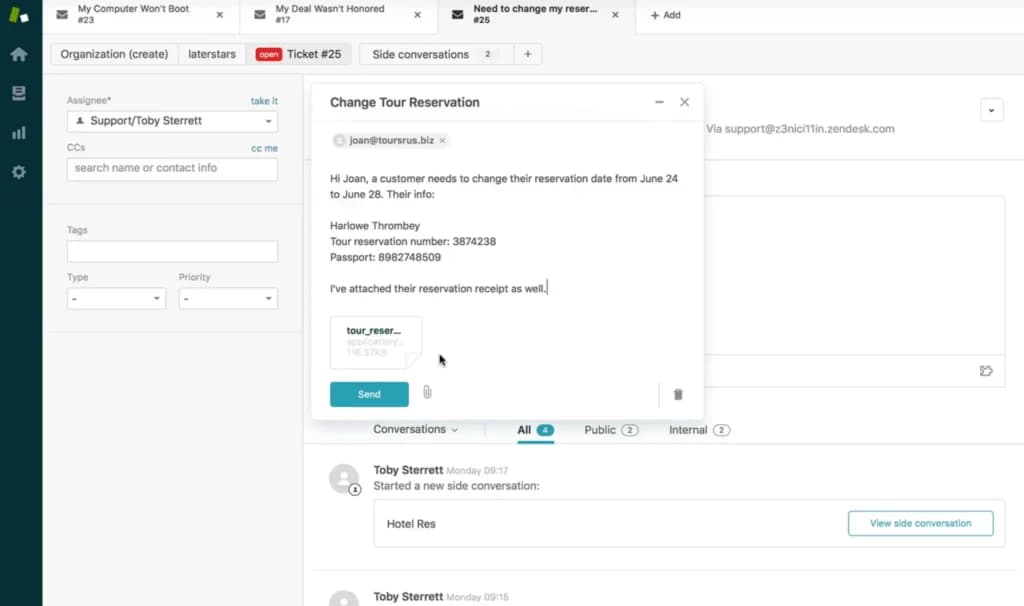
I found Zendesk to be significantly more complicated to get started with than HubSpot, but it’s also a lot more powerful under the hood. In particular, it’s far more adept at managing overlapping sets of agents, multiple support channels, and complex automations.
If you have a large, dedicated customer support team, Zendesk is hands-down the better platform for managing your agents and responding to large ticket volumes. But the complexity barrier is real, so I don’t recommend it if you only have a few support agents.
Omnichannel support: How can you connect with customers?
Zendesk natively supports more channels - including community forums and a full contact center - and feels more polished across them. HubSpot Service Hub covers the basics (email, live chat, phone, knowledge base) but leans on the App Marketplace for channels like WhatsApp and Facebook Messenger.
Customers expect your business to be available on the channels they already use, not just the ones your company prefers. HubSpot Service Hub offers the most widely used channels, like phone and email, but it leans heavily on integrations. Zendesk offers a much wider range of natively supported channels and the omnichannel experience felt a lot smoother.
HubSpot Service Hub
HubSpot Service Hub supports the basic channels I'd expect from a customer support platform, including online forms, live chat, knowledge bases, phone, and email. But it doesn't go above and beyond by any means. Phone features are limited (for example, callbacks aren't supported) and more advanced channels like customer forums are missing entirely.
In addition, a lot of essential channels aren’t supported natively. For example, I had to go through HubSpot’s App Marketplace to set up WhatsApp and Facebook Messenger. It felt like a workaround to integrate core social messaging channels that a lot of businesses rely on.
My experience: Once I had everything set up, some aspects of the omnichannel experience were pretty seamless. For example, HubSpot automatically adjusts which channel is used for replies when a customer switches from live chat to email mid-conversation. In the inbox, the conversation appeared completely unbroken. This made it a lot easier for me to keep up the thread as customers hopped between channels.
But I was a lot less impressed with channels like customer portals and knowledge bases. Customer portals only display tickets, not support conversations that originated in channels like email or live chat. So you can easily miss out on crucial context.
In addition, HubSpot's knowledge base editor felt really rigid. It worked as long as I was trying to create a standard-looking tutorial, but doing anything even slightly outside the lines was off-limits. I also had to set access permissions on a page-by-page basis, which took forever even for a small knowledge base with fewer than 20 pages.
Zendesk
Zendesk offers all of the same support channels as HubSpot, as well as several advanced support channels that can be really valuable for helping your company proactively identify issues. Customer forums enable customers to share knowledge with each other and a contact center add-on enables inbound and outbound calling along with complex call routing schemes.
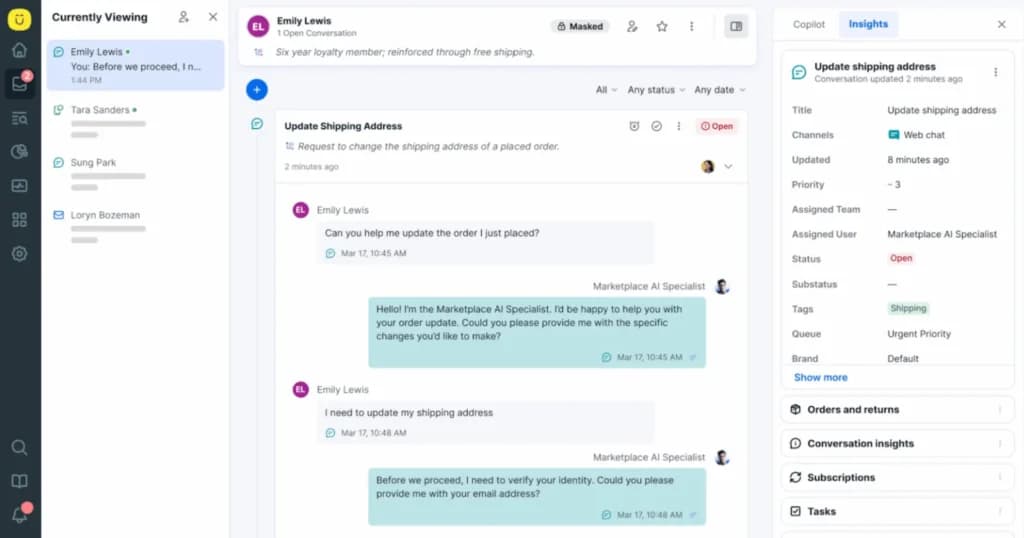
Zendesk also adds more depth to essential channels. For example, the built-in phone service supports priority numbers, callback requests, and call monitoring and barging. Knowledge bases support more than 40 languages and customizable themes.
My experience with Zendesk: I liked Zendesk’s omnichannel experience better than HubSpot’s at almost every turn. The channels just felt richer and more flexible, as if they had been designed with input from customer service managers rather than based purely on what software developers think customer service entails.
As an example, Zendesk allowed me to turn a post in the customer forum into a ticket with one click. It’s a simple feature, but it made it way easier to manage customer requests.
That said, I had a much steeper learning curve with Zendesk, and some aspects of the platform felt unnecessarily complex. For example, switching channels mid-conversation was ridiculously convoluted to set up. If a customer initiated the move, everything was fine. But if I wanted to switch channels, I had to set up an automation that would prompt the customer to follow me to the new channel. That meant moving over to the automation editor and defining a new workflow. It was a lot of work for something that seemed like it should be a one-click deal.
Ticketing efficiency and team management: How do you scale support volume?
HubSpot uses a shared inbox plus kanban board that works well for small teams but lacks forecasting and scheduling. Zendesk uses agent-specific dashboards with demand forecasting, scheduling, and real-time monitoring - making it the clearly stronger fit for scaling support volume without losing tickets.
Ticketing efficiency and team management features are crucial for scaling your support team’s capabilities and ensuring customer questions are handled quickly. HubSpot Service Hub offers a simple shared inbox that works well for small teams, but that isn’t very scalable. Zendesk uses an agent-specific ticketing system and offers team management tools to help you handle service requests at scale.
HubSpot Service Hub
HubSpot Service Hub automatically creates tickets from emails, unanswered live chats, and forms. All of these tickets are then sent to a shared inbox. You can set up automations to tag tickets by priority or assign them to specific agents. A kanban board helps you organize tickets by status and see who’s working on them.
My experience with HubSpot Service Hub: I really liked the simplicity of HubSpot Service Hub’s ticketing system. Within the shared inbox, I could see all the tickets along with who was working on them, what channels they came through, and what was assigned to me. It was straightforward to automate ticket assignments based on agent workload, product, or customer details.
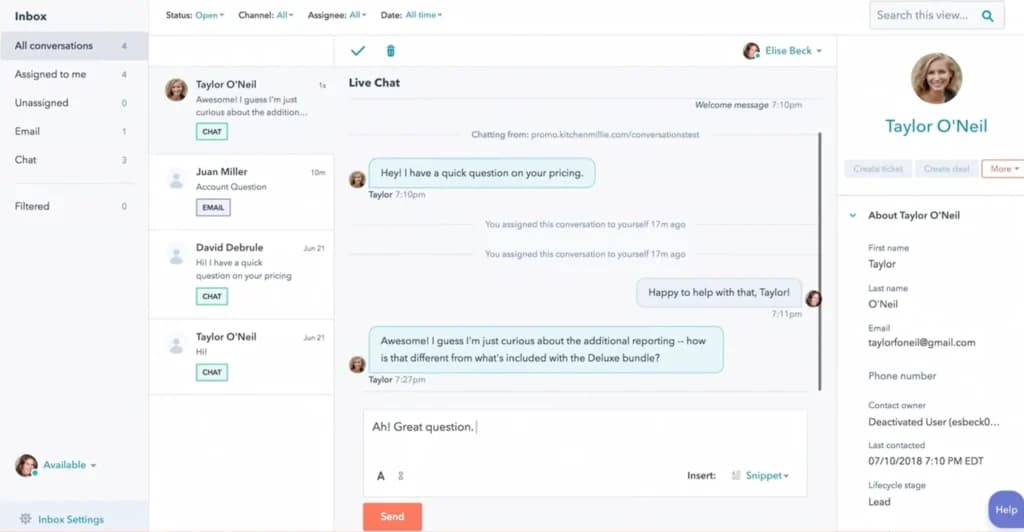
However, I got the feeling that this system wouldn’t scale very well. The shared inbox means that everyone and no one has responsibility to answer tickets that aren’t auto-assigned to a specific agent. There are no reminders or alerts for unanswered tickets, and I even had one fall through the cracks during my testing.
Team management features were also pretty limited. I could organize agents into teams, but there were no demand forecasting tools or scheduling features to help me ensure my support capacity was aligned with actual needs. I was able to use HubSpot’s analytics to see when individual agents were over or under capacity, but that approach felt reactive rather than proactive.
Zendesk
Zendesk offers a more traditional ticketing platform, in which agents see the tickets assigned directly to them, rather than a shared inbox. Each ticket has its own thread and it’s consistent no matter what channel the customer used to contact your company. By default, Zendesk assigns tickets to agents based on current workload, but you can also set up custom automations to triage and assign tickets.
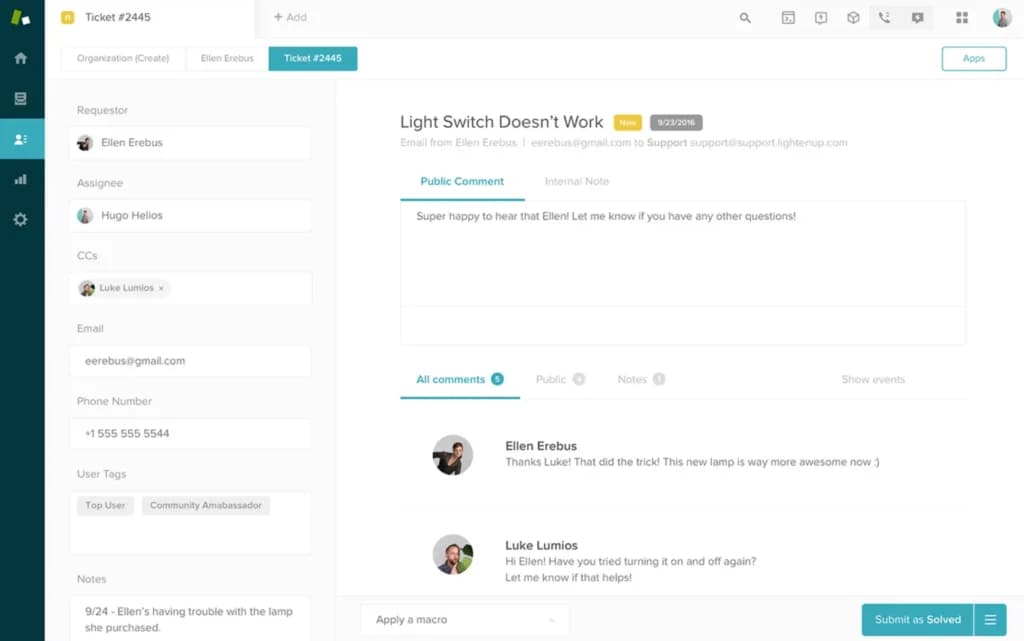
My experience with Zendesk: I much preferred Zendesk’s ticketing platform to HubSpot’s shared inbox. I didn’t have to track every ticket coming into my business, but rather just the ones that were assigned to me. The same was true for my other agents, so the chain of responsibility for each ticket was 100% clear. As I scaled up the number of tickets coming in, I felt a lot more confident that nothing was falling through the cracks.
While this approach made Zendesk feel more siloed compared to HubSpot Service Hub, I didn’t feel like I was missing information. It was easy to re-assign tickets to other agents or CC a colleague if I needed help. Zendesk also has a built-in team chat that was great for quickly double-checking details with other agents on my support team.
Zendesk also had a few touches that made the process of responding to tickets much more efficient, at least for me. For example, I could customize the layout of my workspace. This seems small, but being able to tailor the platform to the way I work in this way saves a lot of time over hundreds of tickets. I also loved that Zendesk supported pre-made quick replies for common questions. Once I started using them, it was pretty hard to go back to answering repetitive questions manually in HubSpot.
I was also impressed with Zendesk’s team management features. I was able to create schedules for my agents based on forecasted demand, which allowed me to cut down on overtime during the busiest parts of the month. Zendesk also offered real-time monitoring, so I could actually see what agents were working on and better estimate how much time they would have later in the day.
AI features and automations: Which platform supercharges your service team?
Both platforms ship a generative AI agent that can reply to customers and summarize tickets. Zendesk's agent can be taught multi-step workflows and integrated with external systems to handle requests autonomously, while HubSpot's Breeze AI is helpful for replies and summaries and is expanding through a growing library of pre-built agents.
AI-powered customer service is helping support teams be more productive by auto-routing tickets, summarizing conversations, suggesting replies, and much more. Both HubSpot and Zendesk offer AI agents, which is great. Zendesk’s agent was especially helpful and could handle an impressive number of customer service tasks.
HubSpot Service Hub
HubSpot has leaned heavily into AI and now includes its AI agent, Breeze AI, in all of its products. Breeze AI can interact with customers through live chat, summarize and decide where to route tickets, and generate recommended replies. It can also turn existing support conversations into new knowledge base articles.
My experience with HubSpot Service Hub: I really liked HubSpot’s AI agent. It felt genuinely helpful without getting in the way. I trusted it as my first line of communication with customers on my website, and it did a pretty good job of offering responses to tickets.
What really caught my attention, though, is that HubSpot has a whole library of AI agents you can add to the platform. I tried out the Internal FAQ Assistant, which instantly pulled up relevant FAQs from my knowledge base when I opened tickets. This particular agent wasn’t groundbreaking, but it was useful. Most of HubSpot’s agents are focused on sales and marketing, but I love the idea that you might be able to add highly tailored support agents to the software in the near future.
Zendesk
Zendesk’s AI supports live chat responses, conversation summaries, auto-generated ticket responses, and knowledge base article writing. It also has several additional capabilities, including the ability to talk to customers on the phone and follow moderately complex workflows to answer customer questions.
My experience with Zendesk: While HubSpot’s AI felt helpful, Zendesk’s felt like having an extra employee.
What hooked me was the ability to teach the agent basic workflows and then set it loose to respond to customers autonomously. For example, I integrated my Shopify store and told the agent to check the store’s back-end to find out the status of any order. Then when a customer asked about their order on live chat, the AI could tell them it had shipped and when to expect it.
I also liked that Zendesk built in quality assurance tools so that your AI can get better over time, at least in theory. I can’t say I noticed much change during my testing, but having the ability to review the agent’s work and fine-tune it made me feel more comfortable deploying it for real customer interactions.
Pricing: Which platform provides better value?
HubSpot wins on entry pricing with a free plan and a $9-per-user Starter tier, but jumps steeply to $90 per user (plus a $1,500 one-time onboarding fee) at Professional. Zendesk has no free plan, but its $19 Support Team and $55 Suite Team tiers offer more capable support features per dollar for teams that take support seriously.
Both HubSpot and Zendesk are pricey compared to other customer service software options, especially if you need advanced features like ticket routing and AI. HubSpot stands out for its free plan, while Zendesk’s paid plans are far more approachable for small businesses.
HubSpot Service Hub
HubSpot Service Hub offers a free plan for up to two users and a Starter plan that costs $9 per user per month. The free version is pretty limited, but the Starter plan can be a great deal for small businesses. It includes live chat, basic ticket routing, and the shared inbox for your support team. If you just need a way to communicate with customers, the Starter plan will get the job done.
But if you want to provide a higher level of support, the Starter plan won’t cut it. It doesn’t include a knowledge base or customer portal, and there’s no kanban board to help manage what agents are working on. Those features require a Professional plan, which costs $90 per user per month and requires a $1,500 one-time onboarding fee.
To me, that pricing feels unreasonable. It’s a huge jump in cost for features that feel essential, but don’t provide a massive leap in capability. The addition of the onboarding fee puts the Professional plan out of reach for a lot of small businesses.
Zendesk
Zendesk’s pricing scales in a way that’s much more approachable for small businesses.
The entry-level Support Team plan starts at $19 per user per month and includes some surprisingly advanced features like pre-written responses, full ticket routing capabilities, and customizable automations. However, it’s missing some support channels that I’d say are a must-have, including live chat, phone support, social messaging, and an online knowledge base.
All of those are included with the Suite Team plan for $55 per user per month. This plan also includes AI features like auto-generated replies, and I think it’s an outstanding deal for the majority of small businesses. You only really need to consider upgrading further if you need features like HIPAA compliance or service-level agreements.
The only thing to watch out for with Zendesk’s pricing is that there are a lot of optional add-ons. For example, the Contact Center add-on costs $50 per user per month. The Workforce Management add-on costs $25 per user per month. I like the scalability these add-ons provide, but beware you could end up with a very hefty bill if you need access to all of Zendesk’s features.
Compare Zendesk vs. HubSpot Service Hub head-to-head
Feature | HubSpot Service Hub | Zendesk |
|---|---|---|
Free plan | Yes (up to 2 users) | No |
Starting paid plan | $9 / user / month (Starter) | $19 / user / month (Support Team) |
Mid-tier plan | $90 / user / month (Professional) | $55 / user / month (Suite Team) |
One-time onboarding fee | $1,500 (Professional plan) | None |
Native | Native | |
Live chat | Native | Native |
Phone / voice (native) | Yes - limited (no callbacks) | Yes - priority numbers, callbacks, monitoring, barging |
Online forms | Native | Native |
Social messaging (WhatsApp, Messenger, Instagram) | Via App Marketplace integration | Native |
Customer community forum | Not supported | Native |
Customer portal | Yes (tickets only) | Yes |
Knowledge bases included | 1 (Professional), 25 (Enterprise) | 1 (Suite Team), 5 (Suite Professional), 300 (Suite Enterprise) |
Knowledge base languages supported | Limited | 40+ |
AI agent included in base plan | Yes (Breeze AI) | Limited - full AI agent features require Copilot add-on (from $155 / user / month) |
Pre-written / canned responses (macros) | Limited | Yes |
Built-in team chat for agents | No | Yes |
Customizable agent workspace | Limited | Yes |
Workforce management (forecasting, scheduling) | Not included | Add-on ($25 / user / month) |
Real-time agent monitoring | No | Yes |
SLA support | Yes - display only, no alerts | Yes - with alerts when overdue |
HIPAA compliance | Enterprise plan | Suite Professional and Suite Enterprise |
Custom reports | Yes | Yes |
Mobile app for agents | Yes (iOS and Android) | Yes (iOS and Android) |
Integrations available | 2,000+ (HubSpot App Marketplace) | 1,700+ (Zendesk Marketplace) |
Best for | Small dual-hat sales-and-support teams | Dedicated, scaling customer support teams |
Pricing reflects publicly listed rates at time of writing and is subject to change - confirm current pricing on each vendor's site before purchasing.
Zendesk vs. HubSpot Service Hub: Which service CRM should you choose?
After testing out both Zendesk and HubSpot Service Hub, here’s what I recommend.
Choose HubSpot if: Your sales reps are doing double-duty as customer service agents. HubSpot Service Hub does a great job of putting customer context alongside every ticket and is easy to use right out of the box.
DON’T choose HubSpot if: You have a large or fast-growing customer support team. It falls very short on team management features.
Choose Zendesk if: You want a dedicated, highly scalable customer support solution. Zendesk excels at managing large ticket volumes and coordinating work among many agents.
DON’T choose Zendesk if: You want a simple support platform with little to no learning curve. Zendesk may be overly complex for small service departments that don’t expect to scale up.
Related comparisons on Sonary
If you're still weighing options, these related Sonary breakdowns can help you triangulate the right fit:
- HubSpot vs. Salesforce CRM: A Head-to-Head Feature & Pricing Analysis- useful if you're cross-shopping between CRM-led platforms before committing to a service tool.
- 6 Smart HubSpot Alternatives for SMBs- broader look at where HubSpot's bundle doesn't fit and which tools step in instead.
See also
- Sales pipelines and support queues are different products, and best CRM for small business covers the pipeline half.
- Ticketing, SLAs and asset tracking sit on the service side, compared in best ITSM software.
- A small team can prove either idea without paying, starting from best free CRM.
- Running a service desk at no cost is realistic at low ticket volume, as best free ITSM tools shows.
FAQs
Does Zendesk offer a free plan?
No. HubSpot Service Hub has a basic free plan for up to two users, but Zendesk is paid-only and starts at $19 per user per month.
What social messengers does HubSpot Service Hub support?
HubSpot Service Hub supports several popular social messaging apps, including Facebook Messenger, Instagram, Telegram, WhatsApp, and TikTok.
Is HubSpot Service Hub considered help desk software?
Yes. HubSpot Service Hub functions as help desk software, but it's bundled inside HubSpot's broader CRM, so it works as both a customer service platform and an extension of HubSpot's sales and marketing tools. That makes it a strong fit for teams that want customer service software tightly integrated with their CRM rather than running as a separate, standalone help desk.
Do HubSpot Service Hub and Zendesk support knowledge bases?
Yes. HubSpot Service Hub supports one knowledge base with a Professional plan and 25 knowledge bases with an Enterprise plan. Zendesk supports one knowledge base with its Suite Team plan, five with its Suite Professional plan, and 300 with its Suite Enterprise plan.
Does HubSpot Service Hub have hidden costs?
HubSpot Service Hub charges a one-time $1,500 onboarding fee for its Professional plan. You also have to pay for additional AI agent credits if you use up the credits included with your plan.
Does Zendesk have hidden costs?
Zendesk offers certain features, like call center and workforce management tools, only through paid add-ons. You also need to purchase a Copilot add-on (starting at $155 per user per month) to get full access to AI agent features.
What are the best Zendesk alternatives?
The most popular Zendesk alternatives are HubSpot Service Hub, Freshdesk, Intercom, Help Scout, and Salesforce Service Cloud. Freshdesk is the closest like-for-like Zendesk alternative at a lower price point, while HubSpot Service Hub is the strongest choice if you want customer service software integrated with a sales CRM. You can also explore our full list of Zendesk alternatives and competitors.
Does HubSpot offer community forums?
No. HubSpot offers a customer portal where customers can monitor and update tickets, but it does not offer a way to build a community forum.
Can I create custom reports in HubSpot Service Hub or Zendesk?
Yes, both HubSpot Service Hub and Zendesk support custom reports. You can use these to track ticket resolution time, agent workloads, customer satisfaction, and more.
What integrations do HubSpot Service Hub and Zendesk support?
HubSpot Service Hub supports 2,000+ integrations through the HubSpot Marketplace. Zendesk supports 1,700+ integrations through the Zendesk Marketplace. This includes a HubSpot Zendesk integration, which enables HubSpot Sales Hub users to import Zendesk conversations into a customer’s profile.
Which platform should I choose for service-level agreements?
Both HubSpot Service Hub and Zendesk support service-level agreements (SLAs). Zendesk makes it easier to alert your agents to SLAs. HubSpot displays SLA data, but doesn’t offer alerts when responses are overdue.
Can I migrate from HubSpot Service Hub to Zendesk later?
Yes, but it’s a complex process because HubSpot’s tickets don’t map directly to data fields in Zendesk. Zendesk recommends using a third-party service like Help Desk Migration to support your move.
Are HubSpot Service Hub and Zendesk HIPAA-compliant?
Yes. HubSpot Service Hub supports HIPAA compliance with its Enterprise plan. Zendesk supports HIPAA compliance with its Suite Professional and Suite Enterprise plans.