
HubSpot starter customer platform review (2026): Is it worth it for a small team? My 6-month hands-on take

The HubSpot Starter Customer Platform is sufficient to run a small team of 3 to 10 people, but only after you survive the import process and accept three real limitations. I spent six months testing it alongside Sonary's sales and marketing team to determine exactly when you should use HubSpot Starter, when you should upgrade, and when you should use a different solution entirely.
Key takeaways
- The verdict: HubSpot Starter is a "yes" for most SMBs and teams with fewer than 10 people. It replaces about 3–5 separate SaaS subscriptions for $9–$20 per seat, giving it excellent value.
- The real math: A 3-person team runs about $27/month (on the promo rate). For a 10-person crew, you’re usually looking at 5–6 paid seats for around $45–$54/month.
- The inventory: You get all six Hubspot Hubs (Marketing, Sales, Service, Content, Data, and Commerce), 1,000 marketing contacts, 50 workflows, and 500 Breeze AI credits per seat.
- The hurdle: Data import is the platform's biggest pain point. My first try flagged 13 errors in just 10 rows. Budget time for 3–4 cleanup passes.
- The MVP feature: Breeze record summary. It’s an AI-generated "cheat sheet" that catches you up on any contact’s history in 30 seconds, saving you countless hours.
- The exit strategy: Don’t move to HubSpot Professional until you cross 1,000 marketing contacts, need lead scoring, or hire a full-time RevOps person.
Is the HubSpot Starter Customer Platform worth it?
Yes, the HubSpot Starter Customer Platform is worth it for small teams of 3 to 10 people in .2026After six months of hands-on testing alongside the Sonary sales and marketing team, I'd recommend it for any small team that needs to consolidate scattered tools (CRM, email marketing, scheduling, forms, support) into a single, connected platform. The exceptions are teams that need advanced lead scoring, custom multi-object reporting, or custom objects from day one - those need HubSpot Professional, or an alternative instead.
The full hands-on review is below, organized around the questions I see asked in the Google People Also Ask box and in startup Slack channels.
Why I’m reviewing the HubSpot starter customer platform after 6 months
Most HubSpot Starter reviews are written either by HubSpot agencies (who have an upgrade incentive) or by paid reviewers who spent two days on the platform.
I cover the intersection of AI app builders and B2B software for Sonary, writing for non-technical founders and small teams trying to figure out which tools are actually worth their money. Earlier this year, I published a hands-on HubSpot Breeze AI review for 1-4 person businesses, which led to a bigger question I kept getting from readers:"Is the entire Starter Customer Platform actually enough to run a real small business - or is Breeze AI the only good thing about it?"
To find out, I tested HubSpot Starter Customer Platform for six months alongside Sonary's sales and marketing team - a 3-person pod inside a 15-person company that operates exactly like the kind of small and agile team that most of our readers are. The team uses HubSpot daily as its actual operating system: capturing inbound leads from people researching software on Sonary, running outbound campaigns to bring new software platforms into our software comparison ecosystem, and managing the pipeline from first contact to closed partnership.
Whether your setup looks like a 3-person pod inside a larger company or a complete 10-person SMB, the HubSpot Starter Customer Platform behaves the same. So when I say "small team" throughout this review, I mean anywhere from 3 to 10 people running real customer-facing work.
This is six months in - past the honeymoon phase, past the import chaos. I feel this is long enough to genuinely know what works and what doesn't. It complements my Breeze AI review by zooming out to the entire platform: the CRM, workflows, email marketing, customer support, payments, and how it all connects on a single record.
What problems does the HubSpot Starter Customer Platform solve for small teams?
The HubSpot Starter Customer Platform solves three major problems that hit nearly every small team running on disconnected tools: scattered customer data, redundant internal communication, and zero visibility into the next action items for each lead or deal.
Before HubSpot, the Sonary team was using a mix of tools and CSV files. We had three main issues we were looking to fix with HubSpot:
- We needed one place for everything. Lead, customer, deal, conversation history - all in a single record. Not in someone's inbox, not in a spreadsheet a colleague forgot to update, not split across three tools.
- We needed to kill the redundant emails."What's the status of X?" "Did you follow up with Y?" "What's the next step on Z?" These messages eat real hours per week across a small team. The team needed one screen, a single source of truth that anyone could open to get the answer without having to tap someone on the shoulder.
- We needed a real, constantly up-to-date "what next" view. Not just a list of contacts, but a system that surfaces what each lead or deal needs done today.
After evaluating alternatives - and you can see Sonary's full breakdown of HubSpot alternatives for SMBs for the broader market context - the HubSpot Starter Customer Platform was chosen because it delivered CRM, marketing, sales, service, and commerce tools on a single record without requiring a full Salesforce-style implementation.
What does the HubSpot starter customer platform include in ?2026
The HubSpot Starter Customer Platform includes the Starter edition of every HubSpot product - Marketing Hub, Sales Hub, Service Hub, Content Hub, Data Hub, and Commerce Hub - bundled together on top of the Smart CRM, with AI features powered by Breeze.
For a full pricing context, Sonary's HubSpot Pricing Breakdown covers every tier in detail. Here's the Starter Customer Platform spec specifically as of :2026
Spec | HubSpot starter customer platform |
|---|---|
First seat | Included |
Additional seats | $9/mo (promo) · $15/mo (annual) · $20/mo (monthly) |
CRM capacity | Up to 15 million records |
Marketing contacts | 1,000 included |
Marketing emails | 5,000 per month |
Total pages | 30 (website + landing pages) |
Deal pipelines | 2 |
Workflows | 50 |
Breeze AI credits | 500 per seat per month |
Branding removal | Yes |
Support | Email + Chat |
A quick side note: most outdated reviews still say that Starter only offers "simple workflows." That’s old news. You now get 50 full workflows, which is enough to automate a massive chunk of your daily grind. We use them constantly.
Is HubSpot Starter Easy to Set Up? My Personal Import Experience (13 Errors in 10 Rows)
The HubSpot Starter Customer Platform is straightforward to set up once your data is clean - but from my experience, the contact import process is the single biggest stumble new accounts hit.
We had data in CSV files and other tools. HubSpot has a guided import flow that walks you through mapping columns to contact properties - Name → Contact Name, Email → Email, Company → Company Name. In theory, ten minutes and you're done.
In reality, my first attempt scanned just 10 rows and flagged 13 errors.
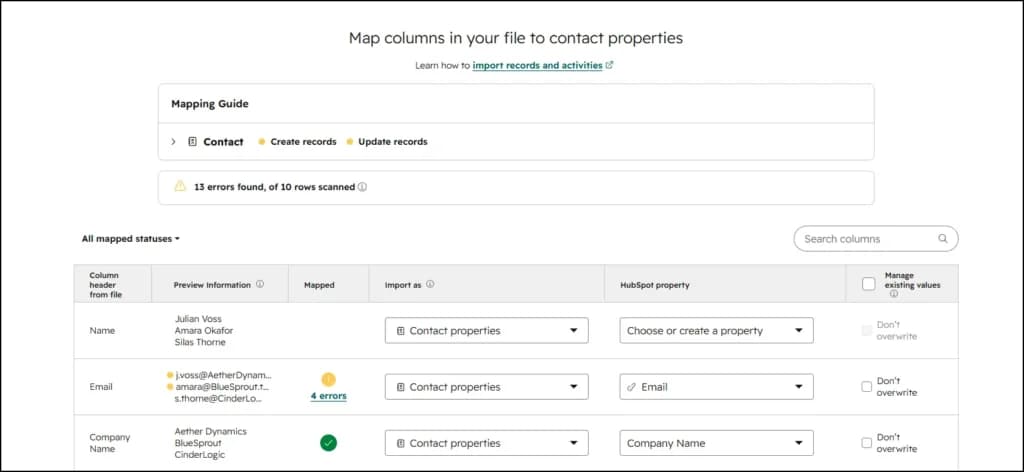
I tweaked the file, re-mapped the columns, and tried again. Still errors. It took me four tries to get a clean green light.
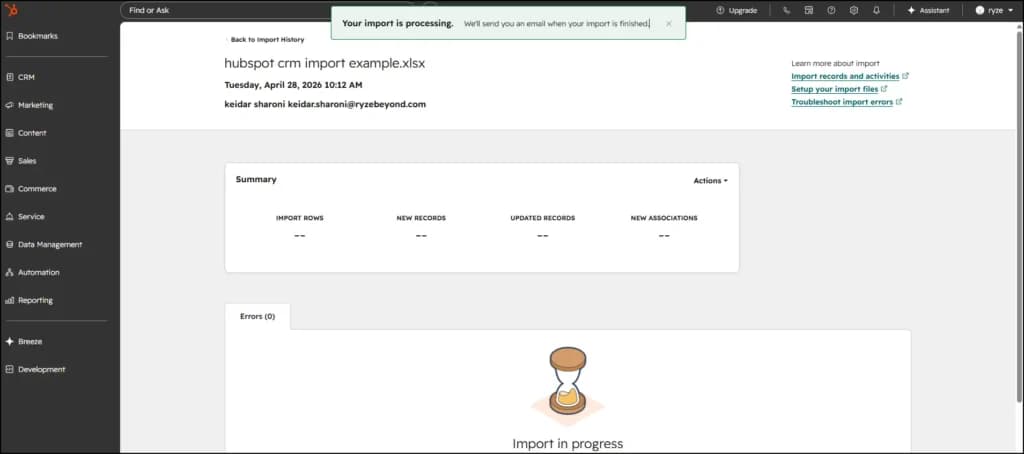
So, my honest take: the HubSpot Starter contact import isn't smooth out of the box. If your data is clean and your column headers exactly match what HubSpot expects, you'll be fine. If your data has any history — and ours did, because it came from multiple sources — budget at least half a day for cleanup.
The flip side: once you've been through that pain, you understand HubSpot's data model. Every column you mapped is available as a property in workflows, segments, reports, and dashboards. The friction paid off in everything that came after.
If to do this over again, I’d follow this checklist:
- Scrub the CSV first: Standardize your country names, fix the phone numbers, and split "Full Name" into First and Last. You should definitely use AI to streamline your data more quickly.
- Run a "sacrificial" test: Import 20 rows first to see what breaks before you try to move the whole mountain. Then fix and repeat.
- Be the boss: Explicitly map mandatory fields like Email and Lifecycle Stage instead of letting the AI guess.
What can each role on a small team actually do on the HubSpot starter plan?
The HubSpot Starter Customer Platform covers the core workflows for every customer-facing person you’ve got: sales, marketing, success, and ops. Everyone can actually do their job without having to jump between tabs. Here is the play-by-play of how my 3-person team uses it.
How does a sales rep use HubSpot starter day-to-day?
A sales rep on HubSpot Starter manages their pipeline through the HubSpot CRM board view, drags contacts between lifecycle stages in real time, logs activity automatically through email and calendar integrations, and sends quotes with payment links from inside deal records.
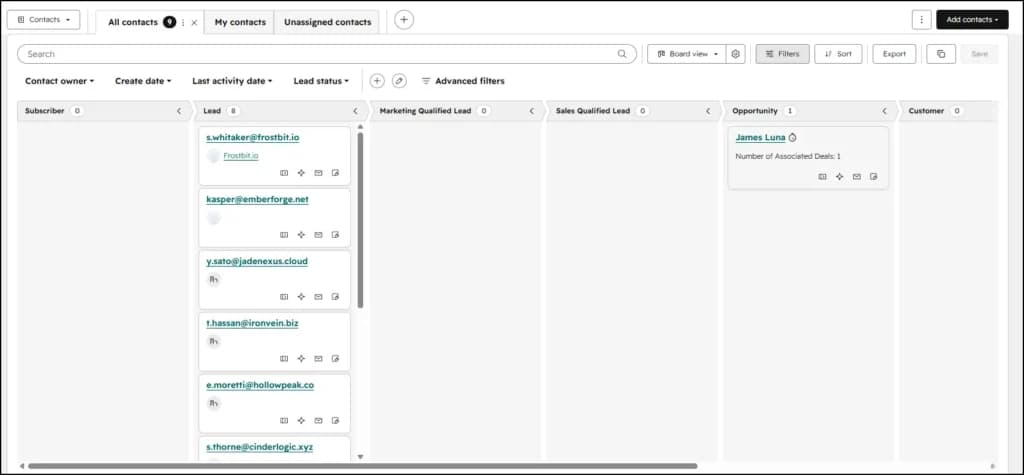
Day-to-day, our sales lead:
- Opens the contacts board view first thing in the morning to see who's where and what needs attention today.
- Drags contacts between stages in real time during or right after calls. The card moves from "Lead" to "MQL" to "SQL" with a click-and-drag, with no menus or clicking through three screens.
- Switches to table view when they need the picture from aboveת same data, sortable and filterable across any property.
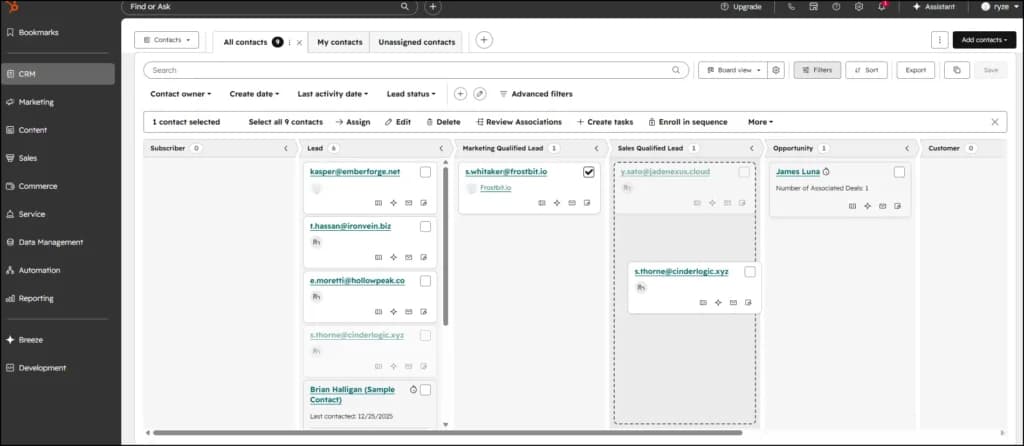
- Auto-logging: Calls, emails, and meetings are automatically logged against the record via the calendar integration.
- The scheduler: They send out meeting links that sync with their actual availability-no more "does 2:00 PM work for you?" emails.
- Templates & snippets: Common outbound messages are saved as templates to save time.
- Real-time signals: They get a notification when a prospect opens an email or visits our site. If a platform we pitched two weeks ago is suddenly back on our website, that’s a signal to pick up the phone.
How does a marketing team use HubSpot starter?
A marketing team on HubSpot Starter Customer Platform captures leads through forms, live chat, and ads; sends branded marketing emails to up to 1,000 contacts; runs paid ad campaigns with full attribution from click to deal; and uses simple workflows to automate lead nurture.
For deeper marketing automation patterns, Sonary's HubSpot Marketing Studio review walks through how the campaign workspace works.
What our marketing/content side does day to day:
- Embeds forms on Sonary pages so every visitor who fills one out becomes a CRM contact instantly.
- Manages segments and lists for newsletter sends and targeted campaigns.
- Sends branded marketing emails without the HubSpot footer - the branding removal alone is one of the biggest practical differences between HubSpot Free and HubSpot Starter.
- Tracks which campaigns drive contacts and deals, not just clicks. The attribution from ad → contact → deal lives in the platform.
How does a team lead get pipeline visibility on HubSpot starter?
A team lead on HubSpot Starter gets full pipeline visibility through dashboards, can spot-check any deal record without asking team members for updates, and can pull leadership reports in minutes.
My job in HubSpot is mostly visibility. I want to walk into a meeting and know exactly where every active deal is, what's blocking it, and what each person is working on this week.
My routine:
- The Dashboard: I open a single view that shows me the pipeline by stage, deals closed this month, and lead sources.
- The Spot-check: If a deal looks stuck, I click in and read the activity history. I get the full story without having to ask for an update.
- Quick Reporting: I can pull numbers for leadership in five minutes. No more asking the team to "send me their stats" by EOD.
This visibility is what killed the redundancy emails for us. "What's the status?" became something you check yourself rather than ask someone else.
What’s the difference between board view and table view in HubSpot CRM?
Board view is a typical kanban-style, drag-and-drop setup where your contacts, deals, or tickets are lined up in columns by stage. It’s built to let you work your pipeline in real time.
Table view shows the same data but serves it up as a sortable, filterable spreadsheet, perfect for deep analysis and bulk edits.
This "dual view" design is the main reason the software actually stuck with my team.
Software with as many sections as HubSpot can easily turn messy. There are sidebars, panels, customizable layouts, and dozens of settings. For a non-technical user, this is enough to get started on the platform in week one.
But the HubSpot CRM section — where 80% of daily work happens — is built with real thought behind the workflow:
- Board view is drag-and-drop. You're literally moving cards between stages with your hand. It maps onto how a salesperson thinks about the pipeline ("I had a good call, this lead is now an SQL"), and the action takes one second.
- The table view is the same data shown above. Sortable, filterable, everything visible. When you need to answer "show me every contact created in the last 7 days from organic traffic," you're in the table.
The pattern repeats in companies, deals, and tickets; every object has both views. Once you internalize it, the platform feels obvious. People who'd never used a CRM before were productive within a few days.
What is the Breeze AI record summary in HubSpot starter, and why is it useful?
Breeze record summary is an AI-generated plain-language summary of recent activity on a contact or company record in HubSpot. It pulls from emails, calls, meetings, and notes to give you a 30-second catch-up before any conversation, and it's included on the HubSpot Starter Customer Platform at no extra cost.
This is the feature that exceeded my expectations the most.
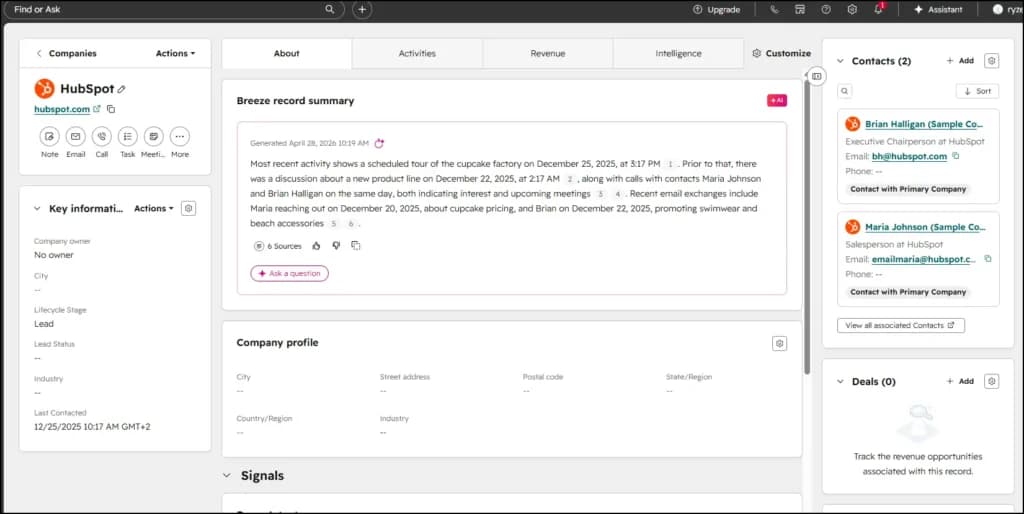
When I open a record for a partner we’ve been courting for a month, I don't see a messy transcript. I see a concise summary:"Most recent activity shows a scheduled tour... prior to that, a discussion about a new product line... recent emails include..."
I read this before every call. It saves me from scrolling through three weeks of email threads or bugging my team to remind me where we left off.
For a small team juggling dozens of conversations, this is the unsung hero of the platform. I didn’t even know it was included when I signed up, but it’s now the one feature I’d hate to lose. The value isn’t in a chatbot that writes poems; it’s in an AI that sits next to your data and saves you from the "scroll of death."
Does Breeze AI work on the HubSpot starter customer platform?
Yes, Breeze AI is fully functional on the Starter tier. You get the Breeze Assistant (for writing), the Breeze Data Agent (for cleaning), record summaries (the pre-call "cheat sheets" I mentioned earlier), and AI image generation.
To power all this, each paid seat comes with 500 HubSpot Credits per month.
What does the Breeze assistant do on the HubSpot starter?
Think of Breeze Assistant as an AI helper living inside your CRM. On the Starter tier, it can draft sales and marketing emails from a quick prompt, rewrite your existing messages to sound better, and summarize your call notes. You can even use it to generate blog outlines or social posts without leaving the platform.
What does Breeze data agent do on HubSpot starter?
The Data Agent is like a background janitor for your CRM. It auto-formats messy data, fills in missing fields where the context is obvious, and suggests bulk fixes that you can approve with one click.
If you don’t have a dedicated "operations" person, this is the next best thing. It’s essentially like having someone audit your database every week for free.
How many HubSpot credits do you get on the starter tier?
Each paid seat on the HubSpot Starter Customer Platform receives 500 HubSpot Credits per month, which reset at the start of each subscription cycle. Credits power all Breeze AI features, Assistant, Data Agent, record summaries, and AI image generation. Additional credits are available at $0.010 each.
For Sonary's 3-person team, that's 1,500 credits monthly — more than they use in practice. For a 10-person team with 5–6 paid seats, that's 2,500–3,000 credits, which gives moderate AI usage plenty of headroom.
What Breeze AI features are NOT included on the HubSpot starter?
You don’t get the "autonomous agents"-the Prospecting, Customer, and Content agents. Those live on the Professional and Enterprise tiers and are designed to run entirely on autopilot.
For most small teams of up to 10 people, the Assistant and Data Agent combo is usually all you need. You don’t really need autonomous agents until your team grows to about 20 people, the point where you’re too big to do the work manually but not quite ready to hire a full-time specialist.
How many workflows does the HubSpot Starter plan include, and what can you build with them?
The HubSpot Starter Customer Platform includes 50 workflows, which are enough to automate the core operations of a small team, lead routing, follow-up emails, internal notifications, deal-stage automation, and CRM data hygiene. After six months of testing alongside the Sonary team, the portal is using around 12–15 of those slots.
- The Lead Catcher: When someone fills out a form on Sonary, HubSpot creates the contact, tags them, sets their stage, sends a welcome email, and pings our sales lead.
- The Deal Mover: When a deal hits a certain stage, the system automatically assigns a follow-up task and updates our internal tracking.
- The "Closed-Won" Handoff: Once we win a deal, a workflow updates the contact to "Customer" status and starts their onboarding sequence.
- The Janitor: We have workflows that flag missing data or mark contacts as inactive to keep the list clean.
Even after being "automation-heavy" for half a year, I haven't even come close to the 50-workflow limit. For a small team, it's a very generous ceiling.
How do you run a lead-to-customer sales process on the HubSpot Starter?
You can run your entire sales engine on HubSpot Starter without touching a single outside tool. The flow is seamless: a lead fills out a form, the CRM creates the record, the system routes it, sales follow up, a meeting is booked, a quote is sent, and the deal closes.
To show you what that looks like in the real world, here is the exact play-by-play my team runs every week:
- The Hand-off: A user finds a software comparison on Sonary and fills out a form. HubSpot instantly creates the contact record and triggers a workflow. That lead is automatically segmented, their "lifecycle stage" is set, a welcome email goes out, and a follow-up task lands in our sales lead’s queue.
- The Connection: Sales opens the record, glances at the Breeze AI summary for context, and sends a tracked personal email. When the prospect replies, it’s logged automatically. They book a discovery call using a HubSpot meeting link, which syncs directly to the contact’s timeline.
- The Close: After the call, sales drag the card from "Lead" to "MQL" on the board. If there’s a fit, they open a deal. They send a quote, complete with a payment link, directly from the deal record. Once the payment hits, a final workflow pings the team and kicks off the onboarding sequence.
Five years ago, you would have needed four different subscriptions and a messy web of Zapier connections to do this. Now, it’s one platform. That consolidation is the real reason to pick HubSpot Starter over a "Frankenstein" stack of point solutions.
How much does HubSpot starter customer platform cost for a small team?
The price of HubSpot Starter depends on how you pay:$9 per seat/month if you prepay annually at the promo rate,$15 per seat/month at the standard annual rate, or $20 per seat/month if you go month-to-month.
For a small team, you don’t need a seat for every single employee. You only need paid seats for the people actually editing CRM data.
The real-world math:
Team size | Paid seats | $9/mo (Promo) | $15/mo (Annual) | $20/mo (Monthly) |
|---|---|---|---|---|
3 people | 3 | $27/mo | $45/mo | $60/mo |
5 people | 3–4 | $27–$36/mo | $45–$60/mo | $60–$80/mo |
10 people | 5–6 | $45–$54/mo | $75–$90/mo | $100–$120/mo |
For my team of three, the cost is practically invisible. I’ve genuinely spent more on a single team lunch than we spend on HubSpot in an entire quarter.
When you compare this to the $300–$600 a month most small teams spend on separate tools for email marketing, scheduling, and forms, the math for HubSpot Starter becomes a no-brainer. If you want the full breakdown of every tier and Hub, check out Sonary’s HubSpot pricing guide.
HubSpot free vs. starter vs. professional: Which is right for a small team?
Feature | HubSpot Free | HubSpot Starter | HubSpot Professional |
|---|---|---|---|
Price (per seat/month) | $0 | $9–$20 | $45+ (plus base fees) |
Branding removal | ❌ | ✅ | ✅ |
Marketing contacts | ~1,000 (capped) | 1,000 | 2,000 |
Marketing emails/mo | 2,000 (branded) | 5,000 | 10x contact tier |
Workflows | None | 50 | 300 |
Deal pipelines | 1 | 2 | 50 |
Pages | Limited | 30 | Unlimited |
AI Credits | None | 500/seat/mo | 5,000/mo total |
Custom reporting | ❌ | ❌ | ✅ |
A/B testing | ❌ | ❌ | ✅ |
Lead scoring | Manual only | Manual only | ✅ |
Custom objects | ❌ | ❌ | ❌ (Enterprise only) |
Support | Community | Email + chat | Email + chat + phone |
Bottom line: Free is a demo, Starter is the real entry point, Professional is roughly 10× the cost of Starter and only worth it when you're actually blocked by a missing feature. If you're considering alternatives, Sonary's roundup of HubSpot alternatives for SMBs covers tools like Pipedrive, ActiveCampaign, EngageBay, and Brevo.
What are the limitations of HubSpot starter customer platform?
The main guardrails on the Starter tier are the 1,000 marketing contact cap, the lack of automated lead scoring, the absence of A/B testing, and a 50-workflow ceiling. You also won't get custom objects or granular "team permissions" (everyone mostly sees everything).
After six months of living in the system, here is my honest "buyer beware" list:
- The import is a grind. I’ve said it before, but it bears repeating: budget real time for this. It’s the first thing that makes new users want to quit.
- "Free" is a bad trial. HubSpot Free lacks enough branding removal, automation, and AI credits to give you a real taste of the platform. Don't judge Starter by the Free version.
- The 1,000-contact limit sneaks up on you. You have to be aggressive about flagging people as "non-marketing" contacts. If you aren't actively emailing them, don't let them count toward your bill.
- Reporting has a ceiling. If you need "investor-grade" dashboards that slice and dice revenue across different cohorts, the Starter library won't cut it. It’s built for daily tracking, not deep data science.
- No custom objects. If your business model requires tracking something unique, like specific "Properties," "Courses," or "Subscriptions"-as their own entities, you're out of luck. You’d need Enterprise for that.
- Onboarding is a DIY project. The marketing makes it sound like a "plug and play" afternoon. In reality, expect to spend a couple of weekends actually tuning the settings so it works the way your team does.
When should you upgrade from HubSpot starter to professional?
HubSpot Professional is roughly 10x the cost of Starter. Do not upgrade just because you like the look of a new feature. Only move up when one of these specific things is actually stopping you from doing business:
- The Contact Ceiling: You’ve hit 1,000 marketing contacts, and your list is still growing fast.
- The Qualification Bottleneck: You have so many leads that you can’t manually keep up; you genuinely need automated lead scoring to tell you who to call first.
- The Workflow Limit: You’ve hit 50 workflows (honestly, we aren't even close).
- The "Board Member" Request: An investor is requesting a custom dashboard that the standard library cannot build.
- Advanced Marketing: You’re ready to run heavy-duty demand gen with A/B-tested landing pages and complex nurture paths.
- The Specialist Hire: You’ve hired a dedicated RevOps or Marketing Manager whose entire job is to squeeze every drop of ROI out of the platform.
Until one of those is a "day-one" problem, stay on Starter. Paying for headroom you aren't using is the easiest way for a small team to set cash on fire. For the full list of what changes at the next level, check out Sonary's HubSpot pricing breakdown.
Final verdict: HubSpot starter customer platform review (6 months in)
For a small team of 3 to 10 people, the HubSpot Starter Customer Platform is the right choice in roughly 90% of cases. Six months in, the Sonary team opens HubSpot first thing every morning and uses it all day. That's the test that actually matters.
There are some definite limitations to be aware of. The contact import is rough, custom reporting is genuinely limited, and there are features I'll outgrow eventually. But for a small team that needs to consolidate scattered tools into a single source of truth, eliminate redundant emails, and operate with real visibility, it's the right tool.
The biggest thing I learned: don't underestimate the value of unity. The reason HubSpot Starter works isn't that any single Hub is best-in-class. It's that the lead, the contact, the company, the deal, the email thread, the meeting notes, the support ticket, and the AI summary all live on one record. The cost of stitching that together with point solutions — in tooling, integration work, and human attention — is bigger than the price of the bundle.
If you're running a team of 3 to 10 people and you're tired of asking "what's the status of this lead" in Slack, give the HubSpot Starter Customer Platform a serious look. Set aside half a day for the data import, give yourself two weekends to configure it properly, and trust that the platform will pay back the investment within the first month.
That's been my experience at Sonary, and I'd bet it'll be most small teams' experience too.
- If you’re a team of 3 to 10 people, the HubSpot Starter Customer Platform is the right call in 90% of cases. After six months, my team still opens it first thing every morning. That’s the only test that matters.
- It isn’t perfect. The data import is a headache, the reporting has its limits, and you’ll eventually outgrow some of the features. But if you’re trying to kill off "status update" emails and actually see what’s happening across your business, it’s the right tool for the job.
- The biggest lesson I’ve learned is that "unified" beats "best-in-class." HubSpot Starter works because everything-the lead, the email thread, the meeting notes, and the AI summary-lives on one single record. The cost of trying to stitch that together with individual apps isn’t just measured in dollars; it’s measured in the time and attention you lose trying to make them talk to each other.
- If you’re tired of asking "what’s the status of this lead" in Slack, give Starter a look. Set aside a half-day for the import, spend a couple of weekends on the configuration, and trust that the visibility you gain will pay for itself within the first month.
That’s been our experience at Sonary, and I’m willing to bet it’ll be yours, too.
Try HubSpot Starter for free
HubSpot starter customer platform FAQ
Is HubSpot starter customer platform worth it for small businesses in ?2026
Yes. After six months of running a 3-person team on it, I’m sold. For any startup or small biz under 10 people, it covers the essentials: lead capture, pipelines, email marketing, support, payments, and AI. It’s the actual operating footprint of a small team.
How much does HubSpot starter cost per month?
It depends on how you pay. It’s $9 per seat/month if you prepay annually on a promo, $15 on the standard annual plan, or $20 if you want to stay flexible with a month-to-month plan. Your first seat is included in the base price.
How many marketing contacts does HubSpot starter include?
You get 1,000 marketing contacts. Only the people you’re actively emailing or targeting with ads count toward this. You can flag partners, vendors, or old customers as "non-marketing" so they don't eat into your limit.
How many workflows does HubSpot starter customer platform include?
You get 50. I’ve been building automation for half a year and my team has only used about 15 of those slots. For a team under 10, 50 workflows is plenty of room to grow.
Is HubSpot starter difficult to set up?
The software is straightforward, but the data import is a bear. My first try had 13 errors in just 10 rows. It’s not a "plug and play" 10-minute job-budget a few hours to clean your spreadsheets before you even try to upload them.
Does Breeze AI work on the HubSpot starter customer platform?
It does. You get the Assistant, the Data Agent, the record summaries, and the image generator. You get 500 credits per seat each month to fuel them. The only things missing are the "autonomous agents" that live on the higher, more expensive tiers.
What’s the most useful Breeze AI feature on HubSpot Starter?
The record summary, hands down. Before every call, I open the contact record and read the AI-generated recap of our history. I’m caught up in 30 seconds without having to hunt through an endless email thread.
How many seats does a 10-person team need on HubSpot Starter?
Usually just 5 or 6. You don't need a seat for everyone on the payroll. Only pay for seats for the people who need to actively edit data-think sales, marketing, and the founder. Everyone else can get by with view-only access.
What’s the difference between HubSpot free and HubSpot Starter?
Free is a basic CRM with HubSpot branding all over your emails and no real automation. Starter removes the branding, gives you 50 workflows, includes 500 AI credits per seat, and bumps your email capacity to 5,000 a month. It also unlocks actual human support via email and chat.
Can you run a complete sales process on HubSpot Starter?
Yes. From the moment a lead fills out a form to the moment they pay a quote and get handed off to onboarding, the entire cycle happens inside HubSpot. No outside tools required.
Is HubSpot starter better than using multiple separate tools?
For a small team, absolutely. Stacking separate apps for email, scheduling, and forms usually costs $300–$600 a month and leaves your data scattered. HubSpot gives you everything for a fraction of that price and keeps all your info on one record.
When should I upgrade from HubSpot Starter to Professional?
Only upgrade when you’re actually blocked. Usually, that’s when you cross 1,000 marketing contacts, your lead volume is too high to qualify manually, or you need custom dashboards for an investor that the standard reports can’t handle.
About the Author: Daniel Zvi covers the intersection of AI app builders and B2B software for Sonary, writing to give non-technical founders the insights they need to leverage new tech. His work focuses on hands-on testing of CRM, payments, productivity, and AI tools used by small and micro businesses.