If you’re running a small or micro-business, you can build a website with Wix on its freemium model. You can technically hang out on the free plan forever, but if you want to be taken seriously as a professional—and not just a hobbyist—you’re going to need a premium tier starting at $17/month. Let’s break it down.
Is Wix’s pricing worth it for small and micro-businesses?
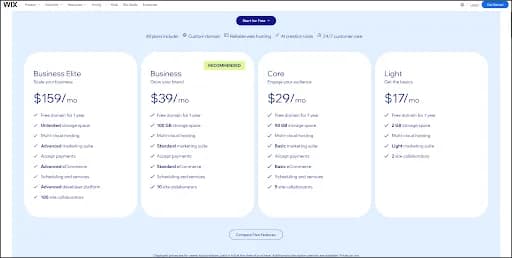
Yes, but for the vast majority of us, there are only two plans worth a second look: Light ($17/month)or Core ($29/month).
Why? Because these two plans give non-developers every tool they actually need without forcing you to overpay for enterprise bells and whistles that usually gather digital dust.
The Light Plan ($17/month): If you’re a freelancer or a service pro who doesn't need to sell products online, this is your sweet spot. It gets you a custom domain and kills those annoying Wix ads, giving you instant brand credibility.
The Core Plan ($29/month): If you need to actually take money—whether it's running a boutique online store or letting clients book appointments with deposits—this is the most cost-effective tier to unlock full e-commerce capabilities.
You really don’t need the Business ($39/month)or Business Elite ($159/month)plans unless you’re sitting on a massive product catalog that requires advanced tax automation or bottomless storage. Keep your overhead low and stick to Light or Core.
Key facts at a glance
The Sweet Spot Tiers: The Light plan ($17/mo) is best for service-based portfolios, while the Core plan ($29/mo) is the minimum requirement for accepting payments and running an online store.
The Free Sandbox: You can build and design a fully functional site for $0, but you cannot connect a custom professional domain or process real transactions without upgrading.
All-in-One Value: Unlike WordPress, which requires separate hosting, security, and plugin fees, Wix bundles everything into one flat, predictable monthly rate.
Speed of Execution: Thanks to the built-in AI Website Builder and free templates, going from a blank screen to a published website takes about 20 minutes.
Zero Risk: Wix offers a 14-day money-back guarantee on all premium plans, allowing you to test e-commerce features and get a full refund if it isn't the right fit.
How we actually tested Wix (Our first-person experience)
To give you a pricing review you can actually trust, we don’t just parrot the feature lists—we get our hands dirty. We built Wix websites from scratch to see how these pricing tiers handle the messy, real-world demands of running a business.
How we test: We approached the platform like a standard micro-business owner managing a team of five. We put the system through two distinct stress tests to map out exactly where your money goes.
First, we built a comprehensive service-based website. We didn’t just throw up a generic homepage; we built a structure that included an About Us section, a functional Contact Us form, five distinct service categories, and a handful of formatted blog posts to see if the content management system actually felt intuitive.
After that, we wiped the slate clean and built a full e-commerce store. We uploaded a catalog of 150 unique products, sorted them into five categories, set up real-time inventory tracking, and built out the entire shopping cart flow.
This hands-on process showed us exactly where the Free and Light plans hit the wall. While setting up 150 products was surprisingly smooth using Wix’s visual editor, we physically couldn’t activate the checkout button to actually sell them until we stepped up to the Core plan. It’s the difference between looking like a store and actually being one.
Wix pricing and value: Is Wix good for small businesses?
Absolutely. In fact, if you’re a business owner who doesn’t want to spend your weekends learning how to code, Wix is arguably the most tailored solution on the market.
When you’re running a lean operation, you likely don’t have a spare few thousand dollars to hand over to a custom web developer. You also probably don't have the technical patience to manage your own servers, hunt down security updates, or untangle complex coding errors.
Compared to other builders that come with a steep learning curve, Wix acts as a completely visual, all-in-one ecosystem. It handles the scary backend technicalities—like secure multi-cloud hosting, SSL certificates, and mobile optimization—so you can focus 100% of your energy on the front end. The platform uses a highly intuitive drag-and-drop interface, meaning if you can click a mouse to move an image, you can build a stunning website. Beyond just building pages, Wix bakes marketing tools, SEO dashboards, and customer relationship management (CRM) features directly into your dashboard. Consolidation like that is a massive win for a small team.
Wix’s free pricing tier: Can I build a website for free?
Yes, you can absolutely build a functional website for free. Wix’s free tier is one of the most generous in the industry, making it the perfect zero-risk testing ground to see if the platform actually clicks with you.
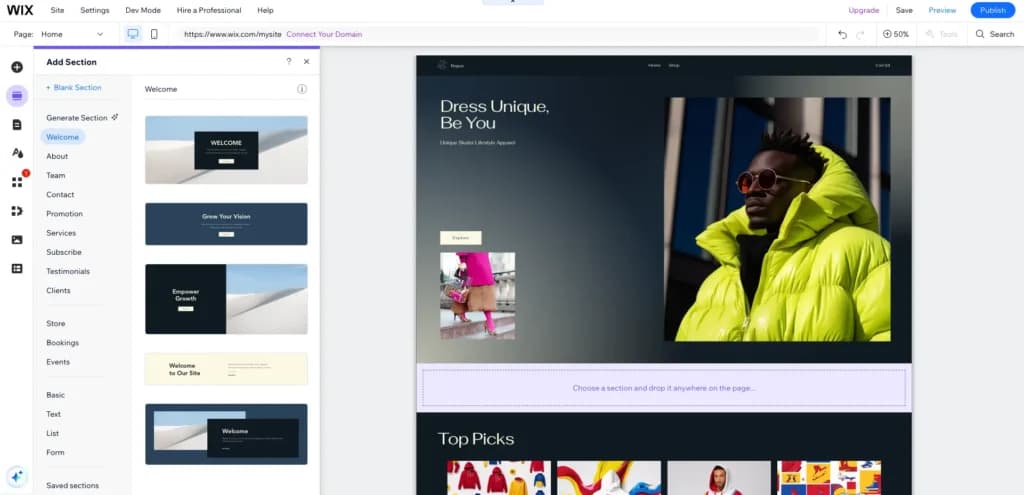
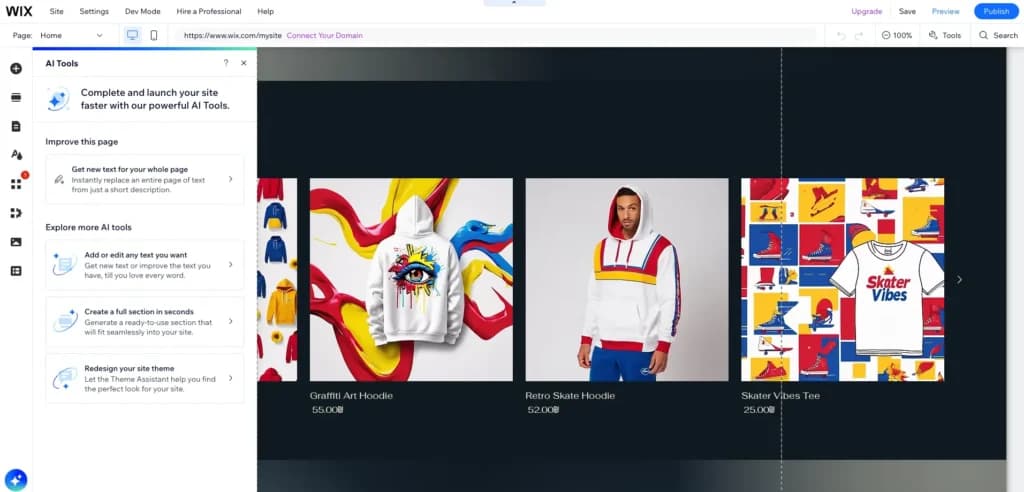
In my experience, Wix’s latest tools have made this process incredibly fast. When we jump into Wix today, it takes us about 20 minutes to go from a rough idea to a live website, thanks largely to their integrated AI Website Builder.
The process: We start by giving a simple prompt to the AI. We describe the site's purpose, our brand colors, the desired tone, and our messaging. We pick a website outline—usually pulling from their massive library of free templates—and from there, Wix practically builds the foundation for us. It even provides free hosting and the ability to publish immediately under a Wix-branded domain.
What you get on the free tier:
Full site customization: You aren't just getting a trial or a limited demo—you can actually build and design an entire, multi-page website from the ground up. This includes a professional homepage, detailed service pages, and an About Us section to tell your story.
Operational tools: You can set up a functional contact form that leads directly to your personal email. This means you can field inquiries, collect leads, and start talking to potential clients from day 1 without spending a dime.
Immediate launch: This tier allows you to go live with a digital business card for $0. For testing a new business idea, initial building, or just getting a basic web presence established, the value-to-cost ratio is unbeatable.
Local visibility: It’s a great, free way to provide a landing page for your Google My Business profile. If you're a local business, you can give customers a place to land when they find you on maps, providing them with your hours, services, and contact info.
Functional limitations: While you get the full design suite, remember the trade-offs: you’ll use a Wix-branded URL (yoursite.wixsite.com), the site will display Wix ads, and while you have basic SEO tools, they aren't robust enough for heavy-duty organic growth. However, for a starter home on the web, it’s got everything you need to get moving.
What you CANNOT do on the free tier:
Use your own domain: You are stuck with a yoursite.wixsite.com URL, which—let’s be honest—looks a bit like you’re still running a hobby rather than a business.
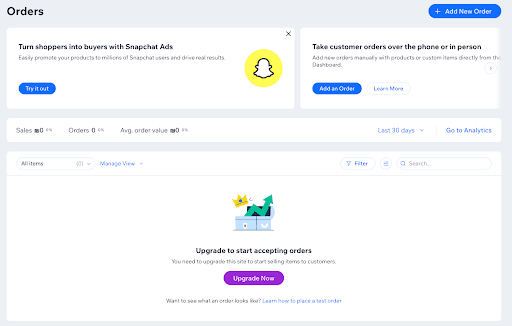
Sell products: As we found in our hands-on test, you can build and edit a draft of your store, add your 150 products, and set prices, but you physically cannot activate the checkout page or accept a single payment until you upgrade.
Wix pricing explanation: Moving up the tiers
Breaking down Wix pricing is actually pretty simple: the tiers are designed to scale exactly when your business does. You’re essentially paying for three specific upgrades as you move up the ladder: brand control, e-commerce capabilities, and more breathing room for your data.
What’s great for a busy owner is that Wix lets you do all the heavy lifting on the backend before you ever see a bill. You can spend weeks perfectly organizing your inventory, uploading product photos, and setting your prices behind the scenes. Once you’re ready to flip the switch and go live, you just upgrade to the right tier.
Brand control ($17/month): This is where you move from hobbyist to professional. To remove the Wix-branded ads and connect your own custom .com domain, you upgrade to the Light plan. It’s the baseline for building trust with your audience.
E-commerce capabilities ($29/month): This turns your website into a transaction engine. If you’ve already been managing your inventory and setting up your shop in the background, you simply upgrade to the Core plan to activate the checkout and start accepting credit cards. It’s a seamless transition from building to selling.
Scale and logistics ($39/month): When your operations outgrow the basics, you step up to the Business plan. This is for stores that need advanced shipping logistics, automated sales tax (so you don't have to be an accountant on the side), and massive storage for things like high-resolution product videos.
The beauty of this setup is that you can manage and configure every detail you need well before your official launch, ensuring everything is just right before you start paying for the higher-tier features.
Website cost scenarios: What exactly will I pay per month?
To make the Wix pricing details even easier to understand, let's break down the real-world costs with practical scenarios.
Scenario A: The Local Freelance Photographer
Needs: A stunning portfolio to show off high-resolution galleries, a contact form, and a custom domain. No online booking or payments needed.
Ideal Plan: Wix Light ($17/month).
Hidden Costs: A custom .com domain is free for the first year, but will cost about $15 to $17/year upon renewal.
Total Monthly Cost:$17/month(plus the yearly domain fee after year one).
Scenario B: The Neighborhood Barbershop
Needs: A landing page with business hours, a service menu, and an automated system where clients can book a haircut appointment and pay a 50% deposit via credit card to secure their slot.
Ideal Plan: Wix Core ($29/month).
Hidden Costs: Payment processing fees. Wix takes 0% commission, but standard credit card processors (like Stripe or Wix Payments) charge around 2.9% + $0.30 per transaction.
Total Monthly Cost:$29/month(plus standard transaction fees on bookings).
Scenario C: The Growing Online Candle Boutique
Needs: A full e-commerce storefront, inventory management for 150 products, customer accounts, and automated sales tax calculation for shipping out of state.
Ideal Plan: Wix Business ($39/month).
Hidden Costs: Transaction fees (2.9% + $0.30 per sale) and perhaps a premium email marketing app integration if they outgrow Wix's basic marketing suite (approx. $10-$15/month).
Total Monthly Cost:$39/month to $54/month, depending on third-party app usage.
When should I consider upgrading my plan?
Knowing when to upgrade is just as important as knowing what plan to start with. Avoid paying for tools you don't need until your operations demand them.
Upgrade from Free to Light when: You hand out your first business card. If you are actively pointing clients to your website, having a .wixsite domain and banner ads looks amateurish. Upgrade to Light to secure your brand reputation.
Upgrade from Light to Core when: You are tired of manual invoicing. If you find yourself constantly emailing PayPal links or chasing down client payments, upgrading to Core allows you to automate everything directly through your site's checkout or booking system.
Upgrade from Core to Business when: Your administrative tasks are drowning you. If calculating out-of-state sales tax is taking hours every week, or if you are running out of the 50 GB storage limit because your product catalog is expanding rapidly, the Business plan's automated tax features and 100 GB storage will save you massive amounts of time.
Consider Wix Studio when: You are a web design agency building sites for clients. Wix Studio is a separate, dedicated platform specifically for agencies, offering advanced coding and client hand-off tools.
The real limitations of the Lite and Core plans
While they are the best options for micro-businesses, you need to know where these plans hit a wall.
Limitations of the Light plan: Zero e-commerce. You cannot process a single transaction. Also, it features low storage (2 GB)—if you plan on hosting native high-definition videos directly on your site, 2 GB will fill up fast.
Limitations of the Core plan: The Core plan requires you to set up flat-rate shipping or manual tax rules. It does not include automated sales tax calculations across different state lines. Additionally, if you run a dropshipping business, the Core plan caps you at only 25 products.
Why Wix is better than Shopify for micro-businesses
If you are researching website builders, you have undoubtedly seen Shopify. While Shopify is a giant in the e-commerce space, Wix is fundamentally better for small and micro-businesses, especially those that do not strictly sell physical goods.
Value for Money: Shopify’s basic plan starts at roughly $29/month (when billed annually)—the exact same price as Wix Core. However, Shopify only gives you an e-commerce store. If you want to add a robust appointment booking system, a beautiful portfolio, or a subscription blog, you have to buy expensive third-party apps on Shopify. Wix includes all of this natively within its Core plan.
Maintenance & Ease of Use: Shopify’s editor is highly restrictive and often requires a developer to tweak the actual layout of the theme code. Wix offers a true 100% freeform drag-and-drop editor. If you want to move a button two inches to the left, you just click and drag it. For a micro-business owner without coding skills, the maintenance and design freedom on Wix is infinitely easier to manage.
Why Wix is better than WordPress for micro-businesses
If you’ve been doing your homework on website builders, you’ve definitely run into Shopify. They’re the heavyweights of the e-commerce world, no doubt—but for a small or micro-business, Wix is often the smarter, more versatile partner, especially if you aren’t just shipping physical boxes.
Value for money: Shopify’s basic tier kicks off at roughly $29/month (on an annual bill), which puts it neck-and-neck with Wix Core. Here’s the catch: Shopify is a store first and everything else second. If you want a robust appointment booking system, a high-end portfolio, or a subscription-based blog, you’ll usually find yourself paying for expensive third-party apps on Shopify. Wix, on the other hand, bakes all of that functionality natively into the Core plan. You get the whole toolbox for one price.
Maintenance & ease of use: Shopify’s editor can be pretty rigid; if you want to stray off the beaten path of your theme, you often need to hire a developer to poke around in the code. Wix is a different animal—it’s a true, 100% freeform drag-and-drop editor. If you want to move a button two inches to the left or nudge an image up, you just click and drag it. For a business owner without a degree in computer science, the day-to-day maintenance and design freedom on Wix is infinitely easier to live with.
Wix pricing details and comparison tables
Here are the specific Wix pricing details that matter most to small and micro-businesses. (Note: These prices reflect the monthly cost when you commit to an annual billing cycle. If you prefer to go month-to-month without the long-term commitment, expect to pay a bit more for that flexibility—usually around $24/month for Light or $36/month for Core).
Feature
Free ($0/mo)
Light ($17/mo)
Core ($29/mo)
Business ($39/mo)
Target Audience
Testing & ideation
Portfolios & service sites
Small online stores
Growing e-commerce
Custom Domain
No (wixsite.com)
Yes (Free 1st year)
Yes (Free 1st year)
Yes (Free 1st year)
Wix Ads Removed
No
Yes
Yes
Yes
E-commerce/Payments
Build only
No
Yes (Basic)
Yes (Standard + Tax Auto)
Storage Space
500 MB
2 GB
50 GB
100 GB
Collaborator Seats
1
2
5
10
Bottom line
Navigating software pricing shouldn't feel like a part-time job. Wix keeps its tiers remarkably transparent compared to other builders on the market, which is a breath of fresh air. Between the AI-driven setup and that 100% visual interface, it’s an absolute powerhouse for small businesses that don't have the resources to keep a web developer on payroll.
If you’re just starting out, my advice is simple: stay in the free plan until you’ve got your vibe figured out. Once you’re ready to launch to the public and start taking payments, making the jump to the Light ($17/month)or Core ($29/month)plan is a worthwhile business investment that usually pays for itself in professional credibility alone. You can do it with zero buyer's remorse, too, since Wix offers a 14-day money-back guarantee on all premium plans. Keep your overhead low, avoid those expensive enterprise tiers until you actually need them, and stay focused on growing your brand.
FAQ: People also ask
Q: Is Wix really free?
A: Yes, Wix is completely free if you want to build and publish a basic website. You can use their templates and editor forever. However, your live site will display a prominent Wix banner ad at the top, and you will be forced to use a Wix-branded domain name.
Q: How much does Wix cost per month?
A: If you choose annual billing, Wix premium plans cost $17/month for Light, $29/month for Core, $39/month for Business, and $159/month for Business Elite. Month-to-month billing is slightly more expensive.
Q: Does Wix take a percentage of my sales?
A: Wix itself does not take a commission of your total sales. However, standard payment gateway fees apply (typically around 2.9% plus $0.30 per transaction via Wix Payments, Stripe, or PayPal).
Q: Do I have to pay for a domain name on Wix?
A: If you purchase an annual Premium plan, Wix gives you a voucher for a free custom domain for your first year. After that, domain renewals generally cost around $15 to $17 annually.
Q: Can I sell products on the free plan?
A: No. You are allowed to set up your product pages and manage your inventory behind the scenes. But to actually enable the checkout button and accept money, you must upgrade to at least the Core plan.
ER
Elinor Rozenvasser
Elinor Rozenvasser is a content editor at Sonary responsible for maintaining editorial quality, clarity, and consistency across all business software content.
She oversees content covering POS systems, ERP software, accounting platforms, merchant services, CRM tools, and other SMB-focused business technologies. Her role ensures that complex software topics are presented accurately, clearly, and in a structured format that supports decision-making for business owners.
Elinor focuses on refining content structure, improving readability, and ensuring that comparisons between software products are consistent, fair, and easy to understand.
Her editorial scope includes:
- POS systems and retail software
- ERP and business operations platforms
- Accounting and financial software
- Merchant services and payment solutions
She plays a key role in ensuring Sonary’s content remains trustworthy, well-structured, and aligned with real-world business use cases.