
How to Check If a Domain Name Is Available in 2026 (Free Tools + Examples)

The fastest way to check if a domain name is available in is to type it into2026GoDaddy's free domain availability checker- results in under a second, with auto-suggested alternatives if your first pick is taken. If you want a neutral, non-commercial check, use ICANN's official Lookup tool. Most available .com domains cost $10-15/year to register.
How do you check if a domain name is available?
Type your desired name (also called a URL or web address) into a domain registrar's search bar - GoDaddy, Namecheap, HostGator or Bluehost all return a free, real-time availability check in seconds.
The check works the same way at every reputable registrar. You enter the name, you see whether it is taken, registered but parked, or available to register right now. If it is available, the registrar quotes the first-year price and offers to register it for you. If it is taken, most registrars also show similar variants you can buy instead - different extensions, hyphenated versions, related words.
Three things to know before you check:
- Type the full domain including the extension. "yourname" is not a domain - "yourname.com" or "yourname.io" is.
- A web search is not a check. Just because nothing loads at a URL does not mean it is available - many registered domains have no live website.
- Register fast if you love it. Domain availability changes minute by minute. Names checked but not bought often get registered by someone else within 24 hours.
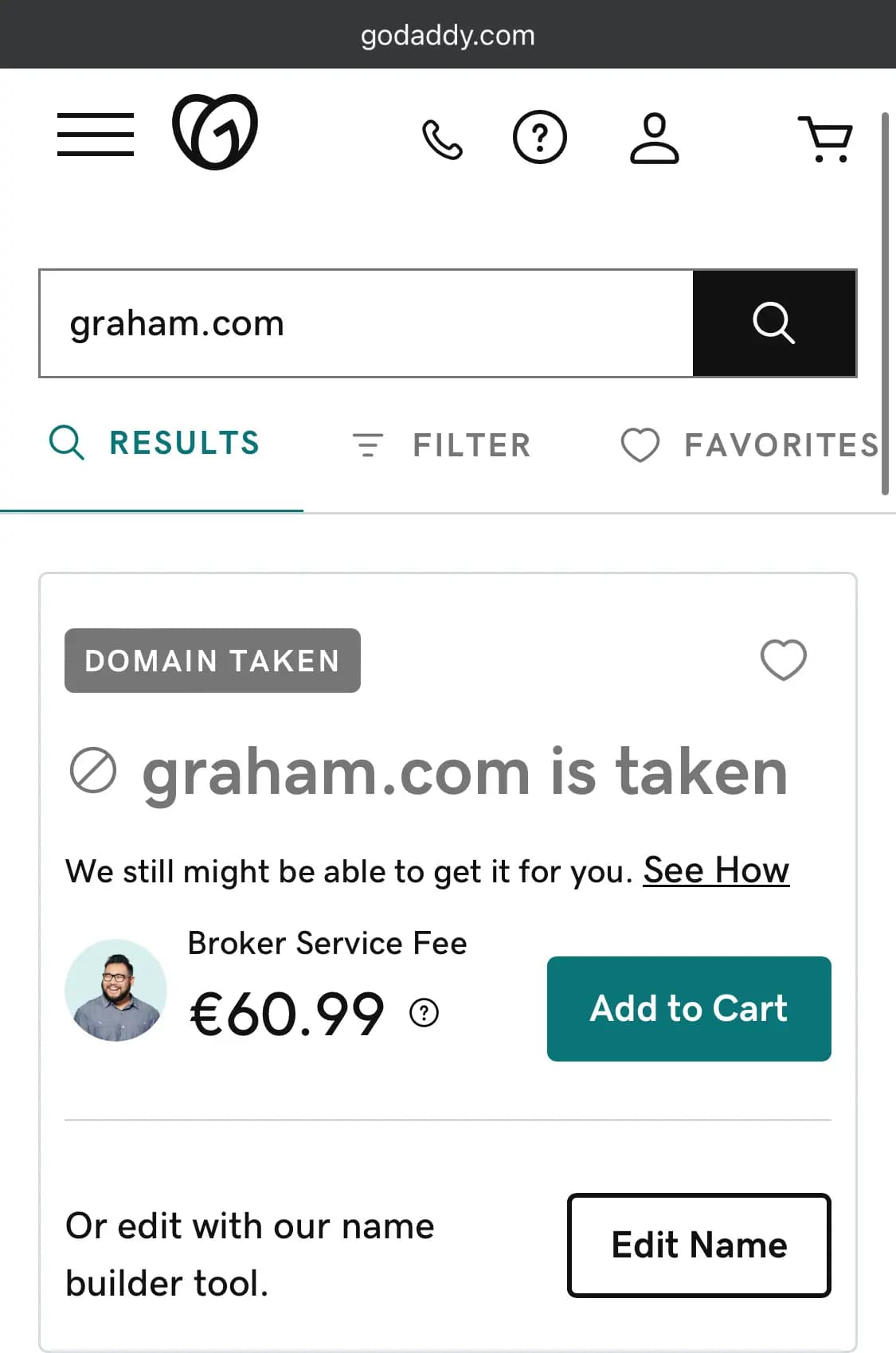
What are the 4 ways to check if a domain name is available?
There are four reliable ways to check the availability of a domain name in , in order of speed and accuracy.2026
Can you check domain availability with a simple web search?
You can try, but it is the least reliable method. Search engines display indexed web pages - they tell you nothing about real-time domain registration status.
- Type the name with the extension (yourname.com, yourname.net) into your browser to see if a website loads.
- Follow up with a registrar check. Many registered domains have no live website at all, so a blank result does not mean the name is free.
How do you check domain availability at a domain name registrar?
A domain name registrar tracks who owns which domain and lets you register a new one. Every reputable registrar provides a free, real-time availability search.
- Choose a registrar-GoDaddy, Namecheap, Bluehost and HostGator are the standard picks.
- Visit the registrar's homepage and find the domain search bar - it is the most prominent feature on most registrar sites.
- Type the name you want, including the extension, and press search.
- Read the results- the registrar shows availability, the first-year price, alternative extensions if your first pick is taken, and similar name suggestions.
- Register on the spot if the name is free and the price is fair. Good names disappear fast.
How do you check domain availability through a web hosting provider?
Many web hosting providers also offer domain registration as part of their hosting plans - useful if you need both.
- Hosts like Bluehost, HostGator, GoDaddy and DreamHost let you search for an available domain when you sign up for hosting.
- When you buy a hosting plan, you can register a new domain or transfer one you already own.
- You then manage your domain and your hosting in the same dashboard - one account, one bill, one support team.
- Many hosts include a free domain for the first year with annual hosting plans. That can save you $10-15 on the first year.
How do you check domain availability using the WHOIS database?
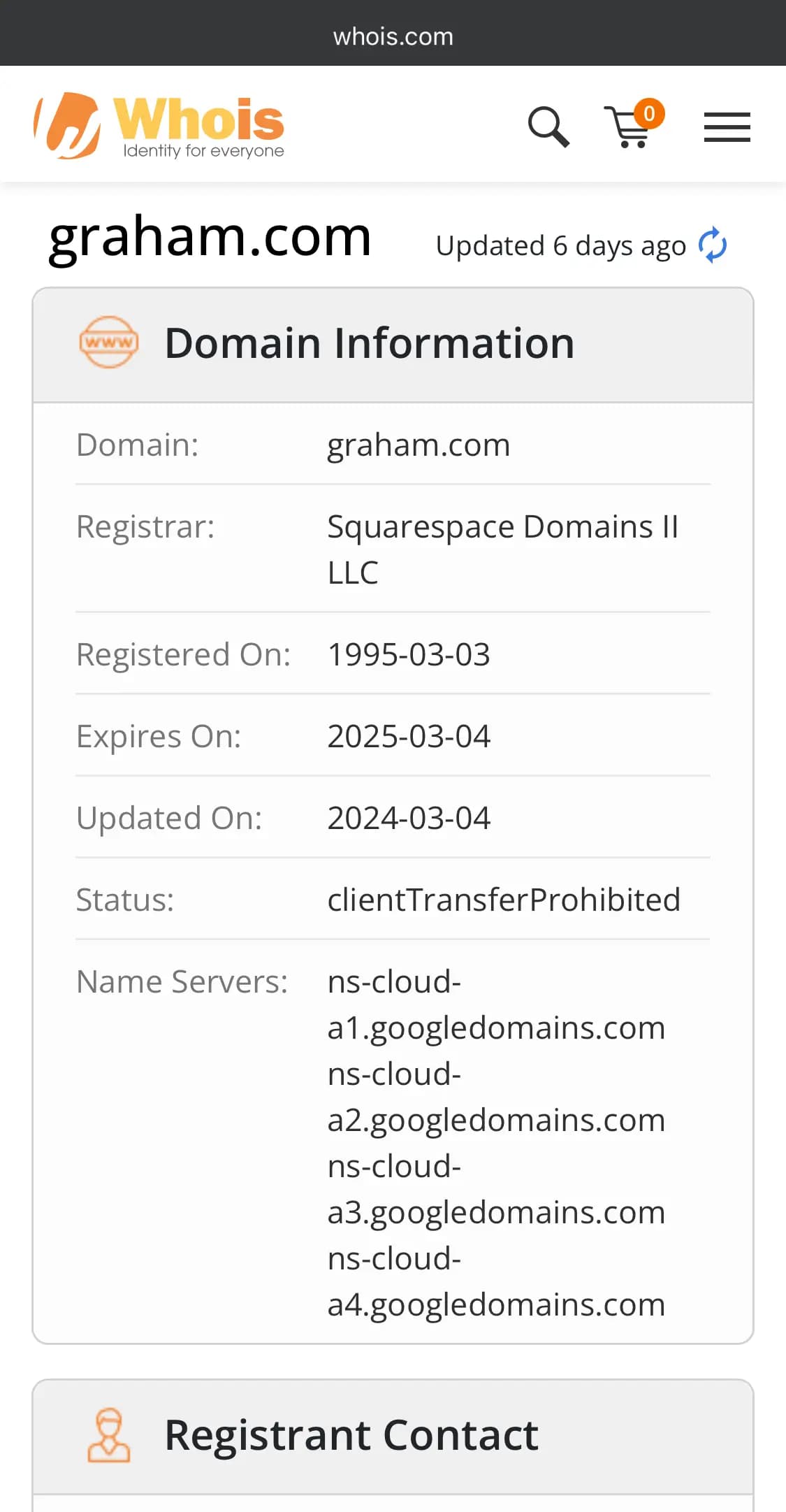
WHOIS is the public directory of every registered domain. It shows you whether a domain is registered, who owns it (when not privacy-protected), when it was created, and when it expires.
- Domain availability- WHOIS shows you whether a domain is registered, though it may lag during renewal or redemption periods.
- Owner contact info- when the owner has not enabled WHOIS privacy, you can see their name, email and registrar.
- Registration details- creation date, expiry date, and the name servers pointing the domain at a website.
- Free lookup tools- use ICANN Lookup or WHOIS.com to query the database for free.
WHOIS is the best tool when you want to find the owner of an active domain and ask if they will sell it to you.
What is the fastest free domain name checker in ?2026
For most small business owners and solopreneurs, the fastest free domain name checker is the search bar on any major registrar's homepage - GoDaddy, Namecheap, HostGator and Bluehost all return results in under a second.
Free checker | Best for | What you get |
|---|---|---|
Fastest search with the most suggested alternatives | Availability check, first-year price, suggested variants when your name is taken, register on the spot | |
Lowest renewal pricing and free WHOIS privacy | Availability check, transparent renewal pricing, free WHOIS privacy included on most TLDs | |
Buying a domain and web hosting together | Availability check, plus shared hosting plans that often include a free domain for the first year | |
WordPress-ready setup with a free domain | Availability check, free domain for the first year with most hosting plans, one-click WordPress install | |
Looking up who owns an active domain | Owner info (when not privacy-protected), registrar, registration date, expiry date |
Free as of . Registration prices vary by registrar - check the current rate for your specific name and extension before you buy.October 2026
How do you find available .com domain names that are not taken?
Available .com domain names are the hardest to find because .com is the most-registered extension - over 160 million .com domains exist. The honest path is to combine your brand idea with a modifier word.
What works in for finding an available .com:2026
- Add a category word- "shoplexi.com" or "getlexi.com" instead of "lexi.com"
- Use two short words- "blue + harbor" reads cleaner than a single forced word
- Try an action verb- "trytrellis.com", "uselemon.com"
- Use your city or region- if you serve a local market, "austinplumber.com" beats fighting for the global .com
- Generate ideas with a tool- GoDaddy, Namecheap and HostGator all run free name generators that check availability as they suggest
What are example patterns for finding an available domain name?
If every name on your shortlist is taken, switch to a pattern. These 12 patterns generate available domain names for almost any small business in :2026
- Verb + your category- try, get, use, shop, hire, book + your word. Examples: tryclear.com, getbloom.co, shoplemon.com.
- Adjective + noun- blueharbor, freshlemon, sunhouse. Two-word pairings read like a brand and stay short.
- Geo + service- austinplumber.com, miami-roofs.com. If you serve a local market, this beats fighting for the global .com.
- Brand + lab, co, hub or studio- lemonlab.com, growco.com, fixhub.com. Reads like a modern small brand.
- Invented two-syllable word- zoolo.com, vello.com, klariso.com. Easy to say, easy to spell, easy to trademark.
- Initials + meaningful word- ml-bakery.com, jk-design.co. Works when your initials carry brand meaning.
- Industry term + .io or .ai- tech and SaaS buyers expect these now. Examples: payroll.ai, intake.io.
- Niche + .shop or .store- sunscreen.shop, coffee.store. Clear ecommerce signal.
- Service noun + .app or .dev- schedule.app, intake.dev. For software products.
- Compound word- moonlamp.co, harborbox.com. Combine two short words your buyer already knows.
- Onomatopoeia or short evocative word- zap.co, buzz.shop. Often available on newer TLDs.
- Country code (.us, .uk, .ca, .au)- if you only serve a country, this is fine, cheap, and almost always available.
These are patterns, not a real-time list. Plug each one into a checker like GoDaddy or Namecheap to see which exact names are available today.
What can you do if someone has taken your business name as a domain?
If someone registered a domain that matches your trademark, your registered business name, or your brand - or if they hijacked a domain you already owned - you have real legal recovery paths. The cheapest takes a few days and costs nothing. The strongest takes 30-60 days, costs $1,500-$5,000, and wins for trademark owners 85-90% of the time. This is not a naming problem - it is a stolen identity problem, and there is a process.
Is this cybersquatting or did someone just register the name first?
Two very different problems. The legal paths only work for the first one.
- Cybersquatting or domain theft- someone registered your trademarked name or your registered brand to profit from you, parks the domain to resell to you, hosts a copycat site, or hijacked your registrar account to steal the domain. You have real recovery rights.
- Someone got there first- someone legitimately registered the name before you and has no trademark conflict with you. You do not have a legal claim. Negotiate, pay, or pick a different name.
If you do not have a registered trademark and you have not been using the name in commerce, your legal position is weak. Talk to a trademark attorney before spending money on recovery.
Step 1: How do you document the case before you act?
Before you contact anyone, build the file. You will need every piece of this later.
- Screenshot the cybersquatter's site- date-stamped, full page, including any logo, "for sale" notice, or copycat content
- Pull your trademark registration- certificate from USPTO (US), UKIPO (UK), EUIPO (EU), or your national office, with the registration date
- Pull your business registration- state filing date, articles of incorporation
- Run a WHOIS lookup on the domain via ICANN Lookup or WHOIS.com- record the registrant name, registrar, registration date, and contact email
- Save evidence of prior use- your earliest invoices, social posts, ads, or website screenshots showing you were using the name first
Store everything in one folder with date-stamped filenames. You will reuse this evidence at every step below.
Step 2: Should you send a cease and desist letter first?
Yes - it is the cheapest path and resolves roughly a third of cases. The squatter either transfers the domain or you learn fast they are going to fight.
Use the WHOIS email to send a short letter. Three things have to be in it:
- Your trademark number, the registration date, and the country office
- The specific domain you want and the specific infringement
- A deadline (14 days is standard) to transfer the domain, after which you will file a UDRP complaint
You can write this yourself or pay a trademark attorney $200-$500 for a template. Do not threaten action you are not prepared to take.
Step 3: Can you report the domain to its registrar?
Yes - and you should, especially if there is clear fraud, phishing, or impersonation. Every reputable registrar has an abuse desk that responds to legitimate complaints.
- Find the registrar- WHOIS shows you which company registered the domain (GoDaddy, Namecheap, etc.)
- Email the abuse desk- usually abuse@[registrar].com, or use the registrar's online abuse form (most have one at /abuse or /report)
- Include your trademark certificate, the offending domain, and dated screenshots
- Ask for an administrative lock to stop the domain being transferred while your complaint is reviewed
- For clear phishing or fraud, request immediate suspension - registrars can act in hours when the abuse is obvious
If the registrar will not act, you can escalate to ICANN Compliance at icann.org/compliance. ICANN cannot transfer the domain to you, but it can force a registrar to comply with its own policies.
Step 4: How does a UDRP complaint work?
UDRP - the Uniform Domain-Name Dispute-Resolution Policy - is ICANN's binding arbitration system for trademark owners. It is the standard path for recovering a cybersquatted domain. Trademark owners win 85-90% of UDRP cases.
- Where to file- WIPO at wipo.int/amc/en/domains or the National Arbitration Forum
- Cost- $1,500 (1 panelist) or $4,000 (3 panelists) for 1-5 domains, as of . WIPO also offers a priority service that returns a decision in ~30 days for ~$4,000.October 2026
- Standard timeline- the respondent has 20 days to reply; the panel typically rules within 60 days of filing
- Attorney fees- $3,000-$7,000 if you hire one. Not required, but recommended for anything over a clear-cut case.
- What you must prove- three things: (1) the domain is identical or confusingly similar to your trademark, (2) the registrant has no rights or legitimate interest in the domain, (3) the domain was registered and is being used in bad faith
- Outcome- if you win, the panel orders the registrar to transfer the domain to you. No money damages - this is a transfer remedy only.
UDRP only works against registered trademarks. If your trademark filing is still pending, file it first, wait for registration, then file UDRP.
Step 5: When should you use URS instead of UDRP?
For very clear-cut cases on newer gTLDs, the Uniform Rapid Suspension (URS) is faster and cheaper. It costs $375, returns a decision in about 20 days, and suspends the domain - it does not transfer it to you.
URS only covers new gTLDs (.shop, .app, .ai, .blog, .io and similar). It does NOT cover .com or .net. Use it when you want to take down a clear infringer fast and you do not need to own the domain yourself.
Step 6: Can you sue under the ACPA in US federal court?
Yes - the Anticybersquatting Consumer Protection Act lets US trademark owners sue cybersquatters in federal court. You can recover the domain and money damages, but it is expensive.
- Statutory damages- $1,000 to $100,000 per domain, plus attorney fees in some cases
- Cost- $15,000-$50,000+ for a full case
- Timeline- months to a year
- What you must prove- bad-faith intent to profit from your trademark, that the trademark was distinctive when the squatter registered, that the domain is identical or confusingly similar
- In rem action- if the squatter is overseas and you cannot find them, you can sue the domain itself under 15 U.S.C. § 1125(d)(2). This works when the registrant has hidden their identity behind privacy services.
ACPA only makes sense for high-value domains or where you want money damages in addition to the transfer. For most small businesses, UDRP is the right path.
Step 7: How do you report domain fraud or theft to the government?
If your domain was actually stolen - account hijack, social engineering, fraudulent transfer - report it. It will not always recover the domain, but it builds the case and triggers investigation.
- United States- file with the FBI Internet Crime Complaint Center at ic3.gov for theft and fraud, and the FTC at reportfraud.ftc.gov for consumer-facing fraud
- United Kingdom- report to Action Fraud at actionfraud.police.uk
- Canada- report to the Canadian Anti-Fraud Centre at antifraudcentre-centreantifraude.ca
- Australia- report to Scamwatch at scamwatch.gov.au
- EU- report to your national cybercrime unit and your country's IP office
- Local police- file a report if there is actual theft (account hijack, fraudulent transfer). This unlocks options like subpoenas to the registrar.
Report to law enforcement on the same day you notice the theft. The faster you move, the better your chance of stopping a resale before the domain is buried behind privacy services or transferred to another country.
What if you do not own a trademark yet?
File one. A trademark application starts at $250-$350 per class with the USPTO, and the moment you file, your priority date is locked. You can still pursue UDRP and ACPA after the trademark registers, using your prior use in commerce as part of the evidence.
If you have been using the name in commerce - selling products, running ads, posting under it on social - keep dated proof. Common-law trademark rights exist in some jurisdictions even without registration, but they are far harder to enforce. Registration is worth it.
This is legal advice you should verify with an attorney
The paths above are real and widely used, but every case is fact-specific. The cost, timeline and probability of winning depend on the country your trademark is in, the country the domain is registered in, the bad faith you can prove, and the strength of your prior-use evidence. Before you spend money on UDRP or ACPA, spend $300-$500 on an hour with a trademark attorney who can tell you whether your case is winnable. That hour is the highest-leverage spend in the whole process.
What do you do if all the domain names are taken?
If every domain name you try is taken, stop fighting for single-word .com names - that game is over for almost every common English word in . The fix that works 9 times out of 10 takes 5 minutes and $15: add a one-syllable verb or category prefix to your brand word. "Lexi.com" is gone; "getlexi.com" or "shoplexi.com" is almost certainly free. If you do not love that, switch from .com to .co - the buyer in reads them the same way. Try the cheaper, faster paths below before you spend hours emailing owners or thousands at auction.20262026
Should you use a different domain extension?
Yes. For most small businesses in , the right move is .co - it reads like .com to buyers and your exact name is probably available. If you are a tech or SaaS business, go with .io. If you are a local service, go with your country code (.us, .uk, .ca). Skip .info, .biz, .xyz - they signal "couldn't get a real domain."2026
- .co- the most common .com alternative, used by serious businesses
- .io- common for tech startups and SaaS
- .shop or.store- clear ecommerce signal
- .app or.dev- for software products
- Your country code(.us, .uk, .ca, .au) - if you serve a local market
Three popular .com alternatives are also worth a direct check:
- .net domain names- originally for network and internet companies, now used broadly. Available .net domains are easier to find than .com because fewer brands target them. Renewal pricing is similar to .com.
- .org domain names- the standard for non-profits, communities, and educational projects. Many .org names are still available. Buyers expect a community or mission-driven feel from a .org.
- .info domain names- originally for information sites, now treated as a budget TLD. Available .info names are plentiful, but the extension looks dated in - skip it for a customer-facing brand unless you have a strong reason.2026
Skip the cheap, novelty extensions like .xyz or .top unless your buyer will never have to remember the URL.
Can a domain name generator help find an available name?
Yes - and this is the next step if modifying your name did not work. Open Lean Domain Search or Namecheap's Beast Mode, type your two best seed words, and skim the first 30 results. You will find an available name in under 10 minutes 95% of the time. The generators only suggest names that are actually available right now, so you skip the search-and-disappointment loop entirely.
How do you modify a desired name to make it available?
Add one short word to your name and check again. This single move turns a taken name into a free one for most small businesses inside 5 minutes - no negotiation, no waiting, no extra cost.
The patterns that work in order of best-first:
- Add a prefix or suffix- "getlexi" or "shoplexi" instead of "lexi"
- Add a category keyword- "lexigarden" or "lexicoffee"
- Use a synonym- if "ideaworld" is taken, try "ideascape", "ideacraft", or "ideastack"
- Run it through an online thesaurus for related words you would not think of
- Use an abbreviation or acronym if the original is long
- Add a hyphen as a last resort - awkward hyphen placement looks unprofessional
Can you contact the owner of a taken domain?
Only if the name is worth $500+ to you - that is the floor for parked domains, and premium names go for far more. Use WHOIS.com or ICANN Lookup to find the owner email. Send a 3-sentence message: "Hi, I am building [business]. Is [domain.com] for sale? What would you consider?" Do not name a price first - let them anchor. Most owners ignore the email. The ones who reply usually quote $1,500-$10,000. Walk away if it is more than the name is worth to you.
Should you track a taken domain until it expires?
Only if you can wait months and the domain shows clear signs of abandonment - no live website, expired for years already, owner contact info bouncing. Otherwise skip this path. Most owners auto-renew. You will wait six months for nothing.
- Use a WHOIS lookup to find the domain's expiration date.
- Set a reminder for 30 days after expiration - that is when most names hit the public release queue.
- Be ready to register quickly. After expiration there is a 30-day grace period, then a 30-day redemption period, then a 5-day pending delete period before anyone can buy it.
- Most owners auto-renew. If the domain is in active use, expect this to fail.
What is a domain backorder service?
A domain backorder service attempts to register a domain the moment it becomes available. GoDaddy, DropCatch and SnapNames all offer this. You pay upfront (typically $20-100). If the domain releases and the service catches it, you get it. If not, you usually get a refund or a credit toward another backorder.
Can you bid on a domain at auction?
Yes. Some domain owners list their names on domain auction platforms like GoDaddy Auctions, Sedo or Afternic. You bid against other interested buyers and the highest bidder takes the name. Auction prices range from $100 for an unwanted hand-registered name to seven figures for a top-tier .com.
How do you find available website names that work for your business?
An available website name (or available URL, or available web address - all the same thing) needs three things: it is genuinely free to register, it matches your brand, and it does not infringe on someone else's trademark.
The fastest workflow:
- List 10 candidate names- mix exact brand names, descriptive names, and creative names
- Check availability in batch- GoDaddy's bulk domain search lets you paste all 10 at once
- Check trademarks- run the available ones through the USPTO trademark database (US) or your country's IP office before you buy
- Check social handles- search the matching handle on Instagram, X, LinkedIn and TikTok
- Register the winner same day- good names disappear fast
A name that is available as a domain but conflicts with an existing trademark can cost you the name later. The trademark check takes ten minutes and is worth it.
How do you check who owns an active domain name?
To check who owns an active domain name, use ICANN Lookup or WHOIS.com - both return the registered owner, registration date, expiry date, and contact info when the owner has not enabled privacy protection.
If the owner has enabled WHOIS privacy (most registrars include this free now), the contact field shows the privacy service instead of the real owner. You can still see the registrar, the registration date and the expiry date - useful if you want to estimate when a domain might become available again.
How much does an available domain name cost in ?2026
Most available .com domain names cost between $10 and $15 for the first year, with renewal prices typically $12-$20/year depending on the registrar. Less popular extensions like .info, .biz or .xyz often launch under $5 for the first year and renew at $15-$25.
- Standard .com- first year $10-$15, renewal $12-$20
- .co, .io, .ai- first year $25-$80, renewal often similar
- .shop, .store, .app- first year often discounted to $1-$5, renewal $30-$50
- Premium names(short, dictionary words, generic terms) - $500 to $50,000+, set by the seller
- WHOIS privacy- free at Namecheap and most modern registrars; ~$10/year at GoDaddy on lower tiers
Pricing as of . Verify the current price for your specific name and extension at the registrar before you register.October 2026
How do you choose a good available domain name?
A good available domain name is short, easy to say out loud, easy to spell, and matches what you actually do.
- Keep it under 15 characters when you can - long names get typed wrong
- Use one or two words- three is the limit before it stops feeling like a brand
- Make it memorable- easy to spell, pronounce, and recall on first hearing. The "radio test": would someone hearing the name once spell it right?
- Keep it brandable- unique and relevant to your business so it builds recognition
- Add relevant keywords carefully- they help SEO and tell users what you do, but readability comes first
- Avoid hyphens, numbers and special characters- they get lost when you say the URL out loud
- Pick the right extension- .com if you can get it, otherwise .co, .io, country code or industry-specific
- Check trademarks- search the USPTO database (US) or your country's IP office before you register, to avoid losing the name later
- Act fast- if you find the perfect name, register it the same day
You can read our full guide on how to choose the perfect domain name for more detail.
How do you register an available domain name once you find it?
Once a domain is available and you have decided to buy it, register it through any reputable registrar - then turn on auto-renew the same day.
- Look for bundled offers- many web hosts include a free domain for the first year with annual hosting plans. Bluehost and HostGator do this routinely. Saves $10-15 on year one.
- Plan for future growth- pick a registrar that scales with you. Solid customer support, DNS management and easy transfer policies matter more than a $2 saving on year one.
- Grab the social handles- check Instagram, X, LinkedIn, TikTok and YouTube for the same name. Register the handles even if you do not use them yet. Consistency strengthens brand recall.
- Read the renewal terms- know what year two costs before you buy year one. Some registrars discount year one heavily and triple the price at renewal.
- Turn on auto-renew- the day you register. Losing a domain to expiration is the single most preventable mistake in this whole process.
- Register variations- the .com plus the .net, plus the hyphenated version, plus common misspellings if the brand matters. This blocks typo-squatters and protects your name. Read our guide on how to register a domain name for the full walkthrough.
How do you protect your domain name once you own it?
Once your domain is registered, three layers of protection keep it safe from theft, hijacking and expiration.
- Use a reputable, ICANN-accredited registrar- skip unknown discount registrars. The biggest names (GoDaddy, Namecheap, Bluehost, HostGator) all carry ICANN accreditation and ship security features by default.
- Enable domain locking (transfer lock)- most registrars offer this free. It blocks unauthorized transfers of your domain to another account. Turn it on and only disable when you actually need to transfer.
- Use a strong password and two-factor authentication (2FA)- your registrar account is the single point of failure. A unique password plus 2FA on that account is the single biggest security upgrade you can make.
- Keep your contact info current- your registrar emails you for renewal, security and policy notices. Stale contact info means missed warnings and lost domains.
- Watch for phishing emails- attackers send fake renewal notices and login alerts that look like they come from your registrar. Never click a link in a renewal email - log in to the registrar directly.
- Turn on WHOIS privacy- hides your personal contact details from the public WHOIS record. Free at Namecheap and most modern registrars.
- Set expiration reminders or use auto-renew- the cheapest, simplest protection. A lapsed domain you cared about is the most expensive mistake on this list.
- Keep your login credentials private- do not share the registrar account password. Use sub-accounts or delegated access if a team member needs to manage DNS.
- Register the domain as a trademark- if your domain is also your brand, file for a trademark. This gives you legal grounds against typo-squatters and copycats.
Do you actually need a paid domain name?
For a real business, yes. A custom domain is the single cheapest credibility signal you can buy - under $15 a year for the difference between "yourbusiness.com" and "yourbusiness.wixsite.com" or "yourbusiness.wordpress.com" on the URL bar.
Skip a paid domain only if you are testing a side project for a few weeks, you have no customers yet, and you do not plan to send anyone the URL. The moment you tell a customer your web address out loud, the free subdomain costs you.
What do people actually ask about checking if a domain is available?
Can I check if a domain name is available for free? Yes. GoDaddy, Namecheap, HostGator, Bluehost and ICANN Lookup all let you check availability free, with no account required.
What is the difference between a domain name and a URL? The domain name is the readable address (yourbusiness.com). A URL is the full web address including the protocol and any path (https://yourbusiness.com/about).
Can someone else register my exact business name as a domain? Yes, unless your business name is a registered trademark in the country where the domain was registered. If they registered it after your trademark and are trying to profit, you can file a UDRP complaint with ICANN.
How long does it take for a domain to become available after it expires? Typically 30-90 days. Domains go through a 30-day grace period, then a 30-day redemption period, then a 5-day pending delete period before they re-open to the public.
Can I register a domain and not build a website yet? Yes. Many small businesses register their domain first and park it (a placeholder page) until they are ready to build. Most registrars include free parking.
Is .com still the best extension in ?2026Yes for global brands and any business where buyers will type the URL. No for tech startups (.io, .ai are common), ecommerce (.shop, .store), or local services (your country code works fine).
What happens if I do not renew my domain? You lose it. After the grace and redemption periods, anyone can register the name. Set auto-renew the day you buy.
Do I need WHOIS privacy? Yes for a personal-use domain or a one-person business - it hides your home address from the public WHOIS record. It is free at Namecheap and most modern registrars.
Where can you go deeper on domains and websites?
- Compare every website builder we cover on our website builders hub.
- See our guide to the best domain registrars in2026.
- Once you have your domain, read how to register a domain name.
- Need hosting too? Start with the best web hosting.
- Picking the perfect name? Read how to choose the perfect domain name.
- How we score and recommend: Sonary brands rating methodology.
What is the bottom line on checking if a domain name is available?
Type your name into GoDaddy's domain checker or any major registrar's search bar. If it is available and under $15, register it the same day - good names disappear fast. If it is taken, try a different extension (.co, .io, .shop), modify the word (add a verb or category), or use ICANN Lookup to find the owner and ask if they will sell. For a real business, the $10-$15 a year a custom domain costs is the cheapest credibility you will ever buy. Once you own it, turn on auto-renew, enable domain lock, and add 2FA to your registrar account - those three settings prevent the most common ways small businesses lose their domain.