Ecommerce SEO: how do you do it in 2026 (for small shops)?
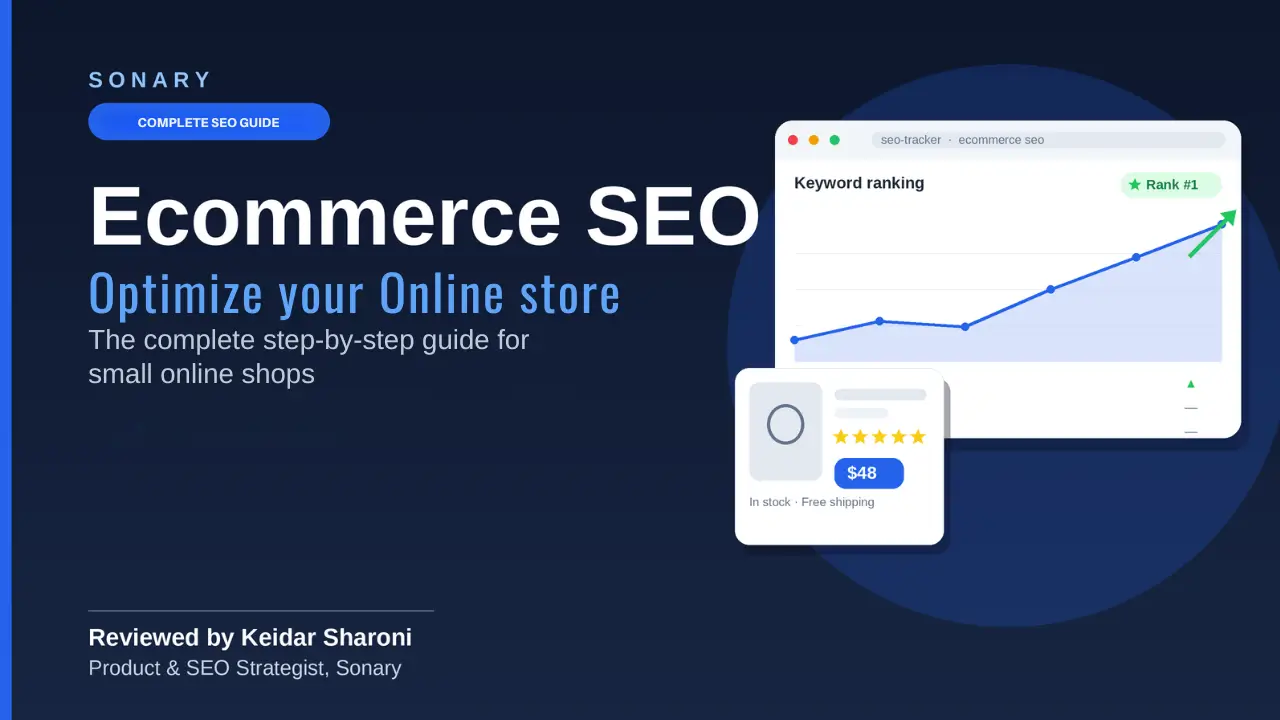


Ecommerce SEO means making your product and category pages rank when shoppers search to buy. If you sell a few items, optimize product pages first. If you sell hundreds, fix category pages first – they earn 3–5x more organic revenue. The catch: you must do this on every new URL, forever.
This is a long guide on purpose. Ecommerce is one of the hardest site types to optimize – you are juggling thousands of URLs, variants, filters, and stock changes at once. The first half is the core system every shop needs. The second half covers the harder pieces: architecture, faceted navigation, pagination, stock, duplicate content, reviews, feeds, links, international, and measurement. Do the core on every page, then work through the rest as you grow.
Why keep reading? Because I do this for a living, and I have the results to back it up. I am Keidar Sharoni, SEO Lead & Product Strategist at Sonary. I do not just write about ecommerce SEO; I run it for real stores. One jewelry shop I personally manage grew to 3.46 million impressions and 311,000 clicks in about nine months, using the exact basics in this guide (see the real Google Search Console data below). Everything here is what I actually do on live stores, not recycled theory. Follow it, and you can do the same.
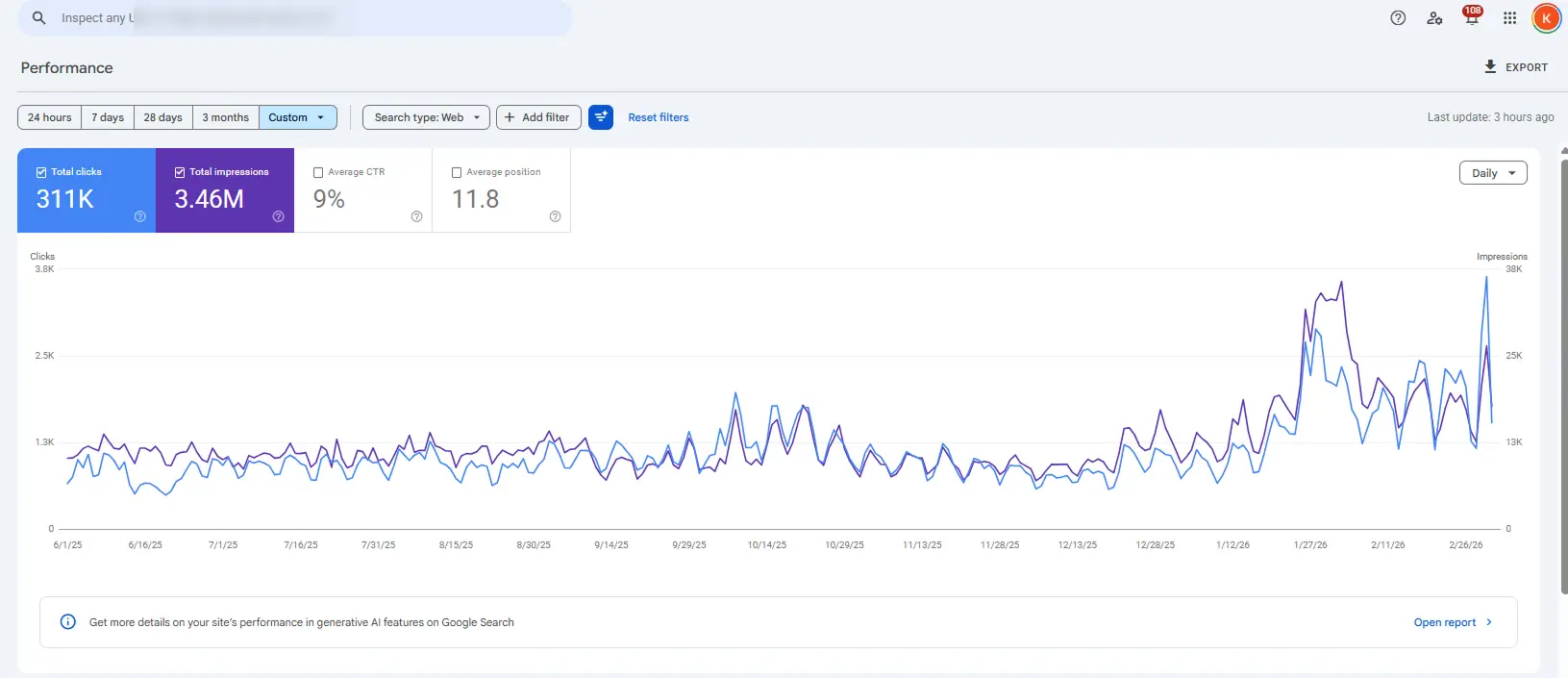
Real Google Search Console data from a jewelry ecommerce store I manage; store URL hidden for privacy. Range: June 2025 to February 2026.
Which ecommerce SEO situation describes you?
Pick the line that best reflects your store. It tells you where to start.
- You sell 1–20 products: start with product pages. Each one is a landing page. Make every field earn its place.
- You sell hundreds or thousands of products: start with category pages, site architecture, and faceted navigation. Categories rank for the big searches and pass strength downward.
- You are launching a brand-new store: get the technical foundation, architecture, and clean URLs right before you add products – ideally on one of the best ecommerce platforms. Fixing 500 messy URLs later is painful.
- You already rank on Google, but AI tools never mention you: jump to the AI search section. Your content is fine; machines just cannot read it cleanly.
- You are moving platforms or redesigning: go straight to the migration section first. A bad move can erase years of rankings in a weekend.
What is the step-by-step system every ecommerce page needs?
Seven moves, run in order on every URL – from keyword to indexing. Learn them once, and you repeat them for the life of your shop.
This is not a pick-and-choose list. It is a sequence you run on every product and category page, old and new. Each step builds on the one before it: there is no point writing a title before you have chosen the keyword, and no point earning links to a page Google cannot crawl. Below is the whole system at a glance. Then we walk through each step in detail – with a good example and a wrong one.
| Step | What it does for you | Matters most on |
|
1. Keyword + intent |
Puts the page in front of ready-to-buy shoppers |
Every page |
|
2. Title + meta + URL |
Wins the click once you appear in results |
Every page |
|
3. Unique content |
Tells Google what the page is; beats thin duplicates |
Product & category |
|
4. Optimized images |
Loads faster, ranks in image search, cuts returns |
Product pages |
|
5. Product schema |
Adds price, stars, stock to your listing; +20–30% CTR |
Product pages |
|
6. Internal links |
Passes ranking strength between your pages |
Category & blog |
|
7. Technical + indexing |
Lets Google crawl, index, and trust the whole site |
Whole site |
Step 1: How do you choose the right keyword for each page?
Match one page to one buyer phrase, then check the intent behind it before you write a word.
Ecommerce keywords split into four intents: navigational (a brand name), informational (how to use it), commercial (best, compare, vs), and transactional (buy, price, near me). Product and category pages should target commercial and transactional phrases. Blog posts handle the informational ones.
Buyers search for categories, not SKUs. Someone types “standing desk for small office”, not your model number. So your category page targets the broad phrase, and each product page targets a specific one like “48-inch bamboo standing desk”. A higher cost-per-click usually means stronger buying intent, so a low-volume phrase can still outsell a popular one. Free tools to find phrases: Google Keyword Planner, Google autocomplete, and the “People also ask” boxes. For search volume and difficulty, our pick of SEO tools like Ahrefs does the job.
| ✓ Good | ✗ Wrong |
|
/desks/standing targets “standing desk”; each product targets “48-inch bamboo standing desk”. |
Homepage, category, and three products all target “standing desk”. |
|
Why: One clear phrase per page, matched to how buyers search. No two pages compete. |
Why: The pages cannibalize each other, so Google cannot tell which to rank – and often ranks none. |
What does this look like in practice?
Maya sells beeswax candles. She was ranking for nothing against big brands on “candles.” She switched her top product page to target “soy-free beeswax candles” – lower volume, but exactly what her buyers type. That page reached the first results within six weeks and now brings 40% of her organic sales.
Step 2: How do you write titles, meta descriptions, and URLs that get clicks?
Put the exact keyword near the front of the title, keep the URL short and descriptive, and treat the meta description as your ad.
Three fields do the heavy lifting. Get them right on every page:
- Title tag – 50–60 characters, keyword in the first few words.
- Meta description – under 155 characters, one clear reason to click. It does not rank you, but it wins the click.
- URL slug – short, lowercase, hyphenated, descriptive words. Google itself says to put real words in the path.
| ✓ Good | ✗ Wrong |
|
Title: “Soy-Free Beeswax Candles | Hand-Poured | Maya Co.” – URL: /candles/soy-free-beeswax |
Title: “Home | Products | Maya Co.” – URL: /product?id=3243 |
|
Why: Keyword leads the title; the URL uses descriptive words Google can read. |
Why: The title wastes the click and the numeric URL tells Google and shoppers nothing. |
Keep URLs stable. Every time you change a slug you must redirect the old one, or you lose the ranking you earned. Decide the pattern once: /category/product works for almost every small shop.
What does this look like in practice?
Devon makes leather wallets. His titles all read “Product – Devon Leather.” He rewrote them to lead with what people search: “Slim RFID Leather Wallet (Handmade) – Devon Leather.” Same page. Clicks from search rose 28% in a month because the title finally matched the search.
Step 3: How much content does a product or category page really need?
Enough to answer the buyer completely and uniquely – not manufacturer copy everyone else already uses.
Category pages need a real 200–400 word intro that helps someone choose, not 80 words of stuffed boilerplate. Product pages need original descriptions: what it is, who it is for, the specs, and the honest trade-offs. Copy-pasting the supplier description is the fastest way to look like a thin duplicate of fifty other shops.
Open each page the way this guide opens: answer the buyer’s main question in the first two or three sentences. Then add the detail – sizing, materials, care, what is in the box. Add a few real FAQs at the bottom; they feed the question boxes in search and AI answers.
| ✓ Good | ✗ Wrong |
|
“This 48-inch desk uses solid bamboo, holds 220 lbs, and adjusts from 28 to 48 inches. Best for a home office under 6 ft wide.” |
“Great quality standing desk. Buy now! Best price online.” (same text on every product) |
|
Why: Original, specific, and answers real buyer questions – impossible to confuse with any other shop. |
Why: Thin, duplicated marketing copy tells Google nothing and gives AI nothing to cite. |
What does this look like in practice?
A two-person ceramics studio used the wholesaler’s exact text on 60 mugs. None ranked. They rewrote 12 best-sellers in their own voice – kiln temperature, dishwasher-safe or not, why the glaze varies – and added three FAQs each. Those 12 pages doubled their organic traffic in one quarter while the untouched pages stayed flat.
Step 4: How do you optimize product images for search?
Name the file for the product, add real alt text, and compress every image to load fast.
Images are half of an ecommerce page, and they leak ranking if you ignore them. Four fixes cover it:
- Descriptive filenames – use nike-air-max-270-black-side.jpg, never IMG_4521.jpg.
- Alt text – describe the image and include the product naturally.
- Compression – export as WebP or AVIF, under about 100KB, no visible quality loss (free tools: Squoosh, TinyPNG).
- Set width and height – so the layout does not jump while loading, which protects your Core Web Vitals.
| ✓ Good | ✗ Wrong |
|
File: bamboo-standing-desk-white-side.webp – Alt: “White 48-inch bamboo standing desk, side view” |
File: IMG_4521.JPG (4MB) – Alt: “” (empty) |
|
Why: Filename and alt text describe the product, so it ranks in image search and helps screen readers. |
Why: Google cannot read the image, it loads slowly, and it is invisible in image search. |
Step 5: How do you add product schema to win rich results?
Add Product structured data in JSON-LD so your listing can show price, stars, and stock – the details that pull clicks.
Schema is code that tells search engines exactly what your page is. For products, JSON-LD is the only format Google recommends. The required fields are name, image, and offers (price, currency, availability). Add brand, gtin, and aggregateRating when you have them – attribute-rich schema appears in AI shopping answers far more often than bare-bones markup.
Proper structured data lifts click-through rate 20–35% versus plain blue links, because price and stars show in the result. Add BreadcrumbList and FAQPage schema too. Most Shopify, WooCommerce, and Wix stores do this with a setting or a free app – you rarely need a developer.
| ✓ Good | ✗ Wrong |
|
Product schema with name, image, price, availability, brand, gtin, and aggregateRating – validated in the Rich Results Test. |
No schema, or schema with a price that does not match the visible page price. |
|
Why: Google shows price and stars in the result, and AI engines can extract every attribute. |
Why: You get a plain listing, and mismatched data can disqualify you from rich results entirely. |
What does this look like in practice?
Sam runs a small pet-treat shop on Shopify. He switched on a free schema app that added price, stock, and review stars to every product. Two weeks later his listings showed gold stars in Google, and his click-through rate on those products climbed from 1.9% to 2.6% – real extra traffic for a ten-minute setup.
Step 6: How do you link your pages so they rank as a team?
Point links from your strongest pages and blog posts to the category and product pages you want to rank, using descriptive anchor text.
Internal links pass ranking strength around your site and show Google how pages relate. Category pages hold the most strength, so link down to key products and link back up from products to their category. Every blog post should link to the relevant category with keyword-rich anchor text.
| ✓ Good | ✗ Wrong |
|
A post links “how to choose a standing desk” to /desks/standing using that exact anchor text. |
The same post links the word “click here”, or does not link to the category at all. |
|
Why: Descriptive anchor text tells Google what the target page is about and passes real strength. |
Why: “Click here” carries no meaning, and an unlinked money page never receives the strength it needs. |
Do this: when you publish a new page, add two or three links to it from existing pages the same day. It is the cheapest ranking lift you have, and the step most small shops skip.
Step 7: What technical basics can you not skip?
Make sure Google can crawl every page, keep speed healthy, and stop duplicate URLs from wasting your crawl budget.
You do not need to be a developer. You need four things handled:
- Crawlable and indexed – submit a sitemap in Google Search Console and confirm your key pages are indexed.
- Core Web Vitals – aim for LCP under 2.5 seconds, INP under 200 milliseconds, CLS under 0.1. INP is the one most stores fail in 2026. Check free at pagespeed.web.dev.
- HTTPS and one home for every page – secure the site, and pick one version of each URL (https, no www vs www, trailing slash) so you do not split signals.
- Canonical tags – a self-referencing canonical on real pages, and duplicates pointed to their primary.
| ✓ Good | ✗ Wrong |
|
A self-referencing canonical on every real page; a sitemap in Search Console; one URL version per page. |
Both http and https live, /Desk and /desk resolve, and 40,000 filter URLs are crawlable. |
|
Why: Google spends its crawl budget on your real pages and indexes them quickly. |
Why: Crawl budget is wasted and signals split across duplicates, so real pages update slowly. |
What does this look like in practice?
A home-fragrance shop kept slipping. In Search Console the owner saw Google crawling 40,000 filter URLs for a 300-product store. She canonicalized the filter pages to their parent categories and fixed a slow script wrecking INP. Within two months Google refocused on the real pages and rankings recovered.
How do you actually optimize one page in 30 minutes?
Run this checklist on the page in front of you, top to bottom, before you move on.
- Keyword: one primary phrase, intent is commercial or transactional.
- Title: keyword in the first few words, 50–60 characters.
- Meta description: under 155 characters, one reason to click.
- URL: short, lowercase, hyphenated, descriptive, no junk parameters.
- Content: a unique opening answer, then real detail in your own words.
- Images: named for the product, alt text written, compressed to WebP.
- Schema: product structured data on, validated in the Rich Results Test.
- Internal links: two or three links pointing to this page from existing pages.
- Index: submit the URL in Search Console so Google sees it today.
That is the whole routine. Do it on every existing page over time, and on every new page the day you publish it.
Do you need technical skills to do this (Shopify, Wix, or WordPress)?
No. Every major platform gives you these controls built in – you fill in fields and pick from menus. No coding required.
The tools are basically the same everywhere; only the menu names differ. Shopify and Wix are all-in-one platforms with SEO built in – per-page meta tags, redirects, and global settings like robots.txt and an automatic sitemap. WordPress works the same once you install a free plugin like Yoast or Rank Math. You do not need deep technical knowledge; you need to know where the fields are and which option to pick.
| Platform | Where the SEO controls live | What is automatic |
|
Shopify |
Per page: the “Edit website SEO / search engine listing” section (title, meta, URL handle, index). Redirects under Navigation > URL Redirects. |
sitemap.xml and robots.txt were generated for you. |
|
Wix |
Per page: the “SEO” tab (meta tags, index / no-index). Site-level SEO settings and 301 redirects in the SEO dashboard. |
sitemap and robots.txt handled in settings. |
|
WordPress / WooCommerce |
Install Yoast or Rank Math: per-page box for title, meta, index control; a schema-type dropdown; redirects. |
The plugin builds your sitemap and robots.txt. |
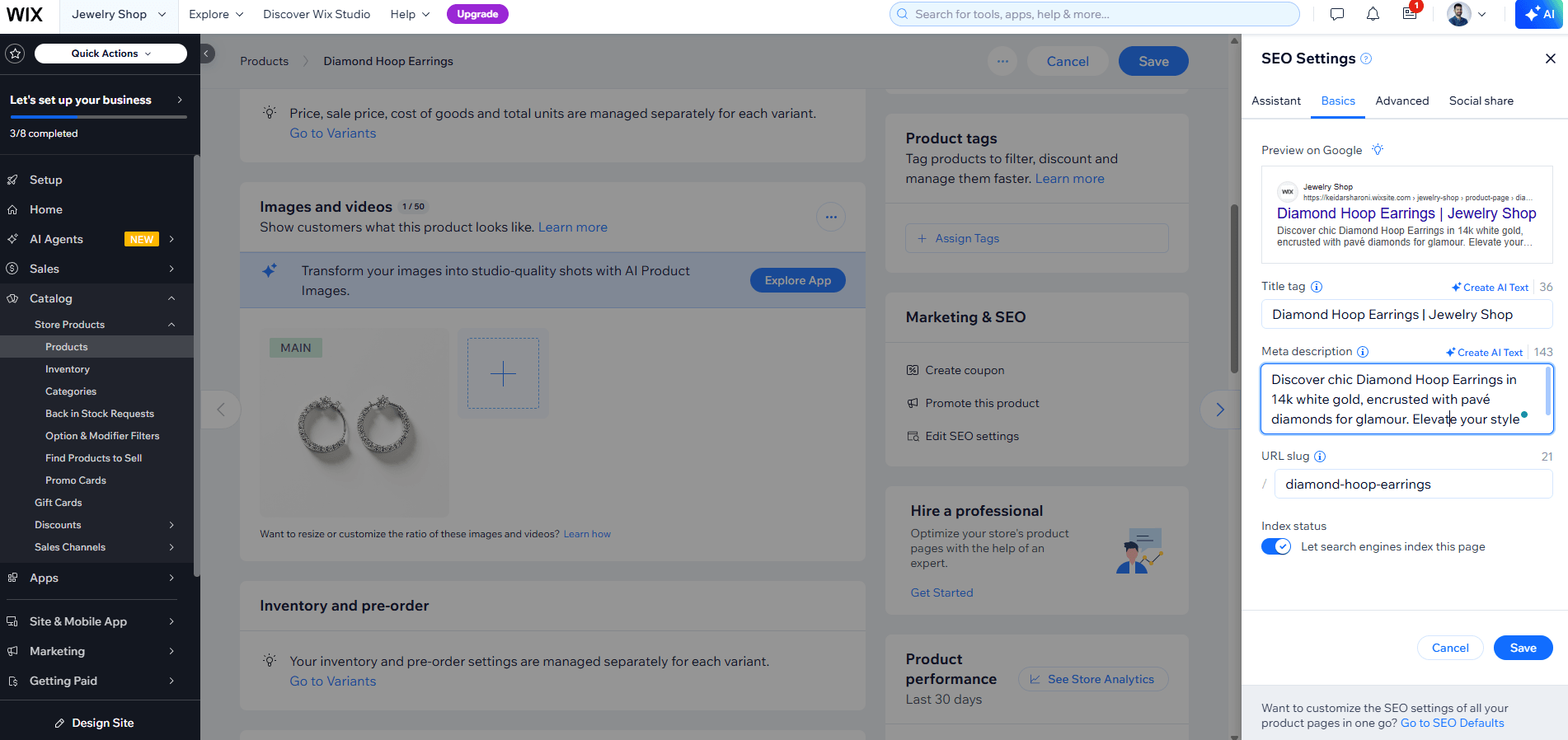
The everyday tasks work almost identically on all three:
- Meta title, description, page robots – open the page, find its SEO tab or section, fill in the fields. Set no-index right there when needed.
- Image ALT text – click the image, open its Settings, add or edit the ALT text. Same idea on every platform.
- Schema – pick the type from a dropdown by page: Product for a product page, Article for a blog post. Built in on Shopify and Wix, or via Yoast / Rank Math on WordPress. You do not hand-code JSON-LD.
- Redirects, sitemap, robots.txt – in your global SEO settings, mostly automatic. You only touch redirects when you change a URL.
| ✓ Good | ✗ Wrong |
|
On a product page, set the schema type to “Product” from the dropdown, then fill the SEO tab: title, meta, clean URL handle. |
Leaving schema on the default “WebPage” for a product, or hand-coding JSON-LD you do not need. |
|
Why: You get correct structured data and meta tags in minutes, no code, by matching the option to the page type. |
Why: The wrong type (or broken hand-coded markup) means no rich result, when a two-click dropdown would have worked. |
What is the real difference between product-page and category-page SEO?
Category pages rank for the big searches; product pages convert the shopper once they arrive.
| Category page | Product page | |
|
Targets |
Broad buying phrases (“running shoes”) |
Specific phrases (“waterproof trail shoes size 10”) |
|
Main job |
Rank and pull in traffic |
Convert the visitor into a sale |
|
Content |
200-400 word buying-guide intro + product grid |
Unique description, specs, FAQs, reviews, video |
|
Schema |
BreadcrumbList + ItemList |
Product + BreadcrumbList + FAQPage + VideoObject |
|
Link role |
Passes strength down to products |
Passes strength back up to category |
The complete picture: the harder half of ecommerce SEO
The seven steps rank individual pages. But an ecommerce site is a system of thousands of pages, and the sections below are what separate a store that scales from one that quietly buries its own best pages. You do not need all of this on day one. Work through it as your catalog grows.
How should you structure your ecommerce site architecture?
Keep it a simple hierarchy – home to category to subcategory to product – with every important page reachable in three clicks.
Architecture is how your pages connect. The proven model is a clean hierarchy: home, then categories, then subcategories, then products, with breadcrumbs on every page and a URL path that mirrors the hierarchy. Pages buried four or more clicks from the homepage get crawled less often and are seen as less important. Keep every category and product within three clicks. Category pages act as the hubs that hold your topical strength and pass it to the products beneath them.
| ✓ Good | ✗ Wrong |
|
Home > /desks > /desks/standing > /desks/standing/bamboo-48. Breadcrumbs on every page; products two to three clicks deep. |
A flat pile where 900 products all hang off the homepage, or products buried five clicks deep. |
|
Why: Google reaches and understands every page fast, and strength flows cleanly down the hierarchy. |
Why: Deep or flat-but-messy structures leave key pages rarely crawled and looking unimportant. |
How do you handle faceted navigation without wasting crawl budget?
Index the few filter combinations people actually search for; block, noindex, or canonicalize the rest.
Filters (size, color, price, brand) are great for shoppers but toxic for SEO, because every combination can create a new URL. A 300-product store can generate tens of thousands of near-duplicate filter URLs that eat your crawl budget. The fix: pick a small number of filter pages that match real demand – like “waterproof hiking boots” – and turn those into clean, indexable pages with their own content. For everything else, canonicalize back to the parent category, or block the parameters, so Google spends its time on pages that matter.
| ✓ Good | ✗ Wrong |
|
/boots/waterproof is a real indexed page with copy; /boots?color=red&size=9&sort=price is canonicalized to /boots. |
Every filter and sort combination is indexable, each with the same product grid. |
|
Why: You capture demand for valuable filters while keeping thousands of junk combinations out of the index. |
Why: Google drowns in duplicate URLs, wastes crawl budget, and may rank none of your real pages. |
How should you handle pagination on category pages?
Give every page in the sequence a unique URL that returns 200, a self-referencing canonical, and a unique title – do not canonical everything to page one.
When a category has more products than fit on one screen, you paginate. The 2026 best practice is simple sequential pagination: /boots?page=2, /boots?page=3, each a real crawlable URL that returns a 200 status, each with a self-referencing canonical and its own title. Do not point pages 2, 3, 4 back to page 1 with a canonical – that tells Google to ignore those products. The old rel=”next” and rel=”prev” tags are gone; Google stopped using them years ago. If you use infinite scroll, back it with a real paginated URL structure, or Google cannot reach the products past the first screen.
| ✓ Good | ✗ Wrong |
|
Each page: /boots?page=2 returns 200, self-canonical, title “Boots – Page 2”. Infinite scroll backed by these URLs. |
Pages 2+ canonical to page 1, or products only load by scrolling with no crawlable URL. |
|
Why: Google crawls and indexes deep products, and no page in the series is accidentally dropped. |
Why: Google never indexes products past page 1, so most of your catalog is invisible in search. |
What do you do with out-of-stock, discontinued, and seasonal products?
Keep temporarily out-of-stock pages live; 301 a permanently gone product to its closest match; let truly worthless pages 404 or 410.
This is where a lot of ranking quietly leaks. Match the action to the situation:
- Temporarily out of stock – keep the page live with all its content, set the schema availability correctly, and add a “notify me” option. Do not 404 or redirect it; it is coming back.
- Permanently discontinued, with traffic or links – 301 redirect to the closest replacement or the parent category, so you keep the value.
- Permanently gone, no traffic or links – let it return 404, or 410 for faster removal from the index. That is not harmful.
- Seasonal – keep the page live all year rather than deleting and rebuilding it, so it keeps its ranking for next season.
| ✓ Good | ✗ Wrong |
|
Discontinued “Red Hiking Boot v1” 301s to “Hiking Boot v2” or the /boots category. |
Every discontinued product mass-redirects to the homepage. |
|
Why: You pass the old page value to a relevant page, and the shopper lands somewhere useful. |
Why: Google treats homepage redirects as soft 404s and ignores them, and shoppers get lost. |
How do you avoid duplicate content across a big catalog?
Write original descriptions, and use one canonical URL per product to consolidate variants, categories, and filters.
Large catalogs create duplicates in predictable ways: manufacturer descriptions copied across shops, one product living on several category URLs, color and size variants, filter combinations, and technical splits like http vs https or trailing-slash versions. The cure is the same each time. Rewrite descriptions in your own words. Then pick one canonical URL per product and point every other version at it: variants canonicalize to the main product, secondary category paths canonicalize to the primary, and filters canonicalize to the category. Never use noindex to manage near-duplicates within your own site – canonical is the right tool; noindex removes the page from search entirely.
| ✓ Good | ✗ Wrong |
|
One product = one canonical URL. Variants and extra category paths canonicalize to it. Descriptions are original. |
The same product sits on three indexed URLs with the manufacturer text and no canonical. |
|
Why: Ranking signals consolidate on one strong page, and nothing competes with itself. |
Why: Google sees duplicates, splits the signals, and may index the weakest copy. |
How do you optimize your ecommerce store for AI search engines (AEO and GEO)?
Give AI engines what they cannot invent – complete, specific, well-structured product facts they can extract and cite.
AI shopping is no longer a side channel. Google AI Overviews appeared in about 14% of shopping queries as of March 2026, up sharply from 2.1% a few months earlier. AI-driven traffic to US retail sites grew 393% year over year in Q1 2026. More than half of shoppers now ask an AI tool about products before they buy.
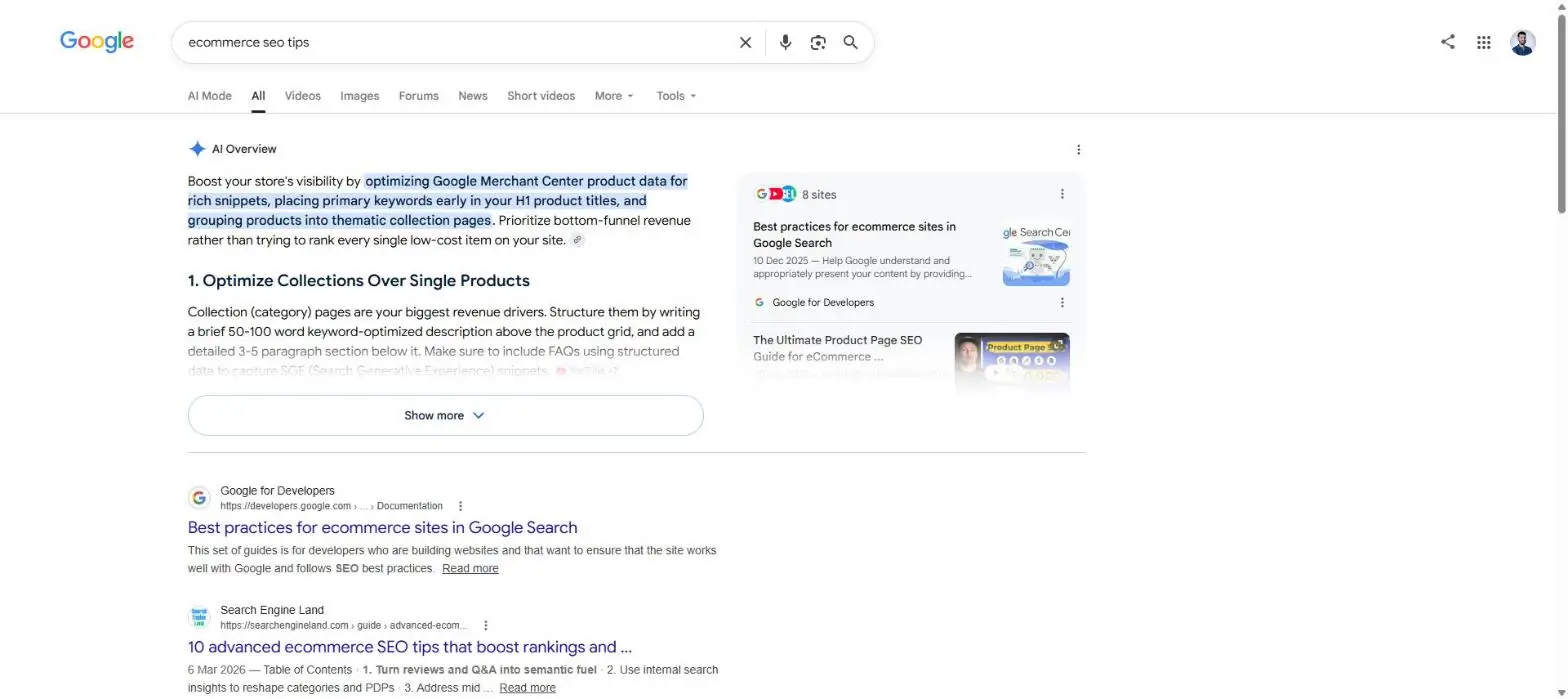
Google is blunt: optimizing for AI search is still SEO, and you can ignore hyped “hacks” like llms.txt files. AI engines do not rank pages; they pull structured, extractable facts. If your page is heavy on marketing fluff and light on real attributes, you will not be cited. AEO means answer engine optimization (snippets, voice, AI answers); GEO means generative engine optimization (ChatGPT, Gemini, Perplexity, AI Overviews). The four moves below earn citations.
What does “unique value and a full product description” actually mean?
Every product page should answer every question a buyer – or an AI – would ask, in plain text on the page.
A complete description covers all of these, in words (not only in an image):
-
- Materials and build – what it is made of, weight, dimensions, capacity.
- Sizes and fit – full size range, a real size guide, how it runs.
- Shipping and returns – cost, time, and return window, stated on the page.
- Use cases – who it is for and the exact situations it solves.
- Care and warranty – how to clean it, how long it lasts, what is covered.
| ✓ Good | ✗ Wrong |
|
Materials: solid bamboo, steel frame. Sizes: 40/48/60 in. Holds 220 lbs. Free shipping 3-5 days, 30-day returns. Best for home offices under 6 ft. |
“Premium quality standing desk. The best choice for your home. Order today!” |
|
Why: Every fact an AI needs is on the page in plain text, so it can quote you confidently. |
Why: No materials, sizes, or shipping – an AI has nothing to cite, so it picks a competitor. |
How do product videos help both shoppers and search engines?
A short product video with VideoObject schema and a transcript earns video rich results and gives AI a second, machine-readable description.
Video lifts conversions and now feeds AI search. Add VideoObject schema with the four fields Google requires – name, description, thumbnailUrl, uploadDate – plus contentUrl or embedUrl. Place the video near the image gallery or in a short “how it works” section. Keep it 30 seconds to 2 minutes, add subtitles (most people watch on mute), and publish a transcript. AI engines read that transcript as extra product context.
| ✓ Good | ✗ Wrong |
|
A 60-second demo near the gallery, with subtitles, a transcript on the page, and VideoObject schema. |
A video embedded with no schema, no captions, no transcript, or hosted only on social media. |
|
Why: Shoppers see the product in use, and both Google and AI engines can read what the video shows. |
Why: Search engines cannot tell what the video is about, so it adds nothing to your visibility. |
How do you put one product in multiple categories without duplicate content?
Choose one primary category as the canonical URL, point every other version to it, and keep one breadcrumb trail.
It is fine for a product to live in several categories. The risk is that each path creates a separate URL with the same content. Pick the single best category as the primary URL, add a rel=”canonical” on every secondary version pointing to it, and show one consistent breadcrumb. Most platforms already use one clean /products/ URL, which solves this by default.
| ✓ Good | ✗ Wrong |
|
Canonical: /desks/standing/bamboo-desk. The eco-furniture path canonicalizes to it. One breadcrumb. |
Two indexable URLs with identical content and no canonical. |
|
Why: All signals consolidate on one page, with no duplicate content. |
Why: Google splits your ranking signals and may index the weaker version. |
Why is the product URL path critical – and which variant URLs should you index?
Use short, descriptive, keyword-rich paths; index the main product and canonicalize size and color variants to it instead of noindexing them.
Google is clear: put real words in the path (/product/black-t-shirt), not a number (/product/3243). Give each variant its own URL – a path segment like /t-shirt/green or a parameter like /t-shirt?color=green. If you use parameters, set the canonical to the version with the parameter omitted. Do not use noindex to manage variants; noindex blocks the page from Search entirely, while rel=”canonical” consolidates near-duplicates. Save noindex for pages that truly should not appear – internal search results and empty categories.
| ✓ Good | ✗ Wrong |
|
/t-shirt is the canonical; /t-shirt?color=green canonicalizes to it. Internal search pages are noindex. |
Every color gets its own indexed URL with no canonical, and #black / #white fragments mark variants. |
|
Why: One strong product ranks, variants stay crawlable, and only true junk is hidden. |
Why: Google treats fragments as one page and the color URLs as thin duplicates, splitting signals. |
Do this: keep a real product feed in Google Merchant Center – 83% of products in AI shopping results match Google Shopping data – and state every specific in plain text, not only in an image.
How do reviews and customer content boost ecommerce SEO?
Real customer reviews add fresh, unique content, earn star ratings in search, and give AI engines trust signals to cite.
Reviews are unique content you do not have to write, and they feed the aggregateRating that shows stars in search. Two rules matter. First, the rating must come from real customer reviews of the product – Google prohibits fake or self-authored review markup, and self-reviews about your own store no longer earn stars. Second, actively ask for reviews: a simple post-purchase email lifts your review count, which lifts both conversions and rankings. Customer questions and answers on the page add even more natural, long-tail language that matches how people search.
| ✓ Good | ✗ Wrong |
|
Verified customer reviews on the product page, wired to aggregateRating schema, plus a Q&A section. |
Fabricated 5-star markup, or Organization “reviews” about the store placed on the product page. |
|
Why: You earn star ratings, add fresh unique text, and give AI real signals of trust and popularity. |
Why: Google disqualifies fake or self-serving review markup and can issue a manual penalty. |
How do you use Google Merchant Center and free product listings?
Upload a clean product feed to Merchant Center so your products can show for free in Shopping and in AI shopping answers.
Google offers free product listings: unpaid tiles in the Shopping tab showing your price, image, retailer, delivery, and star rating. They are pulled from your Merchant Center feed and your on-page Merchant Listing schema, which reinforce each other. This is high-leverage for a small shop, because feed quality directly drives AI visibility – 83% of products in ChatGPT shopping results match Google Shopping data. Keep the feed accurate: correct prices, availability, GTINs, and images. Most platforms sync a feed to Merchant Center automatically through a free channel or app.
How do you build authority and backlinks to an online store?
Earn a few high-quality, topically relevant links through digital PR, linkable guides, and product-review outreach – quality beats quantity every time.
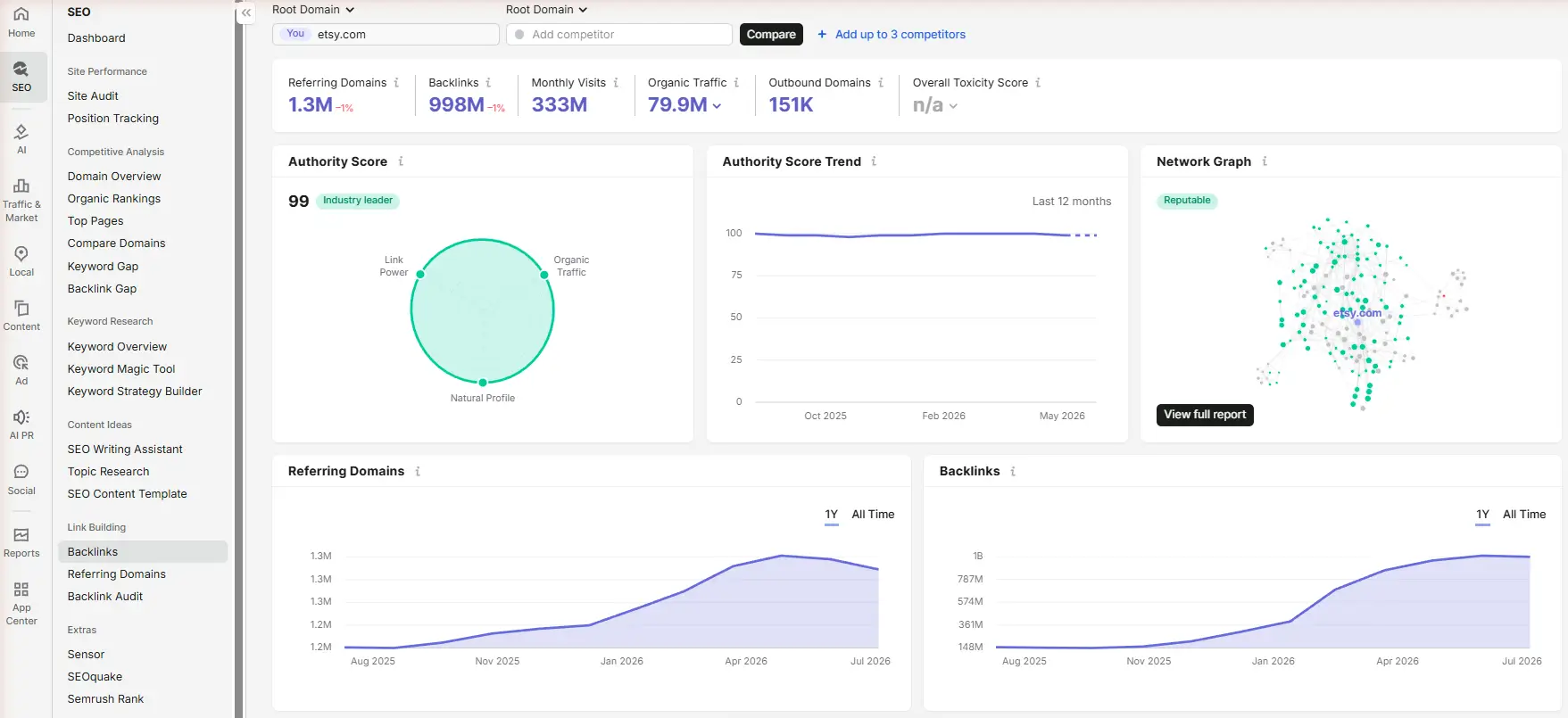
Google ranks domains, not just pages, and product pages are hard to earn links to directly. So you build authority two ways. First, digital PR: original data, a survey, or a genuinely useful story that publications and bloggers want to cite – this builds domain-wide authority and the brand mentions AI engines use to recommend products. Second, linkable assets: buying guides and gift guides that become reference material others link to. Then point those links inward with internal links to your categories. One relevant link from a real publication beats fifty directory links.
| ✓ Good | ✗ Wrong |
|
A “how to choose a standing desk” guide plus a small original survey, pitched to home-office bloggers. |
Buying 200 cheap directory and forum links to product pages. |
|
Why: You earn topically relevant links that lift your whole store and get you mentioned by AI tools. |
Why: Low-quality, irrelevant links do little and can trigger a spam problem. |
How does content marketing build topical authority for your store?
Publish buying guides and how-tos that answer shopper questions, then link them down to the category and product pages they support.
Product pages have buying intent but thin content, so category pages and blog content carry the topical load. Build clusters: a broad guide (“the complete guide to standing desks”) links down to specific category and product pages, and each supporting post links back up and sideways to related posts. This captures informational searches early in the buyer journey, earns links, and channels strength to the pages that make money. Even 10-15 strong guides can anchor your whole SEO and link-building program.
How do you handle international and multi-currency ecommerce SEO?
Give each country or language its own URLs and connect them with hreflang tags so Google shows the right version to the right shopper.
If you sell across countries or languages, do not serve different content on the same URL. Give each version its own URL – a subfolder like /uk/ or /de/ is the simplest for a small shop – and add hreflang tags so Google knows which version belongs to which audience. Keep currency and shipping clear per region. Skip this entirely if you sell in one country and one language; adding hreflang you do not need only creates errors.
| ✓ Good | ✗ Wrong |
|
/us/boots and /uk/boots, each with hreflang pointing to the other, correct currency per region. |
One URL that swaps currency by location, or duplicate country pages with no hreflang. |
|
Why: Google serves US shoppers the US page and UK shoppers the UK page, with no duplicate conflict. |
Why: Google cannot tell the versions apart, so it may show the wrong country or treat them as duplicates. |
How do you measure ecommerce SEO and prove it is working?
Track organic impressions, clicks, and revenue per page in Google Search Console and GA4 – free tools that show exactly what is gaining.
Watch a small set of numbers rather than obsessing over rankings:
- Search Console – impressions, clicks, average position, and indexed-page count, per page and per query.
- GA4 – organic sessions and, most important, organic revenue and conversions by landing page.
- Indexation – how many of your real pages are actually indexed; a gap signals crawl or duplicate problems.
- Trend, not day-to-day – judge over weeks. SEO moves slowly and noisily in the short term.
How do you migrate or replatform without losing rankings?
Keep your URLs if you can; if they must change, map every old URL to its new one with a 301 redirect before launch.
Replatforming (say, Shopify to Wix, or a redesign) is the fastest way to lose years of rankings if you rush it. The rule: preserve URLs where possible. Where URLs must change, build a one-to-one redirect map – every old URL 301-redirected to its closest new URL – and put it live at launch, not weeks later. Keep titles, content, and internal links intact through the move, submit the new sitemap, and watch Search Console daily for the first month for spikes in 404s or dropped pages.
|
✓ Good |
✗ Wrong |
|
A full old-to-new 301 map goes live at launch; content and internal links are preserved; sitemap resubmitted. |
The site relaunches with new URLs and no redirects, “to be added later.” |
|
Why: Rankings carry over to the new URLs with only a brief, small dip. |
Why: Google drops the old pages, traffic collapses, and recovery can take many months. |
Do you actually need to do all of this?
No – the seven core steps are the part you must do everywhere. The rest you add as you grow.
The seven-step system is the non-negotiable foundation. You do not need a big budget, an agency, or a developer to run it. The complete-picture sections matter more as your catalog and traffic grow.
Here is the promise: if you do only the seven steps, and you do them on every single page and every new URL, you will see results as pages get re-crawled over the following weeks.
Most small shops fail not because the work is hard, but because they do it once and stop. Winners treat it as a habit: no page goes live without it. Consistency beats complexity. Start today, apply it to one page, and never publish a naked URL again.
What does this look like on a real store (from my own SEO work)?
Here is proof from my own work: doing only these basics, plus steadily adding category pages for what shoppers actually search, grew a jewelry store to 3.46M impressions and 311K clicks in about nine months.
I personally run SEO for a small jewelry store, and this is its real Google Search Console data. Over about nine months (June 2025 to February 2026) it reached 3.46 million impressions and 311,000 clicks, at a 9% average click-through rate and an average position of 11.8. No tricks. I applied the exact basics in this guide and kept adding new category and product URLs built around the phrases real shoppers type. Look at the shape of the curve. It stays nearly flat for months, then climbs steeply from late January. That is how ecommerce SEO works — it compounds. The early work can feel like nothing is happening, and then the same habit, repeated, tips into real growth.
My three takeaways for any shop owner:
- Do the basics — on every single page. They are enough to start moving the needle.
- Grow your URLs around real demand. Every new category or product page built for a phrase people actually search is another door into your store.
- Consistency is the real multiplier. Keep doing your best, every single time — the Shops that win are the ones that never stop.
Will the basics alone get you to the first page?
Sometimes yes, sometimes no – it depends on your competition, your site’s authority, and whether people actually search for what you sell.
The basics make a page eligible to rank. Whether it reaches page one depends on three things off the page: competition (specific long-tail phrases are winnable; broad head terms are not, on-page work alone), authority and backlinks (Google ranks domains, and a new store earns trust over months), and real demand (SEO surfaces demand that exists; it does not create it).
| Keyword type | Can the basics rank it alone? |
|
Specific long-tail, low competition (“soy-free beeswax candles”) |
Often yes |
|
Mid-competition category (“bamboo standing desk”) |
Sometimes, with strong content and a few links |
|
Broad head term (“standing desk”, “candles”) |
Rarely – needs backlinks and domain authority |
Most small-shop revenue lives in the specific, buyer-intent long-tail – exactly what the basics win. Capture that first, then add links, content, and authority.
Ecommerce SEO FAQ: What do shop owners actually ask?
How does ecommerce SEO work?
You optimize product and category pages so they rank when people search to buy. It combines on-page work (keywords, titles, content, images), technical work (crawling, speed, canonicals), and off-page work (links and authority). Google then ranks your pages, and AI engines cite them.
How much does ecommerce SEO cost?
If you do it yourself, mostly your time plus a few free tools. Agencies typically charge small stores about $500-$1,500 a month, mid-sized stores $1,500-$4,000, and large brands $4,000-$10,000+. Doing the basics yourself first is the smartest spend for a small shop.
How long does ecommerce SEO take to work?
Individual pages often move in 4-12 weeks after you fix them. Competitive categories and new domains commonly take 6-12 months to build real momentum. The work compounds, so early wins grow over time.
Is SEO worth it for a small online store?
Yes, because organic traffic keeps converting after you stop paying, unlike ads. The long-tail phrases small shops can win are cheap to target and bring buyers with clear intent.
Can I do ecommerce SEO myself?
For the basics, yes. Shopify, Wix, and WooCommerce (with Yoast or Rank Math) give you every control you need without code. Bring in help only once the foundation is solid and you want to scale links and content.
How many products do I need before SEO matters?
SEO matters from your first product. With a small catalog, focus on deep, unique product pages. With a large catalog, architecture and category pages matter more.
How do I do keyword research for products?
Find the exact phrases buyers type using Google autocomplete, “People also ask”, and Google Keyword Planner. Group them by intent and give each page one primary phrase. Favor specific, buyer-intent phrases over broad ones.
How do I optimize category pages?
Target a broad buying phrase, write a real 200-400 word intro that helps shoppers choose, keep a clean URL, and add BreadcrumbList and ItemList schema. Category pages are your biggest rankers, so treat them as landing pages.
How important are product images and videos?
Very. Named, compressed images rank in image search and speed up the page; a short video with VideoObject schema lifts conversions and feeds AI search. Both are core, not optional.
Should each variant have its own indexed page?
Usually no. Index the main product and canonicalize color and size variants to it. Give a variant its own page only when people search for it as a distinct product.
How often should I update product pages?
Update when facts change – price, stock, specs – and refresh descriptions and images periodically. Fresh, accurate pages are re-crawled and trusted more than stale ones.
What is the best URL structure for ecommerce?
Short, lowercase, descriptive paths that mirror your hierarchy: /category/product. Use real words, not ID numbers, and keep URLs stable so you do not have to redirect them later.
How do I stop duplicate content on my store?
Write original descriptions instead of manufacturer copy, and use one canonical URL per product so variants, extra category paths, and filters all point to it. Fix technical duplicates like http vs https and trailing slashes.
How do I handle out-of-stock products?
Keep temporarily out-of-stock pages live with correct availability schema. Permanently gone products with value should 301 to the closest match; worthless ones can 404 or 410. Never mass-redirect everything to the homepage.
How do I handle faceted navigation and filters?
Index the few filter pages people actually search for and give them real content. Canonicalize or block the rest so Google does not waste crawl budget on thousands of near-duplicate combinations.
Do I need schema / structured data?
Yes for products. Product schema unlocks price, stars, and stock in results and makes pages readable to AI. Add BreadcrumbList, FAQPage, and VideoObject where relevant. Pick the type from your platform dropdown.
How do I improve Core Web Vitals?
Compress images to WebP, set image width and height, cut heavy scripts, and use good hosting or a CDN. Aim for LCP under 2.5s, INP under 200ms, CLS under 0.1. Check free at pagespeed.web.dev.
Which platform is best for SEO: Shopify, WooCommerce, or Wix?
All three can rank well; the difference is workflow, not ceiling. Shopify and Wix handle most technical SEO automatically; WooCommerce is the most flexible with Yoast or Rank Math. Pick the one you will actually maintain.
How do I get backlinks for an ecommerce site?
Earn a few high-quality, relevant links through digital PR (original data or a useful story) and linkable buying guides, plus product-review outreach. One relevant link from a real publication beats fifty cheap directory links.
Do I need a blog for my store?
Once your product and category pages are solid, yes. Buying guides and how-tos capture early-stage searches, earn links, and pass strength to your money pages through internal links.
How do I get my store cited by ChatGPT or Google AI Overviews?
Put complete, specific facts in plain text – materials, sizes, shipping, use cases – add product schema, collect real reviews, and keep a Merchant Center feed. AI engines cite pages they can extract facts from.
How do I measure ecommerce SEO success?
Use Google Search Console for impressions, clicks, and position, and GA4 for organic revenue by landing page. Track the trend over weeks, and watch that your real pages stay indexed.
How do I move platforms without losing rankings?
Keep URLs where you can. Where they change, put a full old-to-new 301 redirect map live at launch, preserve content and internal links, resubmit your sitemap, and monitor Search Console daily for the first month.
Does SEO work for ecommerce?
Yes. SEO is one of the most reliable long-term traffic sources for an online store, because it puts your product and category pages in front of people at the exact moment they are searching to buy. It takes months to build, but unlike paid ads it keeps working after you stop paying. Stores that say it “does not work” usually skipped the basics or quit before the results compounded.
How long does it usually take to see the results from SEO for an online shop?
Individual pages often start moving in 4-12 weeks after you optimize them, as Google re-crawls and re-indexes. Building real momentum across the whole store – especially in competitive categories – usually takes 6-12 months. New domains take longer than established ones, and because the work compounds, early wins keep growing.
Can ChatGPT do SEO?
ChatGPT can help with SEO, but it cannot do it for you. It is genuinely useful for keyword ideas, drafting product descriptions, outlining content, and generating schema code. It cannot judge intent perfectly, verify facts, earn backlinks, or add your real product experience – and Google penalizes mass-produced, unedited AI text. Use it as an assistant, then review and add real detail yourself.
Is ecommerce SEO worth the investment?
For most stores, yes. Organic visitors cost nothing per click and convert well because they are actively searching to buy. The catch is time: SEO is a compounding investment, not an instant one, so it pairs well with ads that bring traffic while your rankings grow.
How do I optimize my Shopify store for SEO?
Use Shopify’s built-in SEO fields on every product and collection: edit the title, meta description, and URL handle; write unique descriptions; add alt text to images; and turn on product schema through your theme or a free app. Shopify handles the sitemap and robots.txt for you. Then submit your sitemap in Google Search Console.
Why is my ecommerce site not ranking on Google?
The usual causes are thin or duplicated product descriptions, pages Google cannot find or index, no backlinks or domain authority yet, or targeting keywords that are too competitive for a young store. Check Search Console first to confirm your pages are indexed, then run the seven-step system on your most important pages.
How do I get my products to show up on Google for free?
Add your products to Google Merchant Center and enable free product listings, which show your items in the Shopping tab at no cost. Back that up with Product schema on your pages and a clean, accurate product feed. The feed and on-page data reinforce each other and also feed AI shopping answers.
Is SEO or paid ads better for a new online store?
They do different jobs. Paid ads buy traffic instantly but stop the moment you stop paying; SEO takes months but keeps delivering for free once it works. Most new shops run ads for quick sales while building SEO for durable, lower-cost traffic over time.
What are the main types of SEO?
Three: on-page SEO (keywords, titles, content, and images on your pages), technical SEO (crawling, speed, canonicals, and structured data), and off-page SEO (backlinks and brand authority). Ecommerce adds a fourth focus – product feed optimization for Google Shopping and AI search.
Will AI replace SEO for online stores?
No, but it is changing it. AI search engines still pull from the same web content and structured data that SEO produces, so the work overlaps heavily. What changes is the goal: you now optimize to be cited in AI answers as well as ranked in blue links. The stores that do solid SEO are the ones AI engines quote.
How do I write SEO-friendly product descriptions?
Write original copy in your own words, never the manufacturer’s. Lead with a specific answer, then cover materials, sizes, use cases, and care in plain text. Use the primary keyword naturally once or twice, add a few real FAQs, and never reuse the same description across products.
Where can you go deeper?
These Sonary guides take you further on specific pieces:
- Best ecommerce platforms – the category hub for choosing where to build your store.
- Best website builders and best SEO tools – the two hubs that pair with this guide.
- Wix Stores ecommerce review, BigCommerce review, and Squarespace review – platforms most small shops compare.
- Ecommerce vs dropshipping and Wix vs Squarespace – related buying guides.
- How much a small business should spend on SEO software – plan your SEO budget.
Note for editor: confirm the exact live slugs for the linked articles before publishing.
What is the bottom line?
Ecommerce SEO is a system you repeat, not a one-time task. Run the seven core steps on every product and category page: keyword, title and meta, unique content, fast images, product schema, internal links, and clean indexing. As you grow, layer on the harder half – architecture, faceted navigation, pagination, stock handling, duplicate-content control, reviews, a Merchant Center feed, links, content, international, and measurement. The basics win the specific, buyer-intent searches on Google and in AI answers where most small-shop revenue lives; the advanced work lets you scale and compete for bigger terms. Do the core on every single URL, stay consistent, and the results will follow.