
Jira vs ClickUp: which wins in 2026 (for small teams)?

In the Jira vs. ClickUp choice, ClickUp is a better fit for most small teams because its free plan offers unlimited users, while Jira caps its free plan at 10 users. If your team lives in sprints and GitHub, pick Jira. If you run marketing, sales, and ops in one place, pick ClickUp. The catch: ClickUp does so much that most solo founders feel the learning curve in week one.
Jira vs ClickUp: which situation describes you?
Find the line that sounds like your team, then read that tool's section below.
- You are a solo founder or freelancer— you want one free tool for tasks, docs, and clients. Read the ClickUp section.
- You run a 2 to 10-person software team— you live in sprints, backlogs, and GitHub. Read the Jira section.
- You run a marketing or creative agency— you juggle clients, content calendars, and proofs. Read the ClickUp section.
- You lead a non-technical team (HR, sales, ops)— you want visual, user-friendly project management. Read the ClickUp section.

Starting from: $0/month
Free Forever
$0
seat/month
Pros
- Over a dozen project views
- Built-in document editor that can be used to collaborate in real-time
- Dedicated chat interface to aid team collaboration
- Workload and time log tracking
Cons
- Can be difficult to master because of how expansive the platform is
- When using the Everything view, it can be difficult to understand who owns what.

JIRA: The structured pick for software and product teams
What is Jira, and who is it for?
Jira, by Atlassian, is a structured issue tracker built for engineers. Work is organized as epics, tasks, and sub-tasks, then tracked through sprints and backlogs. That structure makes Jira more complex to set up, but it gives dev and product teams deep control. It is less a general task manager and more the default language of software development. For a full plan-by-plan breakdown, read our Jira project management review.
Why does Jira work for software teams?
Jira treats every task as an issue you can track from idea to shipped code. You get native sprint planning, a real backlog view, and Agile boards that keep a Scrum or Kanban team disciplined. Its deep GitHub, GitLab, and Bitbucket links mean a ticket can move to Done the moment a pull request merges. For bug tracking and release planning, few tools match it.
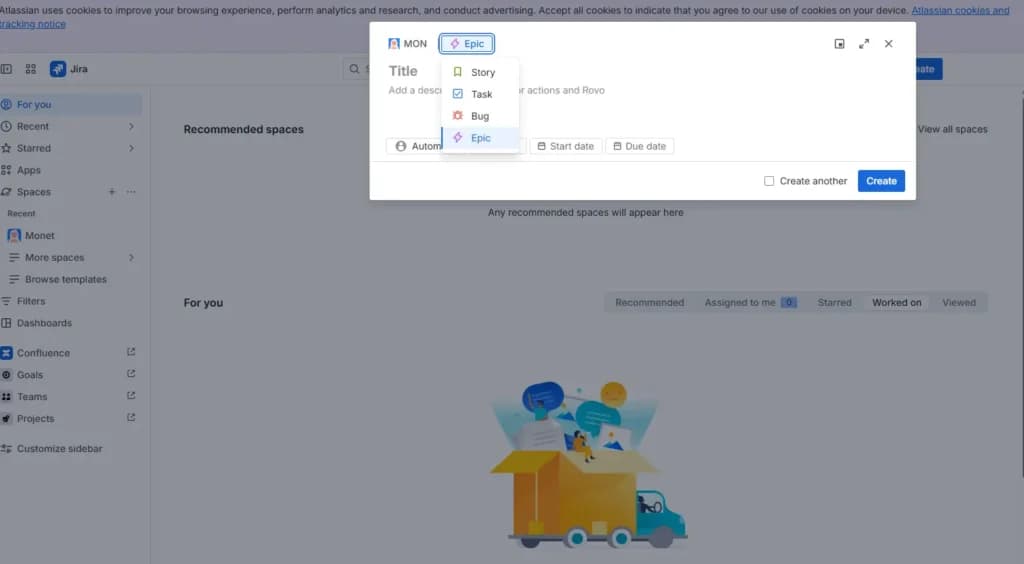
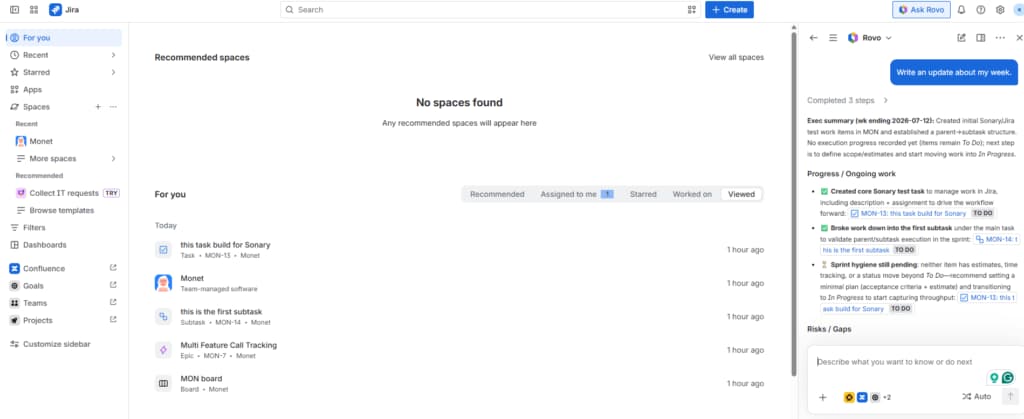
Hands-on test, July 2026. To test this, I built a team-managed Space called Monet in Jira. I added an epic (Multi Feature Call Tracking), created a task inside MON Sprint 1, and nested a subtask beneath it. Every item got its own ID, from MON-13 to MON-14, plus Reporter, Assignee, Sprint, and Story point estimate fields and a 0% Done bar on the parent task. The epic-to-task-to-subtask structure is genuinely powerful, but it took several screens and a fair bit of Jira vocabulary to stand up a single task.
Illustrative example. Picture Maya, a lead engineer at a 6-person fintech startup. She moves her team off a shared spreadsheet and into Jira, links every user story to a Bitbucket branch, and sets an automation that closes the ticket when the pull request merges. In a setup like this, sprint reviews get shorter because the burndown chart shows progress before anyone speaks.
How much does Jira cost?
Jira is free for up to 10 users. Past that, paid plans are billed per user per month on annual billing:
Plan | Price (billed annually) | What you get |
|---|---|---|
Free | $0 | Up to 10 users, 2GB storage, and basic Scrum and Kanban boards. |
Standard | $7.91/user/mo | Project roles, advanced permissions, and 250GB storage. |
Premium | $14.54/user/mo | Advanced Roadmaps, project archiving, and unlimited storage. |
Enterprise | Custom | Multi-site administration, data residency, and 24/7 support. |
The free plan caps storage at 2GB. Documentation usually means adding Confluence, a separate Atlassian product, on top.
What is Jira's AI, Atlassian Rovo?
Atlassian Rovo is Jira's built-in AI, made of Search, Chat, and Agents. As of 2026, core Rovo ships inside paid Jira Cloud plans at no extra charge, with a monthly credit allowance per user (about 25 on Standard, 70 on Premium, and 150 on Enterprise). Its agents are tuned for engineering and Atlassian data, such as sprint planning and incident response, and can update Jira work items directly. For deeper coding help, Rovo Dev is a separate add-on at about $20 per developer per month.
What are Jira's pros and cons?
- Pro: best-in-class Agile boards, backlogs, and automatic burndown and velocity charts.
- Pro: deep developer links to GitHub, GitLab, and Bitbucket automate real dev workflows.
- Pro: enterprise reliability that scales from a small team to thousands of engineers, with core Rovo AI now included.
- Con: the free plan stops at 10 users and per-user pricing climbs fast after that.
- Con: setup is complex and custom workflows often need a dedicated admin.
- Con: Non-technical teams struggle with terms like Epic and Story, and documents usually mean paying for Confluence.
Is Jira right for you?
Skip Jira if your team is mostly non-technical, you have no code repository, or you want documents and time tracking without buying extra tools.
Choose Jira if you run a software team on Scrum or Kanban, you need issue and bug tracking that links to GitHub or Bitbucket, and you want Agile reporting like burndown and velocity charts out of the box.
Jira is best for: software and product teams of any size that run Agile and live in code.
ClickUp: The visual pick for small, ops, and non-technical teams
What is ClickUp, and who is it for?
ClickUp is an all-in-one workspace that aims to replace several tools at once. It is more visual and user-friendly than Jira, so it feels simpler for non-technical users. You can view the same work as a List, Board, Calendar, or Gantt chart, and it includes Docs, time tracking, and email natively. It fits operations, marketing, agencies, startups, and solo founders. See the full feature set in our ClickUp project management review.
Why does ClickUp work for small and non-technical teams?
ClickUp folds task management, documents, and time tracking into one free workspace, so a small team is not juggling or paying for three tools. Its hierarchy (Workspace to Space to Folder to List to Task) lets an agency wall off each client cleanly, and free guest seats let clients see only their own board. It can even stand in as a light CRM, as we cover in how ClickUp works as a CRM. For a solo founder, one workspace replaces a task app, a doc tool, and a timer. Every user gets a free seat, so cost stays low as you grow.
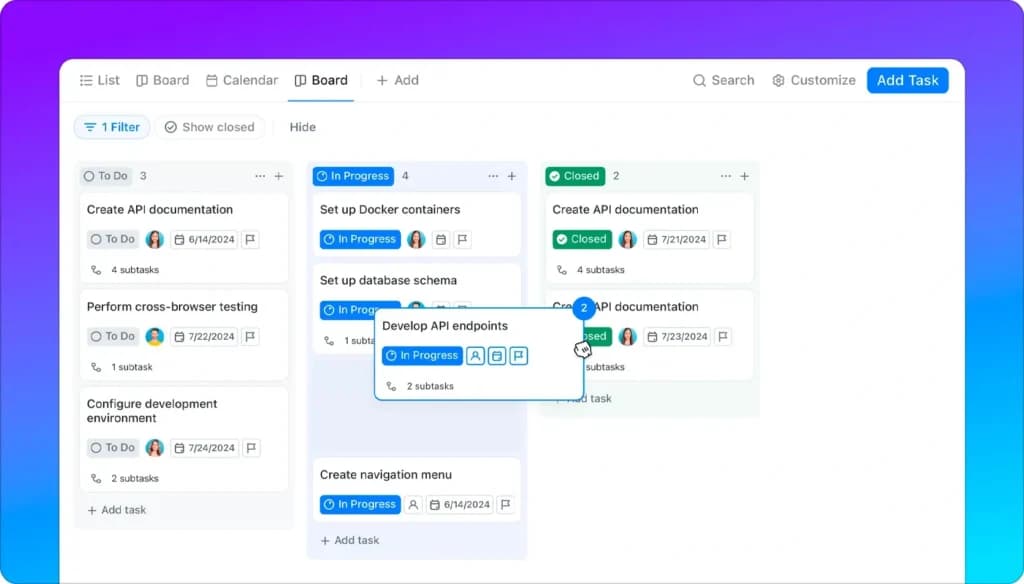
Hands-on test, July 2026. I set up the other side in ClickUp to feel the difference. I built a Team Space with two projects and dropped in a handful of tasks with date ranges. Switching the same tasks between Board, List, Calendar, and Gantt took one click each, and I dragged cards straight across To Do, In Progress, and Complete without opening a settings menu. There were no ticket IDs, sprints, or story points to configure first. It felt visual and immediate, which is exactly why non-technical teams warm to ClickUp faster.
Illustrative example (agency). Picture Devon, who runs a 5-person social media agency with 9 clients. He builds one ClickUp Space per client, gives each client a free Guest seat that shows only their board, and uses Form view to collect content requests. Because clients can check progress themselves, routine status emails tend to drop off.
Illustrative example (solo). Picture Priya, a solo course creator. She replaces Trello, Google Docs, and a separate time tracker with one free ClickUp workspace, tracks launch tasks in List view, and drafts lesson outlines in ClickUp Docs linked to each task. With everything in one place, fewer tasks slip through the gaps between apps.
How much does ClickUp cost?
ClickUp is free for unlimited users, with a 60MB storage cap. Paid plans are billed per user per month on annual billing:
Plan | Price (billed annually) | What you get |
|---|---|---|
Free Forever | $0 | Unlimited users and tasks, 60MB storage, collaborative Docs, and basic views. |
Unlimited | $7/user/mo | Unlimited storage, Gantt charts, free guests, and native time tracking. |
Business | $12/user/mo | Advanced automation, workload management, and single sign-on. |
Enterprise | Custom | White labeling, advanced security, and dedicated support. |
Guest seats for clients do not count as paid users, which keeps an agency's bill low.
What is ClickUp's AI, Brain 2?
ClickUp Brain 2, launched in June 2026, is a rebuilt AI layer that pulls context from every task, doc, chat, and calendar. It routes each request to Claude, GPT, or Gemini based on the job, turns repeat requests into reusable Super Agents, and can generate finished slide decks, dashboards, and simple apps from a prompt. It is a paid add-on at about $9 per user per month, or about $28 per user per month for the full Everything AI stack
What are ClickUp's pros and cons?
- Pro: unlimited free users keep the cost low as you add people, and paid plans stay cheaper per seat than Jira's.
- Pro: one workspace for tasks, Docs, time tracking, and email cuts down on tool sprawl and monthly bills.
- Pro: many views(List, Board, Gantt, Calendar) on the same data suit mixed, non-technical teams.
- Con: a busy interface means new users face a real learning curve in the first week.
- Con: engineering workflows and code links are weaker than Jira's, and large lists can feel slow.
- Con: the best AI (Brain 2)is a paid add-on layered on top of your plan.
Is ClickUp right for you?
Skip ClickUp if you want a lean, opinionated tool, your team is a pure engineering shop, or a busy interface tends to slow you down.
Choose ClickUp if you are a small or cross-functional team that wants tasks, docs, time tracking, and client guests in one free workspace, with the freedom to view work as a list, board, Gantt, or calendar.
ClickUp is best for: small, cross-functional, and non-technical teams that want one visual workspace for everything.
JIRA vs ClickUp : Head-to-head: features, cost, and AI
How do Jira and ClickUp compare, feature by feature?
This table lists outcomes small teams care about, not feature names. Read across each row to see which tool gets you the result.
The outcome you need | Jira | ClickUp |
|---|---|---|
Give every teammate a free seat (unlimited users on the free plan) | No | Best |
Toggle List, Board, Gantt, and Calendar views on the same tasks | Limited | Best |
Link a task straight to a GitHub or Bitbucket branch or pull request | Best | Limited |
Track time inside a task without a separate app | No | Yes |
Write and store documents without buying a second tool | No | Yes |
Run burndown and velocity charts out of the box | Best | Limited |
Give clients free guest access to only their board | Limited | Yes |
Manage a strict Scrum or Kanban backlog | Best | Yes |
Jira vs ClickUp: what is the real cost at 5, 15, 30, and 50 seats?
Most comparison models have 10 seats and stop. Below is the verified annual cost on annual billing at four common team sizes, using July 2026 list prices. Jira is free up to 10 users, so a 5-person team pays nothing; past that, per-user pricing climbs quickly.
Team size | ClickUp Unlimited | ClickUp Business | Jira Standard | Jira Premium |
|---|---|---|---|---|
5 people | $420 | $720 | Free | $872 |
15 people | $1,260 | $2,160 | $1,424 | $2,617 |
30 people | $2,520 | $4,320 | $2,848 | $5,234 |
50 people | $4,200 | $7,200 | $4,746 | $8,724 |
For users below 10, Jira wins on price because it is free. Above that, ClickUp Unlimited is the cheapest paid option at every size. Jira Standard sits between ClickUp's two paid plans, but Jira Premium, the tier most engineering teams actually want for Advanced Roadmaps, is the most expensive of the four.
Winner: ClickUp. Cheaper per seat at every size once you pass Jira's 10-user free cap, and its free plan covers unlimited users. Jira only wins on price for a dev team of 10 or fewer, where it costs nothing.
ClickUp Brain 2 vs Atlassian Rovo: which AI wins?
Both AIs are capable, but they aim at different jobs. Brain 2 spans your whole workspace and lets you pick a model; Rovo is tuned for engineering work inside Atlassian and comes bundled with paid Jira plans.
The outcome you need | Jira (Rovo) | ClickUp (Brain 2) |
|---|---|---|
Included in your paid plan at no extra charge | Best | Limited |
Choose between Claude, GPT, and Gemini models | No | Best |
Generate slide decks, dashboards, and apps from a prompt | Limited | Best |
AI agents that act inside a developer workflow | Best | Yes |
Works across marketing, ops, and docs, not just tickets | Limited | Best |
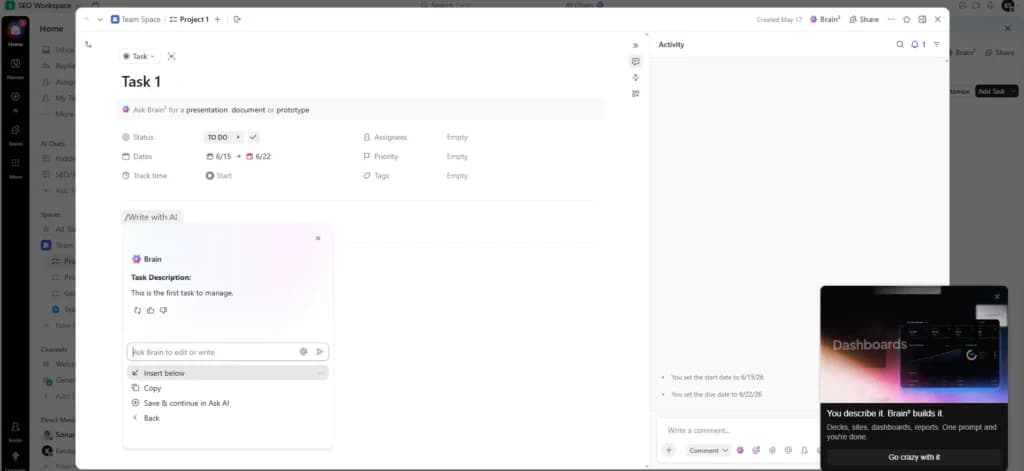
Hands-on test, July 2026. I put both AIs to work. In ClickUp, I opened a task, typed /Write with AI, and Brain 2 drafted a task description I could drop in with one click. Then I asked it in chat to build a stylized deck of what my team shipped that week. Instead of inventing numbers, it told me nothing had been marked done that week and offered to widen the window or spin up a recap agent, which is the honest behavior you want from an AI. In Jira, the AI is Rovo: it shows up as an Ask Rovo button and an Agents panel on every task, flagged 'Uses AI. Verify results,' and it is aimed at moving the ticket forward rather than generating decks.
Winner: ClickUp Brain 2 for most teams. It spans your whole workspace and includes top models for about $9 per user per month. But if your team lives in Jira and Confluence, Rovo's included AI, plus Rovo Dev for coding, is the better fit.
How do you migrate from Jira to ClickUp?
Use ClickUp's built-in Jira import, which pulls your issues, assignees, descriptions, comments, and even maps your statuses. Here is the path (steps as of July 2026):
- In ClickUp, open the Space where you want the data, then click Import and choose Jira.
- Connect your Atlassian account, or upload the Jira export file if you prefer not to link accounts.
- Map your Jira statuses to ClickUp statuses, for example To Do maps to Open and Done maps to Closed.
- Run the import, then spot-check a sample of tickets for assignees, comments, and attachments.
- Keep Jira read-only for two weeks before you archive it, so nothing is lost in the switch.
What is the real difference between Jira and ClickUp?
The core difference: Jira is a structured issue tracker for engineers, while ClickUp is a flexible all-in-one workspace for a whole business. Jira is built around epics, tasks, and sub-tasks, which gives dev and product teams deep control. ClickUp is visual and approachable, which suits operations and small teams.
Quick take: Jira is structured and powerful for dev and product teams. ClickUp is visual and simple for operations and small teams.
Winner: it depends on your team. Choose ClickUp for breadth, ease, and price. Choose Jira for Agile depth and developer workflows.
Do you actually need a tool this powerful?
Maybe not. Plenty of small teams reach for Jira or ClickUp when a simpler tool would do the job.
If you are three people sharing a short task list, a free Trello board or even a shared doc can beat both. For lighter needs, compare monday.com vs Asana for small business; if you think visually, our Miro project management review covers a whiteboard-first option. Jira only pays off once you run real sprints, and ClickUp only pays off once you have several kinds of work to centralize. Buying power you never use just adds a learning curve. Be honest about your workload before you commit to either platform.
What do people actually ask about Jira vs ClickUp?
Can ClickUp replace Jira for software development?
For light development, yes. ClickUp has Agile templates and a Sprints feature. But it lacks the deep repository links and rigid deployment workflows Jira offers, so heavy-duty engineering teams may outgrow it.
Is Jira free for small teams?
Yes. Jira is free for up to 10 users, with Scrum and Kanban boards included. The free plan caps storage at 2GB and does not include advanced permissions or roadmaps.
Is ClickUp better than Jira?
For most small and non-technical teams, yes, because it is easier to use and free for unlimited users. For engineering teams that live in code, Jira is better. The right answer depends on who is doing the work.
Is ClickUp or Jira cheaper as you add users?
ClickUp is cheaper once you pass 10 users. Below that, Jira wins because it is free for up to 10 people. At 30 users on annual billing, ClickUp Unlimited runs about $2,520 a year, versus about $2,848 for Jira Standard and $5,234 for Jira Premium (as of July 2026).
Does ClickUp import data from Jira?
Yes. ClickUp has a native Jira import that pulls issues, descriptions, assignees, and comments, and maps your workflow statuses automatically, such as To Do to Open.
Which tool is better for non-technical teams?
ClickUp is clearly better for non-technical teams in marketing, HR, and sales. Jira's terms like Issues, Epics, and Stories confuse people who do not work in Agile.
Do I need Confluence if I use ClickUp?
Usually no. ClickUp Docs is a built-in documentation tool similar to Notion or Confluence, and you can link docs to tasks. If you use Jira instead, you will most likely want Confluence for documentation.
What is ClickUp Brain 2 and what does it cost?
ClickUp Brain 2, launched in June 2026, is an AI layer that reads your tasks, docs, and chat and routes requests to Claude, GPT, or Gemini. It can also generate slide decks and dashboards. It is a paid add-on at about $9 per user per month, or about $28 per user per month for the full Everything AI stack (pricing as of July 2026).
Is Atlassian Rovo free with Jira?
Core Rovo, meaning Search, Chat, and Agents, is included with paid Jira Cloud plans, with a monthly credit allowance per user (about 25 on Standard and 70 on Premium). Rovo Dev, the coding assistant, is a separate add-on at about $20 per developer per month (as of July 2026).
Can I use Jira and ClickUp together?
Yes, and many companies do. Engineering runs on Jira for code and sprints, while the rest of the company runs on ClickUp for roadmaps and marketing. An integration keeps ticket updates in sync between them.
Where can you go deeper?
The reviews and guides most useful next to this comparison:
- See how the third giant compares in our monday.com project management review
- Still deciding between the two most popular options? Read ClickUp vs monday.com for small teams
- New to scheduling work? Learn how to build a project timeline
- Browse all ClickUp reviews and ratings
What is the bottom line?
In the Jira vs ClickUp decision, most small teams should start with ClickUp: it is free for unlimited users, folds tasks, docs, and time tracking into one workspace, and stays cheaper per seat as you grow. Choose Jira when your work is software development that lives in sprints, backlogs, and code, where its Agile boards, GitHub links, and now-included Rovo AI are hard to beat. Agencies and solo founders lean ClickUp; small dev teams lean Jira. Both have a real free plan, so pilot the one that fits your team before you pay.