
HubSpot lead management for small teams: how to scale sales without hiring (2026 Playbook)

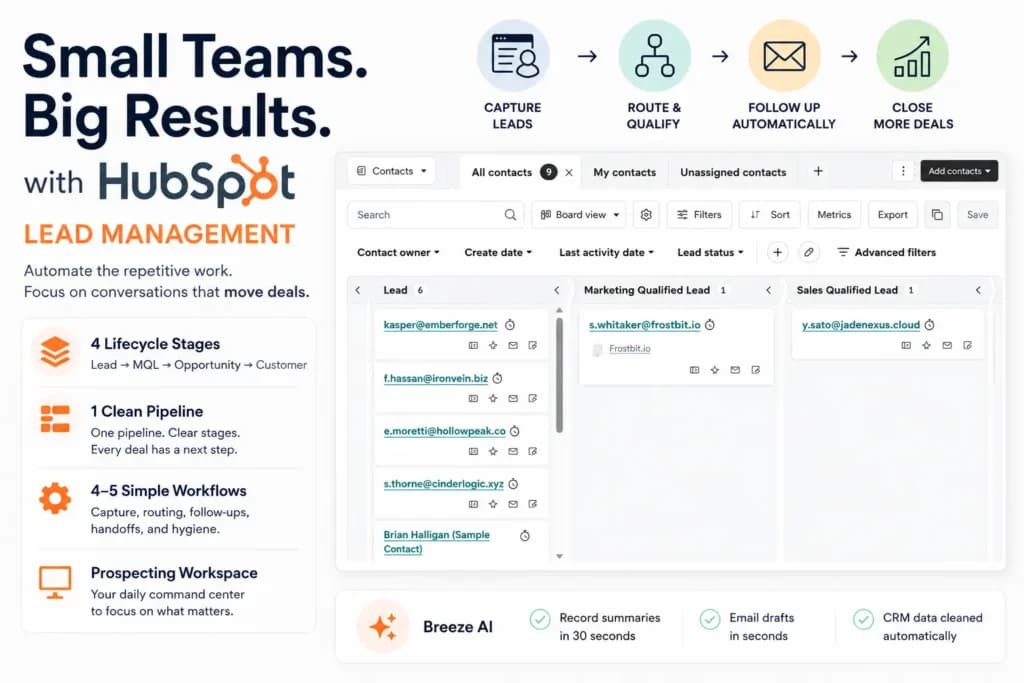
Small teams scale sales with HubSpot lead management by automating repetitive work - lead capture, routing, follow-up reminders, lifecycle updates, and internal handoffs - so humans focus only on conversations that move deals. The right 3–10 person setup: four lifecycle stages, one clean pipeline, 4–5 simple workflows, and the Prospecting Workspace as the daily command center.
Key takeaways
- HubSpot lead management for small teams works best when it’s deliberately simple. Lifecycle stages + one clean pipeline + 4–5 workflows handle 90% of the job for teams under 10 people.
- You don’t need lead scoring yet. It’s the most overrated feature for small teams. Under 200 leads per month, manual qualification beats algorithmic scoring every time.
- The Prospecting Workspace is the most underrated tool in HubSpot lead management. It’s the single screen that makes daily sales execution actually scalable.
- Breeze record summary changes lead management more than any other AI feature. It turns “30 minutes of catching up” into “30 seconds before a call.”
- Sonary’s 3-person team runs about 12–15 simple workflow automations on HubSpot Starter- enough headroom for inbound, MQL handoff, stale-lead reactivation, closed-won onboarding, and weekly hygiene without upgrading.
- Scaling sales as a small team doesn’t mean adding people. It means removing the manual work that consumes your existing people’s time.
What is HubSpot lead management, in plain English?
HubSpot Lead Management is the part of HubSpot that turns every website visitor, form fill, and meeting booking into a tracked, organized contact you can follow up with - automatically, without you having to remember anything. Think of it as an automatic assistant sitting between your website and your inbox.
Here is what that assistant actually does, in everyday words:
- Catches every lead who fills out a form, books a meeting, replies to a chat, or downloads something on your site.
- Saves them as a contact inside HubSpot's CRM - no copy-pasting from email into a spreadsheet.
- Tags them with what they did("downloaded pricing guide," "booked a demo," "opened your last email").
- Tells the right person on your team about them - usually via a Slack ping, an email, or a task on the rep's to-do list.
- Reminds you to follow up if a lead has gone quiet for a few days.
It is not a separate product you buy. It is built into HubSpot's free CRM and gets more powerful in the paid plans (Starter, Professional, Enterprise). If you have HubSpot, you already have lead management - the question is whether you've set it up.
Key terms (glossary)
- HubSpot lead management -The connected system of tools (CRM, forms, workflows, pipelines, AI) that moves a contact from first touch to closed customer inside HubSpot.
- Lifecycle stage -A CRM property that marks where a contact sits in the journey (Lead, MQL, Opportunity, Customer). One stage at a time per contact.
- Lead status -A sub-field on top of the lifecycle stage describing the working state of a Lead (e.g., New, Attempted to Contact, In Progress, Connected, Open Deal, Unqualified).
- MQL (Marketing Qualified Lead) -A contact deemed qualified enough for sales to actively work. At small team size, treat MQL and SQL as one stage.
- Deal pipeline -A visual representation of active sales opportunities, organized by stage from creation to close.
- Workflow -An automation rule inside HubSpot that triggers actions when a condition is met (form submission, property change, time elapsed).
- Prospecting Workspace -HubSpot’s single-screen daily dashboard for sales reps, combining tasks, meetings, activity, and lead queue.
- Breeze AI -HubSpot’s AI layer, including the Assistant (drafting), Data Agent (hygiene), and record summaries.
- HubSpot Starter Customer Platform -The entry-level paid tier bundling CRM, marketing, sales, service, content, and operations tools.
- HubSpot Professional Customer Platform -The mid-tier plan with lead scoring, autonomous AI agents, custom reporting, and higher limits.
How does HubSpot lead management actually work? The 2-second mechanic
The whole system runs on one idea: every action a lead takes (form fill, email open, meeting booked, page visited) becomes a trigger. That trigger fires a workflow, and the workflow does something automatically - send an email, create a task, ping Slack, update a record.
Here is exactly what happens when someone fills out a "Get a demo" form on your site:
- Second 0: They click Submit on your form.
- Second 1: HubSpot creates them as a contact (or updates them if they already exist).
- Second 2: A workflow fires. In parallel, it sends them a "Thanks, we'll be in touch" email, adds a task to a salesperson's to-do list ("Call this person within 24 hours"), pings your #sales Slack channel, and marks the contact as a Lead in the CRM.
- Minute 1: The salesperson sees the task, opens the contact record, and (if they want) clicks "Summarize" - Breeze AI gives them a 30-second briefing on this person.
- Day 4: If the salesperson hasn't replied, another workflow nudges them ("This lead has been waiting 3 days").
No human had to remember any of this. The form was the trigger; everything else ran on rails.
That is the whole pattern, repeated for different scenarios: meeting booked, email replied to, deal closed, lead gone quiet for 30 days, etc. Each scenario gets its own trigger + workflow pair.
What does HubSpot lead management connect to?
It's in between - and here's the honest answer most HubSpot articles won't give you: HubSpot does not magnetize leads for you. It doesn't generate traffic. What it does is capture, organize, and follow up with the leads you bring in. You still need a website, an offer, and traffic.
Here is what you get without building anything (literally minutes after signing up):
- A free CRM with unlimited contacts and basic activity tracking.
- A drop-in contact form you can embed on your website with a 2-line code snippet.
- A personal meeting scheduler link(like Calendly) you can paste in any email.
- A live chat widget that installs on your site in about 10 minutes.
- Auto-tracking of every email you send through Gmail or Outlook to a contact.
That alone is enough for a 1–3 person team to start. You'll see new leads land in your CRM the same day.
Here is what most teams build on top, usually in their first 2–4 hours of setup:
- A simple "funnel"- a landing page, a form, and a 2–3 email follow-up sequence for people who fill it out.
- Lifecycle stages mapped to your real sales process (Lead → Qualified → Opportunity → Customer).
- A handful of simple workflows that auto-tag leads by source, send a welcome email, and ping the right person to follow up.
- A deal pipeline so every active opportunity has a stage and a next step.
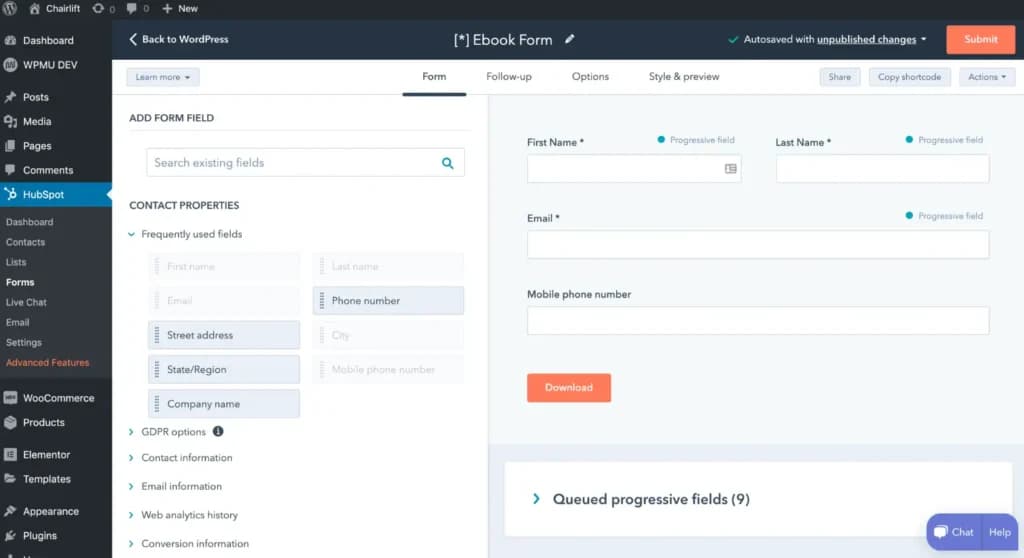
You can start with the one-click pieces today, see leads land tomorrow, and add the funnel pieces as you grow. You do not have to build the whole thing on day one - that's a mistake teams make and then never finish setup.
What does HubSpot lead management connect to?
HubSpot connects to almost everything a small business already uses - email, calendar, payments, chat, ads, video calls - and most connections take 5 minutes through HubSpot's app marketplace. You do not need a developer.
What it connects to | What does that get you |
|---|---|
Gmail / Outlook | Every email you send to a contact is auto-logged in the CRM, so you never lose context. |
Google Calendar / Outlook Calendar | Prospects can self-book on your real calendar; double-bookings are blocked automatically. |
Slack / Microsoft Teams | Pings you instantly when a new lead arrives, a deal moves stage, or a meeting is booked. |
Zoom / Google Meet | Meeting links are auto-generated; recordings and transcripts attach to the contact. |
Stripe / QuickBooks | Deals show payment status; closed-won deals can trigger an invoice automatically. |
Google Ads / Meta / LinkedIn Ads | Tracks which ad each lead came from - so you know which campaign actually produced revenue. |
Mailchimp / ActiveCampaign / Klaviyo | Two-way contact sync if you don't use HubSpot for email yet. |
Salesforce | Two-way sync if you're switching from Salesforce or running both side-by-side. |
WordPress / Webflow / Shopify / Wix | Adds forms, live chat, and visitor tracking to your existing site. |
LinkedIn Sales Navigator | Surfaces buyer-intent data and connects LinkedIn profiles to CRM records. |
The HubSpot App Marketplace has 1,500+ integrations. The 10 above cover what 95% of small teams actually need.
What does your customer actually see? (The user-side experience)
Your prospect should never feel "tracked by software." A good HubSpot setup feels personal and timely from their side - not robotic. The whole system runs in the background; the customer just experiences a business that responds fast and remembers what they asked about.
Here is what your prospect actually sees and feels:
What they see | What's happening behind the scenes |
|---|---|
A contact form on your website (looks normal - name, email, what they're interested in) | HubSpot is the form host, creating a CRM record the instant they click Submit |
A "Thanks, we got your message" confirmation email within seconds | Workflow #1 fired automatically - no human involved yet |
A real reply from a real salesperson within hours (not days) | Because a task was created on the rep's to-do list, and they got a Slack ping |
A meeting booking link that shows your real availability | Calendar integration is blocking out conflicts in real time |
A follow-up email 3–5 days later if they went quiet | Workflow #3 detected no reply and nudged the conversation |
Personal-feeling outreach that references what they downloaded | The rep opened the record, read Breeze's 30-second summary, and tailored the message |
What your prospect does NOT see: the lifecycle stage you tagged them with, the lead score HubSpot gave them, the workflow that pinged Slack, or any "powered by HubSpot" branding (unless you choose to display it). The system is invisible to them by design.
What results do you actually get from HubSpot lead management?
You get four concrete results: a ranked list of who to call first, reporting on what's working, alerts when deals are at risk, and a paper trail of why deals close (or don't). HubSpot does not generate the leads - it tells you which ones to chase and what to do next.
1. Who has the highest intent right now
With lead scoring (Professional tier), HubSpot ranks every contact 0–100 based on how they're actually behaving - pages visited, emails opened, content downloaded, time on pricing page. The top of that list is the "hottest" leads, and your salespeople should call them first.
Without lead scoring (Starter tier), you do this manually using lifecycle stages and lead status. It's less automated but works fine for small teams under 200 leads/month.
2. What's actually working
Built-in dashboards tell you:
- How many leads landed this week, month, or quarter
- Which sources (Google, LinkedIn, referral, ads) produce the most pipeline
- Which forms convert best (and which to retire)
- How fast your team responds to new leads (the response-time number is brutal but useful)
- How many leads turn into closed-won deals, and at what average value
3. Which deals are about to die
A "deals at risk" view shows opportunities that have had no activity in 7+ days, deals past their close date with no update, and contacts you stopped emailing. You can rescue these before they go cold - most small teams find this view recovers 10–15% of their pipeline.
4. Why deals are won and lost
HubSpot logs every email, call, meeting, and note on the contact record. Looking back at your closed-won deals usually reveals a pattern - for example: "Every customer we won had a follow-up call within 48 hours of the demo." Once you spot the pattern, you build a workflow to make it automatic.
What HubSpot Lead Management does NOT do
Being honest about the ceiling:
- It will not write your sales emails for you (though Breeze AI helps draft them - you still edit and send).
- It will not call leads for you. No autodialer, no AI cold caller.
- It will not generate new traffic to your website. SEO, ads, and content are still your job.
- It will not make a weak offer convert better. A clear offer and a real value proposition are upstream of HubSpot.
- It will not tell you a lead is "ready to buy" with certainty - intent signals are a probability, not a guarantee.
HubSpot Lead Management is the engine that organizes everything. You still bring the fuel (traffic + a clear offer + a real salesperson who follows up).
How to get started with HubSpot lead management in 4 steps
You can have HubSpot Lead Management running in about 90 minutes - capture leads, score them, work them daily, and auto-alert sales when one is ready. Do the four steps in order; you can stop after any step and still have a working system.
Step 1: set up lead capture (≈30 minutes)
Add HubSpot forms to your website or turn on the built-in live chat. Both push every new lead straight into the CRM as a contact - no copy-paste from email to spreadsheet.
What to do:
- Build a simple contact form in HubSpot's form builder (name, email, company, and one "what do you need help with?" question).
- Embed it on your homepage, pricing page, and contact page using HubSpot's 2-line script tag - no developer needed.
- Install the live chat widget on your key pages. It qualifies basic intent ("are you looking to buy?") before handing off to a human.
- Add your personal meeting scheduler link to your email signature so prospects can self-book on your real calendar.
Step 2: configure lead scoring or lifecycle stages (≈20 minutes)
Lead scoring assigns a number to every contact based on what they do - points for downloading an ebook, points for viewing your pricing page, points for opening 3+ emails. Higher score = hotter lead. Your salespeople call the top of the list first.
What to do:
On HubSpot Professional: Set up automated lead scoring with point values. Common starting rules: +15 for booking a demo, +10 for a pricing-page visit, +5 for an ebook download, +3 for opening an email. Set a threshold (e.g., 50 points) that auto-marks the contact as a Marketing Qualified Lead.
On HubSpot Starter: Automated lead scoring isn't included. Use lifecycle stages (Lead → MQL → Opportunity → Customer) plus lead status (New, Contacted, Qualified, Unqualified) to do this manually. For under 200 leads per month, manual qualification beats algorithmic scoring - you can read every lead yourself faster than the algorithm.
Step 3: set up your daily lead board (≈5 minutes setup)
Pick the daily screen you'll actually open every morning. Two options depending on your tier:
Free CRM and Starter (recommended for small/micro businesses): Go to Contacts → All contacts → Board view, group by Lead status. You'll see your leads stacked into columns (Lead, MQL, SQL, etc.). Save it as a saved view. This is your daily home screen. Open the Breeze AI sidebar and ask "which lead can bring me the most value today?" - Breeze reads the board and gives you a one-sentence answer.
Sales Hub Starter and above: Activate the HubSpot Prospecting Workspace as a richer alternative. It adds tasks, meetings, and lead queues on top of the board view. For a team with 40+ active deals per rep, this is worth it.
Build the team habit: open whichever screen you picked first thing in the morning, work top-down. Clear today's leads before lunch.
Step 4: automate the handoff to sales (≈15 minutes)
The moment a lead becomes a Marketing Qualified Lead - either by hitting a score threshold (Professional) or being manually flagged (Starter) - fire an automatic alert to the right salesperson so they call within an hour, not three days.
What to do:
- Build a simple workflow: when lifecycle stage = MQL, send a Slack ping to the sales channel + create a high-priority task on the assigned rep's to-do list.
- Build a second workflow as a safety net: if no action 24 hours after MQL, alert the team lead so the lead doesn't go cold.
- (Professional feature) Add auto-routing rules - e.g., U.S. leads go to Rep A, EMEA to Rep B, enterprise-size deals to the senior rep.
Total setup time: about 90 minutes. After this, every form fill, chat, and meeting booking lands in your CRM automatically, the hottest leads surface to the top, and your salespeople know the moment they nee
Why I’m writing this: a small team’s playbook, not an enterprise guide
Most HubSpot lead management guides on Google were written for teams of 25 to 100 people running multi-region pipelines with dedicated RevOps support. The advice is technically correct and practically useless if you are a 3-person team trying to get something done before lunch.
I cover AI tools and B2B software for Sonary, writing for non-technical founders and small teams. My recent work - a hands-on Breeze AI review for 1–4 person businesses, a 6-month review of HubSpot Starter Customer Platform, and Sonary’s official CRM selection guide for small businesses- keeps drawing the same question from readers:"Okay, I have HubSpot. Now how do I actually use it to scale sales without hiring three more people?"
This article is the answer.
How I tested HubSpot lead management (methodology)
To find out what actually works for small teams, I spent six months (November 2025 through April 2026) testing HubSpot lead management end-to-end alongside Sonary’s 3-person sales and marketing pod. They run a two-track motion: inbound leads from people researching software comparisons on Sonary, plus outbound campaigns hunting for new software platforms to bring into the ecosystem.
- Sample size:~480 inbound leads, ~220 outbound contacts, 38 closed deals over six months
- Tier tested: HubSpot Starter Customer Platform (with Breeze AI Starter)
- Team size: 3 people wearing 6 hats
- Test scope: Forms, workflows, lifecycle stages, deal pipeline, Breeze AI features, Prospecting Workspace, dashboards, and reporting
- Compared against: Pipedrive, Zoho CRM, Salesforce Starter (during initial selection)
It is the exact volume and complexity of a typical small B2B team - busy enough to need real systems, small enough that every minute of manual work hurts. What follows is the playbook I built with them and the contrarian opinions I formed along the way.
What surprised me when I tested HubSpot lead management with a small team
Three things stood out over six months that I didn't expect going in:
- The Prospecting Workspace, not the workflows, was the daily MVP. Going in, I assumed workflow automation would be the highest-leverage feature for a 3-person team. It wasn't. The Prospecting Workspace saved more rep hours per week than every workflow combined - about 20 minutes per rep per day of "what do I work on next" overhead, eliminated.
- Breeze record summary changed how reps prepared for calls. The 30-second catch-up summary before every call was the second-biggest time saver. I expected an AI feature to feel gimmicky; instead, it became the single most-used Breeze feature on the team. Reps stopped re-reading email threads. Calls started sharper.
- Reactivation workflows out-produced fresh outbound. About 15% of qualified pipeline came from re-engaging quiet MQLs - a higher conversion rate than fresh cold outbound. The CRM you already have is undervalued. A single "stale lead reactivation" workflow rescued deals that would otherwise have been lost.
How lifecycle stages work in HubSpot lead management for small teams
Lifecycle stages in HubSpot are CRM properties that mark where each contact sits in the journey from prospect to customer. For a small team, the four stages that matter are Lead, MQL, Opportunity, and Customer - and progressing contacts through them is the single most important daily habit the team has.
The board view in HubSpot CRM makes lifecycle stage management visual: each stage is a column, and contacts are draggable cards.
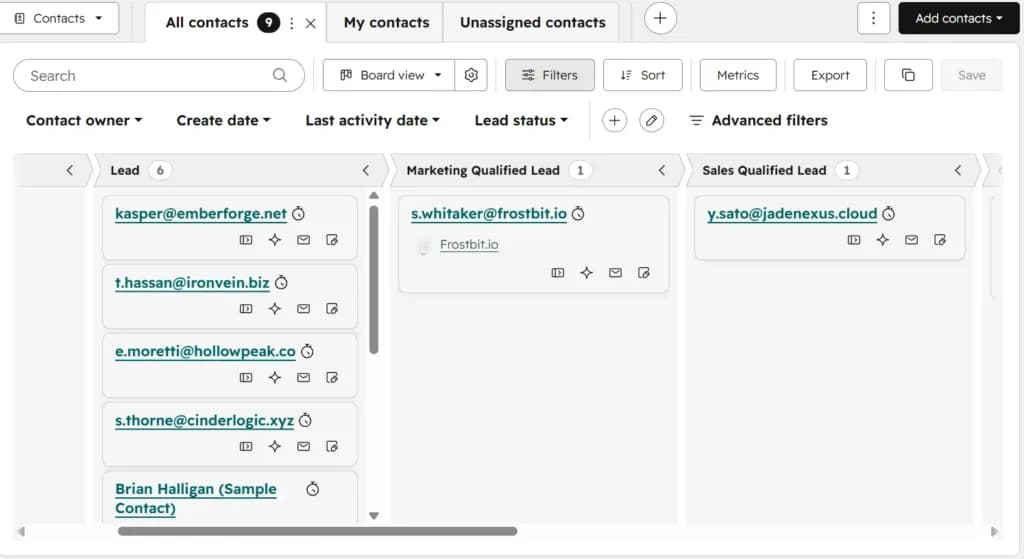
What I noticed watching the Sonary team for six months: the team that updates lifecycle stages religiously is the team that scales. The team that does not ends up with 200 contacts all stuck at "Lead" and a sales rep who cannot tell you who is actually worth pursuing.
There is no software fix for this. It is a discipline problem. The good news: the board view makes the discipline easy. Drag-and-drop is the lowest-friction status-update interface ever designed for sales, and it works.
The Sonary team has one rule:"If you had a meaningful interaction with a contact today, their lifecycle stage moves before you close the laptop."That single rule, applied consistently, is more valuable than any lead scoring algorithm.
How do you capture and route leads automatically in HubSpot?
HubSpot captures leads through forms, live chat, meeting bookings, and ad campaigns, then routes them automatically using workflows that trigger on form submission, lifecycle stage change, or property updates. For a small team, the right routing logic assigns leads based on lead source, region, or product interest - and keeps the rules dead simple.
Here is the actual routing logic at Sonary, simplified for replication:
Lead source | Assigned to | Reason |
|---|---|---|
Inbound form submission (general) | Sales lead | Primary owner of inbound |
Inbound form (partnership inquiry) | Marketing/content lead | Partnership inquiries are different |
Meeting booked via embedded scheduler | Whoever owns that link | Each rep has their own link |
Live chat (qualified) | Whoever is online | Round-robin fallback |
Imported contact from outbound campaign | The rep who imported it | Self-assignment |
The whole rule set is under 10 lines. That is the point. At small team size, complex routing logic is a sign you are over-thinking it.
What you do not need yet: round-robin distribution with weighted capacity rules, lead scoring-based routing, territory rules, account-based routing. These are features for 25+ person teams.
How do small teams use HubSpot’s deal pipeline to track sales?
Small teams use HubSpot’s deal pipeline as the single source of truth for active sales opportunities - every active deal lives there with an owner, a value, a stage, and a close date. The board view is the daily working interface; the table view is the analytical interface.
The same dual board/table pattern that works for contacts applies to deals. Sales reps work the pipeline in board view, dragging deals between stages as conversations progress. The team lead reviews the same data in table view - sortable, filterable, ready for analysis.
The Sonary team has a Monday morning ritual: 15 minutes reviewing the pipeline together. Three questions get asked for every deal:
- Is the stage still accurate?(If not, move it.)
- Is the close date still accurate?(If not, update it.)
- What’s the next concrete action?(If there is not one, the deal is at risk.)
That meeting takes 15 minutes because the data lives in HubSpot and is always current. The same review at a team running on spreadsheets would take an hour and produce worse decisions.
The pipeline also feeds the forecast. With deal value, close date, and stage all tracked, the team can answer"what does this quarter look like?"in five seconds. For a small team without a dedicated finance person, that visibility is genuinely valuable.
How does HubSpot lead scoring work for small teams? (And why you don’t need it yet)
HubSpot lead scoring assigns numeric values to contacts based on attributes and behavior, helping sales prioritize who to contact first. Automated lead scoring is a Professional-tier feature. For small teams under 200 leads per month, it's overrated - manual qualification almost always beats algorithmic scoring at that volume.
This is my most contrarian opinion in this article, so let me explain.
Lead scoring solves a real problem at scale: when 500 leads come in per month, a human cannot realistically evaluate each one, so an algorithm sorts the wheat from the chaff. Score thresholds trigger actions (notify sales, add to nurture, assign owner).
For a small team capturing 30–200 leads per month, this is overkill. Here is why:
- You can read every lead. With 50–100 inbound leads per month, the sales lead can actually look at each one and form an opinion. That opinion is almost always better than what a scoring model would produce, because it incorporates context the algorithm cannot see (industry trend, current pipeline gaps, prior conversations).
- You do not have enough data to score well. Lead scoring works when you have thousands of historical leads to train the model on what "good" looks like. A small team has dozens. The algorithm is essentially guessing.
- Lifecycle stages plus lead status do 80% of the work. Marking a contact as "MQL" with a status of "Interested" tells you everything a numeric score would tell you, in plain language, without the abstraction.
- Scoring rules become technical debt fast. Every change to the scoring model requires understanding the model. At small team size, every layer of abstraction is a layer your future self will have to maintain.
When should a small team add lead scoring? When you genuinely cannot read every lead anymore. For most B2B small teams, that crossover happens around 200–300 inbound leads per month - and at that point you are probably also crossing into HubSpot Professional for other reasons.
Until then: lifecycle stages, lead status, and a 15-minute weekly review beat lead scoring every time.
How does Breeze AI help small teams manage leads?
Breeze AI is HubSpot's built-in AI helper. For lead management, it does three things: summarizes any contact in 30 seconds (record summary), drafts your follow-up emails (Assistant), and cleans messy CRM data in the background (Data Agent). Each paid HubSpot Starter seat gets 500 Breeze AI credits per month at no extra cost.
I wrote a detailed Breeze AI review for 1–4 person businesses covering the full feature set. For lead management specifically, three Breeze features are doing meaningful work for the Sonary team:
- Breeze record summary. This is the most useful AI feature for lead management I have encountered on any platform. Open a contact or company record, and Breeze generates a plain-language summary of recent activity, emails, calls, meetings, and notes. Before any sales call, the rep opens the record, reads the summary, and is fully caught up in 30 seconds.
Why this matters for lead management at scale: the bottleneck for a small sales team is not finding the next lead to call. It is remembering where every conversation stands. Breeze record summary eliminates that bottleneck. - Breeze Assistant for email drafting. When the rep wants to send a follow-up after a discovery call, they can ask Breeze to draft it. They get a usable starting point in seconds, then edit for tone and specifics. This is not replacing the human; it is eliminating the blank-page friction.
- Breeze Data Agent for CRM hygiene. Runs in the background, fixing inconsistent formatting (countries, phone numbers, capitalization), filling missing fields where it can infer values, and surfacing data that needs attention. For a team without an ops person, it's like having someone clean the CRM every week.
The killer daily use case: ask Breeze which lead to work first
This is the single most valuable Breeze AI workflow for a small or micro business — and the one most articles miss.
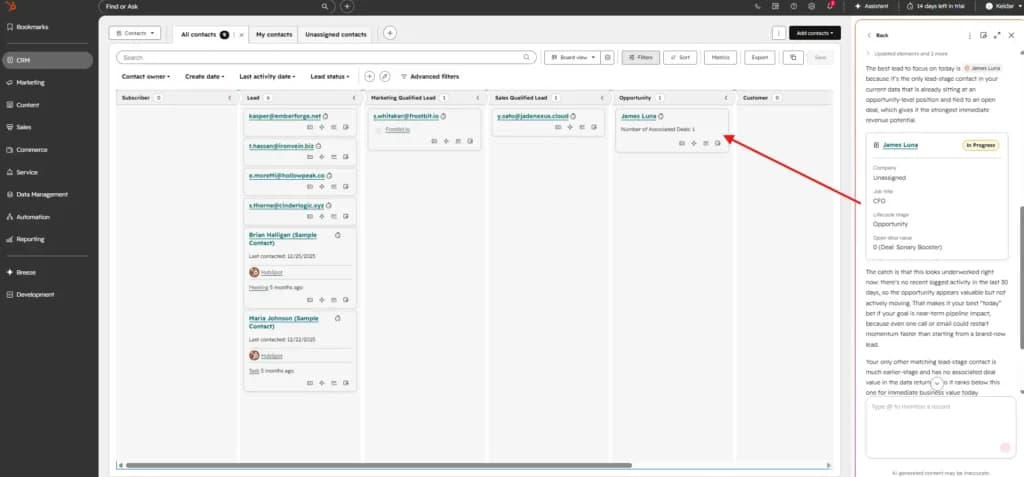
Open HubSpot in the morning. Go to Contacts → All contacts → Board view, grouped by Lead status. You'll see your contacts stacked into columns: Subscriber, Lead, Marketing Qualified Lead, Sales Qualified Lead, and so on. Every lead lives in one column at a time, so you can see at a glance who needs what.
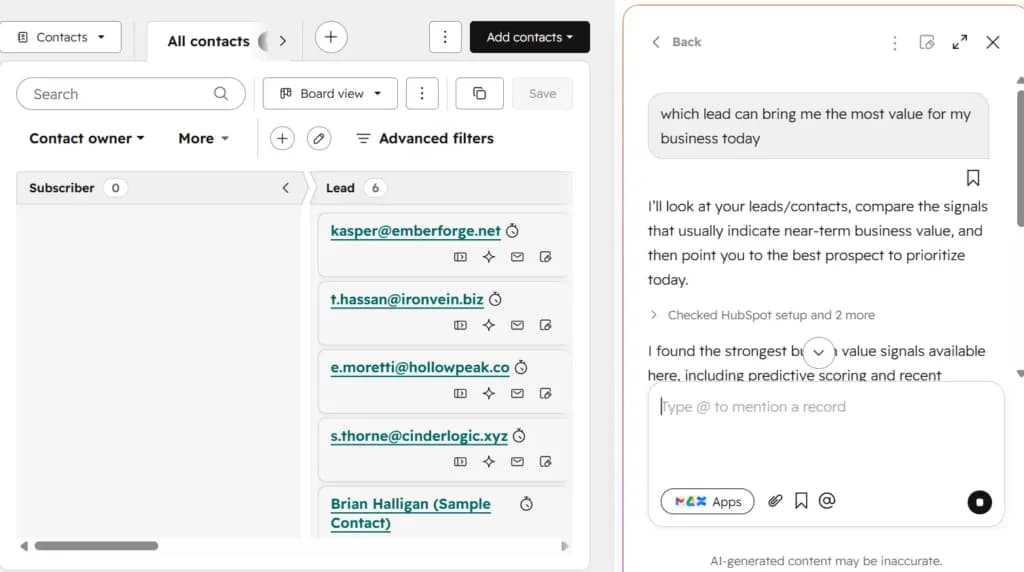
Now open the Breeze AI sidebar (Assistant button) and type a single question:
Try this prompt every morning
"Which lead can bring me the most value for my business today?"
Breeze reads every contact on the board, looks at the signals it has access to (lifecycle stage, last activity, open deals, company info, recent engagement), and gives you a single recommendation in plain English. A real example from a test account:
Example Breeze response
"The best lead to focus on today is James Luna because it's the only lead-stage contact in your current data that is already sitting at an opportunity-level position and tied to an open deal, which gives it the strongest immediate revenue potential."
The Prospecting Workspace vs the Contacts board view: which daily screen should you use?
The HubSpot Prospecting Workspace is a single screen that consolidates a sales rep’s daily work - overdue tasks, today’s meetings, recent activity, and lead queue - into one prioritized view. For small teams, it’s the most underrated productivity tool in HubSpot lead management.
Here is what makes it specifically valuable for small teams: at 3–10 people, each rep is wearing multiple hats. They might own 40+ active deals, 100+ contacts, plus inbound triage, plus outbound campaigns. Without a single command center, they spend half their morning figuring out what to work on.
The Prospecting Workspace solves that. Open it in the morning, and the rep sees:
- Tasks due today and overdue tasks
- Meetings booked for the day
- Recently active contacts (opens, clicks, replies)
- Leads waiting in the queue to be worked
- Pipeline summary at a glance
It is "your day in HubSpot, sorted by what matters most." For a sales rep, it cuts about 20 minutes off the daily orientation cost. Over a six-month period, that is roughly 40 hours of saved time per rep.
If your team is not using the Prospecting Workspace daily, you are paying for HubSpot lead management and getting half the value.
How do you scale sales with HubSpot lead management without hiring?
Small teams scale sales with HubSpot lead management by removing manual work - not by adding human capacity. The path to scale is not "do more things"; it is "do the same things in less time." Specifically: automate handoffs, eliminate redundant communication, surface what needs attention, and let AI handle the catch-up work.
This is the section the title promised, so let me be specific. Here are the five highest-leverage moves a small team can make to scale sales without hiring.
1. Automate every handoff
Every time a lead moves from one person or stage to another, there is a handoff. Sales → Customer Success when a deal closes. Marketing → Sales when a contact becomes an MQL. Account owner → account owner when a territory changes. Every manual handoff is a chance to drop the ball and a tax on someone’s attention.
Build workflows that handle every handoff automatically. Sonary’s five critical workflows (above) eliminate roughly 80% of internal coordination overhead.
2. Kill the status update meeting
The single biggest time sink in small-team sales is the meeting where people verbally update each other on lead and deal status."How’s the X deal going?" "Where are we with Y?"That meeting eats 30–60 minutes per week, per person.
Replace it with the dashboard. If your HubSpot setup is current - lifecycle stages updated, deals in the right pipeline stage, tasks assigned - the answer to every "what’s the status of X" question is already visible. The status meeting becomes a 15-minute pipeline review instead.
3. Let Breeze AI do the catch-up work
Reps spend a meaningful chunk of every day catching up on context: rereading email threads, scrolling through activity timelines, asking colleagues for updates. Breeze record summary collapses that work into 30 seconds per record.
For a sales rep handling 40 active deals, that is potentially 2–3 hours per week saved.
4. Build a template and snippet library
Most outbound and follow-up emails fall into 8–10 recognizable patterns: discovery follow-up, proposal follow-up, decision-maker introduction, re-engagement after silence, etc. Templating these saves 5–10 minutes per email.
For a rep sending 30+ emails per day, that is an hour back daily.
5. Reactivation workflows over new-lead generation
The most underrated lead source for a small team is the contacts already in the CRM who went quiet. A "stale lead reactivation" workflow that flags 30+ day MQLs for re-engagement consistently produces better ROI than new outbound campaigns - because qualified leads who went quiet often went quiet for a fixable reason.
The Sonary team gets about 15% of qualified pipeline from reactivation workflows. That is deals that would otherwise have been lost.
What "scale" actually means for a small team
Here is the honest definition of scale at a small team size: scale is not "doing more deals." Scale is "doing the same number of deals while spending half the time on operational overhead."That extra time then goes into the deals themselves - better discovery, sharper proposals, faster follow-up - which compounds into higher win rates and bigger deal sizes.
The team that aggressively automates with 3 people does not become a 6-person team running the same playbook twice. It becomes a 3-person team that closes the deal flow of a 6-person team.
HubSpot lead management capability matrix: which feature handles which job
Every step of the small-team lead lifecycle has a specific HubSpot feature behind it. This matrix maps the job to the tool so you can audit your own setup: if any row has no owner, that's where leads leak.
Lead lifecycle job | HubSpot feature | What it does |
|---|---|---|
Lead capture | Forms, live chat, meeting scheduler | Brings leads into the CRM from the website, email, and ads |
Routing & assignment | Simple workflows (form/property triggers) | Auto-assigns each lead to the right rep based on source or rules |
Qualification | Lifecycle stages + lead status | Marks where the contact is in the journey and the rep's working state |
Activity tracking | Email tracking, activity timeline | Auto-logs every email, call, meeting, and note on the record |
Call prep / catch-up | Breeze record summary | 30-second plain-language summary of recent activity before any call |
Pipeline management | Deal pipeline + board view | Visual tracking of every active opportunity, owner, value, and stage |
Daily execution | Prospecting Workspace | Single screen consolidating tasks, meetings, recent activity, and lead queue |
Handoff automation | Simple workflows + tasks | Closed-won → onboarding ticket; MQL → sales notification; etc. |
Data hygiene | Breeze Data Agent | Background cleanup of formatting, missing fields, and stale contacts |
Email outreach | Templates, snippets, sequences | Reusable patterns for follow-up, intros, re-engagement |
Reporting | Dashboards + custom reports | Pipeline value, conversion rates, and rep performance at a glance |
If your team can't name the HubSpot feature that owns each row, that's where to focus the next setup hour. The matrix is also the simplest way to brief a new hire on how the CRM works end-to-end.
HubSpot Starter vs Professional: lead management feature comparison
For 90% of small teams under 10 people, the HubSpot Starter Customer Platform handles lead management end-to-end. Professional unlocks lead scoring, autonomous Breeze agents, A/B testing, custom reporting, and higher limits - useful past 200 inbound leads/month or a dedicated RevOps hire.
Lead Management Feature | HubSpot Starter | HubSpot Professional |
|---|---|---|
Deal pipelines | Up to 2 | Many more (Enterprise: 100) |
Workflow automation | Simple workflows only (single-trigger, form/property-based) | Full Workflows tool, up to 300 (Enterprise: 1,000) |
Marketing contact limit | 1,000 included | 2,000 included (expandable) |
Lifecycle stages | Full (8 default + custom values) | Full + advanced automation |
Lead status field | Yes | Yes |
Lead scoring with automated actions | No (manual flagging only) | Yes |
Breeze AI credits | 500 per paid seat/month | 500 per paid seat/month + agents |
Breeze Prospecting Agent (autonomous) | No | Yes |
Breeze Customer Agent (autonomous) | No | Yes |
Custom reporting (multi-object) | Limited | Full |
A/B testing of nurture emails | No | Yes |
Prospecting Workspace | Yes | Yes |
Forms, live chat, meeting scheduler | Yes | Yes |
Approximate monthly price (3 seats) | ~$45 (annual) / ~$60 (monthly) | ~$450–$500 |
The 10× price jump is real. Most small teams should stay on Starter until at least one of the upgrade triggers in the next section is genuinely blocking work. For full pricing, see Sonary’s HubSpot pricing breakdown.
What are the limits of HubSpot lead management for small teams?
HubSpot Starter Customer Platform has five real limits for small teams: no automated lead scoring, no autonomous Breeze agents, no custom multi-object reporting, no A/B testing of nurtures, and a 1,000 marketing contact ceiling. None blocks most teams under 10 people - but knowing the ceiling matters.
Six months in, here is what I would flag honestly:
- No automated lead scoring on Starter. As covered above, this is not actually a problem at small team size - but if you are already running 200+ inbound leads per month, the lack of scoring becomes a real constraint.
- No autonomous Breeze agents. The Prospecting Agent and Customer Agent (which handle entire workflows end-to-end) are Professional/Enterprise. Until your team is big enough to need them, the Assistant + Data Agent combo on Starter is sufficient.
- The 1,000 marketing contact cap. If you are running nurture campaigns aggressively, you will hit this faster than expected. The fix is hygiene: aggressively mark non-marketing contacts (vendors, partners, customers not in nurture) as non-marketing to keep the cap open for actual marketing audiences.
- Limited multi-object reporting. You cannot easily build a custom report that joins contact data, deal data, and ticket data in one view. For a small team, exporting to a spreadsheet for the rare cross-object analysis works fine; for a growth-stage team, this becomes a daily friction.
- No A/B testing of nurture sequences. If you are running multi-variant nurture campaigns, Starter will not help. But A/B testing at small list sizes (under 1,000 contacts) rarely produces statistically meaningful results anyway.
When should a small team upgrade their HubSpot lead management setup?
Upgrade from HubSpot Starter to Professional when one of these is genuinely blocking work: 200+ inbound leads/month, marketing contacts approaching 1,000, need for branching multi-step workflows, a dedicated RevOps hire, or recurring custom multi-object reporting. Until one is blocking, the 10× cost increase is not justified.
Until at least one of those is genuinely blocking work, stay on Starter. Professional is roughly 10× the monthly cost (Starter is ~$15/seat/month annual; Marketing Hub Professional starts around $800/month) - paying for headroom you are not using is one of the easiest ways small teams burn cash.
If you are not sure whether the upgrade is justified, the honest test: open HubSpot, open a notebook, and write down every task in the last 30 days you could not accomplish because of a tier limit. If the list is empty or has one trivial entry, you do not need to upgrade. If the list has three or more genuine blockers, it is time.
FAQ: HubSpot lead management for small teams
What is HubSpot lead management?
HubSpot lead management is the connected set of tools inside HubSpot that handles a contact’s entire journey from first touch to closed customer - lead capture, automatic routing, lifecycle stage tracking, deal pipeline movement, follow-up automation, and activity reporting. It is not a single product but the system that emerges when HubSpot CRM, forms, workflows, and pipeline tools work together on a single record.
How do small teams use HubSpot to scale sales?
Small teams scale sales with HubSpot by automating the repetitive work - lead capture, routing, follow-up reminders, lifecycle updates, internal handoffs - so humans on the team focus only on the conversations that actually move deals forward. The path to scale is not adding people; it is removing manual work from existing people.
Does HubSpot Starter include lead management?
Yes. HubSpot Starter Customer Platform includes the full lead management stack: contact and company records, 2 deal pipelines, lifecycle stages, simple workflow automations (form, property, and lifecycle triggers), forms, live chat, meeting scheduler, and Breeze AI features (500 credits per paid seat per month). The full Workflows tool and lead scoring with automated actions unlock at Professional, but lifecycle stages plus lead status cover most of what small teams need.
How much does HubSpot lead management cost for a small team?
HubSpot Starter Customer Platform is $15 per seat per month (billed annually) or $20 per seat per month (billed monthly), and includes the full lead management stack - forms, simple workflows, deal pipelines, Breeze AI credits, and the Prospecting Workspace. A 3-person team pays roughly $45 per month on annual billing. There is no separate "lead management product"; it is built into the Starter plan.
How many workflows do small teams actually need for lead management?
About 4–5 critical simple workflows handle the core lead management lifecycle for most small teams: new form submission, MQL handoff, stale lead reactivation, closed-won handoff, and data hygiene. Sonary runs 12–15 simple workflow automations on HubSpot Starter - the rest handle smaller operational tasks.
Do small teams need lead scoring in HubSpot?
For most small teams under 200 inbound leads per month, lead scoring is dramatically overrated and manual qualification beats algorithmic scoring. Reasons: you can read every lead at small volume, you do not have enough historical data to train scoring well, and lifecycle stages plus lead status do 80% of the work without the abstraction. Add lead scoring when you genuinely cannot evaluate every lead manually.
What’s the most underrated HubSpot feature for small team lead management?
The Prospecting Workspace. It is a single screen that consolidates a sales rep’s daily work - overdue tasks, today’s meetings, recent activity, lead queue, and pipeline summary - into one prioritized view. For small teams where each rep is juggling 40+ active deals, it saves roughly 20 minutes per day of orientation overhead.
How does Breeze AI help with lead management?
Breeze AI helps with lead management in three main ways: Breeze record summary generates plain-language summaries of contact activity (30-second catch-up before any call), Breeze Assistant drafts and improves emails, and Breeze Data Agent keeps CRM data clean in the background. Each paid seat on HubSpot Starter receives 500 Breeze AI credits per month.
Can you run a complete sales process on HubSpot Starter Customer Platform?
Yes. The full lead-to-customer process - capture → CRM contact → automated routing → sales follow-up → meeting booking → quote with payment link → closed deal → automated handoff to onboarding - runs entirely on HubSpot Starter Customer Platform without additional tools.
What lifecycle stages should small teams use in HubSpot?
For most small teams, four lifecycle stages are enough: Lead, MQL, Opportunity, Customer. Collapsing the default MQL/SQL into a single "MQL" (meaning "qualified enough for sales to actively work") removes a marketing-to-sales handoff friction point that does not add information at a small team size.
How do small teams handle outbound prospecting in HubSpot?
Small teams handle outbound in HubSpot by importing target lists as contacts (flagged non-marketing to preserve the marketing contact cap), assigning them to a sales rep, using email templates and snippets for consistent messaging, tracking opens and clicks via email tracking, and updating lifecycle stage as conversations progress. The autonomous Prospecting Agent that handles outbound end-to-end is a Professional/Enterprise feature.
When should a small team upgrade from HubSpot Starter to Professional?
Upgrade when one of these is genuinely blocking work: inbound lead volume exceeds 200/month, marketing contacts approach 1,000 and the list is still growing, you need branching multi-step workflows that Starter's simple workflows can't express, the team adds a dedicated marketing/RevOps hire, or custom reporting becomes a recurring need. Until one of those is blocking, the 10× cost increase is not justified.
How does HubSpot compare to Salesforce for small team lead management?
HubSpot is significantly better suited to small teams under 25 people: faster to set up, lower starting cost, built-in marketing and email tools, and a less technical admin burden. Salesforce is more powerful at enterprise scale but requires admin expertise that small teams rarely have in-house. For lead management specifically, HubSpot Starter delivers in days what Salesforce typically takes weeks of consulting to deploy.
What integrations matter most for HubSpot lead management at a small team size?
For a 3–10 person B2B team, the highest-value HubSpot integrations are: Gmail or Outlook (email + calendar sync), Zoom or Google Meet (meeting recordings and notes), a billing tool (Stripe or QuickBooks), and Slack (internal notifications from workflows). These four cover 90% of the integration value. Most other integrations add complexity faster than they add value at small team size.
Final verdict: lead management is a discipline, not a tool
After six months of testing HubSpot lead management alongside Sonary’s small team, the biggest lesson is this: lead management is not a feature you turn on, it is a discipline you build.
The teams that scale sales without hiring are the teams that:
- Update lifecycle stages religiously
- Run weekly pipeline reviews using the data already in the system
- Automate every handoff that humans do not add value to
- Use Breeze AI to eliminate the catch-up cost
- Treat the Prospecting Workspace as the daily command center
- Resist the temptation to add features they do not yet need
The HubSpot lead management tools - lifecycle stages, pipelines, workflows, forms, AI - are excellent. But they are scaffolding. The actual scaling work is operational discipline at 3–10 people, layered on top of well-designed scaffolding.
If you are a small team trying to scale sales without hiring, start with the five-step setup above. Build the 4–5 critical workflows. Use the Prospecting Workspace daily. Let Breeze AI do the catch-up work. Keep the system deliberately simpler than the enterprise playbooks suggest.
That is the playbook that works for small teams. And it is the playbook the Sonary team has been running on for six months - to genuinely scale sales without adding a single person to the org chart.
What to do next
Three paths depending on where you are right now:
Pick the path that matches you
- Choosing a CRM for the first time? Start with Sonary's CRM selection guide for small businesses to compare HubSpot to Pipedrive, Zoho, Salesforce, and the other realistic small-team options before committing.
- Already on HubSpot Starter? Read the 6-month HubSpot Starter Customer Platform review to see everything else (marketing emails, scheduling, payments, content) that runs on the same plan.
- Want the AI-specific playbook? Open the hands-on Breeze AI review for 1–4 person businesses for the Breeze record summary, Assistant, and Data Agent tactics in detail.
About the Author -Daniel Zvi is a B2B Software content writer at Sonary, where he covers AI app builders, CRMs, and the broader B2B software stack used by small and micro businesses. His work focuses on hands-on testing - sample sizes, real deployments, and the operational reality of running a small team - rather than feature checklists.
This article on HubSpot lead management is the third in Daniel’s hands-on HubSpot series for small businesses, following his HubSpot Breeze AI review and his 6-month HubSpot Starter Customer Platform review. It reflects six months of testing alongside a 3-person sales and marketing team at Sonary, using HubSpot as their daily operating system. Connect with Daniel on LinkedIn.