Pipedrive vs Zoho: Which CRM is better for small business sales teams in 2026?



Choosing a Customer Relationship Management (CRM) platform is a defining moment for any small business. It is the engine that will power your entire sales process. The right choice will help your team close deals, automate work, and build a predictable revenue pipeline. The wrong choice will be a clunky, expensive database that your team abandons for their old spreadsheets.
For most SMBs, the search boils down to a major showdown: Pipedrive vs Zoho.
This comparison, however, comes with a critical clarification. Pipedrive is a “purebred” sales CRM, laser-focused on one thing: helping salespeople visualize their pipeline and win deals. Zoho CRM is the flagship product of a massive software ecosystem with over 50 apps. To make this a fair, data-driven comparison, we will be comparing Pipedrive to its direct competitor: Zoho CRM.
The core difference is one of philosophy. Pipedrive vs Zoho CRM is a classic battle of specialization vs. generalization. Pipedrive is the simple, intuitive, sales-first tool. Zoho CRM is the powerful, customizable, “all-in-one” platform that aims to be the central hub for your sales, marketing, and support.
This article will break down every key feature, the critical pricing differences, and real-world scenarios to help you decide which CRM software is the right investment for your business.
Key points (quick summary)
For readers who need a fast answer, here is the high-level breakdown of Pipedrive vs Zoho CRM.
- Pipedrive is best for… Small to medium-sized sales teams who prioritize ease of use, a highly visual sales pipeline, and simplicity.
- Zoho CRM is stronger in… Deep customization, all-in-one functionality (sales, marketing, and support), and ecosystem integration.
- The main difference in pricing is… The free plan. Zoho CRM offers a “Free Forever” plan for up to 3 users, ranking it among the best free CRM software available. Pipedrive does not have a free plan, but it offers a 14-day free trial.
- The key feature that separates them is… The interface. Pipedrive is famous for its clean, drag-and-drop Kanban-style pipeline that salespeople love. Zoho CRM is a more traditional, module-based CRM that is “infinitely customizable” but has a much steeper learning curve.
- The ideal audience for Pipedrive is… The “pure” sales team that lives and dies by its pipeline and just wants a tool that “gets out of the way” and helps them sell.
- The ideal audience for Zoho CRM is… The business owner who wants a single, powerful platform to manage the entire customer lifecycle—from marketing campaigns to sales deals to support tickets—and is willing to invest time in setup.

Lite
Pros
- User-friendly design
- Easy setup process
- Friendly customer support
Cons
- No free version
Free
Pros
- Easy setup
- Customizable capabilities
- Reliable customer support
Cons
- Billed per user
- Limited third-party integrations
Head-to-head comparison (detailed breakdown)
We’ll now dive deep into the specific features to compare Pipedrive and Zoho CRM side-by-side.
Market position & ideal use cases
- Pipedrive was famously “built by salespeople, for salespeople.” Its entire philosophy is built around activity-based selling. It operates on the principle that you can’t control outcomes (like winning a deal), but you can control the activities that lead to those outcomes (like making calls, sending emails, and booking meetings). Its ideal user is a sales-focused SMB that needs to get its team organized and closing deals fast, without a complex setup.
- Zoho CRM is the central hub of the vast Zoho ecosystem. Its philosophy is to provide a single, scalable platform for all customer-facing operations. It is designed for businesses that want to align their sales, marketing, and customer service departments. If you are debating between ecosystems, you might also want to see how it stacks up in our Zoho vs HubSpot CRM comparison.
Platform & ecosystem
This section refers to the software’s availability and environment, as neither is a hardware-based product.
- Pipedrive is a cloud-based (SaaS) tool with highly-rated, intuitive mobile apps for both iOS and Android. Its desktop and mobile experience is seamless and focused purely on sales activities.
- Zoho CRM is also a cloud-based tool with robust mobile apps. However, its true “ecosystem” is its biggest differentiator. Zoho CRM integrates natively with 45+ other Zoho applications. This is called the “Zoho One” bundle, and it is a massive advantage if you want one vendor for your entire business operating system.
Core features & capabilities
This is where the “specialist vs. generalist” debate comes to life.
- Sales Pipeline Management:
- Pipedrive: This is Pipedrive’s crown jewel. It offers a clean, visual, drag-and-drop Kanban interface for managing deals. It is simple, intuitive, and universally praised by sales reps for its clarity.
- Zoho CRM: Also offers visual pipeline management, but it is just one of many modules. It is highly customizable, allowing for multiple pipelines and more complex rules, but it requires more configuration to achieve the “out-of-the-box” simplicity of Pipedrive.
- Lead & Contact Management:
- Pipedrive: Simplifies contact management by linking deals directly to contacts and organizations. It has a “Contact Timeline” that shows every interaction, and its “LeadBooster” add-on helps capture new leads via chatbots and web forms.
- Zoho CRM: Is more robust. It uses distinct modules for Leads, Contacts, Accounts (Companies), and Deals. This is more powerful for organizations that have a dedicated process for qualifying leads (e.g., from marketing) before converting them into sales opportunities.
- Email & Activity Tracking:
- Pipedrive: Features excellent, simple email integration. It syncs with your inbox (Gmail, Outlook) and tracks email opens and clicks. It prompts you for your “next activity” for every deal, reinforcing its core philosophy.
- Zoho CRM: Also has full email integration, but it goes a step further by offering built-in email marketing and mass email capabilities in its higher-tier plans, something Pipedrive handles via a paid “Campaigns” add-on.
Reporting, analytics & insights
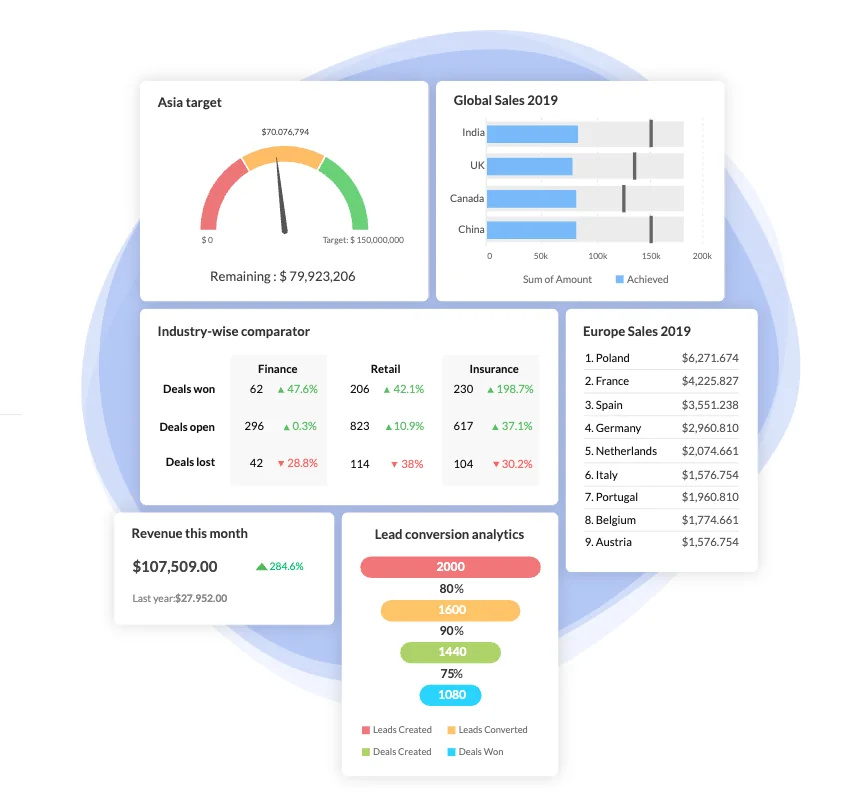
- Pipedrive offers clean, visual, real-time dashboards that focus on core sales KPIs: deal conversion, activity goals, and sales forecasts. The reports are easy to understand but can be limited for those needing deep, cross-departmental analytics.
- Zoho CRM is far more powerful. It offers in-depth, cross-module reporting. You can build complex, custom reports that combine data from sales, marketing, and support. It also integrates with Zoho Analytics for true business intelligence (BI) capabilities that Pipedrive cannot match without third-party tools.
Integrations & connected tools
- Pipedrive has a strong marketplace with over 350+ third-party integrations. It connects easily with all the tools a modern sales team needs, such as Slack, Google Workspace, Microsoft 365, Trello, and Asana. (If your team is heavy on project management, you might also consider Pipedrive vs Monday CRM).
- Zoho CRM has a marketplace with over 800+ external integrations. But its unbeatable advantage is its native, “in-house” integration with the 45+ other Zoho apps. Connecting your CRM to your accounting (Zoho Books), project management (Zoho Projects), and help desk (Zoho Desk) is seamless.
AI, automation & smart features
This is a head-to-head battle between two different AI philosophies.
- Pipedrive AI (Sales Assistant:
- What it is: A set of AI-powered features woven into the sales workflow, including a Sales Assistant.
- Key Features: It’s focused on sales execution.
- Recommends the “next best action” to move a deal forward.
- Provides insights and suggestions to optimize sales activities.
- Uses AI to surface trends and insights from your sales data.
- Pricing: AI features are included in the Growth, Premium, and Ultimate plans.
- Focus: Sales execution.
- Verdict: It acts as a helpful “Sales Coach.”
- Zoho CRM (Zia):
- What it is: A powerful, conversational AI assistant named Zia.
- Key Features: Zia is a true cross-platform assistant.
- Provides predictive analytics (e.g., “lead prediction” and “deal prediction” scores).
- Suggests the “best time to contact” a lead based on past interactions.
- Automates data entry by scanning emails and forms.
- Answers complex questions via chat (e.g., “Show me my sales in New York last quarter”).
- Pricing: Zia’s features are integrated starting with the Professional plan and become more powerful in the Enterprise and Ultimate tiers.
- Focus: Cross-platform data analysis.
- Verdict: It acts as a powerful “Data Analyst.”
Verdict: Pipedrive’s AI is a helpful sales coach. Zoho’s Zia is a powerful, data-driven business analyst. For pure sales optimization, Pipedrive is simpler. For deep business insights, Zoho is more capable.
Pricing & payment processing
The pricing models are a critical differentiator, especially at the entry level.
| Plan | Product | Price (per user/month) | Key Features & Limitations |
|
Free Forever |
Zoho CRM |
$0 |
Up to 3 users. Core features: Lead, contact, & deal management. |
|
Trial |
Pipedrive |
$0 |
14-day free trial. No free plan. |
|
Standard |
Zoho CRM |
$14 |
Adds scoring rules, workflow automation, and mass email. |
|
Lite |
Pipedrive |
$14 |
Re-branded from “Essential” plan. Core pipeline & contact management. |
|
Professional |
Zoho CRM |
$23 |
Adds Zia (AI), inventory management, and web-to-case forms. |
|
Growth |
Pipedrive |
$39 |
Re-branded from “Advanced” plan. Adds email tracking & more automation. |
|
Enterprise |
Zoho CRM |
$40 |
Advanced customization, more AI features, multi-user portals. |
|
Premium |
Pipedrive |
$49 |
Re-branded from “Professional” plan. More reporting, advanced automation. |
Pricing summary:
- For starting out, Zoho CRM is the undeniable winner. Its Free Forever plan for 3 users is a game-changer for freelancers and very small businesses. Pipedrive has no free plan.
- For growing teams, Zoho CRM consistently offers more features at each price point. Its Professional plan ($23) includes AI (Zia) and automation—features that often require higher tiers in Pipedrive.
- Hidden Costs: Be cautious with Pipedrive’s add-ons. Core features like lead generation (LeadBooster) and marketing (Campaigns) are paid extras, which can significantly increase the total monthly bill.
Support, reliability & customer experience
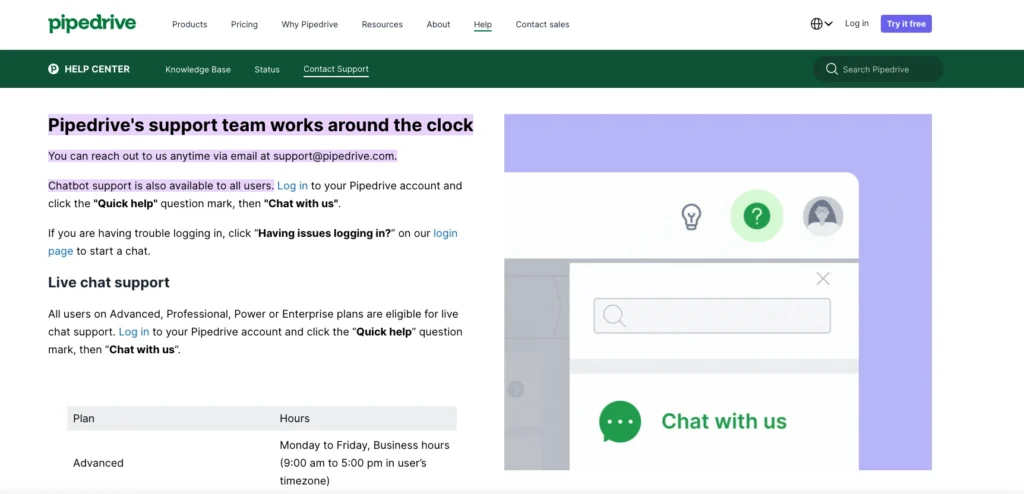
- Pipedrive: Offers 24/7 support via live chat and email to all paying customers. Phone support is generally reserved for the highest tiers. Its support is widely praised for being fast, friendly, and knowledgeable.
- Zoho CRM: Offers 24/5 phone, email, and live chat support on its paid plans. The Premium plan unlocks 24/7 support. The free plan is limited to email support (with a slower response time) and community forums.
Scalability & growth potential
- Pipedrive scales well for sales-focused organizations. You can move up the tiers to get more reporting and automation. Its limitation is that it is only a sales tool. You will eventually have to patch together other software for accounting, support, and project management.
- Zoho CRM has near-limitless scalability. It scales not just as a CRM but as the foundation of your entire business. When you need an accounting app, you add Zoho Books. When you need a help desk, you add Zoho Desk. If you are looking for enterprise-grade scalability beyond even Zoho, you might want to read our Salesforce Pricing Explained guide to see if that ecosystem is worth the cost.
Real-world scenarios / use case analysis
Example 1: The 10-person real estate brokerage
- Needs: A simple, visual way for agents to track their deals (clients), manage follow-ups, and see their commission forecasts.
- Recommendation: Pipedrive Growth
- Reason: This is Pipedrive’s perfect use case (and one of the top CRM for Real Estate picks). The visual, drag-and-drop pipeline is ideal for managing property deals. The “activity-based” workflow ensures agents are making their calls and sending follow-ups. It is simple to learn, and the team will actually use it.
Example 2: The solo business consultant (starting out)
- Needs: A no-cost, professional way to manage a handful of clients, track potential leads from a website, and keep notes on conversations.
- Recommendation: Zoho CRM Free Forever Plan
- Reason: The cost. For a solo operator, a free plan that supports up to 3 users (e.g., the consultant, an assistant, and an accountant) is unbeatable. It provides all the core CRM functions needed to look professional without monthly overhead.
Example 3: The 30-person B2B SaaS company
- Needs: A powerful system to manage marketing leads, score them, pass qualified leads to sales, manage the sales pipeline, and then provide post-sale customer support.
- Recommendation: Zoho CRM Professional (or Zoho One)
- Reason: This business has a complex, multi-stage customer lifecycle. Zoho CRM is built for this. Marketing can use its automation to nurture leads, Zia can score them, and workflow rules can automatically assign them to sales reps. Post-sale, a support ticket can be managed in the same system, giving everyone a 360-degree view of the customer.
Final verdict & recommendation table
| Factor | Best Choice | Reason |
|
Ease of use |
Pipedrive |
Its interface is simpler, more visual, and purpose-built for sales reps. The learning curve is minimal. |
|
Pricing value (to start) |
Zoho CRM |
The “Free Forever” plan for 3 users is unbeatable. Pipedrive has no free plan. |
|
Sales pipeline management |
Pipedrive |
This is its entire focus. The drag-and-drop visual pipeline is best-in-class for pure sales. |
|
All-in-one features |
Zoho CRM |
Includes marketing, support, and inventory management in one platform. Pipedrive is sales-only. |
|
AI & automation |
Zoho CRM |
Zoho’s “Zia” is a more comprehensive AI assistant, and its workflow automation is more powerful. |
|
Ecosystem & scalability |
Zoho CRM |
The ability to natively integrate with 45+ other Zoho business apps (like accounting, HR, and projects) is a massive scaling advantage. |
|
Best for pure sales teams |
Pipedrive |
If your team just needs to sell and hates complex software, Pipedrive is built for them. |
|
Best for a “whole business” OS |
Zoho CRM |
If you want one platform to run your entire business (sales, marketing, support, finance), Zoho is the clear choice. |
FAQ: Pipedrive vs Zoho
How is Pipedrive different from Zoho CRM?
The main difference is specialization vs. generalization. Pipedrive is a specialized, sales-first tool designed to be the best at one thing: visual pipeline management. Zoho CRM is a generalist, all-in-one platform that combines sales, marketing automation, and customer support in one customizable system.
Which is cheaper, Pipedrive or Zoho?
Zoho CRM is cheaper. It offers a Free Forever plan for up to 3 users, which Pipedrive does not. At every paid tier, Zoho CRM generally offers more features (like AI and marketing automation) for a lower per-user price than Pipedrive.
Can Pipedrive be used as a CRM?
Yes, Pipedrive is a Customer Relationship Management (CRM) tool. It’s specifically a “sales-focused” CRM, meaning its features are optimized for sales teams managing deals, contacts, and activities in a pipeline.
Can I migrate from Zoho to Pipedrive?
Yes. While Pipedrive doesn’t have a direct “Zoho” import button, you can export your data (Leads, Contacts, Deals, etc.) from Zoho CRM as a CSV or Excel file. You can then import this file into Pipedrive and map the columns (e.g., “Company Name” from Zoho to “Organization” in Pipedrive). This may require some data cleaning.
Can I import data from Pipedrive to Zoho?
Yes, and this process is very common. You can export your Deals, Contacts, and Organizations from Pipedrive as a CSV file and then use Zoho CRM’s built-in “Import” tool to upload the data. You will then map the fields from your Pipedrive file to the corresponding fields in Zoho CRM.
What is the main Pipedrive alternative?
The main alternatives to Pipedrive are Zoho CRM, HubSpot Sales Hub, and Freshsales, all of which compete on ease of use and features for SMBs.
What is the main Zoho alternative?
The main alternatives to Zoho CRM are HubSpot CRM, Salesforce (Essentials), and Pipedrive. These platforms also offer a combination of sales, marketing, and service tools.
Does Pipedrive integrate with other Zoho apps?
Yes, via third-party integration tools like Zapier or Make. You can create “zaps” that connect Pipedrive to Zoho Books, Zoho Projects, or Zoho Forms. However, this is not the same as the seamless, native, one-click integration you get when using only Zoho products.