
Accounts Payable Explained: A Practical Guide for Small Businesses (2026)

Accounts payable (AP) is the money your business owes to suppliers and vendors for goods or services already received but not yet paid for. It sits on your balance sheet as a short-term liability. Accounts payable software is a specialized tool that automates how those bills get captured, approved, and paid - different from (but usually connected to) your general accounting software like QuickBooks or Xero.
If you've ever wondered whether you actually need a dedicated AP tool when your accounting software already tracks bills, this guide is for you. We'll cover what AP means, how it works in practice, two essential formulas, the real cost of doing AP manually, how AP software compares to accounting software, who genuinely benefits from buying it, and what it typically costs in .2026
What Is Accounts Payable?
What is accounts payable? Accounts payable is the total amount your business owes to outside parties - suppliers, contractors, utility providers, and service vendors - for goods or services you've received but haven't paid for yet. On your balance sheet, it appears as a current liability, meaning it's a short-term obligation typically due within 30, 60, or 90 days.
What are accounts payable? The phrase works both ways. In the singular, "accounts payable" refers to the function or the balance sheet line. In the plural, "accounts payable" refers to the individual invoices that make up that balance - every unpaid bill from every vendor.
What does accounts payable mean in practical terms?
- A vendor sends you an invoice for $500.
- You haven't paid it yet.
- That $500 is now an account payable.
- It stays on your books as a current liability until you settle it.
For a coffee shop owner, AP might be the unpaid invoice from your bean roaster. For a freelance design studio, it could include your Adobe subscription, your accountant's monthly fee, and the photographer you hired last week. Anything you've consumed but haven't paid for yet.
Why AP matters more than people think
Mismanaged AP is one of the most common reasons small businesses damage supplier relationships, miss early-payment discounts, get hit with late fees, or lose track of their real cash position. Late payments are widespread: in the US, only around 36% of invoices are paid on time, and small businesses receive payments an average of eight days past the agreed deadline (HighRadius, 2025).
The consequence isn't theoretical. A NerdWallet survey found that 28% of business owners reported late payments affected their operations to the point of delaying hiring(DocuClipper, 2025). A pile of unopened invoices in an inbox is silent debt - you owe it whether you've recorded it or not. For very small businesses still relying on spreadsheets, this is often the trigger to adopt dedicated bookkeeping software as a first step before moving into AP automation.
How Accounts Payable Works in Practice
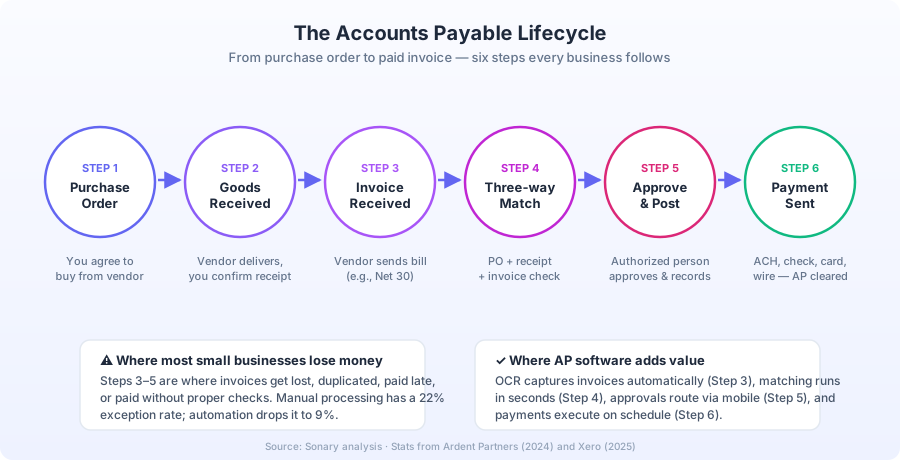
The AP cycle - sometimes called procure-to-pay or P2P - has six distinct steps, even at the smallest business.
- Purchase order (PO) issued- You agree to buy something from a vendor. In larger setups, this is a formal PO document. In micro businesses, it's often just an email or verbal agreement.
- Goods or services received- The vendor delivers, and someone on your team confirms receipt.
- Invoice received- The vendor sends a bill with payment terms (e.g., Net 30).
- Three-way matching- The invoice is checked against the PO and the proof of receipt. If all three match, the invoice is approved. If not, it goes back for clarification. This is one of the strongest controls against duplicate payments and supplier fraud.
- Approval and posting- The invoice is approved by whoever has authority (an owner, manager, or controller), then recorded in your accounting system. Under accrual accounting (GAAP), the expense hits your P&L now, and the liability sits on your balance sheet until paid.
- Payment- You pay the vendor via ACH, check, virtual card, wire, or cash. The AP balance decreases.
Larger businesses use segregation of duties here - the person who enters the bill is not the person who approves it, and neither is the person who actually sends the payment. This separation is the single most effective control against internal fraud, and good AP software enforces it automatically.
Accounts Payable vs Accounts Receivable
These two get confused constantly because they sound similar and live on opposite sides of the same transaction. If your business invoices customers as well as pays suppliers, you'll need both an AP process and an accounts receivable process - they're mirror images of each other.
Accounts Payable (AP) | Accounts Receivable (AR) | |
|---|---|---|
Direction | Money you owe | Money owed to you |
Balance sheet | Current liability | Current asset |
Who tracks it | You, the buyer | You, the seller |
Example | A supplier invoice you haven't paid | A customer invoice they haven't paid |
Goal | Pay on time without paying earlier than needed | Get paid as fast as possible |
Key metric | Days Payable Outstanding (DPO) | Days Sales Outstanding (DSO) |
Easy memory trick:"Payable" = you pay. "Receivable" = you receive.
A vendor's AR is your AP. The invoice they're chasing on their end is the invoice you're holding on yours. Together with inventory days, AP and AR feed into your cash conversion cycle- the number of days between paying for inputs and getting paid by customers. Lengthening AP (within reason) shortens this cycle and frees up working capital.
Key Formulas: AP Turnover and DPO
Two metrics every small business owner should know. They answer slightly different questions about the same thing: how fast you pay your suppliers.
1. Accounts Payable Turnover Formula
The AP turnover ratio tells you how many times in a period you've paid off your full AP balance.
AP Turnover Ratio = Total Supplier Purchases ÷ Average Accounts Payable
Where:
- Total Supplier Purchases= total credit purchases from vendors over the period
- Average Accounts Payable= (Beginning AP + Ending AP) ÷ 2
Worked example. Suppose your bakery had:
- $120,000 in supplier purchases over the year
- $10,000 in AP at the start of the year
- $14,000 in AP at the end of the year
Average AP = (10,000 + 14,000) ÷ 2 = $12,000 AP Turnover = 120,000 ÷ 12,000 =10
You paid off your AP balance roughly 10 times during the year.
2. Days Payable Outstanding (DPO) Formula
DPO is more intuitive for most small business owners because it gives you a number of days rather than a ratio. It's also the metric most commonly tracked by accountants and lenders.
DPO = (Average Accounts Payable ÷ Cost of Goods Sold) × 365
Using the bakery numbers above, and assuming COGS of $80,000:
DPO = (12,000 ÷ 80,000) × 365 =54.75 days
The bakery pays its suppliers, on average, about 55 days after receiving an invoice.
How to interpret these numbers
- Higher DPO / lower turnover→ you're paying slower. Helps short-term cash flow, but risks late fees, strained vendor relationships, and missed early-payment discounts.
- Lower DPO / higher turnover→ you're paying faster. Good for vendor trust, but you may be paying earlier than necessary and tying up cash that could fund growth.
- The right answer depends on your industry. According to APQC benchmarking, the average DPO across industries is around 40 days, but it ranges widely - retail averages around 30 days, manufacturing around 60 (Sage, 2025). Always compare against your own past performance and industry benchmarks rather than chasing a universal ideal.
The Hidden Cost of Manual AP
Most small business owners underestimate what it actually costs to process invoices the old-fashioned way. The numbers from independent research are striking.
Cost per invoice:
- Manual processing averages $12.88 per invoice according to Ardent Partners' 2024 research (Xero, 2025). Other sources put the range at $15–$40 for fully manual workflows (Lido benchmarks).
- Automated processing drops this to $2.78–$5 per invoice, and as low as under $1 with full AI-powered automation (Lido).
- Labor accounts for around 90% of manual AP cost(Xero, 2025).
Time and error costs:
- A typical AP clerk spends about 20% of their work hours on invoices, equating to roughly $10,000/year of payroll dedicated to bill processing for a single $50,000 salary (GoComet, 2025).
- Manual entry has a 1.6% error rate per invoice, and IOFM research found each error costs as much as $53 to fix(GoComet, 2025).
- Manual processing has a 22% exception rate(invoices needing rework); automation cuts that to 9% (Xero, 2025).
Missed opportunities:
- Late payment penalties typically run 1–2% of the invoice or a flat $25–$50(Xero, 2025).
- Vendors commonly offer 1–10% early-payment discounts(for example, "2/10 net 30" means a 2% discount if you pay within 10 days instead of 30). Ardent Partners reports that companies with manual AP capture only 20–30% of available early-payment discounts(Lido).
The state of the industry, 2025:
- 68% of businesses still manually key invoices into their ERP or accounting software (DocuClipper, 2025).
- 48% of small businesses still receive paper invoices(DocuClipper, 2025).
- The global AP automation market is projected to reach $6.17 billion in 2025, growing toward $12.46 billion by 2031 (Factura.ai).
- The SME segment is growing fastest at an estimated 18.15% CAGR - meaning small businesses are now the biggest adopters of AP automation (Factura.ai).
For a small business processing 100 invoices a month, switching from manual to automated AP can save over $1,000 a month in pure processing costs alone - before counting recovered early-payment discounts or eliminated late fees (Xero, 2025).
Accounts Payable vs Accounting Software
This is where small business owners get stuck. They look at their QuickBooks, Xero, or Wave subscription and ask: isn't this already accounts payable software?
Short answer: Accounting software includes basic AP functionality. Dedicated accounts payable software is purpose-built for the AP workflow specifically and goes much deeper.
Feature | Accounting Software | Accounts Payable Software |
|---|---|---|
Examples | QuickBooks, Xero, FreshBooks, Zoho Books | |
Primary job | General ledger, financial reporting, tax prep | Capturing, approving, and paying bills |
Bill capture | Manual entry or basic upload | OCR + AI auto-extraction from emails, PDFs, photos |
Approval workflows | Limited or none | Multi-step routing, role-based approvals |
Three-way matching | Manual or limited | Built-in PO matching against invoice and receipt |
Payment execution | Records the payment | Actually sends ACH, check, card, wire, international |
Vendor management | Basic vendor list | W-9 collection, 1099 tracking, vendor portals |
Fraud controls | Minimal | Duplicate detection, anomaly flags, segregation of duties |
Touchless processing | Not supported | Straight-through processing for clean invoices |
Role in your stack | The hub (general ledger) | Plugs into the accounting software via 2-way sync |
Accounting software answers the question:"What's our financial position?"Accounts payable software answers a different question:"How do we pay every vendor accurately and on time without anyone burning hours on it?"
A useful way to think about it: your accounting software is a system of record. Your AP software is a system of work. They're complementary, not competitive. If you're still deciding on your core accounting platform, our head-to-head comparison of QuickBooks and Xero is the best place to start.
Do You Need AP Software If You Already Have Accounting Software?
For most micro businesses (1–10 people, fewer than 30 invoices per month), probably not yet. Here's the honest test.
You likely DON'T need dedicated AP software if:
- You process fewer than 20–30 bills per month
- You're the only person who approves payments
- Invoices arrive mostly digitally, and you don't lose them
- You're not seeing late payments, duplicate payments, or missed early-payment discounts
- Your accounting software's built-in bill pay is handling the job adequately
You PROBABLY DO need dedicated AP software if:
- You spend more than 5–10 hours a week on bills
- Multiple people approve invoices (owner + manager, partner + bookkeeper)
- You pay contractors or international vendors regularly
- You've had a duplicate payment, missed bill, or late fee in the last year
- You need a clear audit trail for tax season, investors, lenders, or grant reporting
- You handle 50+ invoices per month
- You issue 1099s to several contractors each year
- You can't quickly answer "who approved this expense?" when asked
A useful rule of thumb: when the time you (or your team) spend manually keying and chasing invoices exceeds $50–$100 in salary cost per month, AP software usually pays for itself. If you're at that threshold, our Best Accounts Payable Software roundup is the next stop.
Who Needs ONLY Accounts Payable Software?
Almost no one. AP software is built to work alongside accounting software, not replace it. You still need a general ledger, P&L, tax-ready reports, and bank reconciliation - none of which AP tools handle on their own.
The rare exceptions:
- Pre-revenue startups that only have outgoing bills and no real revenue transactions to record (and even they tend to outgrow this within months).
- Subsidiaries of larger companies where the parent runs accounting centrally and the smaller entity just needs to process its own bills.
For a typical small or micro business, the answer is: keep your accounting software as the core of your finance stack, and add AP software on top once your volume or complexity justifies it.
What Accounts Payable Software Actually Does
Modern AP software covers four phases of the bill lifecycle.
1. Capture
- Forward invoices from a dedicated email address - the tool reads them automatically
- Snap a photo of a paper invoice from your phone
- Pull bills directly from vendor portals
- OCR (optical character recognition)with up to 98% accuracy extracts vendor name, amount, due date, line items, and GL coding (Planergy, 2025)
- AI categorizes the expense and matches it to the correct GL account
2. Approve
- Route bills to the right approver based on amount, department, vendor, or cost center
- Mobile approvals - approve from your phone in a few taps
- Multi-step approval chains for higher-value bills
- Comments, attachments, and full audit trail on every bill
- Automatic escalation if an approver doesn't act within a set window
3. Pay
- ACH(cheapest, 1–3 business days)
- Paper check(slowest, highest fraud risk, but sometimes required)
- Virtual card(faster, often earns cashback)
- Wire(fastest, most expensive)
- International payment in 100+ currencies
- Schedule payments to optimize cash flow
- Pay multiple vendors in a single batch run
- Duplicate payment detection before money goes out
4. Sync, control, and report
- Two-way sync with your accounting software (QuickBooks, Xero, NetSuite, Sage)
- Automatic 1099 tracking and W-9 collection from contractors
- AP aging reports showing what's due, overdue, and upcoming
- Cash flow forecasting based on scheduled payments
- Spend by category, vendor, or cost center
- Segregation of duties enforced by user roles (the person who enters a bill can't approve and pay it)
According to the IFOL Accounts Payable Automation Trends Report 2025, best-in-class AP teams now achieve nearly 50% touchless processing- meaning half their invoices flow from receipt to payment with no human intervention (Planergy, 2025). For the rare flagged exception, a human reviews and approves.
Accounts Payable Software Pricing in2026
Pricing varies widely based on payment volume, payment methods, and feature depth. Here's the general landscape, with links to our full reviews.
Tier | Typical Price | Example Tools | Best For |
|---|---|---|---|
Free / Light | $0–$15/mo | Melio(free tier), QuickBooks Bill Pay basic | Solo founders, 1–10 bills/month |
Small Business | $20–$80/mo | Most micro businesses, 10–50 bills/month | |
Growing Business | $80–$300/mo | Ramp, Stampli, Bill Team | 50–200 bills/month, multiple approvers |
Mid-Market | $300+/mo | Tipalti, AvidXchange | 200+ bills/month, multiple legal entities |
Watch for hidden costs:
- Per-transaction ACH fees($0.49–$1.50 is common)
- Check mailing fees($1.50–$2.50 per check)
- International wire fees($5–$20 per transfer)
- FX margins on cross-border payments (often 1–3%)
- Add-on costs for extra users, entities, or premium support
For a typical micro business processing 20–40 bills a month, expect to spend $40–$100 a month all in, including transaction fees. Most platforms offer a 14- to 30-day free trial, so you can test against your real invoice volume before committing.
A Simple Decision Framework
Three questions cut through most of the noise.
1. How many bills do you process per month?
- Under 15 → your accounting software's bill pay is probably enough
- 15–50 → AP software starts paying for itself in time saved
- 50+ → AP software is almost certainly worth it
2. Does anyone besides you need to approve bills?
- Just you → not urgent
- Two or more people → AP software adds real value
- Multi-level approvals (e.g., manager + owner) → AP software is essential
3. Are you losing money to bad AP today?
Add up your monthly costs from: late fees, duplicate payments, missed early-payment discounts, and the salary cost of hours spent on manual data entry. If that number exceeds $50–$100/month, AP software almost always pays for itself within the first quarter.
Recommended AP Software for Small Businesses
Based on our hands-on reviews of the major AP tools used by small and micro businesses, here's where each one fits best.
- Melio- Best free option for solo founders and micro businesses paying fewer than 10 vendors per month. ACH bank transfers are free; debit/credit card payments cost 2.9%. Integrates with QuickBooks, FreshBooks, and Xero. Minimal features, but you can't beat the price.
- Bill- Best for small businesses that need approvals, multiple users, and proper fraud controls. Strong audit trail, full reporting suite, and the deepest QuickBooks integration in the category. Most reviewers' default pick.
- Tipalti- Best for small businesses paying international contractors or growing fast. Handles global payments in 100+ currencies and adds procurement workflows. Starts at $149/month with a required demo, so not the right fit for a 5-bill-a-month business.
- QuickBooks Bill Pay- Best if you're already deep in the QuickBooks ecosystem and don't want to add another platform. Built-in, no separate integration to maintain.
- Zoho Books- Best if you already use other Zoho apps. Affordable, has a free plan for businesses under $50K/year revenue, and AP comes built into the broader accounting suite.
Common AP Mistakes Small Businesses Make
After watching hundreds of small businesses stumble through bill management, the same five mistakes come up over and over.
- No segregation of duties. One person enters, approves, and pays. That's the single biggest internal fraud risk in a small business. Even a simple two-person check (owner approves before bookkeeper pays) closes most of the gap.
- No three-way matching. Paying invoices without checking them against what was ordered and what was received. Easy way to lose money to duplicate billing or supplier errors.
- Treating AP as an afterthought. Bills sitting in an inbox for two weeks before being entered. By the time you see them, half are overdue.
- Missing 1099 obligations. Failing to collect W-9s upfront from contractors and then scrambling at year-end. The IRS can fine you up to $310 per missing or incorrect 1099(IRS, 2025).
- Ignoring early-payment discounts. A 2% discount for paying 20 days early works out to roughly a 36% annualized return on cash - better than nearly anything else you can do with working capital. Yet most manual AP setups miss it entirely.
The Bottom Line
Accounts payable is, at its core, the discipline of paying the right amount to the right vendor at the right time. For a solo founder with five bills a month, your accounting software handles it just fine. For a growing micro business with a partner, a bookkeeper, and a stream of contractors, dedicated accounts payable software stops being a "nice to have" - it starts saving you hours every week while protecting you from the slow, expensive bleed of late fees, duplicate payments, and missed early-payment discounts.
Start by tracking how many hours you (or your team) spend on bills this month. If that number surprises you, it's probably time to look at AP software.
Related Reading from Sonary
- Best Accounts Payable Software- full comparison of the top AP tools for small businesses
- Best Accounting Software for Small & Micro Businesses- the core platform every business needs first
- Best Accounts Receivable Software- the other side of cash flow management
- QuickBooks vs Xero- head-to-head accounting comparison
- Best Bookkeeping Software for Small Business- for solo operators not yet ready for full AP automation
- The Complete Software Stack for Sole Traders & Small Teams- every tool a small business needs, including AP
Frequently Asked Questions
Is accounts payable a debit or a credit? A credit. AP is a liability account, so it increases with a credit and decreases with a debit. When you receive an invoice, you credit AP and debit an expense or asset account. When you pay, you debit AP and credit cash.
Is accounts payable the same as expenses? No. AP is what you owe. An expense is the cost itself. When you receive a bill, you record both - the expense hits your P&L and the payable lands on your balance sheet. When you pay, the payable goes away, but the expense was already recorded.
Is accounts payable a current liability or a long-term liability? A current liability. Accounts payable balances are typically due within 30 to 90 days, well inside the one-year threshold that defines a current liability under GAAP.
Can I run accounts payable in a spreadsheet? Yes, especially with very few bills. But spreadsheets don't enforce approvals, don't catch duplicates, don't sync with your bank, and don't hold up well in audits. Most businesses outgrow spreadsheets by the time they hit 10–15 bills a month and move to dedicated bookkeeping software or full accounting platforms.
What's the difference between accounts payable and bills payable?"Bills payable" specifically refers to formal promissory notes - written promises to pay. "Accounts payable" is broader and includes any short-term amounts owed to suppliers. In small business contexts, the terms are often used interchangeably.
What is three-way matching in accounts payable? Three-way matching compares three documents before approving a payment: the purchase order (what you agreed to buy), the receiving report (what you actually got), and the invoice (what the vendor is charging). If all three match, the bill is approved. If not, it's flagged for review. It's the most effective control against overcharges and duplicate billing.
What's the difference between AP turnover and DPO? They measure the same thing from different angles. AP turnover gives you a ratio (how many times you paid off your AP balance in a year). DPO converts that into a number of days (how long it takes you, on average, to pay a vendor). DPO is more intuitive; AP turnover is more common in formal financial analysis.
Will accounting software eventually replace AP software? Accounting software keeps getting better at AP, but specialized AP tools stay ahead on capture accuracy, approval workflows, fraud controls, and payment options. For high-volume or multi-approver setups, dedicated AP software still wins. The two products are converging slowly, but they're not the same job.
Is accounts payable software safe for handling payments? Reputable AP platforms use bank-level encryption, two-factor authentication, and enforced segregation of duties. In most cases, dedicated AP software is safer than sharing a bank login or emailing wire instructions, which are common attack vectors.
How long does it take to implement AP software? For a small business, most platforms can be set up and synced with your accounting software in under a week. Full process migration (training your team, importing vendors, switching off the manual workflow) usually takes 4–6 weeks (Xero, 2025).
About the Author
Elana Kirsh is an experienced digital editor with two decades of experience leading content operations for Israel-based newsrooms, startups, and SaaS companies. Her writing has appeared in The Times of Israel, The Jerusalem Post, and The Cannigma. At Sonary, she covers software, finance, and operations topics for small and micro businesses. Connect with Elana on LinkedIn.