
Best ERP Software in 2026
Managing a business at scale requires more than just efficiency—it demands seamless integration across all departments. ERP software (Enterprise Resource Planning) centralizes critical business functions such as finance, supply chain, human resources, and operations, ensuring streamlined workflows, real-time data access, and improved decision-making.
Last updated: April 2026
ERP stands for Enterprise Resource Planning. It's software that brings all your main business tasks, like tracking sales, paying bills, managing inventory, or running payroll, into one simple system.
Instead of using five different apps that don’t talk to each other, ERP helps your business run smoothly by keeping everything in one place. You can see what’s going on in real time, make quicker decisions, and spend less time fixing mistakes.
ERP used to be for big companies, but now there are affordable and easy-to-use options made just for small and mid-sized businesses. If you’re growing or working across remote teams, it might be exactly what your business needs.
Key Takeaways
- ERP systems are no longer just for enterprises - there are affordable, easy-to-use options tailored to SMBs.
- Tools like Microsoft Dynamics 365, Odoo, and Acumatica offer real-time control over finances, inventory, HR, and more.
- Costs vary widely - from free open-source tools to $1,000+/month enterprise platforms - but real ROI comes from time saved and better decision-making.
- Choosing the right ERP involves understanding your needs, budget, current tech stack, and growth plans.
- SMBs can avoid common ERP mistakes by prioritizing simplicity, starting with a demo, and involving their team in the decision process.
Why You Can Trust the Expertise of Sonary
At Sonary, we are committed to providing accurate and trustworthy information to help you make informed decisions. Our research process is meticulous, transparent, and guided by a dedication to maintaining the highest standards of integrity, ensuring accurate, real-world insights.
Read more Unlike many other review platforms, we conduct in-depth evaluations of the software and services we feature. Our expert team tests and actively uses the tools we review to understand their features, performance, and value comprehensively. Our assessments are based on real-world use, giving you insights beyond surface-level descriptions. Our research methodology includes analyzing key consumer factors such as pricing, functionality, device usability, scalability, customer support quality, and unique industry-specific features. This hands-on approach and dedication to transparency mean you can trust Sonary to deliver regular, up-to-date content and recommendations that are well-researched and genuinely helpful for your business needs.

Selecting the right ERP software is a strategic investment. The best solutions offer scalability, deep integrations, and industry-specific capabilities tailored to your organization’s needs. With numerous options available, choosing an ERP that aligns with your business objectives, operational complexity, and growth strategy is crucial. For enterprises looking to enhance productivity and maintain a competitive edge, an advanced ERP system is essential.
ERP Statistics (2025 Update)
- The global ERP software market is projected to hit $123 billion by 2030(Statista).
- 96% of growing businesses rely on ERP systems to streamline their operations (FinancesOnline).
- Companies using ERP see a 23% drop in operational costs on average.
- ERP adoption among SMBs has tripled since 2020.
Best ERP Software
Microsoft Dynamics 365 ERP is a cloud-based enterprise resource planning solution designed to unify and streamline business operations across finance, supply chain, and human resources. By… Read more
Microsoft Dynamics 365 ERP is a cloud-based enterprise resource planning solution designed to unify and streamline business operations across finance, supply chain, and human resources. By integrating these core processes into a single platform, it enhances efficiency, provides real-time insights, and supports data-driven decision-making. With features like AI-powered analytics and seamless integration with other Microsoft products, businesses can adapt swiftly to market changes and drive growth. In this Microsoft Dynamics 365 ERP review, I'll discuss the software's performance, features, customer service, and pricing.
Learn more in our full Microsoft Dynamics 365 review.
Pros & Cons
- Integration with Microsoft Ecosystem
- Comprehensive feature set
- Customizable dashboards
- User-friendly interface
- Cost (may be considered high for small business)
- Initial setup complexity
- Limited built-in payroll
Features
- General Ledger
- Bookkeeping
- Manages Accounts Payable/Receivable
- Income & Expenses Tracking/Management
- Account Reconciliations
- Financial Reporting
- Invoicing
- Record Expenses
- Generate Invoices
- Tax Compliance
- Manage Tax Calculations/Reporting
- Purchase Order Automation
- Payment Processing
- Project Management
- Windows
- Mac
- Web-Based
Pricing
$70
/month or user/
/month or user
$100
/month or user/
/month or user
$8
/month or user/
/month or user
QT9 QMS is a cloud-based quality management system that integrates seamlessly with enterprise resource planning (ERP) functionalities, offering a comprehensive solution for small to medium-sized… Read more
QT9 QMS is a cloud-based quality management system that integrates seamlessly with enterprise resource planning (ERP) functionalities, offering a comprehensive solution for small to medium-sized businesses. Designed to simplify compliance and enhance operational efficiency, QT9 QMS provides extensive features tailored to industries requiring stringent quality control and regulatory adherence. With modules for document control, employee training, corrective actions, and customer feedback, it centralizes quality processes to ensure consistency and accountability. In this review, we'll dive in to how QT9 QMS's features and performance can benefit your organization, along with insights into its customer service and pricing structure.
Learn more in our full QT9 review.
Pros & Cons
- Integration with Microsoft Ecosystem
- Comprehensive feature set
- Customizable dashboards
- User-friendly interface
- Cost (may be considered high for small business)
- Learning curve
Features
- General Ledger
- Bookkeeping
- Manages Accounts Payable/Receivable
- Account Reconciliations
- Financial Reporting
- Generate Invoices
- Tax Compliance
- Automation of Invoices/Notifications
- Project Management
- Third-party Integrations
- Windows
- Linux
- Mac
Pricing
$30
per user/month/
per user/month
$50
per user/month/
per user/month
$70
per user/month/
per user/month

Acumatica has an intuitive design that supports flexible pricing and enterprise scalability. These features combine to make Acumatica a great choice for inventory management, ledger accounting, and… Read more
Acumatica has an intuitive design that supports flexible pricing and enterprise scalability. These features combine to make Acumatica a great choice for inventory management, ledger accounting, and business resource planning.
Learn more in our full Acumatica review.
Pros & Cons
- Supports on-premise or cloud installation and deployment.
- Support for multiple databases.
- In-depth reporting.
- Non-user-based pricing is convenient for small businesses
- Difficulty in license cost estimation.
- Standard report filters require additional customizing.
- Inconvenient pricing structure.
Features
- Accounting Integration
- Activity Dashboard
- Alerts/Notifications
- API
- Auditing
- Barcode/Ticket Scanning
- Billing & Invoicing
- Cloud Infrastructure
- Control Software
- Cost Tracking
- Customer Database
- Data Synchronization
- Forecasting
- Mobile-device access
- Multi-Channel Management
- Optimization
- Purchase Order Management
- Search/Filter
- Tracking
- eCommerce Management
- Invoice Management
- Manufacturing Inventory Management Software
- Multi-Currency
- Multi-Location
- Product Identification
- Purchasing & Receiving
- Real-time Updates
- Reorder Management
- Status Tracking
- Stock Management
- Supplier Management
- Vendor Managed Inventory
- Customizable Reports
- Real Time Reporting
- Real-Time Data
- Sales Reports
- Mailing lists

Netsuite's accounting software improves financial controls, produces accurate reports, and simplifies the recording of payment transactions. Gain real-time insights into financial metrics and ensure… Read more
Netsuite's accounting software improves financial controls, produces accurate reports, and simplifies the recording of payment transactions. Gain real-time insights into financial metrics and ensure accounting regulations, all on their app or desktop.
Learn more in our full Netsuite review.
Pros & Cons
- 24/7 customer support
- Offers an integrated eCommerce storefront
- Extensive global compliance features
- Tons of modules available for nearly everything you need
- Expensive
- Many features are paid add-ons
- Excessive modules
Features
- General Ledger
- Bookkeeping
- Manages Accounts Payable/Receivable
- Income & Expenses Tracking/Management
- Account Reconciliations
- Financial Reporting
- Receipt Scanning
- Invoicing
- Record Expenses
- Generate Invoices
- Recurring Expenses
- Tax Compliance
- Manage Tax Calculations/Reporting
- Accountant-Prep Friendly
- Automation of Invoices/Notifications
- Suggests Transaction Matches
- Purchase Order Automation
- Payment Processing
- Payroll Processing
- Project Management
- Time tracking
- Third-party Integrations
- Web-Based
Based out of the UK, Sage Group is a multinational company that develops enterprise application software. The company offers various types of accounting, payroll, and payment processing software. Not… Read more
Based out of the UK, Sage Group is a multinational company that develops enterprise application software. The company offers various types of accounting, payroll, and payment processing software. Not only do they have desktop-based accounting software, but they also have cloud-based software that’s designed with small and mid-sized business owners in mind.
Learn more in our full Sage review.
Pros & Cons
- Create separate profiles for your employees and accountant
- Send clients invoices directly from the dashboard
- Automatically backup and secure your data
- Limited customization
- No payroll processing features
Features
- General Ledger
- Bookkeeping
- Manages Accounts Payable/Receivable
- Income & Expenses Tracking/Management
- Financial Reporting
- Receipt Scanning
- Invoicing
- Record Expenses
- Record Mileage
- Generate Invoices
- Recurring Expenses
- Tax Compliance
- Manage Tax Calculations/Reporting
- Accountant-Prep Friendly
- Automation of Invoices/Notifications
- Purchase Order Automation
- Payment Processing
- Time tracking
- Third-party Integrations
- Windows
- Android
- iPhone/iPad
- Mac
- Web-Based
Pricing
$128.67
mo/
month
$182.5
mo/
month
$271.17
mo/
month
* Featured prices can be updated and free offers may include additional terms.
Quick Comparison
ERP Software | Key Feature | Best For | Platform | Price Range |
|---|---|---|---|---|
Microsoft Dynamics 365 | AI-driven insights and automation | Large enterprises and global businesses | Cloud, On-Premise, Hybrid | Enterprise pricing, quote-based |
QT9 ERP | Integrated quality and management system | Manufacturing and regulatory industries | Cloud, On-Premise | Mid-range, quote-based |
Acumatica | Cloud-based ERP with real-time data access | Midsize companies | Cloud-Based | Flexible pricing based on users and features |
NetSuite | Comprehensive financial and supply chain management | Scalable solutions for high-growth businesses | Cloud-Based | Premium, subscription-based |
Sage | Industry-specific ERP solutions | Businesses needing customizable ERP systems | Cloud, On-Premise | Varies by deployment and customization |
Our Top Picks
The right ERP software keeps your business running smoothly by automating workflows, managing data, and streamlining operations. Whether you need AI-driven insights, cloud flexibility, or industry-specific tools, these top picks help you stay efficient and competitive.
Microsoft Dynamics 365
- Seamless Microsoft 365 app integrations
- Robust business management & reporting
* Featured prices can be updated and free offers may include additional terms.
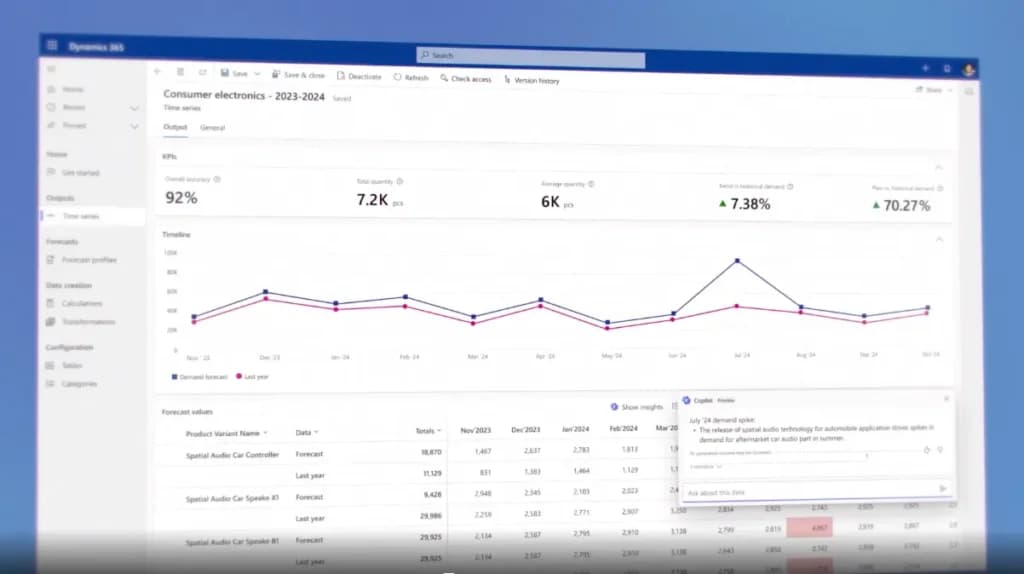
Microsoft Dynamics 365 is a cloud-based ERP software designed for large enterprises and global businesses. It combines AI-driven automation, real-time analytics, and deep integration with Microsoft tools to streamline operations across finance, supply chain, sales, and customer service.
With its modular structure, businesses can choose the applications they need, making it a flexible and scalable ERP solution. Designed for complex organizations, Dynamics 365 enhances decision-making with predictive insights, automation, and workflow optimization to drive efficiency at every level.
Key Features
- AI-driven automation: Uses artificial intelligence to optimize workflows, predict trends, and enhance decision-making.
- Modular design: Businesses can select and customize applications based on their needs.
- Seamless Microsoft integration: Connects with Microsoft 365, Azure, and Power BI for enhanced data insights.
- Advanced financial management: Automates accounting, budgeting, and financial reporting.
- Supply chain optimization: Tracks inventory, logistics, and demand forecasting in real time.
- Scalable cloud and hybrid deployment: Available as a cloud-based, on-premise, or hybrid solution for enterprise flexibility.
Pros and Cons
- Pros
- AI-powered automation improves efficiency.
- Seamless integration with Microsoft tools.
- Modular design allows for customization.
- Scalable for enterprises of all sizes.
- Advanced financial and supply chain management.
- Cons
- Steeper learning curve for new users.
- Higher cost compared to some competitors.
- Best suited for large businesses, not small companies.
Who It's For
Microsoft Dynamics 365 is ideal for large enterprises and global businesses that need an AI-powered ERP solution with scalability, deep integration, and advanced automation. It’s a strong choice for companies managing complex financial operations, supply chains, and customer relationships while leveraging Microsoft’s ecosystem for seamless collaboration and data insights.
QT9 ERP
- Automate manufacturing & sync operations
- Customized dashboards & flexible access
* Featured prices can be updated and free offers may include additional terms.
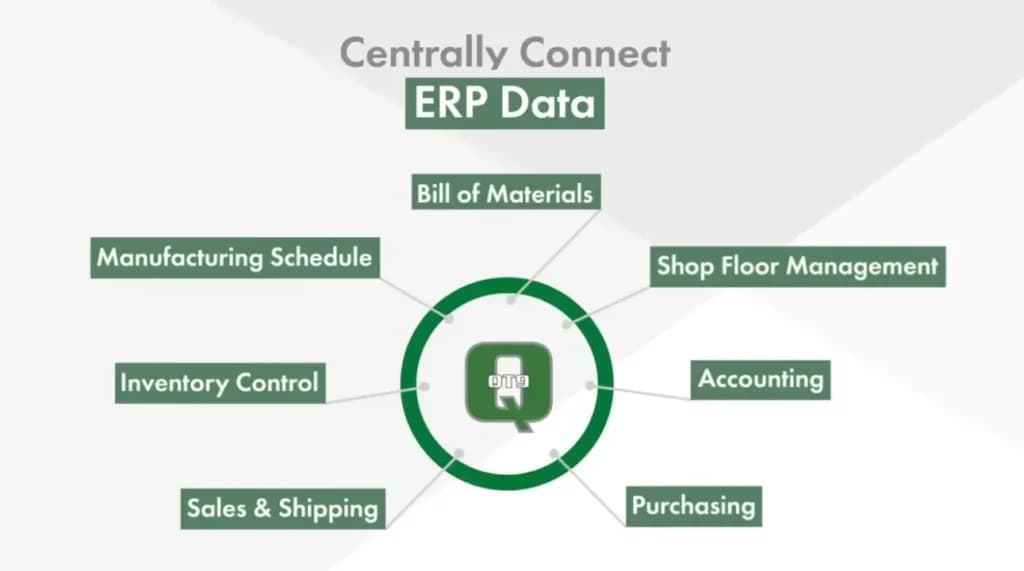
QT9 ERP is a cloud-based and on-premise ERP software designed for manufacturing, quality management, and regulatory industries. It offers automated workflow management, real-time reporting, and built-in compliance tracking to help businesses streamline operations while meeting industry standards.
QT9 ERP is particularly suited for regulated industries such as pharmaceuticals, medical devices, and food production, ensuring compliance with ISO, FDA, and other industry requirements while improving efficiency.
Key Features
- Integrated quality management system: Ensures compliance with ISO, FDA, and other regulatory standards.
- Automated workflow management: Streamlines business processes to improve efficiency.
- Real-time reporting: Provides instant access to financial, operational, and production data.
- Inventory and supply chain tracking: Helps manage stock levels, procurement, and distribution.
- Cloud and on-premise deployment: Offers flexibility for different business needs.
- Customizable modules: Allows businesses to tailor features based on their industry and operational requirements.
Pros and Cons
- Pros
- Built-in compliance tools for regulated industries.
- Customizable modules for different business needs.
- Real-time reporting for better decision-making.
- Available as both cloud-based and on-premise.
- Cons
- Primarily suited for manufacturing and regulatory industries.
- Requires training for full utilization.
- Some advanced features may require additional customization.
Who It's For
QT9 ERP is ideal for manufacturers, regulatory industries, and businesses that require strict compliance tracking. It’s a strong choice for companies in pharmaceuticals, medical devices, food production, and other highly regulated sectors that need an ERP solution with integrated quality management, real-time reporting, and workflow automation to ensure operational efficiency and regulatory compliance.
Acumatica
- Trusted by 8000+ Customers
- Quality traceability with lot and serial control
* Featured prices can be updated and free offers may include additional terms.
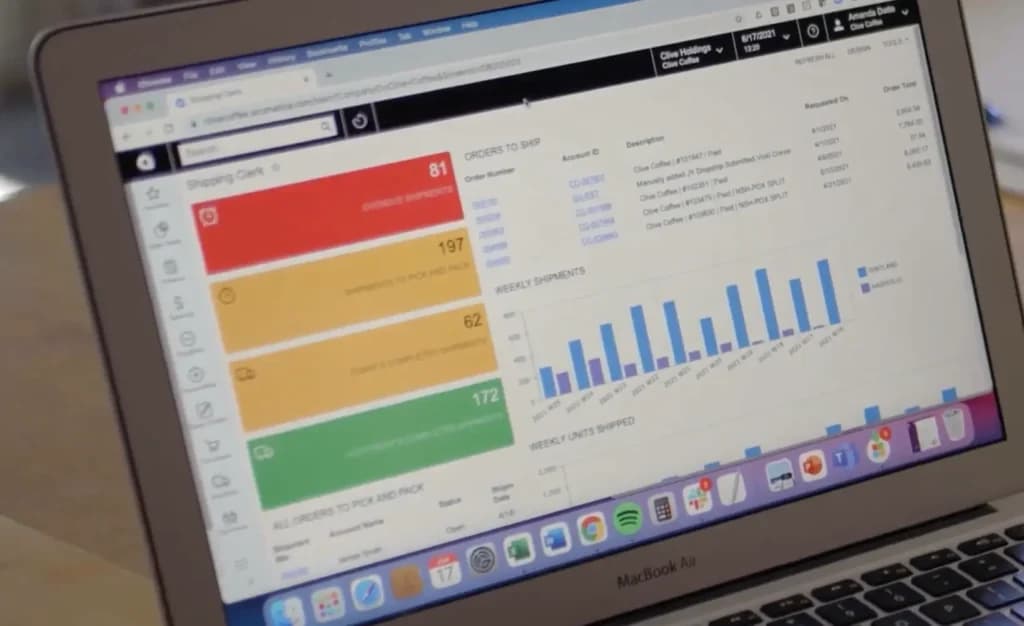
Acumatica is a cloud-based ERP software designed for mid-sized companies that need scalability, flexibility, and real-time data access. It offers a modular structure, industry-specific solutions, and AI-powered automation to streamline financials, inventory, and operations.
Built for businesses that require customizable and mobile-friendly ERP solutions, Acumatica provides seamless integrations, real-time reporting, and advanced cloud capabilities to support business growth and efficiency.
Key Features
- Cloud-based architecture: Provides real-time data access from any device.
- Modular ERP system: Allows businesses to select and customize the features they need.
- AI-powered automation: Streamlines workflows, financials, and inventory management.
- Industry-specific solutions: Offers tailored ERP packages for manufacturing, retail, construction, and more.
- Seamless integrations: Connects with third-party applications like CRM, e-commerce, and business intelligence tools.
- Scalability: Adapts to growing business needs without requiring major system upgrades.
Pros and Cons
- Pros
- Fully cloud-based with real-time data access.
- Modular system allows for flexible customization.
- Industry-specific solutions for different business needs.
- Scales with growing businesses without major upgrades.
- Cons
- Higher learning curve for first-time ERP users.
- Requires customization for full optimization.
- Pricing varies based on modules and user needs.
Who It's For
Acumatica is ideal for mid-sized businesses and growing enterprises that need a cloud-based ERP solution with flexibility, scalability, and real-time data access. It’s a great choice for companies in manufacturing, retail, construction, and service industries that require customizable modules, AI-powered automation, and seamless integrations to optimize their operations.
NetSuite
- Built for scale. Built for the future.
- Speeds up the financial closing process
* Featured prices can be updated and free offers may include additional terms.
NetSuite is a comprehensive cloud-based ERP software designed for fast-growing and large enterprises. It provides financial management, supply chain automation, and business intelligence tools to streamline operations and enhance decision-making. NetSuite supports businesses across various industries, offering real-time reporting, AI-driven analytics, and deep automation to optimize workflows and improve efficiency.
Key Features
- Comprehensive financial management: Automates accounting, budgeting, and financial reporting.
- AI-driven analytics: Provides real-time insights for data-driven decision-making.
- Supply chain and inventory automation: Tracks inventory, procurement, and logistics.
- Customizable and scalable: Adapts to business growth with flexible modules.
- Cloud-based accessibility: Access ERP data from anywhere with secure cloud hosting.
- Seamless integrations: Connects with CRM, e-commerce, and third-party applications.
Pros and Cons
- Pros
- Scalable and customizable for growing businesses.
- AI-driven analytics provide real-time insights.
- Cloud-based for easy access from anywhere.
- Comprehensive financial and supply chain management.
- Cons
- Higher cost compared to some competitors.
- Requires training for full utilization.
- Customization can be complex for smaller teams.
Who It's For
NetSuite is ideal for fast-growing businesses and large enterprises that need a scalable, cloud-based ERP solution with comprehensive financial management, AI-driven analytics, and supply chain automation. It’s a great choice for organizations looking to streamline operations, enhance reporting, and integrate business functions into a single platform.
Sage
- Serves over 20K businesses
- Custom solutions by experts
* Featured prices can be updated and free offers may include additional terms.
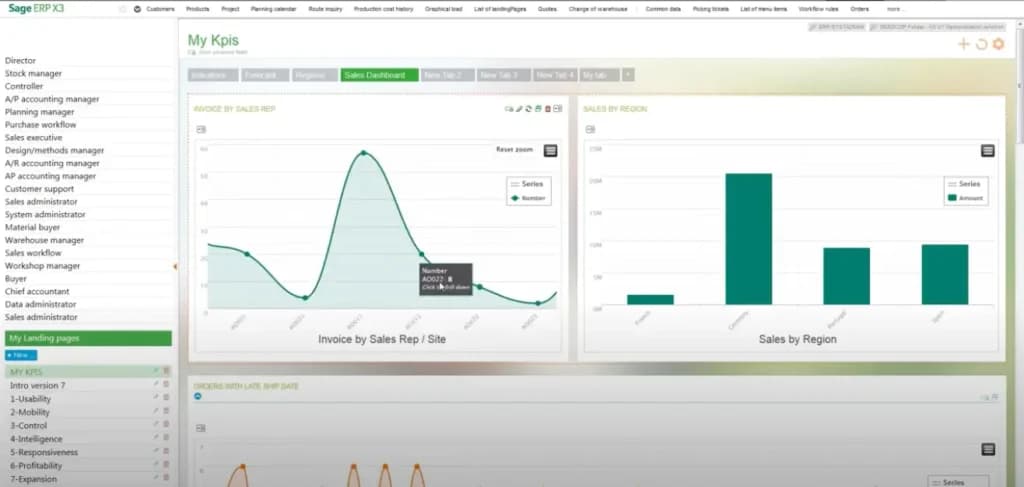
Sage is a flexible ERP software designed for businesses that require industry-specific solutions with deep customization options. It provides financial management, supply chain tracking, and business intelligence tools, making it a versatile choice for a variety of industries. Sage offers both cloud-based and on-premise deployment, ensuring scalability and adaptability to different business needs.
Key Features
- Industry-specific ERP solutions: Tailored for manufacturing, retail, construction, and service industries.
- Modular customization: Choose and configure features based on business needs.
- Comprehensive financial management: Automates accounting, payroll, and budgeting.
- Supply chain and inventory tracking: Monitors stock levels, procurement, and logistics.
- Cloud and on-premise deployment: Flexible hosting options for different business models.
- Business intelligence tools: Provides real-time insights for better decision-making.
Pros and Cons
- Pros
- Industry-specific solutions for different business needs.
- Modular design allows for flexible customization.
- Strong financial and supply chain management features.
- Available as both cloud-based and on-premise.
- Cons
- Customization can be complex and time-consuming.
- Higher cost for advanced features and scalability.
- Requires training for full utilization.
Who It's For
Sage is ideal for businesses that require industry-specific ERP solutions with customizable modules, strong financial management, and supply chain tracking. It’s a great choice for manufacturing, retail, construction, and service-based industries that need a scalable, flexible ERP system with both cloud and on-premise deployment options.

ERP Pricing: What Should You Expect to Pay?
ERP Tier | Monthly Cost | Description |
|---|---|---|
Entry-level | Free – $30/user | Odoo Community, ERPNext, Zoho ERP modules |
Mid-range | $70 – $150/user | Microsoft BC, Acumatica, Odoo Enterprise |
Enterprise | $1,000+/month or $20K+/year | NetSuite, SAP Business One |
Additional costs to consider:
- Implementation/setup: $2K–$20K
- Training and support
- Add-ons for payroll, advanced reporting, or integrations
Types of ERP Software Available
ERP software varies widely to suit different business needs, ranging from comprehensive, integrated solutions to specialized modules focused on specific functions.
Understanding the types of ERP software and their components will help you choose the system that aligns with your business’s operational needs and strategic goals.
Here are the common software types available:
- Generalist ERP Systems
These are broad, all-encompassing solutions designed for a wide range of industries. They typically include modules for finance, HR, manufacturing, project management, and supply chain management ERP modules. - Industry-Specific ERP
Tailored to specific sectors such as manufacturing, retail, healthcare, or education - these systems come with specialized functionalities that address unique industry challenges. - Cloud-based ERP
Cloud ERPs offer flexibility and scalability. They allow businesses to access their systems via the Internet, reducing the need for in-house IT infrastructure and upfront costs. These are ideal scalable ERP solutions for SMEs. - On-Premise ERP
Installed locally on a company's hardware and managed by their IT staff, on-premise systems offer more control over the deployment and security of the ERP software. - Hybrid ERP
Combining both on-premise and cloud functionalities, hybrid systems provide the security of on-premise solutions with the flexibility of cloud services. - Modular ERP
These systems allow companies to select and integrate specific modules based on their needs, making it easier to customize solutions and scale as the business grows. - Cross-Platform ERP Software
Ensures ERP functionality is accessible on any device or operating system, enhancing user accessibility and experience.
Do I Really Need ERP Software?
For businesses looking to maintain competitiveness and streamline their operations, investing in an ERP system can be a game-changer. Adopting an ERP system can lead to substantial cost savings, improved operational efficiency, and enhanced decision-making capabilities.
ERP software centralizes and streamlines core processes, enhancing efficiency and accuracy across your organization. Features like automated expense management reduce manual labor and improve financial oversight. Additionally, real-time financial reporting and scalable ERP solutions adapt to your business growth, providing valuable insights and flexibility.
If you want to stay competitive and optimize your operations, adopting an ERP system can offer significant advantages, making it a worthwhile investment.
Benefits of ERP Software for SMBs
Using ERP software can offer several practical advantages for small and mid-sized businesses:
- Everything in One Place: Run your finances, sales, inventory, and HR from one system.
- Save Time: Automate repetitive tasks like invoicing, inventory tracking, and reporting.
- Fewer Mistakes: With better data flow and automation, you’ll reduce errors and manual work.
- Make Smarter Decisions: Real-time dashboards and reporting help you know what’s happening in your business at any moment.
- Work From Anywhere: Most ERP platforms today are cloud-based, giving you access wherever you are.
- Grow with Ease: As your business scales, a good ERP grows with you without switching systems.
Key Features to Look for in ERP for SMBs
Not every ERP platform fits every business. Here are core features that matter for most SMBs:
- Accounting & Finance: Automate invoicing, billing, payroll, and reporting.
- Inventory Management: Track stock, warehouse activity, and supply chain.
- CRM: Manage customer data, orders, and support interactions.
- Project Management: Track time, milestones, and budgets.
- Human Resources: Handle employee records, onboarding, and payroll.
- Reporting & Analytics: Real-time dashboards and financial reports.
- Cloud Accessibility: Access your data from anywhere, anytime.
- Scalability: Grow from 5 to 500 users without needing a new system.
How to Choose the Right ERP Software for Your Business
The right ERP software maximizes efficiency and achieves strategic business goals. You can find an ERP system that best aligns with your business operations, ensuring a successful implementation and long-term benefits.
Here are some steps to guide you through the decision-making process:
- Assess your business needs
Understand your business's specific needs, including which processes need to be integrated, the level of scalability required, and the most critical features, such as accounts payable software or supply chain management ERP. - Leverage comparative tools
Use online comparison tools and platforms that evaluate ERP systems side by side. These tools can help highlight differences in features, performance, and pricing, aiding in a more informed decision. - Consider system flexibility and scalability
Opt for an ERP system that fits your current needs and can scale as your business grows. Look for features like cloud ERP solutions and customizable ERP software that can adapt to changing demands. - Evaluate integration capabilities
Choose an ERP that can seamlessly integrate with your existing systems and tools. Integration is vital to ensuring smooth operations and minimizing disruption during the ERP implementation. - Check for real-time capabilities
Systems with real-time financial reporting and automated expense management can provide up-to-date data essential for making informed decisions quickly. - Review support and training
Adequate vendor support and comprehensive training ensure your team can fully leverage the ERP system. Check the provider's support policies and training resources. - Consider total cost of ownership
Look beyond the initial purchase price and consider ongoing costs such as maintenance, upgrades, and additional module costs. Cloud-based solutions might offer a more predictable cost structure with their subscription models. - Request demos and trials
Before making a final decision, request demos to see the ERP in action. If possible, use a trial period to test how the ERP system fits with your business processes.
How Do Different Industries Use ERP Software?
ERP software is versatile, catering to the unique needs of various industries by providing specialized functionalities and modules. Each industry benefits differently from ERP software, but the common thread is improved integration, efficiency, and scalability, which help organizations adapt to tough market changes and grow sustainably.
Here’s how different sectors leverage ERP systems to enhance their operations:
- Manufacturing
Manufacturers use ERP for supply chain management, production planning, and quality control. These systems streamline the entire manufacturing process, from procurement of raw materials to production and distribution, ensuring efficiency and cost-effectiveness. - Retail
ERP systems manage inventory, point-of-sale (POS) operations, and customer relationships in the retail industry. They help retailers maintain accurate stock levels and enhance customer service through better data integration. - Construction
ERP software helps with project management, resource allocation, and budgeting. It enables construction companies to keep projects on schedule and within budget while managing complex logistics. - Financial services
ERP systems offer financial compliance and governance tools, risk management, and transaction processing in the financial sector, helping institutions manage their operations within regulatory frameworks. - Healthcare
Healthcare organizations utilize ERP for patient management, procurement, and compliance. These systems ensure sensitive patient information is handled securely while optimizing hospital and clinic operations. - Education
Educational institutions benefit from ERP in managing student information, admissions, and financial aid processes. They also use ERP for facility management and to streamline communication between departments.
Which Type of Hardware Is Needed for ERP Software?
The hardware requirements for ERP software depend largely on the deployment type, cloud-based or on-premise. Ensuring that the hardware can support the ERP software is critical for smooth operation and optimal performance. Businesses, especially those considering on-premise solutions, should consult IT professionals to assess and meet their hardware needs.
Here’s what each option generally requires:
Cloud-based ERP Solutions
These systems are hosted on the vendor's servers and accessed online. Therefore, users' hardware requirements are minimal. Businesses need devices capable of running a web browser, such as desktop computers, laptops, tablets, or smartphones.
This flexibility is a significant advantage, allowing users to access the system from anywhere with an internet connection.
On-Premise ERP Systems
The hardware needs are more substantial for on-premise deployments because the system runs on the company's servers. This setup requires:
- Servers: High-performance servers are needed to host the ERP software and handle processing tasks. The exact specifications will depend on the size of the organization and the complexity of tasks the ERP system is expected to perform.
- Network infrastructure: Robust network equipment (routers, switches) and a stable internet connection are crucial to ensure all parts of the organization can connect to the ERP system efficiently.
- Storage solutions: Sufficient data storage capacity is critical, especially for businesses with large data volumes. Backup solutions are also important to secure data against loss.
Workstations: Desktop computers or terminals for employees to access the ERP system. These should have adequate processing power and memory to run the software smoothly.
Hybrid ERP Systems
For businesses opting for a hybrid approach, combining cloud and on-premise elements, the hardware requirements will be a mix of the above, depending on how the ERP components are distributed.
Final Thoughts
Selecting the right ERP software is more than just a technology upgrade; it’s a strategic move that shapes how your business operates and grows. A well-integrated ERP system streamlines finance, supply chain, HR, and operations, ensuring efficiency, accuracy, and scalability.
With AI-driven insights, automation, and real-time analytics, modern ERP solutions help businesses optimize workflows, improve decision-making, and stay competitive in an increasingly complex market. Whether you're expanding, optimizing processes, or ensuring compliance, the right ERP software provides the foundation for long-term success. Investing in the right system today means building a more agile, data-driven, and future-ready organization.
FAQ
Q: What is ERP software?
A: ERP software integrates various business functions into one system to streamline processes and information across an organization.
Q: Can small businesses benefit from ERP software?
A: ERP systems are scalable and can help small businesses manage operations efficiently and grow.
Q: What are the main benefits of ERP software?
A: Key benefits include improved data accuracy, enhanced efficiency, better financial management, and informed decision-making.
Q: How long does ERP implementation take?
A: Implementation can range from a few months to over a year, depending on the system's complexity and the business's needs.