
HubSpot Pricing 2026: Complete Breakdown from Starter to Enterprise

Let’s be honest, HubSpot is one of the most powerful tools out there for marketing, sales, and customer success. But their pricing page? It’s easy to get lost in tiers, bundles, contact limits, and add-ons.
If you’ve ever wondered:
- “What am I really paying for?”
- “Which plan is best for my team?”
- “Can I start small and scale later?”
This guide will answer all that clearly, simply, and based on the latest 2025 pricing.
Whether you're a startup founder, a B2B marketing leader, or a RevOps pro building the right stack, this article will walk you through your options without fluff.
How HubSpot Pricing Works in 2025
HubSpot is modular. You start with their Free CRM, then add "Hubs" depending on what your business needs:
Hub | What It Does |
|---|---|
Marketing Hub | Email, lead gen, campaigns, automation |
Sales Hub | CRM, deal tracking, automation |
Service Hub | Ticketing, chat, customer support tools |
Content Hub | Websites, landing pages, SEO |
Operations Hub | Sync, workflows, data automations |
Commerce Hub | Quotes, payments, subscriptions |
Each Hub has three tiers: Starter, Professional, and Enterprise, and there's now an all-in-one Starter Customer Platform that gives you all five Hubs at a very low entry cost.

- Unified platform for sales and marketing
- Track customer interactions in real time
Marketing Hub
Generate leads, run email campaigns, automate workflows
Plan | Price | Best For |
|---|---|---|
Starter | $9/month/seat | Small teams sending email and capturing leads |
Professional | $800/month (3 seats) | Teams building full workflows and campaigns |
Enterprise | $3,600/month (5 seats) | Advanced automation, permissions, scale |
What you get:
- Email marketing, forms, and landing pages
- Marketing automation and workflows (Pro+)
- SEO tools and blog (Pro+)
- Smart content and lead scoring (Enterprise)
- Breeze AI and multi-touch attribution (Pro+ and Enterprise)
Sales Hub
Track deals, automate follow-ups, close faster
Plan | Price | Best For |
|---|---|---|
Starter | $9/month/seat | Founders, SDRs, early sales teams |
Professional | $90/month/seat | Sales teams needing automation and analytics |
Enterprise | $150/month/seat | Advanced control, permissions, intelligence |
What you get:
- Contact management, meeting scheduling
- Email templates, sequences (Pro+)
- Forecasting, playbooks, call coaching (Pro+)
- Custom objects and conversation intelligence (Enterprise)
Service Hub
Manage tickets, support customers, gather feedback
Plan | Price | Best For |
|---|---|---|
Starter | $9/month/seat | Small support teams on live chat or email |
Professional | $90/month/seat | Teams needing ticket workflows, CSAT, portal |
Enterprise | $150/month/seat | Larger teams with advanced SLAs, IVR, APIs |
What you get:
- Shared inbox and chat
- Ticketing and automation(Pro+)
- Customer feedback tools, knowledge base (Pro+)
- Skill-based routing, IVR, conditional SLAs (Enterprise)
Content Hub
Manage your website, blog, and gated content
Plan | Price | Best For |
|---|---|---|
Starter | $9/month/seat | Basic website creation, drag-and-drop tools |
Professional | $450/month (3 users) | SEO, smart content, reporting |
Enterprise | $1,500/month (5 users) | Memberships, personalization, secure access |
What you get:
- Website builder, hosting, SSL
- Smart content and A/B testing (Pro+)
- Blog and SEO strategy tools (Pro+)
- Memberships, gated content, and Breeze AI (Enterprise)
Operations Hub
Sync your data and automate backend workflows
Plan | Price | Best For |
|---|---|---|
Starter | $9/month/seat | Syncing tools and email reporting |
Professional | $720/month (1 seat) | Programmable automation and webhooks |
Enterprise | $2,000/month (1 seat) | Advanced datasets, formulas, and AI tools |
What you get:
- Custom field mapping, data sync
- Scheduled workflow triggers (Pro+)
- AI-based process insights (Enterprise)
- Full access to formulas and data sets (Enterprise)
Customer Platform (HubSpot Bundled Pricing)
Use multiple Hubs together with discounted pricing, unified features, and shared AI tools
If you plan to use more than one Hub—like Marketing + Sales or Service + CMS—bundling your Hubs into a platform package is the most cost-efficient option.
HubSpot offers pre-built bundles under the Customer Platform name. You get access to multiple Hubs at once, with discounted pricing and simplified billing.
Plan | Price | Best For |
|---|---|---|
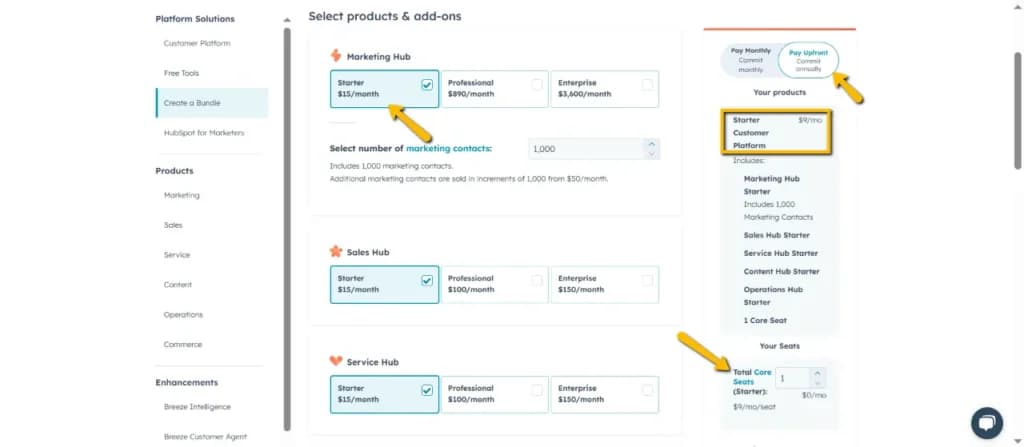
Starter | $9/month/seat (billed annually) | Small teams wanting all five Starter Hubs in one plan |
Professional | $1,781/month (5 users included) | Growing businesses needing full marketing, sales, and service automation |
Enterprise | $5,000/month (10 users included) | Larger orgs with complex operations, automation, and team permissions |
What you get:
- All 5 Hubs: Marketing, Sales, Service, Content, and Operations
- Shared marketing contacts (Starter: 1,000, Pro: 2,000, Enterprise: 10,000)
- Shared AI credits for tools like Breeze Agent and AI workflows
- Unified billing, onboarding, support, and cross-Hub automation
- Add-ons and contacts priced consistently across all tools
* This is the best option if you're planning to use 2+ Hubs and want everything to work seamlessly together.
You can also custom bundle only the Hubs you need and still receive volume-based discounts.
Add-Ons & Hidden Costs
Add-On | Price | Notes |
|---|---|---|
AI Credits | $9/month | Used for automation and AI tools |
WhatsApp Limits | $70/month | Adds 1,000 message capacity |
Ad Events | $100/month | For synced conversions across platforms |
SSL Custom | $100/month | Branded SSL certificates for security |
Phone Lines | $25/month | Adds 5 phone numbers |
Video Hosting | $50/month | Extra video storage and delivery |
Most Pro and Enterprise plans also require onboarding:
- $1,500 for Pro
- $5,500–$7,000 for Enterprise
Final Thoughts
HubSpot’s 2025 pricing is more accessible than ever, especially with the new $9/month Starter options. You can start lean, grow gradually, and unlock serious power with their Pro and Enterprise tiers.
The key is knowing what your team actually needs today versus what you might need 6–12 months from now. Start small, automate wisely, and scale as you go.
Need help choosing the right combo? Use the HubSpot Pricing Calculator or talk to their sales team, they’re surprisingly flexible with deals.
TL;DR: Which Hub Should You Start With?
You Are… | Best Starting Point |
|---|---|
Solo founder | Free Tools or Starter Platform |
Early-stage startup | Starter Customer Platform ($9/seat) |
B2B team with pipeline | Sales Hub Pro + Marketing Hub Starter |
Scaling marketing org | Marketing Hub Pro or CRM Pro Bundle |
Support-heavy business | Service Hub Pro or Enterprise |
Enterprise company | CRM Suite Enterprise + AI add-ons |
HubSpot Pricing FAQ
1. Is HubSpot really free?
Yes. HubSpot’s free plan includes CRM, forms, email (2,000/month), chat, and limited reporting. It’s capped at 2 users and includes HubSpot branding.
2. How does HubSpot charge for contacts?
Only marketing contacts count toward your bill. You can store unlimited non-marketing contacts for free.
3. What is the Starter Customer Platform?
It’s a $9/month/seat bundle that includes all five Starter Hubs—ideal for small teams that want everything in one place.
4. Are there onboarding fees?
Yes. Pro plans typically charge $1,500–$3,000. Enterprise plans run $3,500–$7,000 depending on the Hub.
5. What are HubSpot Credits?
Credits power AI tools like Breeze. Each plan includes monthly credits, with extra available for purchase.
6. Can I upgrade or downgrade later?
Yes. Starter plans are flexible. Pro and Enterprise require annual contracts, so changes may apply at renewal.
7. Are there discounts for nonprofits or startups?
Yes. Startups get 30%–90% off. Nonprofits can receive up to 40% off select plans.
8. What’s a “core seat”?
It’s a paid user with full access to a Hub’s features. Some plans include seats; extras cost $45–$75/month.
9. Are there hidden costs?
Expect charges for extra contacts, seats, onboarding, and certain add-ons (AI, SSL, video hosting).
10. How does HubSpot compare to competitors?
HubSpot is more affordable than Salesforce, but pricier than Mailchimp or Pipedrive. The trade-off is its all-in-one platform.
11. What’s the difference between Starter Hubs and the Starter Customer Platform?
The platform bundles all five Starter Hubs for $9/seat—cheaper than buying each individually.
12. What are view-only vs. core seats?
Core seats allow full use of a Hub; view-only seats are free and limited to viewing data and reports.
13. Are there minimum seat requirements?
Yes. Some Pro and Enterprise plans include a set number of seats (e.g., Marketing Pro includes 3). You may need to buy more based on your team size.
14. Can I mix tiers across Hubs?
Yes. You can use different tiers per Hub—for example, Sales Pro + Marketing Starter.
15. What is Commerce Hub, and how is it priced?
Commerce Hub handles quotes, payments, and subscriptions. Pricing is based on transaction fees, not monthly plans.
16. Is there a free trial or refund policy?
Most Hubs offer a 14-day trial. HubSpot doesn’t advertise a refund policy, but support may assist case-by-case.
17. What is the Customer Platform bundle?
It’s HubSpot’s all-in-one bundle including Sales, Marketing, Service, CMS, and Ops—available at Starter, Pro, or Enterprise levels.
18. How does HubSpot compare to Salesforce or Zoho?
HubSpot is simpler and more SMB-friendly than Salesforce, and more powerful (but pricier) than Zoho.
19. What affects my total HubSpot cost?
Contacts, user seats, onboarding, AI credits, and add-ons can all raise your bill. Always check the pricing calculator.
20. What kind of support do I get?
Starter: chat/email support.
Pro & Enterprise: phone support, onboarding, and access to training resources.