
HubSpot vs Mailchimp: Which is a better email marketing platform for your small business in 2026?

If you're comparing email marketing platforms for your small or micro-business and are not sure what's best for your operation, here's your quick answer:
HubSpot wins for small businesses with a sales team that needs to track leads; Mailchimp wins for retailers, service businesses, and local shops that want simple, affordable email campaigns.
Choose HubSpot if you're building a list that you plan to turn into a sales pipeline — the email marketing and contact management work together in a way that no standalone email tool can match. The free plan gives you a real taste of what that looks like in practice, but be ready for a steep jump the moment you need anything beyond basics.
Mailchimp wins for small business owners, online sellers, and creators who need to send good-looking emails without a steep learning curve or a four-figure monthly bill. It's the most recognizable name in email marketing for a reason — and for simple campaigns, it still earns that reputation. Just understand that the platform has changed significantly in recent years, and not always for the better.
Still not sure which one fits? Here's the full breakdown.

Beyond feature comparison, landing the right email marketing tool demands asking the question of what you're trying to do with email — and what you can afford to pay when your list grows.
HubSpot's email marketing tools live inside Marketing Hub, its dedicated marketing product. That's what we're focused on here — the campaigns, automations, segmentation, and reporting that Marketing Hub provides.
Mailchimp started as a newsletter tool for small businesses and has spent the last several years trying to evolve into an all-in-one marketing platform. The question is whether that evolution has made it better — or just more expensive for the features you actually need.
We break down how both tools perform for email marketing in , with real pricing, hands-on testing notes, and genuine user feedback drawn from the communities that use these platforms every day.2026
How we tested both tools
We set up working accounts on both platforms' free tiers and ran each tool through a realistic small business email marketing workflow: importing a contact list, building a welcome automation, designing a campaign template, testing deliverability with a segmented send, and reviewing reporting after. We also tested the upgrade experience — what triggers the paywall, what you lose when you hit the free tier ceiling, and how support responds when things go wrong. Where we encountered real friction, we documented it. Everything you'll read here is based on that first-hand testing, combined with extensive research into the experience of real users who've been on these platforms for years.
Key points (quick summary)
- HubSpot Marketing Hub is best for: Small-to-mid-size businesses that want email marketing tightly integrated with contact management and basic CRM functionality — particularly if you have a sales team that needs to see email engagement alongside lead data.
- Mailchimp is best for: Small businesses, independent creators, and e-commerce stores that want straightforward email campaign tools without a complex setup — as long as your list stays under a few thousand contacts.
- The main pricing difference: Both platforms offer free plans, but both have significantly restricted them in recent years. HubSpot cut its free contact limit from 1 million to 1,000 in September 2024. Mailchimp's free plan now caps at 250 contacts and 500 emails per month — down from 2,000 contacts in 2022. Neither free plan is sustainable for a growing list.
- The feature that separates them: HubSpot's email marketing is built on top of a contact database, so segmentation, personalization, and reporting are genuinely powerful. Mailchimp's strengths are ease of use, template quality, and e-commerce integrations — but the platform can feel inconsistent once you move beyond basic campaigns.
- The price cliff to watch: HubSpot's jump from Starter ($20/mo) to Professional ($800/mo + a mandatory $3,000 onboarding fee) is one of the steepest upgrade cliffs in marketing software. Many businesses report discovering this barrier only after they've committed to the platform. Mailchimp's pricing is more gradual, but the per-contact model means costs compound quickly as your list grows.
The deliverability concern: Real users have flagged deliverability issues with both platforms. HubSpot users with Microsoft-hosted inboxes (Outlook, Hotmail, business Office 365) have reported DMARC failures causing significant open rate drops. One marketing manager documented an 1.43% open rate on 11,000 engaged subscribers after switching to HubSpot — before moving back to MailerLite. This is worth verifying before committing to HubSpot for any list with a significant Microsoft audience.
The account stability concern: Mailchimp has a documented history of suspending accounts without warning and without a clear appeals process. Multiple long-term users — including a seven-year customer with a legally registered business and paying subscribers — have reported permanent bans with no recourse. If your email program is critical to your revenue, this is a real risk to weigh.
HubSpot or Mailchimp - Which tool wins where?
Factor | Best choice | Here's why |
|---|---|---|
Ease of setup | Mailchimp | Faster to get your first campaign out the door. HubSpot's onboarding is more involved. |
Email design & templates | Mailchimp | Larger template library, more polished drag-and-drop editor. |
Contact management | HubSpot | Built-in CRM-style contact records are far more powerful. |
Segmentation | HubSpot | More granular, especially when combined with contact properties. |
Automation | HubSpot | More sophisticated flows — though many features are paywalled above Starter. |
Deliverability | Draw | Both have real-world issues documented by users; neither has a clear edge. |
E-commerce integrations | Mailchimp | Native Shopify, WooCommerce, and BigCommerce integrations are stronger. |
Reporting & analytics | HubSpot | More detailed, especially for tracking contacts through a funnel. |
Free plan value | Draw | HubSpot's is more capable but capped at 1,000 contacts; Mailchimp's is simpler and capped at 250. |
Pricing transparency | Mailchimp | HubSpot's Professional jump ($800 + $3,000 onboarding) is poorly surfaced. |
Account stability | HubSpot | Mailchimp's suspension practices are a documented risk for established accounts. |
Best for growing businesses | HubSpot | Once you're paying, the CRM-integrated approach scales better. |
Market position & ideal use cases
These two platforms are chasing different customers — and understanding which one you are matters more than any feature checklist.
HubSpot Marketing Hub is built for businesses that see email as part of a customer journey. Every contact is a record. Every email interaction — opens, clicks, replies — is logged against that contact and visible to anyone on the team who might touch that relationship. For a business with a sales process, this is genuinely valuable. For a newsletter creator sending to 3,000 subscribers who just want to know if their open rate is going up, it's more infrastructure than you need.
Mailchimp is built for businesses that see email as a broadcast channel. It's a tool for sending campaigns to a list. The list has segments, the campaigns have templates, and the reporting tells you how the send went. That simplicity is a genuine strength for small teams with no dedicated marketer. The problem is that Mailchimp has added layers of complexity and pricing tiers over the years without proportionally improving the core product — and has done so while steadily cutting what the free plan includes.
When we set up identical welcome sequences in both tools, the contrast was immediate. In Mailchimp, we had a three-email welcome flow live in under 30 minutes — intuitive UI, clean template editor, triggers worked on the first try. In HubSpot, we spent time mapping contacts to lists, configuring enrollment criteria, and navigating the distinction between "marketing contacts" and standard contacts. The result was more powerful. The setup was not more fun.
Platform & ecosystem
HubSpot is a platform that happens to include email marketing. Everything is built around contacts, and contacts are shared across marketing, sales, and service features. This means your email marketing data doesn't live in a silo — it connects to deal stages, lead scores, and sales activity. For a small business with a CRM and a sales team, this integration is the whole point.
Mailchimp is an email marketing tool that has expanded into adjacent features — landing pages, social ads, basic CRM, a website builder. The additions are useful in isolation, but they don't feel as cohesive as HubSpot's platform. If you're using Mailchimp primarily for email (which most users are), this isn't a problem. But if you're hoping Mailchimp will replace multiple tools, manage your expectations.
Core features & capabilities
HubSpot Marketing Hub: Core email features
HubSpot's email tools are built on top of its contact database, which is both its strength and the source of its complexity.
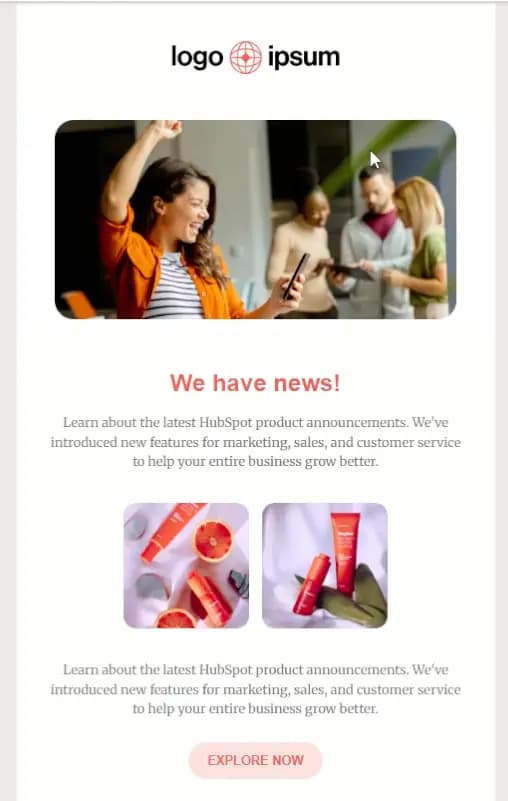
- Email editor: Drag-and-drop with a respectable template library. Personalization tokens pull from contact properties, which is powerful when your data is clean. Less polished visually than Mailchimp, but more customizable. During our testing, the preview-and-test function worked well — we sent test emails to multiple inboxes without issues.
- List segmentation: HubSpot's segmentation is genuinely strong. You can create dynamic lists based on contact properties, engagement behavior, lifecycle stage, or CRM data. This is where the platform's CRM-native approach pays off. Building a segment of "contacts who opened our last 3 emails but haven't clicked" took us about two minutes.
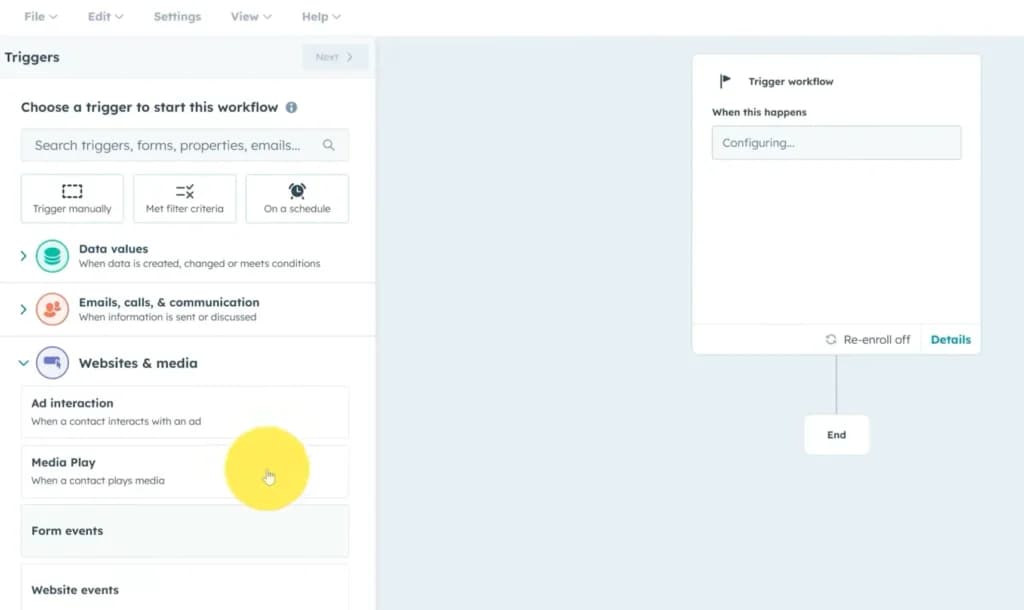
- Automation (workflows): The workflow builder is solid — triggers on form fills, contact behavior, or CRM events. Free tier gets one email per form submission. Starter unlocks basic sequences. Anything more sophisticated — branching, conditional logic, lead scoring — requires Professional at $800/mo. One business owner described discovering that jump mid-contract, calling the gap "extortionate," then finding out about the additional $3,000 mandatory onboarding fee only on the sales call.
- Forms & landing pages: Native forms that capture leads directly into HubSpot contacts. The free tier includes forms; landing pages require Starter or above. Forms are easy to embed and work reliably — we had a working lead capture form integrated with a welcome email in under 20 minutes.
- A/B testing: Available on Professional and above. On Starter and Free, you get no split testing, which is a meaningful limitation for anyone trying to optimize performance.
- Reporting: HubSpot's email reporting is detailed: opens, clicks, bounces, unsubscribes, and click maps, all tied back to individual contact records. For businesses that want to understand which contacts engaged and follow up accordingly, this is the strongest reporting in its class at the entry level.
Mailchimp: Core email features
Mailchimp's features are built around the campaign-send workflow — design, schedule, send, report.
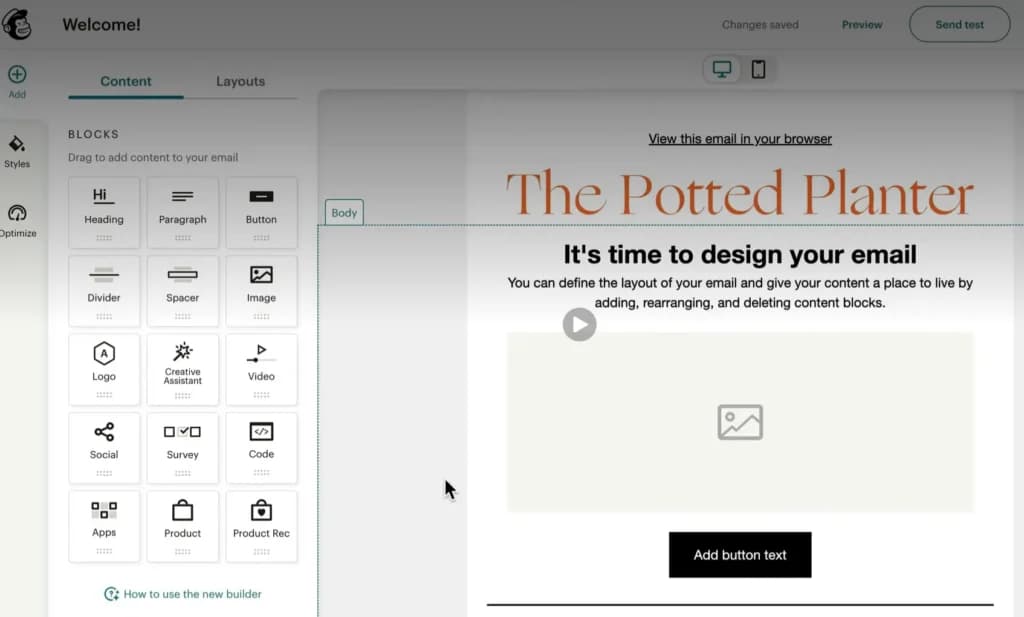
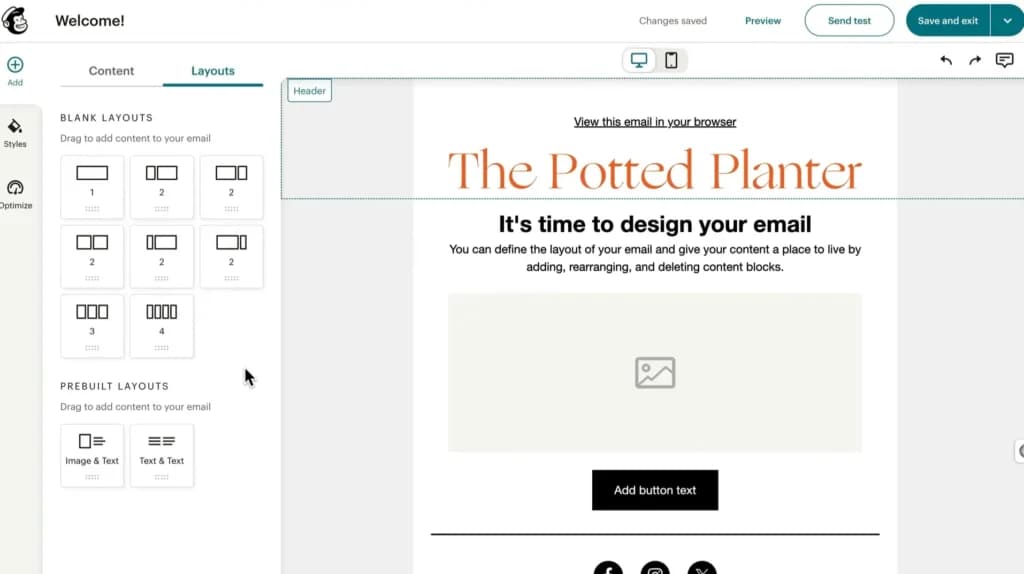
- Email editor: Mailchimp's drag-and-drop editor is one of the better ones in the industry. Template library is large, layouts are responsive by default, and the design experience is fast. We built a clean campaign template in about 15 minutes with no prior Mailchimp experience. This is Mailchimp's most consistent strength.
- List management: Mailchimp calls its lists "audiences." You can have multiple audiences, but contacts are siloed between them — a contact in one audience doesn't automatically appear in another. This model frustrates users who want to manage one master list with multiple segments. It's a known limitation that Mailchimp has never fully resolved.
- Automation: Mailchimp's Customer Journeys are a solid mid-tier automation feature. The visual journey builder is intuitive and covers the standard workflows: welcome series, abandoned cart, re-engagement. However, automations were removed from the free tier in December 2025. If you relied on free-tier automation and haven't upgraded, those flows may no longer be active.
- E-commerce integrations: This is Mailchimp's strongest area. Native integrations with Shopify, WooCommerce, BigCommerce, and Magento include product recommendation emails, purchase follow-ups, and abandoned cart sequences. If you run an online store, Mailchimp's e-commerce tools are competitive with anything at this price point.
- Transactional email (mandrill): Transactional emails require a separate Mailchimp product (Mandrill) as an add-on. It's not included in any paid tier and is priced separately. This surprises many users who assume it's bundled.
- Reporting: Clean, readable campaign reports. Open rates, click rates, and audience growth trends are well-visualized. Mailchimp also has inbox activity predictions and a social performance comparison, though these features are gated to Standard and above.
Deliverability: The issue neither platform advertises
Deliverability is where the gap between marketing copy and real-world performance becomes most visible — and both platforms have documented issues worth knowing about before you commit.
HubSpot deliverability: Multiple users have reported open rate drops after migrating to HubSpot, specifically with Microsoft-hosted inboxes (Outlook, Hotmail, Office 365). The culprit appears to be DMARC authentication failures. One user migrated an 11,000-person engaged list and watched open rates fall to 1.43%. HubSpot support couldn't resolve it — they eventually moved back to MailerLite.
Mailchimp deliverability: Generally solid for legitimate senders. The bigger risk is account suspension — Mailchimp's ToS enforcement is aggressive, and accounts can be banned without warning and with no real appeals process. One seven-year customer was permanently suspended for content that had never been flagged before. When it happens, you lose access to your contacts, templates, and campaign history immediately.
During our own testing, we sent to a mixed list of Gmail, Outlook, and business addresses on both platforms and saw no deliverability issues in the free-tier evaluation period. But our list size was small enough that we wouldn't draw conclusions from that alone.
Automations & workflows
HubSpot gives you a genuinely powerful workflow engine — but most of it is locked behind the Professional tier. On the free plan, automation is limited to a single email per form submission. On Starter ($20/mo), you get basic email sequences. On Professional ($800/mo), you unlock multi-step branching workflows, lead scoring, and dynamic content. The gap between Starter and Professional isn't incremental — it's a category shift. Users consistently describe the jump as the most frustrating part of the HubSpot experience.
One user in the HubSpot community documented the progression: starting at $20/mo, realizing the features they needed required Professional, getting a quote for $800/mo plus a mandatory $3,000 onboarding fee, and ultimately leaving the platform entirely. The onboarding fee — which HubSpot calls a "required onboarding" for Professional — is not prominently surfaced during the sales process.
Mailchimp offers Customer Journeys on paid plans, with a visual builder that covers most standard use cases: welcome sequences, birthday emails, re-engagement flows, post-purchase follow-ups. It's less powerful than HubSpot's workflow engine but covers the 80% case well and is faster to configure. The significant change to note: as of December 2025, Mailchimp removed automations from the free plan entirely. If you're evaluating Mailchimp on the free tier, any automation you build won't run unless you're on a paid plan.
For most small businesses sending a welcome series and a few triggered follow-ups, Mailchimp's automations are more than sufficient and available at a much lower price point than the equivalent HubSpot feature set.
Reporting, analytics & insights
HubSpot wins on depth. Because every email interaction is recorded against a contact record, your reporting isn't just "what percentage opened" — it's "which specific contacts opened, clicked, or unsubscribed, and what did they do next." For a business tracking leads through a funnel, this is genuinely useful. You can filter email performance by lifecycle stage, source, or any custom property on your contact records.
That said, multiple users report that HubSpot's reporting interface is more complicated than it needs to be, and that building custom reports often requires navigating a non-intuitive UI. One user described it bluntly: "The reporting is supposed to be powerful, but it's honestly one of the weakest parts of the platform in practice."
Mailchimp offers clean, readable campaign reports that cover what most small businesses actually need: opens, clicks, bounces, unsubscribes, and revenue attribution for e-commerce sends. The interface is easy to navigate. What it lacks is the contact-level depth that HubSpot provides — you can see aggregate performance, but not easily trace a campaign's impact on specific contacts through a sales pipeline.
Integrations & connected tools
HubSpot integrates natively with hundreds of tools, with particularly strong connections to Salesforce, Google Ads, Facebook Ads, Slack, and its own suite of products. The App Marketplace is extensive. Because HubSpot is a platform company, its integrations are generally deeper than Mailchimp's equivalents — a Salesforce sync, for example, is bidirectional and configurable at the field level.
Mailchimp has solid integrations for its core audience — Shopify, WooCommerce, BigCommerce, Instagram, Facebook, and Zapier. For e-commerce businesses, the Shopify integration is particularly strong: it syncs purchase data, enables product recommendation emails, and tracks revenue from campaigns automatically. For non-e-commerce businesses, the integration library is more limited than in HubSpot.
During our testing, we connected both platforms to a Google Workspace account. HubSpot's Gmail integration (two-way sync of emails sent from Gmail to contacts in HubSpot) worked cleanly and was genuinely useful. Mailchimp's Google integration is limited to sign-in and some analytics connectivity — not comparable in depth.
Plans and pricing: How much does each tool cost?
Both HubSpot and Mailchimp have restructured their pricing and free plan limits significantly in recent years. Here's what you're actually looking at in .2026
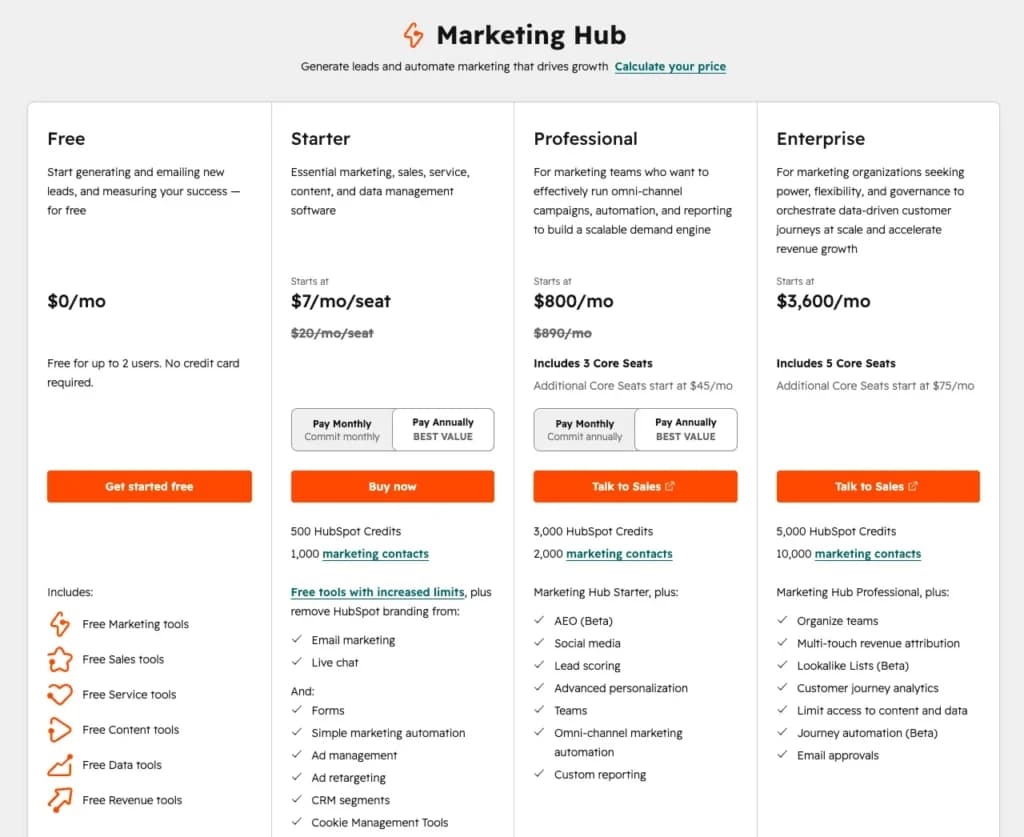
HubSpot Marketing Hub Pricing
Plan | Price | Key Features |
|---|---|---|
Free | $0 (up to 1,000 contacts, 2,000 emails/mo) | Email marketing, forms, landing pages (basic), contact management, 1 automation per form submission. HubSpot branding on all emails. |
Starter | $20/mo | Remove HubSpot branding, unlimited emails, basic email automation sequences, up to 1,000 marketing contacts included (additional contacts billed separately). |
Professional | $800/mo + $3,000 onboarding (required) | Advanced automation workflows, A/B testing, smart content, social media tools, SEO tools, omni-channel marketing, custom reporting. Includes 3 seats. |
Enterprise | $3,600/mo | Adaptive testing, predictive lead scoring, multi-touch revenue attribution, custom events, partitioning. |
(Data from official HubSpot website, June 2026. Professional onboarding fee is mandatory and billed separately at contract start.)
Mailchimp Pricing
Plan | Price | Key Features |
|---|---|---|
Free | $0 (up to 250 contacts, 500 emails/mo) | Email campaigns, basic templates, single-step automations removed as of Dec 2025, 30-day support only. |
Essentials | $13/mo (500 contacts) | All email templates, A/B testing, basic automations, 24/7 email & chat support, remove Mailchimp branding. |
Standard | $20/mo (500 contacts) | Customer Journeys (multi-step automation), advanced segmentation, send time optimization, retargeting ads. |
Premium | $350/mo (10,000 contacts) | Unlimited seats, advanced segmentation, multivariate testing, priority support, phone support. |
(Data from official Mailchimp website, June 2026. Contact limits shown are starting tiers; pricing scales with list size.)
Pricing takeaway
The most important number in this comparison isn't the headline price — it's the Professional jump.
Is Hubpot worth it?
HubSpot's path from Starter to Professional is a 40x price increase: from $20/mo to $800/mo, plus a one-time $3,000 mandatory onboarding fee. If you start your business on HubSpot Starter and eventually need advanced automation, A/B testing, or real reporting, you'll either pay that price or migrate your entire list to a different platform. Many users choose to migrate.
Is Mailchimp worth it?
Mailchimp's pricing is more predictable but compounds quickly at scale. The free plan (250 contacts, 500 emails/month) is now essentially a demo — not viable for any active email program. At 10,000 contacts on Standard, you're looking at roughly $100/mo. And note that Mailchimp bills for all contacts in your audience, including unsubscribed contacts— a persistent frustration for users who've been building a list for years and now pay for contacts who opted out.
One more thing: Mailchimp raised prices 11-13% in April 2026. On the free plan, the contact cap dropped from 500 to 250 (it was 2,000 as recently as 2022). If you're evaluating Mailchimp based on pricing information from 2023 or 2024, verify the current numbers before assuming they still apply.
Support, reliability & customer experience
HubSpot offers strong documentation, an active user community, and competent paid support. During our testing, a question about enrollment criteria for a workflow received a helpful response within a few hours. The challenge users report isn't the quality of initial support — it's what happens when an issue is complex or requires specialist input. Multiple users describe escalations that fall through the cracks, with follow-up required to get resolution. HubSpot also has a large ecosystem of certified agency partners and consultants — which is useful if you want implementation help, but worth knowing that consultants earn commissions to onboard clients to paid tiers.
Mailchimp support is adequate on paid plans. The significant limitation is the free tier: support is only available for the first 30 days after account creation on the free plan. After that, you're on documentation and community forums. For most simple email programs this is manageable — Mailchimp's documentation is genuinely good. The deeper concern is account security: multiple users have reported account suspensions with no meaningful support path to reinstate the account. Mailchimp's Terms of Service give them broad latitude to suspend accounts, and the appeals process has been described by affected users as non-existent. If your business depends on email marketing continuity, this is worth factoring into your platform choice.
Scalability & growth potential
HubSpot is designed to scale — in theory. The platform grows with you from free to enterprise, and the contact database that you build from day one carries forward through every tier. In practice, the Professional barrier means the scaling path has a very expensive gate in the middle. Businesses that outgrow Starter but aren't ready for $800/mo are left with limited options: pay, migrate, or live with Starter's limitations.
Mailchimp scales well for e-commerce businesses and creators building large lists, where its integrations and template quality continue to deliver value. For businesses that need to move from email marketing into CRM, lead scoring, or full-funnel attribution, Mailchimp will eventually feel like the wrong tool — and migration at that point is a significant project.
Real-world scenarios
Scenario 1: The 15-person B2B software company
Needs: Sends product updates, event invitations, and nurture emails to a 3,000-contact list of leads and customers. Sales team wants visibility into which leads are engaging with email content.
Best choice: HubSpot Marketing Hub
Why: The integration between email engagement and contact records is exactly what this team needs. When a prospect opens an email and clicks the pricing page link, that activity is logged in HubSpot and visible to the sales rep who owns that account. Segmentation by lifecycle stage lets the team send different content to free trial users vs. paying customers vs. churned accounts. We modeled this workflow on HubSpot Starter and found it handled the core use case well. The limitation to plan for: as the nurture sequences get more sophisticated, the team will eventually hit the automation ceiling on Starter and face the Professional upgrade decision.
Scenario 2: The independent e-commerce store with 2,000 subscribers
Needs: Sends weekly promotions, abandoned cart reminders, and post-purchase follow-ups. Budget is tight. No dedicated marketer — the owner does everything.
Best choice: Mailchimp
Why: Mailchimp's Shopify integration handles abandoned cart and post-purchase flows natively, without requiring any technical setup. The template editor makes it fast to produce good-looking promotional campaigns. At 2,000 contacts, the Standard plan runs around $30/mo — a reasonable cost for the workflow automation included. We tested the abandoned cart flow during our evaluation; it was live and sending within 45 minutes of setup, which is genuinely fast. HubSpot could handle this use case, but the setup overhead is higher and the e-commerce-specific features are less mature.
Scenario 3: The small business that started on Mailchimp and is hitting limits
Needs: Has been using Mailchimp for three years. List has grown to 5,000 contacts. Automations are getting complicated. The recent free plan cuts mean they're now paying for contacts that opted out years ago. They're wondering if they should switch.
Best choice: Evaluate both — but understand the migration cost
Why: This is a genuinely difficult call. Moving a 5,000-contact list with established automations, templates, and reporting history is a significant project. If the business has a sales team that would benefit from CRM-integrated email activity, HubSpot Starter is worth the migration effort. If it's a pure email marketing operation with no CRM need, alternatives like MailerLite or ActiveCampaign may offer better value at this list size than either HubSpot or Mailchimp. The key question to ask before migrating anywhere: download your full contact list and automations from Mailchimp before canceling anything — account suspensions happen without warning, and access disappears immediately.
See also
- Email is the overlap and the CRM is not, so best email marketing platforms compares the sending side properly.
- Small lists do not need either paid plan, and best free email marketing software shows where the contact caps bite.
- If the contact record matters more than the campaign, start from best free CRM.
Final verdict

Starting from: Custom/month
Custom plan
Custom
seat/month
Pros
- Affordable Starter plan
- Easy-to-create reusable links for checkout pages
- Automated quote to invoice conversion
- No setup fees
Cons
- Available only for US businesses
- Over-complicated mobile app

Starting from: $0/month
Pay As You Go Desktop
$0
seat/month
Pros
- Transparent, flat-rate plan pricing
- Month-to-month contract (no early termination fee)
- Variety of self-help support resources
- Seamless integration with Quickbooks’ bookkeeping features
Cons
- Requires Quickbooks Online subscription
- Pricier than some other processors
- Transaction pricing is a bit complicated
If your business treats email marketing as part of a broader customer relationship — where the same contacts you're emailing are also in your sales pipeline, and your team needs to see the full picture — HubSpot Marketing Hub is the stronger platform. The contact-level reporting, native CRM integration, and segmentation depth are genuinely hard to replicate with a standalone email tool. The free plan gives you a real taste of this, and Starter at $20/mo is a reasonable entry point. Just go in knowing the Professional upgrade cliff is steep, that it's coming sooner than you might expect, and that the $3,000 onboarding fee is mandatory — not optional.
If your business needs well-designed campaigns sent to your list on a predictable budget, Mailchimp still earns its position as the most approachable email marketing tool. The template editor is best-in-class for non-designers, the e-commerce integrations are excellent, and the overall learning curve is low. The free plan is now too restricted to be a serious starting point, but Essentials at $13/mo covers most small business use cases. The risks to weigh honestly: pricing has risen significantly since 2022, unsubscribed contacts still count against your billing limit, and account suspension without recourse is a documented reality for some long-term customers. Export your data regularly, and don't assume continuity just because your account is in good standing today.
Related Articles


FAQ: HubSpot vs Mailchimp
Q: Is HubSpot better than Mailchimp for email marketing?
A: It depends on what you need. HubSpot is better if you want email integrated with contact management, a CRM, or sales pipeline data. Mailchimp is better for straightforward campaign sending, e-commerce automation, and budget-conscious small businesses. HubSpot's ceiling is higher; Mailchimp's floor is lower.
Q: How much does HubSpot email marketing cost in ?2026
A: HubSpot Marketing Hub starts free (1,000 contacts, 2,000 emails/mo, HubSpot branding). Starter is $20/mo. Professional is $800/mo plus a mandatory $3,000 onboarding fee. The jump from Starter to Professional is the biggest decision point in HubSpot's pricing model — understand it before you start.
Q: What happened to Mailchimp's free plan?
A: Mailchimp has progressively cut the free plan over several years. In 2022, it allowed 2,000 contacts. Today it allows 250 contacts and 500 emails per month. As of December 2025, automations were removed from the free tier entirely. The free plan now functions more as a product trial than a usable free tier.
Q: Does Mailchimp charge for unsubscribed contacts?
A: Yes. Mailchimp counts all contacts in your audience toward your billing limit, including those who have unsubscribed. To stop being billed for unsubscribes, you need to archive or delete them manually. This is a commonly reported frustration, particularly for businesses that have been building lists for several years.
Q: What is HubSpot's mandatory onboarding fee?
A: When upgrading to HubSpot Professional, HubSpot requires a one-time onboarding fee of $3,000 (as of June 2026). This is separate from the $800/mo subscription cost and is billed at the start of the contract. It is not optional. Many users report not being clearly informed about this fee until the sales call.
Q: Is HubSpot's email marketing the same as the full HubSpot CRM?
A: No. We're focused specifically on Marketing Hub — HubSpot's dedicated email marketing and automation product. The full HubSpot platform includes additional products (Sales Hub, Service Hub, and others) that are each sold and priced separately. All pricing and features here are for Marketing Hub only.
Q: Which platform is better for deliverability?
A: Neither platform has a clear, consistent edge in deliverability for all senders. HubSpot users have documented DMARC authentication issues with Microsoft-hosted inboxes (Outlook, Hotmail, Office 365) that caused significant open rate drops. Mailchimp has solid infrastructure but a reputation for aggressive account suspension, which can interrupt deliverability abruptly. Before migrating a large list to either platform, send test campaigns to a representative sample of your audience domain types and verify inbox placement.
Q: Can I use Mailchimp and HubSpot together?
A: Yes — many businesses use both, with Mailchimp handling broadcast email campaigns and HubSpot managing CRM and sales workflows. A native integration between the two platforms exists in HubSpot's App Marketplace. Whether it's worth the added complexity depends on how much overlap there is between your email lists and your sales contacts.