
SEO Checklist for Beginners: How to Rank Higher on Google

An SEO checklist for beginners should cover 6 core areas: basic setup, keyword research, technical SEO, on-page content, link building, and local SEO. The most critical first steps are installing Google Search Console, conducting keyword research, and ensuring your site loads fast on mobile.
Search Engine Optimization (SEO) is a fundamental aspect of digital marketing, designed to improve a website’s visibility in search engine results pages (SERPs). Whether you’re running a personal blog, an e-commerce store, or a business website, optimizing your content for search engines is essential to attracting organic traffic, engaging users, and converting visitors into customers. However, SEO is a complex, ever-evolving field that requires a structured approach to achieve long-term success. This is where an SEO checklist comes into play.
Knowing where to start and understanding SEO best practices can be overwhelming, with thousands of ranking factors influencing search performance. That’s why we’ve created this comprehensive SEO checklist, guiding you through the most crucial optimization tasks. By systematically following this guide, you can ensure your website is fully optimized, competitive, and aligned with search engine best practices.
We’ve divided these SEO best practices into five core sections, covering every critical aspect of SEO:
- Basic SEO Practices Checklist– Fundamental steps to set up tracking tools, index your website, and establish a solid foundation.
- Keyword Research Checklist– Techniques to identify, analyze, and implement high-performing keywords to drive targeted traffic.
- Technical SEO Checklist– Ensuring optimal site performance, crawlability, and mobile responsiveness for a smooth user experience.
- Content & On-Page SEO Checklist– Strategies for creating high-quality, engaging, and search-engine-friendly content that ranks.
- Link Building & Off-Page SEO Checklist– Tactics to improve your website’s authority and credibility through quality backlinks and brand mentions.
You develop a holistic SEO strategy that enhances your website’s visibility and user experience by addressing all five sections. If you have limited time or resources, focus on the most relevant tasks for your business goals and return to this guide whenever you’re ready to tackle the next optimization stage.
This structured approach will help you maximize organic traffic, improve rankings, and stay ahead of competitors in an increasingly competitive digital landscape. Now, let’s dive into the SEO checklist and optimize your website for success!
How to use this checklist
You don't need to complete every item at once. If you're launching a new site, start with Sections 1–3. If your site is already live, jump to whichever section matches your biggest gap. Bookmark this page and return to it as your SEO matures.
1. SEO Basics
SEO basics involve setting up essential tools and configurations to monitor and improve your website's performance. This includes integrating analytics tools, ensuring your site is indexed correctly, and eliminating technical barriers that could prevent search engines from understanding and ranking your content. These foundational steps allow you to track your progress and build a strong base for advanced SEO strategies.
✅ Set Up Google Search Console and Bing Webmaster Tools
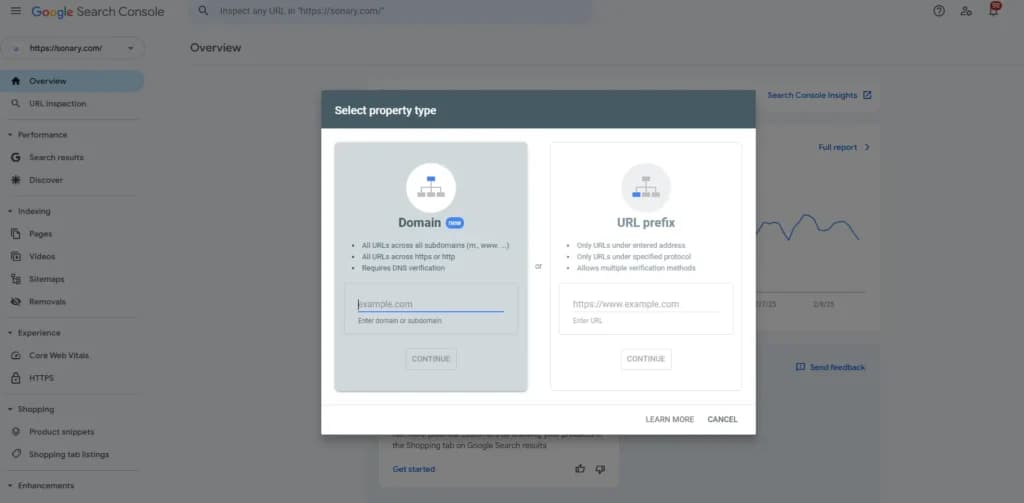
To set up Google Search Console, go to Google Search Console, add your property, and verify ownership via a DNS record or HTML tag. Once verified, navigate to Indexing→ Pages to see which of your pages are indexed. Check the Performance tab weekly to monitor clicks, impressions, and average position. Don't ignore Bing — it powers both Bing and DuckDuckGo and covers roughly 8% of global search traffic.
- These tools allow you to monitor how search engines interact with your website.
- Benefits: Helps identify crawl errors, indexation issues, and penalties.
- Impact: Direct insight into technical and performance-related SEO challenges.
✅ Set Up Google Analytics to Track Performance
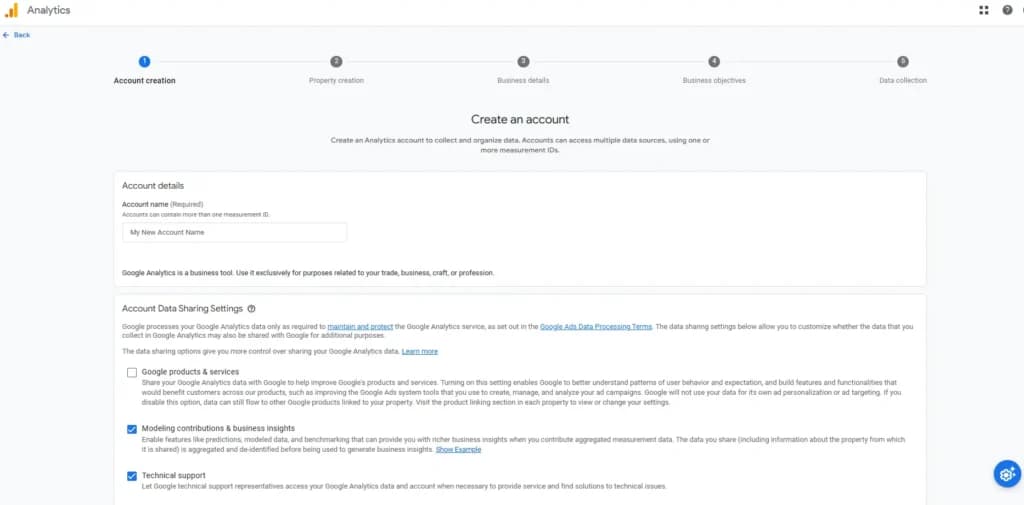
In GA4, set up at least one Conversion Event (e.g., a form submission or purchase) so you can tie SEO traffic to real business outcomes, not just pageviews. Connect GA4 to Search Console so you can see keyword data alongside behavior metrics in one place.
- Google Analytics provides data on website traffic, behavior, and user demographics.
- Benefits: Tracks visitor behavior, identifies top-performing pages, and provides conversion insights.
- Impact: Essential for measuring SEO success and making data-driven decisions.
✅ Install and Configure an SEO Plugin (For WordPress Users)
- Plugins like Yoast SEO and Rank Math help optimize meta titles, descriptions, and schema markup.
- Benefits: Simplifies on-page SEO and technical configurations.
- Impact: Improves search engine understanding of your content.
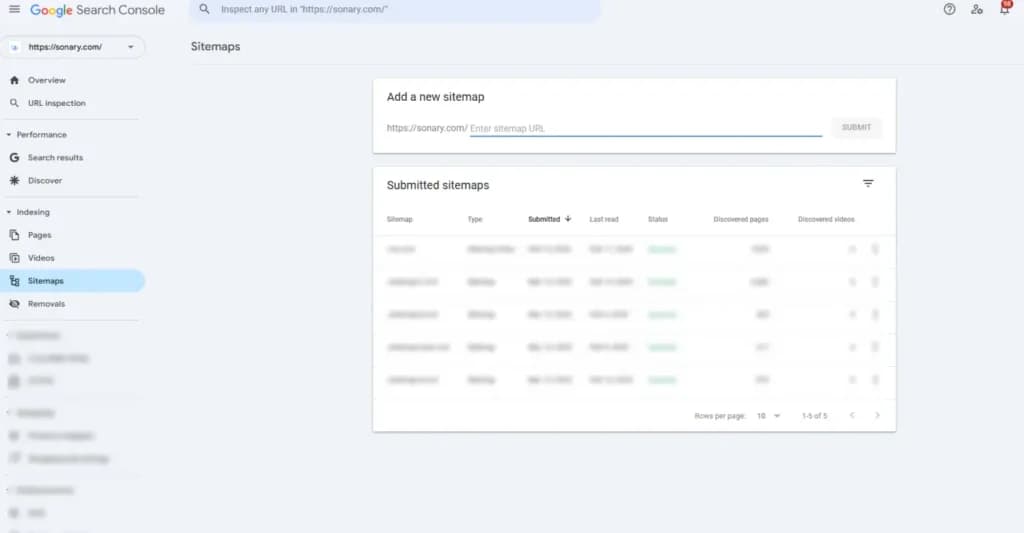
✅ Generate and Submit an XML Sitemap to Search Engines
According to Google, submitting a sitemap doesn't guarantee indexing, but it significantly speeds up the discovery of new pages, especially on sites with fewer than 500 external backlinks.
- A sitemap provides a roadmap of your website structure to search engines.
- Benefits: Helps search engines crawl and index content efficiently.
- Impact: Ensures new content gets indexed faster, improving visibility.
✅ Create and Optimize a robots.txt File
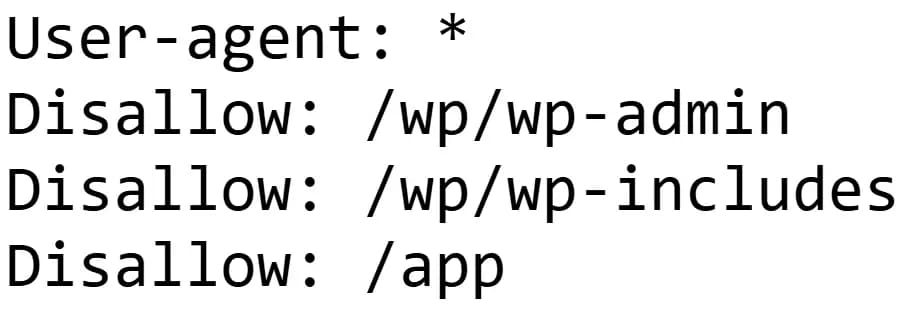
- This file tells search engines which pages to crawl and which to ignore.
- Benefits: Prevents indexing of sensitive or duplicate pages.
- Impact: Enhances crawl efficiency and prevents dilution of link equity.
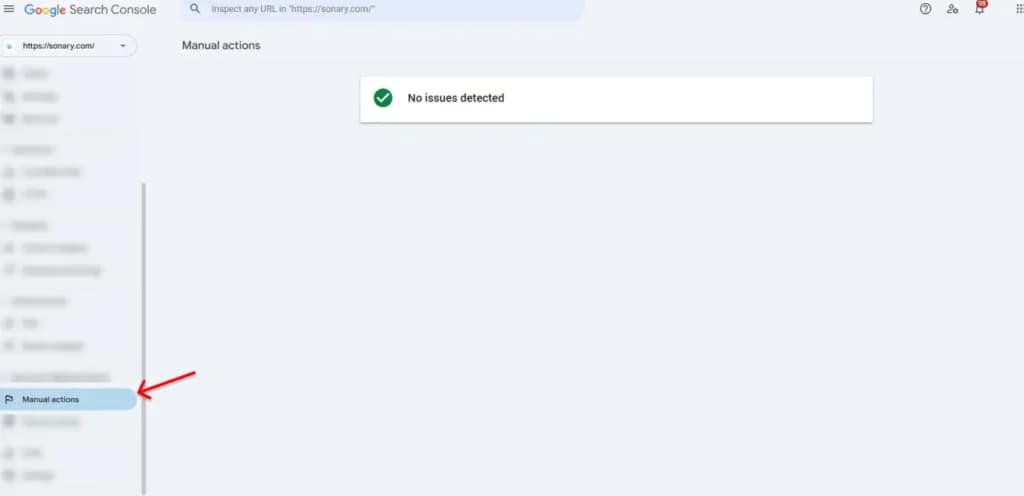
✅ Check Google Search Console for Manual Actions and Indexing Issues
- Manual actions are penalties issued by Google for policy violations.
- Benefits: Early detection of SEO penalties or deindexing problems.
- Impact: Prevents ranking drops by resolving flagged issues.
2. Keyword Research
Keyword research is a vital aspect of SEO that helps you understand what your target audience is searching for. By identifying and analyzing relevant keywords, you can create content that aligns with user intent and improves your chances of ranking higher in search results. A well-researched keyword strategy ensures that your website attracts the right visitors and maximizes conversions.
✅ Identify Competitor Keywords and Rankings
- Analyzing competitors' rankings helps uncover high-performing keywords.
- Benefits: Find keyword opportunities and gaps in your content strategy.
- Impact: Helps build an effective keyword strategy to outperform competitors.
Use tools like Ahrefs, Semrush, or the free version of other SEO tools. Enter a competitor's domain and filter by keywords ranking in positions 1–10 that have a keyword difficulty (KD) under 30. These represent winnable opportunities where competitors already validate that there's traffic to be had.
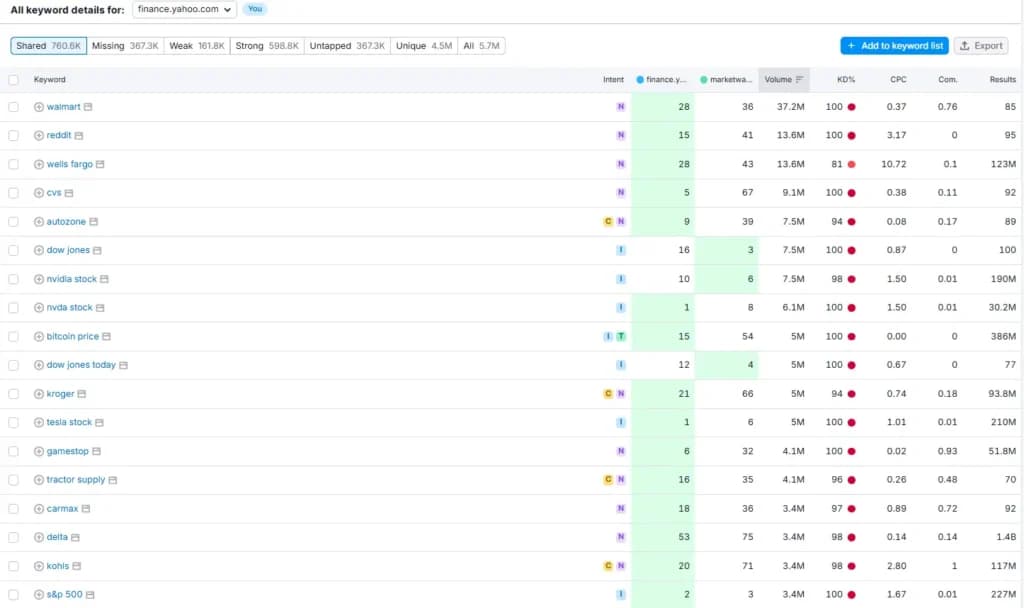
✅ Conduct Keyword Gap Analysis
- Identifies keywords competitors rank for that you don’t.
- Benefits: Expand your keyword strategy to include missed opportunities.
- Impact: Helps improve rankings by targeting untapped search queries.
✅ Find High-Intent Keywords
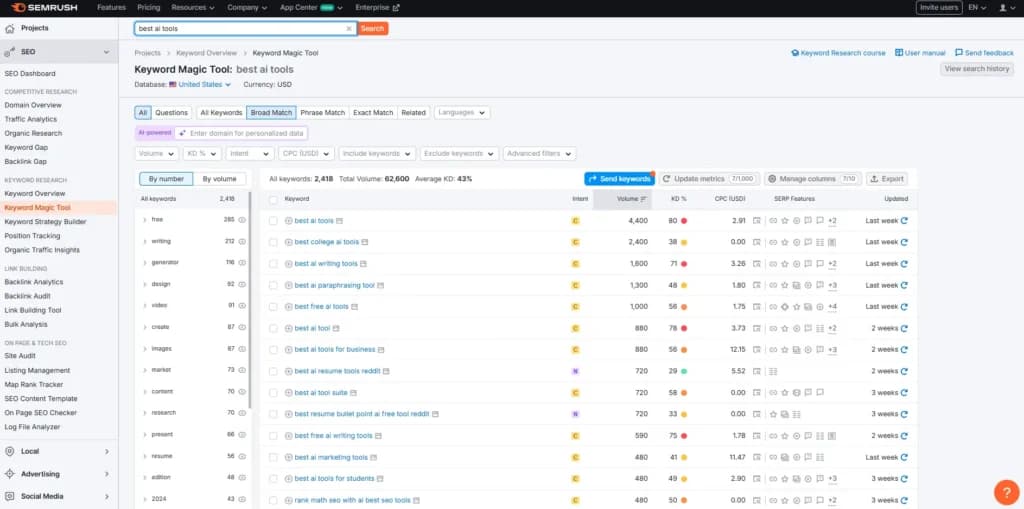
High-intent keywords, those containing words like "best," "buy," "vs," "review," or "near me", convert at 2–5x the rate of informational queries. Prioritize them for landing pages and product/service content.
- These are keywords indicating strong user intent (e.g., “buy,” “best,” “reviews”).
- Benefits: Drives more conversions and revenue.
- Impact: Increases chances of ranking for queries that lead to action.
✅ Discover Long-Tail Keyword Variations
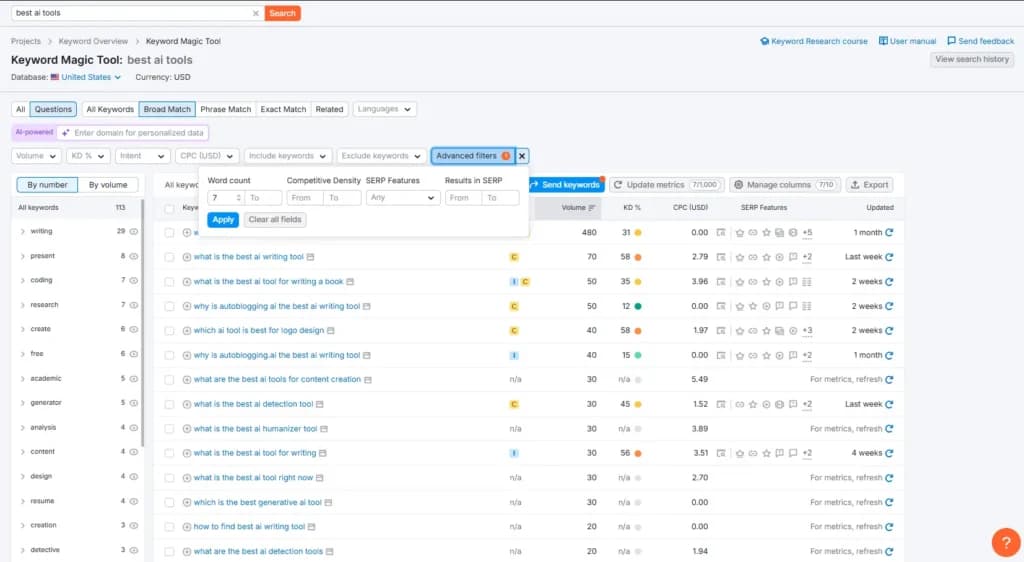
Long-tail keywords (3+ words) make up roughly 70% of all search queries. While each one has low volume individually, collectively they drive the majority of organic traffic for most websites. A good starting point: type your main keyword into Google and scroll to the "People Also Ask" and "Related Searches" sections; those are long-tail goldmines.
- Long-tail keywords are longer and more specific phrases (e.g., “best running shoes for flat feet”).
- Benefits: Less competition and higher intent.
- Impact: Drives more targeted traffic with higher conversion rates.
✅ Analyze the Search Intent of Ranking Pages
Before writing any page, Google the keyword and study the top 5 results. Ask: Are they blog posts or product pages? Are they short answers or deep guides? This tells you the content format Google expects. There are four intent types to recognize:
Informational– "how does X work" → write a guide
Navigational– "Ahrefs login" → don't try to rank here
Commercial– "best SEO tools" → write a comparison
Transactional– "buy SEO software" → send to a product/landing page
- Search intent determines why users perform a search (informational, transactional, etc.).
- Benefits: Ensures your content aligns with what users expect.
- Impact: Improves engagement and decreases bounce rates.
Check Monthly Search Volume and Keyword Difficulty Before Committing
Not every keyword is worth targeting. Use a tool like Ahrefs or Semrush to check:
- Search volume– aim for 100–1,000/mo for new sites, higher as you grow
- Keyword difficulty (KD)– new sites should target KD under 20; established sites can push 40–60
- Traffic potential– the volume of the #1 ranking page (often higher than the keyword itself)
3. Technical SEO
Technical SEO focuses on optimizing your website’s backend structure to enhance its crawlability, speed, and user experience. A well-optimized technical foundation ensures search engines can properly index your content, leading to better rankings and increased organic traffic.
✅ Improve Page Speed
- A fast-loading site enhances user experience and search rankings.
- Benefits: Lower bounce rates and higher user engagement.
- Impact: Google prioritizes fast-loading websites in search results.
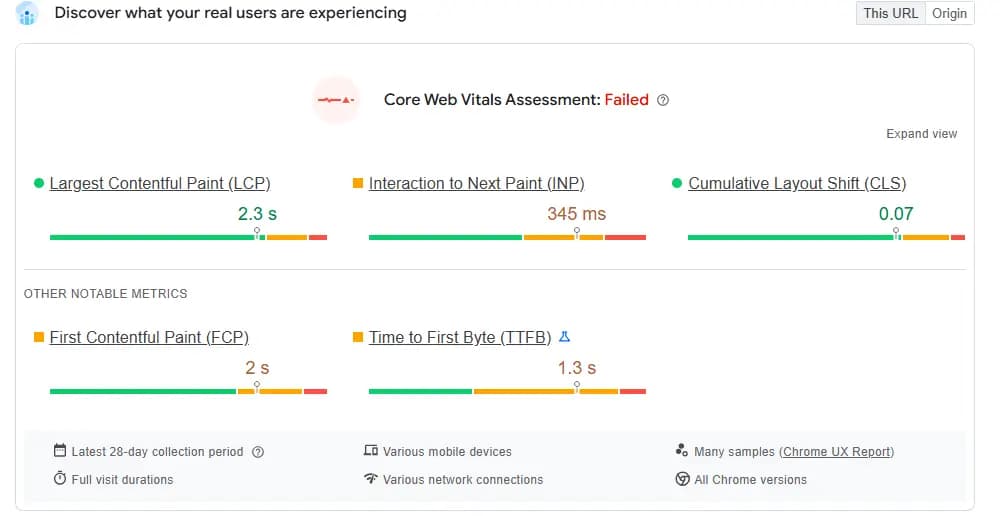
Google's Core Web Vitals are the benchmark. You need:
- LCP (Largest Contentful Paint): under 2.5 seconds
- INP (Interaction to Next Paint): under 200 milliseconds
- CLS (Cumulative Layout Shift): under 0.1
Test your page at PageSpeed Insights. The most common fixes are: compressing images to WebP format, enabling browser caching, deferring non-critical JavaScript, and using a CDN.
✅ Ensure Mobile-Friendliness
- Mobile-first indexing means Google ranks mobile-friendly sites higher.
- Benefits: Improves rankings and usability.
- Impact: Essential for modern search performance.
As of 2024, over 60% of Google searches happen on mobile, and Google uses mobile-first indexing, meaning it crawls and ranks your mobile version first. Test your site on mobile devices. Common failures include text that's too small to read, clickable elements too close together, and content wider than the screen.
✅ Fix Duplicate Content and Canonical Issues
Duplicate content confuses search engines about which page to rank. Use rel="canonical"tags to tell Google which version of a page is the "original." Common duplicates to check: HTTP vs HTTPS, www vs non-www, and URL parameters like?ref=or?utm_source=.
A quick way to audit: type site: yourdomain.com into Google and look for near-identical titles showing up twice.
✅ Set Up Proper Redirects (301 vs 302)
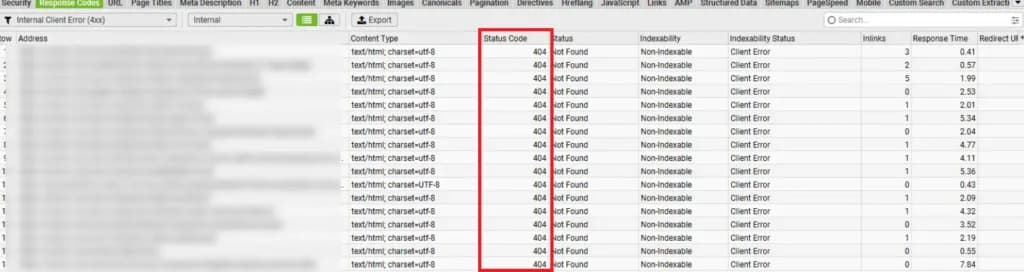
When you delete or move a page, always set up a 301 redirect (permanent) to the most relevant live page. This passes ~90–99% of the original page's link equity to the new URL. Never leave a deleted page returning a 404 if it had backlinks or traffic; you're throwing away earned authority.
✅ Fix Crawl Errors
- Errors like 404s and server issues prevent pages from being indexed.
- Benefits: Ensures all important pages are accessible to search engines.
- Impact: Maximizes crawl efficiency and indexation.
✅ Secure Your Site with HTTPS
- HTTPS provides a secure connection and is a ranking factor.
- Benefits: Improves trust and credibility.
- Impact: Helps prevent security warnings that deter visitors.

4. On-Page SEO & Content Optimization
On-page SEO involves optimizing individual pages to improve rankings and enhance user experience. This includes refining metadata, structuring content effectively, and using internal links to boost engagement and authority.
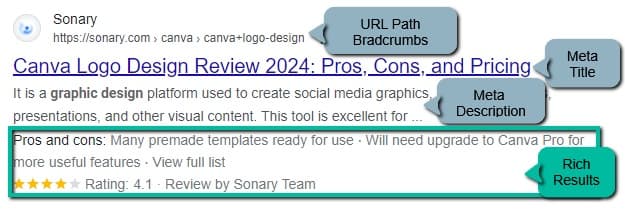
Title tags should be 50–60 characters and lead with the target keyword. Avoid keyword stuffing; Google rewrites titles it considers misleading or overly promotional. Meta descriptions don't directly affect rankings, but a compelling one can lift click-through rate (CTR) by 5–10%, which indirectly signals quality to Google. Aim for 120–155 characters and include a natural call to action.
✅ Optimize Title Tags and Meta Descriptions
- These elements affect click-through rates and rankings.
- Benefits: Encourages users to click on your page.
- Impact: Higher CTR leads to better rankings.
✅ Use Proper Heading Structures (H1, H2, H3, etc.)
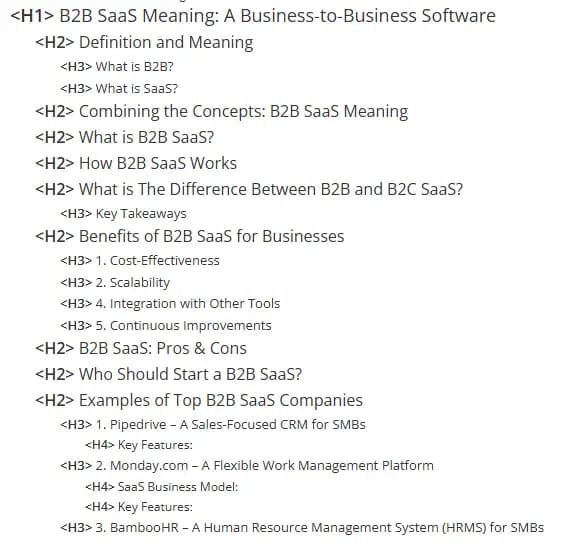
Each page should have exactly one H1, your primary keyword, and page topic. Use H2S for major sections and H3S for subsections within them. Think of headings as a document outline: if you pulled them out and read them top to bottom, they should tell the story of the page. This structure also directly feeds AI-powered answer engines that extract headings as context for generating responses.
- Headings improve readability and SEO.
- Benefits: Helps search engines understand content hierarchy.
- Impact: Better organization improves user experience and rankings.
✅ Write a Unique, Keyword-Rich Introduction
Google often pulls the first 100–160 words of a page for featured snippets and AI overview summaries. Your introduction should:
- State clearly what the page is about
- Include the primary keyword naturally within the first sentence
- Answer the core question the reader came to have answered, immediately, before asking them to scroll.
✅ Add Schema Markup (Structured Data)
Schema markup is code that tells search engines — and AI answer engines — exactly what your content is. For a checklist guide like this one, implement:
- HowTo schema: marks up step-by-step instructions for rich results
- FAQPage schema: enables FAQ rich snippets in Google and feeds AI tools like Perplexity and ChatGPT
- Article schema: confirms the author, publish date, and organization
Use Google's Rich Results Test to verify your schema is valid. Structured data is one of the highest-leverage AEO (Answer Engine Optimization) tactics available.
✅ Include Internal Links to Important Pages
Internal links help search engine crawlers discover more pages and identify your website cluster. This improves your ranking for entities and allows Google and other search engines to understand your website much better.
- Internal links pass authority and improve navigation.
- Benefits: Keeps users engaged longer.
- Impact: Strengthens overall SEO performance.
✅ Optimize Images with Alt Text
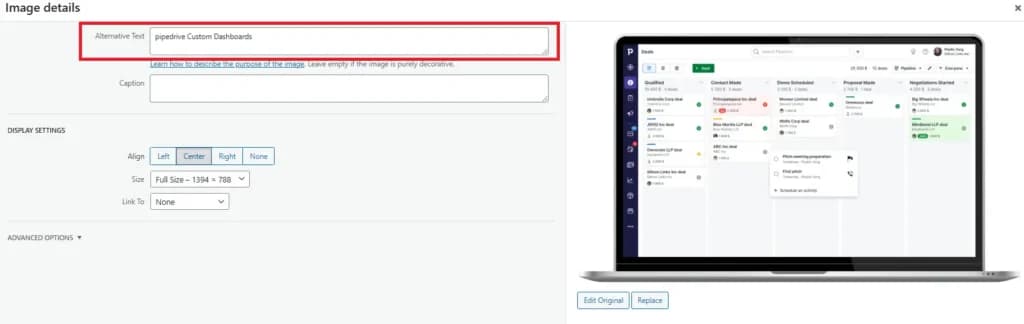
Alt text should describe the image naturally and include the keyword only when it genuinely fits — don't force it. Also: compress images to WebP format (typically 25–35% smaller than JPEG with equal quality), add descriptive file names before uploading (e.g., seo-checklist-google-search-console.webp not IMG_3847.jpg), and use lazy loading for images below the fold to improve page speed.
- Alt text helps search engines understand images.
- Benefits: Improves image SEO and accessibility.
- Impact: Helps rank in Google Image Search and improves usability.
5. Link Building & Off-Page SEO
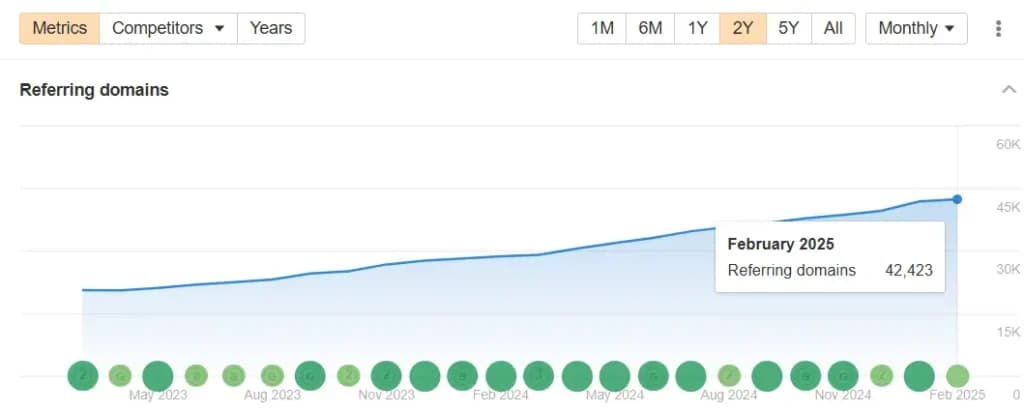
Backlinks remain one of Google's top three ranking factors. But quality matters far more than quantity; a single link from a trusted, topically relevant domain is worth more than 50 links from low-authority directories.
Here are the most effective tactics for earning quality links: The quality of these links is far more important than the quantity. A single link from a relevant, trusted, and high-authority domain is significantly more valuable than 50 links from low-authority directories. Focus on these most effective tactics for earning quality links:
✅ Earn High-Quality Backlinks
- Backlinks from trusted sites improve domain authority.
- Benefits: Strengthens your site’s credibility.
- Impact: Helps achieve higher rankings faster.
The most reliable way to earn links is to create content that is genuinely more useful, more comprehensive, or more original than what already ranks. Types of content that earn links naturally: original research and data, free tools, definitive guides, and visual assets like infographics or diagrams. Once the content is live, manually reach out to sites that have linked to similar (but weaker) content and let them know yours exists.
✅ Use Digital PR for Authoritative Links
Digital PR means creating content worthy of editorial coverage. Tactics include publishing original survey data (journalists love citing proprietary statistics), newsjacking trending stories with expert commentary, and creating "trend reports" in your niche. A single placement in Forbes, TechCrunch, or a niche trade publication can drive dozens of secondary links and significant referral traffic.
- Publishing newsworthy content gets links from media outlets.
- Benefits: Increases brand visibility and SEO value.
- Impact: Attracts high-value referral traffic.
✅ Reclaim Unlinked Brand Mentions
Search Google for your brand name and filter the results to the past 3 months. When you find sites that mention your brand without linking to you, email the author and politely request that they add a link. These have a high conversion rate because the writer already knows your brand, and the mention is already live; you're just asking for a small edit.
✅ Audit and Disavow Toxic Backlinks
Not all backlinks help; spammy or manipulative links can trigger a Google manual action or algorithmic penalty. Use Google Search Console's Links report or a tool like Ahrefs to regularly audit your backlink profile. If you find a pattern of low-quality links you didn't earn (e.g., from link farms or PBNs), use Google's Disavow Tool to tell Google to ignore them.
6. Local SEO (For Businesses Targeting Local Markets)
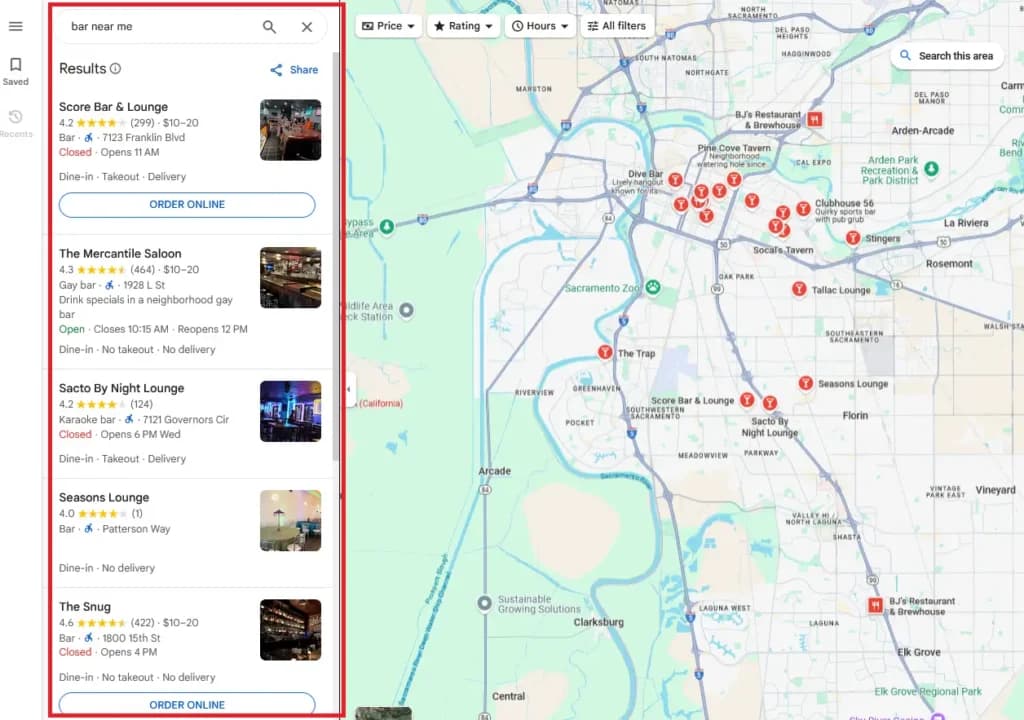
Local SEO is essential for businesses that serve specific geographic areas. By optimizing your website for local searches, you can improve visibility in map listings, attract nearby customers, and enhance credibility.
✅ Optimize Google My Business (GMB) profile
- An optimized GMB profile boosts local rankings.
- Benefits: Improves visibility in Google Maps and local search.
- Impact: Increases customer engagement and conversions.
✅ Build Local Citations (NAP Consistency)
Your business Name, Address, and Phone number (NAP) must be identical across every directory where you're listed, including Google Business Profile, Yelp, TripAdvisor, Apple Maps, and industry-specific directories. Even small inconsistencies (e.g., "St." vs "Street") can confuse search engines and suppress local rankings. Use a tool like BrightLocal or Moz Local to audit and fix citation inconsistencies at scale.
✅ Use Local Keywords in Content and Metadata
- Targeting location-based queries enhances local visibility.
- Benefits: Helps attract customers in specific areas.
- Impact: Improves rankings for regional search terms.
✅ Earn and Respond to Google Reviews
Google reviews are a direct local ranking factor. More reviews, higher average rating, and recent reviews all contribute to better map pack visibility. Ask satisfied customers for reviews via email or SMS shortly after a positive interaction.
Critically: respond to every review, positive or negative. Google sees active engagement as a signal of a legitimate, trustworthy business.
Final Thoughts
SEO is not a one-time task; it's an ongoing system. Sites that consistently publish high-quality content, earn authoritative backlinks, and maintain strong technical health compound their organic visibility over time. According to Ahrefs, the average #1 ranking page is over 2 years old, which means the best time to start is now. Use this checklist as your repeatable process, revisit it every quarter, and track your progress in Google Search Console.
Following this SEO checklist will significantly enhance your website’s visibility by ensuring it is well-optimized for search engines and users. Optimized websites rank higher, making it easier for users to discover your content. By targeting the right keywords and improving technical SEO, you can drive more organic traffic from users actively searching for your offerings.
A well-structured, mobile-friendly, and fast-loading website enhances user experience, reducing bounce rates and increasing conversions. Additionally, building high-quality backlinks and establishing credibility improves your domain authority, making your site more trustworthy in the eyes of search engines. Beyond just bringing traffic, SEO ensures you attract the right visitors—those who are genuinely interested in your content or services. Since SEO is an ongoing process, continuously refining your strategy, analyzing performance metrics, and adapting to search engine algorithm updates will keep you ahead of competitors and sustain long-term success in organic search rankings.
FAQ
Q: How long does SEO take to show results?
A: Most new websites begin seeing meaningful organic traffic after 3–6 months of consistent effort, though competitive keywords can take 12+ months to rank for. Technical fixes (such as correcting crawl errors or improving page speed) can yield results within days. Targeting low-competition keywords can result in ranking within weeks.
Q: What is the difference between SEO and AEO?
A: SEO (Search Engine Optimization) focuses on ranking in traditional search results like Google's blue links. AEO (Answer Engine Optimization) focuses on appearing in AI-generated answers, like Google's AI Overviews, ChatGPT responses, or Perplexity summaries. AEO favors content with clear definitions, FAQ schema, direct answers in the first paragraph, and structured data markup.
Q: Do I need to hire an SEO agency, or can I do this myself?
A: Many of the items in this checklist, especially SEO basics, keyword research, and on-page optimization, can be handled in-house with the right tools and a few hours per week. Technical SEO and link building are areas where experienced help adds the most value. A good middle ground: learn the fundamentals yourself, then hire specialists for audits or link campaigns rather than paying a retainer for tasks you can handle.
Q: What is SEO, and why is it important for my website?
A: SEO, or Search Engine Optimization, involves enhancing your website to improve its visibility on search engines like Google. Effective SEO increases organic traffic, boosts brand credibility, and can lead to higher sales and revenue.
Q: How do I start optimizing my website for search engines?
A: Begin by setting up essential tools like Google Search Console and Google Analytics to monitor your site's performance. Conduct thorough keyword research to identify terms your target audience uses, and optimize your site's content, meta tags, and URLs accordingly.
Q: What are some common on-page SEO practices I should implement?
A: Key on-page SEO practices include using target keywords in your titles, headings, and content; optimizing meta descriptions; ensuring mobile-friendliness; improving site speed; and using descriptive alt text for images.
Q: How can I build quality backlinks to improve my site's authority?
A: Building quality backlinks involves creating valuable, shareable content that others want to link to, reaching out to industry influencers and bloggers for collaborations, and submitting your site to reputable directories. Focus on earning links from authoritative and relevant websites to enhance your site's credibility.