
Pipedrive CRM Review For 2026
Pipedrive CRM Plans & Pricing

Pipedrive Comparison
Expert Review
Pros

Cons

Pipedrive CRM's Offerings
In November 2025, Pipedrive rebranded all four of its plans — Essential became Lite, Advanced became Growth, Professional became Premium, and Enterprise became Ultimate. If you’ve seen reviews referencing the old plan names, they’re outdated. Here’s the verified breakdown as of April 2026, cross-checked against Pipedrive’s official pricing page.
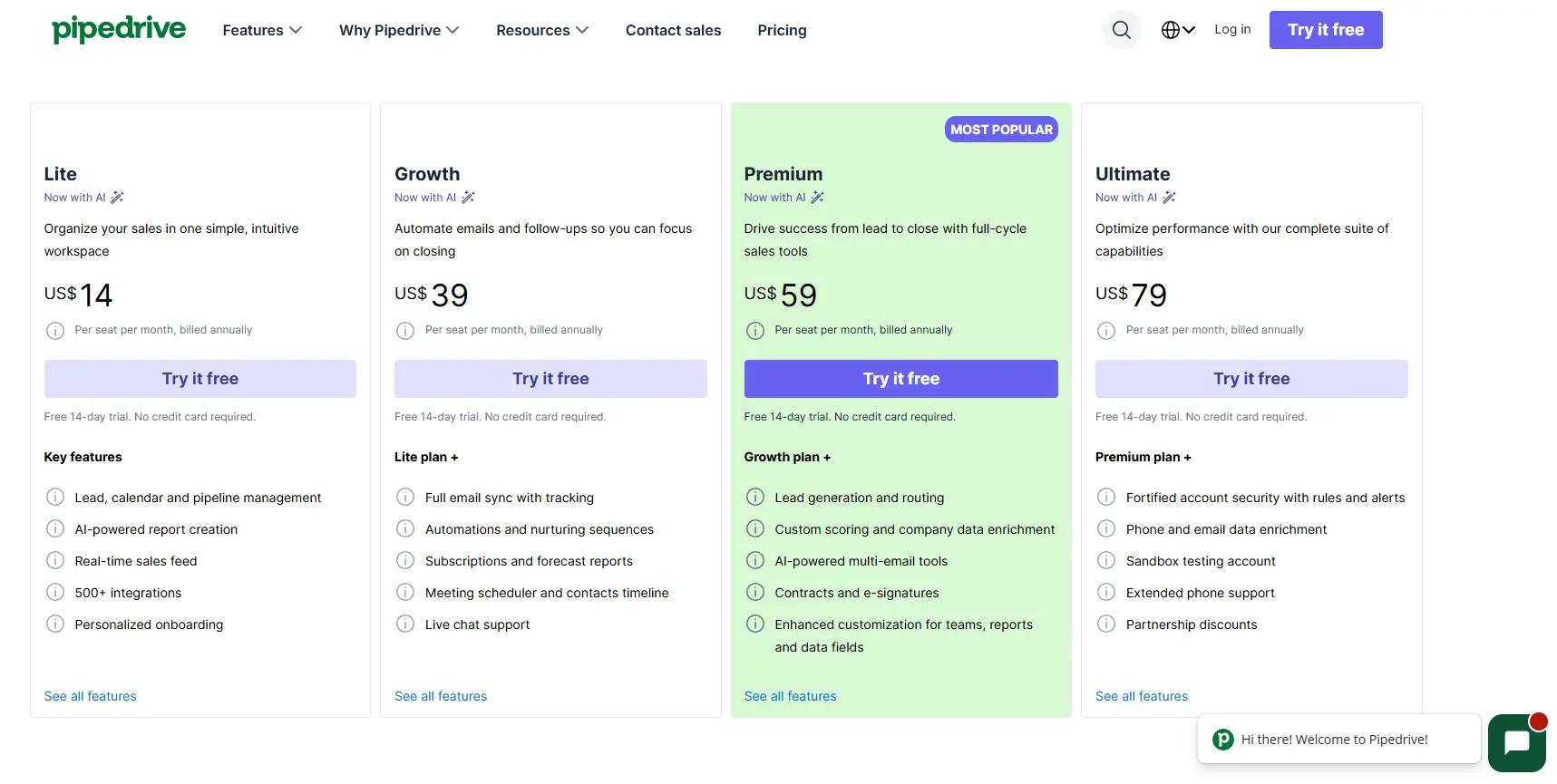
* US list prices as of April 2026. EU customers pay applicable VAT on top. Annual billing saves 30–51% vs monthly. Always confirm on Pipedrive’s official pricing page before purchasing, as prices change.
Which Plan Should a Small Business Choose?
- Solo founder or freelancer: Start with Lite at $14/month. You get the core pipeline, unlimited contacts, mobile app, and all the basics. The only thing you sacrifice is automation and email sync — you can add those later.
- Team of 2–10: Growth at $39/user/month is where Pipedrive earns its keep for small teams. The email sync and 50-automation allowance transform how efficiently your team follows up on leads. This is the plan I personally use and recommend for most small businesses.
- Growing team with inbound leads: Premium at $49 bundles, LeadBooster (worth $32.50/mo alone as an add-on), Smart Docs, AI tools, and forecasting. If you need all of those, Premium is better value than Growth + add-ons.
- Larger team that needs maximum control: Ultimate at $79 adds phone support, sandbox testing, and unlimited reporting. Most small businesses won’t need this until they’re consistently above 20 people.
Watch out for add-on creep: Pipedrive’s headline price is genuinely competitive, but features like LeadBooster ($32.50/mo), Campaigns email marketing, and Smart Docs are priced separately on lower tiers. A 5-person team that needs all three add-ons on the Growth plan can end up paying $280+/month — more than double the base price. Know what you need before you commit to a tier. See our full guide to CRM pricing for a broader comparison.
Who Is Pipedrive Best For?
Pipedrive is an excellent choice for small businesses, startups, or teams new to CRM software. It offers a perfect balance of functionality, affordability, and ease of use, making it ideal for those seeking a straightforward yet feature-rich solution.
- For Larger Teams: Consider the Power or Enterprise plans, which include advanced features like document and project management to support more complex needs.
- For Smaller Teams: The Professional plan provides all the essential tools for managing customer relationships and scaling your operations effectively.
Whether you’re just starting out or expanding your business, Pipedrive offers plans to match your team’s size and goals.
Customer Support
Live Chat
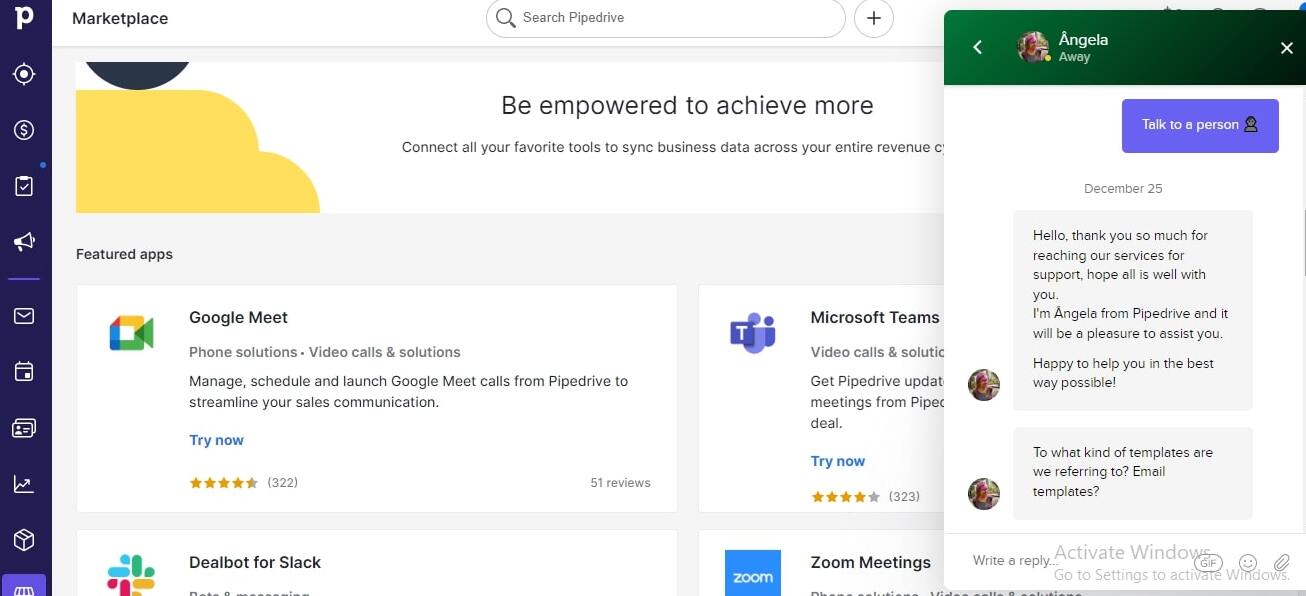
Although I contacted the team during the holiday season, I still got a response within 24 hours. This company showed they valued their employees by offering them ample time to spend with their friends and family. While there was no team member to handle my complaint, there was a live bot that offered suggestions, although it was insufficient for the question I asked. Once the team member got my message, I got 3 follow-up messages that showed concern and an eagerness to help me easily navigate the platform. Afterwards, all the responses were swift and direct.
Email Support
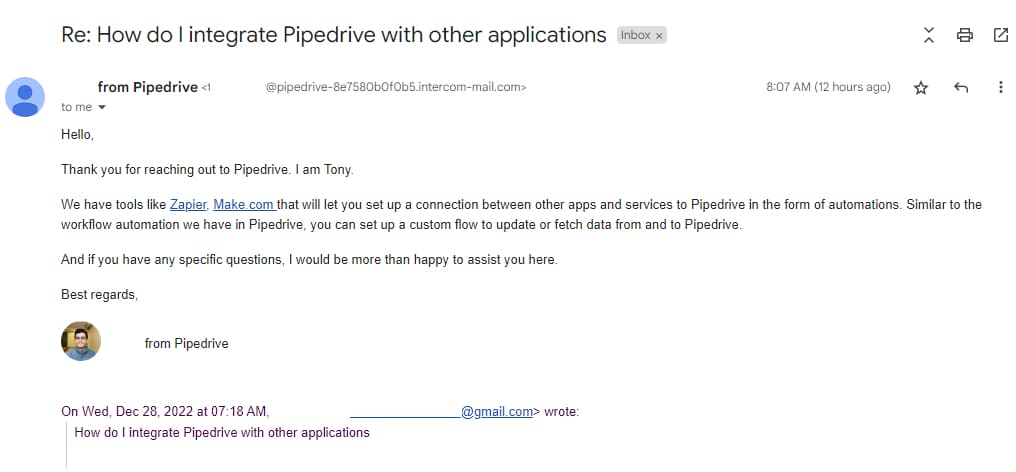
After opening a ticket with Pipedrive, I got a response in 30 minutes, giving me access to interact with a team personnel directly to lodge my complaints and offer details about what I needed. The email support contained information to help me navigate the platform better and make the most out of it.
Phone Support
Pipedrive CRM offers phone support only to customers using the Enterprise. Every other plan apart from that only has access to live chat and email support. However, the phone support that Pipedrive offers is believed to be of acceptable standards.
Blog
When I explored Pipedrive’s resources, I found a wealth of expert-backed content designed to help businesses improve sales, team collaboration, and customer relationships. The platform has dedicated sections on sales strategies, marketing techniques, and product updates, all packed with actionable advice.
If you’re looking for insights on lead generation, automation, and CRM best practices, Pipedrive delivers practical, high-value content to help you stay ahead of the competition.
Pipedrive Academy
I checked out Pipedrive Academy, and it’s a great learning hub for anyone wanting to sharpen their sales and CRM skills. The video tutorials cover everything from basic CRM setup to advanced sales techniques.
One thing I liked was the variety of video lengths—some are quick, under three minutes, perfect if you just need a fast tip or feature explanation. If you prefer more in-depth training, there are longer tutorials that break down complex strategies step by step.
Community
Pipedrive has a growing community where users assist themselves in different areas, including lead generation, project management, workflow automation, sales CRM, apps, and integration.
I found real discussions on lead generation, project management, workflow automation, and integrations—all from people who have hands-on experience with the CRM. If you run into a challenge, chances are someone else has faced it too, and the community provides practical solutions that can save you time. It’s a valuable resource, especially for new users figuring out the best way to optimize their setup.
Features & Functionality
General Features
Pipedrive offers a huge selection of features that meet your customer relationship needs. We’ll discuss some of them below.
Feature Score Breakdown
- Pipeline UX – 4.9
- Email Features – 4.4
- Workflow Automation – 4.3
- Reporting & Dashboards – 4.2
- Contact Management – 4.5
- Lead Generation – 4.1
- Value for Money – 4.7
- Marketing Automation – 3.6
Reporting, Custom Dashboards & Revenue Forecasting
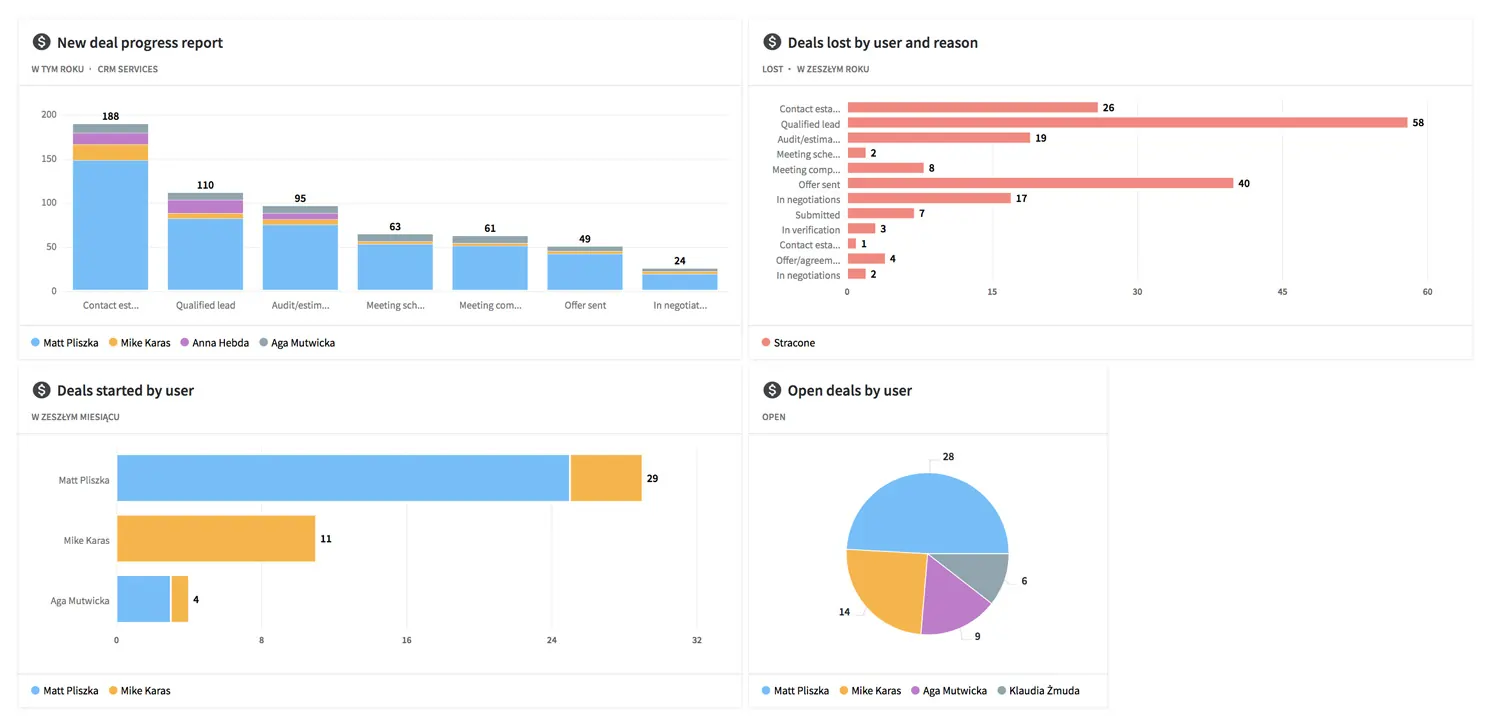
Pipedrive’s reporting is well-calibrated for small businesses: deep enough to be genuinely useful, but not so complex that you need a data analyst to interpret it. The default reports include deal conversion rates by stage, activity performance by user, revenue pipeline by close date, and deals won/lost with reasons.
Revenue Forecasting (Growth plan and above) analyses your current pipeline and projects expected revenue by month, broken down by pipeline stage and probability. For a small business trying to decide whether to hire, invest, or cut costs, a reliable 90-day revenue forecast is enormously valuable. The forecasts are weighted by deal probability, so a $10,000 deal at 30% probability counts differently from one at 90%.
Custom dashboards let you pin the reports that matter most to your business to a single view. I have mine set to show: deals closing this month, overdue activities, conversion rate this week vs last week, and total pipeline value. Everything I need in one scroll.
Smart Docs: Proposals, Quotes & e-Signatures
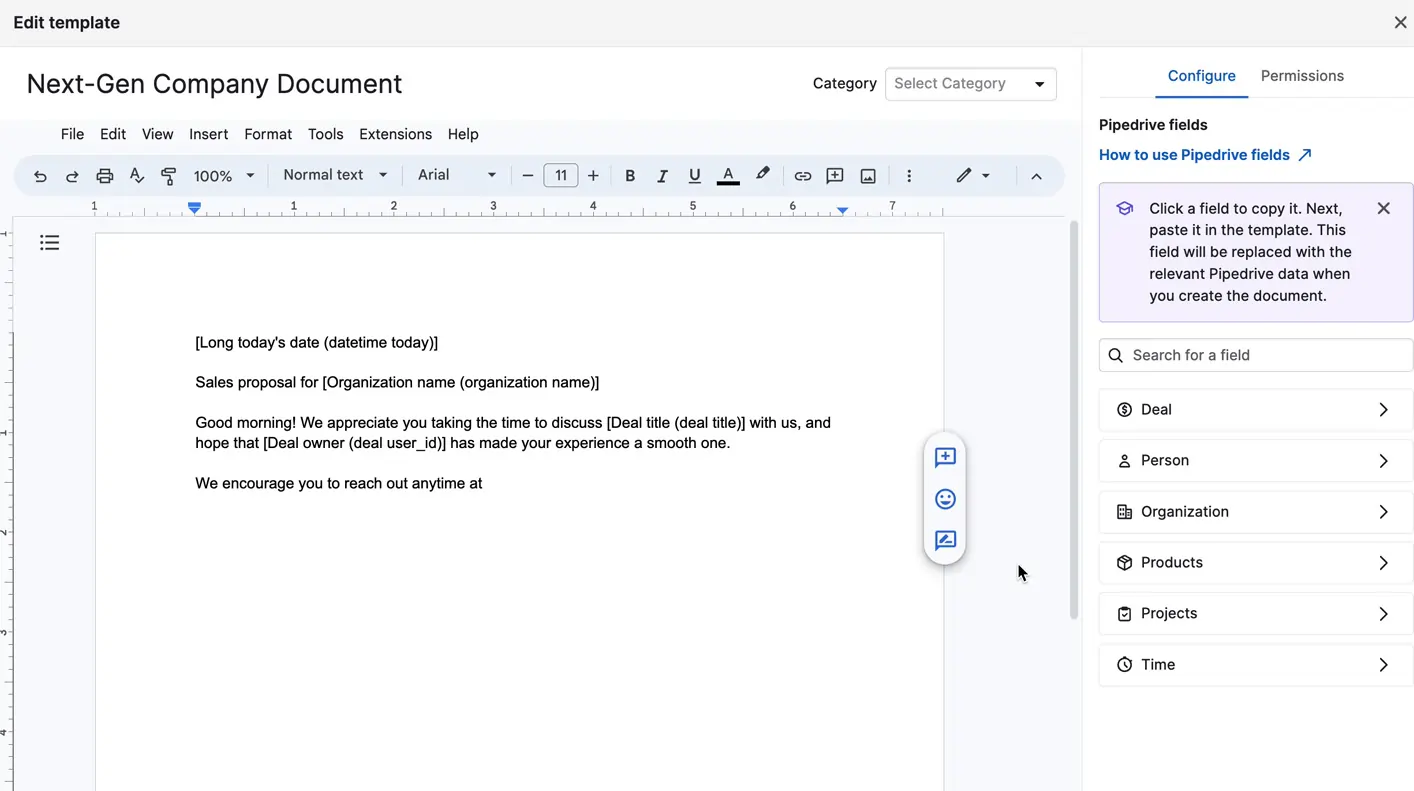
Smart Docs lets you create, send, and track proposals and contracts directly from Pipedrive. Templates auto-fill with deal data (contact name, value, product details), so creating a professional proposal takes minutes, not hours. When the document is opened, you’re notified in real time. Clients can sign electronically without leaving the document.
For a small business that currently emails Word or PDF documents and manually chases signatures, this is a meaningful productivity upgrade. The e-signature capability alone can significantly shorten your proposal-to-signed-contract time. Smart Docs is included in the Premium plan or available as an add-on on lower tiers.
Revenue Forecasting
Pipedrive’s Revenue Forecasting feature analyzes your current deals and sales trends to provide accurate predictions of your future revenue. It breaks down potential earnings by stages in your pipeline, giving you a clear view of where your deals stand and what to expect. With these projections, you can make informed decisions, allocate resources effectively, and strategize for growth, ensuring your business stays on track to meet its financial goals.
Custom Dashboards
You can personalize dashboards to display key metrics and insights tailored to your goals. This makes it easy to monitor performance and stay on top of your targets.
Activity History & Contact Timeline
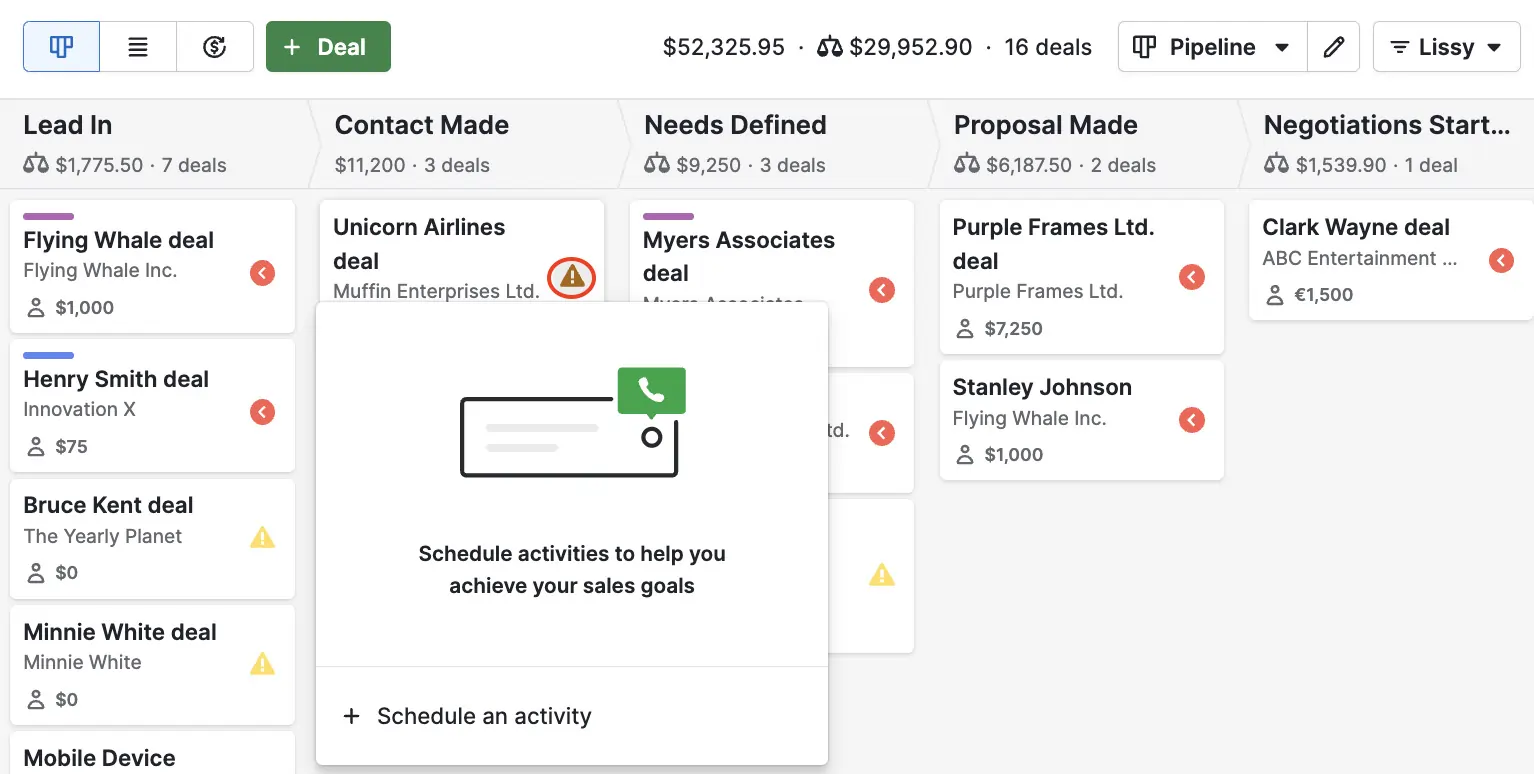
Every call, email, meeting, note, and task is logged chronologically against each deal and contact, creating a complete relationship history that persists indefinitely. This sounds simple — but it’s transformational in practice.
When a prospect who went cold 6 months ago unexpectedly calls back, you don’t scramble for context. You pull up their contact page and see exactly what you discussed in your last three interactions, why they hesitated, and what has changed in their business. I’ve personally closed deals on callbacks because of those logged notes — deals I would have fumbled if I were working from memory.
The activity system also drives a healthy discipline: Pipedrive expects you to log every interaction and schedule a next step on every deal. This habit, more than any feature, is what transforms Pipedrive from a database into a sales coaching system.
Contact & Lead Management
Pipedrive organizes your world into four entities — Contacts, Organizations, Deals, and Leads — that link to each other cleanly. A contact can have multiple deals. An organization can have multiple contacts. Every entity shows its full activity history, linked deals, open tasks, and associated documents in a single timeline view. Custom fields let you capture business-specific data (contract value, lead source, industry, referral code) without being locked into generic CRM field names. Labels (“hot lead,” “warm,” “cold,” “customer”) give you a quick visual priority system. The marketing status field tracks who has opted in or out of email campaigns — critical for GDPR compliance for EU-based businesses.
Pipedrive’s AI Tools – What They Actually Do
Pipedrive has been rolling out AI capabilities since 2023 and expanded them significantly in 2025. Here’s what’s real, what’s useful, and what’s still marketing language.
AI Sales Assistant
The AI Sales Assistant analyses your pipeline and flags deals that have gone quiet (no logged activity in 7+ days). It suggests a specific next action based on the deal stage and history. In practice, it has prompted me to follow up on deals I’d genuinely forgotten — and several of those turned into closed business. This is the most practically useful AI feature in Pipedrive.
AI Email Writing
Give the AI a prompt (“follow up on last week’s demo, offer a 10% discount if they sign this week”), and it drafts a professional sales email in seconds. The output quality is good — better than most AI-written emails I’ve seen from standalone tools. Saves 5–10 minutes per email when you’re staring at a blank screen.
Email Thread Summarisation
Long email chains can be summarised by the AI into 3–5 bullet points. When you’re picking up a deal you haven’t touched in two weeks, this is faster than scrolling through 20 emails. Useful but not essential — most deals that matter, you’ll remember the context.
AI-Powered Lead Scoring (Premium+)
Pipedrive’s lead scoring ranks prospects by their likelihood to convert based on engagement history and deal patterns. Available from the Premium plan. For a small business with under 200 leads in the system, manual prioritization is often as effective. Where lead scoring really shines is at 500+ active leads, where the volume makes human triage impractical.
Honest AI verdict: Pipedrive’s AI tools are genuinely useful and not just marketing decoration — particularly the Sales Assistant and email writing. However, calling Pipedrive an “AI-powered CRM” is a stretch. The AI augments the tool; it doesn’t transform it. If advanced AI forecasting is your primary requirement, HubSpot’s AI forecasting is significantly more sophisticated. For small businesses, Pipedrive’s AI features add real value without creating dependence on them.
Email Sync, Tracking & Templates (Growth plan+)
Two-way email sync with Gmail and Outlook is one of Pipedrive’s most impactful features for small businesses. Every email you send or receive is automatically logged against the relevant deal and contact — no manual copy-pasting, no “I forgot to log that call.” You have a complete communication history on every deal without changing your email habits.
Email tracking (available on Growth and above) notifies you when a recipient opens your email or clicks a link. When you’ve sent a proposal and you see “opened 3 times today,” that’s your signal to call. This has directly influenced when I’ve chosen to follow up and has shortened my average deal-close time.
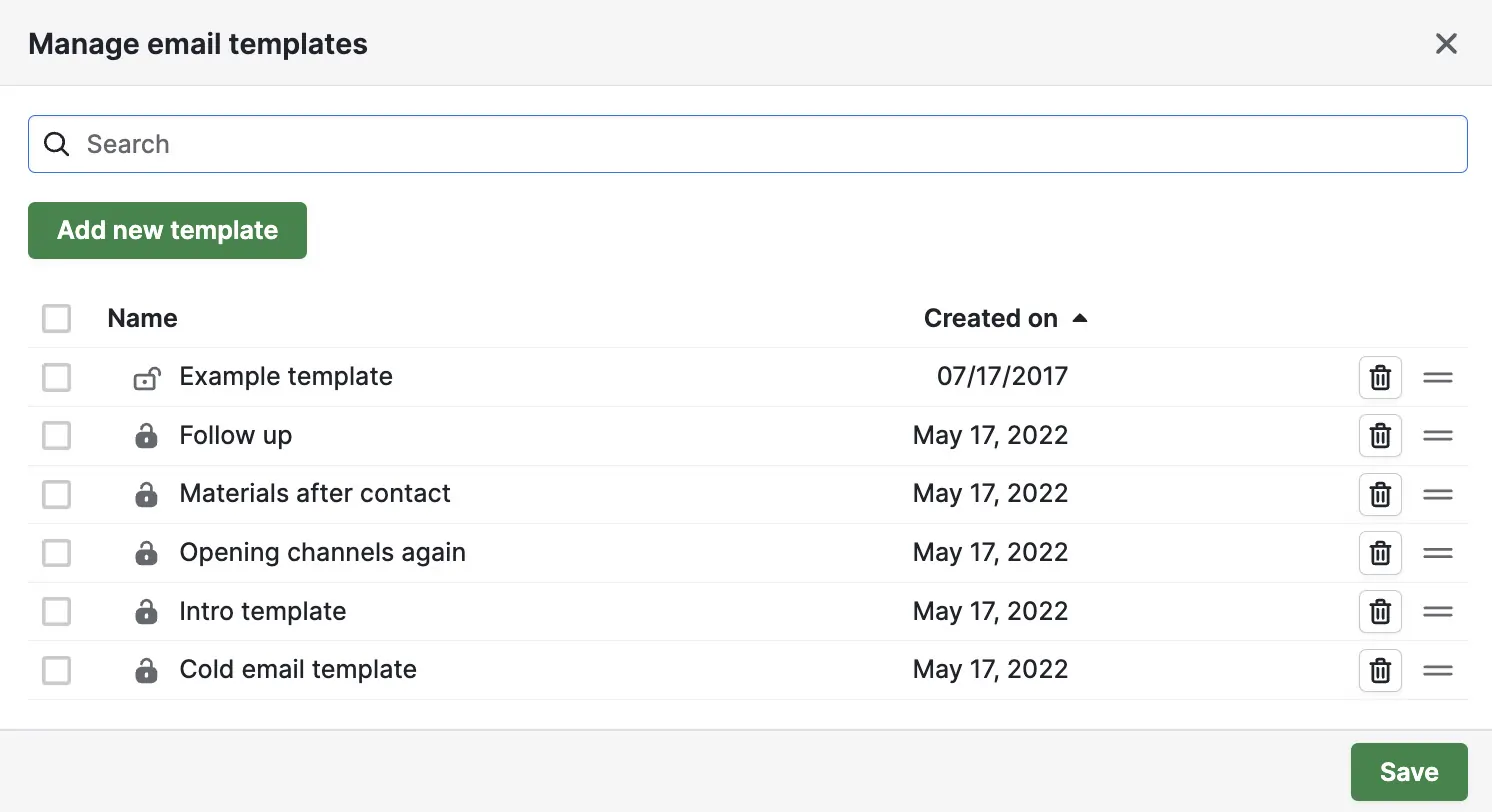
Email templates with merge fields (first name, company name, deal value) let you send personalized messages without rewriting from scratch. For a small business that sends similar follow-up emails repeatedly, templates save 20–30 minutes per day of writing time.
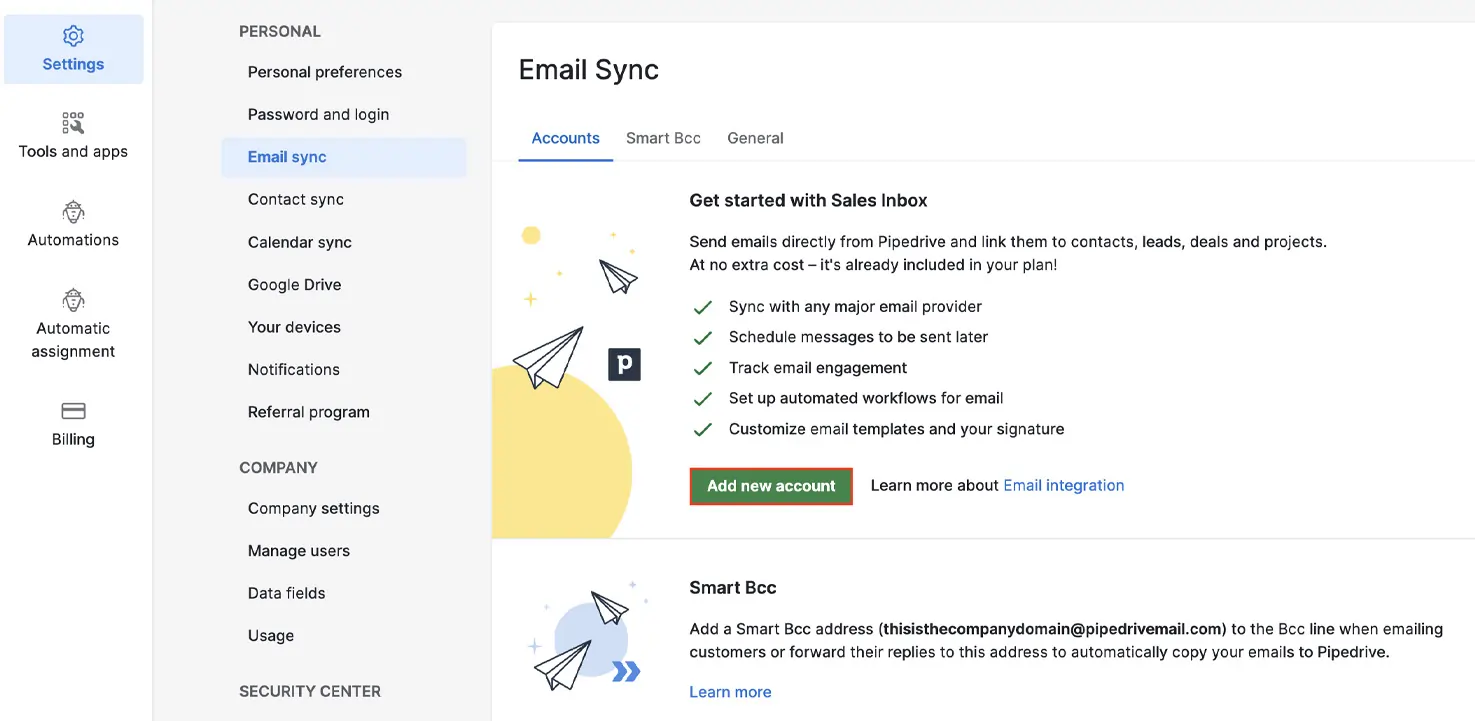
Email Tracking
Pipedrive notifies you when your emails are opened, or links are clicked. You’ll know exactly when to follow up, helping you engage with leads more effectively.
Email Templates
You can create reusable email templates to quickly send professional messages without starting from scratch. It’s a time-saver and ensures consistency in your outreach.
Email Campaigns & Marketing Automation
Pipedrive has a Campaigns add-on for bulk email marketing, but it’s notably more limited than dedicated email tools. It covers basic campaign creation, list segmentation, and send-time optimisation — adequate for a small business sending newsletters and follow-up sequences. It does not match the sophistication of Mailchimp, ActiveCampaign, or HubSpot’s email marketing tools for complex drip sequences, A/B testing, or advanced behavioral triggers.
My recommendation: if email marketing is central to your business, use Pipedrive for your sales pipeline and connect a dedicated email tool via Zapier or native integration. Pipedrive integrates natively with Mailchimp, ActiveCampaign, and others. If email marketing is occasional and simple, the Campaigns add-on is adequate. For more marketing-focused CRM comparisons, check our full guide.
Sales
Sales Pipeline Management
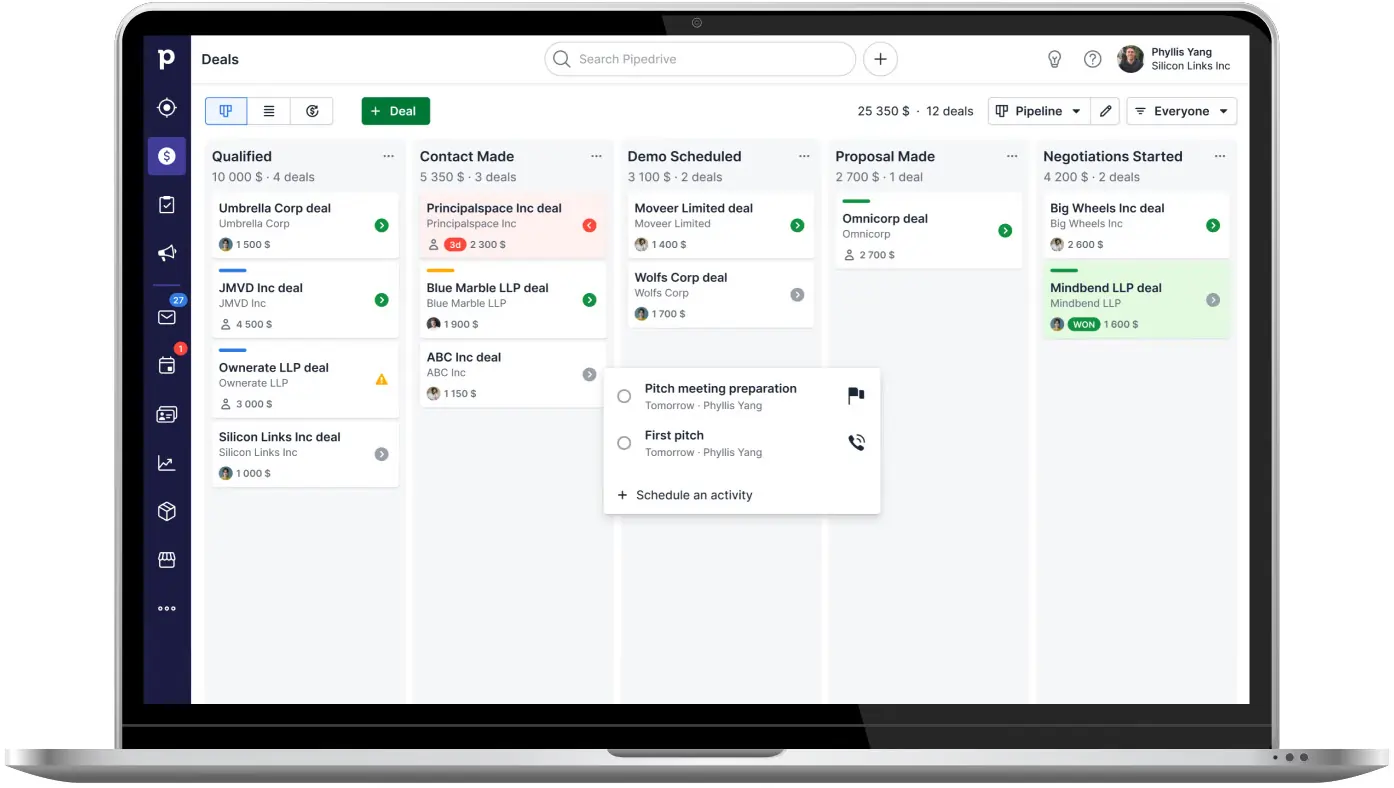
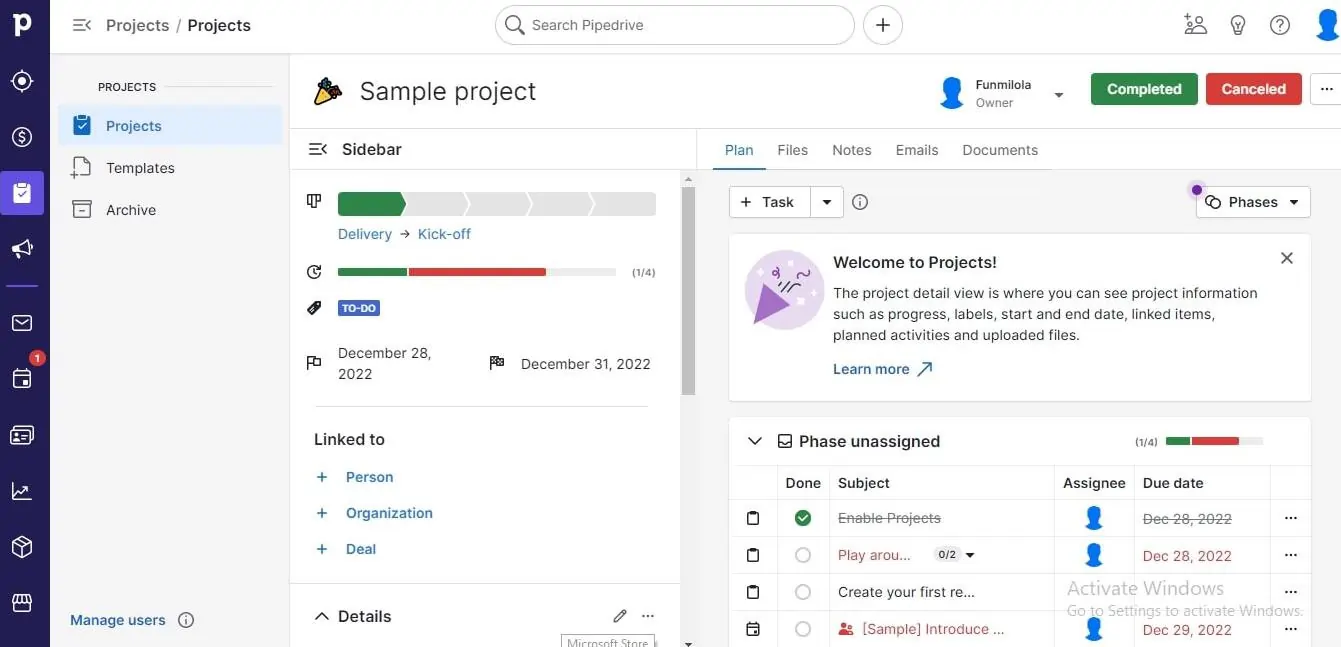
Pipedrive helps you keep track of every lead, project, and deal between you and your customers. This software offers features that assist you in tracking pipeline progress, so every team member remains updated. It also covers activity history, communication channels, and schedules to ensure you maximize every opportunity that comes your way.
LeadBooster — Lead Generation Add-On
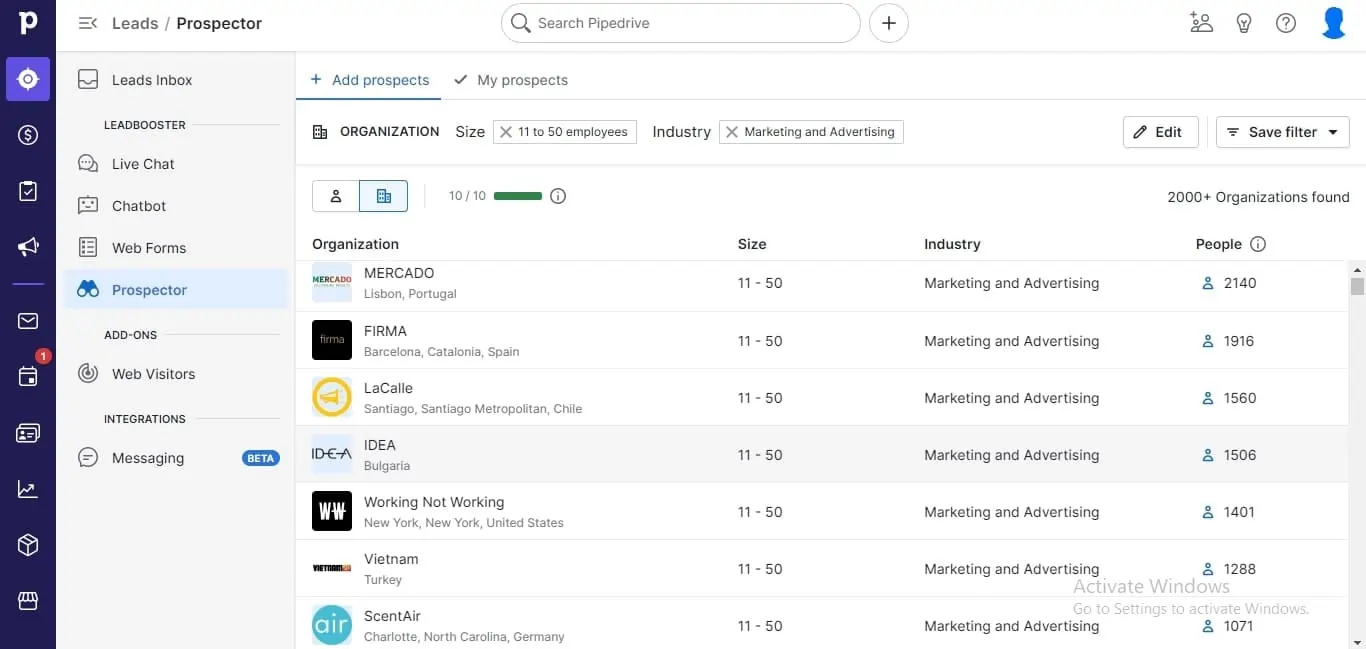
LeadBooster adds four tools to your Pipedrive: a website chatbot, live chat widget, web forms, and a prospector that searches a database of 400M+ professional profiles to find and qualify outbound leads. It’s a comprehensive lead-generation toolkit designed to replace standalone tools like Drift (a chatbot) or Hunter.io (prospecting).
The chatbot can be configured to qualify visitors based on custom questions, capture their details, and route them directly to your Leads Inbox. The prospector lets you search by job title, company size, industry, and location to find your target contacts with email and phone data.
The honest caveat: LeadBooster starts at $32.50/month per company (not per user), which is on top of your plan fee. For a micro business that isn’t yet generating meaningful website traffic, this add-on may not deliver ROI. It’s included free from the Premium plan upward — if you need it, that alone may justify the Premium upgrade.
Sales AI
Pipedrive’s Sales AI acts as your personal sales coach, analyzing your sales data to provide actionable insights and tips. It identifies bottlenecks in your pipeline, suggests next steps, and keeps you on track with reminders for critical tasks. By highlighting overlooked opportunities and optimizing your strategy, this AI-powered feature ensures you close deals faster and more efficiently.
Quote Management
With Pipedrive’s Quote Management, you can quickly create, send, and track professional quotes directly within the platform. The feature integrates seamlessly with e-signature tools, allowing clients to approve proposals effortlessly. By speeding up the quote process and maintaining a consistent brand image, it helps you win client approvals faster and keep deals moving forward.
Lead Scoring
Pipedrive’s Lead Scoring ranks your leads based on their likelihood to convert, using predefined criteria like engagement levels and deal history. This feature helps you focus on high-priority prospects, ensuring your team spends time and resources on leads that matter most. By targeting the right opportunities, you can boost conversion rates and maximize your sales ROI.
Automation
Workflow Automation
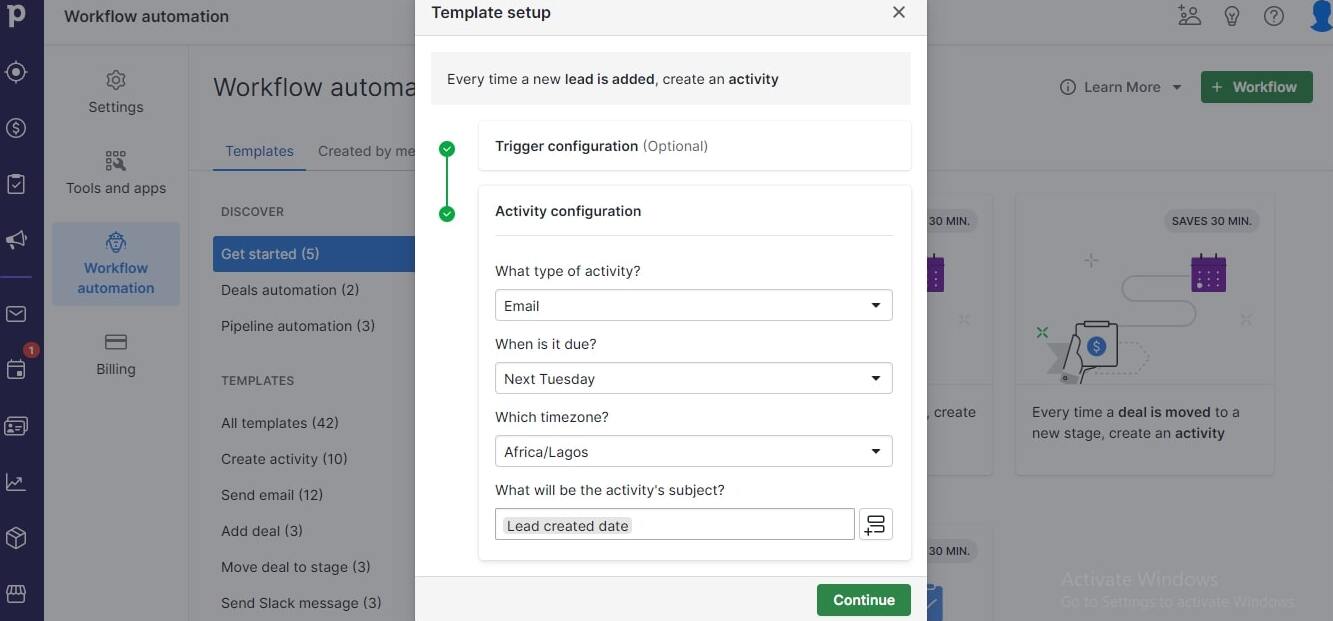
Pipedrive’s automation builder uses a trigger → action logic that any small business owner can set up in under 5 minutes with no technical knowledge. You choose a trigger (“when a deal is moved to stage X”) and one or more actions (“create a follow-up task” + “send email from template Y”). Pipedrive provides pre-built automation templates for the most common scenarios, so you don’t need to build from scratch.
I currently run 7 active automations that handle: new lead assignment, proposal follow-up scheduling, deal-won thank-you emails, re-engagement sequences for cold deals, and activity reminders for the team. Together, these save me an estimated 90 minutes per week of manual admin work.
The Growth plan gives you 50 active automations — more than adequate for a team of 1–10 people. The limitation: automations are not available on the Lite plan at all, which is the most significant reason to consider upgrading from Lite to Growth early.
Pipedrive CRM Integrations: What Connects and What Doesn’t
Pipedrive’s marketplace lists 500+ integrations across virtually every business software category. Here’s the practical landscape for small businesses.
Best Native Integrations for Small Businesses
- Gmail & Google Workspace
- Outlook & Microsoft 365
- Google Calendar
- Slack
- Zoom
- Mailchimp
- ActiveCampaign
- Xero
- QuickBooks
- Zapier
- Make (Integromat)
- Trello
- Asana
- DocuSign
- PandaDoc
- Calendly
- LinkedIn Sales Navigator
- WhatsApp (via Zapier)
- Shopify
- Typeform
How Integrations Work in Practice
The most impactful integrations for a small business are the native email and calendar connections (covered earlier) and Zapier, which opens up connections to 5,000+ additional apps. I use Zapier to automatically create a Pipedrive deal whenever someone fills out a lead-capture form on my website — this alone saves 15 minutes per day of manual data entry.
The accounting integrations (Xero, QuickBooks) let you sync deal values and client details bidirectionally, reducing double-entry between your CRM and accounting software. For a micro business handling its own accounts, this is a meaningful time saver.
The API is open and well-documented, so developers can build custom integrations if the marketplace doesn’t support their specific stack. Most small businesses won’t need this, but it’s good to know the ceiling is high.
Integration reality check: Some integrations listed in the marketplace are deeper than others. Native Gmail and Outlook integration is excellent. Some third-party integrations are thin wrappers that only push data one way. Always check what specific data fields sync and in which direction before assuming an integration will solve your workflow problem.
Why Pipedrive Is Specifically Good for Small Business Owners
Most CRM software comparisons treat all businesses the same. They’re not. Here’s what makes Pipedrive specifically well-suited to the reality of running a small or micro business — and where it differs from enterprise tools that happen to have a small-business pricing tier.
Zero-Configuration Productivity
Enterprise CRMs require weeks of configuration before they’re useful. Pipedrive is productive from day one. The default setup is sensible for most sales-driven businesses, and everything can be customised incrementally as you learn what works. You don’t need to build the perfect system before you can start using it.
Designed for People Who Are Always Moving
Small business owners are rarely at a desk. The mobile app and email sync mean your CRM travels with you — every interaction logged in real time, every follow-up scheduled while the conversation is still fresh. This is the difference between a CRM that gets used and one that turns into a second spreadsheet.
Predictable, Scalable Pricing
One of the most frustrating aspects of CRM pricing is the hidden costs that only appear as you grow. Pipedrive’s per-seat model is genuinely predictable: add a person, pay for a seat. The main add-on cost to know about is LeadBooster ($32.50/mo flat, not per user) — which doesn’t multiply as your team grows.
The AI Does the Nagging You Forget to Do Yourself
The AI Sales Assistant acts as a gentle accountability system — surfacing deals that have gone quiet and prompting next steps. For a small business owner wearing five hats, having the CRM remind you that Client X hasn’t heard from you in 12 days is genuinely valuable. It’s not sophisticated AI; it’s sophisticated nudging, and it works.
Industry-Specific Use Cases
Real Estate Agents
Track every property inquiry, automate viewing follow-ups, and never lose a buyer lead. The pipeline maps perfectly to a property sales cycle. See our best CRM for real estate guide for alternatives.
Consultants & Freelancers
Manage your entire client pipeline solo. See every open proposal, every active project, and every relationship that needs a check-in. Scale from 1 to 5 people without changing tools.
Contractors & Tradespeople
Quote tracking, follow-up reminders, job status pipeline. Simpler than job management software and priced accordingly. Perfect for businesses with 5–30 active quotes at a time.
B2B Wholesale & Retail
Manage buyer relationships, reorder conversations, and account health. See our best CRM for retail guide for a full comparison of options.
Marketing & Design Agencies
Pitch pipeline management, proposal tracking, and client onboarding workflows. Email templates save hours on new business pitches. Multiple pipelines for retainer vs project work.
Healthcare & Wellness
Manage patient or client inquiries, appointment follow-ups, and service upsells for private practices. Pipedrive’s activity system ensures no new patient inquiry falls through the cracks.
Performance:
Although you have to activate the major features on Pipedrive, there’s no denying that it is a high performance tool. Right from setting up an account to the last feature, you can trust Pipedrive to deliver. I analyzed some variables before reaching my conclusion about this tool.
Speed
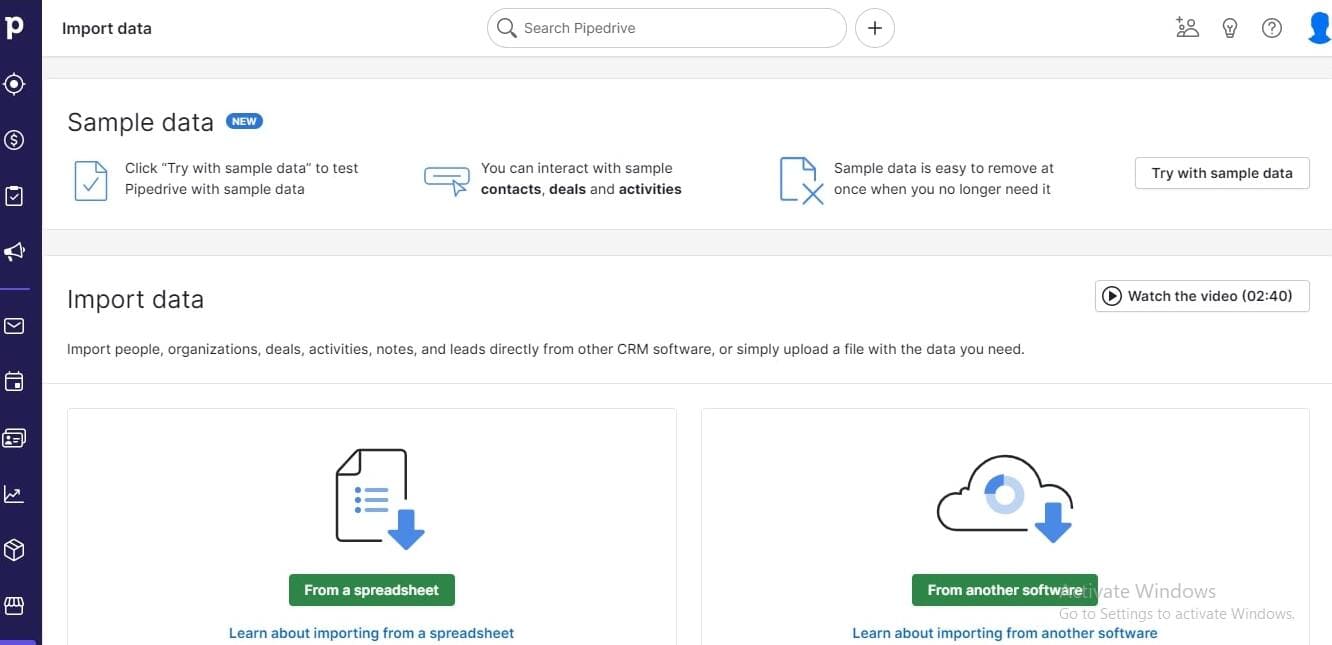
It takes around 2 minutes for you to successfully set up an account with Pipedrive. Also, as long as you’ve prepared your customer data beforehand, importing data takes 1 minute to finish.
You can leverage the samples this software provides to make your data properly suited for the software.
Pipedrive CRM Mobile App: Is It Usable in the Real World?
For a small business owner who is frequently at client sites, on the road, or between meetings, the mobile app is not a nice-to-have — it’s essential. Many CRM tools have mobile apps that are technically functional but practically useless. Pipedrive is a genuine exception.
What Works Well on Mobile
The pipeline view translates cleanly to mobile — you can see all your deals, their stages, and their values in a scrollable list view. More importantly, you can log a call note, move a deal to a new stage, or schedule a follow-up within 60 seconds of hanging up the phone. This immediacy is what prevents “I’ll log that later” from becoming “I completely forgot that conversation.”
The business card scanner (available in the mobile app) lets you photograph a physical business card and create a contact automatically. At networking events, this has replaced my entire post-event contact import process.
Activity management on mobile is clean — you can see your scheduled calls and meetings for the day, mark activities as done, and create new tasks on the go. Push notifications for overdue activities are available and work reliably.
Mobile Limitations
The automation builder, advanced reporting, and Smart Docs features are not available on mobile — you’ll need a desktop for configuration tasks. Some users find the mobile search less powerful than desktop for finding specific contacts in large databases. But for the core daily workflow of a small business owner on the move, the mobile app covers 90% of what you need.
Ease Of Use:
Using Pipedrive can be confusing since you have to activate most features before seeing their full performance. After you can figure this out, this CRM tool performs optimally and saves you the trouble of dealing with overly complex systems to manage your customer data.
Setup
Signing up for Pipedrive was quick and hassle-free. I entered my email, full name, and password, then added some basic business details like company name, size, and my role.
The platform also asked about my experience level with CRM tools and what I planned to use it for, which helped customize my setup. The entire process took under five minutes, and I didn’t run into any technical issues. It’s straightforward enough for anyone to handle.
Audience building and segmenting
Pipedrive organizes customer data into leads, deals, projects, and contacts, making it easy to structure workflows. When I tested the leads page, I could add new leads manually or import data from a spreadsheet—a real time-saver if you’re switching from another CRM.
Adding contacts was simple. I entered names, organizations, phone numbers, emails, and marketing status. I also assigned labels like “hot lead,” “cold lead,” or “customer,” depending on past interactions. The marketing status feature was useful for tracking which clients subscribed to campaigns. What I liked most was that these details sync across all sections, so I never had to input the same data twice.
Automation
Pipedrive’s automation tools saved me a ton of time by eliminating repetitive tasks. Instead of manually entering data, I set up workflows and trigger events with just a few clicks. The process was straightforward—I chose a trigger (like a new deal being created) and configured what action should follow. I also liked that I could limit automation to just myself or share it with my team.
Beyond workflow automation, I tested out email drip campaigns using prebuilt email templates—a huge help for follow-ups. I also explored lead scoring automation and revenue forecasting, which gave me a better picture of my potential earnings over time. These tools make Pipedrive a strong option for sales teams looking to improve efficiency and stay ahead of their pipeline.
Uniqueness:
Pipedrive Gets Smarter with AI
Think of this as giving your Pipedrive a brain boost. The new AI features act like a helpful assistant right inside your CRM.
- Know Who to Call Next: The AI Sales Assistant looks at all your deals and points out which ones are most likely to close. It saves you from guessing and helps you focus on the deals that matter most.
- Write Emails Faster: Stuck on what to write? Just give the AI a simple prompt (like “follow up on our demo”), and it will draft a professional sales email for you in seconds.
- Understand Long Conversations Quickly: Don’t have time to read a long email chain? The AI can summarize it for you, giving you the main points instantly.
A Cleaner, Friendlier Look
Pipedrive has also made a few design tweaks to make it easier and more pleasant to use every day.
- Dark Mode: You can now switch to a dark theme, which is easier on the eyes, especially if you’re working late.
- Quick-Access Info: The contact and deal pages have been updated so you can see the most important information at a glance without having to dig for it.
- Customize Your Menu: You can now hide the tools you don’t use and keep your favorites on the main navigation bar for faster access.
Verdict:
Pipedrive uses powerful tools to help businesses achieve impressive results regardless of size. It creates an equal opportunity for businesses to compete, find clients and manage them effectively through their customer management tools. With this software, you can gain leads, leverage prebuilt templates, and automate actions to facilitate growth and provide better customer experiences. However, this software only offers a 14-day free trial; afterward, you’ll no longer have access to its tools.
I had to spend long hours on the platform before figuring it out. Luckily, there’s a tour and short video before you try out a new feature. This made the process seamless. Pipedrive helps businesses focus on other operations by helping them save time and boost efficiency.
How Pipedrive CRM Stacks Up Against the Competition
Here is an honest comparison against the tools small businesses most commonly consider. For deeper head-to-head analysis, we’ve linked to Sonary’s dedicated comparison articles below.
| Feature | Pipedrive | HubSpot CRM | Zoho CRM | Monday CRM | Salesforce |
| Starting price | $14/user/mo | Free / $20+ paid | Free / $14+ paid | $12/seat/mo | $25/user/mo |
| Free plan | No (14-day trial) | Yes | Yes, 3 users | No (14-day trial) | No |
| Setup time | ~30 minutes | 1–2 hours | 2–4 hours | 1 hour | Days–weeks |
| Pipeline UX | Best-in-class | Good | Complex | Excellent | Powerful, complex |
| Email automation | Growth plan+ | Strong | Strong | Available | Very strong |
| Marketing tools | Add-on only | Built-in | Built-in | Limited | Very strong |
| AI features | Useful, basic | Advanced forecasting | Good | Growing | Salesforce Einstein |
| Ideal team size | 1–50 | 1–200+ | 1–200+ | 5–200 | 50+ |
| Mobile app | Excellent | Good | Good | Good | Good |
Pipedrive vs HubSpot CRM
This is the most common comparison small businesses face. HubSpot has a genuinely free tier that Pipedrive lacks — a significant advantage if budget is tight. HubSpot’s marketing automation and email campaign tools are considerably more powerful. However, for pure sales pipeline management, Pipedrive’s interface is cleaner, faster, and more focused. HubSpot’s paid tiers also escalate in price more sharply than Pipedrive’s. Read our full HubSpot vs Pipedrive comparison →
Pipedrive vs Zoho CRM
Zoho has a free plan (up to 3 users), a broader feature set, and deeper marketing automation at comparable prices. The trade-off is a significantly steeper learning curve — Zoho’s interface is dense and customization-heavy. For a small business that wants to be up and running quickly without configuration overhead, Pipedrive wins. For a budget-conscious team willing to invest setup time for more features per dollar, Zoho delivers better raw value. Read our full Pipedrive vs Zoho comparison →
Pipedrive vs Monday CRM
Monday CRM has an outstanding visual interface and excellent project management integration — useful if your business blends sales and project delivery. Starting at $12/seat/month, it’s comparable in price to Pipedrive’s Lite tier. Pipedrive wins on pure CRM depth (activity history, email sync, revenue forecasting); Monday wins on cross-team collaboration and work management. Read our full Pipedrive vs Monday comparison →
Not sold on Pipedrive? See our full list of top Pipedrive alternatives with side-by-side comparisons.
Should You Use Pipedrive CRM?
After over a year of daily use as a working small business owner, here is my honest final verdict on Pipedrive CRM.
Use Pipedrive if you run a sales-driven business with 1–20 people who need a clean, visual way to manage deals, follow up consistently, and understand their pipeline. If you’ve ever said, “I should have followed up on that lead” or “I can’t remember where that deal is,” Pipedrive directly solves both problems. The $14–$39/month price range for the features you get is genuinely competitive among the best CRM tools for small businesses available today.
Consider an alternative if budget is your primary constraint and you need a free plan (see our free CRM comparison), you need sophisticated email marketing built in rather than bolted on, or your business runs on complex marketing automation flows that go beyond basic drip sequences.
Pipedrive earns its position not through marketing spend but through genuine usability. The pipeline view gives you clarity. The automation saves real time. The mobile app works in the real world. The 14-day free trial with no credit card is a genuinely risk-free way to find out if it works for your specific business — and I’d encourage you to test it against your real contacts and real deals before making a decision.
Highly Recommended for Small & Micro Businesses
Affordable, fast to set up, and genuinely built around how small sales teams work. One of the best CRM tools available at this price point. Start the 14-day free trial with no credit card, and test it on your real pipeline, not sample data.
User Review
 Write a Review
- - Easy to manage multiple pipelines for the different sales projects in an organization
- - Email templates with personalization fields have made it so much easier to send quality emails to every client
- - It has a simple UI that lets me focus on work
- - Pipedrive is very customizable
- - Custom dashboards possible to show the most important information first
- - Best integrations for a CRM in its price range and they are accessible to all the customers
- - Access to all export reports for auditing activity
- - Dashboards are easily customizable