
Gusto vs. QuickBooks Payroll: Which is better for small businesses in 2026?

Gusto wins for most small businesses — cleaner interface, better compliance handling, and stronger HR features out of the box. QuickBooks Payroll makes sense if you're already deep in the QuickBooks ecosystem and payroll is an afterthought, not a priority. But here's the thing: when payroll goes wrong, you don't want to find out your software wasn't built for it. And in , Gusto is the harder choice to argue against.2026
TL;DR
- Gusto is better for businesses that want payroll handled completely, including benefits, compliance, and onboarding — without relying on a bookkeeper to clean things up.
- QuickBooks Payroll is better for businesses already on QuickBooks Online who want payroll bundled into one invoice.
- Gusto starts at $49/mo + $6/employee; QuickBooks Payroll starts at~$45/mo + $5/employee(standalone) or is bundled with QBO plans.
- A significant change hits QuickBooks Payroll users on July 1, 2026: automated tax payments become mandatory, removing manual control over cash timing.
- Neither platform handles international payroll. If you have remote workers abroad, look at Deel.
- Small business owners and accountants who use both platforms daily tend to favor Gusto — but not without caveats.
Gusto vs. QuickBooks Payroll: Quick comparison
Feature | Gusto | QuickBooks Payroll |
|---|---|---|
Starting price | $49/mo + $6/employee | ~$45/mo + $5/employee (standalone) |
Multi-state payroll | Plus plan ($80/mo) | All plans |
QuickBooks integration | Journal entry sync (manual mapping) | Native, real-time |
Benefits administration | Built-in (health, 401k, FSA) | Limited, third-party only |
HR tools | Included (onboarding, org chart, PTO) | Minimal |
International payroll | No | No |
Tax filing | Automated, fully managed | Automated (mandatory as of July 1, 2026) |
Time tracking | Plus and above | All plans |
Contractor payments | Yes ($35/mo base) | Yes |
Customer support | Mixed (see below) | Mixed |
Best for | Full-service payroll + HR |
Who each platform is built for
Gusto was built as a standalone payroll and HR platform for small businesses that don't have an HR department. It handles onboarding, benefits enrollment, compliance, and payroll in one place. The assumption baked into the product is that you're probably not a payroll expert — and it shows, in a good way. The workflow is designed to get out of your way.
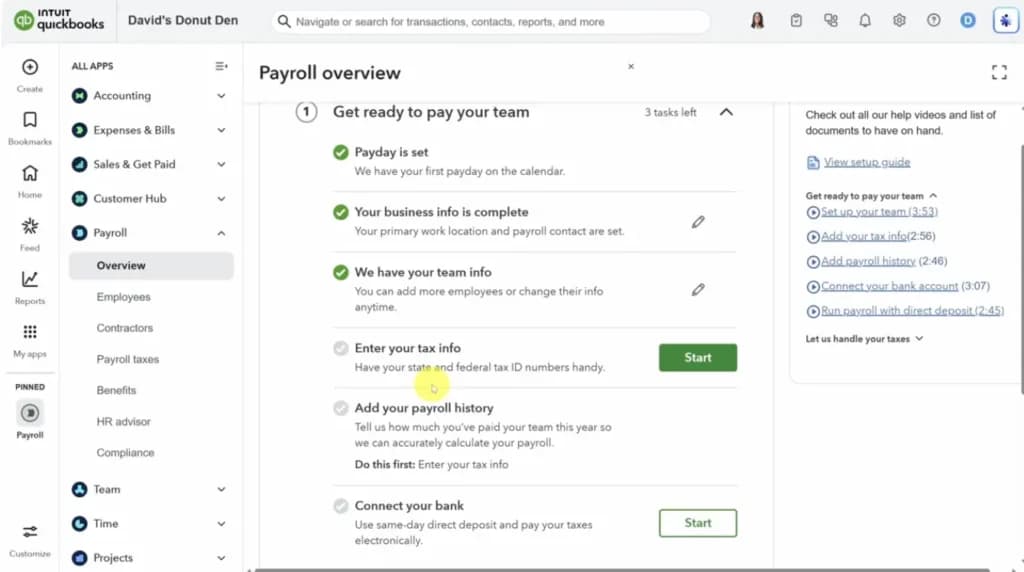
QuickBooks Payroll(recently rebranded as QuickBooks Workforce in bundled plans) is designed as an extension of QuickBooks Online. If your accounting already lives in QBO, adding payroll keeps everything under one roof. It works — but it's optimized for integration, not for payroll as a first-class product. The difference becomes obvious the moment something doesn't go according to plan.
As one accountant who works across both platforms put it:"Business owners love Gusto, but the accountants and bookkeepers who have to troubleshoot edge cases see a very different side of it."That divide is real. Both platforms have strengths — but they show up for different people.
Gusto: Features and real-world performance

- Hire, pay and grow like a pro
- Run automated payroll in 5 minutes flat
What Gusto does well
Compliance is the core product. Gusto handles federal, state, and local tax filings automatically — new hire reporting, quarterly filings, year-end W-2s. You don't need to think about any of it. Multi-state payroll unlocks on the Plus plan, and when you need it, it's already built in, not bolted on.
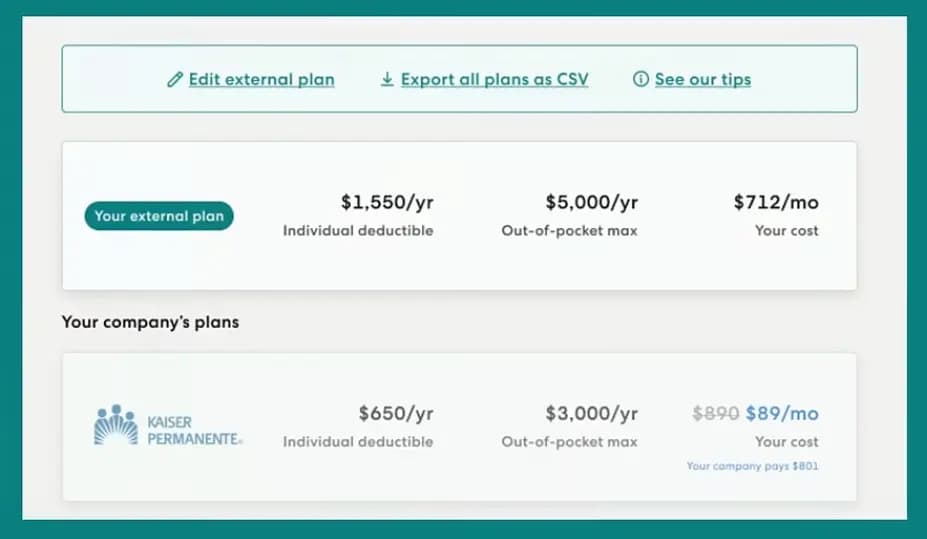
Benefits administration is built in. Gusto has its own benefits marketplace for health insurance, 401(k), FSA, and HSA. Employees enroll themselves directly through the platform — no separate portal, no broker coordinating paperwork on your behalf. At the Plus tier, next-day direct deposit is on the table, which matters more than you'd think when you're managing cash flow for a small team.
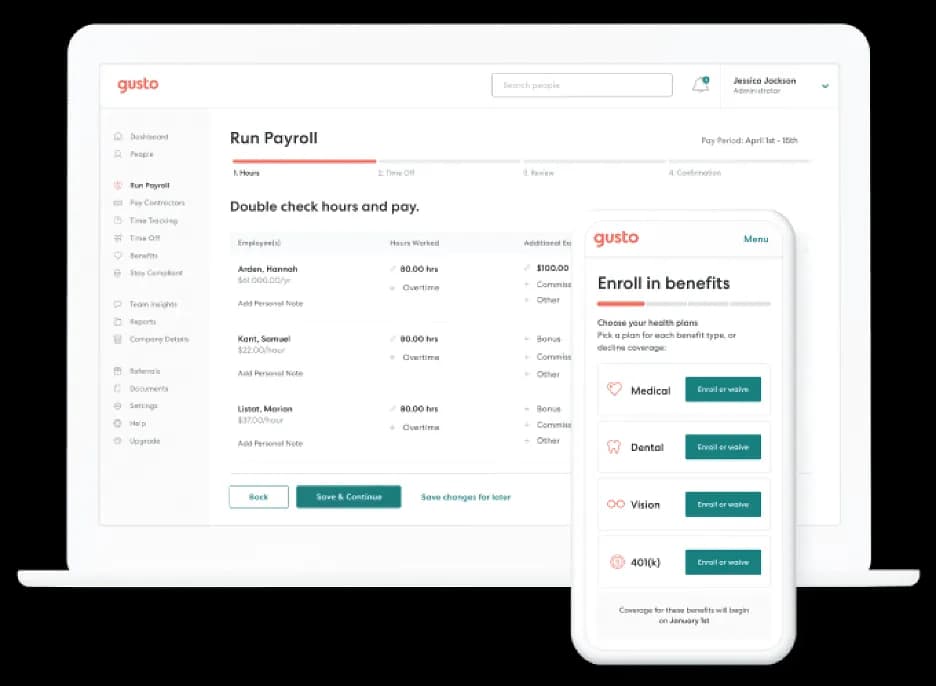
Onboarding and HR tools are included at every tier. The first time a new hire completes their own onboarding through Gusto — offer letter, direct deposit setup, benefits enrollment, all of it — without you chasing a single form, you understand why people stick with it. Digital offer letters, org charts, PTO tracking, and self-service employee profiles come standard across all plans.
Where Gusto falls short
QuickBooks sync is imperfect. Gusto doesn't talk to QuickBooks Online natively — what you get is a journal entry sync that requires manual chart-of-account mapping on your end. It's workable, but it adds a step that QuickBooks Payroll simply doesn't have. If you switch to Gusto mid-year or have a non-standard account structure, expect your bookkeeper to spend time cleaning it up. That's a real cost, even if it's not on the invoice.
Customer support has declined. This is the part that catches people off guard after they've already committed. Users report a noticeable drop in support quality following Gusto's merger with Guideline — complex issues are routed overseas, resolution times slow down, and the experience is a far cry from the sales process. One small business owner summed it up plainly:"Gusto trying to sell you something: American rep who will do anything. Gusto customer support: Overseas who does nothing."It's worth knowing before you need help.
No international payroll. Gusto is U.S.-only, full stop. If you have contractors or employees outside the country, you'll need a separate platform — Deel is the most common recommendation.
QuickBooks Payroll: Features and real-world performance

- Unlimited custom invoices and quotes
- Cleaner books from day one
What QuickBooks Payroll does well
The QBO integration is genuinely seamless. This is where QuickBooks Payroll earns its place. Payroll data flows directly into your QuickBooks ledger in real time — no journal entry to map, no CSV to import, no end-of-month reconciliation headache. If your bookkeeper already lives in QBO, this alone changes the conversation. The fewer the handoffs, the fewer the mistakes.
All plans include multi-state payroll. Unlike Gusto, QuickBooks Payroll doesn't lock multi-state behind an upgrade. It's available across every plan, which makes a real difference for small businesses with employees in more than one state who don't want to pay Plus-plan prices just to unlock it.
Bundled pricing can work in your favor. QuickBooks sells payroll primarily as bundles with QBO accounting plans. If you're already paying for QBO, consolidating onto one invoice — one login, one vendor to call — has real operational value. Just make sure you're comparing post-promo prices, not the introductory rates.
The July 2026 change you need to know about
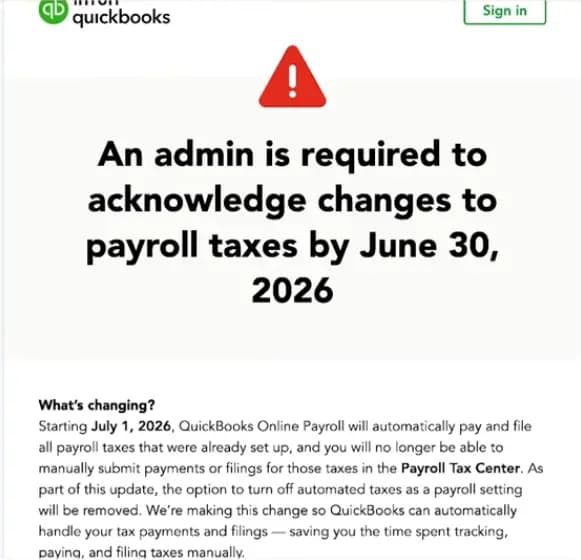
Starting July 1, 2026, QuickBooks Payroll is removing the option to manually control tax payments. Previously, you could choose when to remit payroll taxes — a small but meaningful lever for businesses managing cash flow carefully. That flexibility is gone. From July onward, tax payments are automated on QuickBooks' schedule, not yours.
For some businesses, that's fine. For others, it's a real problem. As one QuickBooks Payroll user put it:"The ugly part here isn't the tax filing, it's losing control over cash timing. A small operator loses one of the few levers they still control."If you've been timing tax payments around receivables or slow weeks, you need to account for this change before July 1 — not after.
Known accuracy issues
There's a pattern worth knowing about: payroll professionals have flagged recurring problems with Texas unemployment tax calculations and Washington state PFML deductions in QuickBooks Payroll. These aren't minor rounding errors — they're the kind of mistakes that generate amended filings and penalty notices. If your business operates in TX or WA, don't assume the defaults are correct. Verify your setup with an accountant before your first filing.
Pricing breakdown
Gusto pricing (verified June 2026)
Plan | Base Fee | Per Employee | What's Included |
|---|---|---|---|
Contractor Only | $35/mo | $6/contractor | Contractor payments and 1099s only |
Simple | $49/mo | $6/employee | Full payroll, single state, benefits admin |
Plus | $80/mo | $12/employee | Multi-state, next-day pay, time tracking |
Premium | $180/mo | $22/employee | Dedicated advisor, HR experts on call |
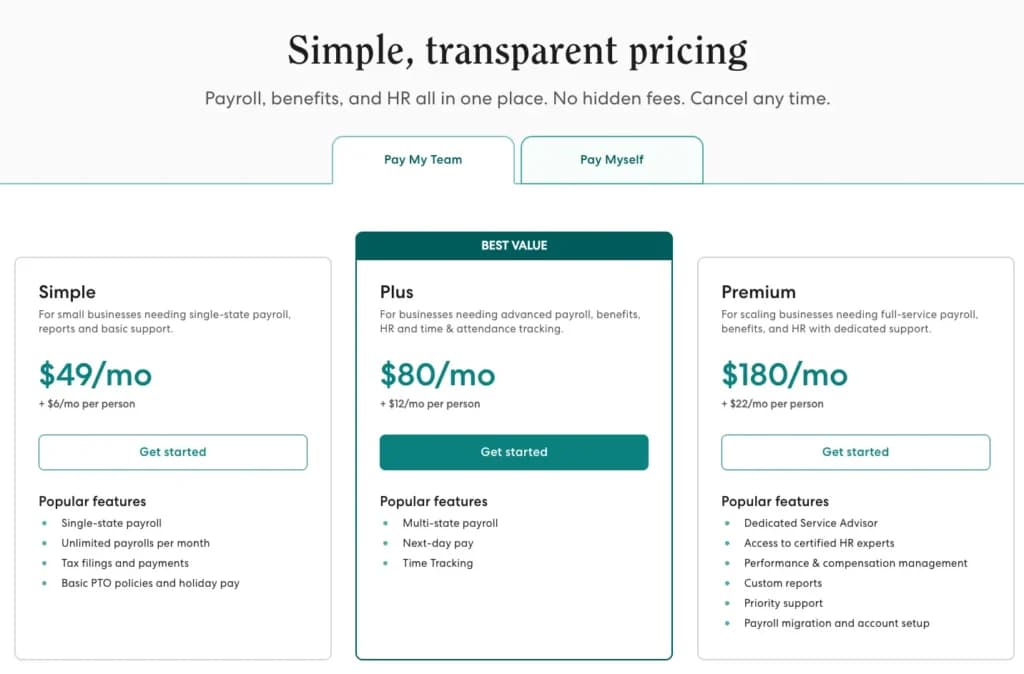
Is Gusto worth it? For a team of 5 on the Simple plan, you're paying $79/mo. That's a fair price for full-service payroll that handles compliance without you having to think about it. The jump to Plus ($140/mo for 5 employees) is more meaningful — it makes sense if you need multi-state payroll or next-day direct deposit, but not if you don't.
QuickBooks Payroll pricing (verified June 2026)
QuickBooks now sells payroll primarily as bundles with QBO. Standalone payroll is available but less prominently marketed.
Bundle | List Price | Per Employee | Promo Price |
|---|---|---|---|
Workforce + Simple Start | $88/mo | $6.50/employee | $44/mo (first 3 months) |
Workforce + Essentials | $125/mo | $6.50/employee | $62.50/mo (first 3 months) |
Workforce Premium + Plus | $203/mo | $10/employee | $101.50/mo (first 3 months) |
Standalone Core | ~$45/mo | $5/employee | — |
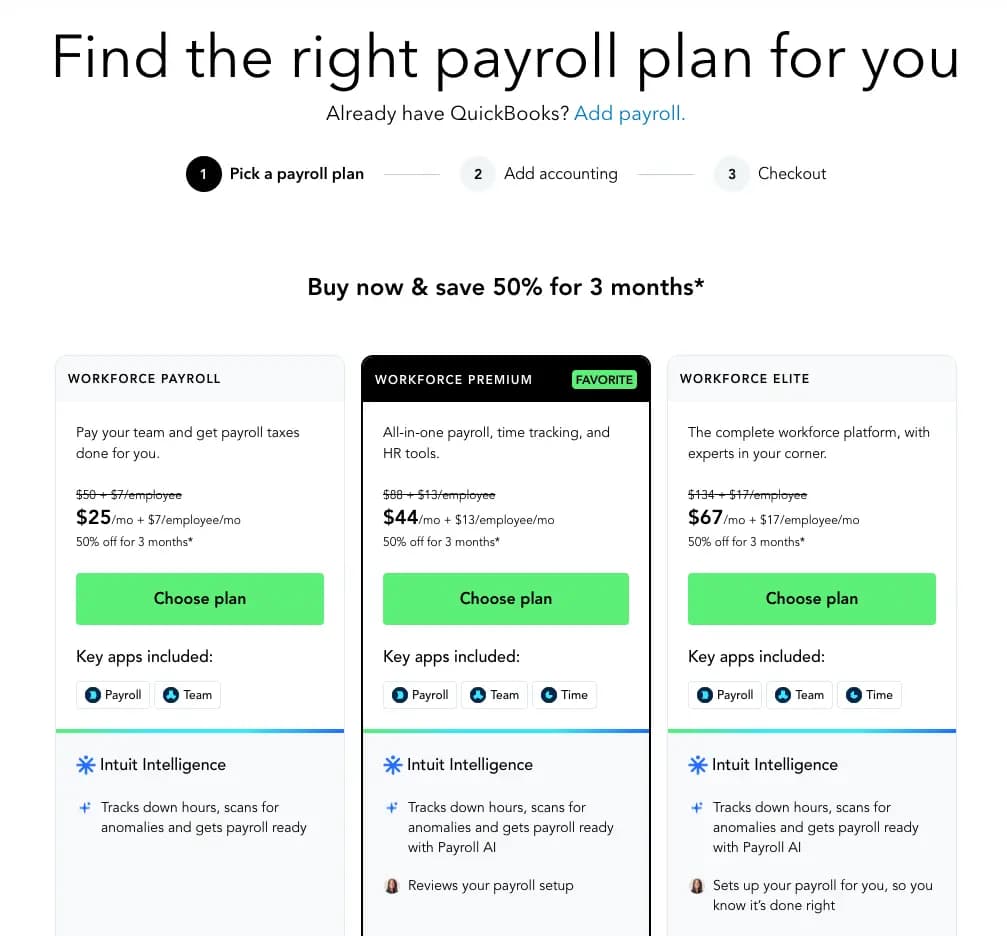
Is QuickBooks Payroll worth it? If you're not on QuickBooks Online, the standalone Core plan is competitively priced and worth a look. If you're already paying for QBO, the bundles make sense — just don't make the decision based on the promo price. The list prices are steep, and three months goes faster than you'd think.
Three scenarios: Which platform wins?
Scenario 1: Solo founder, 4 employees, single state, no benefits yet You need payroll to work without you thinking about it. Gusto's Simple plan ($49 + $24 = $73/mo) covers everything — taxes, W-2s, self-service onboarding. QuickBooks Core is slightly cheaper, but you'd trade the HR layer for the savings, and that layer pays for itself the first time a new hire completes their own setup without you lifting a finger. Gusto wins.
Scenario 2: 8-person team already using QuickBooks Online for accounting Your bookkeeper runs everything in QBO. Every time payroll data has to be manually synced, there's a chance something gets missed. QuickBooks Payroll eliminates that gap — payroll and accounting talk to each other natively, and your bookkeeper doesn't have to touch a journal entry. Factor in the July 2026 automation change, but if cash flow timing isn't a pressure point for you, the integration advantage is hard to give up. QuickBooks Payroll wins.
Scenario 3: Growing team, employees in 3 states, offering health benefits Multi-state compliance alone is enough to complicate things. Add benefits enrollment across states and you're into territory where QuickBooks Payroll's benefits limitations become a real constraint — you'd need a separate broker and a separate portal. Gusto's Plus plan handles multi-state payroll, benefits enrollment, and compliance in one place. It costs more, but you're not stitching three things together. Gusto wins.
Final verdict
Choose Gusto if: you want payroll, compliance, and HR in one place — and you're not locked into QuickBooks for accounting. You'll pay more as the team grows, but you're getting a product built to handle payroll as the main event, not a feature alongside accounting.
Choose QuickBooks Payroll if: your business already runs on QBO and your bookkeeper isn't looking to add a sync step. The trade-off is real — QuickBooks Payroll is a great accounting integration, not the strongest standalone payroll product — but for a lot of small businesses, that trade-off is worth it.
The one thing every QuickBooks Payroll user needs to deal with before July 1, 2026: manual tax payment control is going away. If that's been part of how you manage cash, get ahead of it now. It's not the kind of change you want to discover mid-pay-period.
Both platforms have frustrating edges. Neither has perfect support. As one payroll professional put it:"Payroll software always becomes support software."The best pick is the one you trust when something goes sideways — not just the one that looks cleanest in a demo.
Related Articles


Gusto vs. QuickBooks: People also searched
Q: Is Gusto cheaper than QuickBooks Payroll?
A: It depends on your setup. Gusto Simple starts at $49/mo + $6/employee; QuickBooks standalone Core runs ~$45/mo + $5/employee. For small teams, they're comparable. Gusto gets more expensive at higher tiers. If you're buying QuickBooks as a bundle with QBO, compare the total cost against Gusto plus a separate accounting tool.
Q: Does Gusto integrate with QuickBooks?
A: Yes, but not natively. Gusto syncs to QuickBooks Online via a journal entry that requires manual chart-of-account mapping. It works, but it adds reconciliation overhead. If tight QBO integration matters, QuickBooks Payroll is the cleaner choice.
Q: What is the QuickBooks Payroll July 2026 change?
A: Starting July 1, 2026, QuickBooks Payroll is removing manual tax payment control. Tax remittances will be automated and pushed on QuickBooks' schedule. Businesses that previously managed cash flow by timing manual tax payments will lose that flexibility.
Q: Which is better for multi-state payroll — Gusto or QuickBooks?
A: QuickBooks Payroll includes multi-state at every plan. Gusto requires the Plus plan ($80/mo) to unlock multi-state. For a very small team with multi-state needs, QuickBooks may be more cost-effective. For larger teams that also want benefits and HR tools, Gusto Plus is worth the cost.
Q: Can either platform handle international payroll?
A: No. Both Gusto and QuickBooks Payroll are U.S.-only. For international employees or contractors, look at platforms like Deel or Remote.
Q: Is QuickBooks Payroll accurate for state taxes?
A: Generally yes, but payroll professionals have flagged known issues with Texas unemployment and Washington PFML calculations. If you operate in those states, verify your setup with an accountant and check for any pending corrections before filing.
Q: Which has better customer support — Gusto or QuickBooks?
A: Neither platform scores consistently well for support when problems escalate. Gusto has faced criticism for routing complex issues to overseas support with slow resolution times. QuickBooks support varies by plan tier. At the higher tiers of both platforms, support quality improves — but it's a real cost of entry.