Best Restaurants POS Systems for in 2026

The right restaurant point of sale (POS) system can make all the difference. Whether you run a small café, a bustling pizzeria, or a full-service restaurant, this guide compares the top restaurant POS systems to help you find the perfect fit. From Toast to Lightspeed, we’ll break down features, pricing, and benefits to help you make an informed decision.
- Start for free
- Customize your package
- Features to help your restaurant adapt


- Hassle-free online ordering
- Kitchen display system
- Fully-integrated restaurant system

- Manage tables with smart floor plan tools
- Boost loyalty with custom rewards plans
- Simplify staff scheduling and payroll
- Cloud-hosted & accessible from anywhere
- Accept payments & track inventory
- Offer gift cards to boost customer retention
- Free setup & no hidden fees
- Create customer profiles in seconds
- Simple to use inventory management

- Integrates with top e-commerce platforms
- Automated rewards & marketing
- Seamless Bluetooth app connectivity

- Offset 99% of credit card fees
- Affordable and easy-to-use iPad technology
- Offer easy online ordering to boost sales

- Securely access your data from the cloud
- Get powerful analytics on real-time sales
- Leverage open API & integrated partners

- 24/7 support & low commission rates
- Ability to build custom menus
- Simplify staff scheduling and payroll
The best restaurant POS system for most full-service businesses in 2026 is Toast due to its industry-leading handheld hardware and kitchen display systems (KDS). For small cafes and food trucks, Square for Restaurants is the superior choice because of its zero monthly fees and easy setup. If you specifically require an iPad-based setup, TouchBistro is the top-rated iOS solution.
We tested the top contenders to help you avoid hidden fees and find the perfect fit.
Best Restaurant POS Systems (2026)
- Best Overall POS: Toast – The industry standard for full-service dining with best-in-class handhelds.
- Best for Small Business: Square – Zero monthly fees and easiest setup for cafes & food trucks.
- Best for iPads: TouchBistro – Reliable hybrid system that runs perfectly on Apple hardware.
- Best for Multi-Location: Lightspeed – Advanced inventory & central management
- Most Budget-Friendly: Square for Restaurants – $0/month basic plan
- Best for Cafes & Food Trucks: SumUp – Mobile POS with compact hardware
- Best for Scaling: Lightspeed – Powerful inventory tools for multi-location restaurants.
Scroll down to see full comparisons, features, and pricing breakdowns.
Top POS Software for Restaurants
| POS Software | Best For | Starting Price | Key Features |
| Toast POS | Full-Service Restaurants | $0; Free basic plan | Order & table management, online ordering, payroll integration, loyalty programs, offline mode |
| Lightspeed Restaurant | Multi-Location Restaurants | $189/year | Cloud-based, advanced inventory, multi-location management, CRM features |
| TouchBistro | Ease of Use and Quick Setup | $69/month per terminal | iPad-based, offline capabilities, tableside ordering, detailed reporting |
| Clover POS | Flexibility and Customization | $89.95/month | Modular hardware, customizable apps, inventory management, loyalty programs |
| Square for Restaurants | Budget-Friendly Solutions | $0; Free basic plan | No upfront costs, integrated payments, online ordering, transparent fees |
| SumUp POS | Small Cafes and Food Trucks | $99/month | Compact mobile POS, simple payment processing, basic reporting |
| Lavu POS | Customizable Restaurant Operations | $59/month per terminal | Customizable workflows, integrated payments, inventory tracking, robust reporting |
| SpotOn POS | Customer Engagement and Loyalty | $0; Free basic plan | Integrated marketing tools, advanced analytics, online ordering, employee management |
1. Toast POS – Best for Full-Service Restaurants
Toast is built by restaurant people, for restaurant people. It is the gold standard for full-service operations that need to sync the front-of-house with the kitchen instantly.
Toast excels because it is an Android-based “Walled Garden”- software and hardware are designed to work perfectly together. Their Toast Go 2 handhelds allow servers to fire orders tableside, which our data shows can improve table turnover by up to 15%.


Features
Best For

General Features
Hardware & Software
Pricing Options
Pros & Cons
Pros
Cons

Key Features:
- Order and table management with real-time updates.
- Customizable menus with modifiers and easy item editing.
- Integrated online ordering and delivery options.
- Employee management tools, including scheduling and payroll.
- Robust reporting and analytics for data-driven decisions.
- Offline mode for uninterrupted service.
- Loyalty programs and gift card integration.
Pricing:
- Starts at $69/month per terminal, with additional fees for add-ons.
- Hardware costs are separate and can vary based on setup.
Is Toast POS good value for my business?
If you are a busy restaurant processing over $30k/month, yes. The efficiency gains from their Kitchen Display System (KDS) alone pay for the subscription. However, if you are a low-volume coffee shop, the transaction fees might be too high compared to a simple iPad solution.
Who is this NOT for?
Small coffee shops that just need a simple checkout, or businesses that refuse to sign long-term processing contracts.
2. Lightspeed Restaurant – Best for Multi-Location Restaurants
Lightspeed is the brain that powers complex restaurant groups. If you have 3+ locations and need to manage one central menu, this is your tool.
Lightspeed’s strength lies in its Advanced Inventory. It doesn’t just track “Burgers sold”; it tracks buns, patties, and cheese slices across multiple warehouses or kitchens. It also integrates seamlessly with hotel property management systems (PMS), making it a favorite for hotel restaurants.

Features
Best For
General Features
Hardware & Software
Pricing Options
Pros & Cons
Pros
Cons
Key Features:
- Cloud-based system accessible from anywhere.
- Advanced inventory management with real-time tracking.
- Multi-location management for centralized control.
- Customizable floor plans and table management.
- Integrated payment processing and reporting.
- CRM features to build customer loyalty.
Pricing:
- Starts at $69/month per register.
- Additional costs for premium features and hardware.
Is Lightspeed a good value for my business?
For single locations, it’s overkill. But for multi-unit owners, it’s a lifesaver. The ability to push a menu update to 10 locations in one click saves hours of admin work every week.
Who is this NOT for?
A single-location food truck or a mom-and-pop diner.
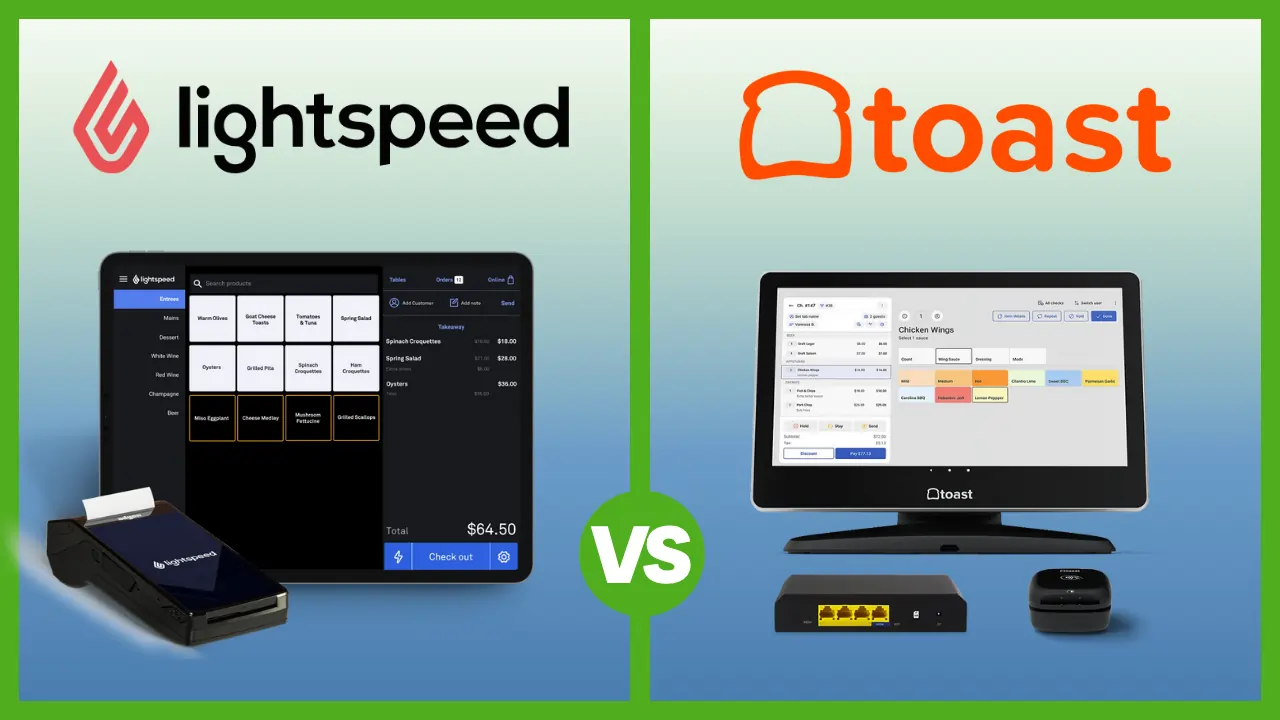
See how it compares: Lightspeed vs. Toast
3. TouchBistro – Best for Ease of Use and Quick Setup
TouchBistro is the premier choice for restaurateurs who want the reliability of a local server with the sleekness of an iPad interface.
If you are looking for an iPad POS for restaurant use, this is the market leader. Uniquely, TouchBistro uses a “Hybrid” model. The system runs on a local network in your restaurant (so it never crashes if the internet cuts out), but syncs to the cloud for reporting.

Features
Best For
General Features
Hardware & Software
Pricing Options
Pros & Cons
Pros
Cons
Key Features:
- iPad-based POS system with a user-friendly interface.
- Offline capabilities for uninterrupted service.
- Menu management with easy updates and customization.
- Tableside ordering and payment processing.
- Detailed sales reports and analytics.
- Employee management tools.
Pricing:
- Starts at $69/month per terminal.
- Hardware packages available at additional cost.
Is TouchBistro a good value for my business?
Yes, if you already own iPads. Being able to reuse your existing Apple hardware makes the upfront cost significantly lower than buying proprietary Android terminals.
Who is this NOT for?
Android enthusiasts or those who want an “out of the box” hardware setup without configuring a network.
4. Clover POS – Best for Flexibility and Customization
Clover POS is known for its customizable features and flexible hardware options. It’s ideal for restaurants that want to tailor their POS system to specific business needs.

Features
Best For
General Features
Hardware & Software
Pricing Options
Pros & Cons
Pros
Cons
Key Features:
- Modular hardware options, from handheld devices to full terminals.
- Customizable apps from the Clover App Market.
- Tableside ordering and payment.
- Inventory management with real-time updates.
- Employee and shift management.
- Integrated loyalty programs and customer engagement tools.
Pricing:
- Starts at $39.95/month for basic plans.
- Hardware costs vary based on setup.
Is Clover a good value for my business?
It depends on who you buy it from. If you get a good processing rate from your bank, Clover is an excellent value. Just be careful of “free placement” leases that lock you into long contracts.
Who is this NOT for?
Owners who want one single point of contact for support (software + payments + hardware).
5. Square for Restaurants – Best for Budget-Friendly Solutions
Square removed the barrier to entry. It is the cheapest restaurant POS that is actually viable for professional use, perfect for cafes, bakeries, and QSRs.
Square is famous for its “Free” plan, but don’t let the price tag fool you. It includes a free online ordering site, table management, and inventory tracking. For 2026, their KDS on iPad has become a legitimate competitor to pricier systems.

Features
Best For
General Features
Hardware & Software
Pricing Options
Pros & Cons
Pros
Cons
Key Features:
- No upfront costs with pay-as-you-go pricing.
- Customizable menus and table layouts.
- Integrated payment processing with transparent fees.
- Online ordering and delivery integrations.
- Employee management and time tracking.
- Detailed reporting and analytics.
Pricing:
- Free basic plan available; plus plans start at $60/month per location.
- 2.6% + 10¢ per transaction for payment processing.
Is Square a good value for my business?
For startups, absolutely. The $0 monthly fee is unbeatable. However, once you scale, the standard processing fees (2.6% + 10¢) can become more expensive than a negotiated rate with a traditional provider.
Who is this NOT for?
High-volume, full-service restaurants that need intricate course firing and dedicated 24/7 phone support.
How to Choose a Restaurant POS System
Don’t get dazzled by shiny screens. Focus on these 4 “Dealbreaker” factors:
- Processing Fees: This is your biggest long-term cost. A “free” POS that charges 3.5% is much more expensive than a $100/mo POS that charges 2.2%. Do the math on your annual sales.
- Offline Capability: Pull the ethernet cable out of the demo unit. Does it still work? If not, don’t buy it. Internet outages happen.
- Hardware Durability: Is the screen “consumer grade” (like a regular iPad) or “commercial grade” (hardened plastic, spill-proof)? Kitchens are wet, hot, and greasy.
- Integration Ecosystem: Does it talk to your accounting software (QuickBooks) and your staff scheduling tool (7shifts)? If it doesn’t, you are creating hours of manual data entry for yourself.
2026 Tech Trends: What Your POS Needs Now
The restaurant industry has changed. A static cash register doesn’t cut it anymore. To stay competitive in 2026, ensure your chosen system supports these four pillars:
- Handheld POS terminals: Speed is currency. Systems like Toast Go or Square Terminal allow servers to take orders and payments at the table. This reduces error rates and turns tables 15-20% faster.
- QR Code Ordering & Payments: Even in sit-down dining, customers prefer the option to scan a QR code to pay their bill instantly rather than waiting for a server. Ensure your POS has this native integration (TouchBistro and Toast excel here).
- Self-Service Kiosks: For Quick Service Restaurants (QSR), labor costs are the biggest killer. Kiosks allow customers to order themselves, increasing average ticket size (thanks to automated upsells) and reducing front-of-house labor needs.
- Third-Party Delivery Integration: Does your POS sync with UberEats and DoorDash automatically? If your staff has to manually type tablet orders into the POS, you are losing money. Look for “Otter” or “Deliverect” integrations if the POS doesn’t do it natively.
What are the Alternatives to Restaurant POS Systems?
If you aren’t ready for a full POS, what are your options?
- Cash Registers: The $200 Sam4s machines. They hold money and print receipts, but they won’t track inventory or sales data. Good only for ultra-low volume hobby businesses.
- Standalone Payment Terminals: A simple Verifone or Ingenico card machine from your bank. You type in the total amount manually (e.g., “$25.00”). It takes payments but doesn’t track what you sold.
- Mobile Card Readers: Using a simple PayPal Zettle or Stripe reader connected to a phone. Great for farmers markets, but too slow for a busy sit-down restaurant.
How We Rate Restaurant POS Systems
The team at Sonary spent over 100 hours testing 30+ different POS systems. We don’t just rely on what companies claim; we get hands-on with the hardware and software to see how they perform in the heat of a simulated dinner rush.
Our ratings are based on a mix of research and real-world stress testing. We talk to restaurant owners about their daily challenges, like internet outages during peak hours or grease-covered screens. We assess:
- Speed & Durability: Can the hardware survive a drop? How many clicks does it take to split a check 4 ways?
- Kitchen Logic: Does the system understand that “Appetizers” fire before “Entrees”? (You’d be surprised how many don’t).
- Support Reality: We call customer support anonymously at 9 PM on a Friday to see if they actually pick up.
Our goal is to provide an honest look at how these tools handle the pressure of running a busy kitchen, not just an empty office.
Considerations before moving to a new POS system
The customer should always come first. You’ll need to ask yourself how the switch will affect their restaurant business, and how exactly you will be improving their services. In many cases, businesses think about their needs and don’t properly prioritize the customer. You’ll want to make sure that a new POS system offers you the right balance to serve the needs of both sides.
It’s also important to think about your business goals on a more long-term scale. Consider your business goals and what will happen with any potential expansions. Before moving to a new restaurant POS system, make sure you understand why you’re doing it and what you hope to get from the change. Having this deeper understanding can make finding a solution much easier.
You might also want to consider setting up your new POS system for your restaurant in stages. This can help make the learning process less overwhelming and more gradual for your team to get used to. This can also help you learn to better prepare for any issues that may arise.
FAQs About Restaurant POS Systems
What is the best POS system for small restaurants?
Toast is an excellent choice for small restaurants due to its free plan and scalable features.
What features should I look for in a restaurant POS system?
Key features include inventory management, employee scheduling, customer loyalty programs, and actionable reporting.
Can I use a POS system for online orders?
Yes, most modern POS for restaurants integrate with online ordering platforms for seamless management.
What hardware do I need for a restaurant POS system?
Common hardware includes tablets, touchscreen monitors, receipt printers, and card readers. Many systems are compatible with iPads or Android devices.
Which POS is best for a small cafe?
For a small cafe, Square is typically the best choice because it has no monthly fees and excellent free hardware options (like free magstripe readers). TouchBistro is also a strong contender if you prefer an iPad interface, though it has a monthly cost.
How much does a restaurant POS system cost?
The cost varies wildly. Software typically ranges from $0/month (Square) to $70-$100/month (Toast, TouchBistro). Hardware can cost anywhere from $50 for a mobile reader to $1,500+ for a full terminal setup. Be wary of “free hardware” offers, as they often come with higher credit card processing fees.
Can I use my own iPad for a restaurant POS?
Yes, but only with certain systems. TouchBistro, Square, Lavu, and Lightspeed are “iPad-native” and allow you to bring your own device (BYOD). Toast and Clover are “Android-native” and require you to purchase their specific proprietary tablets.
Do I need a Kitchen Display System (KDS)?
If you are a full-service restaurant or a high-volume quick-service spot, yes. A KDS eliminates the cost of printer paper, prevents “lost tickets” that fall on the floor, and tracks ticket times so you can see if the kitchen is slowing down.
What is “Offline Mode” and why do I need it?
Offline Mode allows your POS to keep working even if your Wi-Fi crashes. It stores credit card data locally (encrypted) and uploads it once the internet is back. Without this, your restaurant effectively shuts down during an outage. Toast and TouchBistro are known for having the most reliable offline modes.