
Best Mobile POS Systems in 2026
Take cards on your phone without a reader using Kurv, or start for free with Square's card reader. Pick SumUp for the cheapest reader, or Helcim for the lowest fees above $10K a month.
Last updated: October 2026

- Process digital wallets & popular payments
- Personalize marketing to boost loyalty
- Sync online & in-store sales effortlessly
- Seamlessly integrate your online and in-person store. Keep inventory, payments, and customers in sync.
- Rich customer profiles & integrated loyalty programs
- Very cost-effective service fee
- Integrated payments: Accept payments in store with low rates, quick payouts, and fully integrated Shopify hardware.
- Shopify plan (for ecommerce) is required for POS i.e. not suited for retail only merchants
- POS Lite is included with Shopify plan but additional upgrade to POS Pro plan is required for more advanced features
- Not suitable for certain industries such as restaurants or grocery stores/supermarkets
- Process digital wallets & popular payments
- Personalize marketing to boost loyalty
- Sync online & in-store sales effortlessly
- Seamlessly integrate your online and in-person store. Keep inventory, payments, and customers in sync.
- Rich customer profiles & integrated loyalty programs
- Very cost-effective service fee
- Integrated payments: Accept payments in store with low rates, quick payouts, and fully integrated Shopify hardware.
- Shopify plan (for ecommerce) is required for POS i.e. not suited for retail only merchants
- POS Lite is included with Shopify plan but additional upgrade to POS Pro plan is required for more advanced features
- Not suitable for certain industries such as restaurants or grocery stores/supermarkets

- Manage tables with smart floor plan tools
- Boost loyalty with custom rewards plans
- Simplify staff scheduling and payroll
- Intuitive system build specifically for restaurants
- Easily manage online ordering and table reservations
- 24/7 support available
- A wide choice of add-ons
- Some additional features cost extra
- Only supports iPads
- Pricing for multiple users could be more transparent
- Manage tables with smart floor plan tools
- Boost loyalty with custom rewards plans
- Simplify staff scheduling and payroll
- Intuitive system build specifically for restaurants
- Easily manage online ordering and table reservations
- 24/7 support available
- A wide choice of add-ons
- Some additional features cost extra
- Only supports iPads
- Pricing for multiple users could be more transparent

Free plan available
- Free setup & no hidden fees
- Create customer profiles in seconds
- Simple to use inventory management
- No monthly payment
- Next-business-day transfers
- Inexpensive long-term option
- Comprehensive inventory management
- Not great for all industries
- Some performance issues
Free plan available
- Free setup & no hidden fees
- Create customer profiles in seconds
- Simple to use inventory management
- No monthly payment
- Next-business-day transfers
- Inexpensive long-term option
- Comprehensive inventory management
- Not great for all industries
- Some performance issues

14-Days Free Trial
- Advanced inventory management capabilities
- Smarter sales & reporting
- Cloud-based data management
- Payments, POS and e-commerce all in one place
- Wide hardware compatibility makes customization easy
- Interface is intuitive and simple to use
- Lots of support options and helpful tutorials
- Some desirable features only included in the top tier plans
- Add-ons can ramp up the cost
- You are tied in to an annual contract
14-Days Free Trial
- Advanced inventory management capabilities
- Smarter sales & reporting
- Cloud-based data management
- Payments, POS and e-commerce all in one place
- Wide hardware compatibility makes customization easy
- Interface is intuitive and simple to use
- Lots of support options and helpful tutorials
- Some desirable features only included in the top tier plans
- Add-ons can ramp up the cost
- You are tied in to an annual contract

Free plan available
- Start for free
- Customize your package
- Features to help your restaurant adapt
- Streamlined back office operations
- Excellent integration between kitchen and service staff
- Multi-location menu management
- Fairly priced
- Only available on Android
- Early termination fee
- Not suitable for large restaurants or chains
Free plan available
- Start for free
- Customize your package
- Features to help your restaurant adapt
- Streamlined back office operations
- Excellent integration between kitchen and service staff
- Multi-location menu management
- Fairly priced
- Only available on Android
- Early termination fee
- Not suitable for large restaurants or chains

Free plan available
- Secure, simple application—approved fast
- Clear, competitive pricing with no surprises
- Join the 30,000+ businesses leveraging Kurv
- Reliable Merchant Services software
- Transparent transaction-based pricing
- Strong online payment solutions
- Responsive, knowledgeable support
- No money-back guarantee
- No free trial option
Free plan available
- Secure, simple application—approved fast
- Clear, competitive pricing with no surprises
- Join the 30,000+ businesses leveraging Kurv
- Reliable Merchant Services software
- Transparent transaction-based pricing
- Strong online payment solutions
- Responsive, knowledgeable support
- No money-back guarantee
- No free trial option

30-Days Free Trial
- Cloud-hosted & accessible from anywhere
- Accept payments & track inventory
- Offer gift cards to boost customer retention
- Attractive pricing 30-day trial at no cost
- Affordable hardware beginning at $49
- Feature-packed Ideal for businesses with an online presence
- Round-the-clock phone and email assistance.
- You can't apply for the POS online; it requires interaction with a sales representative
- Pricing information isn't clear-cut
- No complimentary plan available
30-Days Free Trial
- Cloud-hosted & accessible from anywhere
- Accept payments & track inventory
- Offer gift cards to boost customer retention
- Attractive pricing 30-day trial at no cost
- Affordable hardware beginning at $49
- Feature-packed Ideal for businesses with an online presence
- Round-the-clock phone and email assistance.
- You can't apply for the POS online; it requires interaction with a sales representative
- Pricing information isn't clear-cut
- No complimentary plan available

- Securely access your data from the cloud
- Get powerful analytics on real-time sales
- Leverage open API & integrated partners
- Flexible hardware option
- Countless integrations and add-ons
- Compatible for multiple store locations
- Comprehensive reporting system
- Exclusive for iOS devices
- Cumbersome setup
- Securely access your data from the cloud
- Get powerful analytics on real-time sales
- Leverage open API & integrated partners
- Flexible hardware option
- Countless integrations and add-ons
- Compatible for multiple store locations
- Comprehensive reporting system
- Exclusive for iOS devices
- Cumbersome setup
* Featured prices and terms can be updated. Free offers may include additional terms.
Why You Can Trust the Expertise of Sonary
At Sonary, we are committed to providing accurate and trustworthy information to help you make informed decisions. Our research process is meticulous, transparent, and guided by a dedication to maintaining the highest standards of integrity.
Unlike many other review platforms, we conduct in-depth evaluations of the software and services we feature. Our expert team tests and actively uses the tools we review to understand their features, performance, and value comprehensively. Our assessments are based on real-world use, giving you insights beyond surface-level descriptions.
Our research methodology includes analyzing key consumer factors such as pricing, functionality, device usability, scalability, customer support quality, and unique industry-specific features.
This hands-on approach and dedication to transparency mean you can trust Sonary to deliver regular, up-to-date content and recommendations that are well-researched and genuinely helpful for your business needs.
What is a Mobile POS System?
A mobile POS system combines hardware and software, allowing businesses to process transactions on mobile devices like smartphones or tablets. Mobile POS systems offer the convenience of handling payments and sales anywhere, whether in-store, at a market, or at customers' homes, instead of being tied to a stationary counter.
These portable POS systems allow for greater mobility and flexibility, making them ideal for businesses that need to serve customers on the go. From pop-up shops and food trucks to restaurants and service providers, mobile POS systems enable seamless payment processing and enhance customer experiences.
What are the best POS software options with mobile compatibility?
The best mobile POS software depends on your industry. You need software that runs natively on iOS/Android devices, supports Tap to Pay, handles offline outages, and keeps mobile sales in sync with your central inventory and reporting.
The fit: Shopify POS, Toast, or Square
- Shopify POS (Best mobile software for retail): Starting at $39/month, Shopify's mobile app turns any mobile device into a retail checkout that keeps physical stock perfectly in sync with your online store.
- Toast (Best mobile software for food & beverage): Starting at $0/month, Toast’s mobile software manages kitchen ticket routing, menu item modifiers, and tableside ordering on portable devices.
- Square (Best mobile software for micro-businesses): Starting at $0/month, Square provides an all-in-one free app for simple mobile sales, invoicing, and Tap to Pay payments.
Skip: Stationary desktop software that lacks dedicated iOS and Android mobile apps or charges expensive add-on fees for mobile device access.
Which mobile POS option has the lowest fees?
Helcim and GoDaddy offer the lowest fees depending on your monthly sales volume. To minimize costs, low-volume mobile sellers should prioritize a $0/month plan with low flat-rate processing, while businesses processing over $5,000/month save the most with interchange-plus rates.
The fit: Helcim, GoDaddy, or Square
- Helcim (Lowest fees for volume over $5,000/mo): Starting at $0/month, Helcim charges no monthly software fee and uses interchange-plus pricing (averaging ~1.93% + 8¢ in-person), making it the cheapest option for higher-volume mobile sellers.
- GoDaddy (Lowest flat-rate fees for low volume): Starting at $0/month, GoDaddy provides industry-leading flat rates for in-person payments without required monthly subscriptions.
- Square (Best $0 hardware barrier to entry): Starting at $0/month, Square charges a standard flat rate (2.6% + 10¢) and lets you accept card payments directly on your smartphone via Tap to Pay with zero hardware investment.
Skip: Monthly subscription plans (like Shopify at $39/mo or Lightspeed at $89/mo) if you only need basic mobile card processing.
Is it the best mobile POS for food trucks with offline mode and card processing?
Toast is our top pick for food trucks needing offline processing. Outdoor events and food truck spots often suffer from spotty cellular networks. You need durable hardware that securely stores encrypted card transactions offline, auto-submits them once connected, and handles high-speed food ordering with complex menu modifiers.
The fit: Toast Go 2, Square, or Helcim
- Toast Mobile (Best overall for food trucks): Starting at $0/month, Toast Go 2 handhelds are splash-proof, drop-tested, support offline card processing, and sync orders directly with kitchen display screens.
- Square (Best $0/mo budget option for simple pop-up trucks): Starting at $0/month, Square offers reliable built-in offline processing on phones or Square Terminals with zero monthly software costs.
- Helcim (Best for high-volume food trucks saving on fees): Starting at $0/month, Helcim combines offline processing with interchange-plus rates (~1.93% + 8¢ average) to keep costs low for busy trucks doing $5,000+/month.
Skip: Cloud-only software that freezes without cell service, forcing staff to stop taking orders or revert to cash-only.
What are the best handheld POS devices for mobile sales?
Clover Flex is our top pick for all-in-one handheld POS hardware. Dedicated mobile sales require portable terminals that integrate a touchscreen display, EMV chip/contactless reader, wireless connectivity (Wi-Fi/cellular), and a built-in receipt printer into a single device.
The fit: Clover Flex, Toast Go 2, or Square Terminal
- Clover Flex (Best overall dedicated handheld terminal): Starting at $13/month, Clover Flex is a fully integrated portable register with a touchscreen, built-in card reader, thermal printer, and barcode scanner.
- Toast Go 2 (Best handheld for mobile food service): Starting at $0/month, Toast Go 2 is a splash-resistant, spill-proof handheld built for tableside ordering, line-busting, and direct kitchen ticket routing.
- Square Terminal (Best $0 software subscription handheld): Starting at $0/month for software, Square Terminal gives you an all-in-one handheld register with a built-in receipt printer without monthly software fees.
Skip: Clunky tablet stands or desktop units that require wall outlets and external receipt printers for mobile setups.
Which mobile payment apps are best for service businesses on the go?
Square is our top pick for mobile service providers like cleaners, plumbers, and detailers. On-the-go service businesses need mobile software that combines instant card acceptance (via smartphone), digital job estimates, invoice generation, and customer card-on-file storage for recurring appointments.
The fit: Square, Helcim, or Clover Flex
- Square (Best overall for mobile service trades): Starting at $0/month, Square lets you send estimates, convert them to invoices, save cards on file, and take on-site card payments directly on your phone using Tap to Pay.
- Helcim (Best for higher-ticket service calls): Starting at $0/month, Helcim includes mobile invoicing and recurring billing paired with interchange-plus pricing, saving money on large invoice amounts.
- Clover Flex (Best for printed on-site receipts): Starting at $13/month, Clover Flex provides a rugged handheld device with a built-in printer for technicians who must hand clients a physical receipt on-site.
Skip: Heavy desktop POS setups or retail-only platforms (like Shopify or Lightspeed) that lack mobile invoicing capabilities.
Which mobile POS works with meal kit subscriptions?
Shopify POS is our top pick for meal kit subscriptions. Running a meal kit business requires software that seamlessly connects recurring online subscription payments with mobile distribution points (like farmers' markets or pop-up pickup spots) while keeping ingredient and meal inventory synced in real time.
The fit: Shopify POS, Square, or Toast
- Shopify POS (Best overall for meal subscriptions): Starting at $39/month, Shopify integrates directly with subscription management apps (like Recharge or Shopify Subscriptions). Customers can manage recurring weekly meal plans online while staff process mobile pickups or local sales on a tablet or phone.
- Square (Best $0/mo option for basic recurring invoices): Starting at $0/month, Square supports card-on-file storage and recurring billing. It works well for simple local meal prep operations that charge fixed recurring invoices directly to customers' cards.
- Toast (Best for kitchen-based meal prep): Starting at $0/month, Toast is ideal if your meal kit operation runs out of a commercial kitchen, allowing you to manage scheduled prep lists and pickup orders on mobile handhelds.
Skip: Basic credit card swipers that lack card-on-file features and subscription management integrations.
Which mobile POS supports tipping and item catalogs?
Toast (for food service) and Square (for general retail/pop-ups) offer the most robust item catalogs and customizable tipping workflows. You need an app with flexible visual grid menus, item modifiers (like sizes, add-ons, or side options), and clear on-screen tip prompts during checkout.
The fit: Toast Mobile, Square, or Clover Flex
- Toast Mobile (Best for food trucks, cafes & mobile food): Starting at $0/month, Toast’s handheld devices handle complex food catalogs, item modifiers, kitchen ticket firing, and custom tip prompts designed specifically for fast-paced food service.
- Square (Best for pop-up retail & mobile services): Starting at $0/month, Square provides an intuitive visual item catalog with product variations and customizable percentage or dollar tip screens on smartphones and tablets.
- Clover Flex (Best dedicated handheld with built-in printing): Starting at $13/month, Clover Flex combines visual item menus, on-screen tipping, and a thermal printer in a single handheld unit.
Skip: Simple card swipers that only allow manual dollar entry without stored item menus or tip options.
What mobile POS systems work well for hotel restaurants and bars?
Lightspeed Restaurant is our top pick for hotel dining and nightlife. Hotel operations require mobile handhelds that integrate directly with hotel Property Management Systems (PMS) to charge meals directly to guest rooms, manage open bar tabs, and split bills tableside across large properties.
The fit: Lightspeed Restaurant, Toast Mobile, or Clover Flex
- Lightspeed Restaurant (Best overall for hotel PMS integrations): Starting at $89/month, Lightspeed connects directly with PMS software (Opera, Cloudbeds, Mews) so staff can post meal charges to room accounts on handheld devices anywhere on hotel property.
- Toast Mobile (Best for busy hotel bars & outdoor patios): Starting at $0/month, Toast Go 2 handhelds handle fast bar tabs, tableside bill splitting, and drink ticket firing in high-volume hospitality environments.
- Clover Flex (Best for room service & lobby carts): Starting at $13/month, Clover Flex offers a portable register with an integrated receipt printer for room service deliveries and lobby retail.
Skip: Retail or basic payment apps that lack PMS room-charge integrations, open bar tabs, and multi-station ticket routing.
Why Mobile POS Systems Are Essential for Modern Businesses
Implementing a POS system offers several advantages that can transform the way your business operates. Here are some key reasons why investing in mobile POS solutions is a smart move:
- Increased Mobility: A mobile POS system allows your business to process transactions from anywhere, whether at your physical location or on the move. This is particularly useful for businesses that operate in different locations, such as farmers’ markets, trade shows, or pop-up shops.
- Enhanced Customer Experience: You can provide faster and more convenient service with mobile POS solutions. For example, restaurants can use mobile POS devices to accept orders and payments tableside, reducing wait times and improving customer satisfaction.
- Cost Efficiency: A mobile POS system often requires minimal investment, as many solutions work with existing mobile devices like smartphones or tablets. This means you can save on hardware costs compared to traditional POS setups.
- Real-Time Data and Inventory Management: Many mobile point-of-sale systems come with built-in inventory tracking and sales reporting features. This allows businesses to monitor stock levels and sales data in real time, helping with accurate decision-making.
- Barcode Scanning: One of the key features of a mobile POS system is its ability to scan barcodes of products. This functionality makes it easy to manage inventory, track items, and speed up the checkout process. By scanning barcodes, you ensure accurate pricing and maintain real-time inventory counts.
- Receipt Printing: Many POS systems allow you to print a final receipt for the customer right after their order is processed. Whether at a pop-up event or running a mobile business, having a portable receipt printer provides a professional touch and helps keep customers satisfied with tangible proof of purchase.
- Software Integration for Inventory Tracking: Modern mobile POS solutions come with software that manages sales and connects to all other parts of your business. The system can maintain a basic history of the inventory sold at each store, enabling you to track stock levels and make data-driven decisions on reordering. This seamless integration ensures that every transaction is recorded and inventory is updated in real-time across all locations.
Key Features to Look for in the Best Mobile POS Systems
When selecting the best mobile POS system for your business, it’s crucial to consider several key features. These will ensure that your mobile POS solution aligns with your business goals and offers a seamless experience for both you and your customers:
- Ease of Use: A user-friendly interface is critical for smooth operations. Whether you or your staff use the system, the easier it is to navigate, the faster transactions can be completed.
- Comprehensive Payment Options: The best mobile POS systems should support various payment methods, including credit and debit cards, mobile payments (such as Apple Pay and Google Pay), and even QR code payments. This flexibility ensures you can cater to all customer preferences.
- Inventory Management: Advanced portable POS systems come equipped with robust inventory management tools. These allow businesses to track stock levels, set low-stock alerts, and even automate reordering processes.
- Customer Relationship Management (CRM): A top-quality mobile POS system will include CRM functionality, allowing businesses to track customer behavior, preferences, and purchase history. This can lead to better customer retention through personalized promotions and loyalty programs.
- Integration with Other Software: Look for mobile POS solutions that integrate seamlessly with your existing business software, such as accounting tools, e-commerce platforms, or payroll systems. This helps streamline your business operations and reduces manual data entry.
- Security: It’s essential to choose a mobile POS system that complies with PCI DSS (Payment Card Industry Data Security Standard) to ensure all customer payment information is securely processed.
Related Articles

Best Practices for Using Mobile POS Systems
To maximize the potential of your mobile POS system, here are some best practices to follow:
- Train Your Staff Thoroughly: Make sure your employees are well-trained in using the mobile POS system. Familiarity with the system ensures faster transactions and minimizes errors, especially during peak business hours.
- Monitor Sales Analytics: Utilize the data provided by your mobile POS to monitor sales patterns, customer behaviors, and inventory levels. Analyzing this data will allow you to make informed decisions to grow your business.
- Offer Multiple Payment Options: By accepting various payment methods such as credit cards, mobile wallets, and contactless payments, you can make the checkout process faster and more convenient for your customers.
- Ensure Stable Connectivity: While some mobile POS systems can operate offline, most require an internet connection. Ensure you have a reliable mobile data plan or Wi-Fi network to avoid interruptions in service.
Top Free Mobile POS Systems
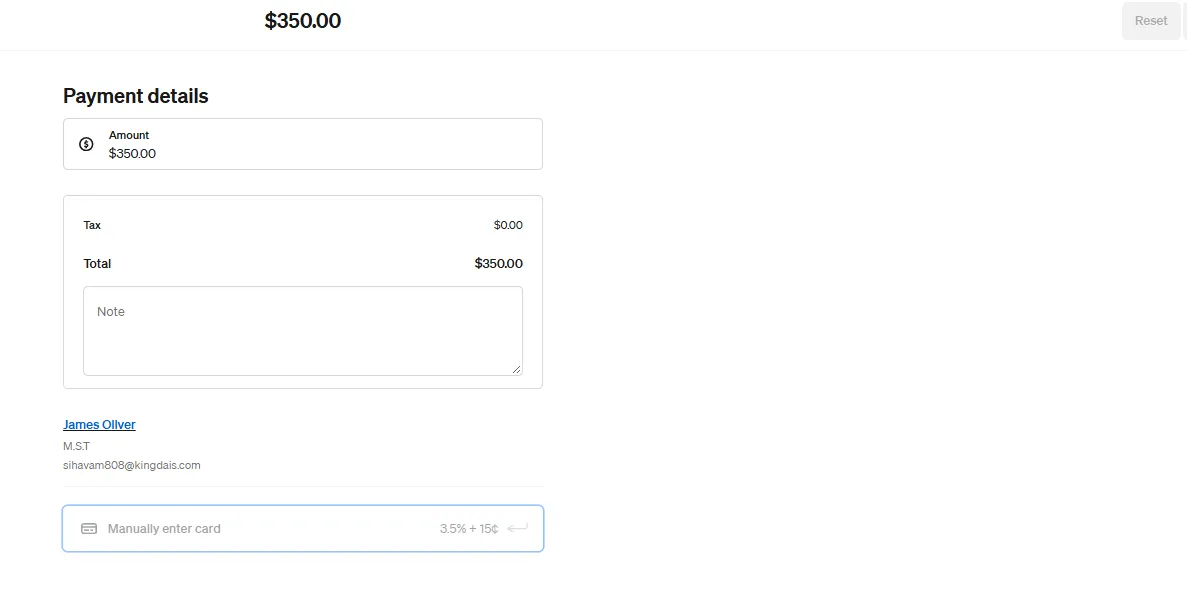
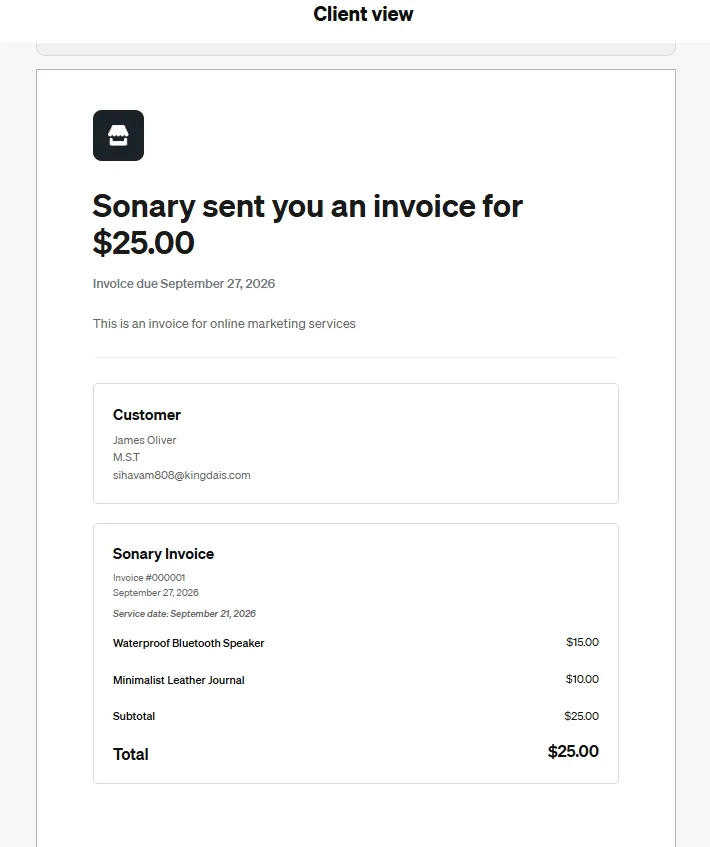
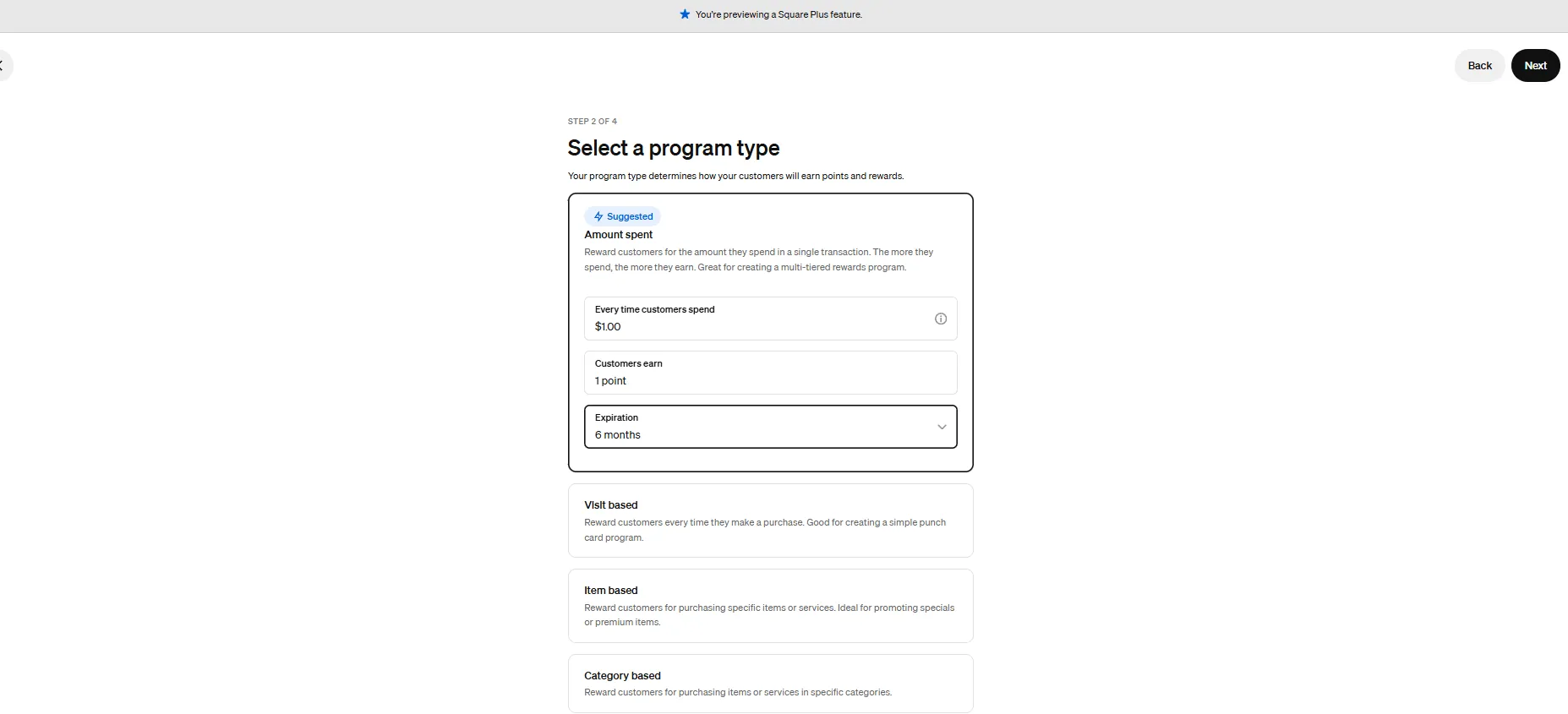
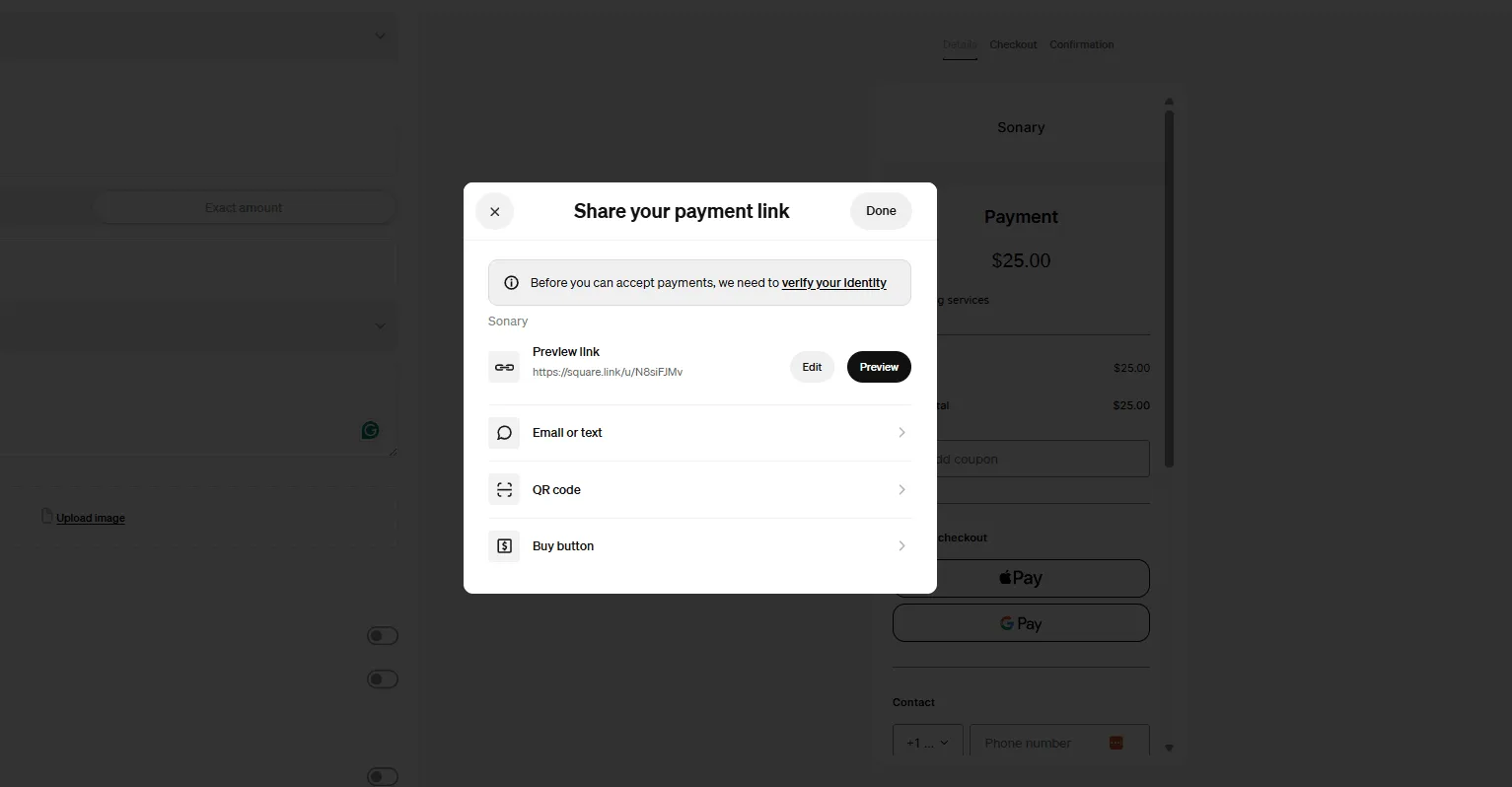
Square is one of the most complete free business platforms for small businesses, covering POS, merchant services, accounting, online invoicing, payroll, bookkeeping, and ecommerce from a single… Read more
Square is one of the most complete free business platforms for small businesses, covering POS, merchant services, accounting, online invoicing, payroll, bookkeeping, and ecommerce from a single dashboard. It works especially well for micro businesses and SMBs that want to replace multiple subscriptions with one connected system — where sales, finances, inventory, and payroll all update automatically in the same place. For most small businesses, Square is worth it.
Learn more in our full Square review.
Pros & Cons
- No monthly payment
- Next-business-day transfers
- Inexpensive long-term option
- Comprehensive inventory management
- Not great for all industries
- Some performance issues
Features
- Inventory Management
- Loyalty Program
- Mobile Compatibility
- Online Ordering
- Reporting
- Split Checks
- Manage Tips
- Staff Scheduling
- Offline Payments
- Customer Profiles
- Multidevice Payments
- Gift Card Support
- Accounting Integration
- Tableside Ordering
- Floor Plan Management
- Customer-Facing Display
- Self-Service Kiosk
- Retail Store
- Coffee Shop
- Nightclub
- Quick Service
- Bars
- Restaurants
- Food Truck
- iOS
- Android
- Cloud-Based
- Free Trial
- Freemium
- Monthly subscription
- One-Time License
Pricing
$0
mo/
month
$29
mo/
month
Screenshots
Clover is a user-friendly point-of-sale (POS) system designed for small to medium businesses, offering a range of software and hardware tailored to different industries, from retail to restaurants.… Read more
Clover is a user-friendly point-of-sale (POS) system designed for small to medium businesses, offering a range of software and hardware tailored to different industries, from retail to restaurants. While not the most affordable, its diverse payment partners make it a reliable choice. Developed by Clover Network Inc., a First Data Corporation subsidiary, Clover POS delivers a comprehensive solution for payment processing, inventory management, and sales tracking.
Learn more in our full Clover review.
Pros & Cons
- Attractive pricing 30-day trial at no cost
- Affordable hardware beginning at $49
- Feature-packed Ideal for businesses with an online presence
- Round-the-clock phone and email assistance.
- You can't apply for the POS online; it requires interaction with a sales representative
- Pricing information isn't clear-cut
- No complimentary plan available
Features
- Inventory Management
- Loyalty Program
- Mobile Compatibility
- Online Ordering
- Reporting
- Split Checks
- Manage Tips
- Staff Scheduling
- Offline Payments
- Customer Profiles
- Multidevice Payments
- Gift Card Support
- Accounting Integration
- Tableside Ordering
- Floor Plan Management
- Customer-Facing Display
- Self-Service Kiosk
- Retail Store
- Coffee Shop
- Nightclub
- Quick Service
- Bars
- Restaurants
- Food Truck
- Android
- Cloud-Based
- Free Trial
- Monthly subscription
Pricing
$13
mo/
month
$105
mo/
month
$170
mo/
month
$145
mo/
month
$230
mo/
month
$205
mo/
month
Toast POS is a cloud-based POS system tailored to restaurants. It offers special features for restaurant management and a diverse array of features for restaurant management and revenue maximization.
Learn more in our full Toast review.
Pros & Cons
- Streamlined back office operations
- Excellent integration between kitchen and service staff
- Multi-location menu management
- Fairly priced
- Only available on Android
- Early termination fee
- Not suitable for large restaurants or chains
Features
- Inventory Management
- Loyalty Program
- Mobile Compatibility
- Online Ordering
- Reporting
- Split Checks
- Manage Tips
- Staff Scheduling
- Offline Payments
- Customer Profiles
- Multidevice Payments
- Gift Card Support
- Accounting Integration
- Tableside Ordering
- Floor Plan Management
- Customer-Facing Display
- Self-Service Kiosk
- Coffee Shop
- Quick Service
- Bars
- Restaurants
- Food Truck
- iOS
- Android
- Cloud-Based
- On-place Installation
- Windows
- Mac
- Free Trial
- Monthly subscription
- Annual subscription
- One-Time License
Pricing
$0
mo/
month
$69
mo/
month
$69
mo/
month
How to Choose the Right Mobile POS System for Your Business
When it comes to selecting the best mobile POS solution, it’s important to assess your business’s unique needs. Below are several factors to consider when making your decision:
- Type of Business: Your industry plays a significant role in determining which mobile POS system is best suited for you. For example, a restaurant may need features like tableside ordering and tipping options, while a retail store might prioritize inventory management and customer data tracking.
- Cost of Software and Hardware: Many mobile POS systems offer free software, making them ideal for startups or small businesses. However, as your business grows, you may need to invest in more advanced hardware such as portable card readers, receipt printers, or barcode scanners.
- Transaction Fees: Some mobile POS solutions charge flat-rate fees for processing payments, while others offer tiered or volume-based pricing. Consider your monthly sales volume and compare fees to find a system that provides the best value.
- Hardware Compatibility: Some mobile POS systems are compatible with both iOS and Android devices, while others may require you to purchase specific proprietary hardware. Ensure that the system you choose works with your existing devices to save on costs.
Advantages of Using a Mobile POS App
The mobile POS app is a key component of your mobile POS solution, providing the flexibility to process transactions on the go. Here’s why using a POS app can benefit your business:
- Instant Setup: Most POS apps are easy to download and install, allowing you to quickly transform your smartphone or tablet into a fully functional POS system.
- Mobile Convenience: With a mobile POS app, you can process transactions, track inventory, and manage sales from virtually anywhere. This mobility is ideal for businesses outside of a traditional brick-and-mortar store.
- Real-Time Sales Tracking: Many mobile POS apps offer real-time data analysis, helping you monitor sales performance and adjust strategies on the fly.
- Offline Capabilities: Some POS apps allow you to continue processing transactions offline even if your internet connection is down, ensuring that your business continues to run smoothly.
See also
- Going mobile changes the hardware more than the software, and best POS software for small business shows which tills ship a genuine portable app.
- The reader, the rate and the payout speed all come from your processor, compared in best card readers for taking payments on the move.
- Service windows that lose signal mid-lunch need offline queueing, treated as a hard requirement in best food truck POS systems.
- A fixed tablet on a stand is a different buy from a handheld, so read the best POS app for iPad comparison.
Conclusion
In today’s competitive marketplace, adopting the right mobile POS system can significantly improve the efficiency and success of your business. Whether you’re looking for enhanced mobility, better customer service, or seamless integration with your existing systems, a mobile point-of-sale solution can offer the tools you need to stay ahead.
You’ll benefit from streamlined payment processing, improved inventory management, and real-time data analytics by choosing the best portable POS system for your business. The right mobile POS solution will also help you deliver a superior customer experience, allowing you to grow your business and maintain a competitive edge in the market.
Investing in a mobile POS system isn’t just about accepting payments—it’s about transforming your business for the better. Get started today and discover how a mobile point-of-sale system can take your operations to the next level.