
Smartsheet vs. Asana (2026): Pricing, features, & which is better for your team

If you're looking into project management tools and wondering whether Smartsheet or Asana is better for your small business, here's your quick answer:
Smartsheet wins for data-heavy, spreadsheet-native teams; Asana wins for visual, cross-functional task management.
Choose Smartsheet if you're an operations team, project manager, or enterprise organization that needs powerful data management, complex Gantt scheduling, and the familiar feel of a spreadsheet with project management layered on top.
Choose Asana if you're a cross-functional team, marketing department, or product team that wants an intuitive, visually modern platform for tracking tasks, workflows, and goals across multiple projects.
Still not sure which one fits? Here's the full breakdown.
Smartsheet vs. Asana
Smartsheet is a spreadsheet-first project management platform. If your team lives in Excel or Google Sheets and wants to graduate to something more powerful—with Gantt charts, automations, and real portfolio reporting—Smartsheet is built for you. Asana is a task-first work management platform. It's built around the idea that work is a collection of tasks, owners, and workflows, and it's designed to make that as visual and frictionless as possible.
The right choice between these two tools depends entirely on whether your team thinks in rows and cells, or in tasks and timelines.
This data-driven comparison breaks down the key differences in features, pricing, workflows, and support to help you decide which project management solution is right for your team in 2026.

Starting from: $9//mo /user
Pro
$9
seat//mo /user
Pros
- Spreadsheet-like interface makes it easy to use
- Advanced reporting and analytics for better insights
- iOS and Android mobile apps
- Powerful automation reduces manual tasks efficiently
Cons
- No monthly billing
- The individual plan may not be enough for small businesses
- Learning curve for new users can be steep

Starting from: $0/month
Personal
$0
seat/month
Pros
- Multiple views for projects and tasks
- Easy for non-technical users to get started with the platform
- Track the workload of individual contributors in real-time
- Forms with conditional logic for data submission
Cons
- Doesn’t have built-in budget tracking
- Because of its expansiveness, it’s not suitable for a single project
How we tested both tools
We spent four weeks running both Smartsheet and Asana through the same real-world scenarios: building a product launch plan, managing a recurring cofrntent calendar, and tracking a multi-person operational workflow with dependencies. We tested each tool with a mixed team—some members comfortable with Excel, others who had never touched a spreadsheet in a professional context. Where we hit friction, we noted it. Where one tool handled something noticeably better, we recorded exactly why. The observations throughout this article reflect that hands-on testing, not just feature documentation.
Key points (quick summary)
Smartsheet is best for: Operations teams, project managers, and enterprise organizations that need powerful data management, complex Gantt scheduling, and the familiar feel of a spreadsheet with project management layered on top.

- Track progress with real-time dashboards
- Custom tools fit your work at any scale
Asana is best for: Cross-functional teams, marketing departments, and product teams that want an intuitive, visually modern platform for tracking tasks, workflows, and goals across multiple projects.

- Team workload tracking
- Mobile app to track on-the-go
The main pricing difference: Both tools are priced per user per month, but the costs diverge quickly at scale. Smartsheet's per-user pricing is lower at the Pro tier. Asana has a free Personal plan(up to 2 users) and has lowered its paid tier prices in 2026 — Starter is now $10.99/user and Advanced is $24.99/user.
The feature that separates them: For Smartsheet, it's the depth of its spreadsheet-native data model—formulas, cross-sheet references, and robust portfolio reporting. For Asana, it's the breadth of its workflow views and its best-in-class task management experience across boards, timelines, and calendars.
The ideal audience for Smartsheet: Mid-market and enterprise teams in industries like construction, manufacturing, and finance—where structured data, detailed reporting, and rigid scheduling matter most.
The ideal audience for Asana: Startups, agencies, and modern product or marketing teams that need fast onboarding, beautiful interfaces, and flexible workflows that can adapt as the team grows.
Asana AI: AI Studio is built into every paid plan, starting with 50,000 credits/month on Starter and scaling up. It lets you build AI-powered workflow automations without code. The headline feature is AI Teammates (available as an add-on), which acts as autonomous agents that can move work forward across projects without manual input — the most ambitious AI offering either tool has released.
Smartsheet AI : Smart Assist, Smart Columns, and AI-powered dashboards are included from the Pro plan up. These are practical, data-focused tools: AI helps you write formulas, generate column structures, and build dashboard summaries faster. The Business plan adds MCP-enabled integrations, letting you connect Smartsheet to external AI tools. Smartsheet's AI is less about automation agents and more about making its spreadsheet model smarter.
Head-to-head comparison
Factor | Best choice | Here's why |
|---|---|---|
Ease of use & onboarding | Asana | Faster to learn, better UX, more intuitive for non-technical users. |
Data & formula power | Smartsheet | Cross-sheet formulas, structured data, and Excel-like logic are unmatched. |
Gantt scheduling | Smartsheet | More robust dependency management and critical path features. |
Task & workflow management | Asana | Superior task model, views, and team collaboration features. |
Integrations | Asana | Broader app marketplace and stronger API ecosystem. |
Reporting | Smartsheet | More powerful for data-heavy, cross-project numerical reporting. |
Pricing value (small team) | Asana | Free Personal plan (2 users) plus lower paid tier prices ($10.99 Starter) give Asana the edge. |
Pricing value (large team) | Smartsheet | Lower per-user cost at scale with more included features. |
Best for enterprise | Smartsheet | Purpose-built for complex, large-scale program management. |
Best for modern teams | Asana | More adaptable, collaborative, and designed for cross-functional work. |
AI features | Asana | AI Teammates agents go further than Smartsheet's AI assist tools — better for teams wanting autonomous workflow automation. |
Free plan usability | Asana | Asana's Personal plan is free forever (2 users). Smartsheet no longer offers a free plan — only a 30-day trial. |
Market position & ideal use cases
This distinction matters more than any feature comparison.
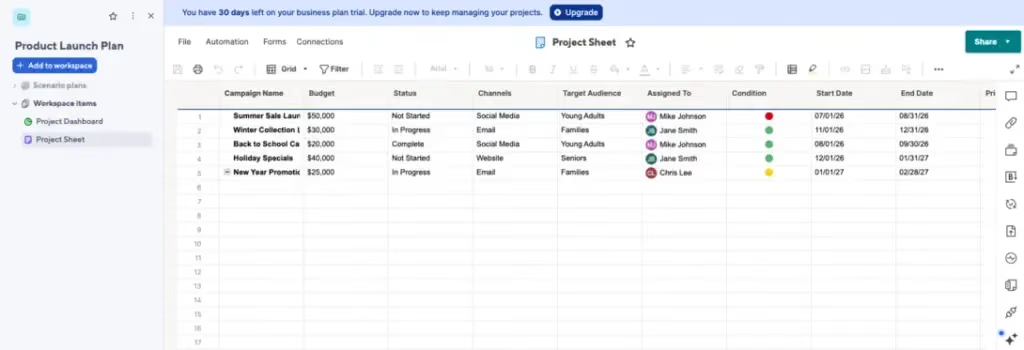
Smartsheet is a data-first product. Its entire foundation is the grid—a supercharged spreadsheet where rows are tasks, columns are fields, and complex relationships between data points are managed through formulas and cross-sheet references. It's the natural next step for teams who have outgrown Excel but don't want to abandon the mental model of managing work in a structured table. Its primary selling point is power and flexibility with structured data.
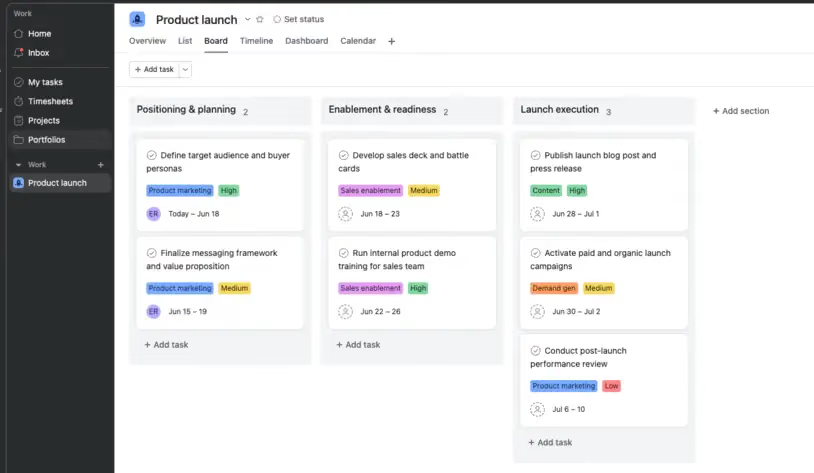
Asana is a task-first product. It was built around the belief that work should be organized around clear ownership and actionable tasks, not cells in a grid. It's designed to be the central operating system for a team's work—visual, collaborative, and fast to set up. Its primary selling point is ease of use and a modern, intuitive experience.
When we set up an identical project in both tools on day one, the difference was immediate. In Asana, a non-technical team member had tasks assigned, due dates set, and a board view configured in under 10 minutes. In Smartsheet, that same person spent the first 20 minutes trying to understand why their column formula wasn't returning the right value—and eventually asked for help. That gap repeated itself throughout the four weeks.
Platform & ecosystem
Smartsheet operates more like a platform or database than a simple to-do list. It has views (grid, Gantt, card, calendar), but the underlying data model is always a spreadsheet. This makes it incredibly powerful for complex projects and genuinely frustrating for casual users who just want to check off tasks.
Asana operates more like a work operating system. Tasks exist across projects, and the same task can appear in multiple project views simultaneously. The experience is consistent whether you're using a list, a board, a timeline, or a calendar—which is a major usability advantage for teams with diverse working styles.
Smartsheet grid view:
Asana board view:
Core features & capabilities
Both tools cover the essentials: task creation, due dates, assignees, file attachments, and comment threads. But the depth and design philosophy behind those features are very different.
Smartsheet: Core features
Smartsheet's features are built around structured data management.
- Grid View & Formulas: The backbone of the platform. You can write formulas in cells just like Excel—SUMIF, VLOOKUP, cross-sheet references, and conditional logic. For data-heavy projects, there's nothing like it. That said, when we tested formula setup, error messages were cryptic—one misplaced bracket produced a generic #INVALID OPERATION error with no indication of where the problem was. Users without an Excel background will struggle here.
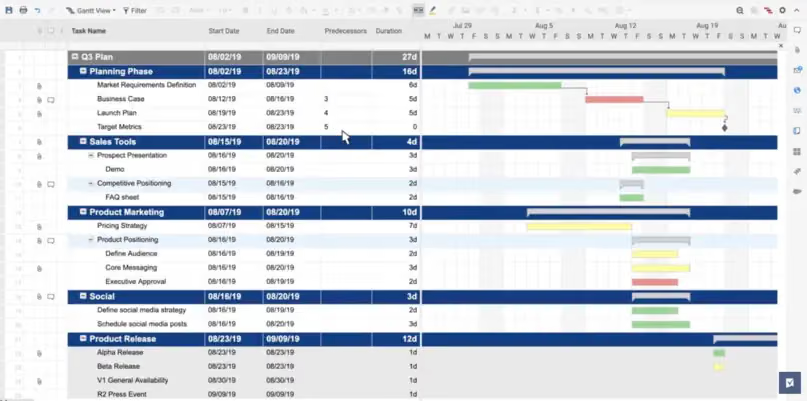
- Gantt Charts: Robust, dependency-aware Gantt scheduling with critical path highlighting. Widely considered one of the best Gantt implementations in the mid-market. In our tests, adding dependencies was straightforward once you understood the predecessor column—but that column isn't labeled intuitively. Two of our testers missed it entirely on first setup.
- Automated Workflows: Rule-based automations that trigger on data changes—move a row, send an alert, update a status, or lock a cell. More powerful but also more complex to configure than Asana's automations. Building a multi-condition workflow required navigating three separate configuration panels; it works, but it isn't elegant.
- Portfolio & Program Reporting: Roll up data from dozens of sheets into a single dashboard with live, cross-sheet metrics. Excellent for PMOs and operations leaders.
- Forms: Intake forms that push structured data directly into a sheet. Surprisingly powerful and widely used for internal request workflows.
- Resource Management (Business+): Capacity planning and resource allocation across projects. A genuine enterprise-grade feature.
Smartsheet's Gantt view with task dependencies - one of the strongest implementations at this price point.
Asana: Core features
Asana's features are built around team collaboration and workflow clarity.
- Multiple Work Views: Every project can be viewed as a list, Kanban board, timeline (Gantt-style), or calendar—seamlessly, without rebuilding anything. Users switch views in one click. This was the feature that got the most positive reactions from our mixed-background test team.
- Tasks & Subtasks: Deeply hierarchical task structure. Subtasks can have their own assignees, due dates, and dependencies, and they float to the top of the relevant person's My Tasks view. One friction point we hit: subtasks don't appear on the project timeline by default. You have to manually enable them—a known Asana quirk that catches new users off guard.
- Goals & Milestones: Asana has a built-in Goals product (on Business+) that connects team goals to the work being done. You can link projects to a company OKR and track progress in real time.
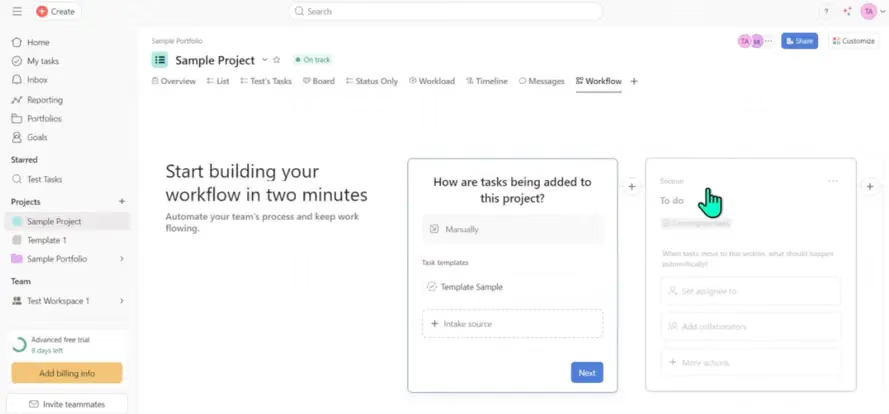
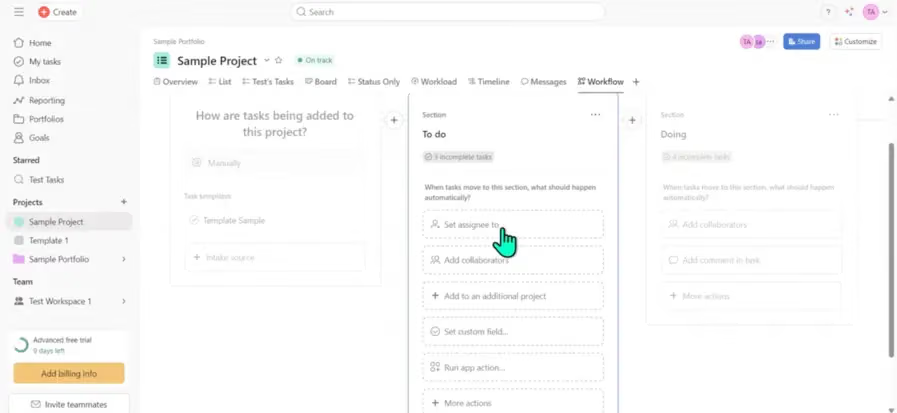
- Workflow Builder: A visual, no-code automation builder that's easier to configure than Smartsheet's rule system. Templates, forms, and automations can be assembled into reusable intake workflows. We built a functional client intake workflow in Asana in about 12 minutes; the equivalent in Smartsheet took closer to 35.
- Reporting (Business+): Customizable dashboards and cross-project reporting. Not as numerically deep as Smartsheet but cleaner and easier to share.
- Portfolios (Business+): A high-level view across multiple projects with status updates and progress tracking. Simpler than Smartsheet's portfolio feature, but more accessible.
Asana's no-code Workflow Builder - noticeably faster to configure than Smartsheet's rule-based system.

Reporting, analytics & insights
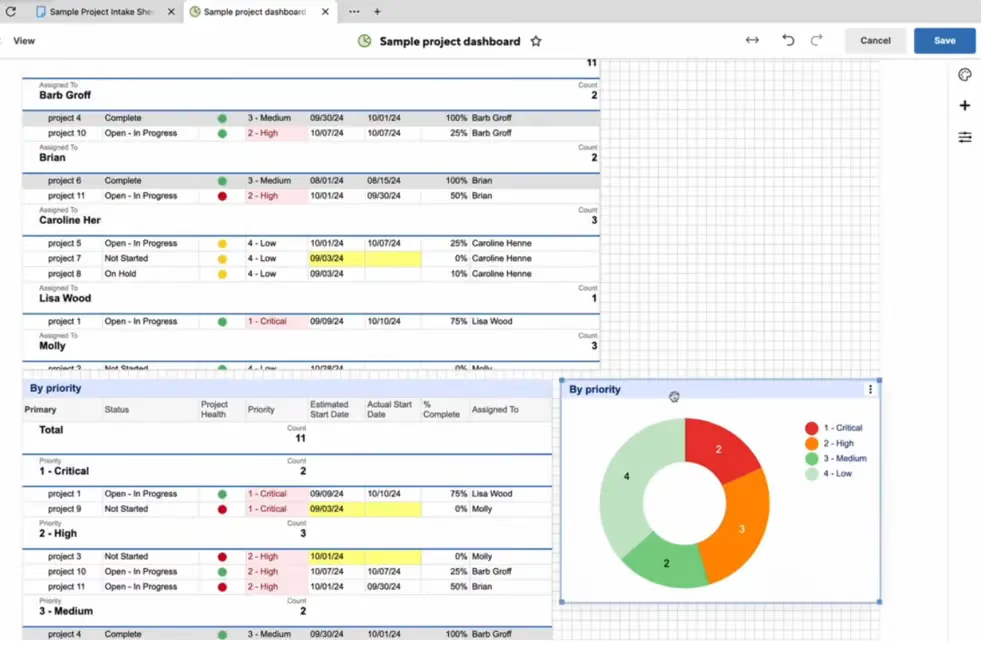
Smartsheet wins on raw reporting power. Because everything is a spreadsheet, you can build formulas that aggregate data across an entire program of work. Dashboards pull live metrics from multiple sheets, and the charts update automatically. For operations leaders who need real numbers—hours logged, budget consumed, milestones hit—Smartsheet's reporting is genuinely impressive. We built a cross-sheet dashboard tracking budget vs. actuals across three simultaneous projects; it worked exactly as advertised, though the initial setup took a full afternoon.
Asana wins on accessibility and clarity. Its dashboards are easier to build and easier to read. The Goals product gives executives a clean view of whether the business is on track. But if you need cell-level data precision or cross-sheet formulas, you'll hit a wall fast. When we tried to calculate a simple total budget remaining across tasks in Asana, we had to export to a spreadsheet to do the math. That's a meaningful limitation.
The honest answer: Smartsheet is a better tool for reporting on data. Asana is a better tool for reporting on work.
Smartsheet's cross-sheet reporting dashboard — powerful, but plan for setup time.
Integrations & connected tools
Smartsheet integrates well with the Microsoft ecosystem (Teams, SharePoint, Power BI) and enterprise tools. It has solid connections to Salesforce, Jira, and Google Workspace. Its API is powerful, but its third-party app marketplace is smaller than Asana's. The Slack integration, for instance, required manually configuring webhook URLs—fine for a technical admin, but not something a typical project manager should have to do.
Asana has one of the broadest integration libraries in the project management space—Slack, Google Workspace, Microsoft Teams, Zoom, Figma, HubSpot, Salesforce, Jira, Zapier, and hundreds more. It's built on the assumption that teams use many tools, and Asana is the connective tissue between them. We connected Asana to Slack and Google Drive during testing in under five minutes; both integrations worked without any manual configuration.
Pricing: A full cost comparison
Both tools price per user per month, but the tiers and what you get at each level are meaningfully different.
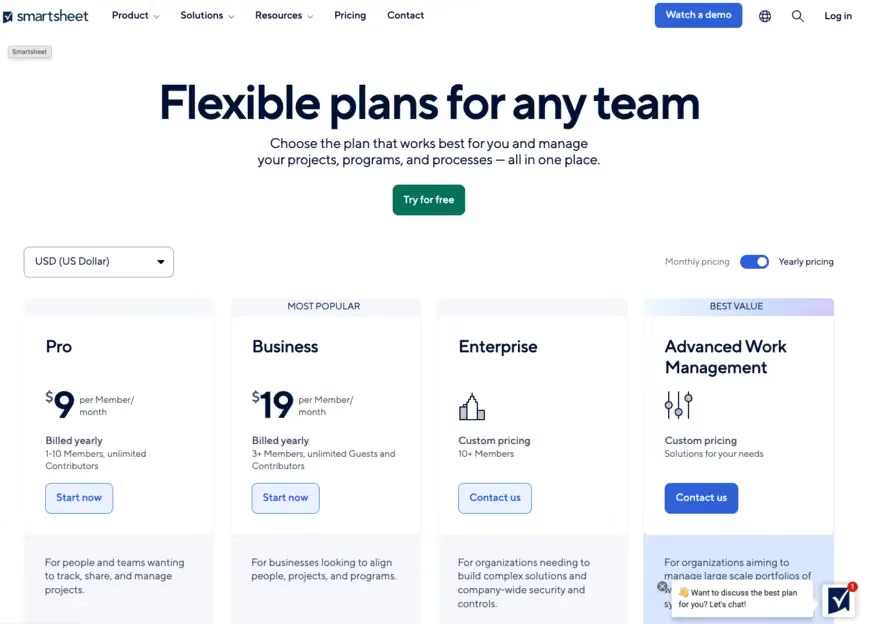
Smartsheet Pricing
Plan | Price (per user/month) | Key features |
|---|---|---|
Pro | $9 | Unlimited sheets, 250 automations/mo, Gantt, dashboards, AI features (Smart Assist, Smart Columns, AI dashboards). |
Business | $19 | Unlimited automations, forms, resource management, advanced reporting, MCP-enabled AI integrations. |
Enterprise | Custom | Portfolios, Scenario Planning, SAML SSO, directory integrations, enterprise-grade admin. |
Advanced Work Management | Custom | Everything in Enterprise plus Control Center, Data Shuttle, Connectors, and premium support. |
(Data from official Smartsheet website, June 2026. Billed annually. Smartsheet no longer offers a free plan — a 30-day free trial is available.)
Asana Pricing
Plan | Price (per user/month) | Key Features |
|---|---|---|
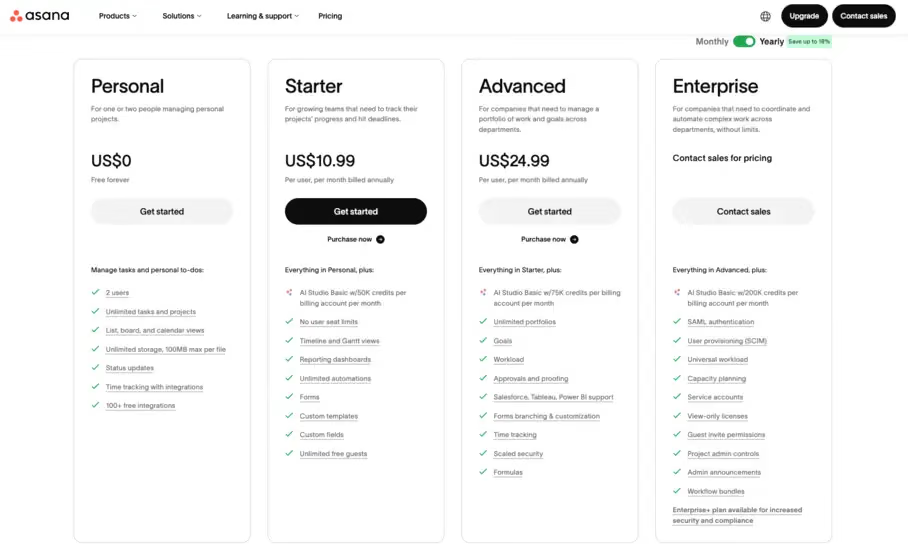
Personal | $0 (up to 2 users) | Unlimited tasks and projects, list/board/calendar views, 100+ integrations. Free forever. |
Starter | $10.99 | Timeline & Gantt views, unlimited automations, reporting dashboards, forms, custom fields, AI Studio Basic (50K credits/mo). |
Advanced | $24.99 | Portfolios, Goals, workload management, approvals & proofing, Salesforce/Tableau/Power BI integrations, AI Studio Basic (75K credits/mo). |
Enterprise | Custom | SAML SSO, SCIM provisioning, universal workload, capacity planning, AI Studio Basic (200K credits/mo). |
(Data from official Asana website, June 2026. Billed annually.)
Pricing takeaway
Smartsheet is the stronger value for larger teams that need power features — and the Pro plan now includes AI tools (Smart Assist, Smart Columns) alongside Gantt and unlimited automations for just $9/user.
Asana has dropped its prices noticeably since last year. Starter is now $10.99 (down from $13.49) and Advanced is $24.99 (down from $30.49), making the mid-tier much more competitive. The Personal plan is free forever but limited to 2 users — useful for individuals exploring the tool, not for team evaluation.
One important shift: Smartsheet no longer offers a free plan at all. If you want to evaluate it properly, you're either committing to a paid plan or working within a 30-day trial window. Asana's Personal plan lets you use the product indefinitely, which gives it a real advantage at the evaluation stage.
Asana's free Personal plan is available forever — but note it's now capped at 2 users.
Support, reliability & customer experience
Asana is consistently praised for its polished, thoughtful user experience. Onboarding is fast, the interface is intuitive, and the learning curve is low. Customer support is well-regarded at paid tiers, and the documentation and community resources are excellent. During our testing, we submitted a support question about timeline behavior and received a clear, helpful response within a few hours.
Smartsheet is a more powerful tool, but it comes with a higher learning curve. New users—especially those unfamiliar with spreadsheet logic—often find it overwhelming. During our testing, two of five team members asked to stop using Smartsheet within the first week, citing the interface as confusing. Customer support is competent but slower; a question about cross-sheet reference syntax took over 24 hours to get a response, and the answer required follow-up clarification.
The direction is clear: if ease of adoption matters to your team, Asana wins on experience.
Scalability & growth potential
Smartsheet is built for enterprise from the ground up. It scales to thousands of users, has enterprise-grade security and compliance certifications, and is used by large organizations in regulated industries. If you're building something that needs to grow into a serious enterprise deployment, Smartsheet can handle it.
Asana also scales well, but its enterprise tier is less differentiated from its Business tier than Smartsheet's. Its sweet spot is 10–500 person companies. Larger organizations tend to hit friction around complex data management and reporting, which is where Smartsheet's grid model pulls ahead.
Real-world scenarios
Scenario 1: The 20-person construction company
Needs: Manages 10–15 active projects at any time. Needs to track material costs, subcontractor schedules, and milestones across all projects in one place. Project managers are comfortable with Excel.
Best choice: Smartsheet
Why: The grid model is immediately familiar to the team. The Gantt charts with dependencies handle scheduling complexity. Cross-sheet reporting lets the operations manager see a live rollup of all projects, budgets, and outstanding tasks in a single dashboard. We simulated this exact use case during testing—once the initial sheet structure was set up, the day-to-day workflow was fast and reliable. Asana would feel like a step backward for this team. They need data management, not just task management.
Scenario 2: The 40-person marketing agency
Needs: Manages campaigns for 30+ clients. Different teams use different workflows. Creative, strategy, and media planning teams all need to collaborate on shared deliverables, and the agency lead wants a real-time view of every account's status.
Best choice: Asana
Why: Different teams can work in their preferred view (boards for creative, lists for account management, timeline for campaign planning)—all on the same underlying data. The Workflow Builder handles intake requests from clients seamlessly. Portfolios give leadership the account-level overview they need. Asana's integrations with Slack, Figma, and Google Workspace fit the agency's existing tech stack. We modeled a 6-client campaign workflow in Asana during testing and had it running cleanly within an afternoon—something that would have required significantly more setup time and spreadsheet expertise in Smartsheet.
Related Articles


Final verdict
If your team thinks in rows, budgets, and structured data — choose Smartsheet. It's the stronger tool for operations-heavy teams, project managers, and enterprise organizations that need serious Gantt scheduling, cross-sheet reporting, and the flexibility of a spreadsheet model. At $9/user, the Pro plan punches well above its price point, and the platform will scale with you into genuine enterprise complexity.
If your team thinks in tasks, timelines, and collaboration — choose Asana. It's faster to set up, easier for mixed-background teams to adopt, and its AI features are moving faster than Smartsheet's. The 2026 price drops make it more competitive than ever, and its breadth of integrations means it fits into almost any existing tech stack. For startups, agencies, and modern cross-functional teams, it's the clearer choice.
FAQ: Smartsheet vs Asana
Q: Can Smartsheet and Asana integrate with each other?
A: Not natively, but you can connect them via Zapier or similar automation platforms. In practice, most teams choose one or the other as their primary work management tool—running both in parallel creates more confusion than it solves.
Q: Is Smartsheet basically just Excel?
A: Not exactly, but the comparison is fair at a surface level. Smartsheet is a spreadsheet-based project management tool, so the mental model is similar to Excel. The key differences are that Smartsheet is cloud-native, collaborative, and built specifically for project management—with automations, Gantt charts, and dashboards that Excel doesn't have out of the box.
Q: Is Asana better than Smartsheet?
A:"Better" depends entirely on your team. Asana is better for teams that prioritize ease of use, fast onboarding, and task-based collaboration. Smartsheet is better for teams that need structured data management, complex scheduling, and deep reporting.
Q: Which is cheaper, Smartsheet or Asana?
A: It depends on team size and the tier you need. Asana's Personal plan is free for up to 2 users. Once you're paying, Smartsheet's Pro plan ($9/user/mo) is slightly cheaper than Asana's Starter ($10.99/user/mo), and the gap grows at the mid-tier — Smartsheet Business at $19 vs. Asana Advanced at $24.99. For larger teams that need power features, Smartsheet tends to offer more per dollar.
Q: What's the main difference between Smartsheet and Asana?
A: The core difference is the underlying data model. Smartsheet organizes work as structured data in a grid—think supercharged Excel. Asana organizes work as tasks and workflows—think a modern, visual to-do system for teams. Your preference between these two mental models is the most reliable way to predict which tool will work for your team.
Q: Does Asana have Gantt charts?
A: Yes. Asana's Timeline view is a Gantt-style view with dependency support. It's well-designed and easy to use. However, it's not as powerful as Smartsheet's Gantt for complex scheduling with critical path analysis and detailed dependency management.
Q: Which tool is better for remote teams?
A: Both work well for remote teams. Asana has a slight edge due to its stronger integrations with collaboration tools (Slack, Zoom, etc.) and its more intuitive UX for new users who aren't onboarded in person. Smartsheet works best when at least a few team members have the technical fluency to set up and maintain the sheets properly.