
Standard Features for a Restaurant POS System: What Your Small Restaurant Actually Needs in 2026

If you run a small restaurant, café, or food truck, you've probably wondered which POS features actually matter for your day-to-day - and which are just marketing copy. This guide cuts straight to the answer, with real examples for each feature and honest picks for different restaurant types.
TL;DR: the standard features your small restaurant actually needs in2026
These are the 8 standard features every small restaurant POS should have:
- Real-time menu sync across every screen- when you mark something as sold out, it disappears from server tablets, kitchen screens, your website, and delivery apps instantly.
- Automatic ingredient tracking- the POS subtracts ingredients from stock as each dish sells, so you stop running out of avocados mid-shift.
- Table management with a live floor plan- your dining room layout on screen, with each table color-coded by status (open, ordering, paying, dirty).
- Kitchen display screen integration: orders go straight from the server's tablet to a kitchen display screen for the cook line, eliminating paper tickets and printer chaos.
- Tableside payments- servers process payments at the customer's table on a small handheld device, cutting payment time from 15 minutes to 5, and increasing turnover.
- Tip splitting and check splitting- the POS automatically calculates each team member's tip share, saving managers 30-60 minutes per shift.
- Online order routing into the kitchen- orders from DoorDash, Uber Eats, Grubhub, and other online orders flow directly into your kitchen system without the need for manual re-entry.
- Offline mode that actually works- the POS keeps taking payments when WiFi or cellular drops, so nothing can shut you down during the Saturday rush.
Beyond these features, a real restaurant POS also saves you money- by surfacing food cost leaks, killing unprofitable menu items, and showing you exactly when you're busy. For most small restaurants, the savings from these insights cover the POS cost within 90 days.
Who this guide is for
This guide is for owners of small restaurants, cafés, food trucks, family-run joints, and counter-service places - operators with 1-30 employees who want to understand restaurant POS standard features. It's NOT for big corporate chains, fine-dining establishments with dedicated IT staff, or readers looking for enterprise-level solutions.
When we at Sonary surveyed 448 small restaurant operators, we found 41% did under $100K/year, and 80% needed only 1-2 POS terminals. That's the audience this guide serves. If you're running a 50-table fine-dining restaurant or a multi-location chain, this guide isn't for you.
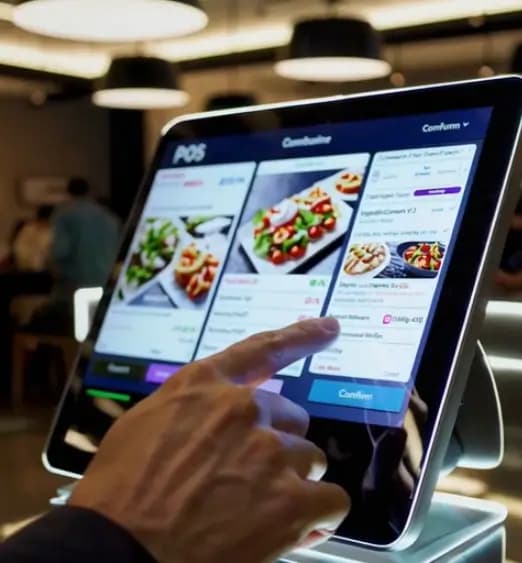
If you're newer to the POS topic, I recommend you start with our what is a POS system guide to get the basics, or our general POS features guide for non-restaurant businesses.
How is this guide different than other best restaurant POS articles?
Most restaurant POS articles list features. This one translates each feature into what it actually does for you on a Tuesday lunch shift, and shows you where a POS actually saves you money.
Here's the real point: a generic POS (like a basic Square plan) can take a customer's payment, but it can't track how much chicken you sold today, send orders to the right kitchen station, or split tips fairly between your team. Restaurant owners who start on a generic POS usually end up switching to a more tailored solution within 18 months - and the switch is painful.
Why restaurant POS standard features matter:
- 70% of restaurants reported better order accuracy after switching to a POS that tracks ingredients automatically and sends orders to the kitchen.(Source:Sonary)
- Online orders pulled straight into your POS reduce order entry mistakes by 67%.(Source: Sonary)
- 61% of small businesses had to switch POS systems because what they bought didn't fit their needs or expectations.(Source: Sonary's data)
What we learned from surveying 448 small restaurant operators (Sonary's own research):
- 42% of small restaurant operators seeking a POS are food truck operators.
- 41% are micro-businesses under $100K/year; 58% are under $250K/year.
- 80% need only 1-2 POS terminals.
- 78% need a POS within 3 months; 35% need it immediately.
- 40% of restaurant operators don't accept credit cards at all.
(Source: Sonary's research with small restaurant operators)
Most restaurant POS content misses the mark. The real small restaurant audience is dominated by food trucks, micro-businesses, and operators running on tight budgets, making fast decisions - not the 30-table full-service restaurant most articles cater to.
The 8 standard features for a restaurant POS system
The standard features every restaurant POS system should have are listed below. Each starts with a real example so you can see what the feature actually does on a Tuesday lunch shift - not just what the marketing ad-copy says.
1. Real-time menu sync across every screen
Real-time menu sync is the industry-standard feature that prevents customers from ordering items you're sold out of.
Real example: It's 7:30 pm on a Friday. You've sold the last duck dish - you're out. Your server taps the iPad. The duck instantly disappears from every screen at once: server tablets, the kitchen screen, your website, and the delivery apps (Uber Eats, DoorDash, Grubhub). Three minutes later, no one is able to order duck.
What it means: When you mark something as sold out, that change shows up in real-time on every device, every screen, and every online channel - instantly. No more arguing with a customer who ordered something on the delivery app that you sold out of two hours ago.
2. Automatic ingredient tracking
Automatic ingredient tracking is a standard feature that subtracts ingredients from your stock as each dish sells, so you stop running out mid-shift.
Real example: It's lunchtime on Tuesday. You sell 40 avocado toasts before 1 pm. Your POS automatically subtracts 80 avocado halves from your stock count (2 per dish). At 47 toasts sold, you get an alert on your phone: avocados running low. You text your supplier from the kitchen. You don't run out before dinner.
What it means: A restaurant POS tracks how much of each ingredient you use - not just how many dishes you sold.
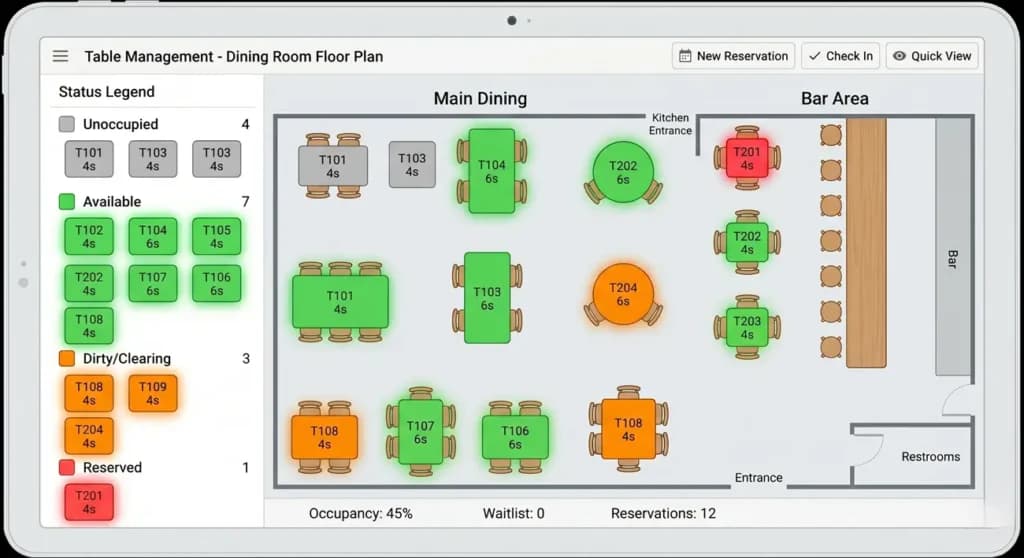
3. Table management with a live floor plan
Table management is the standard feature that shows your dining room layout on screen - so hosts and servers know exactly which tables are open, occupied, or ready to be cleaned.
Real example: Saturday at 7 pm. The dining room is packed. Your host opens the iPad and sees the dining room layout on the screen. At a glance, she knows: table 6 just got their checks (will be free in 5 minutes), table 12 is finishing dessert, table 4 is still ordering, table 9 just left and needs to be cleaned. She seats the next walk-in at table 6, skips 9 (which is still dirty), and tracks the wait list.
What it means: A restaurant POS shows your actual dining room layout on a screen, with each table's status (empty, seated, ordering, eating, paying, dirty).
4. Kitchen display screen integration
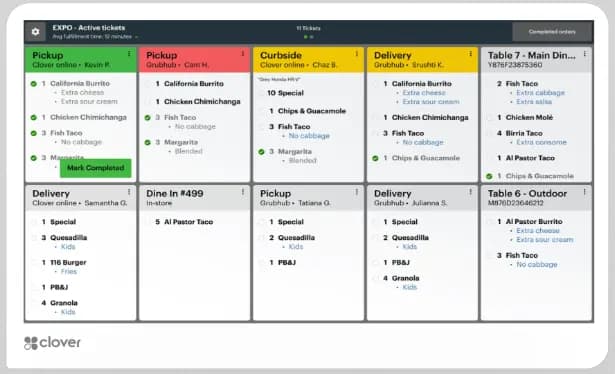
Kitchen display screen integration is a standard feature that sends server orders directly to a kitchen display screen, replacing paper tickets and printer chaos.
Real example: A server enters a 4-person order on a small device at table 14: 2 burgers (one medium, one well-done), 1 salmon, 1 pasta. The order shows up instantly on the kitchen's screen, sorted by station: the grill cook sees the burgers and salmon, the pasta station sees the pasta, the salad station sees the side salads. A timer starts on each order.
What it means: Different stations see only their orders. Timers track how long each order's been waiting.
5. Tableside payments
Tableside payments are a standard feature that lets servers process payments at the customer's table on a small handheld device, cutting payment time from 15 minutes to 5.
Real example: Your server clears the dessert plates at table 7. Without leaving the table, she pulls out a small device, brings up the check, splits it three ways (one customer pays with Apple Pay, another taps a card, the third pays cash). Receipts are emailed automatically. She moves to the next table.
What it means: Faster payment = faster table turnover. For a 15-table restaurant, this typically means 1-2 extra groups served per night. That's real money.
6. Tip splitting and check splitting
Tip splitting is a standard feature that automatically calculates each team member's tip share based on hours worked and role percentages, saving managers 30-60 minutes per shift.
Real example: End of Saturday night. Total tips earned: $1,240. You have 5 servers, 2 bussers, and 1 bartender. Your POS automatically calculates each person's share. Money is distributed fairly. You go home at midnight instead of 1 am.
What it means: A restaurant POS handles tip math and splits checks at the table (3 ways: by item, by percentage). No more end-of-night calculator marathons.
7. Online order routing into the kitchen
Online order routing is a standard feature that pulls orders from your website, DoorDash, Uber Eats, and Grubhub directly into your kitchen system, eliminating the manual retyping that causes order errors.
Real example: A customer orders on your website at 7:42 pm: a burger, fries, and a cocktail. The order shows up on the kitchen screen at 7:42 pm - no manager re-typing it. The cocktail is displayed on the bar's screen. Burger and fries go to the cook line. The food's ready by 7:54 pm.
What it means: If online orders are 20%+ of your sales, the time saved on re-typing - and the order errors avoided - is significant.
8. Offline mode that actually works
Offline mode is a standard feature that keeps your POS accepting payments when WiFi or cellular drops, preventing the Saturday-rush disaster of having to send paying customers away.
Real example: It's Saturday at 8:15 pm. Your restaurant is packed. The internet drops. With most basic POS systems, you'd have to send people away. With a restaurant-built POS, you keep ringing up sales offline. Card payments queue up and process automatically once the connection is back at 8:33 pm.
What it means: A restaurant that can't process payments during a Saturday rush loses thousands of dollars in 30 minutes. Test offline mode before you commit - it's the feature that separates good restaurant POS systems from generic ones.
How a POS actually saves you money (the part most owners miss)
Here's the part most restaurant owners miss when they're shopping for a POS: the right system doesn't just cost you money - it actively saves you money. For a small restaurant running on tight margins, the savings can be the difference between a profitable month and a tight one. A POS pays for itself by helping you cut food waste, kill unprofitable menu items, optimize your inventory ordering, and stop the small leaks that quietly destroy your margins.
I'll be honest: this is the section most other POS articles skip - because it requires actually understanding restaurant economics. But it's the section that matters most for whether a POS is worth your money. Below are the four ways a real restaurant POS can save you actual cash.
1. Cutting your food costs by knowing what you actually use
Industry estimates suggest most small restaurants lose meaningful percentages of food cost to invisible waste - over-portioning, spoilage, theft, mistakes that get comped or thrown out. The exact number varies wildly depending on how tight your kitchen runs, but if you're not actively measuring it, you can't manage it. Without a POS that tracks ingredients, you just see the gap between what you ordered and what you sold, and assume the rest just happened.
A restaurant POS tracks ingredients automatically. So when you sell 40 chicken parmesans on Tuesday, the POS subtracts the recipe amount (let's say 6oz chicken each = 240oz). At the end of the day, you can compare how much chicken I had at open vs. close. If you used 280oz but only sold 240oz worth, that's 40oz of missing chicken - about 6.5 portions. At $8 cost per portion, that's $52 lost in one day. Whether it adds up to $500/month or $2,000/month depends entirely on how chaotic your starting baseline is, but until you measure it, you genuinely don't know.
The POS doesn't tell you why it's missing. But it tells you it's happening. And just knowing tells you where to focus: portion control training, better receiving practices, tighter prep procedures, or just paying more attention.
2. Killing the menu items that are losing you money
Some of your most popular dishes are probably your least profitable. That artisan burger that everyone orders? After ingredient costs, prep labor, and waste, it might be making you $4 in profit. Your simple chicken sandwich might be making $9. The POS knows this - and most owners don't.
A restaurant POS tracks two things together: how often each dish sells, AND the cost of the ingredients in each dish. The math gives you each menu item's actual profit margin - not what you guess, but what's true.
Once you know:
- Slow-selling AND low-margin dishes: cut them from the menu
- Slow-selling AND high-margin dishes: market them more, give servers a script to suggest them
- Fast-selling AND low-margin dishes: raise the price, change the recipe, or replace an expensive ingredient
- Fast-selling AND high-margin dishes: protect them - feature them, train servers to push them
This single insight has turned more small restaurants from break-even to profitable than anything else I've seen. And it's only possible if your POS is actually tracking the right data.
3. Ordering smarter (not too much, not too little)
Most small restaurants order on instinct. They look at the walk-in, guess what they need, and place an order. Sometimes they over-order (ingredients spoil, money wasted). Sometimes they under-order (run out mid-shift, send guests away, lose sales).
A POS that tracks ingredients shows you exactly what you used last week, last month, and last Tuesday. It can predict what you'll need based on your actual sales history. Some POS systems can even automatically generate purchase orders when stock reaches a level you set.
This eliminates the two big ordering mistakes:
- Spoilage from over-ordering- usually 3-5% of food cost in small restaurants
- Lost sales from running out- every time we're out of X is a guest who orders something less profitable, or a guest who walks out
For a $30K/month restaurant with chaotic ordering practices, in our experience, this typically saves several hundred dollars per month in spoilage alone - sometimes more. The savings depend heavily on your starting baseline.
4. Knowing when you're actually busy (and staffing accordingly)
Most small restaurants overstaff their slow shifts and understaff their busy ones - because they're guessing. The POS knows. It tracks every sale by hour, day of the week, and month. After 30 days, you have real data showing your busiest and slowest hours, as well as seasonal patterns.
Use this to:
- Cut a server from your slow Tuesday lunch (saves $150-$200/shift)
- Add prep help on busy Friday afternoons (prevents the kitchen from falling behind)
- Plan promotions for slow times instead of busy ones
- Schedule cleaning and maintenance during predictable lulls
For a small restaurant, optimizing labor based on POS data typically yields meaningful savings on labor cost - though how much depends on how badly you were over- or under-staffing before. If you've been guessing for years, the savings can be significant. If you've already been disciplined, less so.
The total picture: what this actually adds up to
Here's the honest version: a properly-used restaurant POS can save a small restaurant real money - but how much depends entirely on how chaotic your starting baseline is.
If you're currently running on instinct, paper inventory counts, and gut-feel staffing, the recoverable savings can be substantial. We've seen small restaurants identify several thousand dollars per month in waste, over-staffing, and unprofitable menu items they didn't know they had. The POS doesn't fix these problems automatically - but it shows you exactly where the money is leaking.
If you're already running a tight ship - measuring food cost percentages weekly, scheduling against historical data, reviewing menu profitability monthly - the savings will be smaller because you've already captured most of them.
The honest range: between $500/month and several thousand/month, depending on your baseline. The cost of a good restaurant POS is usually under $200/month. For most small restaurants in our experience, the math works out clearly in favor of the POS - but we can't promise specific savings, because they depend on your specific situation.
The way to know for sure: track for 90 days and see what changes.
Is a restaurant POS worth it? When it pays off and when it doesn't
A restaurant POS isn't free - it costs money to buy, set up, learn, and use every day. So the honest question is, should every restaurant get one? - it's is it worth it for MY restaurant right now? The answer depends on your size, complexity, and how much money you're leaving on the table by NOT having one. Below is the honest breakdown of when a POS pays for itself and when it doesn't.
I'll be direct: most articles about restaurant POS will tell you every restaurant needs one. That's not true. Some restaurants genuinely don't need a full POS yet, and starting too early can waste money you don't have. Here's how to know.
What our research shows about restaurant POS urgency:
- 78% of small restaurant operators we surveyed needed a POS solution within 3 months.
- 35% needed it immediately.
- 40% of restaurant operators looking at payment solutions don't accept credit cards yet at all- they're starting from scratch.
If you're in the urgent-buyer segment, that's normal - most small restaurant POS decisions are time-pressured. The mistake we see most often isn't waiting too long. It's making a fast decision without running the cost math first.(Source: Sonary's research with small restaurant operators)
When a restaurant POS is absolutely worth it
You'll get clear payback if any of these apply:
- You do $20,000+/month in sales. At this volume, the food cost savings alone usually cover the POS subscription within the first month.
- You have 5+ employees. Tip pooling, scheduling, and labor tracking save management time that's worth more than the cost of the POS.
- You have 10+ tables and table service. Without a POS to manage tables, you're losing money on bad seating decisions, missed reservations, and slow turnover.
- You sell online (your own site or delivery apps) at 15%+ of revenue. The time wasted on re-typing orders is brutal - and the order errors from manual entry will eat your margins.
- Your menu has 15+ items or complex recipes. Tracking ingredients across complex menus is impossible by hand.
- You've been running on instinct and are not sure if you're actually profitable. A POS will tell you the truth - and most owners are surprised by what it shows.
For these restaurants, the POS pays for itself within 1-3 months - usually faster. Don't think of it as a cost. Think of it as the tool that finds the money you're already losing.
When it might NOT be worth it (yet)
Be honest about your situation:
- You're brand new and doing under $5,000/month. At this volume, the POS subscription is a meaningful percentage of your revenue. Start with a free option (Square Free, Square for Restaurants free starter plan) and upgrade once you're consistently above $10,000/month.
- You're a one-person operation. A solo food truck owner or a one-person catering business can probably manage with a basic card reader (Square or Helcim) and a simple notebook for inventory. The full set of POS features won't recoup their cost yet.
- You're seasonal and only open 4-5 months a year. Annual contracts (especially Toast's 2-year deal) hurt seasonal businesses. Look for month-to-month options if your operation closes for half the year.
- You're a pop-up or short-term concept. If you're running a 6-month pop-up, don't sign a 2-year POS contract. Use Square's free plan, prove the concept, then upgrade if you go permanent.
Who basically doesn't need a restaurant POS at all
Some genuinely don't need one. Don't let any vendor tell you otherwise:
- Catering-only businesses that bill clients by invoice (no in-person payments). You need accounting software, not a POS.
- Private chefs doing in-home cooking with monthly client billing. Same as catering - invoice-based, not transaction-based.
- Pop-up dinners or supper clubs with prepaid tickets. The payment is made before the event, not during it.
- Cooking class businesses where customers pay to attend. Class registration software handles this better than POS.
- Wholesale-only food businesses selling to other restaurants or stores. You need invoicing and accounting, not a POS.
If your business doesn't accept walk-in payments, you don't need a POS. You need a payment processor (Stripe, Helcim) or invoicing software.
The honest middle ground: starting cheap and upgrading
For most small restaurants in the gray zone - somewhere between definitely yes and not yet - the right move is:
- Start with the free or cheapest option that has restaurant features (Square for Restaurants' free starter plan is the obvious answer)
- Track for 90 days what you're actually using and what's missing
- Upgrade when you hit a clear pain point- usually around $20K/month in sales or when you add a 5th employee
- Skip the long contracts at this stage - month-to-month flexibility is worth more than locked-in pricing
The biggest mistake I see at Sonary is small restaurant owners signing 2-year contracts on Day 1, then realizing 8 months in that they picked the wrong one. Start cheap. Prove the model. Upgrade when the math actually works.
Run the cost math at YOUR sales volume using Sonary's credit card processing fee calculator before committing to anything.
Tracking ingredients, not just dishes
Ingredient-level tracking is what separates a restaurant POS from a generic one. It's also where most of the money-saving impact comes from - by surfacing waste, theft, and over-portioning that you can't see otherwise.
What ingredient tracking does for you
- Stops you running out. Set a level for each ingredient. Get an alert when you drop below. Order before the rush, not during it.
- Catches food waste. Compare what you used (from POS) to what should have been used (recipes × dishes sold). If the gap is big, you've got a portion control, theft, or waste problem.
- Smarter ordering. Better systems predict what you'll need next week based on past sales. You stop over-ordering (waste) and under-ordering (lost sales).
- Auto-orders supplies. Some systems email purchase orders to your supplier when stock hits a level you set.
Which POS handles inventory best
Toast and Lightspeed Restaurant lead for full-service restaurants - recipe-based tracking is deep and reliable. Square for Restaurants works at a basic level for small cafés and counter-service. Generic POS systems (Clover, basic Square) track dishes, not ingredients- which isn't enough for a real restaurant kitchen.
Managing your tables without the stress
Table management on a screen - instead of in your host's head - is what makes service sustainable on busy nights.
What good table management does
- Shows your dining room layout on screen with each table color-coded by status (open, occupied, paying, dirty).
- Tracks who's serving each table so hosts seat new groups strategically across servers.
- Handles reservations, walk-ins, and the wait list in one view- your host sees who's booked at 7 pm and texts when tables are ready.
- Tracks how far along each table is(drinks ordered, mains delivered, desserts cleared) so you spot tables stuck waiting before service tanks.
- Handles server shift changes cleanly- open checks transfer to the next server without confusion.
I see small restaurant owners skip table management because we only have 15 tables. Then they live through one Saturday where two parties get double-seated and a regular's reservation gets lost. For full-service or busy seated cafés, table management isn't optional.
Which POS handles table management best
Toast has the most polished tools for small full-service restaurants. TouchBistro is the iPad-native option with strong table management at a reasonable price. Lightspeed Restaurant is more flexible but more complex to set up. Square for Restaurants has basic tools - enough for counter-service or simple cafés, not enough for busy full-service nights. Food trucks, quick-service, and counter-service: skip this feature entirely in your evaluation.
Kitchen Display System (KDS) - what it does for your kitchen
A Kitchen Display System is a screen on the cook line that shows orders digitally instead of on paper tickets. Each station sees only its items. Timers track wait times. Done items get bumped with a tap.
Why a KDS matters for small restaurants
A small kitchen with 2-3 cooks running paper tickets typically loses 10-20% of orders to paper-related mistakes over a year - wrong dishes, missed customizations, forgotten orders. Each mistake is a comp, a refund, an unhappy customer.
A KDS doesn't fix bad cooking, but it eliminates the category of mistakes caused by paper tickets, illegible handwriting, and lost orders. The investment usually pays for itself within 3-6 months.
KDS impact on order accuracy:
- 70% of restaurants reported better order accuracy after switching to a POS that includes a Kitchen Display System.(Source: Sonary)
Which POS handles KDS best
Toast KDS is best-in-class - purpose-built and tightly integrated with Toast POS. TouchBistro KDS
is solid for iPad setups. Lightspeed KDS is flexible but takes more setup. Square for Restaurants KDS is basic but works for simpler operations. Coffee shops and counter-service spots with simple orders (drinks + pastries) usually don't need a dedicated KDS - printer tickets work fine.
For more, see Sonary's Kitchen Display Systems guide.
Real examples for different restaurant types
The right POS depends on your specific situation - not just on a feature list. Below are 6 scenarios that match the actual small-restaurant audience we see at Sonary (based on our research with 448 small-restaurant operators). You'll notice the order - food trucks first, because they're 42% of the small restaurant audience, not the niche category most articles treat them as. You'll also notice these are NOT all Toast - different restaurants need different tools.
Food truck doing $8K-15K/month depending on season, 1-2 person operation
Square is the best POS for food trucks at low-to-mid volume; Helcim is better once card volume exceeds $10K/month.
Why we listed this first: In our survey of small restaurant operators, food trucks were the largest single segment at 42%. Most articles bury food trucks at the bottom - that's wrong for the real small restaurant market.
Features that matter: Mobile capability, strong offline mode, low monthly cost, simple setup.
Reasoning behind the pick: Square wins on simplicity (Tap to Pay on your iPhone, no card reader needed). Helcim wins on transparent interchange-plus pricing once volume justifies it - at higher food truck volumes, Helcim genuinely costs less per month than Square's flat-rate fees.
Watch out for: Test offline mode hard before you commit. Food trucks have unreliable WiFi at events. Toast and TouchBistro lead in offline mode if reliability matters more than simplicity.
Small full-service restaurant doing $30K/month, 8 employees, 20 tables, dine-in + takeout
Toast is the best POS for small full-service restaurants with 15-25 tables.
Features that matter: Strong table management, ingredient tracking, kitchen screen integration, tableside payments, online order integration, tip splitting.
Reasoning behind the pick: This is the scenario Toast was built for. Yes, it's more expensive than Square. Yes, it requires a 2-year contract. But for a full-service restaurant at this scale, the restaurant-specific features genuinely earn back the cost difference. Kitchen screen integration alone is hard to beat.
Watch out for: Toast's contract terms. Negotiate the processing rate before signing - there's usually room, especially if you do $250K+ per year.
Quick-service or sandwich shop doing $25K/month, 5 employees, focus on speed and online orders
Clover is the best POS for quick-service restaurants and sandwich shops focused on speed.
Why this matters: Quick-service was the third-largest segment in our survey at 17% of small restaurant operators - bigger than bars, pizzerias, or cafés.
Features that matter: Lightning-fast checkout, robust online order integration, a kitchen screen for the line, and hardware that withstands high transaction volumes.
Reasoning behind the pick: Clover's hardware is faster and more durable than competitors at quick-service volumes. The app marketplace handles multi-channel ordering (DoorDash, Uber Eats, your website) better than most. All-in-one terminals are designed for fast sandwich-shop transactions.
Watch out for: Clover is sold through resellers - the same hardware can come with very different rates and contract terms. Get quotes from at least 2-3 resellers before signing.
Small café or coffee shop doing $12K/month, 3 employees, counter service, light food menu
Square for Restaurants is the best POS for small cafés and coffee shops doing under $20K/month.
Features that matter: All payment types, basic ingredient tracking, customer loyalty program, simple reports, and mobile capability.
Reasoning behind the pick: Square's free starter plan is genuinely free, the interface trains a new barista in 30 minutes, and the loyalty features work well for coffee shops where regulars are everything. You don't need Toast's complexity at this scale.
Watch out for: As your sales grow past $20K/month, Square's transaction fees start hurting more than the monthly fee on Toast or Helcim. Plan the upgrade path before you hit that threshold.
Small bistro or family restaurant doing $40K/month, 12 employees, full-service evenings + light lunch
TouchBistro is the best POS for mid-size bistros and family restaurants that want depth without the enterprise setup of Toast.
Features that matter: All 8 standard features in this guide. This is the scenario where every restaurant POS feature pays for itself.
Reasoning behind the pick: At this size, you need depth, but you don't need Toast's enterprise-style setup. TouchBistro is iPad-native, easier to administer than Toast, and has the strongest offline mode in the category. Toast is fine here, too, if you want maximum integration; Lightspeed if you want deeper analytics.
Watch out for: Multi-location capability if you're planning a second location. TouchBistro handles multi-location well, but verify it scales for YOUR specific setup.
Restaurant of any size where transaction fees are your top priority
Helcim is the best POS for restaurants that prioritize transparent, low transaction fees over deep restaurant features.
Why this scenario exists: When restaurant operators tell us their priorities, transparent pricing and lower transaction fees consistently come up - especially at higher volumes where percentage-based fees compound fast. Most restaurant POS guides ignore this priority entirely.
Features that matter: Lowest possible transaction fees, transparent pricing, no hidden margins on payment processing.
Reasoning behind the pick: Helcim uses interchange-plus pricing, which means they show you exactly what the card networks charge, plus their markup. For restaurants processing $10K+/month in card sales, this transparency typically results in lower total fees than with Square, Toast, or Clover.
Watch out for: Helcim's restaurant-specific features (table management, kitchen integration) are basic compared to Toast or TouchBistro. If you need advanced restaurant tools, Helcim is not the right choice. If you mostly need cheap, transparent payment processing with basic POS functions, it's the right call.
Which restaurant POS should I pick?
Toast for full-service restaurants. Square for Restaurants for small cafés and tight budgets. Clover for quick-service and food trucks. Lightspeed Restaurant for multi-location or fine dining. TouchBistro for iPad-based setups. Helcim if transparent transaction fees are your top priority.
For a full comparison with current pricing, scoring, and reviews, see Sonary's best POS systems for restaurants- it's our living comparison page that we keep updated.
One quick note on contracts before you commit: Toast typically requires a 2-year contract with cancellation fees. Lightspeed has annual contracts. TouchBistro is annual. Square for Restaurants has a month-to-month contract. Clover is sold through resellers, so contract terms vary widely. For a small restaurant just starting out, contract length matters. If you're confident about your restaurant's longevity over 2 years, Toast's commitment is fine. If you're not, the no-contract options (Square for Restaurants) give you more flexibility.
How did Sonary learn what we shared here?
We're a small team running a small business that reviews software for small businesses, including restaurants. We've spent years talking to restaurant POS vendors' sales and support teams, testing software the way our readers would, and watching small restaurants make the same mistakes over and over. Most of what we share here isn't theoretical - it's the patterns we see every week, backed by our own primary research.
What's different about this guide compared to most best-restaurant POS content? We asked actual small-restaurant operators what they need. The findings genuinely changed how we wrote this article:
- Food trucks turned out to be the largest single segment (42%)- bigger than full-service, quick-service, or any other category. Most restaurant POS articles bury food trucks at the bottom or skip them. We led with them because they're the actual majority of the small restaurant audience.
- 41% of operators are doing under $100K/year in revenue. Most articles assume readers run bigger operations. They're writing for a minority of the actual market.
- 80% only need 1-2 POS terminals. Single-location, small-footprint operations dominate.
- 78% are buying within 3 months - 35% immediately. This is high-urgency content, not browsing material.
These findings shaped the article's recommendations. For example, we feature Helcim and TouchBistro prominently because they fit the actual operator profile (small, urgent, cost-conscious) better than the brands with the biggest marketing budgets.
Most articles about restaurant POS systems are written by people who only work with big corporate chains, or by sites that get paid by whichever vendor pays them most. That's not us. Sonary has 45+ combined years of small business experience across our team - and we apply that lens, plus our primary research, to every recommendation.
We're SMB-only by design: every recommendation is filtered through the question, 'Would this work for a small or family-run restaurant?' If a tool requires a corporate IT department to set up, it doesn't make our list - no matter how powerful it is.
One thing I'll say that most other restaurant POS guides won't: the gap between Toast and the generic POS systems (basic Square, basic Clover) is bigger than people realize. Restaurant owners who try to save $40-50/month by going with a generic POS often spend that savings 10x over in operational headaches and eventual switching costs. If you're a real restaurant - full service, table service, or any kitchen with multiple cooks - pay for the restaurant-specific tool. The math works out.
For more on the patterns we see, our report on how microbusinesses are managing software covers the most common SMB software mistakes.
The bottom line: which restaurant POS features actually matter
A small restaurant in needs a restaurant-specific POS - not a generic one. The 8 things that matter every day: real-time menu updates, ingredient tracking, table management, sending orders to a kitchen screen, tableside payments, tip splitting, online order integration, and offline mode. Plus, the POS should save you money - by cutting food waste, killing unprofitable menu items, optimizing your ordering, and showing you when you're actually busy.2026
If you take one thing from this guide, take this: a good restaurant POS doesn't just cost you money - it helps you find money you're already losing. The amount depends entirely on your starting baseline. Restaurants that run on instinct typically find more savings than those that already track everything carefully. The cost of the POS itself is usually under $200/month, and for most small restaurants we work with at Sonary, the math works out clearly in favor of getting one.
If you're below $5,000/month, start with a free option. If you're above $20,000/month and running on a generic POS or a notebook, you're losing real money every month you don't switch.
Match your situation to one of the scenarios above. Use Sonary's credit card processing fee calculator to compare your real costs at your actual volume. Test the POS hands-on during a free trial or demo - especially the offline mode and the kitchen integration. The POS that survives those tests is the one to buy.
Ready to find the right restaurant POS?
- Compare restaurant POS systems: Sonary's best POS systems for restaurants ranking.
- Just starting? Read our" What is a POS System " guide for the basics.
- Not just restaurants? See our general POS features guide for non-restaurant capabilities.
- Run the cost math: Sonary's credit card processing fee calculator.
- Read Sonary's Toast review: Toast POS review.
- Deeper guides: how to choose the right POS, how much does a POS cost, Kitchen Display Systems explained.
FAQ: restaurant POS questions from small restaurant owners
What's the difference between a generic POS and a restaurant POS?
A generic POS (basic Square, basic Clover) takes payments and tracks dishes sold. A restaurant POS does that plus: tracks ingredients per dish, manages tables and floor plans, sends orders to a kitchen screen, splits tips between team members, pulls online orders directly into the kitchen, and shows you which dishes are profitable. The gap is large enough that most restaurants that start on a generic POS switch within 12-18 months.
How does a POS save my restaurant money?
Four ways: (1) cuts food waste by tracking what you actually use vs. what you ordered, (2) shows you which menu items are losing you money so you can cut or reprice them, (3) helps you order smarter (less spoilage, fewer stockouts), and (4) shows your busy and slow times so you can staff right. The actual dollar savings depend heavily on how chaotic your starting baseline is - restaurants running on instinct can recover thousands per month, restaurants already running tight kitchens recover less. Either way, the savings are real and worth measuring.
Do small cafés and coffee shops need a restaurant POS?
Maybe not. A counter-service coffee shop with a simple food menu can usually run fine on Square's basic plan or Square for Restaurants. The line is roughly: if your kitchen has multiple cooks, multiple stations, or multi-step prep, you need a restaurant POS. If it's just baristas making coffees and pulling pastries, a generic POS is usually fine.
What's a Kitchen Display System (KDS)?
A KDS is a screen mounted on your kitchen cook line that shows orders digitally, replacing paper tickets. Orders appear instantly when servers enter them. Different stations see only their items (the grill sees only the grill, the salad station sees only salads, etc.). Timers track how long each order's been waiting. When an item is ready, a tap marks it done. The result: faster cooking, fewer errors, less yelling.
What's the difference between tracking ingredients and tracking dishes?
Tracking dishes: When you sell a chicken parm, the POS subtracts 1 chicken parm from inventory. Tracking ingredients: when you sell a chicken parm, the POS subtracts the right amounts of chicken, cheese, sauce, and pasta from your stock counts. Restaurants need ingredient tracking because the same ingredients appear across multiple dishes - and you can't manage waste without it.
When is a restaurant POS NOT worth it?
If you're brand new and doing under $5,000/month, you can usually start with a free option (Square Free or Square for Restaurants free starter) and upgrade later. If you're a one-person catering business, a private chef, or a wholesale-only operation that bills by invoice, you don't need a POS at all; you need invoicing software. If you're seasonal (open 4-5 months/year), avoid annual contracts.
How much does a restaurant POS cost?
Most small restaurant POS systems cost $0-$200/month for the software, plus 2.3-3.0% per card sale, plus equipment ($1,000-$3,000 for a full setup). Square for Restaurants has a genuinely free tier. Toast typically costs $69-$299/month per terminal plus card processing. Run the math at YOUR sales volume using Sonary's credit card processing fee calculator.
Does Toast require a contract?
Yes - Toast typically requires a 2-year contract with cancellation fees. Square for Restaurants and Clover (depending on reseller) usually don't require contracts. If you're confident about your restaurant's longevity, the 2-year commitment to Toast is usually fine. If you're not, Square for Restaurants gives you more flexibility.
What POS works best for a food truck?
For mobile food businesses: Square for the simplest start (you can run it on your phone with Tap to Pay), Toast or TouchBistro for stronger restaurant features. Test offline mode aggressively - food trucks have unreliable WiFi.
Can I run a small restaurant on Square's free plan?
For a counter-service café or a simple food spot, yes, Square Free can work. For a full-service restaurant with table service, multi-station kitchen, or complex menu - no, you'll outgrow it within months. Transaction fees on Square Free also start hurting at higher restaurant volumes ($20K+/month in card sales).
What's the biggest mistake small restaurant owners make with POS?
Picking a generic POS to save money, then switching to a restaurant-specific POS 12-18 months later when the daily friction becomes unbearable. The savings from going generic ($40-50/month) are almost always eaten up by operational losses (kitchen mistakes, missed orders, comp'd meals, slow turnover). Start with a restaurant-specific POS from day one if you're a real restaurant.
Should I get a POS with built-in online ordering?
Yes, especially if online orders are 20%+ of revenue (which is now most restaurants). Built-in online ordering routes orders directly to your kitchen, skips third-party fees on your own customers, and stays synchronized with your menu. Toast, Square for Restaurants, and TouchBistro all have built-in online ordering.
About the author: Daniel Zvi leads Sonary's coverage of POS systems and small business operations software, including restaurants. He's spent years tracking how small restaurants, cafés, and food trucks actually use POS systems, informed by Sonary's primary research, including a recent survey of 448 small restaurant operators on their POS needs, timelines, and priorities. His coverage focuses on what actually matters at small-restaurant volumes (the majority of small restaurant operators are food trucks and micro-businesses doing under $250K/year, not the 30-table full-service spots most articles assume). The recommendations in this guide come from Sonary's actual experience reviewing POS software as a small business, as well as from what real small restaurant operators told us they need.