
What Is a POS System? The 2026 Guide for Small and Micro Businesses

TL;DR: What is a POS system in 2026?
A POS (point of sale) system is the iPad, smartphone, or screen at your counter where customers pay you - plus the app that runs on it. The screen lets the customer pay by card, tap, or cash. The app behind it does the rest: it remembers what you sold, keeps track of how much you have left in stock, saves customer information, and even shows you how your business is doing day by day. In 2026, most small businesses run their POS from a regular tablet or even a phone - no special equipment needed.
The simplest way to think about it: a cash register only takes the money. A POS system takes the money AND tells you what's selling, who's buying, what's running low, and what's working - all automatically. That's why almost every small business in 2026 uses a POS instead of a traditional cash register, and why picking the right one - and one that grows with you - matters so much.
The data behind the shift to POS:
- 72% of US retailers upgraded their POS systems between 2020 and 2025 to enable contactless payments.(Source)
- 57% of US small businesses now accept mobile wallet payments in 2025, up from 42% in 2020.(Source)
- 61% of businesses had to upgrade their POS systems at some point because the original choice no longer fit.(Sonary)
This guide answers the most common real questions about POS systems: what they are, how they work, what's included, what they cost, and how to pick the right one for your specific business.
What should you know about POS systems in 30 seconds?
- A POS system is the screen at your counter plus the app that runs on it. That's it. The screen is usually a tablet or smartphone. The app tracks your sales, inventory, customers, and reports.
- Inventory tracking, customer data, and reports are usually built in. You don't need separate tools for these. Almost every modern POS includes them in the basic plan.
- A POS is not a cash register, nor is it a payment processor. A cash register just takes money. A payment processor handles only credit card processing. A POS is the whole operation - payments, inventory, customers, reports, all connected.
- Most modern POS systems work on a regular smartphone or tablet. If you have a recent iPhone, you can take card payments by having customers tap their card to your phone. No card reader needed.
- The #1 POS mistake we see at Sonary is picking the cheapest tool today and getting trapped by price jumps later. SMBs pick what's cheap when they're starting, build their whole business on it, then can't afford to switch when they need to scale. Plan for next year before you sign anything.
- Transaction fees often cost more than the monthly subscription. A free plan with high transaction fees can cost more than a $89/month plan with lower fees. Always run the math at YOUR actual sales volume; you can use Sonary's credit card processing fee calculator.
- Sonary's own research supports this. Our POS cost guide shows real examples: a boutique processing $10,000/month on Lightspeed pays $89 in software and $1,260 in transaction fees. The transaction fees are the bigger number almost every time.
What is a POS system, exactly?
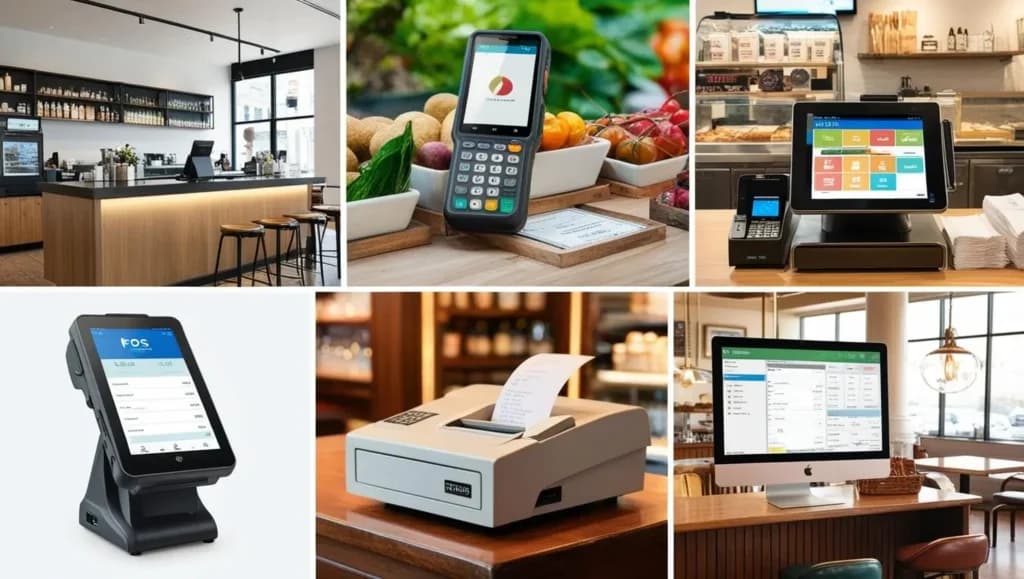
A POS (point of sale) system is the system you use at your counter to take payments and run your business. It's two things working together: the equipment customers see (a tablet, phone, or screen, plus a card reader) and the program running on that equipment (the app that tracks sales, inventory, customers, and everything else). When a customer is ready to pay, you ring them up on the screen, they tap or insert their card, and the POS handles everything that happens next - from sending them a receipt to updating your stock count.
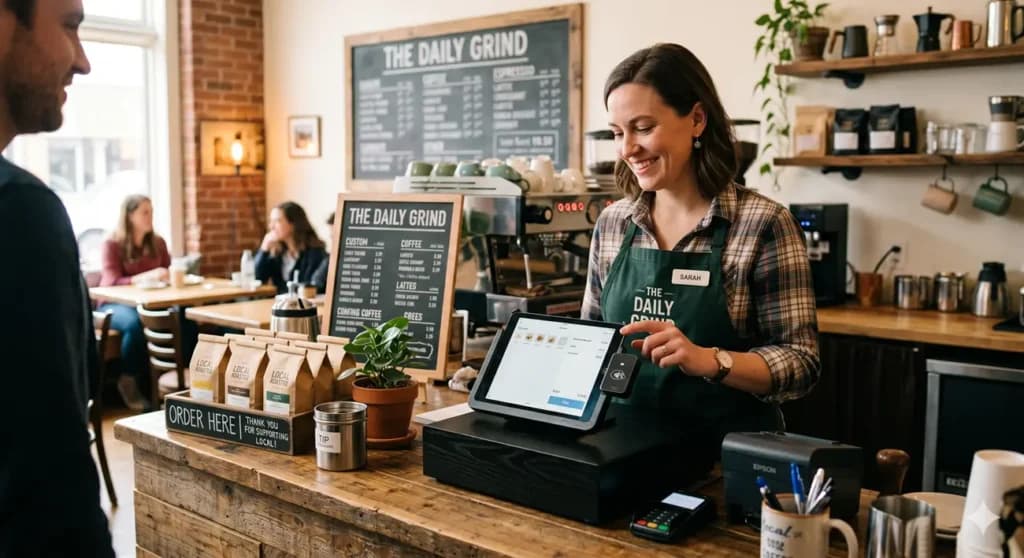
The simplest way to picture it: imagine your local coffee shop. The barista taps your order on an iPad. You tap your card on a small device. You get an email receipt seconds later. Behind the scenes, the iPad just told the coffee shop owner that one less large oat latte is in stock, that you came back for the third time this month, and that 2:30 pm is their busiest hour. That whole thing - the iPad, the card reader, and the app doing the tracking - is the POS system.
POS = Point of Sale. The name is literal. It's the system at the point where the sale happens. In modern usage, a POS system means the whole package: the equipment, the app, the payment processing, and the data tracking.
The two parts of a POS system
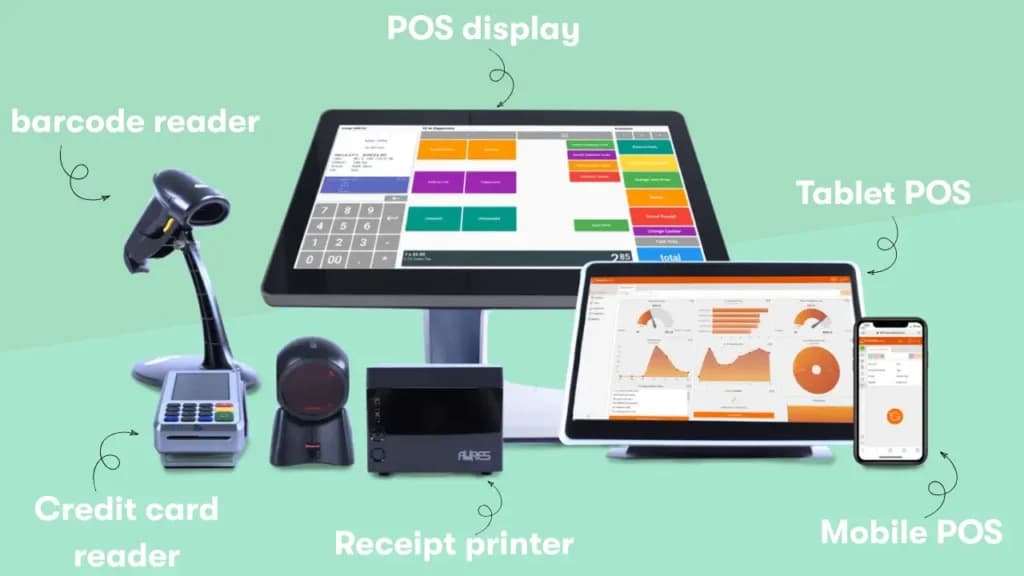
Part 1: The equipment:
- A screen (tablet, smartphone, or dedicated POS terminal)
- A card reader for accepting card and tap payments
- A barcode scanner if you sell physical products
- A receipt printer if you give paper receipts
- A cash drawer if you take cash
Part 2: The app:
- Records every sale you make
- Tracks how much inventory you have left
- Saves customer information automatically
- Shows you reports - what sold, when, and how much
- Connects to your other tools (accounting software, email marketing, online store)
The equipment lasts for years. The app updates automatically. For a small business in 2026, what matters most is the app - not the fancy hardware.
How does a POS system work?
A POS system works by combining the equipment at your counter with an app that handles all the behind-the-scenes work. When a customer is ready to pay, the cashier scans an item or taps it on the screen; the app calculates the total with tax; the customer pays by card or tap; the POS saves the transaction, sends a receipt, and updates your stock count automatically. The whole thing takes seconds.
A POS system can handle three different selling situations: in-person sales at your counter, online sales through a website, or both at once. If you do both, the POS automatically keeps your stock counts the same online and in person. Sell one item online - your in-store stock goes down by one, too. No more accidentally selling something to two different customers.
For mobile or service businesses without a physical storefront, you can run a complete POS on your existing smartphone with Tap to Pay. Your customers expect tap-to-pay. Most modern POS systems handle this natively.
Why every modern POS supports tap-to-pay:
- 86% of global consumers now use contactless payment methods in 2025.
- 68% of US card transactions are contactless-enabled- a 10% increase over the past year.
- 83% of small businesses that adopted contactless technology reported higher customer satisfaction in 2025.
What does a POS system actually do for me?
A POS system does five things for a small business: it takes payments (cards, tap, cash, mobile wallets), automatically tracks your inventory, remembers your customers, generates sales reports, and connects to your other business tools. Most modern POS systems include all five in their basic plans - you don't need to pay extra for inventory tracking or customer data. What changes between plans is usually the depth (how many users, how many locations) - not whether you have these features at all.
This is the question we get most often from small business owners. Here are honest answers to each one.
Does a POS system include inventory tracking?
Yes - almost every modern POS system tracks your inventory automatically, and it's included in the basic plan. When you sell something, your stock count decreases by 1. When stock is running low, the POS sends you an alert. When you're running out of something, you know before your customers do.
What's typically included by default: stock counts that update in real time with every sale, low-stock alerts, product variants (size, color, flavor), barcodes, and manual stock adjustments. What changes between POS systems is HOW the inventory works: Square keeps it simple, Toast tracks ingredients (built for restaurants), and Shopify POS syncs your in-person stock with your online store automatically.
If a POS doesn't include inventory tracking in 2026, it's not actually a real POS - it's just a payment app with a screen.
Does a POS system include customer information and loyalty programs?
Yes - modern POS systems automatically save customer information, and most include built-in loyalty programs that let your customers earn points or rewards. This includes customer profiles automatically built from purchases and purchase history, loyalty points based on spending, email/text receipt collection (which builds your marketing list), and gift card management.
For a small business, the customer information is the most underused feature in your POS. Most owners we talk to have hundreds of customer records and have never sent a single email to them. The data is sitting there. The next step is using it. (For how to actually use that data, see Sonary's email marketing strategy guide for small business.)
Does a POS system include team and employee management?
Most POS systems include basic team management - like employee logins, sales-per-employee tracking, and clock-in/clock-out for hours. More advanced features (permissions, scheduling, payroll) are usually in higher-tier plans or paid add-ons.
For small businesses with 3 or more employees, this is one of the most underused features in a POS. If your POS already tracks employee hours, you might not need a separate time-tracking tool, which saves you money.
Does a POS system include sales reports?
Yes - every modern POS system gives you sales reports, and most show live numbers on your phone whenever you want. Reports cover daily/weekly/monthly totals; sales by product/category/employee; peak hours; top sellers; and tax summaries.
For most small businesses, six numbers actually matter: daily sales trend, top 10 sellers, bottom 10 sellers, average sale size, repeat customer rate, and busiest hours. Skip the 50-metric dashboards.
Does a POS system include accounting features?
No - POS systems don't replace accounting software. They share data with it. What POS systems DO is automatically send your sales numbers to QuickBooks, Xero, or whatever accounting tool you use, so you don't have to type them in by hand. A POS doesn't do bookkeeping. It feeds data into the tool that does.
Is the customer's credit card information safe in a POS system?
Yes - modern POS systems scramble (encrypt) the credit card information before it leaves the card reader, and the actual card numbers are never saved anywhere in the system. Reputable POS providers handle all the security rules so you don't have to think about it. If a POS asks you to manually save full card numbers, walk away - that's a red flag.
Why what it actually does for me matters more than the features list
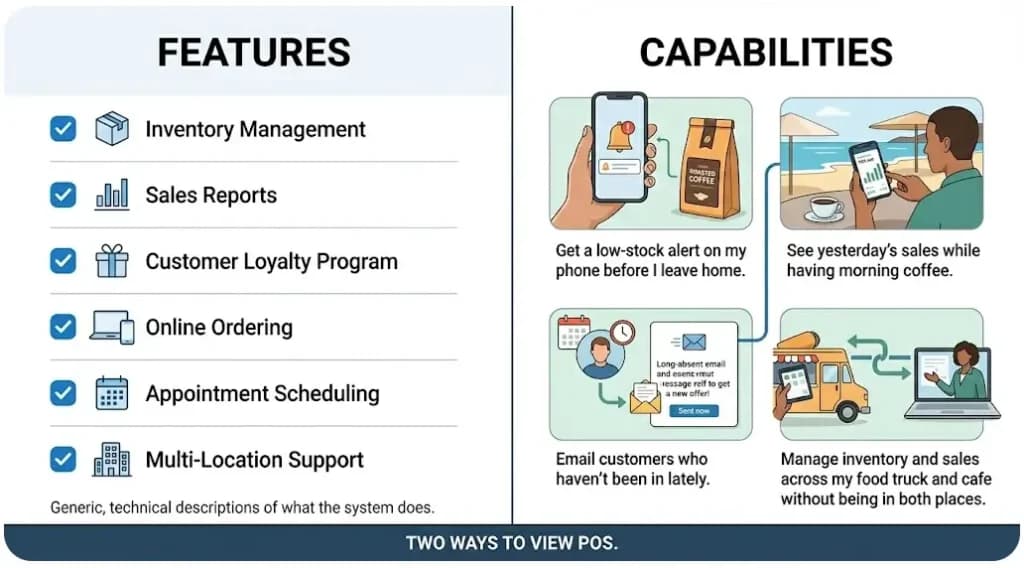
A feature is a checkbox on a sales page. A capability is the actual job you'll do with it.
Inventory management is a feature. Every POS has it. But the way different POS systems handle inventory varies widely. Square keeps it simple. Toast tracks restaurant ingredients. Shopify POS syncs to your online store. Same feature on the checklist - completely different in real use. You need to find the right fit for your specific business needs, not just the system that checks the most boxes.
The right question isn't Does this POS have inventory management? It's Will I actually be able to use this POS to do what I need to do? That's the question Daniel writes about in his guide to choosing the right CRM for small business too - the same principle applies across all small business software.
What's the difference between a POS, a cash register, and a payment processor?
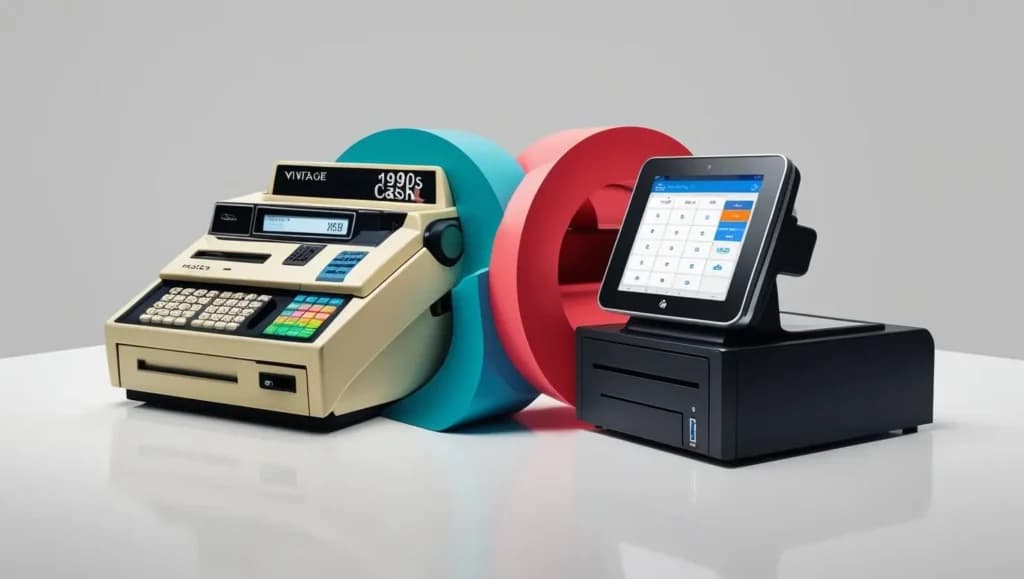
A cash register, a payment processor, and a POS system are three distinct systems that are often confused with one another. A cash register only records sales and stores cash. A payment processor handles only the credit card portion of a transaction. A POS system is the complete setup - it does what a cash register does, includes a payment processor, AND adds inventory tracking, customer data, reports, and connections to your other tools. A POS replaces the cash register entirely and includes a payment processor as just one of its features.
Cash register vs. POS - what's actually different
What it does | Cash register | POS system |
|---|---|---|
Takes payments | Cash and basic card swipes | Cash, all major cards, tap-to-pay, mobile wallets, online payments |
Tracks inventory | No - you count by hand | Yes - automatically, with low-stock alerts |
Saves customer info | No | Yes - names, purchase history, loyalty points |
Shows reports | One end-of-day printed strip | Live dashboards on your phone |
Keeps card data safe | Limited | Encrypted automatically, follows industry security rules |
Connects to other tools | No - it's standalone | Yes - accounting, online store, email marketing |
The cash register era ended around 2015. In 2026, even the smallest operation is better off with Tap to Pay on a smartphone (no special equipment needed) than a $500 traditional register.
POS system vs. payment processor
A payment processor ONLY handles the credit card transaction itself - the part where the card is approved, and the money moves from the customer's bank to yours. Examples: Stripe, PayPal, Adyen.
A POS system includes a payment processor PLUS the screen at your counter, inventory tracking, customer data, reports, and connections to your other tools. You don't need a separate payment processor if you have a modern POS - payment processing is included. What you need to check is the RATE the POS charges for processing, because some POS systems mark up the rate (which is why we recommend Helcim for small businesses that care most about transparent processing fees).
For the full side-by-side breakdown of two of the most popular POS options, see Sonary's Clover vs. Square comparison.
How much does a POS system cost for a small business?
A POS system for a small or micro business costs $0-$200 a month for the app, plus 2.3-3.0% per card sale, plus equipment ranging from $0 (using your existing smartphone) to $2,000 for a full counter setup. Most small businesses spend $30- $100 per month. Free plans like Square genuinely work for very small businesses - but transaction fees are higher, so as your sales grow, paying for a plan with lower fees usually saves you money. For a complete pricing breakdown with examples by business type, see Sonary's How Much Does a POS System Cost guide.
What a POS costs in 2026 - real numbers
Cost | Cheap option | Middle option | Premium option |
|---|---|---|---|
App (per month) | $0 (Square Free) | $30-100 | $100-300 |
Equipment (one-time) | $0-59 | $300-1,000 | $1,500-3,000 |
Card transaction fees | 2.6-3.5% per sale | 2.4-2.9% per sale | 2.3-2.6% per sale |
Realistic monthly total | $0-50 | $50-200 | $200-500+ |
*Pricing checked April 2026. Always verify before signing up.
Real cost examples for small businesses
Sonary's POS cost guide shows real take-home math for different business types:
Real take-home math by business type:
- Boutique clothing store processing $10,000/month on Lightspeed: $89/month software + $1,260 in transaction fees =$8,740/month take-home
- Busy restaurant processing $50,000/month on Epos Now: $422/month software + $6,300 in transaction fees =$43,278/month take-home
The pattern in both examples: the transaction fees are bigger than the software cost. That's the math you need to run before signing up for any POS.
You also need to budget for setup.
Setup and training cost:
- $200-$1,000 for training and onboarding for a small business with 5-10 employees.
The free plan math that surprises small businesses
Free POS plans are genuinely free for the app, but transaction fees are higher than paid plans. A real example using Square:
- Square Free:$0/month + 2.6% + 15¢ per in-person card sale
- Square Plus:$89/month + 2.5% per in-person card sale
If you do $5,000/month in card sales, free wins ($130 in fees vs. $89 + $125 = $214). If you do $50,000/month, paid wins by hundreds of dollars.
Don't guess. Run the math. That's exactly why we built our credit card processing fee calculator- it does the comparison instantly across multiple POS systems at YOUR actual sales volume.
Credit Card Processing Fee
Your Business Info
Processor Rates
Best option is:
Processor 2
Monthly Cost:
$298.30
Processor 2
Processor 1
How It's Calculated
For SMBs that want a simpler starting point, our free POS systems guide covers the genuinely free options worth considering.
How does Sonary verify the information we write about?
We're a small team running a small business that reviews software for small businesses. We've spent years talking to vendors' sales and support teams, testing software the way our readers would, and watching small businesses make the same mistakes over and over. Most of what we share isn't theoretical - it's the pattern we've seen play out hundreds of times.
We also publish primary research on how small businesses actually use software. Our report on how microbusinesses are managing software covers the real patterns we see across SMB software adoption - including POS. And for SMB voices outside Sonary's team, we've interviewed industry leaders like SumUp's US CEO Andrew Helms - see his perspective on the future of POS technology for context on where the industry is heading.
That's the lens. Now let's get to the recommendations.
How do you choose the right POS for your business?
The right POS isn't the one with the most features — it's the one that fits how you sell and connects to the tools you already use. Before comparing brands, answer five questions about your own business:
- Where do you sell? In person, online, or both? Selling in both places means you need stock that stays in sync across channels.
- What do you sell? Physical products need strong inventory tools; restaurants need kitchen and menu features; service businesses need scheduling.
- What's your monthly card volume? This decides whether a free plan or a paid plan with lower fees costs you less.
- What must it connect to? Your accounting, email marketing, and online store should link without manual data entry.
- Where will you be in 18 months? Pick something that still fits at your next stage, so you don't pay to switch.
Answer those, and your shortlist almost picks itself. For our specific recommendations by business type — retail, restaurants, food trucks, cafés, service businesses, and Shopify sellers — see Sonary's best POS systems for small businesses and our best free POS systems. That's where we name and compare individual tools.
What's the most expensive POS mistake small businesses make?
The most expensive POS mistake small businesses make isn't picking the wrong tool - it's not understanding how the price changes as your business grows. SMBs pick what's cheapest today, build their whole workflow on it, then hit a price jump 12-18 months later that costs 10x more than they planned for. By that point, switching is painful enough that most just absorb the cost. The fix: think about what you need now AND what you'll need at the next stage of growth before you commit.
Once you start using a POS, switching isn't really an option anymore. You've trained your team. Your inventory is loaded. Your customer data lives there. Your other tools are connected. Switching means rebuilding all of that - usually 1-3 months of headache. They picked too small, got locked in, and had to do the painful switch anyway.
Why the price-jump trap matters:
- 61% of businesses had to upgrade their POS systems at some point
They picked too small, got locked in, and had to do the painful switch anyway. A POS that costs you $50/month at $5,000 in monthly card sales can cost $500/month at $50,000 in monthly card sales - and many small businesses don't see the jump coming until they're past the threshold.
The most common SMB POS switching pattern
Most POS switches we see at Sonary go INTO and OUT OF Square. Square's free plan is the gateway - no monthly fee, easy setup, intuitive. Many small businesses start there. Then they realize, at $5,000-$10,000 in monthly card sales, that Square's transaction rates are higher than competitors', and the math no longer favors free.
That's the pattern: Square gets the new businesses. Other POS systems get the growing businesses. Knowing this pattern up front lets you decide whether to start with Square (and plan to switch later) or skip the switch by starting with the right paid POS for your projected sales.
Start with simple and cheap if the budget is tight - but always know which POS you'll switch to next, and what threshold triggers the switch.
The 2 underrated POS systems most small businesses miss
The two most underrated POS systems for small businesses in 2026 are Helcim and Epos Now. Helcim is overlooked because it doesn't have the marketing budget of Square or Toast, but it offers the lowest transparent transaction fees in the industry. Epos Now is a reliable cloud-based POS that handles sales and inventory really well. Neither is loud about marketing, which is exactly why they're worth knowing about.
Almost every best POS system list skips these two. We think that's a mistake.
Why brand recognition skews the conversation:
- Square dominates the POS software market with a 27% share.
- Toast holds 24%.
The two giants get most of the attention because they have the marketing budgets - not because they're always the best choice for every small business.
Helcim - the transparent transaction fee winner
Helcim is built around interchange-plus pricing - basically, the most honest pricing model in payment processing. Most competitors mark up payment processing through pricing that hides their margins. Helcim shows you exactly what the card networks charge and what Helcim adds.
For small businesses processing more than $5,000/month in card sales, this transparency typically means lower total fees than Square, Stripe, or most competitors. The trade-off: Helcim has fewer integrations than Square or Toast, and the brand isn't as well-known.
Epos Now - the reliable cloud POS no one talks about
Epos Now is a cloud-based POS that reliably handles retail and hospitality. It's not the cheapest, not the most feature-rich, not the most-marketed - but it works.
This is the same pattern we wrote about in our CRM guide for Odoo: quiet brands with strong products that get skipped by content sites optimizing for the loudest names.
Why do integrations matter more than features?
The right POS isn't the one with the most features - it's the one that connects to the other tools you already use, so your data flows automatically without you typing it in. POS systems that integrate with email marketing platforms(Klaviyo, Mailchimp) let you build a real customer base. POS systems that connect to accounting software(QuickBooks, Xero) eliminate manual data entry. A POS that connects to your online store(Shopify or WooCommerce) keeps your stock counts in sync across all channels.
If your POS handles payments + inventory + employee time tracking + sales reports, you're replacing 3-4 separate tools you'd otherwise pay for ($30-60/month for a payment processor, $30-100/month for inventory software, $5-10 per employee for time tracking, $30-100/month for analytics). A single POS that handles all of this might cost $100-200/month - but you're saving the subscription costs PLUS the time spent connecting them. The time you save on connecting tools manually is often worth more than the subscription savings.
Honest exception: if your current setup works without paying for an upgrade, don't replace it just to replace it. But if you're spending hours every week creating manual reports, matching data between systems, or counting inventory by hand - that's the signal.
The 3 connections that drive real ROI for small businesses
1. POS + email marketing (Klaviyo or Mailchimp)- the highest-leverage connection. Customer purchase data automatically flows to your email tool, so you can email customers who haven't been in for 60 days, send birthday rewards, earn loyalty points, and turn one-time buyers into repeat customers.
2. POS + accounting (QuickBooks or Xero)- eliminates the biggest time-waster in small business operations: typing daily sales into accounting software by hand. Saves most small businesses 5-10 hours a month.
3. POS + online store (Shopify, WooCommerce)- non-negotiable for any small business with both physical and online sales. Stock counts stay matched. The same customer record works in both places.
Do you really need a POS system for your small business?
Yes - for almost every small or micro business in 2026, a POS system is the right choice. The cash register era ended around 2015. Modern POS systems do everything a register does PLUS inventory, customer data, reports, and connections to other tools - for $0-$200 a month. Even the smallest business can run a complete POS on an existing smartphone with Tap to Pay. The right POS isn't about features. It's about fit, connections, and pricing that grow with your business. Pick by use case, plan for your next stage of growth, and use Sonary's credit card processing fee calculator to compare your real costs before signing up.
Start with your business type. Match it to one of our recommendations above. Verify pricing on each vendor's website. Run the math at YOUR actual sales volume. Skip the enterprise systems built for businesses with dedicated IT. Consider the underrated picks (Helcim, Epos Now) before defaulting to the brands with the loudest marketing.
Do this, and the POS you choose becomes a multiplier on every customer transaction for years.
FAQ: Most common POS questions from small business owners
What is a POS system in simple terms?
A POS (point of sale) system is the screen at your counter where customers pay you, plus the app that runs on it. The screen takes the payment. The app tracks sales, inventory, customers, and reports. It's the modern replacement for a cash register - and it does much more than just take money.
Does a POS system include inventory tracking?
Yes - almost every modern POS system tracks your inventory automatically and includes it in the basic plan. When you sell something, your stock count decreases by 1. When stock is running low, you get an alert. The depth varies by vendor, but the basics remain the same.
Does a POS include customer loyalty programs?
Most POS systems include a basic loyalty program - customers earn points based on spending. Advanced features (tiered rewards, custom campaigns, SMS marketing) are usually in higher-tier plans or paid add-ons.
Can a POS system work without internet?
Most cloud-based POS systems include offline mode that lets you keep accepting payments when WiFi drops. Quality varies - Toast's is robust, some others are barely functional. During your trial, deliberately disconnect WiFi and try to process a sale.
Is a POS system the same as a payment processor?
No. A payment processor handles only the credit card transaction itself. A POS system includes a payment processor PLUS equipment, inventory tracking, customer data, reports, and connections to other tools.
Can I use a POS system on my smartphone?
Yes - and for many very small businesses, this is the cheapest way to start. Square Tap to Pay on iPhone (and Android equivalents) lets customers pay by tapping their card or phone directly to your device, with no separate POS terminal or card reader needed.
How much does a POS system cost for a small business?
A POS for a small or micro business costs $0-$200/month for the app, plus 2.3-3.0% per card sale, plus equipment ranging from $0 (using your smartphone) to $2,000 for a full counter setup. Most small businesses spend $30-$100/month total. Run the math at YOUR sales volume using Sonary's credit card processing fee calculator- and see our POS cost guide for real examples.
What's the most expensive POS mistake a small business can make?
Not understanding how the pricing changes as your business grows. SMBs pick what's cheapest today, build their workflow on it, then hit a price jump 12-18 months later. The fix: think about what you need now AND what you'll need at the next stage before you commit.
What's the best POS system for a small restaurant?
Toast - built specifically for food service. For very small food businesses, Square for Restaurants is a more affordable alternative. See Sonary's best POS for restaurants for more options.
What's the best POS system if I already use Shopify?
Shopify POS - almost always. Not because of the brand, but because of the deep connection to your online store. Switching to anything else means rebuilding integrations that Shopify POS gives you natively.
Are there underrated POS systems most small businesses don't know about?
Two: Helcim(lowest transparent transaction fees - overlooked because it has a small marketing budget) and Epos Now(reliable cloud-based POS that punches above its name recognition).
About the author: Daniel Zvi covers the intersection of AI app builders and B2B software at Sonary. He writes to give non-technical founders the practical insights they need to make the most of modern tools - including POS systems, CRMs, payment processors, and AI-powered business software. The recommendations in this guide come from Sonary's actual experience reviewing POS software as a small business itself.