
How to Choose the Right CRM for Your Small or Micro Business in 2026: The Sonary Guide

The right CRM for a small or micro business comes down to one question, almost no one asks correctly: not what features do I want? But what capabilities do I actually need to use weekly? Most small businesses overpay for features they'll never touch and underbuy on the integrations they live or die by.
After reviewing CRMs as a small business ourselves at Sonary, our short answer: solopreneurs should go with Zoho, ecommerce teams go with Klaviyo, service businesses with appointments go with Pipedrive, B2B sales teams go with HubSpot, and local trades go with Monday CRM. The longer answer - and why most best CRM articles steer SMBs wrong - is below.
Key points: what Sonary has learned from helping small and micro businesses choose CRMs
- Stop searching for features. Start defining capabilities. Features are checkboxes (custom dashboards, lead scoring, email automation). Capabilities are jobs (I need to see which deals haven't been touched in 14 days from my phone). Every SMB CRM mistake we see traces back to this confusion.
- Most SMBs that choose Salesforce shouldn't have. They picked it for brand authority, then discovered they need Salesforce's paid support for basic tasks like adding a column or building a dashboard. Salesforce isn't bad. It's built for enterprises with dedicated CRM admins. It's almost always overkill for small businesses.
- HubSpot's free tier is a trap if you don't read the fine print. It's genuinely useful for small teams - but new accounts are capped at 1,000 contacts and 2 users, and the moment you upgrade, every contact in your free CRM gets pulled into the paid Marketing Hub at much lower contact limits. Suddenly, free becomes $20/seat plus marketing tier costs.
- The most common SMB CRM switch is INTO and OUT OF HubSpot. When SMBs leave HubSpot, they typically move to Klaviyo (if they're ecommerce) or Zoho (if they want similar functionality at a lower cost). Knowing this pattern ahead of time saves you 6 months of regret and headache.
- The #1 reason SMBs abandon a CRM in the first 6 months is wrong expectations. They picked based on a feature list, but the actual software organizes work in a way that doesn't align with their thinking. All features look the same in the comparison tables. Interface, layout, and UX don't.
- For some micro businesses, building your own CRM with AI app builders like Base44 or Lovable now beats buying one. This is a real option in 2026 that wasn't viable two years ago. You simply tell the AI builder what you want to do (your capabilities) and which tools it needs to integrate with - you can have a working CRM in an afternoon for less than one month of HubSpot Starter.
- Odoo is the most underrated CRM for SMBs in 2026. Almost nobody recommends it because it's not loud about marketing. It's an excellent fit for small businesses looking for an open-source, customizable, and genuinely affordable solution.
- Sonary tests these tools as a small business ourselves. This isn't enterprise-bias content. We use HubSpot for our own website contact lists. We've watched HoneyBook work for solopreneur clients. Our recommendations always come from really running a small business while reviewing software for small businesses.
- Adoption beats features every time. Roughly 65% of CRM implementations fail because teams don't actually use them. The simplest tool your team will open every Monday morning always beats the most powerful tool that doesn't get used.
How does Sonary think about choosing a CRM for small and micro businesses?
At Sonary, we approach the CRM choice for small and micro businesses through three questions in this order:
- What capabilities do you need (not features) - what jobs you want the CRM to do weekly
- Which tools do you already use that the CRM needs to integrate with - Gmail, Google Calendar, QuickBooks, Shopify, Outlook
- Realistically, what will your team actually use?
Get these three answers before you look at a single product page.
Most SMBs mistakenly flip the order: they start with product comparisons and end up picking the wrong one. We've watched this play out hundreds of times across different small and micro businesses. The pattern is always the same.
Why capabilities, not features is the most important reframe you can make
Comparison sites - including Sonary - list features. That's how the industry works. The problem is that two CRMs can both have contact management as a feature and feel completely different to use.
Here's what we mean. Contact management might look like:
- A spreadsheet-style table where each row is a customer, and you scroll across columns to see details
- A card view where each customer opens into a full profile screen with tabs
- A timeline-first view where the focus is on every interaction in chronological order
All three are contact management. The feature checkbox is the same. The actual experience of using them is completely different - and matches different brains differently.
The capabilities reframe asks: what do you actually want to DO?
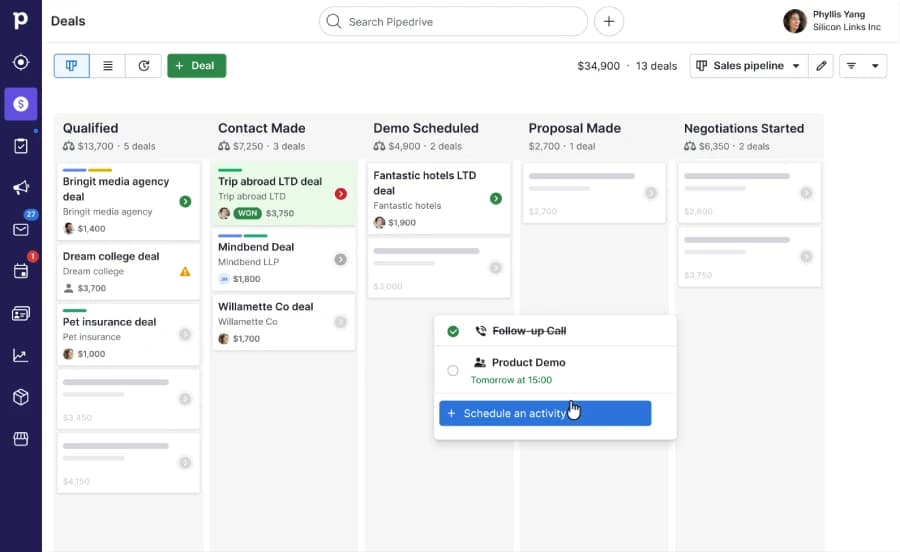
- Do you want to scan your full customer list and spot patterns? → table view (Pipedrive, Zoho)
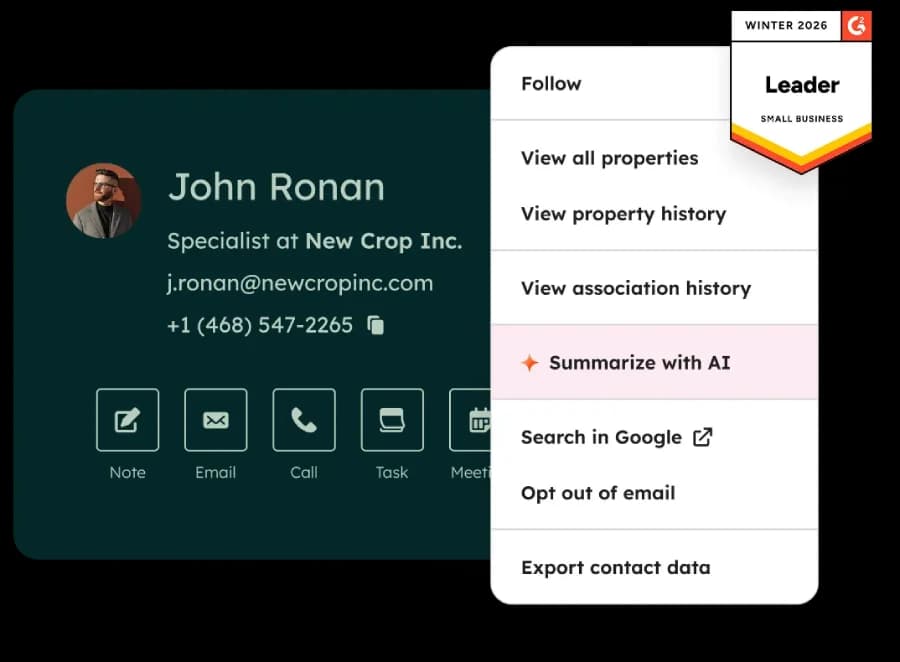
- Do you want to dive deep into one customer at a time? → card-based (HubSpot)
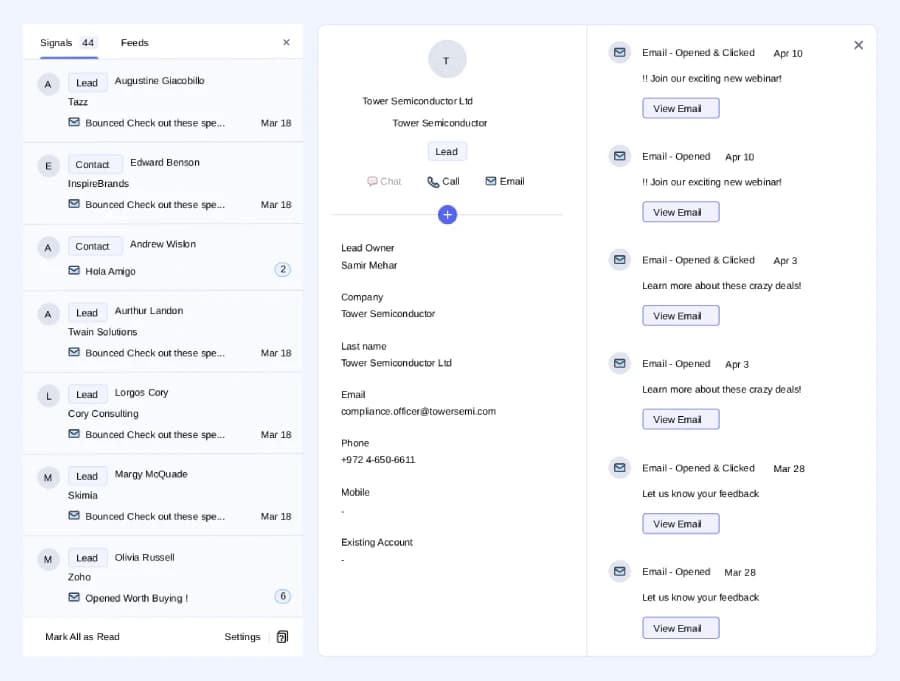
- Do you want to see what happened across all communications? → timeline-first (HubSpot, Klaviyo)
This is the one question most CRM buying guides skip. It's also the question that, when answered correctly, eliminates 80% of the options before you start.
Why Sonary's perspective on SMB CRM is different
Sonary is a software review platform for small businesses. We're not a media company writing about enterprise CRM from outside. We use these tools. I personally use HubSpot for our own contact and review tracking - which means I run into HubSpot's actual limitations in real workflows, not just from reading documentation.
This matters because most CRM best-of-content is written by:
- Enterprise consultants who understand Salesforce and Microsoft Dynamics deeply, but don't know what it's like to choose a CRM with no IT department
- Affiliate sites that optimize for whichever CRM pays them the most per click
- Vendors writing thinly-disguised marketing as comparison guides
We're none of those. We're an SMB choosing tools for other SMBs, with relationships across most major CRM brands' sales and support teams (which means we hear what's actually happening with their customers - not just what's on their pricing page).
Why do most small businesses pick the wrong CRM? The 3 most common Sonary observations
The three most common CRM mistakes we see at Sonary are:
- Picking Salesforce for the brand name when they don't have the dedicated admin Salesforce requires
- Picking HubSpot's free tier without reading the contact limits and getting trapped into paid upgrades
- Picking based on a feature checklist that doesn't match how the actual software works.
Each of these mistakes costs SMBs 6-12 months and several thousand dollars in switching costs.
These aren't generic common mistakes you read in every CRM article. These are patterns we see specifically because we work with small and micro businesses every day.
Mistake 1: Picking Salesforce because of the brand name
Most SMBs we know that picked Salesforce did so because of their brand authority. It's by far one of the most recognized names in CRMs. It could be because their consultant recommended it. Or a bigger company they admire uses it. So they sign up.
Then reality hits:
- Adding a custom column requires Salesforce paid support
- Building a custom dashboard requires Salesforce paid support
- Customizing a workflow requires Salesforce paid support
- Adopting it across the team requires expensive training
Salesforce isn't bad software. It's the opposite - it's incredibly powerful. The mismatch is that Salesforce is built for enterprises with dedicated CRM admin positions. That role doesn't exist in a 5-person business. So you either pay Salesforce thousands extra for ongoing support, or you use 15% of what you're paying for.
Compare this to HubSpot or Pipedrive: both offer built-in integrations with hundreds of common tools, and their UIs are friendly enough that almost any small business owner can configure them without paid help. For 95% of small and micro businesses, that ability to self-serve is worth more than every enterprise feature Salesforce offers.
Mistake 2: Picking HubSpot Free without reading the fine print
HubSpot Free is genuinely a good product. We use it. The issue isn't quality - it's that small businesses don't read the built-in limitations before they build their workflow on top of it.
The numbers SMBs miss:
- New free accounts are capped at 1,000 total contacts(changed September 2024 - older articles still claim 1M)
- Only 2 free seats for users
- Zero workflow automation- you need the Starter plan ($50/month) for any real automation
- 2,000 marketing emails per month total
- The moment you upgrade to a paid Marketing Hub, all the contacts in your free CRM get pulled into the paid system with much lower paid contact limits - so you may need a higher tier just to keep the contacts you already have
For a true micro business under 1,000 contacts, this is fine. For anyone scaling, the trap closes a lot faster than people expect. We watch SMBs hit it around the 6-month mark.
Mistake 3: Picking based on features instead of how the CRM actually works
This is the one most teams underestimate. From our experience with SMB clients, wrong expectations are the #1 reason a CRM gets abandoned in the first 6 months.
The pattern: someone reads a comparison article or reads an AI overview. The features all line up with their business needs on paper. They pick the one with the most 'checkmarks'. They sign up. They open the platform only to find that the way the interface organizes work doesn't match how they think about their business.
Some people need a table view of customers. Some need a card view. Some need a timeline view of every interaction. The truth of the matter is that all features look the same in a comparison table. The actual experience of using them is completely different.
Our recommendation: before you commit, watch a real product demo (not a marketing video) for each finalist. Better still, watch a YouTube tutorial of a real user doing real work in the tool. If the way they navigate doesn't feel right to you in 5 minutes, it won't feel right after 5 months.
Which CRM should I choose for my specific small business?
The right CRM depends on your specific use case and business needs.
After reviewing CRMs as a small business ourselves at Sonary, our recommendations are the following:
- Solopreneur creatives should go with Zoho
- Shopify ecommerce under $500K should use Klaviyo
- Service businesses with appointments should go with Pipedrive
- 5-person B2B sales teams are a good fit for HubSpot
- Real estate agencies should go with Odoo, Pipedrive, or Zoho
- Restaurants should use HubSpot
- Local trades should use monday CRM. Here's why for each.
These aren't theoretical recommendations. These are the situations we actually see day to day at Sonary, and the tools we'd send a friend to.
Solopreneur photographers, designers, or freelancer creatives → Zoho
Why Zoho: Solopreneurs need a digital notebook to organize client info, track projects, and remember follow-ups - without paying for features they'll never use. Zoho's free tier (up to 3 users) covers exactly this without forcing you into paid tiers prematurely. The interface isn't the prettiest, but for solo creatives, it's enough.
Alternatively, if you bill by project, HoneyBook handles proposals, contracts, and invoicing in one tool. It's not technically a CRM, but for many freelancers, it covers the actual job better.
Small ecommerce stores on Shopify, under $500K/year → Klaviyo
Why Klaviyo: General CRMs treat customers as contacts in a sales pipeline. Klaviyo treats them as buyers - purchase history, abandoned carts, browsing behavior, lifetime value, product affinity. For ecommerce SMBs, this difference IS the whole point of having a CRM, it's not just sales or marketing, it's a whole pipeline.
Native integration with Shopify means setup takes 30 minutes, not 30 hours. Free up to 500 contacts and 500 emails/month. For deeper analysis, see our HubSpot vs. Klaviyo comparison for ecommerce abandoned cart automation.
Service business with appointments - beauty salons, therapists, tutors, fitness trainers → Pipedrive
Why Pipedrive: Service businesses with appointments need to track clients through clear stages - initial inquiry, booked, served, follow-up, repeat customer. Pipedrive's drag-and-drop pipeline is built for exactly this kind of stage-based tracking. Mobile app actually works on the road, which matters when your office is a salon chair or a client's home.
Alternatively, if you book a lot of appointments, Vcita combines a client portal, online scheduling, invoicing, and basic CRM in one tool - designed specifically for businesses where customers book time with you.
5-person B2B sales team → HubSpot
Why HubSpot: For B2B sales, you usually need marketing tools alongside the CRM (landing pages, email sequences, lead capture forms) because B2B leads come through content. HubSpot's biggest strength is its unified platform: sales and marketing share data without the duct tape required by connecting separate tools.
The free tier covers the basics. Most 5-person B2B teams end up on Sales Hub Starter ($20/seat) within 6 months, but the upgrade path is smooth.
Real estate agent or small brokerage → Odoo, Pipedrive, or Zoho
Why these three: Real estate is appointment-driven and pipeline-driven, so the right tool depends on team size and budget.
- Solo agent or 2-3 people on a tight budget: Zoho Free (3 users)
- Growing brokerage that wants a visual pipeline: Pipedrive
- Open to something open-source and customizable: Odoo (more on this later)
What real estate doesn't need: HubSpot's marketing tools (you're not running content campaigns) or Salesforce's enterprise features.
Restaurant or food business → HubSpot
Why HubSpot: Restaurants need to manage customer relationships across multiple channels - reservations, loyalty programs, catering inquiries, email lists, and social media DMs. HubSpot's unified inbox (which combines email, chat, and forms) plus marketing tools make this easier than running 5 separate tools. The free tier handles a single-location restaurant; the Starter scales to multi-location.
Local trades - plumbers, electricians, contractors → monday CRM
Why monday CRM: Local trades businesses operate in two worlds - sales (winning the job) and project management (executing the job). Most CRMs handle one well; monday handles both excellently. The visual board interface translates naturally to job tracking, and field teams find it intuitive on mobile.
For a sales-focused comparison, see our Pipedrive vs. Monday CRM breakdown.
Special category: when an AI-built CRM beats buying one
For some micro businesses, especially those with fewer than 5 people and very specific workflows, building your own CRM with an AI app builder like Base44 or Lovable now beats buying off-the-shelf.
The math is simple: HubSpot Starter is $20/seat × 3 seats = $60/month = $720/year. A custom CRM built in an afternoon with Base44 or Lovable can cost less than two months of that, for something perfectly tailored to your capabilities and integrations.
This works especially well when:
- You only need 5-10 specific capabilities
- You already use specific tools that need integration (Google Calendar, QuickBooks, Stripe)
- Off-the-shelf CRMs feel like 80% overkill for your use case
For a deeper look, see Sonary's piece on how we built a custom AI CRM in one afternoon for $20.
What is the most underrated CRM for small businesses?
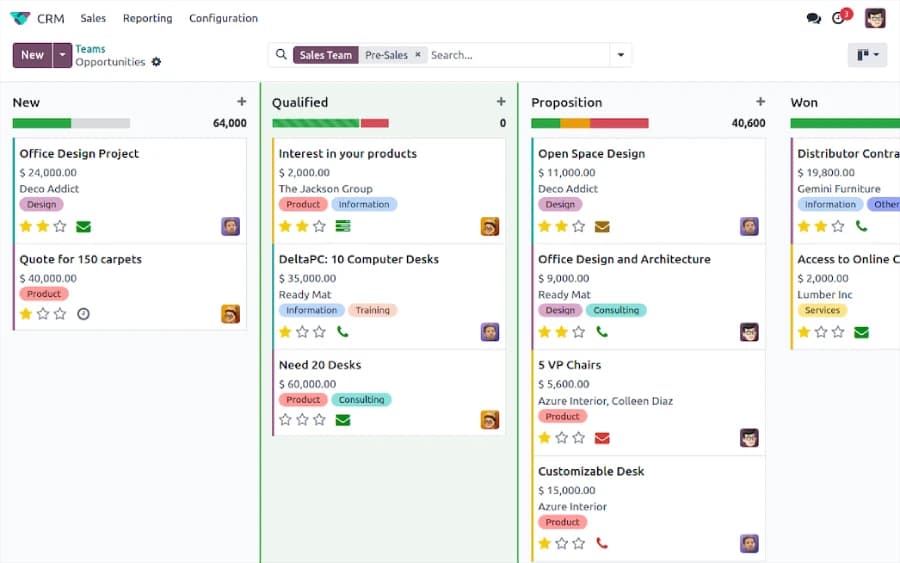
In our honest opinion, Odoo is the most underrated CRM for small and micro businesses in 2026. It's open source, genuinely customizable without paid support, and the CRM module integrates natively with Odoo's accounting, inventory, and project management modules, giving small businesses something close to an all-in-one platform at a fraction of the cost of enterprise alternatives. The reason nobody is talking about it: Odoo doesn't market loudly, and that's exactly why it's worth knowing about.
Almost every best CRM list skips Odoo. We think that's a huge mistake.
Why Sonary likes Odoo for SMBs
- Open-source community edition is genuinely free, not free with limits
- The CRM module is a small piece of a larger, comprehensive business suite- accounting, inventory, project management, e-commerce, all integrated
- For small businesses that hate having 8 different tools, Odoo can replace several of them
- The interface is much more user-friendly than enterprise tools- closer to HubSpot than Salesforce in feel
- Customization doesn't require paid support for technically comfortable users
Where Odoo isn't right
- You need to be at least somewhat technical to set it up well - there's a learning curve, of course, you can make use of AI tools to guide your way through the setup
- Customer support is community-driven for the free version
- The integrations market isn't as deep as HubSpot, Salesforce, or other enterprise CRM systems
- Real estate, restaurants, and very small solopreneur use cases are usually better served by purpose-built tools
For the right SMB - somewhat technical owner, who wants an integrated platform, doesn't want to pay enterprise prices - Odoo punches well above its weight.
What's Daniel's honest take on HubSpot Free for SMBs?
HubSpot Free is a great tool - I use it myself for Sonary's contact management. The interface is intuitive; you can easily manage your list and add custom data per row, and onboarding takes 30 minutes instead of 30 hours. Where HubSpot Free fails: calendar sync. The platform only syncs with your primary Google or Outlook calendar, which makes setting up Google Meet calls with external customers genuinely confusing - you end up duplicating events or are unsure whether to schedule from HubSpot or directly in Google Calendar.
This is my personal experience with HubSpot Free, not just theory. Here's what I actually love and hate.
What HubSpot Free does brilliantly
- The setup is fast and user-friendly. I had our review pipeline running within an hour, no technical help needed.
- Custom fields are easy. Adding new data columns to track per-contact information is genuinely intuitive - no consultant required.
- The list management is clean. I can segment contacts by type, source, status, or any tag I've assigned them in seconds.
- The interface doesn't fight me. This sounds obvious, but it's rare. Most CRMs I've used feel like they're trying to teach me their philosophy. HubSpot just lets me work.
- The AI assistant works pretty well. HubSpot recently released an update introducing Breeze, a powerful collection of AI tools built into its platform. Think Microsoft Copilot companion type AI. From my experience, it genuinely helps speed up what I'm trying to do.
Where HubSpot Free fails (specifically for me)
The biggest issue is calendar sync. HubSpot only syncs with your primary calendar. If you have multiple calendars in Google or Outlook (most professionals do - work, personal, projects, team calendars), HubSpot only sees the primary one.
When I'm trying to set up a Google Meet with an external customer through HubSpot, this gets confusing fast. Do I need to duplicate the event? Should I just schedule directly in Google Calendar instead and skip HubSpot's meeting tool? The friction is real, and it's the kind of friction that compounds - every customer meeting becomes a small decision instead of a smooth flow.
This is exactly the kind of issue you only discover by actually using the tool, not from reading the feature list. Calendar sync is a checkbox item in every comparison; the fact that it only handles primary calendars is a footnote nobody reads until they hit it.
Who should still pick HubSpot Free despite this
If you're under 1,000 contacts, have 1-2 users, and your customer scheduling is mostly internal or async (email, not video calls), HubSpot Free is excellent. If your business relies on calendared meetings with external customers across multiple calendars, factor calendar limitations into your decision.
How do I decide between Pipedrive and Zoho for a micro business?
For a micro team that needs a digital notebook to arrange customer data without overpaying, Pipedrive and Zoho are both excellent choices- and the decision is closer than most comparison articles admit. Both are massively feature-rich, both have far more capability than most micro businesses will ever use, and the right pick comes down to which interface fits your brain better. Try both free trials. The one that feels more natural in 30 minutes is the right one.
This is the comparison Sonary gets asked most often, and the honest answer is unsatisfying: It depends on your needs! They both work quite well, but the best one is the one that aligns more closely with your business needs.
Where Pipedrive specifically wins
- Visual pipeline. If your business thinks in stages (lead → qualified → proposal → won), Pipedrive's drag-and-drop pipeline is unmatched.
- Mobile experience. Field-based teams genuinely use Pipedrive's mobile app, not just tolerate it.
- Sales-focused simplicity. No marketing modules to ignore.
- Price: Lite at $14/seat (no free plan in 2026 - only 14-day trial)
Where Zoho specifically wins
- Free tier for 3 users. Pipedrive has no free plan in 2026, so for true micro businesses, Zoho wins on price by default.
- Multiple pipelines from the Standard tier. Pipedrive's Lite plan only allows one pipeline.
- The Zoho ecosystem. If you're already using Zoho Books, Zoho Desk, or Zoho Mail, the integration is seamless.
- Mass email is built in from the Standard tier. Pipedrive locks email marketing behind add-ons.
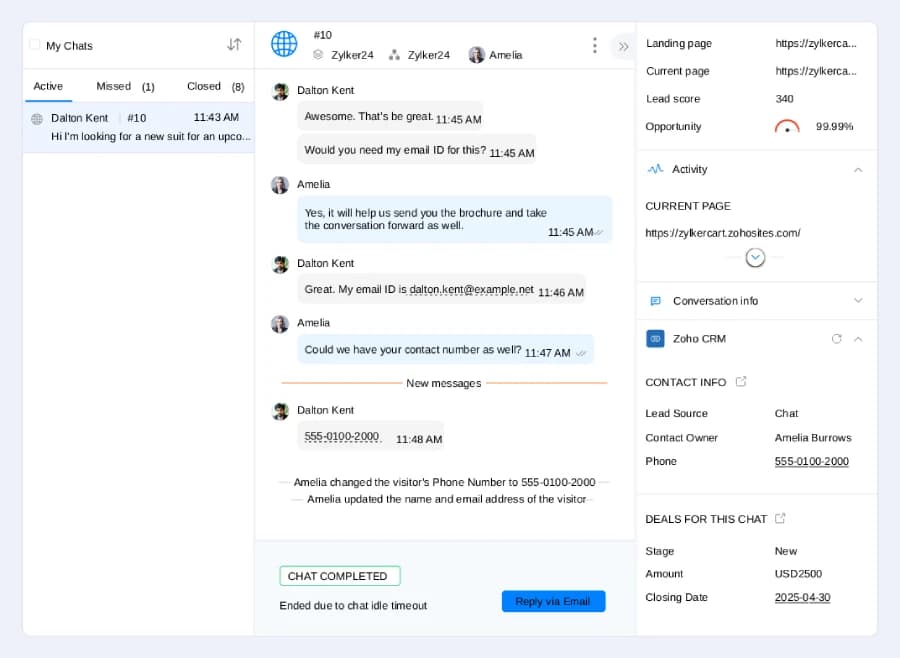
The honest Sonary recommendation
For a micro team where money matters: start with Zoho Free. If you outgrow it, upgrade to Zoho Standard ($14-20/user) before you switch tools.
For a sales-focused team that values visual workflow over price: pick Pipedrive Lite ($14/seat).
For a deeper comparison, see our Pipedrive vs. Zoho breakdown for small business sales teams.
What's a realistic CRM budget for a small or micro business?
Your CRM budget as a small or micro business in 2026 should be around $0 to $200 per month total - not per user, total. Most micro businesses (under 5 people) can get by on a free tier or a $14-20/user plan. Most small businesses (5-30 people) land between $50 and $200/month total. If you're being quoted more than $300/month for a small business CRM, you're most likely looking at the wrong tools.
CRM pricing is designed to look cheap upfront and expand quietly. Here's what to actually expect.
Verified 2026 starting prices for the top SMB CRMs
CRM | Free tier | Paid starting price | Real cost at 5 users with essentials |
HubSpot | 1,000 contacts, 2 users | Starter $20/seat/mo | $100-200/mo |
Zoho CRM | 3 users, 1 pipeline | Standard $14-20/user/mo | $70-100/mo |
Pipedrive | No (14-day trial) | Lite $14/seat/mo | $200-300/mo with add-ons |
Monday CRM | No (14-day trial) | Basic $12/seat/mo (3-seat min) | $60-150/mo |
Freshsales | Yes - basic plan | Growth $11/user/mo | $55-100/mo |
Klaviyo | 500 contacts | $20/mo (500 contacts) | $45-150/mo |
HoneyBook | No | $19/mo unlimited clients | $19-39/mo |
vcita | No | Around $24/mo | $24-65/mo |
Odoo | Yes (community edition) | $0-25/user/mo | $0-100/mo |
Pricing verified against vendor pages April 2026. Re-verify before committing - CRM pricing changes frequently.
The three hidden costs SMBs miss most often
- Add-ons that aren't optional. Pipedrive's $14/seat plan doesn't include automation, lead capture, or email marketing - all common add-ons that turn $14 into $40+ per seat.
- The HubSpot Marketing Hub trap. When you upgrade from free CRM to paid Marketing Hub, your contacts get pulled into the paid system at much lower limits, sometimes forcing a higher tier.
- Per-seat pricing on shared roles. If you have a part-time bookkeeper or seasonal helper, you're often paying full price per seat for partial use.
How do I stress-test a CRM before committing?
To stress-test a CRM before committing, narrow your shortlist to 2-3 finalists, then run real workflow tests on each: import 50 real contacts, run a complete sales cycle from new lead to closed won, try to break it with duplicate data, and open a support ticket during the free trial. The CRM that survives all four tests is the one to buy. Most demo videos hide the friction points; only real use reveals them.
The stress test catches the wrong expectations problem we mentioned earlier - the #1 reason SMBs abandon CRMs in the first 6 months.
The 4-step stress test
- Import 50 real contacts from your existing system. See how messy the import is. If it takes more than an hour for 50 contacts, scaling will be painful.
- Run a complete sales cycle. Move a deal from a new lead to a closed won. Note every place you have to leave the CRM to do something it should handle.
- Try to break it. Enter duplicate data. Delete a contact attached to a deal. Switch tabs mid-update. CRMs that survive abuse are the ones that survive your team's real use.
- Open a support ticket. Ask a non-urgent question during your trial. If they take 3 days to respond when you're a potential customer, imagine how they'll respond once you've paid.
Read the 3-star reviews specifically
Don't just read 5-star reviews. Filter for 3-star reviews on other review sites. These are usually real users describing real day-to-day annoyances (the mobile app crashes on photo upload, search misses 30% of contacts). Five-star reviews are often incentivized; one-star reviews are often outliers; three-star reviews are typically honest.
The bottom line: how do I make the right CRM decision for my small or micro business?
The right answer to how to choose a CRM for your small or micro business: define your capabilities before you compare features, match the tool to your specific use case (not the loudest brand), verify your shortlist with a real free trial, and remember that the simplest tool your team will actually use beats the most powerful tool that gets ignored. After helping hundreds of small businesses navigate this decision at Sonary, we'd add one more rule: don't pick Salesforce because it's famous, don't pick HubSpot Free without reading the contact limit, and don't pick any CRM based on a feature checklist alone.
Choosing a CRM isn't about features. It's about fit. A solopreneur photographer needs Zoho or HoneyBook, not HubSpot Enterprise. An e-commerce shop needs Klaviyo, not Pipedrive. A 5-person sales team needs HubSpot, not Salesforce. The right tool depends entirely on what your business actually does day to day.
Start with your capabilities - the actual jobs you need the CRM to do. Match those to one of the use cases above. Stress-test 2-3 finalists with real workflows. Get team buy-in before signing.
Do this, and the CRM you choose becomes a multiplier for every customer relationship you build over the years. Skip these steps, and you'll be back here in 12 months - joining the hundreds of small businesses we've watched switch CRMs because the first one didn't fit.
FAQ: the most common CRM questions Sonary hears from small business owners
What's the best free CRM for a small business in 2026?
HubSpot Free if you're under 1,000 contacts and need 2 users - clean interface, native Gmail/Outlook/Calendar integration. Zoho Free if you need 3 users (HubSpot's max is 2) or you'll use other Zoho apps. Important: Pipedrive does NOT have a free plan in 2026 - only a 14-day trial. If you're seeing Pipedrive listed as free in other articles, those are using outdated information.
Why is Salesforce often the wrong choice for small businesses?
Salesforce is built for enterprises with dedicated CRM admin positions. Almost no small business has that role. The result: you pay Salesforce thousands extra for ongoing support to do basic things like add columns or build dashboards, OR you use 15% of what you're paying for. This isn't a Salesforce quality problem - it's a fit problem. For small and micro businesses, HubSpot, Pipedrive, Zoho, or Monday CRM almost always fit better.
Can I really run a small business on a free CRM?
Yes, if you're under the contact and user limits. HubSpot Free (1,000 contacts, 2 users), Zoho Free (3 users), and Freshsales Free all handle the basics - contact management, deal tracking, email integration, mobile access. Where free plans break down: workflow automation, advanced reporting, mass email beyond limits, and team sizes above 3-5 people. Most micro businesses can run on free for the first year.
Should I build my own CRM instead of buying one?
For some micro businesses, yes - especially in 2026. AI app builders like Base44 and Lovable can produce a custom CRM in an afternoon, perfectly matched to your specific capabilities and integrations, for less than two months of HubSpot Starter. This works best for businesses with very specific workflows that off-the-shelf CRMs only partially fit. See our guide on building a custom AI CRM in one afternoon.
What does Sonary mean by capabilities, not features?
Features are checkboxes (custom dashboards, lead scoring, workflow automation). Capabilities are jobs (I need to see which deals haven't been touched in 14 days from my phone). Two CRMs can have identical feature checklists and feel completely different to use. Defining your capabilities (the jobs) before comparing features (the tools) is the single biggest improvement small businesses can make to their CRM selection process.
What's the difference between a sales CRM and an ecommerce CRM?
A sales CRM (HubSpot, Pipedrive, Zoho) treats customers as contacts in a sales pipeline - leads, prospects, deals, closed. An ecommerce CRM (Klaviyo) treats them as buyers with purchase history, browsing behavior, abandoned carts, lifetime value, and product affinity. If you sell products online, the ecommerce CRM model is fundamentally better for what you do.
Why do so many small businesses switch CRMs within their first year?
Wrong expectations are the #1 reason. They picked based on a feature checklist that didn't reveal how the actual interface organizes work. The features matched their needs; the actual experience didn't match how they think about their business. The fix: stress-test before you commit. Real use in the free trial reveals what no comparison table can.
What CRMs do small businesses most commonly switch INTO and OUT OF?
The most common switches we see at Sonary are into and out of HubSpot. SMBs hit HubSpot Free's 1,000-contact ceiling or get sticker-shocked by Marketing Hub paid tiers, and switch to either Klaviyo (if ecommerce) or Zoho (if they want similar functionality at lower cost). Knowing this pattern up front saves you from making the mistake yourself.
How long does it take to implement a new CRM in a small business?
For self-serve cloud tools (HubSpot, Pipedrive, Zoho, Monday CRM, Copper), 1-2 weeks. For tools with complex integrations or large data migrations, 4-8 weeks. The biggest variable is data migration - cleaning and importing existing customer data usually takes 60-70% of the total time. For micro businesses with under 5 people, the timeline can compress to 2-3 weeks total.
What's the single most expensive CRM mistake a small business can make?
Picking based on brand authority instead of fit. We see this most often with Salesforce - businesses pick it because it's the recognized name, then realize they need dedicated CRM admin support to use it properly. The cheaper, simpler CRM that matches your actual capabilities and team always wins. Match the tool to the job, not the brand to your ego.
How often should I evaluate whether my CRM is still right?
Every 12-18 months. Your business changes faster than your CRM does. Run a quick audit: are you using the features you're paying for? Has your team grown beyond what the tool supports well? Are integrations still working? If two or more answers raise concerns, start evaluating alternatives - but don't switch until the new tool is at least 30% better than your current one. Switching costs are real.
Related reading from Sonary
- Best CRM Software for Small Business
- Best Free CRM Software
- Pipedrive vs. Zoho: Which CRM is better for small business sales teams?
- Pipedrive vs. Monday CRM: Which is better for small business sales?
- HubSpot Marketing Hub vs. Klaviyo: Best for ecommerce abandoned cart
- How I Built a Custom AI CRM in One Afternoon for $20
- What is CRM? A Complete Guide
- Email Marketing Strategy for Small Business
About the author: Daniel Zvi covers the intersection of AI app builders and B2B software at Sonary. He writes to give non-technical founders the practical insights they need to leverage modern tools - including CRMs, POS systems, payment processors, and AI-powered business software. The recommendations in this guide come from Sonary's firsthand experience reviewing CRM software as a small business, as well as relationships with the sales and support teams of most major CRM brands.