
How to Start a Blog in 2026: A Beginner-Friendly, In-Depth Guide

To start a blog in , pick a niche, buy hosting and a domain, install WordPress, publish a keyword-researched first post, and promote it where your audience actually spends time.2026A self-hosted WordPress blog typically costs $50–$200 for the first year and can be live in about 30 minutes.
The full 10 steps:
- Define your blog's goal
- Pick a focused niche
- Choose a blog name
- Buy a domain
- Sign up for web hosting
- Install WordPress (or use an AI site builder)
- Create your core pages
- Write and publish your first post
- Submit your site to Google Search Console
- Publish consistently and promote on the right channels
So, you're thinking about starting a blog. Good timing.
Despite the rise of short-form video and AI-generated search results, over 600 million blogs exist worldwide. Roughly 77% of internet users still read blogs regularly. Businesses with active blogs generate significantly more leads than those without. Blogging has evolved - but it's far from dead.
This guide is written by the SEO team at Sonary, the same team that has built and maintains 400+ in-depth articles ranking for small and micro business software. Our content library brings us substantial organic traffic every month, and along the way we've learned what actually moves the needle in 2026 - and what doesn't. Everywhere it's relevant below, we share the specific numbers from our own data.
Why this guide is different
Most how to start a blog articles online are written by hosting companies trying to sell you hosting, or by general marketing sites that don't actually run content operations. This one is written by our in-house SEO team at Sonary, who does this for a living. Everything below is the exact framework we use internally, with real numbers from our own library.
Let's dive in.
What is a blog?
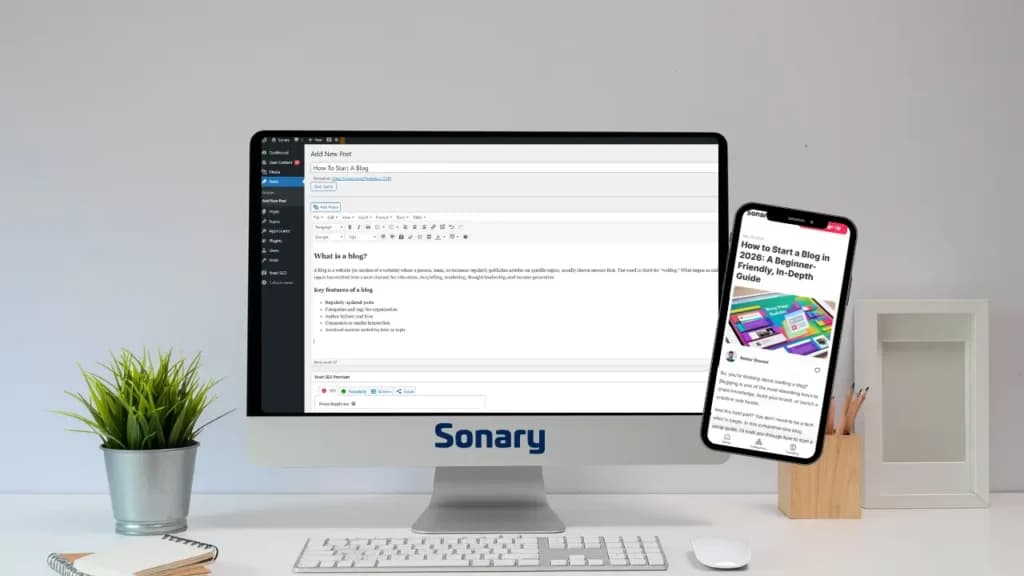
A blog is a website (or section of a website) where a person, team, or business regularly publishes articles on specific topics, usually shown newest-first. The word is short for weblog. What began as online journals in the late 1990s has evolved into a core channel for education, storytelling, marketing, thought leadership, and income generation.
Key features of a blog
- Regularly updated posts
- Categories and tags for organization
- Author bylines and bios
- Comments or reader interaction
- Archived content sorted by date or topic
How is a blog different from a website?
A website can be fully static - think of an About or Contact page that rarely changes. A blog is dynamic: it grows continuously with new content. Most modern websites include a blog section as part of their SEO and content strategy.
What can you blog about?
Anything with an audience: personal experiences and lifestyle, travel and food, professional advice (marketing, finance, coding, HR), product reviews and comparisons, news and industry analysis, or how-to guides and tutorials. Speaking of how-to content -all 10 of our best-performing articles at Sonary are how-to guides. We'll come back to why that matters shortly.
Should you start a blog in ?2026
Short answer: Yes - if you're in it for the long game. No, if you're looking for fast money or instant traffic.
Blogging in is not what it was in 2015. Google's AI Overviews now answer many questions directly on the results page. Zero-click searches are rising. AI tools have flooded the web with generic content. At the same time, quality human-authored content is more valuable than ever. Google's E-E-A-T signals (Experience, Expertise, Authoritativeness, Trust) actively reward it, and long-form posts over 3,000 words consistently outperform short ones in traffic and backlinks.2026
Start a blog if you…
- Want a long-term digital asset you fully own. Unlike social platforms, no algorithm can turn off your blog.
- Want to build authority in a niche - for career, business, or personal brand.
- Enjoy writing and can commit to at least 6–12 months before expecting traction.
- Want a platform for selling products, services, courses, or affiliate recommendations.
- Are willing to develop real expertise or original experience- not rewrite what's already out there.
Reconsider if you…
- Expect to earn money in the first few months.
- Don't enjoy writing, research, or editing.
- Want instant reach. Social video is faster.
- Plan to publish AI-generated content with no human perspective. Google's quality systems actively filter this out in .2026
What successful blogs in have in common2026
- Named, credentialed authors with real bios.
- Original research, data, or first-hand experience rather than rewrites.
- Long-form depth- typically 1,500–3,000+ words for competitive topics.
- Clear structure- H2/H3 headings that answer specific questions.
- Consistent publishing- quality over quantity; 11+ thoughtful posts per month is a strong benchmark.
- Multi-channel distribution- email, social, SEO, not just search.
If that sounds like something you can do, keep reading.
First, get clear on your goal: what is this blog for?
Honestly, starting a blog isn't complicated. The technical part is pretty simple. But before you buy a domain or pick a template, you need to answer a few important questions - because your answers shape everything that follows.
1. What's the real goal of your blog?
For most people, the headline answer is to make money. Fair. But there are almost always intermediate goals stacked underneath that one, and they matter just as much:
- Building exposure and brand awareness
- Establishing yourself as a trustworthy voice or writer in your space
- Opening doors to partnerships, collaborations, and press
- Supporting a broader business, service, or product you already run
Pick the one that's most honest for you. The goal you pick changes what you write, how you write it, and how you measure success.
2. Are you using the blog to prove your expertise?
Most business blogs exist for one reason: to show potential customers just how deeply you understand your industry. A blog is how readers figure out that you actually know what you're talking about - and it's how you move them from passive readers to real leads and customers.
If that's your goal, your content has to reflect genuine depth. Surface-level rewrites of what's already ranking will not move the needle.
3. Do you want an organic growth engine that compounds over time?
This is the goal most new bloggers underestimate. When you build content around real keywords and real user searches, you're optimizing every post to match what your potential customers are actively looking for. Every article becomes a small, permanent traffic source. Stack 50 of them over 18 months, and you have an asset that keeps working long after you've hit publish.
That's the real power of blogging - not any individual post, but the compounding effect of a library of them. Our own content library at Sonary is proof of this: 400+ articles published over several years now bring us consistent monthly organic traffic, with a large share coming from posts written 12–24 months ago. The posts keep working while we sleep.
What makes a great blog?
A great blog isn't just well-written - it's built on nine ingredients that work together. Use this as a self-audit as you plan, launch, and grow your site.
What it includes | Why it matters |
|---|---|
Clear focus | Keeps your content relevant and attracts the right readers |
Consistent posting | Builds trust and keeps your audience engaged |
Authentic voice | Helps you connect and stand out from other blogs |
Useful and valuable content | Provides readers with insights, answers, or entertainment |
Easy-to-read format | Makes your posts enjoyable and accessible on any device |
Strong visuals | Supports your content and makes your blog visually appealing |
SEO-friendly structure | Helps new readers discover your blog through search engines and AI answer engines |
Easy navigation | Allows visitors to explore more of your content effortlessly |
Clear calls to action | Encourages readers to take the next step - subscribe, share, or buy |
Miss one, and your blog still works. Miss three or four, and growth stalls no matter how much you publish.
A few hard-won warnings before you build
Based on what we see work (and not work) across our own library:
- ❌ Don't try to write for everyone - you'll reach no one.
- ❌ Don't obsess over perfection before launching. Done beats perfect.
- ❌ Don't skip SEO basics. Even simple optimizations help people find you.
- ❌ Don't copy competitors - take inspiration, but keep your own voice.
- ❌ Don't expect instant traffic. Most blogs take 6–12 months to gain traction.
- ❌ Don't publish pure AI-generated content with no original perspective. Google downranks it, and readers notice.
How to choose your blog topic and niche
Before you build anything, get clear on what your blog is about - and who it's for.
What is a blog niche?
A blog niche is a focused topic or category you'll consistently write about. Instead of trying to appeal to everyone, a niche attracts the right readers and keeps them coming back.
Food is too broad. Plant-based meal prep for busy parents is a niche.
How to choose a blog niche
Ask yourself:
- What topics am I genuinely interested in - for years, not weeks?
- What do people already ask me for help or advice on?
- Are people searching for this topic? (Check Google Trends, Ubersuggest, or AnswerThePublic.)
- Is there a way to make money in this niche eventually - products, affiliates, services?
You don't need to be an expert. Sharing your learning journey is a legitimate, proven angle - as long as you're honest about where you are.
Popular blog niches that still perform in2026
- Personal finance- budgeting, investing, side hustles
- Health and wellness- fitness, mental health, nutrition
- Travel- solo travel, budget trips, digital nomad life
- Parenting- baby tips, parenting hacks, working parents
- Food and recipes- plant-based, baking, meal prep
- Tech and AI- tool reviews, tutorials, prompts
- Career and productivity- freelancing, remote work, job search
- Lifestyle and home- decor, minimalism, sustainable living
Digital marketing, tech/AI, and personal finance remain among the highest-earning niches.
A real example: how we think about niche at Sonary
At Sonary, our expertise is software for small and micro businesses. Is that broad? Yes. Is there a lot of competition? Absolutely. But it's the core of what we actually know, and that matters more than chasing an easier niche we don't have real expertise in.
Here's a mindset shift most new bloggers miss: competition is usually a good sign. When you see a topic with real search volume and real competition, it means the topic is commercially valuable and the audience is active. If nobody's writing about a topic, there's usually a reason - and it's rarely you discovered a hidden goldmine.
Your job isn't to avoid competitive niches. It's to find a competitive niche where you can bring something the existing players aren't. For us, that's been a library of 400+ deeply researched articles specifically for small and micro business owners - an audience that bigger, generalist software sites tend to under-serve.
How to name your blog
Choose a name that is memorable, easy to spell, and at least loosely tied to your topic. Avoid hard-to-spell words, numbers, and hyphens.
A formula that works:[Topic or Benefit] + [Personality Word or Twist]
Examples:
- The Balanced Byte- tech meets mindfulness
- Savvy Spoon- budget-friendly cooking
- Wander Glow- travel + wellness
Check domain availability on Namecheap, Hover, or GoDaddy. Aim for the.com version - it's still the default readers trust. If your ideal .com is taken, consider .co or a niche-specific extension like .blog or .tech before settling for a less memorable name.
How much does it cost to start a blog?
A self-hosted WordPress blog costs $50–$200 for the first year. Ongoing costs run roughly $100–$300 per year once introductory discounts expire.
Here's the realistic breakdown:2026
Expense | What it's for | Typical cost ()2026 | Required? |
|---|---|---|---|
Your blog's web address (e.g., yourblog.com) | $10–$20/year (often free for year 1 with hosting) | Yes | |
Where your blog lives online | $2–$10/month (intro) → $8–$15/month (renewal) | Yes | |
Security (the padlock in the browser) | Usually free with hosting | Yes | |
The CMS that runs your blog | Free | Yes | |
Free theme | Your blog's visual design | $0 | Yes (free or paid) |
Premium theme | More polished design, more features | $50–$130 one-time | Optional |
Add functions (SEO, forms, backups) | $0 | Yes (free usually enough) | |
Premium plugins | Advanced SEO, forms, security | $0–$200/year | Optional |
Newsletter (MailerLite, Kit, etc.) | $0 up to ~1,000 subs, then $15–$40/month | Optional early on | |
Stock photos/design tools | Canva, Unsplash, Pexels | $0 (free tiers exist) | Optional |
For a deeper dive on hosting specifically, we break down every variable - performance, uptime, support, renewal traps - in our guide to how to host a website.
Three realistic budgets
- Bare minimum blog:~$50/year - cheap hosting plus a free domain and free theme.
- Recommended starter setup:~$100–$200/year - solid hosting, free .com for year 1, free theme, free SEO plugin.
- Growth-focused blog:~$300–$600/year - upgraded hosting, premium theme, paid SEO plugin, email marketing on a paid plan.
Can you start a blog for free?
Technically, yes - WordPress.com, Blogger, and Medium all offer free tiers. But free blogs come with real trade-offs:
- You get a subdomain(e.g., yourname.wordpress.com), not a real domain.
- Limited customization- no custom themes, limited plugins.
- Ads you don't control and can't monetize.
- You don't own your audience- the platform does, and rules can change anytime.
For a hobby, free is fine. For anything you want to grow or monetize, self-hosted WordPress is the standard - and $100–$200 a year is a small investment for full ownership and control. If budget is the main constraint, our roundup of the cheapest website builders is a good starting point.
Three ways to actually build a blog in2026
The technical part of building a blog is honestly the easiest part of this whole process. The platform you pick will walk you through most of it. Here are your three main options:
Option 1: Drag-and-drop website builders (easiest)
Platforms like Wix, Squarespace, and Shopify bundle everything - domain, hosting, design, and tools - into one subscription. You pick a template, drag elements around the page, and publish. No technical skill required. See our full comparison of drag-and-drop website builders if you want to go this route.
Best for: non-technical creators who want to be live in an afternoon.
Option 2: WordPress with pre-built templates (recommended for most)
This is the path most serious bloggers still choose in . You buy2026hosting, install WordPress (usually one click), pick a pre-built theme, and customize from there. More flexibility than drag-and-drop builders, full ownership of your content, unlimited plugins, and a clear upgrade path as you grow.
Best for: anyone who wants real ownership, monetization flexibility, and long-term scalability.
Option 3: AI site builders (fastest)
This is the newer path, and it's legitimately impressive in .2026Wix, Shopify, and WordPress all have AI-powered site builders that generate a working blog for you in minutes. You describe your blog, pick a style, and the AI handles domain suggestions, template selection, layout, copy drafts, and starter images.
The entire setup - domain, template, initial design, even first-draft content - can be almost fully automated. You'll still want to edit the AI's output so it sounds like you, but the scaffolding is done for you. For deeper research, check our guide to the best AI website builders.
Best for: non-technical creators who want the absolute fastest path to live.
All three paths follow the same basic flow: pick a domain, set up hosting, choose a template, customize, publish. The walkthrough below uses self-hosted WordPress because that's what we'd still recommend for most serious bloggers - but the same principles apply to any platform.
How to start a WordPress blog in (step-by-step)2026
Step 1: Choose web hosting and a domain
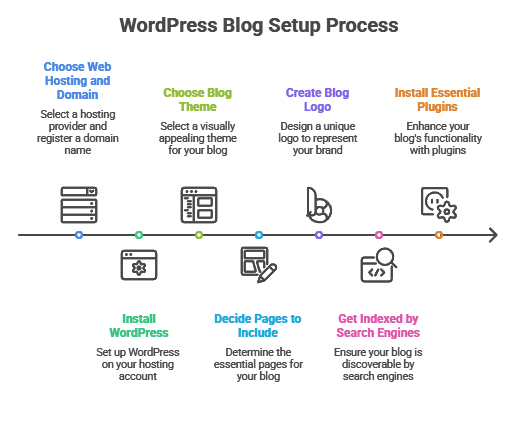
To run a self-hosted WordPress blog, you need a domain name(like yourblog.com) and a web hosting provider(where your site lives).
For a new WordPress blog, shared hosting is perfectly fine. Here are three well-reviewed beginner hosts in :2026
Host | Great for | Starting price ()*2026 |
|---|---|---|
Beginners, free domain, one-click WordPress | $2.95–$4.95/month | |
Budget-conscious bloggers, strong performance | $2.49–$5.99/month | |
Cheap domains, affordable hosting bundles | $1.98–$5.85/month |
Compare the Best Domain Registrars
*Introductory pricing. Renewal rates are typically 2–3x higher - always read the fine print.
What to look for in any host: one-click WordPress install, free SSL certificate, free domain (at least for year 1), automated daily backups, 24/7 support, easy upgrade path as your traffic grows, and a 30-day money-back guarantee.
For a head-to-head comparison between the most popular options, see our Hostinger alternatives.
Step 2: Install WordPress
Modern hosts install WordPress automatically or with a single click. Once it's installed, you'll log into your WordPress dashboard, where you control everything on your blog. WordPress is free, open source, and powers about 43% of all websites. It remains the most flexible and scalable CMS in .2026
Step 3: Choose a blog theme (template)
Your theme controls your blog's visual layout. WordPress has thousands of free and premium themes. Pick one that:
- Matches your niche and tone
- Is mobile-responsive- non-negotiable, since most readers are on phones
- Loads fast- check with PageSpeed Insights
- Is easy to customize- drag-and-drop builders like Elementor, or native block themes (Kadence, GeneratePress), work well for beginners
Step 4: Decide which pages to include
A great blog needs more than just posts. At minimum, create:
- Home page- summarizes your blog's purpose and routes visitors to key content
- About page- who you are, why you blog, what readers can expect (critical for E-E-A-T)
- Contact page- email or contact form
- Blog page- feed of all your articles
- Privacy policy and terms- required by most privacy laws (GDPR, CCPA)
- Optional: Shop, Services, Resources, Start Here
Step 5: Create a blog logo
A logo gives your blog a recognizable identity. Free tools like Canva or Looka generate a clean logo in minutes. Keep it simple, on-brand, and adaptable to different screen sizes and backgrounds.
Step 6: Get indexed by search engines
To show up on Google, register your blog with Google Search Console:
- Create a free account at search.google.com/search-console
- Add and verify your domain
- Submit your sitemap (Yoast SEO, Rank Math, or All in One SEO can generate one automatically)
Also connect Google Analytics 4(or a privacy-friendly alternative like Plausible or Fathom) to track your visitors and content performance.
Step 7: Install essential plugins
You don't need many, but a few are worth installing from day one:
- SEO plugin- Yoast SEO, Rank Math, or All in One SEO
- Caching/performance- WP Rocket (paid) or LiteSpeed Cache (free, if your host supports it)
- Security- Wordfence or Solid Security
- Backups- UpdraftPlus or your host's built-in backups
- Image optimization- ShortPixel or Imagify
Avoid plugin bloat. Install only what you actually use.
Behind the scenes: how we plan every blog post at Sonary
Since we're talking about how to start a blog, let us pull back the curtain on how our team actually approaches this - it might be the most useful part of this guide.
Our content library at Sonary now includes 400+ in-depth articles covering software for small and micro businesses. That library brings us consistent organic traffic every month. But it didn't happen by writing whatever came to mind. Every single one of those 400 articles went through the same workflow.
Step 1: Find questions real users are asking
We dig through Google's People also ask box, AnswerThePublic, Reddit threads in our niche, and our keyword research tools to find the questions our target audience is actually searching for. We're not looking for high-volume generic keywords - we're looking for real questions from real people who match our buyer profile. (We've written a full keyword research guide for small businesses if you want to go deeper.)
Step 2: Check what competitors are publishing
We read the top 10 ranking articles for each query. What do they cover? What do they miss? How deep do they actually go? This tells us two things: what the baseline for ranking is, and where the gaps are.
Step 3: Ask the hard question - can we add real value?
If the topic is something we understand deeply and we can clearly see a gap in what competitors are offering, that's the green light. That's a post worth writing. If we can't beat what's out there, we don't publish. Better to skip the topic than add another mediocre article to the pile.
What we've learned from 400+ articles
A few things we can tell you with confidence, based on our own data:
- How-to guides dominate. All 10 of our top-performing posts are how-to guides. If you're picking a format to start with, this is it.
- Direct-answer paragraphs earn AI Overview impressions. Posts where we open each section with a 1–2 sentence direct answer earn roughly 30% more impressions from Google's AI Overviews compared to posts without them. This is the single most impactful AEO tactic we've tested.
- Long-tail queries rank fast. For long-tail small business queries where we have genuine expertise, our average time-to-first-ranking is 5 days. Not 5 weeks. Not 5 months. Days. The key is genuine depth plus a keyword that isn't already saturated.
- Refreshing old posts works. Articles we've updated within the last 6 months outperform static ones by roughly 35% in organic traffic. Updating existing posts is often higher-leverage than writing new ones.
For every article, we do proper keyword research - but we don't chase generic keywords just because they have high volume. Our target audience is small and micro businesses, so we only target keywords that match that audience. Running after easier keywords outside your niche is how blogs lose their identity and stop converting.
User intent is where most blogs get it wrong
Beyond the keyword itself, the question we always ask is: what was the user actually trying to accomplish with this search?
Take this article you're reading right now - How to Start a Blog. The user behind that query isn't looking for a 400-word summary. They're looking for a complete, professional guide. And they fall into roughly three buckets:
- The curious beginner wants to know if starting a blog is even worth it.
- The motivated creator- already decided they want to blog, now wants the how-to.
- The frustrated veteran started a blog that isn't performing, and is trying to figure out where they went wrong.
A great post has to serve all three. That's why this guide starts with Should you start a blog?, moves into How much does it cost?, walks through the full step-by-step, and ends with how to grow once you're live.
Starting is easy - standing out takes expertise and patience
Here's the honest truth about blogging in : it's not hard to start. Almost anyone with an internet connection and a spare afternoon can launch a blog. That low barrier is exactly2026why standing out is hard - there's probably already a blog covering the topic you want to cover.
So the real question is: what do you bring that others don't?
That's where your personal expertise matters. How deep is your knowledge? How up-to-date are you on what's actually changing in your field right now? What have you personally done, tested, or learned that isn't already public?
What you do need is a real understanding of your users and their actual pain points. Not what you assume they care about - what they actually care about, and why. Once you can answer that honestly, you have the brief for your first real post.
How to write your first blog post
Your first post sets the tone for your blog. Here's the exact process we use for every new article at Sonary.
1. Start with keyword research
Before writing, understand what your target readers actually search for. Use:
- Ubersuggest- free-tier keyword volumes and difficulty
- Google Keyword Planner- free, official Google data
- AnswerThePublic- question-based search discovery
- Semrush or Ahrefs- paid but powerful for competitor analysis
Look for long-tail keywords(3+ words, more specific) with lower competition. How to start a vegan meal prep blog is a far better target than blog.
Our rule of thumb: if the top 10 results for a keyword are all from sites with 10x your domain authority, skip it. Find the adjacent long-tail query where the top results are weaker. That's where a new blog can actually rank - and based on our data, a well-researched long-tail post can hit its first ranking in about 5 days.
2. Write a compelling title
Your title is a headline, hook, and promise in one. Use proven formulas:
- How to [Do Something] Without [Negative Outcome]
- [Number] [Things] Every [Audience] Should Know About [Topic]
- The Beginner's Guide to [Topic]
- [Topic]: [Specific Benefit] in [Timeframe]
Include your primary keyword naturally in the title. Aim for 55–60 characters so the full title shows in search results.
Good examples:
- How to Start a Blog in : Step-by-Step Guide for Beginners2026
- CRM for Small Business: 7 Tools We've Tested This Year
- Payroll Software vs. Manual: What 50 Micro Business Owners Told Us
3. Outline your post before writing
A clear outline prevents rambling. Our standard structure for every article:
- Quick answer at the top- 40–80 words directly answering the query, so AI answer engines can pull it cleanly. Posts where we do this see roughly 30% more AI Overview impressions than posts where we don't.
- Introduction- hook the reader, acknowledge their pain point, promise what they'll learn.
- Main sections- organized with H2 and H3 headings phrased as questions the reader is asking.
- Actionable takeaways- specific, concrete, immediately usable.
- Conclusion and CTA: summary and next step.
Never start writing before the outline is locked. We've cut our editing time roughly in half by outlining thoroughly first.
4. Write in a conversational tone
Write the way you'd talk to one reader over coffee. Tips:
- Short paragraphs(2–4 sentences). Walls of text lose readers on mobile.
- Concrete examples over abstract claims. Our direct-answer paragraphs earn 30% more AI Overview impressions than AEO works.
- Share your own experience where you have it. This is where E-E-A-T points come from.
- Cut filler words- really, very, just, basically. If a sentence works without the word, delete it.
- Read it out loud. If you stumble over a sentence, rewrite it.
Use 'you' and 'we' far more than 'one' or 'people'.
5. Optimize for SEO (and AI answer engines)
Your on-page checklist for every post:
- Primary keyword in the title, URL, H1, and first 100 words.
- Meta description under 155 characters, includes the keyword, and has a reason to click.
- H2/H3 headings phrased as questions your audience asks.
- Direct answers in the first sentence under each heading - this is what AI Overviews and featured snippets extract. In our data, this single tactic drives ~30% more AI Overview impressions.
- One self-contained fact per sentence for standalone claims. AI answer engines can't cite multi-clause sentences cleanly.
- Internal links to other relevant pages - 3–10 per post depending on length.
- External links to authoritative sources.
- Image alt text that describes the image accurately.
- Author bio with credentials at the top or bottom of the post.
- Last updated date visible to readers and in your schema.
For the full on-page framework, see our SEO best practices guide.
6. Add images and visuals
Break up long sections of text. Our rule: at least one visual every 300–500 words. Options:
- Screenshots- especially for tutorials. Annotate with arrows and callouts.
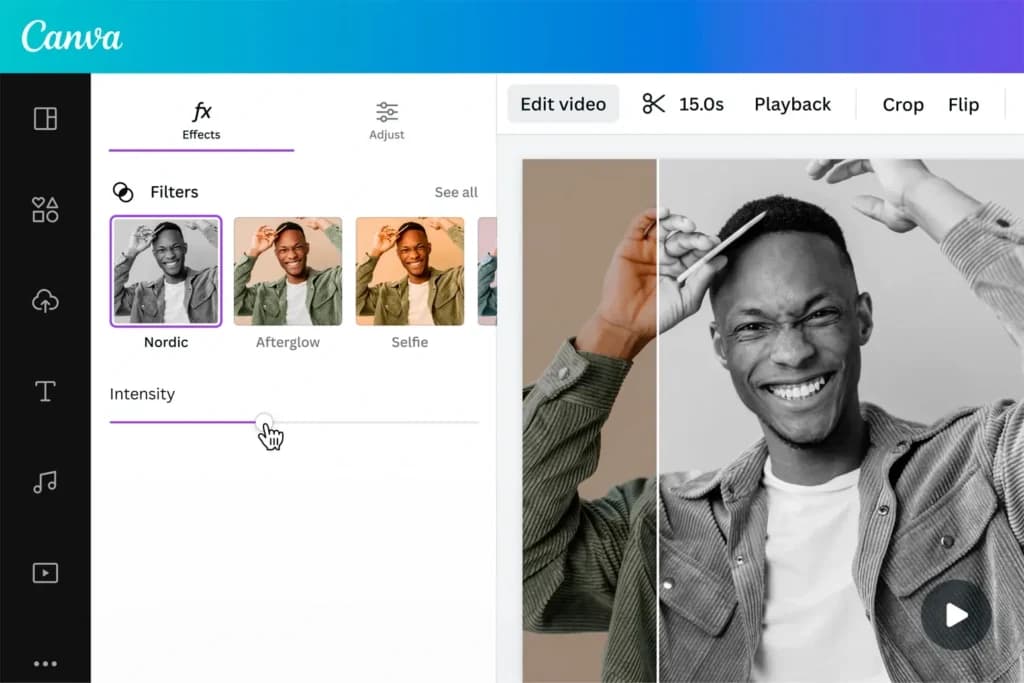
- Custom graphics in Canva or Figma. Flow diagrams, comparison charts, decision trees.
- Royalty-free photos from Unsplash or Pexels. Avoid cheesy stock photography.
- Charts and data visualizations if you have proprietary numbers. These earn more backlinks than any other content type.
- Embedded video- a 60-second walkthrough can double time-on-page.
Always compress images before uploading. Large images slow your site and hurt SEO.
7. Edit, polish, and plan the refresh
Before you hit publish:
- Read it out loud to catch awkward phrasing.
- Run it through Grammarly or Hemingway Editor.
- Check formatting on both mobile and desktop.
- Click every link and verify every image loads.
- Double-check every statistic against its source.
Also, plan to revisit this post in 6 months. Refreshing old posts is one of the highest-leverage SEO activities you can do - in our data, articles updated within the last 6 months outperform static ones by about 35% in organic traffic. Track your content in a simple Google Sheet, Notion doc, or Trello board (keywords, publish date, last update, performance) so nothing falls through the cracks.
8. Publish and promote
Hit Publish. Then share it:
- On your social profiles
- In relevant Reddit communities (r/Blogging, r/juststart, niche-specific subs)
- In Facebook Groups and LinkedIn (if B2B)
- To your email list, even if it has 5 people - start it from day one
Don't wait for your blog to be perfect. Improve it as you go. The first 10 posts are learning posts. The next 50 are where your voice and ranking start to compound.
How to drive traffic to your blog
Writing great posts is only half the job. Once your blog is live and a few posts are up, the next question every new blogger asks is: how do I actually get people to read this?
There are really only three channels that scale - and the right mix depends entirely on who your readers are.
1. SEO is the channel that compounds
This is the answer that pays off over years, not weeks. Even basic on-page SEO applied to genuinely great content can dramatically change how much reach that post gets.
Proper SEO isn't about tricks or stuffing keywords. It's about making your post easy for search engines (and AI answer engines) to understand, and making it the best possible answer to a specific question someone is actually searching for. Done well, a single SEO-optimized post can bring traffic consistently for years after you publish it.
Our own library at Sonary is built almost entirely on this principle. For long-tail queries where we have genuine expertise, we typically see first rankings within about 5 days of publishing. A large share of our 400+ articles keep bringing in traffic month after month, long after we hit publish.
If you want to go deeper on this, we wrote a full guide: SEO Best Practices.

2. Social media - organic and paid
Sharing your posts on social platforms is the fastest way to get eyes on new content while SEO builds up in the background. Paid promotion on social networks (or paid search via Google Ads) can accelerate that further, especially if you're launching a product or service alongside the blog.
3. Referral and community channels
Reddit, niche forums, Slack and Discord communities, LinkedIn groups, and podcast appearances all drive targeted traffic. These often convert better than cold social traffic because the audience is already interested in your topic.
The part most bloggers miss: match the channel to your audience
Here's the piece that trips up new bloggers constantly -the right promotion channel depends entirely on who your readers are.
Quick example: say you're building a blog about the best PC games for 17-year-olds. Trying to reach that audience on Facebook is a losing game. That audience isn't on Facebook. They're on TikTok, Discord, YouTube, Reddit, and Twitch. Spend your time promoting there, and you'll see real results. Post on Facebook, and it doesn't matter how good your content is - the audience isn't there to see it.
Before you pick a promotion channel, do the research:
- Who exactly is my reader (age, role, interests, buying behavior)?
- Where do they actually spend time online?
- What formats do they engage with - long articles, short videos, threads, podcasts?
Then show up in the places they're already in. That's how you turn great content into actual traffic.
Related reading from Sonary
- SEO Best Practices: The Complete Guide2026
- How to Do Keyword Research for Small Businesses (Step by Step)
- How to Host a Website: The Ultimate Beginner's Guide
- Best Website Builders
- Best AI Website Builders
- Best Website Platforms for SEO
- Cheapest Website Builders
- Drag-and-Drop Website Builders
How to monetize your blog
Once you have consistent traffic and an audience, you can monetize in several ways:
- Affiliate marketing- recommend products you use; earn a commission on purchases. Common programs: Amazon Associates, ShareASale, Impact, Awin, direct partnerships.
- Display ads- Google AdSense (entry-level), Mediavine, or Raptive pay you per impression. Mediavine and Raptive pay far better but require traffic thresholds (typically 50,000+ sessions/month).
- Digital products- ebooks, courses, templates, printables, workbooks. Highest margins and full control.
- Services- coaching, consulting, freelance writing, design, development.
- Sponsorships- brands pay for reviews or dedicated posts. Disclose clearly per FTC rules.
- Memberships and communities- paid Discord, Circle, or Substack community. Fastest-growing monetization category in because it provides recurring revenue independent of search algorithms.2026
Monetizing turns your blog from a hobby into an asset. Only about 14% of bloggers earn any meaningful income- and the ones who do almost always combine consistent publishing, real expertise, and multi-channel distribution. Top bloggers diversify across 3–5 streams rather than relying on a single one.
Recap: 10 steps to start a blog
Here's the full process in order. Treat it as a checklist.
- Define your goal. Make money, build authority, grow a business, or create an organic traffic engine. It shapes every decision that follows.
- Pick a niche that's focused enough to stand out and broad enough to sustain 50+ posts, and where you can genuinely add value.
- Choose a blog name that's memorable, easy to spell, and .com-friendly.
- Buy a domain through your host or a registrar like Namecheap.
- Sign up for web hosting(Bluehost, Hostinger, SiteGround, or Namecheap). Or use a drag-and-drop or AI site builder.
- Install WordPress and pick a theme- fast, mobile-responsive, easy to customize.
- Create your core pages- Home, About, Contact, Blog, Privacy Policy.
- Write and publish your first post- keyword-researched, structured with direct-answer paragraphs, written for real user intent.
- Submit your sitemap to Google Search Console and connect Google Analytics 4.
- Publish consistently, refresh old posts, and promote on the right channels- aim for 11+ quality posts per month, build an email list from day one, and update each post every 6 months to keep it performing.
You can complete steps 1–7 in a single afternoon. Steps 8–10 are where blogs are actually built - they're the long game.
Final thoughts
Learning how to start a blog is more than a technical exercise - it's an investment in your voice, your expertise, and a platform you actually own. Every step in this guide, from defining your goal to picking the right promotion channels, compounds over time. A single well-written post can rank for years. A year of consistent publishing can change your career.
Blogging in isn't easy, but it's more rewarding than ever for people who show up consistently, write with a real point of view, and treat their blog as a long-term asset rather than a quick traffic play.2026
You're not just creating a blog. You're building a platform that can teach, inspire, connect, and generate income - for years to come.
Now go launch it.
Frequently asked questions (FAQ)
How much does it cost to start a blog in ?2026
A self-hosted WordPress blog costs $50–$200 for the first year. This includes hosting (~$3–$6/month with intro pricing) and a domain (often free for year 1, then $10–$20/year). You can start for free on platforms like WordPress.com or Medium, but you give up ownership, customization, and most monetization options.
How long does it take to start a blog?
You can get your blog online in under an hour: buy hosting, install WordPress, pick a theme, create basic pages. Writing and publishing your first post usually takes another 2–4 hours. Growing the blog is the long game - expect 6–12 months to see meaningful organic traffic.
Do I need to know how to code to start a blog?
No. WordPress, modern themes, drag-and-drop builders like Elementor, and AI site builders (Wix, Shopify, WordPress AI) let complete beginners build a polished blog without writing a line of code.
Is blogging still worth it in ?2026
Yes, for the long-term creator. Over 77% of internet users still read blogs. Businesses with blogs generate significantly more leads than those without. A blog is a digital asset you fully own. The era of quick, keyword-stuffed posts ranking overnight is over - in , quality, originality, and consistency win.2026
What's the best platform to start a blog?
Self-hosted WordPress(WordPress.org) remains the standard for anyone serious about growth, ownership, and monetization. Ghost and Substack are strong alternatives for writers focused on paid newsletters. Wix and Squarespace work for non-technical creators who prioritize ease over control.
How often should I publish blog posts?
Aim for at least 1–2 quality posts per week when starting out. The strongest performing blogs publish 11+ posts per month, but quality matters more than frequency - one well-researched, original article beats ten shallow ones.
How long should a blog post be?
The average blog post in is around 1,400 words. Posts over20263,000 words earn roughly 3x more traffic and 3.5x more backlinks on competitive topics. Match length to search intent - a best of roundup needs depth, a quick tutorial doesn't.
How do I get traffic to my new blog?
The three main channels are SEO (compounds over time), social media (fastest early traffic), and referral communities like Reddit and niche forums. The most important question is where your target audience actually spends time - posting on the wrong platform wastes effort no matter how good your content is.
Do you need a business license to start a blog?
No, not for a personal or hobby blog in most countries. If you start earning income - affiliate commissions, ad revenue, product sales - you may need to register as a sole proprietor or small business for tax purposes. Rules vary by country and state, so check your local regulations once you start earning.
How do free blogs make money?
Free blogs on platforms like WordPress.com, Blogger, or Medium have limited monetization options. You typically can't run your own ads or use most affiliate programs on free tiers. Medium has its Partner Program, which pays based on member engagement. Substack lets you charge for paid subscriptions. For full monetization flexibility, you need a self-hosted blog on your own domain.
Which blog niches are most profitable in ?2026
The most profitable blog niches in are2026digital marketing, tech and AI, personal finance, health and fitness, and making money online. These niches have either high affiliate commission rates, premium advertising CPMs, or audiences willing to buy digital products. Profitability is less about the niche and more about depth.
Can I start a blog for free?
Yes. WordPress.com, Blogger, and Medium offer free plans. But you'll have a subdomain (like yourname.wordpress.com), limited design options, and little control over monetization. For anything beyond a hobby, a self-hosted WordPress blog at ~$100/year is worth the investment.
How long until a blog starts making money?
Most blogs take 6 to 18 months to earn their first meaningful income. Niche, effort, publishing consistency, and monetization strategy all affect the timeline. Only about 14% of bloggers earn any real income, so treat the first year as a learning and compounding phase.
Does AI hurt blogging?
AI has changed blogging, not ended it. Google's AI Overviews reduce some click-throughs, and AI-generated filler content is actively downranked. But blogs with named authors, original research, and genuine expertise are more visible than ever. Use AI to speed up research, outlines, and editing - not to replace your voice.
About the author: Keidar Sharoni is the SEO Lead at Sonary, where the content team has built and maintains a library of 400+ in-depth articles covering software for small and micro businesses. Every framework in this guide is based on the exact workflow we use internally.