
Best AI Website Builders for Small Business in 2026
For solo founders, freelancers, side hustlers, local services, coaches, and 1–5 person small businesses
Last updated: September 2026

Free plan available
- Over 300 million sites were built on Wix
- 90K+ Sites created daily
- Website creation as natural as thinking
- Wix-powered websites are fast
- Has intuitive drag-and-drop design features
- Digital marketing integrations are super easy
- Massive reservoir of support materials
- One paid plan (except Enterprise) for only one site.
- Wix branding on Free plan
- Cannot use a custom domain on Free plan
Free plan available
- Over 300 million sites were built on Wix
- 90K+ Sites created daily
- Website creation as natural as thinking
- Wix-powered websites are fast
- Has intuitive drag-and-drop design features
- Digital marketing integrations are super easy
- Massive reservoir of support materials
- One paid plan (except Enterprise) for only one site.
- Wix branding on Free plan
- Cannot use a custom domain on Free plan

- Over 3M already chose web.com
- Award-winning software
- Free 1-hour design support session*
- Streamlines the website building and management process
- Provides hundreds of templates
- Sell up to 50 products with just a simple eCommerce store
- Provides email marketing tools
- Website builder offers limited customization functionality
- Some customers report uptime issues
- Over 3M already chose web.com
- Award-winning software
- Free 1-hour design support session*
- Streamlines the website building and management process
- Provides hundreds of templates
- Sell up to 50 products with just a simple eCommerce store
- Provides email marketing tools
- Website builder offers limited customization functionality
- Some customers report uptime issues

- Chat your way to a custom website
- Shop in just 3 easy steps
- Simple, affordable plans
- Multilingual website
- Free domain and SSL certificate
- Built-in editor SEO tools
- Predesigned website layouts
- App integrations require an upgrade to eCommerce plan
- No free website transfers
- Chat your way to a custom website
- Shop in just 3 easy steps
- Simple, affordable plans
- Multilingual website
- Free domain and SSL certificate
- Built-in editor SEO tools
- Predesigned website layouts
- App integrations require an upgrade to eCommerce plan
- No free website transfers

Free plan available
- Create a website in 10 minutes.
- Used by 356,000 small business owners
- Average score of 4.4/5 on Trustpilot
- Excellent UI/UX
- Easy to setup and use
- Multiple ready-made templates
- Commission-free webshop selling
- No phone support
- Limited third-party apps integration
Free plan available
- Create a website in 10 minutes.
- Used by 356,000 small business owners
- Average score of 4.4/5 on Trustpilot
- Excellent UI/UX
- Easy to setup and use
- Multiple ready-made templates
- Commission-free webshop selling
- No phone support
- Limited third-party apps integration

14-Days Free Trial
- Manage products, orders & customers
- Powered by Google Cloud: Reliable & fast
- Hosting services, PageSpeed booster & more
- An intuitive drag-and-drop page editor
- AI content suggestion and generation
- Generate multiple images with AI
- Specialized e-commerce features
- The platform can be a tad slow at times
- Requires a credit card for the pro trial
- A learning curve exists for newbies
14-Days Free Trial
- Manage products, orders & customers
- Powered by Google Cloud: Reliable & fast
- Hosting services, PageSpeed booster & more
- An intuitive drag-and-drop page editor
- AI content suggestion and generation
- Generate multiple images with AI
- Specialized e-commerce features
- The platform can be a tad slow at times
- Requires a credit card for the pro trial
- A learning curve exists for newbies

- Create your website, store, & logo in one place
- Digital tools and features for a pro website
- Free image library and photo editing
- Effective free plan
- You can choose another template and not lose your content
- Beginner-friendly website builder
- Fast loading speed
- A limited number of templates
- No 24/7 customer support
- Create your website, store, & logo in one place
- Digital tools and features for a pro website
- Free image library and photo editing
- Effective free plan
- You can choose another template and not lose your content
- Beginner-friendly website builder
- Fast loading speed
- A limited number of templates
- No 24/7 customer support

14-Days Free Trial
- Personalized design tailored to your business
- Generate content and images for your site
- 14M+ running their business on Squarespace
- You can create up to 1,000 pages
- In-built SEO tools
- Free SSL certificates
- Rich library of user learning materials
- You can not publish your professional website on the free trial mode
- No free plan, only free trail period
- Has a bit of a learning curve
14-Days Free Trial
- Personalized design tailored to your business
- Generate content and images for your site
- 14M+ running their business on Squarespace
- You can create up to 1,000 pages
- In-built SEO tools
- Free SSL certificates
- Rich library of user learning materials
- You can not publish your professional website on the free trial mode
- No free plan, only free trail period
- Has a bit of a learning curve

- Top rated drag & drop editor
- Live editing capabilities
- Powers 5,000,000+ websites
- Live page editor
- 300+ customizable templates
- Thousands of powerful integrations
- Mobile-responsive design
- Has a somewhat steep learning curve
- No white-label option for developers
- Top rated drag & drop editor
- Live editing capabilities
- Powers 5,000,000+ websites
- Live page editor
- 300+ customizable templates
- Thousands of powerful integrations
- Mobile-responsive design
- Has a somewhat steep learning curve
- No white-label option for developers
* Featured prices and terms can be updated. Free offers may include additional terms.
The best AI website builder for a small business in depends on what you do and how custom you need the site to be.2026Wix AI Site Generator is the most polished AI-first builder for non-technical owners - we tested it by building a jewelry e-commerce site from a single prompt, and the result was production-ready in under 30 minutes. Base44 is the parallel pick when your "website" is actually a working tool - we tested it by turning an e-commerce profit calculator into a full multi-page finance app (FinanceOS), and the result was a real working web application after six prompt iterations. Shopify AI(with Shopify Magic and Sidekick) is the strongest pick when e-commerce is your primary business - it generates an entire store with demo products so you can see how your shop feels before uploading a real SKU. Squarespace AI wins on design quality for portfolios and personal brands. Hostinger's AI website builder is the cheapest way to a real AI-generated site with hosting bundled. Lovable, Base44, and Hostinger Horizons are the AI-native picks if you want real app functionality (logins, dashboards, custom workflows) - not just a brochure site. Jimdo Dolphin remains a solid free option for the simplest local business setup.
Which situation describes you?
Each path below is the exact question someone in that spot is asking. Click into the section that sounds like you.
- I’ve never built a website before and want one this weekend
- I run a local service business (cleaner, salon, contractor, dog walker, mobile services)
- I sell on Etsy / Instagram and want a real website with a small shop
- I’m building an online store as my primary business
- I’m a coach, consultant, or freelancer building a portfolio + booking site
- I’m a founder building a SaaS landing page or MVP-style app
- I want the cheapest path to a real AI-built website
Which AI website builder fits your situation?
If this is your situation | AI website builder that fits | Why this one |
|---|---|---|
You've never built a website before and want one this weekend | Wix AI Site Generator | Strongest "answer 5 questions, get a real site" experience; free to start |
You run a local service (cleaner, salon, contractor, dog walker) | Wix AI or Jimdo Dolphin | Local-business friendly; AI generates contact, services, hours, location |
You sell on Etsy / social and want a real website with a small shop | Wix AI | AI builds the marketing site + shop together; we tested it with a jewelry store |
You're building an online store as your primary business | Shopify AI | AI builds an e-commerce-first store with demo products you can see and feel |
You're a coach, consultant, freelancer building a portfolio | Squarespace AI | Best design quality out of the box for personal brands; AI handles polish |
You're a founder building a SaaS landing page or MVP-like app | Lovable or Hostinger Horizons | AI-native builders that generate landing pages AND working app logic |
You want the cheapest path to a "real" AI-built website | Hostinger AI / Jimdo Dolphin | Free or near-free; AI generates the whole site in one go |
You're building something custom (booking, portal, dashboard) | Base44 or Lovable | AI generates real app functionality, not just a brochure site |
Find the row that matches what you actually do, then read that section below for the why and the how.
What does Wix AI actually build? (We tested it with a jewelry e-commerce site)
Most "best AI website builder" articles describe what these platforms claim to do. We did something different: we ran a real e-commerce test. The goal was to feel the machine, not just read its marketing page.
The setup: one prompt, no developer, no template picking, no manual page setup. We asked Wix AI Site Generator to build an e-commerce site for a jewelry shop, with real demo inventory images generated by the AI. The whole experiment took less than 30 minutes from sign-up to a working, browsable store.
What did Wix AI generate from one prompt?
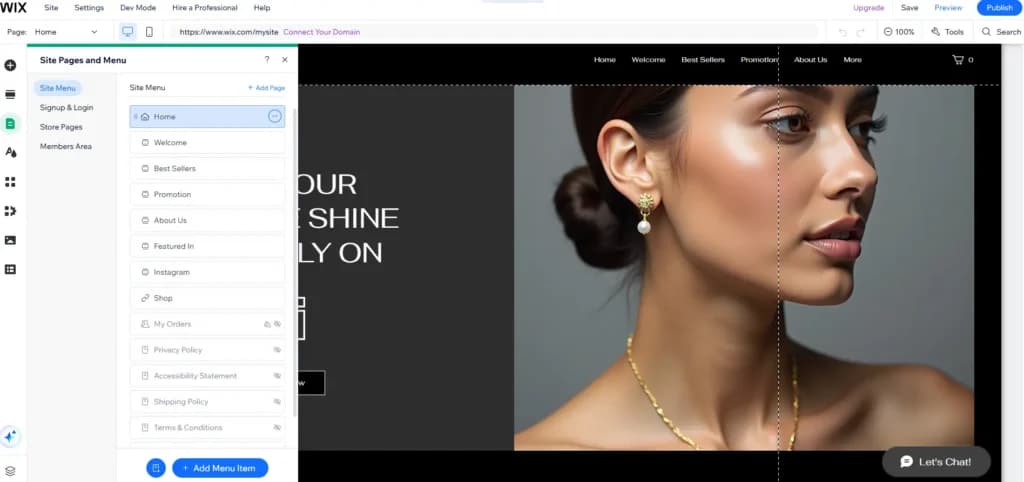
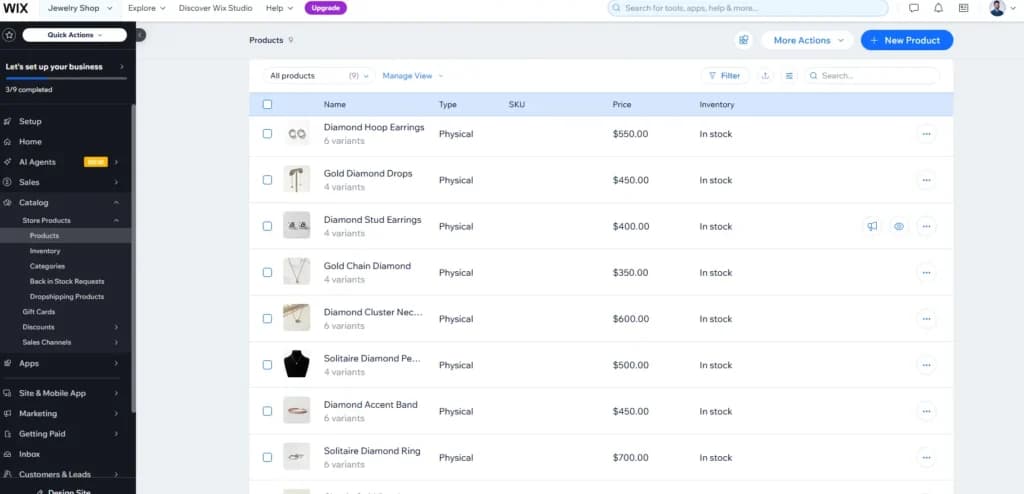
A complete jewelry e-commerce site, structured exactly the way a real online store would be - not a placeholder shell. The site Wix AI delivered out of the gate included:
- A full multi-page site: Home, Welcome, Best Sellers, Promotion, About Us, Featured In, Instagram, Shop, My Orders, Privacy Policy, Accessibility Statement, Shipping Policy, Terms & Conditions
- A working storefront with 9 demo products - Diamond Hoop Earrings, Gold Diamond Drops, Diamond Stud Earrings, Gold Chain Diamond, Diamond Cluster Necklace, Solitaire Diamond Pendant, Diamond Accent Band, Solitaire Diamond Ring, and more
- Realistic pricing across the catalog ($350–$700 range), variant options (multiple per product), and "In stock" inventory status
- AI-generated product imagery - not stock photos pulled from a library, but visuals that fit the jewelry niche
- A hero section with a styled headline ("OUR GOLD TO SHINE BOLDLY ON"), a model image, and a clear CTA
- A signed-up customer flow with member areas, signup/login pages, and order management built in
- Mobile-responsive design out of the box, with a one-click mobile preview
What surprised who has built 100+ websites?
"I've built over 100 websites in my career. This was massively different. I didn't use a developer at all - I just put my knowledge into one prompt and asked the AI for an e-commerce site with real inventory images. The results exceeded my expectations, especially the structure and the initial pages needed to actually start a business."-Keidar Sharoni, SEO & AEO Expert
"The most impressive part was the e-commerce integration. Wix AI doesn't just give you a shell; it provides full e-commerce capabilities out of the gate, complete with demo products. That's a game-changer because it lets you see exactly how your store looks, feels, and functions before you upload your first real SKU."-Keidar Sharoni, SEO & AEO Expert
The strategic implication for any small business owner: you no longer have to imagine what your store could look like. You can have a working version of it in 30 minutes, populated with demo products, then refine - replace the demo inventory with your real products, adjust the brand, swap the hero image. The "blank page" problem that kept first-time owners stuck for weeks is essentially gone.
What was good but not perfect?
The resulting site was fairly basic in visual design - clean and on-brand for a starting business, but not a custom-designed look you'd see from a $5,000 agency project. That's the correct trade-off for a tool meant to get you live fast. Refining the brand identity (custom typography, distinctive photography, considered animations) is the second weekend of work, not the first.
The AI also occasionally needed clarification on edge cases. Generated copy was strong on structure but generic on specifics - the kind of details only the owner knows ("we ship to Canada in 5 days," "made in our Brooklyn studio") needed manual edits. Expect to spend 30–60 minutes after the initial generation refining copy to match how you actually talk about your business.
Why does this test matter for picking your AI website builder?
Two things. First, it confirms that AI-first website builders in actually deliver on the promise - this isn't marketing hype. Second, the gap between "AI-first" and "traditional builder with AI features" is real and growing. The platforms in this guide can take you from idea to working business in an afternoon. Traditional builders still ask you to pick a template, drag sections, and write your own copy. Same brand, different worlds.2026
Related: Full Wix review · Full Shopify review · All website builders
What does Base44 actually build? (We tested it by turning a calculator into a full finance app)
The Wix test above showed what AI-first website creation looks like for a marketing site with a store. We ran the parallel test for AI-native app building - same hands-on approach, different tool, completely different use case.
The setup: we started with a single tool - an E-commerce Profit Calculator - and gave Base44 one instruction: "build entire website around this tool." The goal was to see whether Base44 could take a small piece of business logic and turn it into a real, usable web application with multiple pages, real data, and a working dashboard. Six prompt iterations later, it delivered.
What did Base44 generate from one prompt plus iteration?
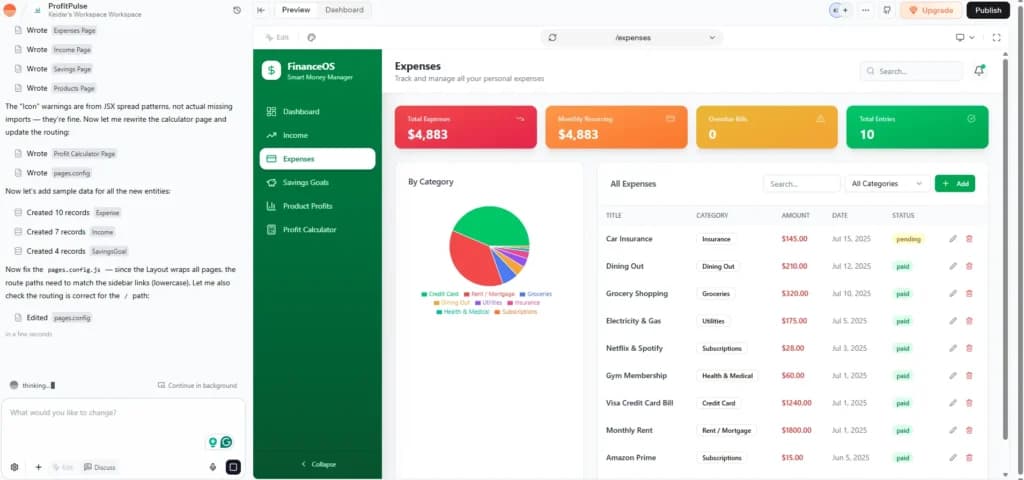
A complete multi-page web application called ProfitPulse, branded as "FinanceOS - Smart Money Manager," with real business logic, sample data, and the kind of UI a paying user would expect. The app Base44 built included:
- A full multi-page app - Dashboard, Income, Expenses, Savings Goals, Product Profits, and the original Profit Calculator - all linked in a custom sidebar navigation
- A working Expenses page with four stat cards (Total Expenses $4,883, Monthly Recurring $4,883, Overdue Bills 0, Total Entries 10), a By Category pie chart, and an All Expenses table with edit and delete actions
- Ten realistic sample expense records - Car Insurance ($145), Dining Out ($210), Grocery Shopping ($320), Electricity & Gas ($175), Netflix & Spotify ($28), Gym Membership ($60), Visa Credit Card Bill ($1,240), Monthly Rent ($1,800), Amazon Prime ($15) - with status badges (paid, pending)
- A working Income page with four stat cards (Total Income $15,770, Monthly Recurring $11,820, 6 Sources, 5 Categories), an Income by Source bar chart, and an Income Records table
- Seven realistic sample income records - Stock Dividends, Side Hustle Etsy Shop, Freelance Web Project, Monthly Salary, Performance Bonus, Freelance Design Work - with recurrence labels (Monthly, One-Time)
- Color-coded categories, custom branding (green accent palette and FinanceOS identity), search and filter controls on every table, and an Add button to create new records
- Coherent multi-page state - each page renders its own data, breakdown, and actions, all under one consistent app shell
![base44 ai webapp tool - four stat cards an Income by Source bar chart, and a 7-row income records table.]](/_next/image/?url=https%3A%2F%2Fassets.sonary.com%2Fwp-content%2Fuploads%2F2026%2F05%2F13083845%2Fbase44-ai-webapp-tool-four-stat-cards-an-Income-by-Source-bar-chart-and-a-7-row-income-records-table-1024x642.webp&w=3840&q=75)
What surprised me
"When you know exactly what you want, Base44 delivers exactly that. The process took around 6 iterations, but the final result was impressive. Base44 converted my idea into a real web application that solves a real problem, with sample data, multi-page state, and a UI a real user could pay for."-Keidar Sharoni, SEO & AEO Expert.
"If you're a small business that wants to solve a specific pain point, Base44 is a great AI builder. The platform does exactly what you write - but you still need to think through every case yourself. It won't automatically cover edge cases or potential bugs; that's on you to specify."-Keidar Sharoni, SEO & AEO Expert.
The strategic implication: Base44 isn't one-shot magic the way Wix AI is for marketing sites. It's a collaborative builder - you describe, it builds, you refine, it rebuilds. Six iterations sounds like a lot but each iteration was minutes, not hours. A full working app from a single calculator concept to a multi-page Smart Money Manager in roughly the same time it would take a developer to set up a project scaffold.
How is the Base44 test different from the Wix AI test?
The two tests reveal where the AI-first website-builder vs AI-native app-builder split actually matters. Wix AI is best when you describe a business and need a polished marketing site with a store - the result is one-shot good and you refine details. Base44 is best when you describe a working tool and need it turned into a real multi-page app with data and logic - the result needs iteration but you end up with something a marketing site cannot do.
For a small business owner, the practical rule: if your "website" is really a brochure (services, hours, contact, maybe a small shop), use Wix AI or Squarespace AI. If your "website" is really a tool (calculators, dashboards, internal portals, custom workflows that solve a specific pain point), use Base44 - and budget 30–90 minutes of prompt iteration before the result is production-ready.
Related: Full Base44 review · Full Lovable review · Base44 vs Lovable deep dive · AI app builders
What makes a website builder genuinely "AI-first" (and why it matters)?
Most "AI website builder" lists you find online mix two very different kinds of products together: platforms where AI generates the entire website from a prompt, and traditional drag-and-drop builders that added an "AI text writer" button to a sidebar. They are not the same thing, and picking the wrong kind will waste your weekend.
What AI does | AI-first website builders | Traditional builders with AI features added on |
|---|---|---|
Generates the entire site from your prompt | Yes - describe your business, the AI builds a full structure, copy, design, navigation, and even demo inventory | No - you still drag and drop sections; AI just helps with snippets |
Writes all your page copy automatically | Yes | Sometimes (one section at a time) |
Picks layouts, colors, fonts for your industry | Yes | Limited; usually, you pick a template first |
You edit by chatting with the AI | Yes - "make the hero bigger and add a contact form" works | No, you click and drag like a traditional builder |
Time to a real published site | 15–30 minutes from sign-up to live URL | 2–6 hours if you know what you’re doing |
Best fit for non-technical owners | Yes - built for people who don’t want to learn a builder | OK - still requires learning the editor |
This guide focuses on the first column - platforms where AI is the primary way you build the site, not a sidebar feature.
How does an AI website builder actually create your site in 3 steps?
Modern AI-first website builders let you go from sign-up to a real published site in 15–30 minutes. No hardware to set up, no templates to choose from a gallery, no copy you have to write yourself. The three steps below are roughly the same across every platform in this guide.
Step 1: How do you describe your business so the AI builds the right site?
Every AI website builder starts with a short prompt or a 3–5 question intake - what your business does, who it’s for, what action you want visitors to take. The clearer and more specific you are, the better the result. "A jewelry e-commerce shop selling handcrafted diamond pieces; want customers to browse, save favorites, and check out with a card" produces a far better site than "jewelry website."
Step 2: What does the AI actually generate the first time?
Within 60–120 seconds, the AI generates a complete site: hero section with a headline and CTA, services or product pages, an about section, contact form, navigation, footer, color palette, fonts, and AI-written copy for every section. Wix AI and Shopify AI go further and generate demo products (with images and pricing) so you can see the store working before uploading real inventory. Hosting is included; you get a temporary URL on the spot and can connect a custom domain in another minute.
Step 3: How do you refine the site without losing the AI build?
Two paths: chat with the AI ("make the hero bigger, swap the third service for ‘overnight care,’ change the accent color to forest green") or click into the visual editor and edit directly. Lovable and Base44 lean into chat-based editing; Wix, Shopify, Squarespace, Hostinger, and Jimdo lean into visual editing after the initial AI build. Either way, you keep iterating until it’s right, then publish.
What can each AI website builder actually do for your business?
Most "compare features" tables list checkmarks for things you’ll never use. The matrix below is reframed around capabilities - the things you’ll feel a difference using or not using when you’re actually trying to launch and run a small business website.
What it actually does for you | Wix AI | Shopify AI | Squarespace AI | Jimdo Dolphin | Hostinger AI | Lovable | Base44 |
|---|---|---|---|---|---|---|---|
Generates entire site from a short prompt | Yes | Yes | Yes | Yes | Yes | Yes | Yes |
Writes all your page copy with the build | Yes | Yes | Yes | Yes | Yes | Yes | Yes |
Generates demo products / inventory you can edit | Best | Best | Yes | No | OK | No | OK |
You edit later by chatting with the AI | Yes | Yes | OK | OK | Yes | Best | Best |
Built-in online store / e-commerce | Yes | Best | Yes | OK | OK | No | No |
Built-in hosting + custom domain | Yes | Yes | Yes | Yes | Yes | Yes | Yes |
Generates contact form, services, hours | Yes | OK | Yes | Yes | Yes | Yes | Yes |
Generates real app functionality | Limited | Limited | Limited | No | Limited | Yes | Best |
Free plan that publishes a real site | Yes | 3-day trial | No | Yes | OK | Yes | Yes |
Mobile-responsive out of the box | Yes | Yes | Yes | Yes | Yes | Yes | Yes |
Prices and capabilities as of May 2026.
What’s the best AI website builder for someone building their first website?
What you actually need
A platform that doesn’t ask you to pick a template, choose a layout, or know what a "section" is. Something that produces a real, professional-looking site from a short conversation about your business. Built-in hosting, free SSL, a real URL, and the ability to edit later without learning a complicated editor. And ideally a free plan so you can see what you get before paying anything.
Why does Wix AI Site Generator fit?
Wix AI Site Generator is the most polished "answer five questions, get a real site" experience on the market. You describe your business in plain English, answer a few prompts about goals and style, and Wix builds a full multi-page site - copy, images, contact form, layout, mobile-responsive - in about two minutes. The free plan publishes a real site on a wix.com subdomain; paid plans ($16+/month) add a custom domain and remove ads.
Our jewelry e-commerce test (above) is the proof. One prompt, full e-commerce site, real demo inventory, member areas, policy pages - under 30 minutes. The "blank page" stage that historically eats weekends is essentially gone with Wix AI.
Related: Full Wix review · All website builders
What’s the best AI website builder for a local service business?
What you actually need
A site that signals "real business in this neighborhood" - local area code, services laid out clearly, hours, a contact form that actually lands in your inbox, and a real address (or service-area map) that helps with local SEO. The site needs to load fast on a phone (most local searches are mobile) and needs to be findable in Google Maps within a few weeks of launch.
Why does Wix AI or Jimdo Dolphin fit?
Wix AI Site Generator handles local-service generation cleanly. The intake asks about your service area, the AI generates a services-list section, contact form, hours block, and a Google Maps embed. Wix's SEO Wiz then walks you through claiming a Google Business Profile and adding basic schema markup. Cost: free to start; $16/month for a real domain.
Jimdo Dolphin is the cheaper, simpler alternative. One of the original AI website builders, Jimdo asks ~10 questions and generates a clean three-page site (home, services, contact). Less design depth than Wix but a free plan that actually publishes a usable site at jimdosite.com.
Related: Full Wix review · Full Jimdo review
What’s the best AI website builder for Etsy and social sellers adding a real website?
What you actually need
A real website you can put on Instagram bios, packaging, and business cards - something that says "I am a real brand, not just an Etsy listing." A shop bundled into the same AI build so customers can buy direct (and you keep the margin Etsy charges). AI that handles the parts you don’t want to do - product descriptions, About copy, brand story.
Why does Wix AI fit?
Wix AI is the right call for sellers transitioning from Etsy or social to their own brand. Our jewelry e-commerce test (above) was exactly this scenario - and Wix AI delivered an entire e-commerce site with demo inventory, member areas, and policy pages in under 30 minutes from one prompt. The Business plan ($23/month) includes the store, and the AI-generated structure is genuinely usable as a starting brand foundation.
For sellers whose primary business model is e-commerce (you're not a maker with a side store, you're running an online store), see the next situation - Shopify AI is the stronger fit.
Related: Full Wix review · Full Squarespace review
What’s the best AI website builder when e-commerce is your primary business?
What you actually need
A real online store - inventory, variants, shipping zones, payment processing, checkout flow, abandoned cart recovery, customer accounts, sales analytics. The "marketing site" (about, contact, blog) is secondary; the shop is the business. You're probably going to be on this platform for years, and you want one built specifically for selling, not selling-as-an-add-on.
Why does Shopify AI fit?
Shopify is the e-commerce platform built ground-up for selling, and Shopify AI (with Shopify Magic for content generation and Sidekick as a conversational AI agent) brings AI-first website creation to a platform whose entire DNA is online stores. The AI can generate sections, write product descriptions, suggest theme changes, edit photos, build store pages from prompts, and answer setup questions through chat. New Shopify stores can be created with AI prompts that generate themes, product placeholders, and store sections in one flow.
Where Shopify AI is the right choice over Wix AI: you're running e-commerce as your primary business model with serious volume potential. Shopify's e-commerce capabilities (inventory across channels, advanced shipping, B2B wholesale, international markets, deep app ecosystem) outclass every other platform in this guide once you're past $10K/month in sales. Shopify Magic handles the AI generation; the underlying platform handles the scale.
Where Wix AI is still the right choice: you're a maker, side hustle, or small seller where the website (story, brand, services) is at least as important as the shop. The jewelry e-commerce test we ran above used Wix AI - and for that scale of business (a starting jewelry brand), Wix was excellent. For an established jewelry brand doing real e-commerce volume, Shopify is the next step.
Related: Full Shopify review · Full Wix review
What’s the best AI website builder for a coach, consultant, or freelancer?
A site that looks expensive but didn’t cost $5,000 to build. Strong typography, calm whitespace, a portfolio or testimonials section, a clear "book a call" or "work with me" CTA, and a blog if you want one. The design needs to communicate competence without you having to fuss over it. Mobile experience needs to be flawless because most LinkedIn link clicks happen on a phone.
Why does Squarespace AI fit?
Squarespace AI (with Blueprint AI and Design Intelligence) is the strongest choice for personal-brand websites in . The AI generates a site that looks like a designer made it - sophisticated typography, considered spacing, a polished portfolio template, calendar/booking integration. Pricing starts at $16/month. Best fit for coaches, consultants, designers, writers, photographers, and anyone whose value proposition rests partly on how put-together they look.2026
When Lovable might fit instead: if your "site" is really an app - a self-paced coaching course platform, a client portal with login, a custom assessment tool - Lovable generates real app functionality with the same AI-first experience.
Related: Full Squarespace review · Full Lovable review
What’s the best AI website builder for a SaaS landing page or MVP-style app?
A landing page that doesn’t look like a generic website builder. The ability to add real product functionality - login pages, a working dashboard, a free-trial signup flow, an admin panel for invites. AI that understands you want a software product, not a brochure. And ideally code export or hosting flexibility so you can graduate to a real codebase when traction starts.
Why does Lovable, Base44, or Hostinger Horizons fit?
Lovable, Base44, and Hostinger Horizons are AI-native platforms designed for this exact use case. Instead of "build a website," the prompt is more like "build me a project management tool with login, dashboard, and team invites." The AI generates a real working app - pages, forms, a database, user authentication, deploy-ready - from natural-language descriptions. Lovable is the strongest balance of design quality and functionality; Base44 is the best for back-office tools and SaaS products; Hostinger Horizons is the cheapest credible option at $6.99/month with hosting included.
Our Base44 test (above) is the proof. Starting from a single E-commerce Profit Calculator, the prompt "build entire website around this tool" produced a complete FinanceOS app with Dashboard, Income, Expenses, Savings Goals, Product Profits, sample data, charts, and edit/delete actions - six prompt iterations from concept to working app. That's the kind of result you cannot get from Wix or Squarespace, no matter how good their AI Site Generator is.
Related: Full Lovable review · Full Base44 review · Full Hostinger Horizons review · AI app builders
What’s the cheapest AI website builder that actually works?
A real, published, AI-generated website that costs as close to zero as possible. Ideally, with a free plan, you can run a side hustle for months without paying anything. Hosting included. The trade-offs you can live with: ads on the free plan, a builder-branded subdomain, and some limits on storage or pages.
Why does Hostinger AI or Jimdo Dolphin fit?
Hostinger's AI website builder is the cheapest path to a real AI-built site with a real domain. Hostinger's entry hosting plan is around $2.99/month and includes the AI builder, hosting, SSL, and (often) a free domain for the first year. AI generates the full site from a short conversation.
Jimdo Dolphin is the alternative if you want forever-free without paying for hosting. Asks ~10 questions and generates a clean 3-page site you can publish on a jimdosite.com subdomain. Stays free as long as you can live with the subdomain.
Wix AI also has a real free plan - site publishes on a wix.com subdomain with Wix branding, no payment required, no time limit. Not as cheap-per-month as Hostinger when you want a real domain, but the cleanest free experience.
Related: Full Jimdo review · Full Hostinger Horizons review · Full Wix review
Which AI website builders are worth knowing about?
Each profile below answers two questions: who chooses this builder, and what it actually does for you in practice.
Is Wix AI Site Generator right for you?
Wix is a versatile website builder that empowers users to create stunning, professional websites without requiring advanced technical skills. Known for its intuitive drag-and-drop editor, Wix offers… Read more
Wix is a versatile website builder that empowers users to create stunning, professional websites without requiring advanced technical skills. Known for its intuitive drag-and-drop editor, Wix offers hundreds of customizable templates, robust e-commerce capabilities, and built-in SEO tools to optimize site performance. Whether you're a small business owner, blogger, or creative professional, Wix provides an all-in-one solution to design, manage, and grow your online presence. With features like mobile optimization, app integrations, and reliable hosting, Wix ensures your website is both functional and visually impressive, making it a top choice for users of all experience levels.
Learn more in our full Wix review.
Pros & Cons
- Wix-powered websites are fast
- Has intuitive drag-and-drop design features
- Digital marketing integrations are super easy
- Massive reservoir of support materials
- One paid plan (except Enterprise) for only one site.
- Wix branding on Free plan
- Cannot use a custom domain on Free plan
Features
- 100+ Templates
- Add HTML code
- Blog Templates
- Portfolio
- Drag & Drop Editor
- Multi-lingual website
- Fully customized
- SEO Tools
- Social Media Integration
- Widgets + Apps
- Newsletter tool
- Monetization
- Visitor statistics
- Multiple Sites
- Free Stock Photos
- Free custom domain
- Unlimited Space
- Unmetered Bandwidth
- Video Plug-Ins
- Blogging
- Online Stores
- Automatic Website Building
- Mobile-friendly
Pricing
$0
mo/
month
$17
mo/
month
$29
mo/
month
$39
mo/
month
$159
mo/
month
- Who chooses this: Solo founders and small-business owners building their first real website; local services, side hustles, makers transitioning from Etsy, e-commerce starters
- Free option: Yes - free plan publishes a real site on a wix.com subdomain
- Paid plan starts:$16/mo Light (custom domain); $23/mo Core (online store); $36/mo Business
- Hosting + domain? Yes - hosting + SSL included; custom domain on paid plans
- What it actually does for you: Answers five questions and generates a complete multi-page site with copy, layout, contact form, mobile-responsive design, AI-generated images, and demo inventory (for e-commerce builds) in 60–120 seconds. Tested with a jewelry shop built above.
Wix AI Site Generator is the most polished AI-first website creator for non-technical owners. We tested it with a jewelry e-commerce prompt, and the result was production-ready in under 30 minutes - full site structure, 9 demo products with images and pricing, member areas, policy pages, and mobile-responsive. See the test section above for the full walkthrough.
Where Wix is the wrong call: you're running e-commerce at scale as your primary business (Shopify wins). You want extreme design polish for a personal brand (Squarespace is better). You're building a real working app, not a marketing site (Lovable or Base44).
Is Shopify AI right for you?

Shopify stands as a leading e-commerce platform, empowering over 1.75 million merchants across 175 countries to sell online seamlessly. Its user-friendly interface, customizable templates, and… Read more
Shopify stands as a leading e-commerce platform, empowering over 1.75 million merchants across 175 countries to sell online seamlessly. Its user-friendly interface, customizable templates, and comprehensive app ecosystem enable businesses to create and manage online stores with ease. Features like integrated inventory management, secure payment gateways, and mobile-responsive design ensure a smooth shopping experience for customers. Trusted by brands like Netflix and Mattel, Shopify offers scalable solutions suitable for businesses of all sizes. In this Shopify e-commerce review, I'll discuss features, performance, customer service, and Shopify pricing.
Learn more in our full Shopify review.
Pros & Cons
- Large suite of marketing tools to grow your website
- You’re able to sell online, offline, and through multiple marketplaces
- It has a built-in payment processor
- Supports unlimited products on every plan
- It charges you for third party payment processors
- The basic plan doesn’t have access to pro reports
Features
- Number of templates
- Drag & Drop Editor
- Free Stock Photos
- SEO Tools
- Social Media Integration
- Visitor statistics
- Third-party apps
- Data Security
- Multi-lingual website
- Inventory Management
- Payment options
- Returns & Refunds
- Shipping Management
- Mobile - friendly
- Mobile compatible templates
- Add HTML code
- Portfolio
- Design flexibility
- Fully customized
- Video Plug-Ins
- Audio Plug-Ins
- Widgets + Apps
- Abandoned cart tools
- Newsletter tool
- Monetization
- Product reviews
- Promotions & Discounts
- Advertising credits
- Free custom domain
- Space
- Bandwith
Pricing
$29
mo/
month
$79
mo/
month
$299
mo/
month
- Who chooses this: Sellers building online stores as their primary business; D2C brands, dropshippers, scaling product businesses past $10K/month
- Free option: 3-day free trial, then $1/mo for the first month
- Paid plan starts:$39/mo Basic Shopify; $105/mo Shopify; $399/mo Advanced
- Hosting + domain? Yes - hosting, SSL, and a free shopify subdomain; custom domain on paid plans
- What it actually does for you: AI generates a full e-commerce store with demo products you can see and feel before uploading real inventory. Shopify Magic writes product descriptions, generates store sections, edits images. Sidekick is the conversational AI agent that edits the store through chat.
Shopify is the e-commerce platform built ground-up for selling - and Shopify AI brings AI-first creation to that DNA. Shopify Magic generates content (product descriptions, store sections, email subject lines, FAQs); Sidekick is the conversational agent that lets you build and edit the store via chat. New stores can be set up with AI prompts that generate themes and product placeholders. The underlying platform handles e-commerce scale that no other platform on this list can match.
Where Shopify is the wrong call: e-commerce isn't your primary business - you're a maker or service business that just wants a small shop (Wix AI is cheaper and the marketing site is stronger). You want the cheapest path (Shopify is the most expensive credible option here). You need real working app functionality, not a store (Lovable or Base44).
Read the full Shopify review →
Is Squarespace AI right for you?
The Squarespace drag-and-drop editor allows users to create stunning websites. Be it a simple portfolio or an online store, the website builder has over 100 modern templates and integrates with… Read more
The Squarespace drag-and-drop editor allows users to create stunning websites. Be it a simple portfolio or an online store, the website builder has over 100 modern templates and integrates with 5,000+ apps. Squarespace lets users can begin their website building with customizable web page sections.
Learn more in our full Squarespace review.
Pros & Cons
- You can create up to 1,000 pages
- In-built SEO tools
- Free SSL certificates
- Rich library of user learning materials
- You can not publish your professional website on the free trial mode
- No free plan, only free trail period
- Has a bit of a learning curve
Features
- 100+ Templates
- Add HTML code
- Blog Templates
- Drag & Drop Editor
- Multi-lingual website
- Fully customized
- Mobile-friendly
- SEO Tools
- Social Media Integration
- Widgets + Apps
- Newsletter tool
- Visitor statistics
- Free custom domain
- Unlimited Space
- Unmetered Bandwidth
- Free Stock Photos
- Video Plug-Ins
- Audio Plug-Ins
- Blogging
- Online Stores
- Automatic Website Building
Pricing
$16
mo/
month
$23
mo/
month
$39
mo/
month
$99
mo/
month
- Who chooses this: Coaches, consultants, freelancers, designers, photographers, premium-brand sellers - people whose visual polish is part of their pitch
- Free option: No forever-free plan; 14-day trial
- Paid plan starts:$16/mo Personal; $23/mo Business (online store); $39+ Commerce
- Hosting + domain? Yes - hosting, SSL, and unlimited bandwidth on all plans
- What it actually does for you: Generates a portfolio-grade website from a Blueprint AI conversation - sophisticated typography, considered layouts, premium feel. Best design-quality AI-first builder on this list.
Squarespace AI (with Blueprint AI and Design Intelligence) generates a site that looks like a designer made it. Particularly strong for personal brands, portfolios, premium services, and businesses where visual polish matters. Native integration with Acuity Scheduling (Squarespace owns it) makes booking flows easy.
Where Squarespace is the wrong call: you need a forever-free plan (there isn't one). You're building an app, not a site (Lovable). You're selling at e-commerce scale (Shopify is stronger).
Read the full Squarespace review →
Is Lovable right for you?

Lovable.dev is an AI-native platform for building web apps that are ready for real users-without writing code. Unlike basic no-code tools built for mockups or MVPs, Lovable is focused on enabling… Read more
Lovable.dev is an AI-native platform for building web apps that are ready for real users-without writing code. Unlike basic no-code tools built for mockups or MVPs, Lovable is focused on enabling small businesses, founders, and product teams to design, test, and launch production-grade software. This isn’t just about dragging and dropping UI blocks. Lovable lets you define your data structure, automate workflows, set up user roles and authentication, connect third-party services, and go live with custom domains inside one clean interface. And while it does use AI to accelerate the process, you're always in control of the results.
Learn more in our full Lovable review.
Pros & Cons
- Live deployment, not just prototypes
- Full-stack app logic, roles, and data
- Clear, fast AI-powered builder
- Excellent team support and active community
- No mobile app output yet (web only)
- Learning curve if you're new to workflows or database logic
- Code export not available
Features
- Grammar and Style Checks
- SEO Optimization
- Collaboration Features
- Content Personalization
- Multilingual Support
- API Access
- Text Editing and Formatting
- Compliance and Security Measures
- Web
- Windows
- macOS
- Android
- iOS
Pricing
$0
mo/
month
$25
mo/
month
$50
mo/
month
- Who chooses this: Founders and small teams building real web apps - SaaS products, client portals, custom internal tools, MVPs ready for real users
- Free option: Yes - free plan available
- Paid plan starts:$20/mo+
- Hosting + domain? Yes - deploy to a Lovable subdomain or connect a custom domain
- What it actually does for you: Lets you describe a working application in plain English and the AI generates the full stack - pages, database, user auth, business logic. You iterate by chatting with the AI. Far beyond a brochure site.
Lovable is the AI-native pick when you need real app functionality, not just a marketing page. It generates production-ready web apps from natural-language prompts - define your data model, add user roles, automate workflows, connect third-party services, deploy with custom domains. Always in control of the result; the AI accelerates, doesn't replace your decisions.
Where Lovable is the wrong call: you just need a marketing site or local-business website (Wix or Squarespace are simpler). You're running an e-commerce store (Shopify is built for that). You want extreme design polish (Squarespace beats Lovable on pure aesthetic).
Read the full Lovable review →
Is Base44 right for you?

Base44 is an AI-powered no-code platform that lets users build fully functional applications in minutes using natural language descriptions. The platform can generate anything from personal… Read more
Base44 is an AI-powered no-code platform that lets users build fully functional applications in minutes using natural language descriptions. The platform can generate anything from personal productivity tools and mobile-friendly web apps to back-office systems, customer portals, or even complete SaaS products – all just by describing your requirements in plain English
Learn more in our full Base44 review.
Pros & Cons
- Anyone can build real software-no dev skills needed
- Clean, responsive design by default
- Element-based editing is intuitive
- Includes backend, database, APIs, hosting
- Not a full enterprise-grade solution (yet)
- AI can lose context during complex edits
- Some integration limits on lower plans
- Still maturing advanced logic handling
Features
- Grammar and Style Checks
- SEO Optimization
- Collaboration Features
- Content Personalization
- Multilingual Support
- API Access
- Text Editing and Formatting
- Compliance and Security Measures
- Web
- Windows
- macOS
- Android
- iOS
Pricing
$0
mo/
month
$20
mo/
month
$50
mo/
month
$100
mo/
month
$200
mo/
month
- Who chooses this: SaaS founders, operators building back-office tools, anyone whose "website" is really a working application
- Free option: Yes - free plan available
- Paid plan starts:$0 free; paid plans on request
- Hosting + domain? Yes - Base44 hosts and manages the backend automatically
- What it actually does for you: Builds fully functional web apps from a prompt - including the backend, database, APIs, and hosting. Strongest for back-office tools, customer portals, and complete SaaS products.
Base44 is an AI-powered no-code platform that builds applications you can actually run a business on - not just landing pages. The platform handles database design, user authentication, business logic, and deployment automatically. Particularly strong for SaaS-like products, internal tools, customer portals, and any "build me an app that does X" use case. We tested it by turning an e-commerce profit calculator into a full FinanceOS app - see the test section above for the full walkthrough.
Where Base44 is the wrong call: you want a marketing site for an existing business (overkill - use Wix). You want extreme design control. You want one-shot generation with no iteration (Base44 is collaborative; budget 6+ refinement prompts).
Is Hostinger's AI website builder right for you?

Hostinger Horizons is an AI-powered no-code web app builder designed to help anyone—especially non-developers—go from concept to live site quickly. Using conversational prompts, Horizons generates… Read more
Hostinger Horizons is an AI-powered no-code web app builder designed to help anyone—especially non-developers—go from concept to live site quickly. Using conversational prompts, Horizons generates fully responsive web apps and deploys them with hosting, SSL, and domain—all in one platform.
Learn more in our full Hostinger Horizons review.
Pros & Cons
- Truly no-code with real deployment power
- Built-in hosting, domain, and email
- Supports voice/sketch input and 80+ languages
- Exportable code and prompt history
- No mobile app export (yet)
- Doesn’t support visual flow logic builders
- API integration and Stripe are manual or partially supported
- Prompt/message limit per plan can restrict frequent iterators
Features
- Grammar and Style Checks
- SEO Optimization
- Content Personalization
- Multilingual Support
- API Access
- Text Editing and Formatting
- Compliance and Security Measures
- Web
- Windows
- macOS
- Android
- iOS
Pricing
$6.99
mo/
month
$13.99
mo/
month
$39.99
mo/
month
$79.99
mo/
month
- Who chooses this: Cost-conscious solo founders and small businesses who want a real AI-generated site with a real domain for the lowest possible total cost
- Free option: Bundled with Hostinger hosting plans starting ~$2.99/mo; Hostinger Horizons (AI app builder) is $6.99/mo
- Paid plan starts:~$2.99/mo (hosting with AI website builder) or $6.99/mo (Horizons)
- Hosting + domain? Yes - hosting + SSL + often a free first-year domain
- What it actually does for you: Cheapest credible total package - AI generates the site, Hostinger hosts it, you get a real custom domain, all under $5/month effective cost in year one.
Hostinger offers two AI products worth knowing about. The AI Website Builder (bundled with regular Hostinger hosting plans) generates traditional websites from prompts at the lowest total cost on this list. Hostinger Horizons is the company's AI-native web app builder for more app-like projects at $6.99/month.
Where Hostinger is the wrong call: you want the most polished website-builder UX (Wix and Squarespace beat it). You're building e-commerce at scale (Shopify wins). You're building something with sophisticated app logic (Lovable or Base44).
Read the full Hostinger Horizons review →
Is Jimdo Dolphin right for you?
The Jimdo website builder is a worry-free, no-code website solution for self-employed professionals and small businesses to build an online store, receive bookings, and showcase their works (with… Read more
The Jimdo website builder is a worry-free, no-code website solution for self-employed professionals and small businesses to build an online store, receive bookings, and showcase their works (with portfolios) without having to pay programmers and designers.
Learn more in our full Jimdo review.
Pros & Cons
- Effective free plan
- You can choose another template and not lose your content
- Beginner-friendly website builder
- Fast loading speed
- A limited number of templates
- No 24/7 customer support
Features
- Portfolio
- Drag & Drop Editor
- Fully customized
- Mobile-friendly
- SEO Tools
- Social Media Integration
- Widgets + Apps
- Newsletter tool
- Monetization
- Visitor statistics
- Free custom domain
- Unlimited Space
- Unmetered Bandwidth
- Free Stock Photos
- Video Plug-Ins
- Audio Plug-Ins
- Online Stores
- Automatic Website Building
Pricing
$0
mo/
month
$11
mo/
month
$18
mo/
month
$45
mo/
month
- Who chooses this: Solo owners building the simplest possible site - single service, single location, single phone number - who want forever-free
- Free option: Yes - forever-free plan on a jimdosite.com subdomain
- Paid plan starts:€9/mo (~$10/mo) Start (custom domain); €15/mo Grow; €19/mo Grow Legal
- Hosting + domain? Yes - hosting + SSL included
- What it actually does for you: One of the original AI website builders (since 2016). Asks ~10 questions and generates a clean 3-page site (home, services, contact). Simple, fast, and stays usable on the free plan indefinitely.
Jimdo Dolphin is the AI builder for businesses that genuinely just need a digital business card - a contact page that ranks for the business name, hours, and a phone number. Less design depth and fewer features than Wix or Squarespace, but the free plan is usable and the intake is the fastest on this list (under 5 minutes from start to published site).
Where Jimdo is the wrong call: you sell products at scale (use Shopify or Wix). You want deep design control (use Wix or Squarespace). You're building anything app-like (use Lovable, Base44, or Hostinger Horizons).
What's the actual difference between a free and paid AI website builder?
Every AI website builder in this guide has either a free plan or a free trial. The free tier is real - you can publish a working site without paying. But there are specific things that change when you upgrade, and knowing them up front saves a frustrating week.
- You get a real custom domain. Free plans publish to yourbusiness.wix.com (or similar). Paid plans connect yourbusiness.com - which matters for credibility, business cards, and email.
- Builder branding and ads disappear. Free plans show "Made with Wix" or similar in the footer. Paid plans don’t.
- You can take real payments. Online store and payment processing are paid-only on every platform here.
- You stop hitting storage and bandwidth caps. Free plans cap storage (often 500MB–1GB) and bandwidth (often 1–2GB/month). Real traffic blows past that fast.
- You get business email. you@yourbusiness.com is paid-only and almost always worth it for inbound credibility.
- Real SEO and analytics tools unlock. Free plans give you basic visibility. Paid plans add real keyword tools, Google Analytics integration, schema markup, and indexing controls.
Honest take: the free plan is the right call for the first 30 days while you decide if the business is real. The moment you put the site on a business card or run any paid ads, upgrade. The $15–$25/month difference pays back in a single customer.
How does an AI-built website affect your SEO and AI search visibility?
Most "AI website builder" articles stop at "publish your site." That’s half the work. The other half is making sure that the AI-generated site actually shows up when customers search for what you do - in Google, Google Maps, AI Overviews, and answer engines like ChatGPT and Perplexity. Below is what a small business should actually do after the AI finishes generating.
Does AI-generated copy hurt your SEO?
Not by itself. Google's policy as of is clear: it judges content by helpfulness and originality, not by whether a human or an AI typed it. AI-generated copy can rank perfectly well - as long as it's accurate, specific to your actual business, and not generic boilerplate that says nothing. The trap with AI website builders: the default copy is usually too generic. Rewrite the hero, services, and about sections with your real business specifics within 24 hours of publishing. Generic AI copy is the actual SEO risk, not "AI copy" per se.2026
What should you fix immediately after the AI builds your site?
Five things, in order. (1) Replace the generated title tag and meta description on every page with copy that includes your actual location and service. (2) Edit every H1 to include your primary keyword + city (for local) or + niche (for online). (3) Add real photos - AI stock images and AI-generated images hurt local SEO trust signals. (4) Add LocalBusiness or Organization schema markup with your real NAP (name, address, phone). (5) Submit the sitemap to Google Search Console. Every AI website builder in this guide has these settings; most people skip them.
How do you make an AI-built site findable in Google Maps?
The AI site builder doesn't do this - you do. Claim your Google Business Profile separately at google.com/business, verify by postcard or phone, and add the new website URL there. Your business name, address, and phone on the website must match your Business Profile exactly - different formatting splits your local SEO authority. Add your phone number with a tel: link on the website so mobile Google search shows the click-to-call button.
How do you make an AI-built site visible in AI Overviews and ChatGPT?
AI search engines extract from the same signals Google ranks - but they weight structured data, clear answer chunks, and authoritative sourcing higher than traditional Google. Three concrete moves: (1) Add FAQ schema on your services and about pages. (2) Structure your service descriptions as direct answers to "what does [your business] do." (3) Get cited in industry directories, Yelp, Chamber of Commerce listings - AI systems heavily lean on third-party citations for credibility.
Does the choice of AI website builder affect your SEO ceiling?
Yes, modestly. Wix, Shopify, and Squarespace produce clean HTML with good Core Web Vitals out of the box - fast load times and proper structure. Hostinger's AI builder is similarly clean. Jimdo Dolphin is older and the generated HTML is slightly heavier. Lovable and Base44 are optimized for app delivery, not SEO; if you're building a public website (not a logged-in app), Wix, Shopify, or Squarespace will give you a higher SEO ceiling.
Who reviewed and tested this article?
This guide was reviewed for accuracy, and SEO/AEO best practices - and both the Wix AI and Base44 hands-on tests were conducted firsthand - by Keidar Sharoni, an SEO and AEO expert who helps small businesses get found by both traditional search engines and AI-powered answer engines like Google AI Overviews, ChatGPT, Perplexity, and Claude. Keidar has built 100+ websites over his career and is the author of the Wix AI jewelry e-commerce benchmark and the Base44 FinanceOS app benchmark included in this guide.
Editorial process: every claim about AI website builder features, pricing, and capabilities was checked against current public documentation as of May . The Wix AI jewelry shop benchmark was run firsthand. Product recommendations reflect a genuine fit for each audience; advertiser disclosures are noted in the site footer.2026
Where can you go deeper?
For provider-by-provider comparisons and AI-native app builders:
- Best website builders- full comparison of all website builder categories
- Best AI app builders- for projects where you need working app functionality, not just a marketing site
- All AI tools- content generation, design, automation, and more
Provider deep-dives:
- Wix review
- Shopify review
- Squarespace review
- Jimdo review
- Hostinger Horizons review
- Lovable review
- Base44 review
- Bubble review
Useful reads on AI building:
- Cursor AI vs. Base44 vs. Lovable: honest review
- Base44 vs Lovable deep dive
- Do you need to know Python to vibe code an app with AI?
- How to build a CRM without code in one afternoon
- How AI helps us move faster at Sonary
What's the bottom line?
AI website builders in actually deliver on the original promise - we tested it twice. Our jewelry e-commerce site, built with Wix AI from one prompt in under 30 minutes, came out with a complete site structure, 9 demo products, member areas, and a real storefront a customer could browse. Our FinanceOS app, built with Base44 from a single calculator concept in six prompt iterations, came out as a complete multi-page web application with Dashboard, Income, Expenses, Savings Goals, and sample data - a real tool that solves a real business pain point. The blank-page stage that historically eats weekends is gone.2026
Whichever you pick, the worst version of an AI website is the one you have not built yet. Spend an afternoon, ship the first version, fix what bothers you in the second week. That is the play.
What do small business owners actually ask before picking an AI website builder?
What is the best free AI website builder?
For most small businesses, Wix AI Site Generator. The free plan publishes a real multi-page site with AI-generated copy, layout, a contact form, mobile responsiveness, and basic SEO tools - on a wix.com subdomain. Jimdo Dolphin is the alternative if you want a simpler 3-page site, forever free. Both are AI-first and fully publish without payment.
Can AI actually build a working e-commerce site?
Yes - we tested it with Wix AI by prompting for a jewelry e-commerce shop. The AI generated a full site with 9 demo products(with images and pricing), a working storefront, member areas, signup/login flow, policy pages, and a mobile-responsive design -in under 30 minutes. See the "What does Wix AI actually build?" section above for the full walkthrough.
Which AI website builder builds an entire website, not just a small AI feature?
Wix AI Site Generator, Shopify AI (Magic + Sidekick), Squarespace AI, Hostinger's AI Website Builder, Hostinger Horizons, Lovable, Base44, and Jimdo Dolphin all generate the entire site from a prompt or short intake - not just a sidebar AI text writer. Traditional builders that bolted an "AI text" feature onto their drag-and-drop editor are not in this guide.
Wix AI vs Shopify AI: which one is better for selling online?
Both build full e-commerce sites with AI, but the fit is different. Wix AI is better for websites that matter as much as for shop-makers transitioning from Etsy, side hustles becoming real brands, and small e-commerce starters. Shopify AI is better when e-commerce IS the business, and you're scaling - D2C brands, dropshippers, anything past $10K/month. The jewelry shop test we ran used Wix AI, which was excellent for a starting jewelry brand; once that brand reached real e-commerce volume, Shopify would be the next step.
Can I really build a real website with AI in 30 minutes?
Yes. The first AI generation takes 60–120 seconds. The remaining 20–25 minutes are spent editing the hero copy, swapping demo products for real ones (or stock images for real photos), adding your contact details, and connecting a custom domain. We did exactly this with Wix AI and a jewelry shop prompt; the result was production-ready in under 30 minutes.
What's the best AI website builder for a local service business?
Wix AI Site Generator, for most cases, generates contact, services, hours, and location, and works well with Google Business Profile setup. Jimdo Dolphin is the cheaper-and-simpler alternative for single-service single-location businesses.
Are AI-built websites good for SEO?
They can be. Google judges by helpfulness and originality, not by whether AI wrote the copy. Wix, Shopify, Squarespace, and Hostinger all produce clean HTML with good Core Web Vitals. The SEO trap is leaving the AI-generated boilerplate copy as-is - generic copy hurts ranking. Rewrite the hero, services, and about pages with your real business specifics in the first 24 hours after publishing.
What's the cheapest AI website builder with a custom domain?
Hostinger's AI Website Builder is bundled with their hosting plans (~$2.99/month+ often a free first-year domain). Jimdo Start at €9/month is the European alternative. Wix Light at $16/month is the easiest "name brand" option.
Can AI website builders build a SaaS product or a working app?
Yes - but with different tools. Lovable, Base44, and Hostinger Horizons are AI-native app builders that generate real working applications (login pages, dashboards, databases, business logic) from natural-language prompts. These are different from website builders like Wix or Squarespace, which generate marketing/brochure sites. We tested Base44 directly: starting from a single E-commerce Profit Calculator and the prompt "build entire website around this tool," Base44 generated a full multi-page FinanceOS app with Dashboard, Income, Expenses, Savings Goals, and sample data - in six prompt iterations. See the test section above for the full walkthrough and screenshots.
Can I switch from a traditional website builder to an AI one?
Yes -most AI website builders let you start fresh and then redirect your old domain. Steps: (1) Build the new AI site on a temporary URL. (2) Connect your existing domain only after you're happy. (3) Set up 301 redirects from old URLs to matching new URLs. (4) Re-submit your sitemap in Google Search Console. Plan for a 1–2 week traffic dip; recovery is typically within 30–60 days.
Will AI-generated copy get my site penalized by Google?
No, not as of .2026Google's policy explicitly states that AI-assisted content is fine, as long as it's helpful, accurate, and original to your business. What does get penalized: generic AI boilerplate that says nothing, scaled spam, or copy with factual errors. The safe approach: treat AI-generated copy as a first draft and edit every page within 24 hours of publishing.
Do I have to keep the demo products generated by the AI?
No - they're placeholders meant to show you the store working before you upload real inventory. In our Wix AI jewelry test, the AI generated 9 demo products with images and pricing. Replace them with your real products as soon as you have them; until then, the demo inventory lets you see how the storefront actually looks and functions, which is more useful than an empty shell.
See also
- Prompt-generated pages are only one route in, and the wider website builders comparison also covers template-first and blank-canvas editors.
- AI drafts the layout in one pass, but nudging a single block later is a different skill, which is what best drag and drop website builders are judged on.
- Generated copy does not fill in title tags, slugs or redirects for you, so read the best website builders for SEO picks before committing to a platform.
- Generators tend to sit behind the paid tier the moment you attach a custom domain, so check renewal pricing on the cheapest website builders page.
- Wanting logins, records and workflows instead of pages puts you in best no-code app builders territory rather than site generation.