
CRM Pricing Explained: How Much Does CRM Software Cost in 2026?

If you're shopping for CRM software, one of the first questions you'll ask is how much a CRM costs. The answer depends on several factors, including the number of users, the features you need, and the CRM provider you choose.
Most CRM platforms use a per-user, per-month pricing model, meaning your monthly bill increases as your team grows. While some CRM solutions offer free plans for individuals and startups, businesses that need automation, reporting, integrations, or AI tools should expect to pay for a premium plan.
For small and micro businesses, CRM software typically costs between $15 and $50 per user per month, while growing businesses often spend $100 to $500+ per month, depending on team size and required features.
This guide explains how CRM pricing works, how much you should expect to pay, what affects CRM software costs, hidden fees to watch for, and how to choose the right pricing plan for your business.
How CRM Pricing Works
Most CRM software follows a simple pricing formula.
Monthly CRM Cost = Number of Users × Monthly Price Per User + Optional Add-ons
For example:
Team Size | CRM Price | Total Monthly Cost |
|---|---|---|
1 user | $20/user | $20 |
3 users | $25/user | $75 |
5 users | $35/user | $175 |
10 users | $50/user | $500 |
This pricing model allows businesses to start small and add users as they grow.
Many CRM vendors also offer annual billing discounts, which typically reduce the overall price by 15% to 30% compared to monthly billing.
How Much Does CRM Software Cost?
CRM pricing varies significantly depending on your business size and software requirements.
Here's what most businesses can realistically expect to pay.
Business Size | Monthly CRM Cost |
|---|---|
Freelancer | Free – $20 |
2–5 employees | $30 – $150 |
6–10 employees | $150 – $400 |
11–25 employees | $300 – $1,000 |
Growing SMB | $500 – $2,000+ |
For most small businesses, the sweet spot is an entry-level Professional or Standard plan costing between $20 and $40 per user per month.
Enterprise CRM solutions can exceed $150 per user each month, especially when advanced analytics, AI, forecasting, and security features are included.
CRM Pricing Models Explained
Although every CRM provider has different plans, most pricing follows one of four common models.
Per-User Subscription Pricing
This is the most common CRM pricing model.
Businesses pay a fixed monthly or annual fee for each employee who uses the CRM.
Best for:
- Small businesses
- Growing teams
- Predictable monthly budgeting
Examples include HubSpot CRM, Pipedrive, Zoho CRM, Freshsales, monday CRM, and Salesforce.
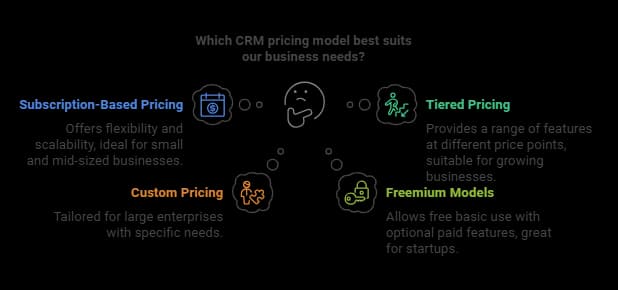
Tiered Pricing
Many CRM providers offer multiple pricing tiers.
For example:
Plan | Typical Features |
|---|---|
Free | Contacts, deals, tasks |
Starter | Pipelines, email tracking |
Professional | Automation, reporting |
Enterprise | AI, forecasting, advanced permissions |
Freemium CRM
Some providers offer a permanently free version with limited functionality.
Free CRM plans usually include:
- Contact management
- Deal tracking
- Basic reporting
- Mobile app
- Email integrations
They are ideal for freelancers and startups but usually have limits on automation, reporting, storage, or users.
Custom Enterprise Pricing
Large organizations often negotiate custom pricing.
Instead of paying standard per-user rates, pricing is based on:
- Number of users
- Business requirements
- Integrations
- API usage
- Security requirements
- Dedicated support
What Affects CRM Pricing?
Several elements influence the overall CRM software cost:
- Number of Users: The CRM cost per user is a primary driver. Adding more users increases the total price.
- Features and Add-ons: Advanced tools such as workflow automation, analytics, and AI capabilities typically raise costs.
- Deployment Type: Cloud-based solutions are generally subscription-based, while on-premises systems may require a higher upfront CRM system price for installation and maintenance.
- Integrations and Customizations: Additional costs may arise when integrating the CRM platform with other software or tailoring it to unique business needs.
- CRM Implementation: Costs related to onboarding, support, and potential need for outside consultants.
Features
Basic CRM plans usually include:
- Contact management
- Lead management
- Sales pipeline
- Notes
- Tasks
Premium plans often include:
- Workflow automation
- AI assistance
- Sales forecasting
- Custom dashboards
- Advanced reporting
- Marketing automation
- Multiple pipelines
More advanced functionality typically results in higher monthly pricing.
Integrations
Many businesses connect their CRM with tools like:
- Gmail
- Outlook
- QuickBooks
- Slack
- Shopify
- Microsoft Teams
- Mailchimp
Some integrations are included, while others require higher-tier plans or paid add-ons.
Storage and Contacts
Some CRM providers limit:
- Number of contacts
- File storage
- Email sends
- Marketing contacts
Exceeding those limits may require upgrading your plan.
CRM Costs by Business Size
The cost of CRM software can vary significantly depending on the size of the business. Small businesses typically require a limited number of CRM features and a small number of users, while large businesses require more advanced features and a larger number of users. Here’s a general breakdown:
- Small Businesses (1-10 users):$10-$50 per user per month
- Medium-Sized Businesses (11-50 users):$20-$100 per user per month
- Large Businesses (51-100 users):$50-$200 per user per month
- Enterprise Businesses (101+ users):$100-$500 per user per month
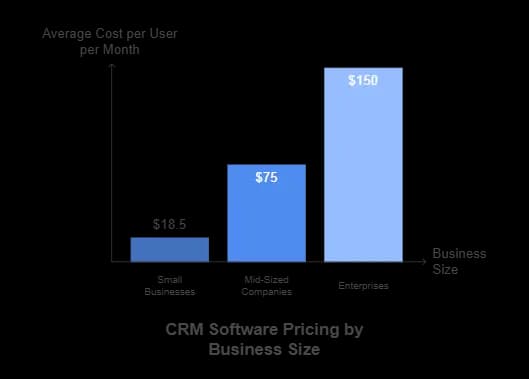
These estimates provide a general idea of CRM costs, but actual prices can vary based on specific business needs and the chosen CRM features. Medium-sized businesses, for instance, might find that investing in advanced features like sales automation and marketing automation is essential for their growth.
Related Articles


CRM Software Cost for Small Businesses
For small businesses, affordability and value are critical when choosing a CRM platform. The CRM software cost for small businesses typically falls into the lower pricing tiers, with plans designed to provide essential tools without overwhelming budgets.
Pricing Overview
- Free Plans: Many vendors, like HubSpot and Zoho, offer freemium options that include basic features such as contact management and email tracking. These are ideal for startups or businesses testing the waters with CRM software.
- Paid Plans: Entry-level paid plans range from $12 to $25 per user per month. These plans often include core features like sales pipelines, task tracking, and customer support integrations.
Key Features to Expect
Small business plans typically focus on usability and essential functionality, including:
- Contact and Lead Management: Organize and track customer interactions easily.
- Sales Pipeline Tracking: Visualize and manage sales stages to improve deal closures.
- Automation Tools: Automate repetitive tasks like follow-up emails and reminders.
- Reporting and Analytics: Basic tools to monitor performance and customer engagement.
Hidden Costs to Consider
While upfront prices are often affordable, small businesses should consider additional expenses that may impact the total CRM system price:
- Add-Ons: Some integrations or premium features (e.g., email marketing tools or advanced analytics) may incur extra fees.
- Scalability: As the team grows, the CRM cost per user will increase. Ensure the platform allows for cost-effective scaling.
Best CRM Options for Small Businesses
Several CRM platforms are specifically tailored for small businesses, offering competitive pricing and intuitive interfaces:

- Unified platform for sales and marketing
- Track customer interactions in real time
- Increase sales with multichannel software
- In-depth analytics to track success
- Mobile app means you never miss a sale
- 300+ integrations enhance functionality
Is CRM Software Worth the Cost?
For most businesses, investing in CRM software delivers measurable returns through improved organization, automation, and customer management.
A CRM can help you:
- Increase sales productivity
- Improve customer retention
- Track every lead and opportunity
- Automate repetitive tasks
- Build stronger customer relationships
- Improve forecasting accuracy
- Generate better business insights
Rather than viewing CRM software as an expense, many businesses see it as an investment that helps generate more revenue while reducing manual work.
Popular CRM Pricing Comparison
Here is a comparison of the pricing plans of some popular CRM software:
Starting from: $12/seat/month
Basic
$12/seat
seat/month
Pros
- Intuitive design
- Responsive customer service
- Numerous templates
- Cross-team collaboration tools
Cons
- Limited features on free version
Starting from: $14/month
Lite
$14
seat/month
Pros
- User-friendly design
- Easy setup process
- Friendly customer support
- Efficient management tools
Cons
- No free version

These prices are subject to change, so it’s always best to check the CRM software provider's pricing page for the most up-to-date information. Comparing these options can help you find a CRM solution that fits your budget and meets your business needs.
Choosing the Right CRM Pricing Plan for Your Business
Selecting the best CRM platform pricing requires evaluating your specific business needs:
- Assess Your Team Size: Calculate the CRM cost per user to determine scalability as your business grows.
- Define Your Feature Requirements: Prioritize essential features like automation and analytics while avoiding unnecessary extras that may inflate the CRM software cost.
- Evaluate Contact Management: Ensure the CRM offers robust contact management features to enhance customer relationships and automate workflows.
- Consider Long-Term Needs: Choose a plan that allows flexibility as your business expands or changes.
For example, startups might find freemium or basic plans sufficient, while mid-sized businesses could benefit from tiered or subscription models offering more features.
CRM Free Trials and Demos
Most CRM software providers offer free trials or demos of their software, allowing businesses to test the CRM system before committing. Here are some examples:
- Zoho CRM: 15-day free trial
- Pipedrive: 14-day free trial
- mondayCRM: 14-day free trial
- Freshsales: 21-day free trial
- Zendesk: 14-day free trial
Taking advantage of these free trials is essential to ensuring the CRM software meets your business's specific needs. They allow you to explore the CRM features, assess the user interface, and determine if the CRM solution aligns with your operational goals.
Should You Choose a Free CRM?
Free CRM software can be an excellent option if you're:
- Starting a new business
- Working independently
- Managing a small customer base
- Testing CRM software
However, businesses often outgrow free plans once they need:
- Workflow automation
- Team collaboration
- Sales forecasting
- Marketing campaigns
- Advanced reporting
- AI features
Choose a CRM that makes upgrading as simple as your business expands.
Hidden CRM Costs You Should Know About
The advertised monthly price isn't always the total amount you'll pay.
Additional costs may include:
Extra Cost | Typical Range |
|---|---|
AI tools | $10–$75/user/month |
Marketing automation | $20–$500/month |
Premium support | Included on higher plans or additional fee |
Data migration | Free–$5,000+ |
CRM implementation | Free–$10,000+ |
Additional storage | Varies |
SMS usage | Pay as you go |
Phone calls | Pay as you go |
API access | Premium plans only |
CRM Pricing vs. Value: How to Evaluate ROI
Balancing CRM pricing with the value it delivers is crucial. To ensure a strong return on investment (ROI), consider:
- Efficiency Gains: Does the software save time and improve team productivity?
- Revenue Impact: Are customer insights and automation features driving higher sales?
- Sales Forecasting: Evaluate if the CRM's sales forecasting features help anticipate revenue and streamline operations.
- Cost-Benefit Analysis: Compare the total price of the CRM system with the measurable benefits to determine whether it’s worth the expense.
For example, businesses that use automation and analytics often see significant improvements in lead conversion rates and customer satisfaction.
Final Thoughts
Understanding CRM pricing models and evaluating the cost of CRM software is essential for selecting the right solution for your business. Whether you’re a small startup looking for a basic plan or a large enterprise requiring a tailored system, knowing how much CRM software costs and what influences the CRM platform pricing helps you make an informed decision.
For businesses handling complex sales processes, investing in comprehensive CRM solutions is crucial for managing customer interactions effectively. Take the time to assess your needs, explore free trials, and calculate potential ROI to ensure your investment aligns with your business goals. By doing so, you’ll find a CRM system price that delivers both affordability and value.
FAQ
Q: How much does CRM software cost?
A: Most small businesses spend between $15 and $50 per user per month. Larger businesses that require advanced automation, AI, analytics, and enterprise features may spend $100 or more per user each month.
Q: What is the most common CRM pricing model?
A: The most common CRM pricing model is per-user subscription pricing, where businesses pay a monthly or annual fee for each employee using the CRM.
Q: Are free CRM platforms worth it?
A: Yes. Free CRM software is a good option for freelancers, startups, and very small businesses. However, businesses usually upgrade to paid plans when they need automation, integrations, reporting, or additional users.
Q: What affects CRM pricing?
A: The biggest factors include the number of users, available features, automation tools, integrations, AI capabilities, storage limits, customer support, and implementation requirements.
Q: Should small businesses pay for CRM software?
A: If your business manages leads, customers, or recurring sales, a paid CRM can improve productivity, reduce manual work, and help increase revenue. Many small businesses start with an affordable entry-level plan and upgrade as they grow.
Q: What are the common pricing models for CRM software?
A: CRM software commonly uses subscription-based pricing with monthly or annual fees, tiered plans that range from basic to enterprise features, custom pricing tailored for large enterprises, and freemium models offering free basic versions with optional paid upgrades.
Q: What factors influence CRM costs?
A: CRM costs depend on the number of users, advanced features or add-ons, the type of deployment (cloud-based or on-premises), integrations or customizations, and implementation costs like training and onboarding.
Q: What are the benefits of a CRM system?
A: CRM systems improve customer relationships, boost efficiency through automation, enhance reporting and analytics for better decisions, and support scalability as the business grows.