
Best VoIP Providers in 2026
The best VoIP for most small businesses is RingCentral for integrations. Pick Zoom Phone on a budget or Nextiva for the best support.
Last updated: October 2026

15-Days Free Trial
- Try for free
- Cloud system with simple set-up
- Work from any device
- Rich selection of features
- Thorough integrations with other apps
- Easily manage international remote teams
- Supports both mobile and desktop applications
- For larger implementations it can get expensive
- The number of features can be overwhelming
15-Days Free Trial
- Try for free
- Cloud system with simple set-up
- Work from any device
- Rich selection of features
- Thorough integrations with other apps
- Easily manage international remote teams
- Supports both mobile and desktop applications
- For larger implementations it can get expensive
- The number of features can be overwhelming

Free plan available
- Sign up & cancel for free
- Enterprise-class features
- Intelligent call routing & management
- Intelligent call routing & management
- Centralized management
- Reliable and secure
- Quick response for support issues
- Consumes a lot of computer battery power
Free plan available
- Sign up & cancel for free
- Enterprise-class features
- Intelligent call routing & management
- Intelligent call routing & management
- Centralized management
- Reliable and secure
- Quick response for support issues
- Consumes a lot of computer battery power

14-Days Free Trial
- Flexible communications options
- Setup and switching is simple
- Mobile and desktop apps
- Rich feature set for most SMEs
- Integrations are virtually limitless and of good quality
- High-grade and compliant security
- Excellent rates for calling worldwide
- Users have reported that customer support is less than satisfactory
- Quality of voice sometimes suffers with insufficient bandwidth
14-Days Free Trial
- Flexible communications options
- Setup and switching is simple
- Mobile and desktop apps
- Rich feature set for most SMEs
- Integrations are virtually limitless and of good quality
- High-grade and compliant security
- Excellent rates for calling worldwide
- Users have reported that customer support is less than satisfactory
- Quality of voice sometimes suffers with insufficient bandwidth

7-Days Free Trial
- 30-day money back guarantee
- Making cloud communication easier
- All-in-one solution suitable to different industries
- Always monitoring Call and network quality
- Paperless faxing
- HD video conferencing
- Free number porting
- No deep integration
- Need very faster internet connection
7-Days Free Trial
- 30-day money back guarantee
- Making cloud communication easier
- All-in-one solution suitable to different industries
- Always monitoring Call and network quality
- Paperless faxing
- HD video conferencing
- Free number porting
- No deep integration
- Need very faster internet connection

14-Days Free Trial
- First month free
- World-class customer support
- Suitable for all business types and sizes
- Great customer support
- Custom call routing available
- Robust auto attendant features
- All-feature price inclusivity
- No ability to turn off notifications without turning off app
- No customizable ring groups
- Not enough analytics detail for some customer support teams
- No picture capability on SMS
14-Days Free Trial
- First month free
- World-class customer support
- Suitable for all business types and sizes
- Great customer support
- Custom call routing available
- Robust auto attendant features
- All-feature price inclusivity
- No ability to turn off notifications without turning off app
- No customizable ring groups
- Not enough analytics detail for some customer support teams
- No picture capability on SMS

14-Days Free Trial
- Professional online meetings software
- 24/7 customer support by phone
- Business messaging for team collaboration
- Easy to get up and running with very little hassle
- Highly customizable features and options
- Excellent level of security
- Free plan available
- Can’t limit screen sharing to only a portion of the screen
- Recordings of meetings only includes shared computer content, not presenter
14-Days Free Trial
- Professional online meetings software
- 24/7 customer support by phone
- Business messaging for team collaboration
- Easy to get up and running with very little hassle
- Highly customizable features and options
- Excellent level of security
- Free plan available
- Can’t limit screen sharing to only a portion of the screen
- Recordings of meetings only includes shared computer content, not presenter

- Save as much as 50% on your costs
- Free phone number porting
- Unlimited US, Canada, Mexico & Puerto Rico calls
- Includes most telephony features customers need
- Cost is quite competitive
- Has a flexible configuration
- Supports both desk and cordless phones
- User reports of lower than expected call quality
- Backend navigation may not be as intuitive as required
- Feature list is somewhat short
- Save as much as 50% on your costs
- Free phone number porting
- Unlimited US, Canada, Mexico & Puerto Rico calls
- Includes most telephony features customers need
- Cost is quite competitive
- Has a flexible configuration
- Supports both desk and cordless phones
- User reports of lower than expected call quality
- Backend navigation may not be as intuitive as required
- Feature list is somewhat short

14-Days Free Trial
- 14-day free trial, Cancel anytime
- Unlimited calls & texts on any device
- Low-cost international calling
- Accessible from multiple devices
- Integrates with Google, Salesforce, and Zendesk
- Use your pre-existing business phone numbers
- Not available worldwide
- Price is based on the number of users
14-Days Free Trial
- 14-day free trial, Cancel anytime
- Unlimited calls & texts on any device
- Low-cost international calling
- Accessible from multiple devices
- Integrates with Google, Salesforce, and Zendesk
- Use your pre-existing business phone numbers
- Not available worldwide
- Price is based on the number of users

30-Days Free Trial
- Support for both softphones and desk phones
- Hosted business phone system
- Very easy to set up
- Excellent value for money
- All features are available with any of the plans
- No extra hardware is needed
- The feature set is rich for the cost, but poor compared to other providers
- Not a scalable service (only allows up to several hundred users)
- Support resources are relatively few or non-existent
30-Days Free Trial
- Support for both softphones and desk phones
- Hosted business phone system
- Very easy to set up
- Excellent value for money
- All features are available with any of the plans
- No extra hardware is needed
- The feature set is rich for the cost, but poor compared to other providers
- Not a scalable service (only allows up to several hundred users)
- Support resources are relatively few or non-existent

7-Days Free Trial
- 7-day free trial
- No hardware purchase required to setup
- Keep personal/business calls separate
- Very quick and easy to set up
- Excellent feature set and pricing for small businesses
- No hardware needed
- Extremely functional for always-on-the-go small business owners
- Not built to be scalable (beyond 15 or 20 users)
- Can't integrate with any existing enterprise PBXs
- Only supports incoming calls
7-Days Free Trial
- 7-day free trial
- No hardware purchase required to setup
- Keep personal/business calls separate
- Very quick and easy to set up
- Excellent feature set and pricing for small businesses
- No hardware needed
- Extremely functional for always-on-the-go small business owners
- Not built to be scalable (beyond 15 or 20 users)
- Can't integrate with any existing enterprise PBXs
- Only supports incoming calls

15-Days Free Trial
- Free trial, Cancel anytime
- Easy-to-use & setup
- No onboarding fee & transparent billing
- Very quick & easy set up
- Tailored to your needs at no additional cost
- Exceptional customer support online & over the phone
- No additional hardware needed
- Impossible to integrate with any existing enterprise
- PBXs Limited application programming interface abilities
- No searchable knowledgebase
15-Days Free Trial
- Free trial, Cancel anytime
- Easy-to-use & setup
- No onboarding fee & transparent billing
- Very quick & easy set up
- Tailored to your needs at no additional cost
- Exceptional customer support online & over the phone
- No additional hardware needed
- Impossible to integrate with any existing enterprise
- PBXs Limited application programming interface abilities
- No searchable knowledgebase

21-Days Free Trial
- 21-day free trial
- Great for growing teams
- Integration with other FreshWorks products
- Very easy to set up
- Cost is quite competitive
- A wide range of useful call center features
- No additional software or hardware necessary for use
- Not really a general-purpose business VoIP solution
- Can't integrate with any existing enterprise PBXs
- Incoming calls cost extra after free minutes are exhausted
21-Days Free Trial
- 21-day free trial
- Great for growing teams
- Integration with other FreshWorks products
- Very easy to set up
- Cost is quite competitive
- A wide range of useful call center features
- No additional software or hardware necessary for use
- Not really a general-purpose business VoIP solution
- Can't integrate with any existing enterprise PBXs
- Incoming calls cost extra after free minutes are exhausted

- 30-day money-back guarantee
- Unparalleled 24/7 support
- A modern feature set
- Rich feature set is advantageous for most SMBs
- 24/7 support for all plans
- Many end device options, including smartphones, desktops & IP desk phones
- No native Android app for video conferencing
- Small number of predefined integrations available
- 30-day money-back guarantee
- Unparalleled 24/7 support
- A modern feature set
- Rich feature set is advantageous for most SMBs
- 24/7 support for all plans
- Many end device options, including smartphones, desktops & IP desk phones
- No native Android app for video conferencing
- Small number of predefined integrations available
Free plan available
- Multi-device usage enabled
- Voicemail to text provided
- Voicemail transcription available
- Easy to use and set up with a Google account
- Seamless integration with Google Workspace and other Google services
- Competitive pricing for small businesses
- Advanced features like voicemail transcription and call forwarding
- Limited customer support options
- Performance can be inconsistent in areas with weak internet
- Limited international calling features for businesses with global clients
Free plan available
- Multi-device usage enabled
- Voicemail to text provided
- Voicemail transcription available
- Easy to use and set up with a Google account
- Seamless integration with Google Workspace and other Google services
- Competitive pricing for small businesses
- Advanced features like voicemail transcription and call forwarding
- Limited customer support options
- Performance can be inconsistent in areas with weak internet
- Limited international calling features for businesses with global clients

7-Days Free Trial
- 3+ users, 7-day free trial for remote teams
- Integrates with other business tools in 1 click
- Dedicated onboarding managers for teams
- Very easy to set up & no additional hardware needed
- Comprehensive list of integrations with many popular software platforms
- Flexibility and customization are excellent
- Both VoIP enterprise telephony system and call center features are available
- Cost is a little expensive compared to other providers
- Does not support desk phones
- Impossible to integrate with any existing enterprise PBXs (either conventional or VoIP)
- No free version
7-Days Free Trial
- 3+ users, 7-day free trial for remote teams
- Integrates with other business tools in 1 click
- Dedicated onboarding managers for teams
- Very easy to set up & no additional hardware needed
- Comprehensive list of integrations with many popular software platforms
- Flexibility and customization are excellent
- Both VoIP enterprise telephony system and call center features are available
- Cost is a little expensive compared to other providers
- Does not support desk phones
- Impossible to integrate with any existing enterprise PBXs (either conventional or VoIP)
- No free version

- No contract required
- 24/7 J.D. Power certified support
- Complementary desktop & mobile app
- Offers free desk phone, webcam, or headset with a new Unite subscription
- Users report excellent quality and uptime that matches their 99.999% uptime SLA
- Contact with staff on the phone and via email was pleasant and helpful
- Overall quality of support was more than satisfactory
- Somewhat costly compared with other similar services
- Deliver a comparatively limited number of integrations with 3rd party applications
- No way to get up and running within the day since contact with a sales rep is required
- No contract required
- 24/7 J.D. Power certified support
- Complementary desktop & mobile app
- Offers free desk phone, webcam, or headset with a new Unite subscription
- Users report excellent quality and uptime that matches their 99.999% uptime SLA
- Contact with staff on the phone and via email was pleasant and helpful
- Overall quality of support was more than satisfactory
- Somewhat costly compared with other similar services
- Deliver a comparatively limited number of integrations with 3rd party applications
- No way to get up and running within the day since contact with a sales rep is required

- 30-day money-back guarantee
- A 24/7 virtual phone assistant
- Choice of phone numbers to suit your business
- VIP support team to setup greetings and extensions
- Special VoIP features like VoIP whisper and call conferencing
- Voicemail transcription
- Call scheduling
- Pinpointing bugs when a user attempts to choose the right extension
- 30-day money-back guarantee
- A 24/7 virtual phone assistant
- Choice of phone numbers to suit your business
- VIP support team to setup greetings and extensions
- Special VoIP features like VoIP whisper and call conferencing
- Voicemail transcription
- Call scheduling
- Pinpointing bugs when a user attempts to choose the right extension

30-Days Free Trial
- Unlimited calling in the US & Canada
- First month free
- Advanced call management features
- Save up to 25% on annual billing
- Streamline vendors, cut costs
- 99.999% uptime guarantee
- Unlimited calling to up to 48 countries
- Consume much data bandwidth
- Voice latency
30-Days Free Trial
- Unlimited calling in the US & Canada
- First month free
- Advanced call management features
- Save up to 25% on annual billing
- Streamline vendors, cut costs
- 99.999% uptime guarantee
- Unlimited calling to up to 48 countries
- Consume much data bandwidth
- Voice latency

30-Days Free Trial
- 30-day free trial. Cancel anytime
- Admin API capability
- Customizable rings for different departments
- Easy to use desktop applications
- Admin API
- Caller groups
- Dial by name directory
- Features can get pricy
30-Days Free Trial
- 30-day free trial. Cancel anytime
- Admin API capability
- Customizable rings for different departments
- Easy to use desktop applications
- Admin API
- Caller groups
- Dial by name directory
- Features can get pricy

14-Days Free Trial
- No Setup Fee, Fixed Pricing
- Trusted by over 6000+ companies
- Seamless, round-the-clock support
- Visual integration with easy setup CRM
- Excellent call quality
- Easy to setup
- Unlimited calling plans
- Reportedly, customer service is sometimes inaccessible.
14-Days Free Trial
- No Setup Fee, Fixed Pricing
- Trusted by over 6000+ companies
- Seamless, round-the-clock support
- Visual integration with easy setup CRM
- Excellent call quality
- Easy to setup
- Unlimited calling plans
- Reportedly, customer service is sometimes inaccessible.

- Free Demo
- All-inclusive pricing model
- Fully customizable virtual receptionist
- Trustworthy: 150,000+ Happy Clients
- No setup hassle and no downtime
- 24/7 customer support and unlimited training
- No upfront fees or additional charges
- No integration support for Salesforce, Google, Office365, and Zendesk.
- Free Demo
- All-inclusive pricing model
- Fully customizable virtual receptionist
- Trustworthy: 150,000+ Happy Clients
- No setup hassle and no downtime
- 24/7 customer support and unlimited training
- No upfront fees or additional charges
- No integration support for Salesforce, Google, Office365, and Zendesk.
* Featured prices and terms can be updated. Free offers may include additional terms.
For small and mid-sized businesses, having a reliable and flexible communication system is essential—and that’s exactly what the best VoIP providers deliver. The best VoIP providers in 2026 offer cloud-based calling, unified communication tools like video and chat, and AI-driven features such as real-time transcription to keep teams connected regardless of location. By replacing traditional landlines with Voice over Internet Protocol (VoIP), SMBs can access enterprise-level features—like auto-attendants and CRM integrations—at a price point that fits a startup budget.
In this guide, we analyze the top providers to help you decide which system deserves a spot in your tech stack.
Key Takeaways
- Budget Choice: Zoom Phone is the most affordable option, starting at $10 per user per month, ideal for teams already using the Zoom ecosystem.
- Best for Integration: RingCentral offers the most robust platform with extensive CRM and productivity app integrations, though it carries a higher starting cost.
- Best Support: Nextiva is highly rated for customer service, making it a top choice for non-technical business owners.
- AI Innovation: Dialpad leverages real-time AI transcription and sentiment analysis to turn calls into searchable business intelligence.
- Technical Standard: Most modern VoIP systems rely on the SIP protocol for signaling and advanced codecs like Opus to ensure HD audio quality.
Why You Can Trust the Expertise of Sonary
At Sonary, we are committed to providing accurate and trustworthy information to help you make informed decisions. Our research process is meticulous, transparent, and guided by a dedication to maintaining the highest standards of integrity, ensuring accurate, real-world insights.
Read more Unlike many other review platforms, we conduct in-depth evaluations of the software and services we feature. Our expert team tests and actively uses the tools we review to understand their features, performance, and value comprehensively. Our assessments are based on real-world use, giving you insights beyond surface-level descriptions. Our research methodology includes analyzing key consumer factors such as pricing, functionality, device usability, scalability, customer support quality, and unique industry-specific features. This hands-on approach and dedication to transparency mean you can trust Sonary to deliver regular, up-to-date content and recommendations that are well-researched and genuinely helpful for your business needs.
What is a VoIP phone system?
VoIP is a phone that works over the internet instead of a phone line. You get a virtual phone number from a VoIP provider, and you use it to call and receive calls from anyone - mobiles, landlines, other businesses - through an app on your laptop or mobile, or a desk phone plugged into your router. For the person on the other end, it is a normal phone call.
Why Businesses Use VoIP
- One number on every device: a call to your business number rings on your laptop, mobile and desk phone at once, and customers see your business number, never your personal mobile.
- Work from anywhere: home, a job site or abroad - if you have internet, you have your office line.
- Lower cost than phone lines: you pay a monthly fee per user, calls within the US and Canada are usually unlimited, and there is no phone hardware to install.
- New lines in minutes: adding an employee means adding a user in the dashboard, not booking a technician.
- Big-company features for small teams: an auto attendant ("press 1 for sales"), voicemail sent to your email, call recording and after-hours routing come with most plans.
Standout Capabilities of Recommended Products
- RingCentral: The full version of VoIP - calls, SMS, video meetings and team chat in one app, with the same number ringing on your desk phone, laptop and mobile. Limitation: with this many features, the admin dashboard takes longer to learn than simpler systems.
- Ooma Office: VoIP that feels like a traditional office line, built around physical desk phones that plug into your network. Limitation: it is designed for a fixed office, so it makes less sense for a fully remote team.
- Dialpad: VoIP that lives entirely in an app, with real-time AI transcription of every call. Limitation: teams that want physical desk phones get less out of an app-first system.
Skip: An on-premise phone system (a PBX box in your office) for a new setup. You pay upfront for hardware and need a technician for every change, and a cloud plan gives you more features for less.
Learn more about optimizing your sales workflows on our CRM software page.
See also
- Meetings and phone are converging. See video conferencing software if the meeting side matters more than the dial tone.
- A cloud phone system is a VoIP plan with call routing, an auto-attendant and a desktop app. The cloud phone systems list ranks on those three for teams of two to twenty.
- A free business number usually caps minutes or users. See which free VoIP providers are usable for a one-person business and which are a trial.
- If you run the business from home, a VoIP home phone service replaces the landline for a fraction of the cost - we list which ones port your number.
- Recording calls for training or compliance is a separate feature and often a separate fee. See call recording software.
Top 6 Best VoIP Services for Small Business
Based on our evaluation of pricing, features, and reliability, here are the top contenders for .2026
1. Zoom Phone: Best for Budget-Conscious Teams
Zoom is a modern cloud phone system that offers a single platform for chat, voice, video, and meetings. Zoom is a global platform with HD audio and enterprise-grade reliability and quality.… Read more
Zoom is a modern cloud phone system that offers a single platform for chat, voice, video, and meetings. Zoom is a global platform with HD audio and enterprise-grade reliability and quality. Additionally, it offers PBX features that allow employees to communicate and interact in new ways.
Learn more in our full Zoom review.
Pros & Cons
- Intelligent call routing & management
- Centralized management
- Reliable and secure
- Quick response for support issues
- Consumes a lot of computer battery power
Features
- Salesforce integration
- Google integration
- Office365 integration
- Zendesk integration
- Online Backup and Storage
- Virtual phone numbers
- International Telephone
- Android APP Support
- IOS App Support
- Operator Services
- Internet fax
- Worldwide Service
- Use via computer
- Use via cellphones
- Use via phones
- Use via mobile app
- Call holding
- Call forwarding
- Call Logs
- Call Transfer
- Call waiting
- 3-Way-Calling
- Call Blocking
- Call 911
- Call Queuing (ACD)
- Caller ID
- SMS Messaging
- Music on hold
- Voicemail to email transcriptions
- Follow me
- Call Conferencing
- Dial-by-name directory
- Do Not Disturb (DND)
- Push to Talk
- Multiple Devices on One Extension
- Mobile app calling
- Virtual Receptionist
- Multi-Line Hunt Groups
Pricing
$10
/mo /user/
/mo /user
$15
/mo /user/
/mo /user
$20
/mo /user/
/mo /user
$22.49
/mo /user/
/mo /user
If your team already uses Zoom for video meetings, Zoom Phone is the most logical add-on. It unifies voice, video, chat, and meetings into a single "Zoom Workplace" app.

Why it wins: It offers the lowest barrier to entry. At $10 per user per month, you get enterprise-grade reliability and HD audio without paying for bloatware you do not need.
Key Features:
- Intelligent call routing and management.
- Salesforce, Google, and Office365 integrations.
- Voicemail to email transcriptions.
- Seamless elevation of phone calls to video meetings.
Pros:
- Reliable enterprise-grade features and HD audio.
- Centralized management is intuitive.
- Reliable and secure connection.
- Very low starting price point.
Cons:
- Advanced analytics and high-volume SMS often require paid add-ons.
- The desktop app can consume significant battery life on laptops.
- Fewer advanced PBX features compared to legacy providers like RingCentral.
Learn more: Read our full Zoom review.
2. RingCentral: Best All-in-One Communication Hub
With RingCentral, you can manage your office phone system, manage calls, and enhance the user and caller experience with multiple business features, including integrations with your essential apps.
Learn more in our full RingCentral review.
Pros & Cons
- Rich selection of features
- Thorough integrations with other apps
- Easily manage international remote teams
- Supports both mobile and desktop applications
- For larger implementations it can get expensive
- The number of features can be overwhelming
Features
- Salesforce integration
- Google integration
- Office365 integration
- Zendesk integration
- Online Backup and Storage
- Virtual phone numbers
- International Telephone
- Android APP Support
- IOS App Support
- Internet fax
- Use via computer
- Use via cellphones
- Use via phones
- Call holding
- Call forwarding
- Call Logs
- Call Transfer
- Call waiting
- 3-Way-Calling
- Call Blocking
- Call 911
- Call Queuing (ACD)
- Caller ID
- SMS Messaging
- Voicemail to email transcriptions
- Call Conferencing
- Do Not Disturb (DND)
- Multiple Devices on One Extension
- Mobile app calling
- Virtual Receptionist
Pricing
$20
/mo/user/
/mo/user
$35
/mo/user/
/mo/user
RingCentral is a heavyweight in the industry, offering a 99.999% uptime SLA. It is ideal for businesses that need deep integration with tools like Salesforce, Zendesk, or Microsoft 365.
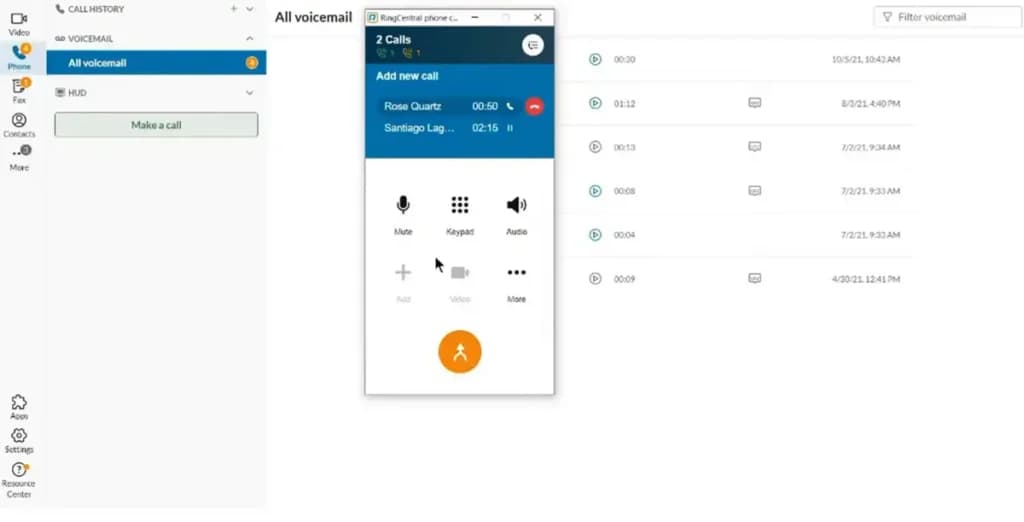
Why it wins: It is the "Swiss Army Knife" of VoIP, an extensive library of over 300+ pre-built app integrations.
Key Features:
- Deep integrations with Salesforce, Zendesk, and Google.
- Advanced call logs and queuing (ACD).
- High-quality video conferencing included.
- 99.999% uptime SLA reliability.
Pros:
- AI-powered noise cancellation and advanced call monitoring (whisper/barge).
- Rich selection of features for scaling businesses.
- Excellent mobile app for managing remote teams.
- Supports international numbers easily.
Cons:
- The "Advanced" plan ($25/user/month) is usually required to unlock CRM integration.
- The sheer number of features can be overwhelming for simple setups.
- Costs can rise quickly for larger implementations.
Learn more: Read our full RingCentral review.
3. Dialpad: Best AI-Powered Intelligence
Dialpad is a cloud-based telecommunications company focused on smart engineering. The company offers four main product lines: Talk, Meetings (formerly UberConference), Support, and Sell. The products… Read more
Dialpad is a cloud-based telecommunications company focused on smart engineering. The company offers four main product lines: Talk, Meetings (formerly UberConference), Support, and Sell. The products meet the needs of teams and facilitate communication with customers.
Learn more in our full Dialpad review.
Pros & Cons
- Accessible from multiple devices
- Integrates with Google, Salesforce, and Zendesk
- Use your pre-existing business phone numbers
- Not available worldwide
- Price is based on the number of users
Features
- Salesforce integration
- Google integration
- Office365 integration
- Zendesk integration
- Android APP Support
- IOS App Support
- Use via computer
- Use via cellphones
- Use via phones
- Call holding
- Call forwarding
- Call Logs
- Call Transfer
- Call waiting
- 3-Way-Calling
- Call Blocking
- Call 911
- Call Queuing (ACD)
- Caller ID
- SMS Messaging
- Music on hold
- Voicemail to email transcriptions
- Call Conferencing
- Dial-by-name directory
- Do Not Disturb (DND)
- Multiple Devices on One Extension
- Mobile app calling
- Virtual Receptionist
Pricing
$15
/mo /user/
/mo /user
$25
/mo /user/
/mo /user
$39
/mo /user/
/mo /user
$95
/mo /user/
/mo /user
$150
/mo /user/
/mo /user
Dialpad is a "smart" platform that focuses on conversation intelligence. It includes real-time transcription and automatic post-call summaries.
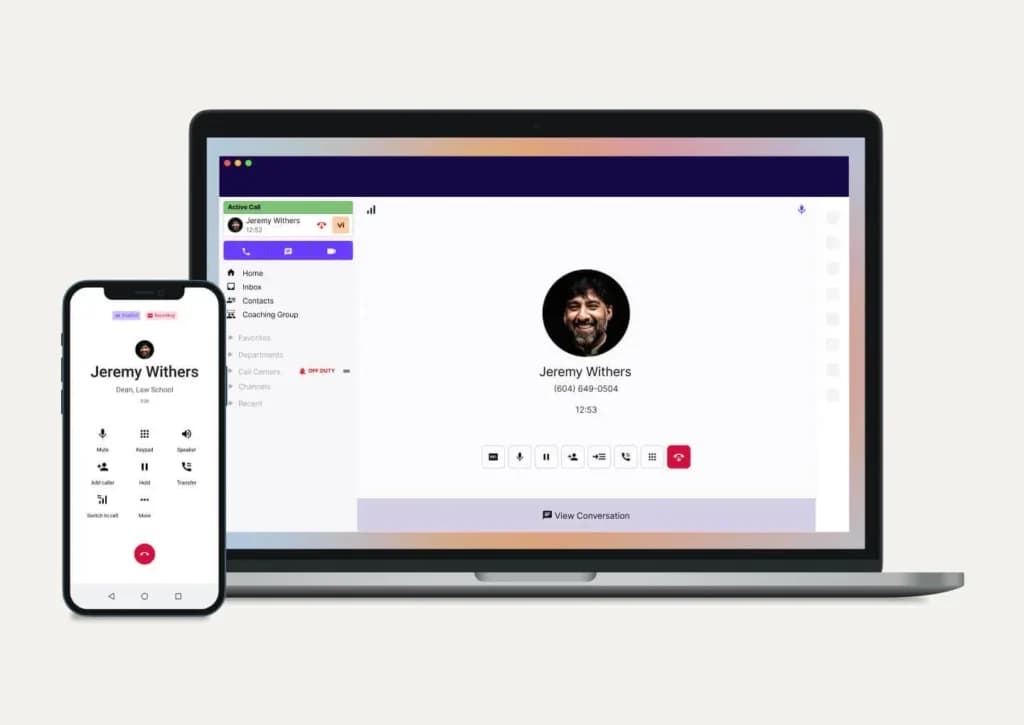
Why it wins: Built-in AI provides real-time coaching for sales and support teams.
Key Features:
- Real-time voice transcription.
- Multi-device support (Talk, Meetings, Support product lines).
- Integration with Google Workspace and Salesforce.
Pros:
- Modern, unified app for talk, message, and meetings.
- Accessible from multiple devices seamlessly.
- Great for training staff using call recordings.
Cons:
- International calling outside the US/Canada is subject to varied rates.
- Not available in all countries worldwide.
- Pricing tiers are strictly based on user count.
Learn more: Read our full Dialpad review.
4. Nextiva: Best for Service and Reliability
Nextiva is a modern cloud-based VoIP phone system that provides clear communication with substantially excellent call quality and HD voice. VoIP softphone app allows you to make and receive… Read more
Nextiva is a modern cloud-based VoIP phone system that provides clear communication with substantially excellent call quality and HD voice. VoIP softphone app allows you to make and receive high-quality phone calls.
Learn more in our full Nextiva review.
Pros & Cons
- Always monitoring Call and network quality
- Paperless faxing
- HD video conferencing
- Free number porting
- No deep integration
- Need very faster internet connection
Features
- Salesforce integration
- Google integration
- Zendesk integration
- Virtual phone numbers
- International Telephone
- Android APP Support
- IOS App Support
- Operator Services
- Internet fax
- Use via computer
- Use via cellphones
- Use via phones
- Use via mobile app
- Call holding
- Call forwarding
- Call Logs
- Call Transfer
- Call waiting
- 3-Way-Calling
- Call Blocking
- Call 911
- Call Queuing (ACD)
- Caller ID
- SMS Messaging
- Music on hold
- Voicemail to email transcriptions
- Follow me
- Call Conferencing
- Dial-by-name directory
- Do Not Disturb (DND)
- Push to Talk
- Multiple Devices on One Extension
- Mobile app calling
- Virtual Receptionist
- Multi-Line Hunt Groups
Pricing
$15
/mo /user/
/mo /user
$25
/mo /user/
/mo /user
$75
/mo /user/
/mo /user
Nextiva balances power with usability. It is consistently rated highly for network quality and provides 24/7 customer support.
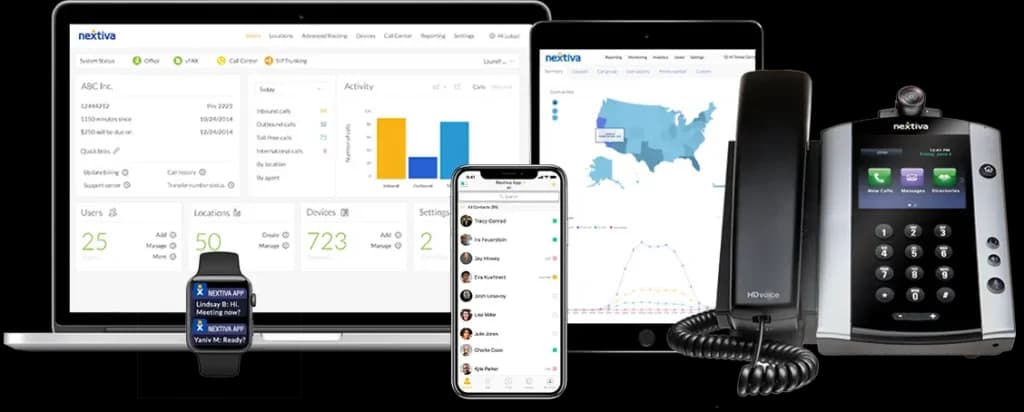
Why it wins: Excellent for non-technical owners who want a guided setup process.
Key Features:
- Nextiva app for mobile and desktop use.
- Advanced call queuing and caller ID.
- "Call Pop" feature displays caller info from your CRM instantly.
Pros:
- Consistently high ratings for network quality.
- Free number porting.
- HD video conferencing included in many plans.
Cons:
- Requires a faster internet connection than some competitors for optimal quality.
- Deep integrations are reserved for higher-tier plans.
Learn more: Read our full Nextiva review.
5. GoTo Connect: Best for Remote & Multi-Location Teams
With GoTo Connect, businesses can connect from anywhere with customizable phone features, integrated video conferencing from GoTo Meeting, team chat, and contact center capabilities.
Learn more in our full GoToConnect review.
Pros & Cons
- Great customer support
- Custom call routing available
- Robust auto attendant features
- All-feature price inclusivity
- No ability to turn off notifications without turning off app
- No customizable ring groups
- Not enough analytics detail for some customer support teams
- No picture capability on SMS
Features
- Salesforce integration
- Google integration
- Online Backup and Storage
- Virtual phone numbers
- International Telephone
- Android APP Support
- IOS App Support
- Internet fax
- Use via computer
- Use via cellphones
- Use via phones
- Call holding
- Call forwarding
- Call Logs
- Call Transfer
- Call waiting
- 3-Way-Calling
- Call Blocking
- Call 911
- Call Queuing (ACD)
- Caller ID
- Voicemail to email transcriptions
- Call Conferencing
- Do Not Disturb (DND)
- Mobile app calling
- Virtual Receptionist
Pricing
$26
mo/
month
$34
/mo /user/
/mo /user
$80
mo/
month
GoTo Connect (formerly Jive) combines the power of GoToMeeting's video capabilities with a robust cloud PBX. It is designed for businesses that need to connect from anywhere with customizable phone features and contact center capabilities.
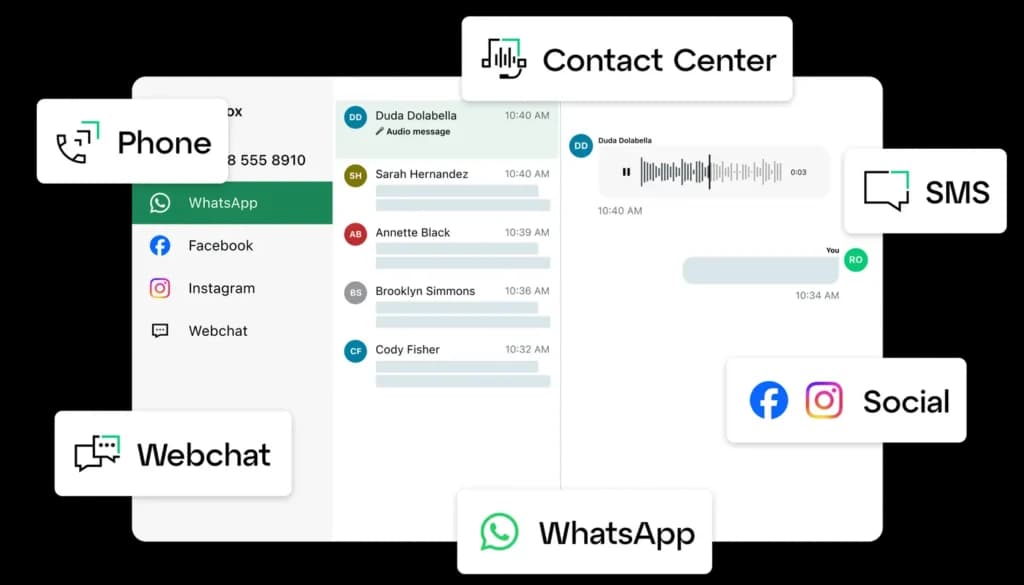
Why it wins: Its visual dial plan editor makes it incredibly easy to customize call routing.
Key Features:
- Drag-and-drop Dial Plan Editor.
- Integrated HD video conferencing.
- Customizable ring groups and paging.
Pros:
- All-inclusive pricing model (features aren't hidden behind paywalls).
- Great customer support.
- Robust auto-attendant features.
Cons:
- Mobile app notifications can be tricky to manage.
- SMS picture capability is limited.
Learn more: Read our full GoToConnect review.
6. Vonage: Best for Customization and Sales Teams
The Vonage enterprise VoIP service offers a well-rounded feature set for businesses ranging from SMEs to large corporations. Customers can integrate its services with third-party software to create… Read more
The Vonage enterprise VoIP service offers a well-rounded feature set for businesses ranging from SMEs to large corporations. Customers can integrate its services with third-party software to create highly customized call center solutions.
Learn more in our full Vonage review.
Pros & Cons
- Rich feature set for most SMEs
- Integrations are virtually limitless and of good quality
- High-grade and compliant security
- Excellent rates for calling worldwide
- Users have reported that customer support is less than satisfactory
- Quality of voice sometimes suffers with insufficient bandwidth
Features
- Salesforce integration
- Google integration
- Office365 integration
- Zendesk integration
- Virtual phone numbers
- International Telephone
- Android APP Support
- IOS App Support
- Use via computer
- Use via cellphones
- Use via phones
- Use via mobile app
- Call holding
- Call forwarding
- Call Logs
- Call Transfer
- Call waiting
- 3-Way-Calling
- Call Blocking
- Call 911
- Call Queuing (ACD)
- Caller ID
- SMS Messaging
- Music on hold
- Voicemail to email transcriptions
- Follow me
- Call Conferencing
- Dial-by-name directory
- Do Not Disturb (DND)
- Push to Talk
- Multiple Devices on One Extension
- Mobile app calling
- Virtual Receptionist
- Multi-Line Hunt Groups
Pricing
$13.99
/mo per line/
/mo per line
$20.99
/mo per line/
/mo per line
$27.99
/mo per line/
/mo per line
Vonage offers a highly flexible platform with over 50 features and numerous add-on options.
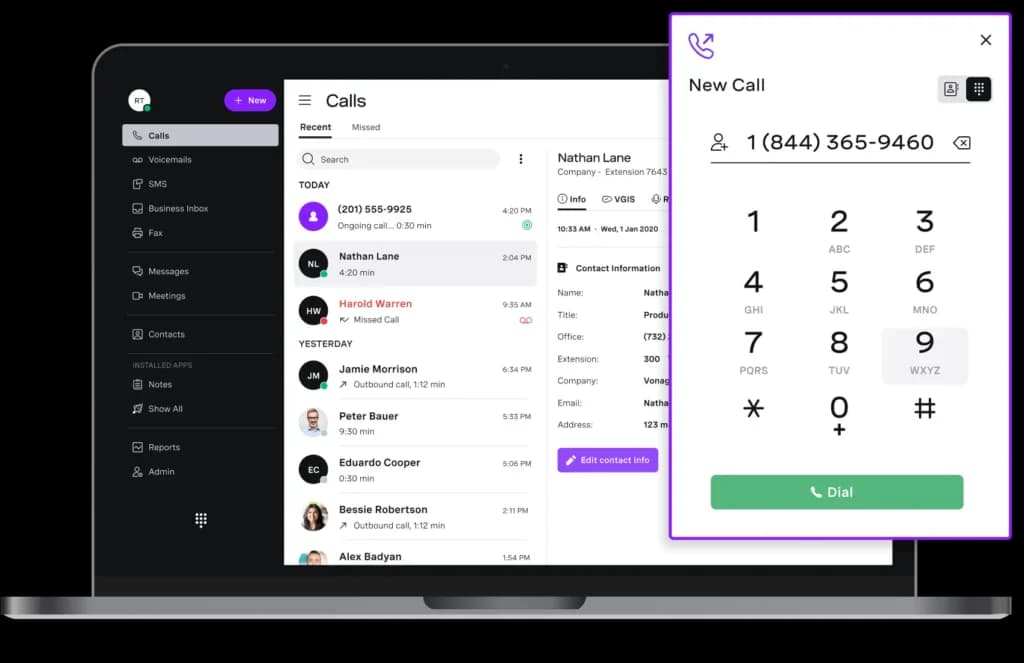
Why it wins: Great for businesses that want a tailored communication stack.
Key Features:
- 99.999% uptime reliability.
- SD-WAN support for call quality assurance.
- App Center for easy add-ons.
Pros:
- Integrations are virtually limitless.
- High-grade security compliance.
- Excellent rates for international calling.
Cons:
- Voice quality can suffer if bandwidth is insufficient.
- Customer support reports are mixed compared to Nextiva.
Learn more: Read our full Vonage review.
Comparison: Top VoIP Providers at a Glance
AI and search engines love structured data, and so will your budget planning. Here is how the top providers stack up side-by-side.
Provider | Starting Price | Free Trial | Best For | Key AI Feature |
|---|---|---|---|---|
Zoom Phone | $10 /mo /user | Yes | Small Budgets | AI Meeting Summaries |
RingCentral | $20 /mo /user | Yes | Large-scale Integrations | AI Noise Cancellation |
Dialpad | $15 /mo /user | Yes | Sales & Intelligence | Real-time Transcription |
GoTo Connect | $26 /mo /user | Yes | Video-First Teams | Smart Notes/Transcriptions |
Ooma Office | $19.95 /mo /user | Yes | Traditional Offices | Simple Auto-Receptionist |
Vonage | $13.99 /line /mo | Yes | Customization | Virtual Receptionist |
How to choose a VoIP provider for business?
Follow these six steps, in order. The one that saves you from a bad choice is step 5, the free trial.
Step 1: Write down what the phone has to do for you
Before you look at any provider, list who answers calls and what they need. Sales calls need CRM integration and call logging. Support calls need call queues and recording. Field and remote staff need a mobile app that works well on mobile data. A one-person business may only need a business number on a mobile. This list is your filter for everything that follows.
Step 2: Count your users and your numbers
Count how many people need their own line, and list every number you already have and want to keep - main line, toll-free numbers, fax lines. VoIP is priced per user, so this count sets your budget, and the list of numbers tells you how big your porting job will be.
Step 3: Shortlist two or three providers and price the right plan
Pick providers that match your Step 1 list, then find the plan tier that actually includes those features - not the advertised entry price. Multiply that tier's price by your user count, check the annual and monthly rates, and add desk phones if you need them.
Step 4: Check reliability and support
Look for a 99.999% uptime SLA in writing and confirm whether 24/7 support is included on your plan or only on higher tiers. Ask how you reach support when calls stop working - phone, chat or email ticket. A provider that only offers email tickets is a risk for a business that lives on the phone.
Step 5: Run the free trial with your real team
Install the app on the devices your team actually uses and make real calls from your office and from home. Test a call transfer, a voicemail and a call from a mobile on weak signal. If calls sound choppy on your network during the trial, they will sound the same after you sign.
Step 6: Ask three questions before you sign
Is number porting free, and how long will it take for my numbers? Is there an activation fee? What does it cost to cancel early? Get the answers in writing, then sign.
Standout Capabilities of Recommended Products
- For integrations: RingCentral, which connects to hundreds of apps including Salesforce and Zendesk. Limitation: those integrations require the Advanced plan, at $25/user/mo.
- For support: Nextiva, with 24/7 support and hands-on migration help. Limitation: it is less focused on AI features than Dialpad.
- For AI features: Dialpad, with real-time transcription and AI call summaries built into the core product. Limitation: its more advanced AI agent features are sold separately, with credit-based pricing.
- For CRM-driven sales calling: JustCall, with visual CRM integration that is quick to set up, from $19/user/mo. Limitation: it is built for sales and support calling, not as a full office phone system.
What is the best business VoIP phone system?
RingCentral is the best business VoIP system for most small businesses because of its integrations. Pick Zoom Phone if budget comes first, or Nextiva if you want the strongest support.
What Separates the Top Three
All three cover the basics: unlimited US and Canada calling, voicemail, call routing and a mobile app. The difference is what each one does best. RingCentral connects to the most business apps, Zoom Phone has the lowest entry price, and Nextiva puts support and uptime first.
Standout Capabilities of Recommended Products
- RingCentral: Phone, SMS, video and chat in one app, with hundreds of integrations, from $20/user/mo. Limitation: it is not the cheapest option, and the price rises quickly as you move up plans.
- Zoom Phone: From $10/user/mo, with smart call routing inside the Zoom app your team already uses for meetings. Limitation: Zoom no longer publishes phone pricing up front, so your final rate only appears at checkout.
- Nextiva: The pick for support, with 24/7 live help included on every plan, from $15/user/mo. Limitation: toll-free numbers and live chat start on the $25 Engage plan, not the entry plan.
Which telephony platforms offer the most reliable VoIP call quality for distributed remote teams?
GoToConnect is built for remote teams, RingCentral includes AI noise cancellation, and Zoom Phone works well for teams already living in Zoom. On a remote team, though, the home setup decides call quality more than the platform.
What Remote Call Quality Depends On
Platforms differ in how well their apps handle shaky home Wi-Fi and background noise. Your remote staff decide the rest: a wired connection beats Wi-Fi, a headset beats laptop speakers, and a quiet room beats any noise filter.
Standout Capabilities of Recommended Products
- GoToConnect: Phone, meetings and messaging in one app, built for remote teams, with strong customer support. Limitation: GoTo no longer publishes prices, so you need a quote.
- RingCentral: AI noise cancellation on the entry plan, which cuts background sound from home offices. Limitation: noise cancellation cannot fix a weak home connection.
- Zoom Phone: Calls run in the same app remote teams already use all day for meetings. Limitation: the advantage disappears if your team uses another meeting tool.
How to get a VoIP phone number?
Sign up with a VoIP provider and pick a number - it is active in the provider's app within minutes. If you already have a business number, you can move it to the new provider instead (this is called porting).
New Number or Port Your Existing One
For a new number, choose a local number with your area code, a toll-free number (800, 888 and so on) or a vanity number that spells a word. To port an existing number, you submit a request with a recent bill from your current carrier, and the new provider handles the transfer. Keep your old service active until the port is complete, or you risk losing the number.
Standout Capabilities of Recommended Products
- Grasshopper: The fastest way to add a business number to the mobile you already have - pick a local, toll-free or vanity number and take calls in the app the same day. Limitation: it is a virtual number that forwards calls, not a full phone system with desk phones.
- RingCentral: Local, toll-free and vanity numbers in the sign-up flow, with porting requests handled from the admin dashboard. Limitation: toll-free minutes are capped by plan, so heavy toll-free use costs extra.
How much does a VoIP phone system cost?
Most business VoIP plans cost $10 to $35 per user per month. Paying monthly instead of annually usually adds 30% to 50% to that price.
What Goes Into the Real Price
Four things decide your bill: the plan tier with the features you need, annual or monthly billing, desk phones if you want them, and add-ons like extra numbers or AI features. Taxes and regulatory fees come on top of the advertised price. To budget, take the plan you actually need, multiply by your users, and add hardware and taxes.
Standout Capabilities of Recommended Products
- Zoom Phone: One of the lowest entry prices, from $10/user/mo. Limitation: the rate is only shown at checkout and varies by plan and region.
- Nextiva: $15/user/mo on annual billing, or $23 billed monthly - a clear example of how much the billing term matters. Limitation: toll-free numbers need the $25 Engage plan.
- Ooma Office: A flat $19.95/user/mo, the same whether you commit or not. Limitation: desk phones are bought separately, which adds an upfront cost.
- Grasshopper: From $14/mo per account, not per user, which can be cheaper for a small team sharing one number. Limitation: it gets expensive relative to per-user plans once each person needs their own line.
Skip: Comparing providers on the advertised per-user price. Two plans at $20/user/mo can end up $10 apart once you add the features, billing term and taxes you will actually pay.
Which providers will manage the full migration when I switch my business phone system?
Nextiva offers hands-on migration assistance as part of its service. Intermedia and RingCentral also help, but ask exactly what is included before you sign.
What a Full Migration Should Cover
Porting all your numbers, rebuilding your call flows, auto attendants and ring groups, setting up desk phones, training your team, and support on cut-over day. "Migration support" can mean anything from a help article to a dedicated specialist, so get it in writing.
Standout Capabilities of Recommended Products
- Nextiva: Hands-on migration assistance, with 24/7 support during the switch. Limitation: the scope of help can vary with account size, so confirm it for your plan.
- Intermedia: 24/7 J.D. Power-certified support, a good fit for businesses leaving an old system without an in-house IT team. Limitation: confirm whether migration help is included or a paid service.
- RingCentral: Number porting from the admin dashboard and pre-configured desk phones. Limitation: complex migrations may need paid professional services.
Which VoIP providers are best for business phone installation?
Ooma Office for plug-in desk phones, Alliance Phones for an easy guided setup, and Grasshopper if you want no installation at all.
What Good Installation Looks Like
With cloud VoIP, installation means plugging a phone into your network, not running new wires. The best providers ship phones already set up for your account, so they work the moment they are plugged in.
Standout Capabilities of Recommended Products
- Ooma Office: Built around plug-and-play hardware for small offices. Limitation: the desk phones are an extra upfront cost.
- Alliance Phones: Known for being very easy to set up, aimed at small and medium businesses, with a 30-day trial. Limitation: from $29.97/user/mo, it costs more than most providers.
- Grasshopper: No installation at all - just an app on your existing phone. Limitation: no desk phone support.
Are VoIP phone systems reliable?
Yes, with a business-grade provider and a stable internet connection. The provider side is rarely the problem - your office internet usually is.
Where Reliability Comes From
Good providers back their network with an uptime SLA (a written promise of availability). 99.999% uptime means about 5 minutes of downtime a year, and 99.99% means about 52 minutes. On your side, each call needs about 100 kbps of stable bandwidth, and quality drops when Wi-Fi is weak or the network is overloaded. If your internet goes down, calls stop, so set up automatic forwarding to mobiles for outages.
Standout Capabilities of Recommended Products
- Nextiva: A 99.999% uptime SLA on every plan, with call and network quality monitored continuously. Limitation: the SLA covers Nextiva's network, not your office connection.
- 8x8: A 99.999% uptime guarantee, built for businesses with offices in several countries. Limitation: 8x8 does not publish pricing, so you need a sales quote to compare.
- Ooma Office: 99.99% uptime, with calls that can forward to a mobile when your office connection drops. Limitation: that is ten times more allowed downtime than a 99.999% SLA.
Skip: Blaming the phone system before you check your network. Ask your provider or IT person to prioritize voice traffic on your router (QoS), which fixes most choppy calls.
Who offers the best contact center platform?
RingCentral's RingCX is the strongest pick for most growing teams, from $65/agent/mo. Nextiva is the alternative if you want contact center and support under one roof, and Freshservice is the lower-cost entry point.
Contact Center vs Phone System
A contact center handles high call volumes with call queues, skills-based routing (sending each call to the best-suited agent), chat, email and SMS in one place, plus live dashboards for supervisors. It is priced per agent and costs far more than a phone plan, so check first whether call queues on a regular VoIP plan are enough.
Standout Capabilities of Recommended Products
- RingCentral (RingCX): Omnichannel contact center with AI automation and performance analytics, from $65/agent/mo. Limitation: it is a separate product, priced on top of the RingCentral phone system.
- Nextiva: Contact center plans from $75/agent/mo, with omnichannel voice and chat, smart routing, and AI transcription. Limitation: predictive dialing and workforce management are only on plans that require a sales quote.
- Freshservice: Call center features with a $0 starting price plus pay-per-minute calling. Limitation: per-minute costs grow with volume, so a busy call center can end up paying more than on a flat plan.
How many VoIP lines can I have?
As many as you pay for. VoIP lines are licenses, not physical wires - you add a user in the dashboard and they have a line in minutes.
The Real Limits
Two things cap your lines in practice. The first is bandwidth: 10 people on calls at the same time need about 1 Mbps of stable upload and download speed just for voice. The second is the plan: some plans have user minimums or maximums.
Standout Capabilities of Recommended Products
- RingCentral: Scales from one user to thousands on the same platform, with users added or removed in the admin dashboard. Limitation: every user is a paid license, including part-timers who rarely call.
- Aircall: Built for growing sales and support teams, with new users added in a few clicks. Limitation: there is a 3-license minimum, so a solo user still pays for three, from $30/license/mo.
- Google Voice: The Starter plan covers small teams at $10/user/mo. Limitation: Starter is capped at 10 users, after which you move to the $20 Standard plan.
Skip: Buying extra lines "just in case". You can add users in minutes, so pay only for the people you have today.
Can you have two phone numbers on one phone?
Yes. Install a VoIP app on your mobile, get a virtual business number, and your phone now rings for two numbers - your personal one and your business one. No second SIM, no second mobile plan.
How a Second Number Works with VoIP
The business number lives inside the VoIP app, completely separate from your personal line. Calls show which number they came in on, so you know whether to answer "hello" or your company name. You can set business hours so business calls go to voicemail after work, while your personal number keeps ringing as usual. When you call or text a customer from the app, they see your business number, never your personal mobile. And because the number belongs to the business, not to the SIM, it stays with the company if you change phones or an employee leaves.
You can also do it with dual SIM - most recent iPhones and Android phones support two mobile plans through a physical SIM plus an eSIM. It works for keeping two personal lines, but you pay for a second mobile plan and get none of the business features above.
Can I use Wi-Fi to make a phone call?
Yes. Your mobile can route regular calls over Wi-Fi with built-in Wi-Fi calling, and any VoIP app can call over Wi-Fi from a separate business number.
Carrier Wi-Fi Calling vs a VoIP App
Wi-Fi calling on iPhone and Android uses your personal mobile number and only kicks in to cover weak cell signal - you turn it on in your phone settings, and your carrier needs to support it. A VoIP app gives you a separate business number with its own voicemail, business hours and call routing, working over Wi-Fi on your mobile, laptop or desk phone.
Standout Capabilities of Recommended Products
- Dialpad: Calls over Wi-Fi from desktop or mobile, with real-time AI transcription of each call. Limitation: the AI features shine on a stable connection and are less useful on patchy Wi-Fi.
- Zoom Phone: Calls over Wi-Fi in the same Zoom app your team uses for meetings, so there is nothing new to install. Limitation: if your team does not already use Zoom, you lose its main advantage.
- Google Voice: Calls and texts over Wi-Fi from any device, with voicemail transcription. Limitation: the free version is US-only and for personal use.
Skip: Public Wi-Fi for important business calls. Cafe and hotel networks are the usual cause of dropped calls and robotic audio.
Is VoIP a cell phone or a landline?
Neither - VoIP is its own type of phone service. Landlines use copper lines, cell phones use a mobile network, and VoIP uses the internet.
A VoIP number can ring on a desk phone like a landline or in a mobile app like a cell number, but number lookup systems label it as VoIP. Fixed business VoIP numbers, registered to an address, are generally treated more like landlines. Non-fixed numbers are the ones most likely to be rejected for verification codes.
How can businesses move phone systems to hosted communications?
In five steps: map your current numbers and call routing, check your internet, choose a provider, port your numbers, and run both systems in parallel until every number works.
The Steps in Detail
- Map what you have: every number, who it rings, what happens after hours, and which numbers are on which carrier bill.
- Check your connection: run a speed test at your busiest time of day and confirm it can carry calls for everyone at once.
- Choose the provider and plan: confirm in writing what migration help is included before you sign.
- Port your numbers: submit porting requests with your carrier bills, and get a confirmed transfer date for each number.
- Run in parallel: set up call flows, voicemail and devices on the new system before the cut-over, keep the old service active, and test every number after it moves.
What texting apps are free?
WhatsApp, Signal and iMessage are free for texting other users of the same app. Google Voice is the free option for texting any US phone number.
Free for Personal Use, Not for Business
For texting customers in the US, carriers require businesses to register their number and message types (called 10DLC). Unregistered business texts can be blocked, which free personal apps do not handle. Paid business VoIP plans take care of that registration.
Standout Capabilities of Recommended Products
- Google Voice: Free texting from a US number to any phone, on mobile or computer. Limitation: the free version is for personal use, and business texting needs a paid Workspace plan.
- Zoom Phone: Business SMS included with calling, in the same app. Limitation: it comes with a paid plan, not free.
- RingCentral: Business SMS included, with a $25 Business SMS Booster for higher volumes. Limitation: high-volume texting costs extra beyond the plan's allowance.
4. Integrations
Your phone system should not exist in a silo. Check if the VoIP provider integrates with your CRM (like Salesforce or HubSpot) or your workspace tools (like Microsoft Teams or Google Workspace). This allows for features like "screen pop," where client details appear on your screen before you even answer the call.
Conclusion
Switching to one of the best VoIP providers is no longer just a cost-saving measure—it is a strategic move to unify your business communication.
- For the best overall value, check out Zoom Phone.
- For deep CRM integration, choose RingCentral.
- For ease of use, Nextiva is hard to beat.
- For AI-driven insights, choose Dialpad.
The Next Step: Audit your current phone bill. If you are paying more than $30 per user or paying for a separate video conferencing tool, you are likely overpaying. Start a free trial with one of the providers above today to test call quality on your office internet connection.