

Claude AI Review 2026: Pricing, Models & Features
Overall Rating
4.8
Last updated: July 2026
Claude AI, built by Anthropic, is a safety-first AI assistant for writing, coding, research, data analysis, and agentic tasks. You can use Claude on the web, desktop (Windows/macOS), and mobile (iOS and Android), through the API, or inside tools via connectors. Claude reads and reasons over long documents and images, searches the web for current information with cited sources, and runs multi-step work through Claude Code and connectors (remote MCP). In 2026 the lineup runs on Anthropic's newest models — Opus 4.8, Sonnet 5, and Haiku 4.5 — with plans for individuals, teams, and enterprises.
Plans & Pricing
Free
$0
seat/
month
- No charges ever
- Chat with Claude 4 Sonnet model and generate content
- Upload and ask about docs and images
Pro
$20
seat/
month
- Chat with Claude 4 Opus model
- Use model selector
- Priority access when traffic is high
Team
$25
seat/
/mo or per user
- Minimum 5 seats
- Everything in Pro plus:
- Increased usage limits
- Priority access to new collaborative features
- Central administration and billing
* Featured prices can be updated and free offers may include additional terms.
Claude AI Models (2026) Claude runs on Anthropic's model family. The right one depends on whether you need maximum capability, balanced speed, or lowest cost.
- Claude Opus 4.8— Anthropic's most capable model, built for complex agentic coding and enterprise work, with up to a 1M-token context window for reasoning over very large codebases and document sets.
- Claude Sonnet 5— the default model on the Free and Pro plans. A high-performance model for coding and agents that pairs Opus-class accuracy with faster, more economical responses, also with a large (up to 1M-token) context window.
- Claude Haiku 4.5— the fastest and most cost-efficient model, with a 200K-token context window. Best for high-volume, latency-sensitive tasks.
- Claude Fable 5— a newer model in the family aimed at long-running agent workflows (currently surfaced in Claude's API/platform pricing).
Paid plans let you switch between models; Free defaults to Sonnet 5 with usage limits.
Claude Pricing
Plan | Price | Who it's for |
Free | $0 | Anyone trying Claude — chat on web/desktop/mobile, web search, memory, file creation, connectors and extended thinking, with usage limits. |
Pro | $20/mo (or ~$17/mo billed annually — $200 up front) | Individuals who use Claude daily — more usage, unlimited Projects, Research, more models, and Claude Code. |
Max | From $100/mo (5×) or $200/mo (20×) | Power users who want much higher limits, higher output limits, and priority/early access to new features. |
Team | $20/seat/mo billed annually ($25 monthly); Premium seat $100/seat/mo annually ($125 monthly). Teams of 5–150. | Teams needing shared admin, SSO, central billing, and enterprise search. |
Enterprise | Custom — seat price + usage at API rates (from $20/seat), annual, contact sales | Large organizations needing SSO/SCIM, audit logs, role-based access, HIPAA-ready offering, and custom data controls. |
Prices verified on claude.com/pricing on 2026-07-14 and subject to change at Anthropic's discretion. Add a note: "Featured prices and terms can be updated."
Free is genuinely useful for everyday questions; Pro is the sweet spot for daily users at $20/mo (cheaper billed annually); Max is for heavy, all-day usage; Team and Enterprise add administration, security, and per-seat billing.
Expert Score
Pros
- Runs on Anthropic's newest models (Opus 4.8, Sonnet 5, Haiku 4.5) with very large context windows
- Genuinely useful free plan; Pro is competitively priced at $20/mo (less billed annually)
- Strong at coding and agentic work via Claude Code and MCP connectors
- Web search with cited sources, vision, and extended reasoning built in
Cons
- Heaviest usage requires the Max plan (from $100/mo)
- Team plan requires a minimum of 5 seats
- Usage is capped by rolling session limits rather than a fixed message count, which can interrupt heavy sessions
Customer Support
For support with the AI writing tool, Claude offers a comprehensive support center filled with hundreds of articles across more than ten categories, including different plans, trust and safety, phone verification, and Claude apps. Additionally, a chatbot is available anytime for immediate assistance. It can be accessed by clicking the chat icon in the lower-right corner of any page. The chatbot functions similarly to the Claude AI tool, allowing you to choose options or type questions. If your query isn't resolved, you can leave a message for further support.
Blog
support.anthropic.com
Ease of Use
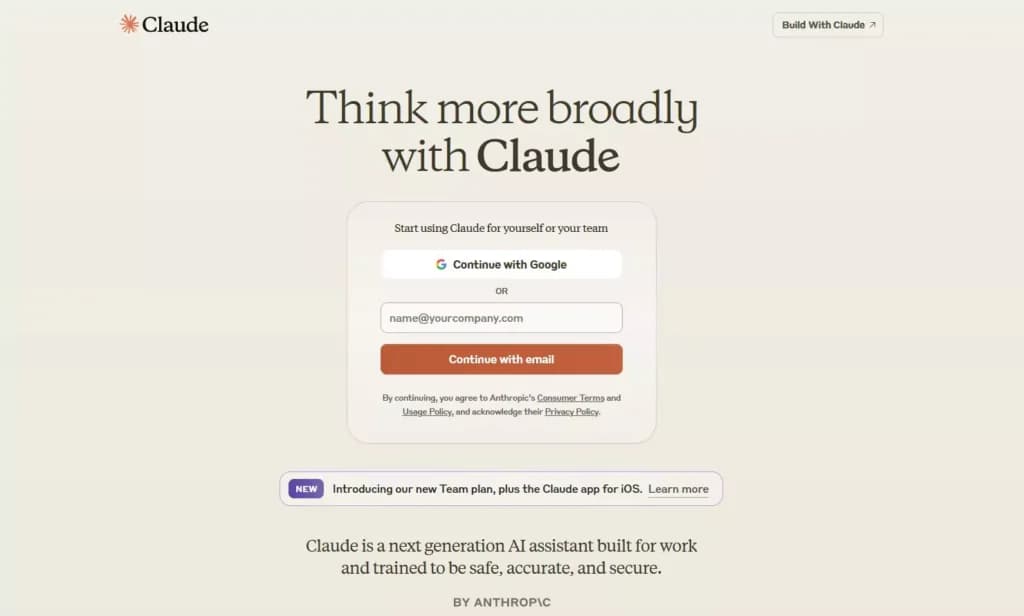
The AI tool is user-friendly and straightforward to use, featuring a simple two-step registration process:
- Email Registration: You can sign up using your email or via Google. After signing up, you'll need to confirm your email by clicking a link sent to you by Claude.
- Phone Verification: Enter a valid phone number to receive a confirmation code for verification.
Once registered, you'll access the main interface of the Claude tool, which is designed for ease of use. The interface greets you and prompts you to enter questions or tasks. You can also attach documents or images for Claude to analyze and provide responses.
Users can choose between light and dark themes. The default theme is light, and it looks like this:
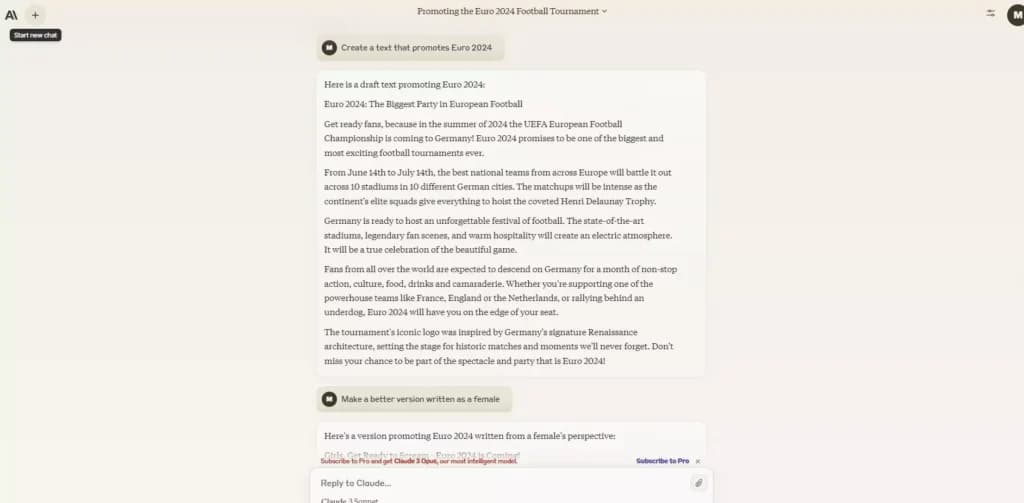
You can change to the dark theme in the evening or if you feel it’s better for your eyes.
Performance
The first thing you notice is how fast the Claude AI writing tool is. Once you enter your question or task in the prompt and send it, the content writing process will begin almost immediately. Claude will gradually reveal the text on the screen, which is a nice touch. The process will finish in seconds, and you’ll have the content ready.
I asked it to generate a text about the 2024 Football European Championship. I typed that I needed a promotion text for Euro 2024, and Claude understood perfectly. There was no confusion regarding the topic, and the quality of the content was decent.
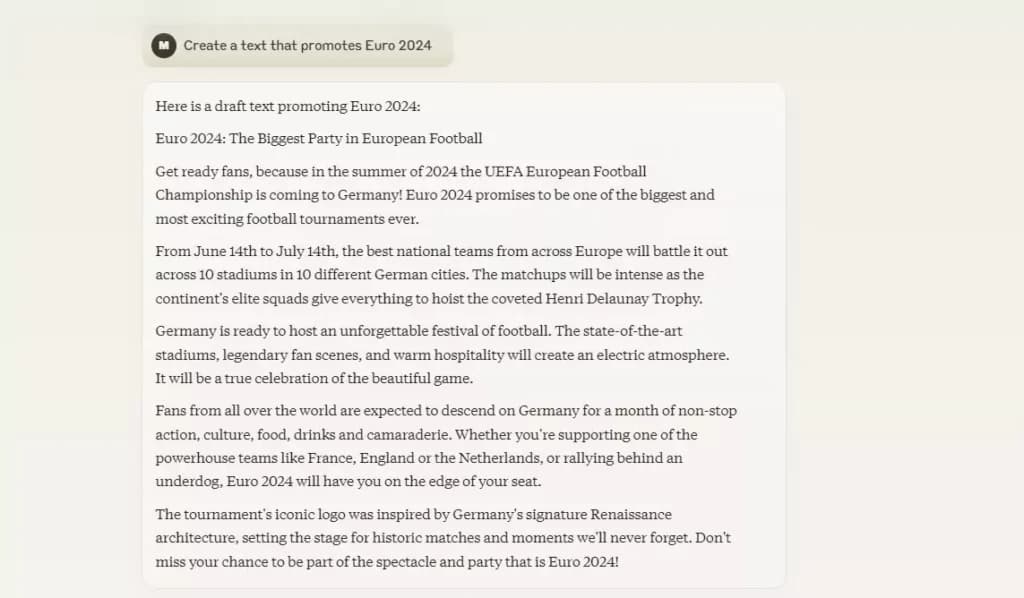
I wanted to see if Claude can improve the existing content based on additional input. The next task was to add some statistics and facts from the past to the article. As you can see below, it combined some impressive figures from the past Euro competitions into the text. That shows us that Claude's AI tool does an excellent job of understanding the purpose and context of the task. It manages to stay relevant and on-topic.
My next idea was to see if Claude could meet different styles and tones of voice. First, I asked Claude if writing Euro 2024 from a female perspective would be possible. The result was impressive, and the tool was on point. I wasn’t too happy with the title, so I asked for a second revision, which was even better.
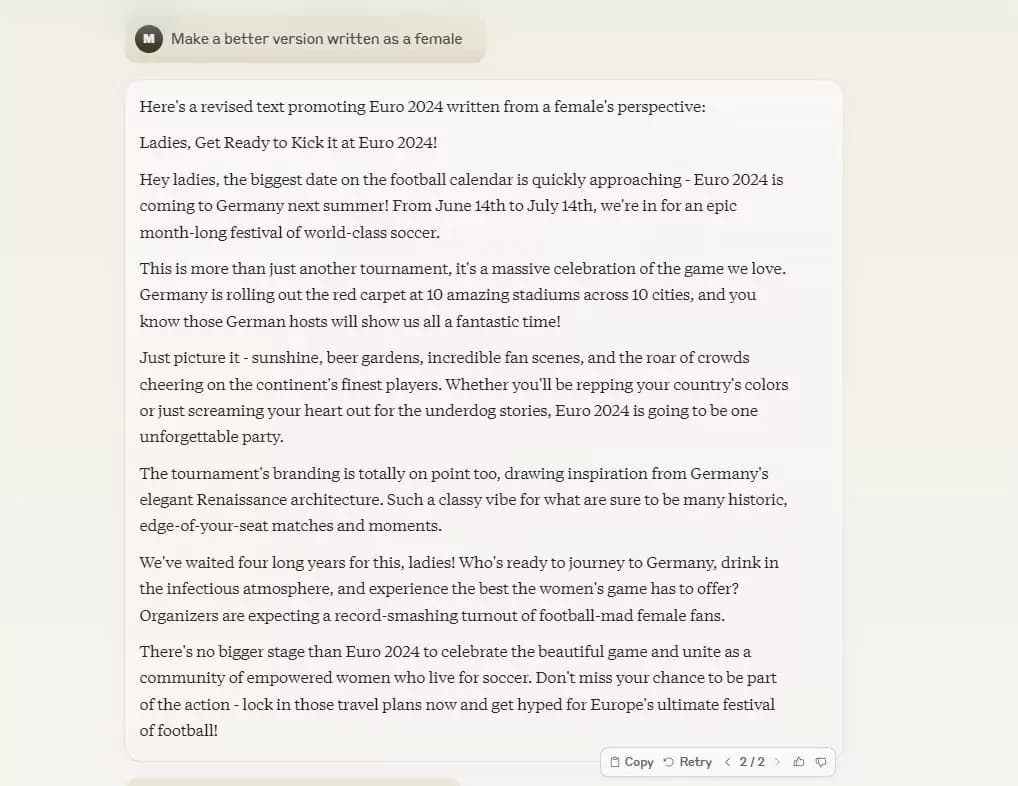
The female perspective also reveals that Claude can get creative. It showed unique ideas and diverse expressions while doing its best to avoid repetition. The article was well-connected and nicely structured into different paragraphs.
Claude might take a bit more when you provide extensive instructions. You can also upload documents or images, which it can read for instructions or information gathering. It’s a slight downside that the AI tool needs to re-read the document each time you ask for a revision, but that doesn’t take more than a few seconds. Overall, it’s fast and reliable even for the most complex writing tasks, such as generating codes.
Features & Functionality
The AI Writing Tool is equipped with a suite of features designed to streamline and enhance various aspects of text creation:
- Multilingual Assistance: It supports multiple languages, easing translation and enabling effective cross-cultural communication.
- Automated Text Creation: This tool excels at producing tailored content for diverse needs such as marketing, educational materials, and official documentation.
- Content Integrity Tools: It incorporates functionalities for plagiarism detection and advanced editing to ensure the content's uniqueness and quality.
- Innovative and Educational Applications: Ideal for creative expressions and educational purposes, it facilitates idea generation and content development for academic settings.
- Analytical Features: Equipped with capabilities to analyze and interpret complex data, it assists in predictive analysis and strategic planning.
- Seamless Integration: The tool integrates smoothly with existing digital environments, improving efficiency and connectivity across software ecosystems.
- Customizable Controls: Users can adjust various settings to customize the AI's performance, adapting its output to fit specific stylistic or tonal preferences.
These features collectively make the AI Writing Tool a powerful ally for anyone looking to enhance their content creation process, providing both creativity and analytical depth.
Looking at some features in more detail:
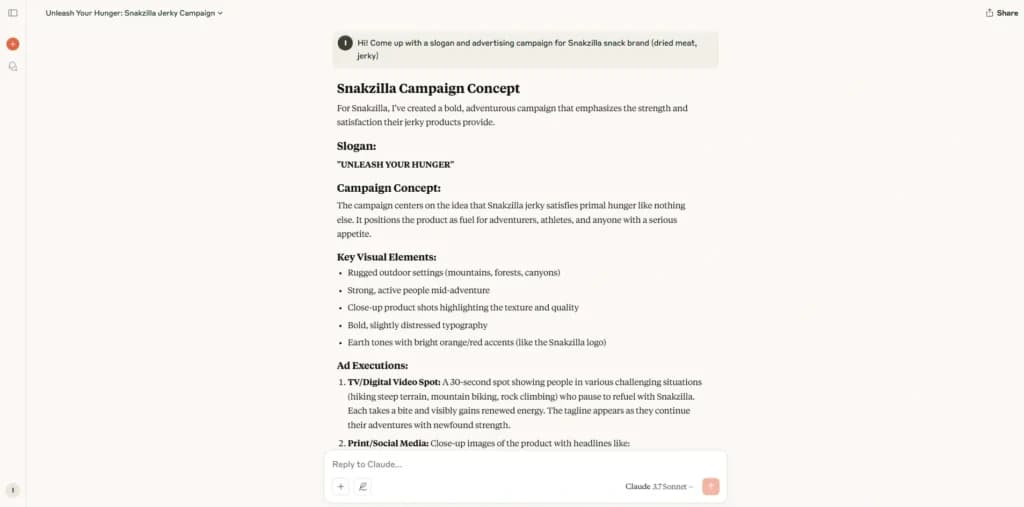
Claude is an AI writing tool that does an excellent job in content generation. Whether you need a blog article, a speech prepared, or coding generated, different models of this platform will be able to help.
Text Generation
The Claude AI writing tool is pretty slick when it comes to generating text. It uses natural language prompts to churn out high-quality text for all sorts of tasks. Whether you're looking to create engaging blog posts, get the gist of long documents quickly, or pull specific data from texts, Claude has got you covered.
It's also great for building chatbots and translating text into different languages, making interactions smoother.
Plus, for the coders out there, Claude can help review and write code, which is a huge time-saver. Overall, it’s a versatile tool that’s designed to make your work a lot easier and more efficient.
Control Options and Customizations
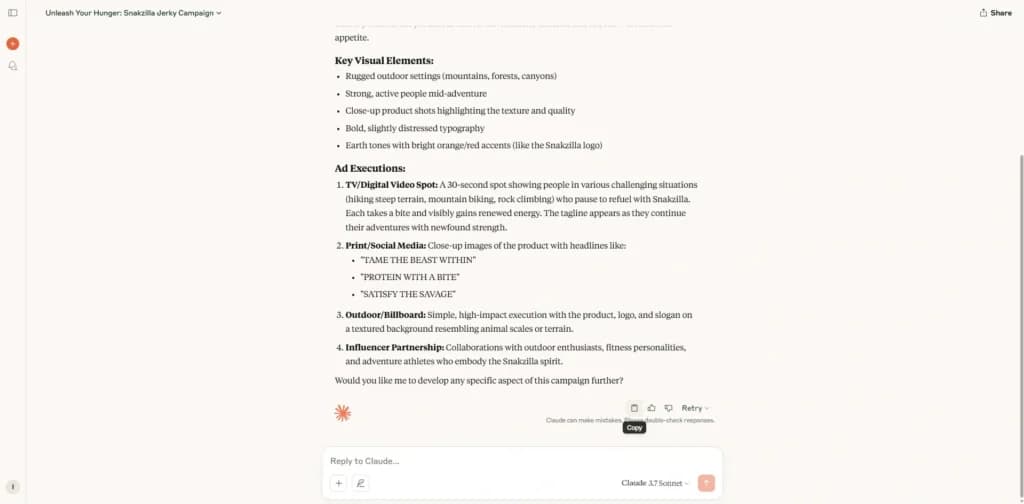
The interface is user-friendly and easy to use. Once you generate text, you can use the Copy icon to copy the text to the clipboard immediately. You also have a shortcut to retry the creation of the text. The convenient thing is that you can browse the history of different text versions. That makes it easy to compare the versions and take what’s best from each.
You can also provide feedback. You can like or dislike the content while providing a detailed explanation. That can be helpful for Anthropic when developing the future Claude models.
For chat controls, you can choose from different fonts. That includes a dyslexic-friendly version, a match system, and the default font. In Settings, you can adjust the theme and billing information and delete your accounts. The basic customization is all there, and I expect more features in the future.
Plagiarism Checks, Editing, and Proofreading
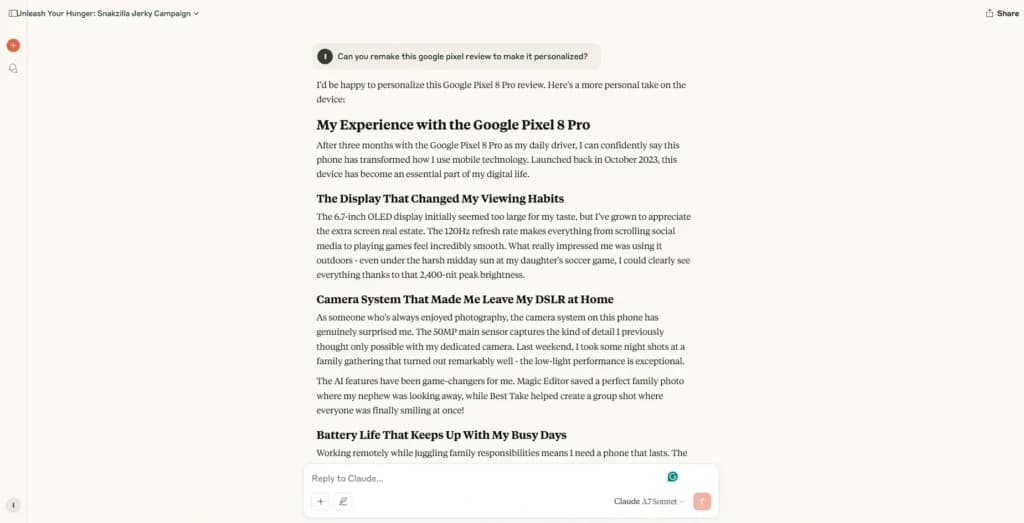
At this point, there’s no option to edit the text that Claude generated. It might be a feature that will be added soon. For now, the way around is to reply to Claude and ask the AI to make the necessary changes. Or you can copy the content to the text editor to make the adjustments yourself.
Claude doesn’t have proofreading or plagiarism checking as the default function. If you ask the tool to execute a plagiarism check, it will tell you that it’s not connected to the internet and, therefore, can’t perform it. However, it also mentions that Claude can’t plagiarize texts because it generates original outputs based on the provided instructions.
You can also execute a proofreading check. Interestingly, Claude was capable of catching a few minor issues in the text it generated. That means it has excellent capabilities for analyzing the text and detecting potential mistakes. The suggestions included better grammatical fits and smoothness.
Language Support
Anthropic is sincere regarding the multi-language capabilities of its Claude AI writing tool. It’s primarily optimized for the English language and best understands your tasks written that way. However, Claude can generate content and read your instructions in different languages. That ranges from Deutsch and French to some less popular, such as Serbian. Overall, the tool does a decent job in most languages and can be helpful outside of areas speaking English.
As a side note, the support section is also available in multiple languages. That includes English, Italian, Russian, Chinese, and many others.
Educational and Creative Uses
Claude AI is also great for getting those creative juices flowing. It's a handy tool for anyone involved in creative writing or educational content creation. If you're brainstorming ideas, Claude can help flesh them out into something more substantial. Whether you’re crafting stories, developing educational materials, or just looking for some creative inspiration, Claude offers the tools to support your creative process and make idea generation a breeze.
Content and Data Analysis
The AI tool excels in analyzing complex datasets and extracting actionable insights, making it ideal for detailed data analysis and forecasting. It is specifically designed to simplify the processing of large data volumes, enabling users to identify trends and make data-driven decisions more effectively. Claude serves as a valuable asset for anyone needing in-depth data exploration to guide strategic planning.
Integration Capabilities
Claude's standout integration feature is the Claude API, available via Anthropic's website, which operates on a pay-as-you-go basis to optimize user value. For Slack users, the Claude app can be installed for free, allowing direct interaction with the AI across various channels. Additionally, Claude offers a robust iOS app compatible with devices running iOS 17.0 or higher, providing a fast and reliable AI assistant experience on the go.
AI Chatbot
Once you’ve increased traffic to your site, you can also use the chatbot features to answer any customer questions. Here are a few of the features:
- Interactive Conversational Agent: Manages extended dialogues, keeping track of context throughout conversations.
- Multilingual Support: Facilitates communication and content creation in various languages.
- Customizable AI Experiences: Allows users to personalize conversation styles and interaction depth.
- Vision Capabilities: Analyzes visual data, extracts insights, and enhances image accessibility.
- Control and Customization Options: Offers comprehensive control to fine-tune AI settings and performance according to specific requirements.
What Claude AI does ()2026
- Apps everywhere: web, desktop (Windows & macOS), and mobile (iOS & Android).
- Web search: Claude retrieves current information and provides cited sources.
- Vision / file & image analysis: upload images, PDFs, and documents for analysis and summarization.
- Extended thinking: a deeper reasoning mode for complex, multi-step problems.
- Projects: organize chats, documents, and context into persistent workspaces.
- Artifacts: generate and iterate on code, documents, and interactive outputs in a side panel.
- Claude Code: agentic coding in the terminal/IDE — included on all paid plans.
- Connectors & MCP: connect Slack, Google Workspace, Microsoft 365, and custom tools through remote MCP connectors.
- Memory: context carries across conversations.
- Create files & run code: build and execute files in a sandboxed environment.
Best use cases: long-document analysis and summarization, software development and code review, research assistance, content creation and editing, customer-support automation, and data analysis — with Anthropic's safety-first ("Constitutional AI") positioning making it a strong fit for compliance-sensitive teams.
Web search, extended thinking, and memory capabilities
Features
- Grammar and Style Checks
- Collaboration Features
- Content Personalization
- Multilingual Support
- API Access
- Compliance and Security Measures
- Web
- Windows
- macOS
- iOS
Verdict
Claude AI writing tool can be an excellent choice for both individuals and teams. If you are an enthusiast wanting to generate content for your website, this platform is the right choice. And if you are a professional who needs a speech for the next event or some coding for your app, Claude can be of assistance. The AI tool is also great for teams since it offers administration and user roles, making it easy to work with other team members.
As for Claude AI pricing, it can’t get much better. The free version offers the Sonnet model, which will do a great job handling various tasks while balancing performance and speed. Accessing the most advanced model and increasing usage limits is quite affordable. The team version is only available for at least five members, which is a bit limiting, but the subscription provides excellent value for money.
Ultimately, Claude is a reliable AI-powered content-writing tool. It can generate high-quality texts in seconds and follow the instructions well. The platform can change the tone and style of writing to meet even the smallest details in the instructions provided. Considering that a free version is available, it doesn’t cost anything to try Claude. I encourage you to test the AI writing tool since it will undoubtedly meet and exceed your expectations!
What is Claude AI? Claude AI is both a chatbot and the name for a series of large language models (LLMs) developed by Anthropic. Claude can read and analyze long documents, making it ideal for users who need extensive context in their interactions.
Who is Anthropic AI?
Anthropic, founded by former OpenAI researchers, is dedicated to building AI with a focus on safety and ethics. The company was started in 2021 by the Amodei siblings, who were also instrumental in developing GPT-3 at OpenAI. Anthropic's approach is distinguished by its "constitutional AI" methodology, which involves training Claude to align with specific ethical principles, ensuring safer and more responsible AI interactions. With substantial investments from Google and Amazon, Anthropic is positioned as a major player in the AI landscape.
Use Cases for Claude AI
Claude AI is a versatile tool with many applications across industries and for various users, particularly those looking for ethical and reliable AI solutions. Here’s where Claude AI stands out:
- Document Analysis and Summarization: With its high 100,000-token capacity, Claude AI is ideal for analyzing lengthy documents like legal briefs, research papers, and business reports. It efficiently summarizes content and pulls out key information, saving professionals hours of reading and note-taking.
- Customer Service and Support Automation: Claude’s natural language understanding makes it well-suited for customer service applications. It can handle frequently asked questions, provide troubleshooting steps, and offer informative responses, which improves response times and customer satisfaction.
- Research Assistance: Claude's ability to understand and process large amounts of data benefits researchers in fields such as academia, science, and legal studies. By summarizing documents or answering complex questions, Claude assists researchers with literature reviews, case studies, and knowledge synthesis.
- Content Creation and Editing: Writers, marketers, and content creators can use Claude AI to generate ideas, proofread, and edit drafts. It can also help improve grammar, ensure consistency, and offer suggestions to enhance clarity in writing.
- Ethics-Focused Applications: Claude AI's unique focus on ethical AI principles makes it an excellent choice for organizations prioritizing responsible AI usage. Its “constitutional AI” framework allows businesses to rely on a tool that aligns with values like privacy, transparency, and fairness.
- Coding Assistance and Software Development: Claude can support developers with coding tasks by providing code suggestions, identifying errors, or creating simple scripts. Although less specialized than some coding-focused AI tools, Claude’s capabilities are still valuable for general development tasks.
- Productivity and Time Management: Professionals can use Claude AI to streamline their daily tasks. It can summarize meeting notes, provide quick answers to questions, and even help draft professional documents, making it a productivity booster for busy teams.
- Healthcare Documentation: Claude’s high-capacity reading and summarizing abilities make it suitable for healthcare applications where summarizing patient information, clinical studies, or medical reports is required. It can quickly synthesize data without accessing confidential or real-time patient information.
- Human Resources and Talent Management: Claude AI can assist HR teams by answering employee inquiries, creating recruitment materials, and summarizing HR policies. By automating repetitive tasks, it helps streamline HR operations and improve employee experiences.
- Educational Support and Tutoring: Students and educators can use Claude AI for explanations of complex topics, study material summarization, and even tutoring in various subjects. Its long-context reading ability is ideal for helping students grasp difficult concepts or conduct literature reviews.
- Financial and Legal Analysis: With its capability for in-depth analysis and summarization, Claude AI is useful in finance and law for reading through financial documents, generating reports, and offering insights on compliance or legal cases. This speeds up analysis and ensures teams stay informed.
Key Features in Action for Claude AI Users:
- High Token Limit for Long Documents: Analyze and summarize documents up to 75,000 words, making Claude ideal for data-heavy industries.
- Ethically Aligned with “Constitutional AI”: Claude’s constitution-focused design is great for users requiring ethical and transparent AI, aligning with compliance and values-driven industries.
- User-Friendly for Non-Technical Users: Claude’s accessible design and easy-to-use chat interface are beneficial for users without technical expertise, such as in customer service or HR roles.
Frequently asked questions
Is Claude AI free?
How much is Claude Pro?
Which Claude model is best?
Claude vs ChatGPT — what's the difference?
Does Claude AI have an app?
Users Reviews
Be the first to write a review
Share your experience with Claude Ai and help others choose the right software.