
Best AI Agents for Small Business in 2026: Which AI Agent Should You Pick?
We tested 10+ AI agent platforms hands-on against the realities of running a small or micro business: lean teams, long task lists, no in-house engineering, and zero time to babysit a half-built workflow. This is the agentic AI software that actually shipped real work in our tests.
Last updated: September 2026

- Automatically sets up the backend for you
- Build with words. No coding needed
- Launch your apps directly to App Store
- Anyone can build real software-no dev skills needed
- Clean, responsive design by default
- Element-based editing is intuitive
- Includes backend, database, APIs, hosting
- Not a full enterprise-grade solution (yet)
- AI can lose context during complex edits
- Some integration limits on lower plans
- Still maturing advanced logic handling
- Automatically sets up the backend for you
- Build with words. No coding needed
- Launch your apps directly to App Store
- Anyone can build real software-no dev skills needed
- Clean, responsive design by default
- Element-based editing is intuitive
- Includes backend, database, APIs, hosting
- Not a full enterprise-grade solution (yet)
- AI can lose context during complex edits
- Some integration limits on lower plans
- Still maturing advanced logic handling

- AI agents that run inside your existing boards
- Handle sales, ops, HR, and marketing automatically
- Stay in control with human oversight built in
- AI agents run natively on your live board data with no extra setup.
- Work management, CRM, service desk, and AI agents all share one data layer.
- Any team member can configure and deploy agents without technical skills.
- Core AI features like Formula Builder and Docs Assistant are free on all paid plans.
- Paid plans require a 3-seat minimum, making it impractical for solo users.
- Agents only work inside monday.com and cannot reach external apps or channels.
- Credit-based pricing can create unpredictable costs for heavy agent usage.
- Full agent access requires the Pro plan at $19 per seat per month.
- AI agents that run inside your existing boards
- Handle sales, ops, HR, and marketing automatically
- Stay in control with human oversight built in
- AI agents run natively on your live board data with no extra setup.
- Work management, CRM, service desk, and AI agents all share one data layer.
- Any team member can configure and deploy agents without technical skills.
- Core AI features like Formula Builder and Docs Assistant are free on all paid plans.
- Paid plans require a 3-seat minimum, making it impractical for solo users.
- Agents only work inside monday.com and cannot reach external apps or channels.
- Credit-based pricing can create unpredictable costs for heavy agent usage.
- Full agent access requires the Pro plan at $19 per seat per month.

- ClickUp agents handle the busywork
- Real-time, actionable business insights
- Connects to all of the tools you use with ease
- Brain reads your actual tasks, docs and sprint history for context-aware answers.
- Super Agents work autonomously, can be assigned tasks and run on schedules.
- Switch between GPT-5, Claude Opus and other models depending on the task.
- Everything AI bundles meeting transcription, talk-to-text and image generation in one plan.
- Brain only sees ClickUp data, so cross-platform teams get an incomplete picture.
- AI is a separate add-on that can more than double your per-user cost.
- Super Agents are locked behind the $28/user/mo Everything AI tier.
- AI credits are shared across the workspace and do not roll over monthly.
- ClickUp agents handle the busywork
- Real-time, actionable business insights
- Connects to all of the tools you use with ease
- Brain reads your actual tasks, docs and sprint history for context-aware answers.
- Super Agents work autonomously, can be assigned tasks and run on schedules.
- Switch between GPT-5, Claude Opus and other models depending on the task.
- Everything AI bundles meeting transcription, talk-to-text and image generation in one plan.
- Brain only sees ClickUp data, so cross-platform teams get an incomplete picture.
- AI is a separate add-on that can more than double your per-user cost.
- Super Agents are locked behind the $28/user/mo Everything AI tier.
- AI credits are shared across the workspace and do not roll over monthly.

- Fully fleshed out products in minutes
- Get paying customers and revenue
- Stay fully in control of all your apps
- Prompt-based building makes it incredibly easy to get started.
- An integrated AI team assists with research, planning, and coding.
- Race Mode lets you compare outputs from multiple AI models at once.
- Code export and GitHub sync give users maximum flexibility and control.
- The platform's pre-made template library is still relatively small.
- Essential features like deployment and code export require a paid plan.
- Fully fleshed out products in minutes
- Get paying customers and revenue
- Stay fully in control of all your apps
- Prompt-based building makes it incredibly easy to get started.
- An integrated AI team assists with research, planning, and coding.
- Race Mode lets you compare outputs from multiple AI models at once.
- Code export and GitHub sync give users maximum flexibility and control.
- The platform's pre-made template library is still relatively small.
- Essential features like deployment and code export require a paid plan.

- Transform your ideas into functional apps & sites
- Design & deploy intelligent agents
- Build powerful scalable integrations
- Build full apps instantly from natural language prompts
- Backend, hosting, authentication, and payments included by default
- Responsive, mobile-ready designs without extra effort
- Plug-and-play integrations with tools like Google Sheets, Airtable, Slack, and Stripe
- Occasional reliability issues during generation and deployment
- Credit-based system can be restrictive for heavier users
- Limited customer support options (no phone or live chat)
- Unclear support hours and billing structure
- Transform your ideas into functional apps & sites
- Design & deploy intelligent agents
- Build powerful scalable integrations
- Build full apps instantly from natural language prompts
- Backend, hosting, authentication, and payments included by default
- Responsive, mobile-ready designs without extra effort
- Plug-and-play integrations with tools like Google Sheets, Airtable, Slack, and Stripe
- Occasional reliability issues during generation and deployment
- Credit-based system can be restrictive for heavier users
- Limited customer support options (no phone or live chat)
- Unclear support hours and billing structure

- Free apps for Slack and iOS are available
- Multi-language support for global users
- Anything from emails to detailed reports
- Runs on Anthropic's newest models (Opus 4.8, Sonnet 5, Haiku 4.5) with very large context windows
- Genuinely useful free plan; Pro is competitively priced at $20/mo (less billed annually)
- Strong at coding and agentic work via Claude Code and MCP connectors
- Web search with cited sources, vision, and extended reasoning built in
- Heaviest usage requires the Max plan (from $100/mo)
- Team plan requires a minimum of 5 seats
- Usage is capped by rolling session limits rather than a fixed message count, which can interrupt heavy sessions
- Free apps for Slack and iOS are available
- Multi-language support for global users
- Anything from emails to detailed reports
- Runs on Anthropic's newest models (Opus 4.8, Sonnet 5, Haiku 4.5) with very large context windows
- Genuinely useful free plan; Pro is competitively priced at $20/mo (less billed annually)
- Strong at coding and agentic work via Claude Code and MCP connectors
- Web search with cited sources, vision, and extended reasoning built in
- Heaviest usage requires the Max plan (from $100/mo)
- Team plan requires a minimum of 5 seats
- Usage is capped by rolling session limits rather than a fixed message count, which can interrupt heavy sessions
* Featured prices and terms can be updated. Free offers may include additional terms.
The best AI agents for small businesses in , ranked by job:2026
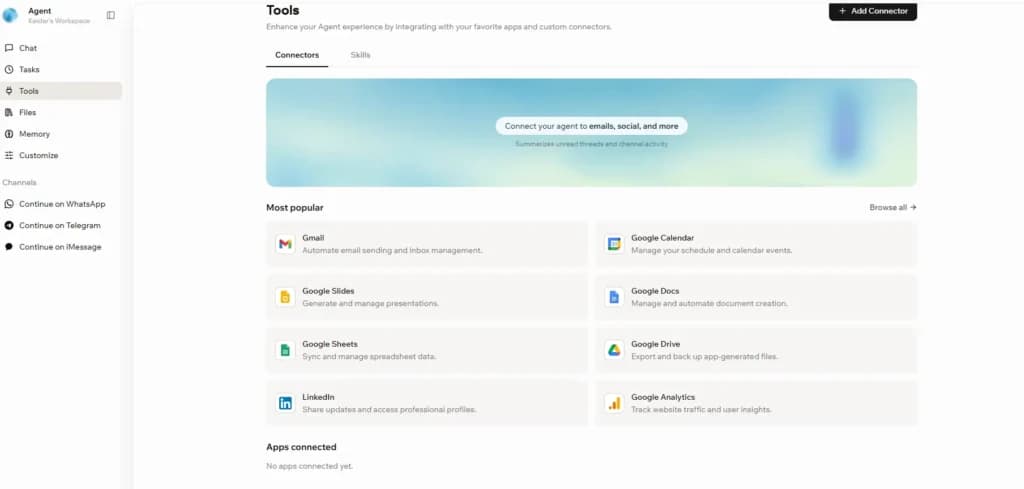
Our top pick for building your own AI agent without code is Base44. It's a no-code AI agent builder with a deep MCP-style connector library (Gmail, Google Analytics, Drive, Docs, Sheets, Slides, LinkedIn), a live browser, and native WhatsApp, Telegram and iMessage channels, the most flexible no-code AI agent we tested for a small business that hasn't committed to one work platform yet.
If you already run sales, marketing, or operations on Monday, Monday.com AI is the easiest path to value: a board-aware autonomous AI agent for sales follow-up, scheduling, and morning briefings.
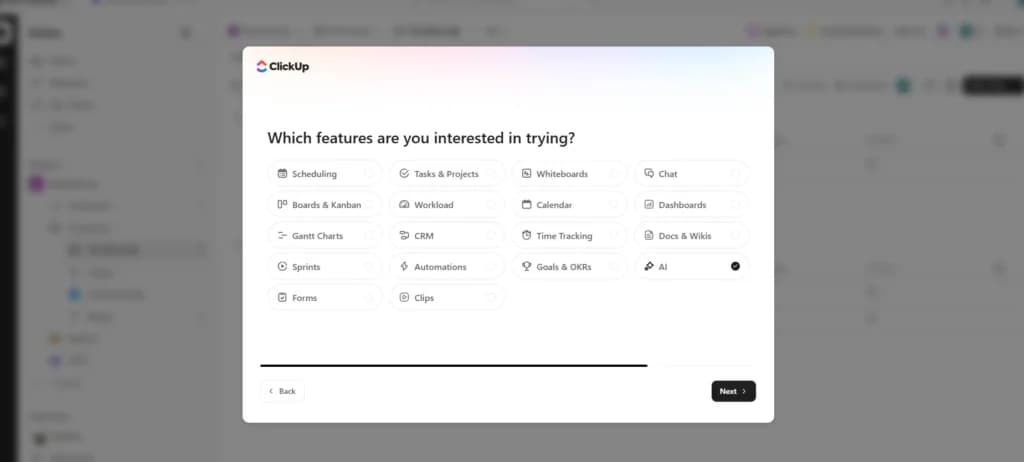
If your projects and tasks live in ClickUp, ClickUp AI (Brain)runs a short onboarding quiz that auto-builds an AI agent for productivity tailored to your role.
If you're technically comfortable and want a powerhouse, Claude is one of the most capable AI agent platforms on the market, with per-project agents, live artifacts, and a computer-use mode.
If you're a solo founder building a product from scratch, research, spec, code, SEO and ads, Atoms is the most complete pick. Instead of one agent, you get a coordinated team of eight specialists for $15.80/mo.
A real AI agent runs by itself. You set it up once with instructions, and it then knows what to do every time — working on a schedule or reacting to triggers, making decisions, and taking actions across your email, calendar, CRM, and payment tools. That’s different from an AI assistant (like a writing helper), which only acts when you prompt it.
You don’t need a big budget. Most SMB-ready agents offer free tiers or start at $7-$40/month. A micro business can stand up a lean stack for under $80/month, and a growing business can run a full stack for under $300/month.
Which AI agents did we test side-by-side?
This table reflects how each AI agent actually felt to set up and use during our hands-on testing - not the marketing pages.
Can it do this? | Base44 | Monday AI | ClickUp AI | Atoms | Claude | n8n | Cursor AI | Manus | OpenClaw |
|---|---|---|---|---|---|---|---|---|---|
Set up in under 10 minutes, no code | Yes | Best | Best | Yes | Limited | No | No | Yes | No |
Read and act on my Gmail | Best | Limited | Yes | No | Yes | Yes | No | Limited | Limited |
Send messages on WhatsApp, Slack or Teams | Best | Yes | Yes | No | Limited | Yes | No | No | No |
Follow up on stalled deals automatically | Yes | Best | Yes | No | Limited | Yes | No | No | No |
Manage projects, tasks and deadlines | Limited | Yes | Best | Yes | Yes | Limited | Yes | No | No |
Ship a product end-to-end (research, spec, code, ads) | Limited | No | No | Best | Yes | No | Yes | Limited | No |
Run autonomously overnight on a schedule | Yes | Yes | Yes | Yes | Limited | Yes | Yes | Best | Yes |
Ships approvals, audit logs and a pause button | Yes | Best | Best | Yes | Yes | Limited | Yes | Limited | No |
Needs a developer to maintain | No | No | No | No | Limited | Yes | Yes | No | Yes |
Starting price (USD/mo, as of )October 2026 | Free / $20+ | $12+/user | $7+/user | Free / $15.80 | $20/user | Free / $20 | $20/user | Credit-based | Free / self-host |
Pricing as of . Yes = standard capability. Best = leader in our tests. Limited = works with caveats. No = not supported.October 2026
*Easy = no-code chat builder. Easiest = guided onboarding quiz auto-builds an agent.
What is an AI agent, and how does it make a small business more efficient?
An AI agent is an automation that runs on its own. You give it instructions once, and from then on it knows what to do every time — it runs on a schedule or watches for triggers, makes decisions, and takes real actions across your tools (Gmail, Google Calendar, Slack, Stripe, your CRM) without you prompting it. It can read a new inquiry, draft and send a reply, update a record, and book a follow-up on its own. This is the key distinction from an AI assistant (a writing helper or chatbot): an assistant only responds when you ask it to, while an agent works while you’re doing something else.
For a small or micro business, that’s the difference between “another app to check” and “a teammate that handles the busywork.” The practical wins are consistent: fewer hours on repetitive admin, faster response times to customers and leads, and the ability to run marketing, support, and operations that normally require staff you can’t yet afford.
Why integrations matter so much for SMBs: an agent is only as useful as the tools it can reach. When your support agent, CRM, and email marketing all share data, a single customer action can automatically trigger a whole chain of work. Throughout this guide, we call out what each agent connects to, because that’s where the real automation — and the real time savings — come from.
Which is the best AI agent for each job?
Rather than rank a single 'winner' (an AI agent for daily tasks looks nothing like an AI agent for research), we organized the leaders by the job a small or micro business is trying to get done. Each pick below includes what the platform can actually do, who it's designed for, why an SMB needs it (or doesn't), and the specific pain points it solves day-to-day.
Is Base44 the best AI agent for a no-code workflow across your tools?
Best for: Small business owners, solopreneurs, founders, agency operators, consultants and entrepreneurs who know their workflow well, want to build a personal AI agent with their own 'skill set,' and want to plug it into the apps and channels they actually use - without writing code.
- Automatically sets up the backend for you
- Build with words. No coding needed
What can Base44 actually do?
Base44 is a no-code AI agent builder. You brief it the way you'd brief a new hire - in plain English, in a chat - and the platform wires up the connectors, the data layer, the deployment and the schedule for you. The agents you ship with it are not chat-only assistants: they're real, deployed automation that takes action across your tools.
The capability set is the broadest we tested in the no-code category. Base44 ships with a rich library of MCP-style connectors out of the box - Gmail, Google Calendar, Google Drive, Google Docs, Google Sheets, Google Slides, Google Analytics, LinkedIn - plus a tools page where you add anything else. The live browser feature lets your agent run actual web sessions, similar to Claude's computer-use mode, which means it can scrape, click, fill forms and pull data from sites that don't have clean APIs. The'skill sets' model lets you compose specific behaviours - morning briefing, PR review reminder, new-ticket alert, sales follow-up - into one composite agent that handles a whole job, not just a single task.
Channels are first-class. Base44 lets you continue the conversation directly on WhatsApp, Telegram or iMessage. Your personal AI agent really can live in your pocket - you can text it from a train, get an answer back, and ask it to take an action. For an SMB owner who isn't sitting at a desk all day, that multi-channel reach is the difference between an agent you forget about and an agent you actually use.
Who is Base44 designed for?
Base44 is built for the SMB owner who has a clear sense of the painful, repeatable jobs in their day and wants to delegate them to software - but who doesn't want to learn code, hire a developer or wrestle with API jargon. Solopreneurs use it to build a personal AI assistant that runs their solo operation. Founders use it to build internal tools that ship faster than going through a contractor. Marketing operators, consultants and agency teams use it to build skill-set agents tuned to their exact workflow, then deploy them across the channels their clients live on.
What does Base44 look like in practice?
A Base44 agent runs a real, repeatable job across the apps you already use, with no developer involved.
The fractional bookkeeper in Austin who runs 14 client books across Gmail, Drive and WhatsApp built a Base44 agent in 22 minutes. The brief was one paragraph: when a client emails a receipt, file it in the right Drive folder by vendor, drop a row into the month-end sheet, and ping me on WhatsApp if a client misses the cutoff. Base44 wired the Gmail, Drive and Sheets connectors, deployed the agent on a schedule, and added the WhatsApp channel. Three weeks later, her receipt-triage time went from 4.5 hours a week to 22 minutes, and she has not missed a client month-end since.
Why does a small business need Base44?
Most off-the-shelf AI tools force you to fit your workflow to their template. Base44 lets you fit the agent to your workflow. The pain it solves for a small business is specific: you have a repetitive job ("every time a lead comes in, enrich the record, draft a personalized reply and add a follow-up task"), and you don't want to do it manually any more. Off-the-shelf agents from ClickUp or Monday work great if your work already lives in those platforms, but if your operation spans Gmail, a calendar, Drive, a CRM and WhatsApp, you need an AI agent that spans those tools too. That's Base44's whole pitch - task automation across the stack you actually use, with no engineer required.
It's also the strongest pick when you want a personal AI agent for personal use that follows you around: morning briefings on WhatsApp, scheduling on iMessage, content drafts in Telegram, and a live browser to handle the web tasks that don't fit a clean API. For an owner running on lean bandwidth, that's the closest thing to having a chief-of-staff at every channel you check.
What did we like (and not like) about Base44?
Pros | Cons |
|---|---|
+ Real no-code builder; agents you produce are as capable as anything outside Claude. | - A step more technical than Monday.com AI or ClickUp AI - you decide which connectors and skills to enable. |
+ Rich MCP-style connector library covers Gmail, Calendar, Drive, Docs, Sheets, Slides, Analytics, LinkedIn and more. | - Best for owners who already know their painful, repeatable jobs and want to delegate them. |
+ Built-in live browser for web automation that doesn't fit a clean API. | - If you only need a chat assistant, this is more platform than you need. |
+ Native WhatsApp, Telegram and iMessage channels - your personal AI agent lives in your pocket. | |
+ 'Skill set' composition lets you build a single agent that handles a full job, not just a single task. | |
+ Generous free tier - ship a useful AI agent for daily tasks before paying. | |
+ 24/7 autonomy: run on schedule or react to events while you sleep. |
Is Base44 worth it in ?2026
Base44 is the best AI agent platform we tested for an SMB that wants more than a chat box and isn't already tied to one work-management tool. It's the easiest way for a non-technical owner to build a powerful, connector-rich, channel-native AI agent that actually takes action on the routine that's eating your week.
Read more: [link: Full Sonary review of Base44]
Official source: verify Base44's current plans and credits on the official Base44 pricing page.
Skip Base44 if: you only need a chat assistant, your work already lives entirely inside Monday or ClickUp, or you want zero setup at all.
Choose Base44 if: you want one agent that spans Gmail, Drive, Calendar and WhatsApp, you know the repeatable jobs eating your week, and you want to ship without a developer.
Is Monday.com AI the best AI agent for sales follow-up and morning briefings?
Best for: Small sales, marketing, customer-success and operations teams that already run their work on Monday - and want an AI agent that learns from their boards, automates the customer-facing flow, and reaches them where they live (Slack, email, WhatsApp).
- Instantly organize with 200+ templates
- 40+ integration apps including Zoom
What can Monday.com AI actually do?
Monday.com is one of the strongest platforms for AI agents that handle revenue and operational workflow. The reason is structural: Monday's data model is built around boards, items and statuses, which gives an AI agent a clean place to live and clear actions to take. The result is one of the few platforms where 'AI agent for sales follow-up' isn't a feature pitch - it's a deployable, autonomous agent a small business can turn on this week, no scripting required.
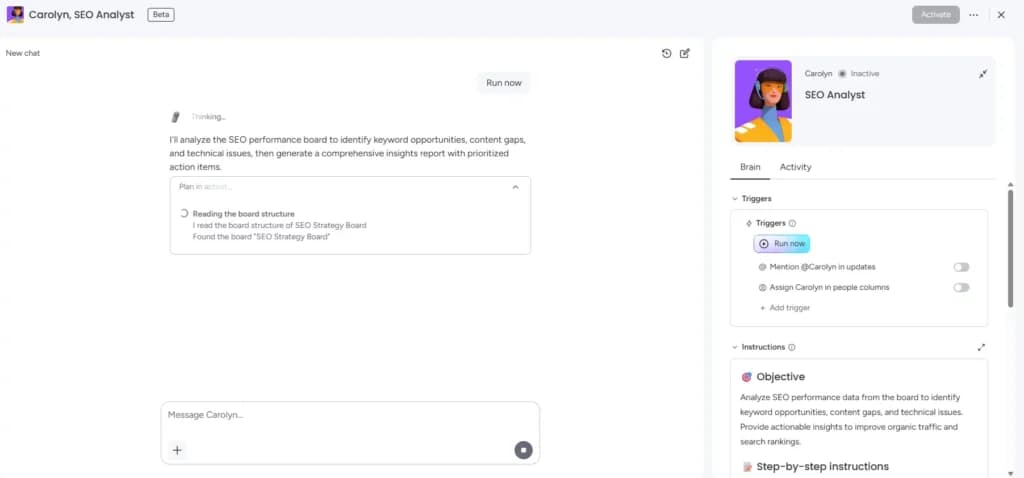
The setup experience was the surprise. A short onboarding quiz - between one and five questions - asks who you are, what you do and what you're trying to improve. Skip what you want; the platform fills in the rest. Within minutes, Monday auto-built a working AI agent for our role (in our test, marketing and SEO) that immediately started analysing our tasks, flagging missing work, suggesting priorities and proposing new tasks to fill the gaps.
The AI agents inside Monday come in two flavours. The first is AI Blocks: drop-in actions you place inside workflows - auto-summarise a deal note, classify a lead, draft a follow-up, choose the next status, generate a status update. The second is autonomous AI agents that monitor a board and take action on their own: re-engage stale opportunities, follow up after a missed reply, send a morning briefing into a Slack channel, schedule a call when a deal hits a certain stage. Both run on autopilot, around the clock.
Who is Monday.com AI designed for?
Monday.com AI is built for small sales, marketing, partnership, ops and customer-success teams that already use Monday as their work OS. If your pipeline lives there, your campaigns live there, your partnerships live there, your tickets live there - then Monday's AI agents are the most powerful productivity layer you can add without changing any other tool. The platform is especially strong for revenue work: SDRs, account executives, customer success managers and ops teams who run on follow-ups and status updates.
What does Monday.com AI look like in practice?
A Monday autonomous agent watches your boards and acts on stalled deals before a rep would notice they slipped.
The 5-rep B2B SaaS sales team in Denver running 280 active deals across two Monday pipelines turned on the sales follow-up agent on a Tuesday. By Friday the agent had drafted re-engagement messages for every deal sitting more than 14 days, posted a Monday-morning pipeline summary into their #revenue Slack channel, and flagged 14 deals the team had quietly forgotten over the prior quarter. The reps approved the drafts in batch each morning. In the first 30 days, three of those 14 stalled deals closed for a combined $47K in new ARR - a single agent paying for the platform many times over.
Why does a small business need Monday.com AI?
For a small business, the single biggest pain Monday.com AI solves is missed follow-up. A 5-person sales team running 200 prospects manually will let deals slip; not maliciously, just because human bandwidth runs out. Monday's sales follow-up agent never forgets. It tracks the last interaction on every deal, knows the right cadence, drafts a context-aware message in your voice, updates the CRM record, and posts a Monday-morning summary of every stalled deal into your rep's Slack. In our test, that single agent surfaced 14 deals our team had quietly forgotten over a quarter.
The same principle applies to scheduling, morning briefings, status updates and customer outreach. Monday.com AI takes the routine, repetitive customer-facing workflow off your team's plate so they can focus on the deals, conversations and decisions that need real human judgment. It's not replacing your salespeople - it's giving them the bandwidth of a much bigger team.
Governance is the other reason an SMB picks Monday.com AI: approvals, audit logs and role-based controls ship by default. When an autonomous AI agent is sending messages to real prospects, those guardrails aren't optional. Monday gives them to you out of the box.
What did we like (and not like) about Monday.com AI?
Pros | Cons |
|---|---|
+ Best-in-class AI agent for sales follow-up - auto-drafted messages, CRM updates and rep briefings handled end-to-end, no code. | - Best ROI only if your team already runs work on Monday. |
+ Morning briefing agents that summarise pipeline, projects and risks before your first coffee. | - Pricing scales with seats plus AI actions - estimate volume before rollout. |
+ Onboarding quiz auto-builds an agent tailored to your role. | - First answers can feel a little shallow; quality jumps after two or three follow-up prompts. |
+ Native WhatsApp, Slack, Teams and email channels - agent reaches you and your prospects where they live. | |
+ AI Blocks make it easy to layer agent behaviour into existing workflows without rebuilding them. | |
+ Governance: approvals, audit logs, role-based controls baked in. |
Is Monday.com AI worth it in ?2026
If your work runs on follow-up, status updates and morning briefings - sales, ops, partnerships, marketing, customer success - Monday.com AI is the most complete autonomous AI agent platform we tested for an SMB. It's a daily, board-aware AI agent that actually takes action, with the governance a small business needs the moment an agent starts sending real messages.
Read more: [link: Full Sonary review of Monday.com]
Official source: review Monday's AI Blocks, agents and credit pricing in their official AI pricing documentation.
Skip Monday.com AI if: your team is not on Monday and you do not want to move there - the value is tied to the platform.
Choose Monday.com AI if: your sales, ops or marketing work already lives in Monday boards, and you want an agent that follows up on deals and posts morning briefings without code.
Is ClickUp AI (Brain) the best AI agent for productivity and daily work tasks?
Best for: Small business teams and solo operators who run their projects, tasks, docs, and chats inside ClickUp and want an AI agent for productivity that actually executes daily work - not just summarises it.
- Affordable plans suitable for all businesses
- Free training & 24-hour support
What can ClickUp AI actually do?
ClickUp AI(sometimes called ClickUp Brain) sits on top of the project, task, doc, chat, and whiteboard data you already have inside ClickUp - and acts on all of it. Like Monday, ClickUp runs a brief onboarding quiz that identifies your role and auto-builds an agent tailored to it -there's almost no setup before you're using a productive AI agent for daily tasks.
Where most AI assistants stop at 'here's a summary,' ClickUp AI takes the next step. You can spin up Autopilot Agents that monitor tasks for status changes, escalate blockers into Slack, generate the morning standup automatically, triage emails into the right project, schedule the day around your priorities, and update doc pages when source data changes. Each agent runs on a schedule or reacts to events -true 24/7 autonomy, the AI agent that works while you sleep. In our tests, ClickUp AI handled 9 of 10 'AI agent for daily tasks' and 'AI agent for work tasks' jobs end-to-end with no hand-holding, and none of it required a developer.
Who is ClickUp AI designed for?
ClickUp AI is built for knowledge-worker teams whose work lives in projects and tasks: marketing agencies, design studios, consultancies, SaaS startups, content teams, freelance operators running a portfolio of clients. If you ship work that has phases, deadlines, dependencies and handoffs, ClickUp is probably already your workspace - and ClickUp AI is the productivity layer that turns it into an active assistant rather than a passive board.
What does ClickUp AI look like in practice?
A ClickUp Autopilot agent absorbs the small, constant project overhead that eats a founder's week.
The 7-person content agency in Chicago managing 12 client projects in ClickUp spun up three Autopilot agents in one afternoon. One watches every project for missed deadlines and posts a Slack alert with a draft client email. One generates the Monday morning status update from the prior week's task changes. One triages incoming client emails into the right project board. The founder's project-management hours dropped from 9 to 3 a week within a month. Client retention rose from 78 percent to 91 percent over the next quarter - clients felt heard because nothing fell through the cracks.
Why does a small business need ClickUp AI?
Small businesses live and die by execution. The pain ClickUp AI solves is the small but constant overhead of running projects: writing the standup, chasing the blocker, summarising the sprint, tagging the new task, updating the doc when the data changed, triaging the email that came in. None of that work is hard. All of it eats hours that should go to client work, product work, or strategy. ClickUp AI absorbs that overhead and runs it on autopilot.
The practical benefit for a 5- or 10-person SMB: project oversight without hiring a dedicated PM, daily status visibility without a standing meeting, email triage without an executive assistant, and a morning briefing without anyone manually compiling one. It's the difference between a founder who runs every project themselves and a founder who has a 'PM in the workspace' working alongside them.
Like Monday, ClickUp ships approvals, audit logs and role-based permissions as part of the platform - important the moment an agent starts taking real actions on real client data.
What did we like (and not like) about ClickUp AI?
Pros | Cons |
|---|---|
+ An AI agent for productivity that already understands your projects, deadlines and people. | - Best ROI only if you actually use ClickUp as your workspace. |
+ Autopilot agents run 24/7: morning briefings, status updates, follow-ups and email triage without daily prompting. | - Highly configurable, so complex agents take more thought than a chat-only assistant. |
+ Excellent AI agent for email management with the native email integration. | - Heavy AI usage can push you toward higher tiers as you scale agents. |
+ AI agent for scheduling: blocks focus time, routes meetings based on workload. | |
+ 1,000+ integrations including Slack, calendar, CRM and chat surfaces. | |
+ Onboarding quiz tailors the agent to your role in minutes. |
Is ClickUp AI worth it in ?2026
If you want one AI agent that handles email, scheduling, daily standups, and repetitive work tasks without forcing you to assemble five tools, ClickUp AI is the cleanest single-platform answer for an SMB already living inside ClickUp. It's the closest thing to a personal AI assistant for project-led teams.
Read more: [link: Full Sonary review of ClickUp]
Skip ClickUp AI if: your team does not run projects in ClickUp, or your work is mostly email and customer follow-up rather than task tracking.
Choose ClickUp AI if: your projects, tasks, docs and chats already live in ClickUp, and you want an agent that runs your standups, status updates and email triage on autopilot.
Is Atoms the best AI agent team for solo founders building a product from scratch?
Best for: Solo founders, indie builders, and micro-business operators who want to take a product from idea to launch, research, spec, architecture, code, SEO, and ads , without hiring a team or stitching tools together.
- Fully fleshed out products in minutes
- Get paying customers and revenue
What can Atoms actually do?
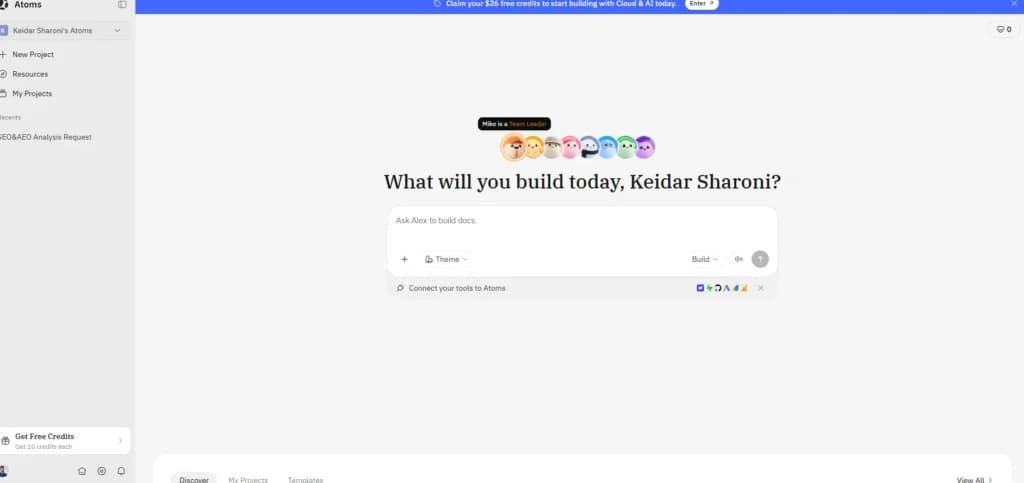
Atoms is not a single AI agent. It's a coordinated team of eight named specialists that work like a real startup crew: Mike (team lead), Iris (deep researcher), Emma (product manager), Bob (architect), Alex (engineer), Sarah (SEO specialist), David (data analyst), and Adrian (ads specialist). You brief the team in one paragraph; Mike sequences who works on what, then the relevant agents do the work and hand back results. The platform is built on MetaGPT, the open-source multi-agent framework with 165K GitHub stars and roughly 30 published academic papers, and was rebranded from MGX in January .2026
What separates Atoms from a single autonomous AI agent like Manus or Devin is structural. Iris runs deep research and hands the synthesis straight to Emma for the product spec. Bob picks the architecture; Alex writes the code. Sarah then writes indexable landing pages with FAQ schema, and Adrian launches Google Ads against those same pages, both agents working off the shared product brief, which closes the organic-plus-paid loop that other platforms can't. This is the structural advantage of a team of agents over a generalist.
On the Max plan, Atoms adds Race Mode, parallel outputs from four frontier models (Claude Opus 4.6, Gemini 3.1 Pro, GPT-5.2, DeepSeek 3.2) on the same brief, so you can compare which model handles your kind of work best. Code export and GitHub sync ship on Pro.
Who is Atoms designed for?
Atoms is built for the solopreneur or indie founder who has an idea and wants to ship a real product without hiring a contractor for every role. A fractional marketer launching a paid newsletter, a product designer shipping a Figma-to-React tool, a boutique brand wanting paired SEO and Google Ads, all are real Atoms use cases. It's less of a fit if you only need a single autonomous agent (Manus or Devin are sharper for that) or if your team is already shipping code in Python, Go or Rust (Atoms is strongest with JavaScript and TypeScript).
What does an Atoms multi-agent team look like in practice?
Atoms ships a real product end-to-end with one paragraph of input from the founder.
The solo product designer in Lisbon launching a Figma-to-React converter briefed Mike in one paragraph: who the buyer is, what the product does, what to charge. Iris ran 8 hours of market research overnight. Emma turned the research into a product spec by morning. Bob picked the architecture. Alex shipped a working MVP by day 9. Sarah wrote 12 SEO landing pages targeted at "Figma to React" long-tail queries. Adrian launched a $150 Google Ads test against those same pages. The designer shipped a paying product in 23 days on the $15.80/mo Pro plan - without hiring a single contractor.
Why does a solo founder need Atoms?
The single biggest pain Atoms solves is the 'everything else around the code'problem. Most solo founders can describe a product but can't do market research, product specs, system architecture, full-stack code, SEO landing pages, and Google Ads campaigns at the same time. Hiring those six roles costs tens of thousands a month. Atoms ships all six as agents for $15.80/mo. You're not replacing your team, you're giving yourself one.
The catch to know: the Atoms agents only run within the Atoms workspace. You can't deploy them onto your own stack or wire them into Gmail or Slack the way you can with Base44. If you need an AI agent for daily operational work across apps you already use, pair Atoms with Base44 (for cross-app workflows) or Monday.com AI / ClickUp AI (if your team already runs work there).
What did we like (and not like) about Atoms?
Pros | Cons |
|---|---|
+ Eight role-specific agents that coordinate, Mike, Iris, Emma, Bob, Alex, Sarah, David, Adrian, instead of one generalist. | - Agents run only inside the Atoms workspace; you can't deploy them into Gmail, Slack or your CRM the way Base44 does. |
+ Only consumer-priced platform we tested that ships both an SEO agent (Sarah) and an Ads agent (Adrian) working off a shared product brief. | - Strongest with JavaScript and TypeScript; weaker if your stack is Python, Go or Rust. |
+ Engineering team in a box: Emma + Bob + Alex cover product spec, architecture, and full-stack code for $15.80/mo Pro. | - Template library is still relatively small in ; expect more iteration than with a single-purpose agent.2026 |
+ Built on MetaGPT, 165K GitHub stars and active academic backing, not a wrapped prompt set. | - Custom domains, code export and Race Mode are paid-only. |
+ Race Mode (Max plan) compares outputs from four frontier models in parallel. | |
+ Code export and GitHub sync mean you're not locked in. |
Is Atoms worth it in ?2026
Atoms is the most complete multi-agent platform we tested for a solo founder taking a product from idea to launch. The Pro plan at $15.80/mo is the right tier; Max at $79/mo is for heavy iteration. Pick Atoms if your bottleneck is everything around the code, research, spec, SEO, ads, not just the code itself. Pick Devin if you only need an autonomous coding agent; pick Manus if you only need a general research agent; pick Base44 if you need agents that live in your existing tools.
Skip Atoms if: you need agents that live inside Gmail, Slack or your CRM - Atoms only runs inside its own workspace.
Choose Atoms if: you are a solo founder shipping a product from scratch and want a coordinated team for research, spec, code, SEO and ads at $15.80/mo.
Is Claude the best AI agent for technical users who want maximum power?
Best for: Technically comfortable founders, operators, analysts, consultants, and content creators who want a powerhouse AI agent platform with deep reasoning, real-time data via MCPs, and a real browser the agent can drive itself.
- Free apps for Slack and iOS are available
- Multi-language support for global users
What can Claude actually do?
Anthropic's Claude is one of the most capable AI agent platforms on the market - not just a chat window. You can build per-project agents with their own instructions, files and context. You can drop in live artifacts that fetch and render real-time data on demand. You can connect MCP servers to give the agent access to your tools - Gmail, calendar, your CRM, your analytics, your docs. And you can let it browse the web in its computer-use mode, where the agent operates a real browser to click, fill forms, and pull data from sites that don't have APIs.
For a technical small-business owner, that combination is powerful. A single Claude project can act as an AI agent for productivity, an AI agent for research, an AI agent for daily tasks, a content engine and a strategic thinking partner - all at the same time, all driven by the same underlying intelligence. It's the most flexible agentic AI engine in this guide; the catch is that you steer it.
Who is Claude designed for?
Claude is built for owners and operators who are comfortable with the vocabulary of AI tooling - projects, MCP servers, artifacts, system prompts, computer-use mode. That doesn't mean you have to write code, but it does mean you have to understand a few concepts and be willing to compose them yourself. Analysts, consultants, founders with technical instincts, content creators, researchers, and strategy operators all get extraordinary value out of Claude. Non-technical owners typically don't - they get further faster with Base44, Monday.com AI or ClickUp AI.
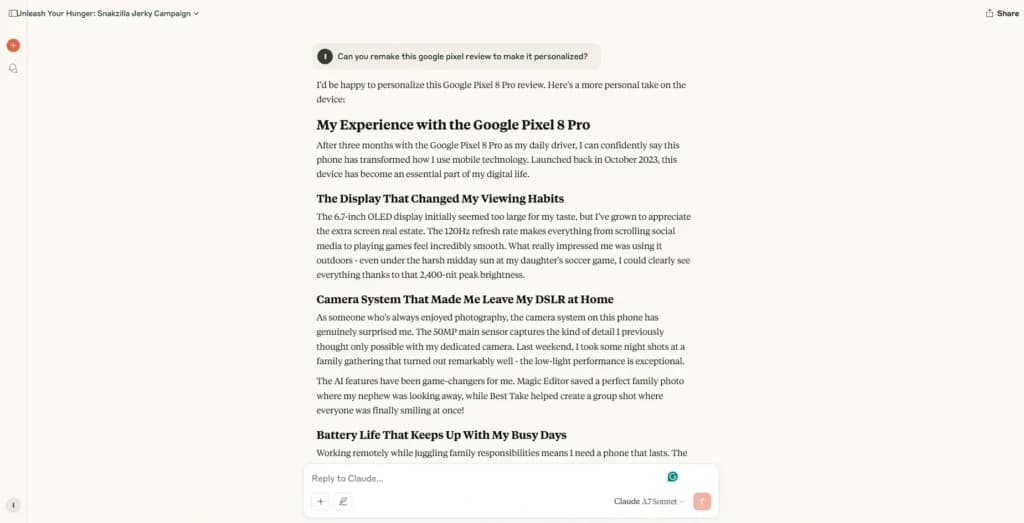
What does Claude look like in practice for a technical SMB?
A Claude project with the right MCPs turns days of reading and writing into a single morning of work.
The independent strategy consultant in London who turns 50-page client briefs into board decks built one Claude project per client. Each project holds the brand brief, three years of competitor PDFs, and a Drive MCP that reaches the client's shared folder. A single prompt - "draft this quarter's competitive brief, cite every claim, output to Drive" - produces a 12-page document with sourced citations in under 40 minutes. The consultant cut a 6-hour research job to roughly 40 minutes. The extra capacity let her take on two additional retainer clients in the first quarter without adding hours to her week.
Why does a technical small business pick Claude?
The biggest pain Claude solves for a technical SMB is strategic and creative bandwidth. A solo founder running every part of their business needs a thinking partner - someone who can read 50 PDFs and write a competitive brief, draft a strategic memo from a board, comb through customer interview notes, or generate a quarter's worth of content from a brand brief. Claude can be that thinking partner. With MCPs, it can also take action: read your inbox, draft replies, pull live analytics, update a Google Sheet, write a doc back to Drive.
For an SMB that already has the technical comfort to wire MCPs and steer prompts, Claude is one of the highest-ceiling AI agents you can adopt. For one that doesn't, the friction is real.
Skip Claude if: you want the platform to make the technical choices for you. Base44, Monday.com AI, and ClickUp AI will get you there faster.
Choose Claude if: you are comfortable in AI tooling, you want maximum power per agent, and you are willing to do a little wiring to get there.
Compare every category we cover in our AI tools hub.
* Every score reflects hands-on testing under our Sonary brands rating methodology.
Which AI agents are powerful but harder to recommend for a small business?
These platforms are powerful in their own right - but each one asks more of a small or micro business buyer than the picks above.
Should you pick n8n for AI workflow automation if you do not have a developer?
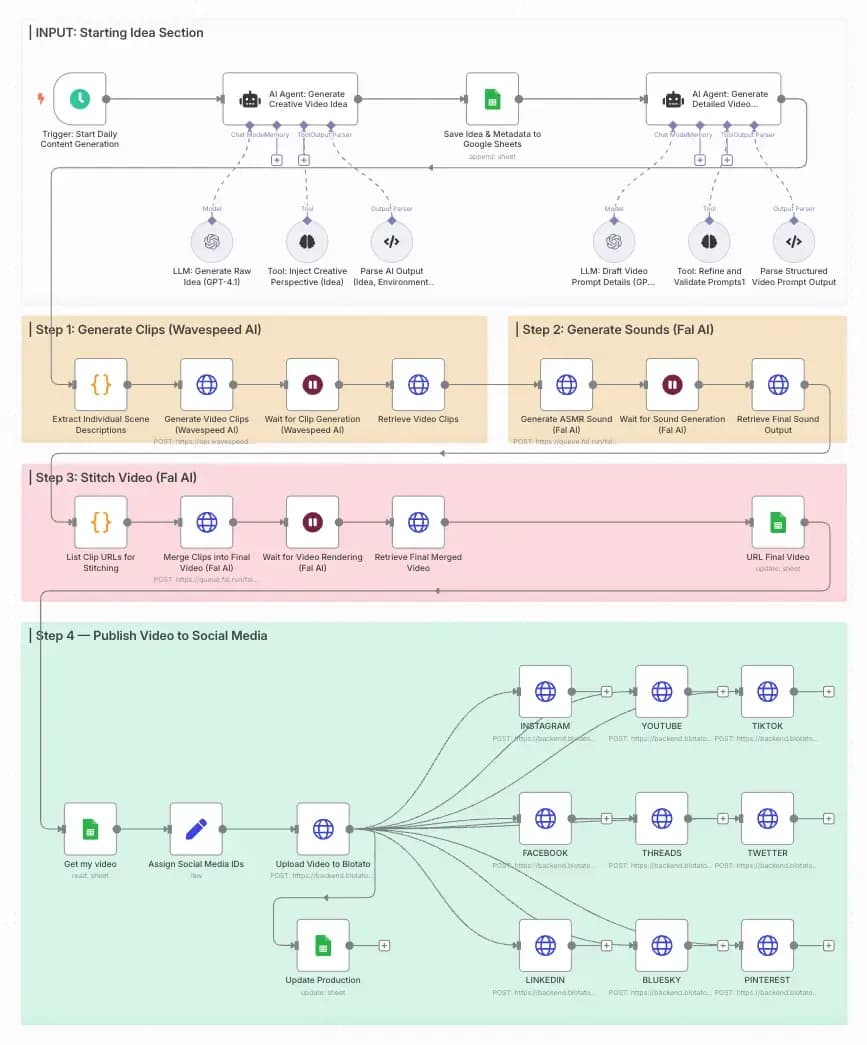
n8n is a beloved drag-and-drop AI workflow automation builder with first-class AI agent support. For developers and ops engineers, it's brilliant: any agent you can describe, you can build; almost any tool you use, you can connect; the whole platform is self-hostable for privacy. As an AI workflow tool, it has few peers among technical users.
In our hands-on test, however, n8n was clearly the wrong tool for a small business without a technical hire. The interface looks no-code - you drag nodes onto a canvas and connect them - but the moment your flow has to read real data from a real app, you're configuring credentials, mapping JSON paths, and writing little code blocks. A first-run flow surfaced errors like 'Parameter "Document" is required,' 'Not a valid Google Drive File ID' and 'Credentials for Google Sheets are not set.' Those are routine for a developer; for a non-technical founder, they are a brick wall. The 30-minute test sums it up: the capabilities are there, but the path to a working agent is too long for a typical SMB owner running on lean bandwidth.
Skip n8n if: you do not have a developer or ops engineer who can build and maintain agents. Pick Base44, Monday.com AI, or ClickUp AI instead.
Choose n8n if: you have a developer or ops engineer who will build, maintain, and monitor your agents.
Is Cursor AI the right pick if your small business does not write code?
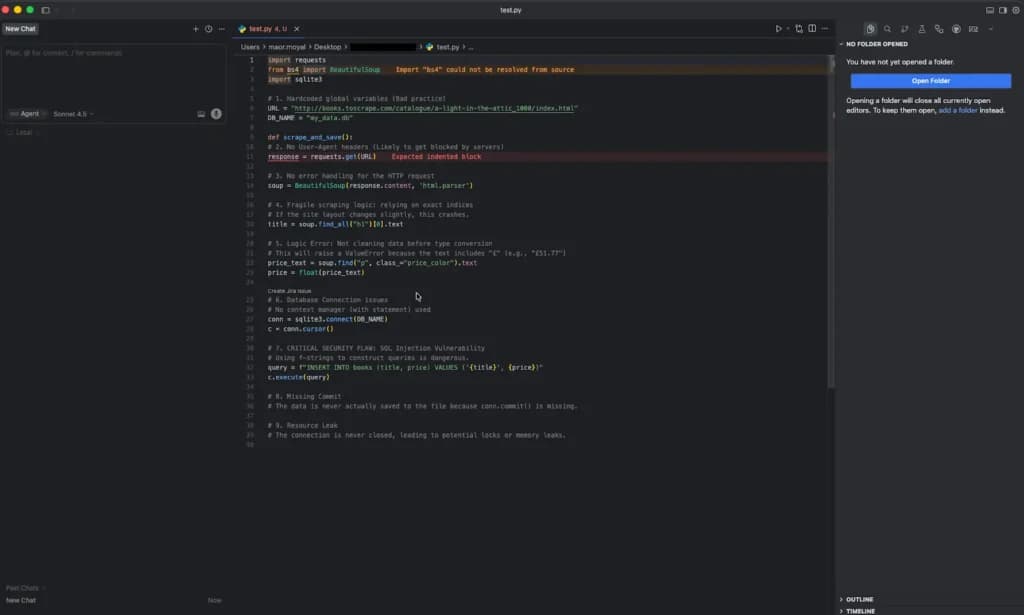
Cursor AI is one of the most talked-about AI agents in software engineering, and rightly so. It connects directly to your GitHub repositories and source code and then acts as a real engineering teammate: planning sprints, breaking work into tasks, writing and editing code across files, running QA, opening pull requests and deploying to production. For technical teams, it's transformative - an AI agent that takes action on the codebase, not just suggestions in a sidebar.
The reason we don't put Cursor AI in our top picks for a small or micro business is the audience it's built for. To get value from Cursor AI, you need to write code - JavaScript, HTML, React or another stack - and you need to understand pull requests, branches, CI and deployment. Most small business owners don't, and most micro-business teams don't have a developer on the payroll. There's also a scope mismatch: small businesses usually need an AI agent for daily tasks, AI agent for email, AI agent for sales follow-up or AI agent for scheduling - not an agent that ships pull requests.
Skip Cursor AI if: your business does not write code. Pick Base44, Monday.com AI or ClickUp AI instead.
Choose Cursor AI if: you ship software and your team writes code.
Is Manus the right autonomous AI agent for occasional deep research?
Manus is an ambitious autonomous AI agent that can plan, browse and produce a deliverable over hours of unattended work. It's a great choice for one-off, long-horizon tasks - research a market, scrape a competitor, write up a positioning brief. Where it isn't a great fit for a small business is the everyday: repeated follow-ups, daily morning briefings and AI agent for daily tasks work where you want predictable behaviour, predictable cost and tight integration with your existing apps. Pricing is credit-based and can spike when an agent runs unattended overnight, which is exactly the autonomous behaviour you want but the wrong cost shape for a lean SMB budget. Treat Manus as a specialist tool you reach for occasionally, not your always-on agent.
Should a small or micro business pick OpenClaw?
Let's say this plainly: OpenClaw is not an AI agent we recommend for small or micro businesses. It is an open-source autonomous agent designed for engineering teams that can run their own infrastructure. To use it, you need real technical knowledge- at minimum a developer, and ideally DevOps support - to install it, configure model providers, secure credentials, manage updates, and supervise what it does. An SMB owner reaching for OpenClaw will spend more time keeping the agent running than the agent will spend doing actual work.
There's also a safety story worth knowing before you let any raw autonomous agent touch your data. The autonomous-agent category has produced multiple reported incidents in 2026 in which agents with broad permissions and weak guardrails took destructive actions - most notably deleting email and files the user could not recover. The lesson is the same in every incident: autonomous agents without approvals, audit logs, and a clear pause button can fail in ways that are not 'wrong answer' but 'permanently destroyed data.' The workspace-native agents we recommend above ship those controls by default.
- Skip OpenClaw if you're a small or micro business. This one isn't a 'maybe' - without a developer and devops it's the wrong tool, full stop.
Sample AI agent stacks for under $300/month
You don’t need every tool above. Here are two ready-to-copy stacks — one for a solo/micro business on a tight budget, and one for a growing SMB that wants broad coverage. Both stay well under $300/month and lean on integrations so the tools work together.
Lean micro-business stack — about $59/month
Best for a solo founder or 1–2 person business. Covers CRM, email marketing, meetings, and support with agents that run on their own — using free tiers wherever possible.
Agent | Role in your business | Monthly cost |
|---|---|---|
HubSpot (Free CRM + Breeze agents) | Auto-qualifies leads & resolves chats | $0 |
Fathom (Free) | Auto-joins, records & summarizes meetings | $0 |
Mailchimp (Standard) | Runs email automations on their own | $20 |
Tidio Lyro (entry) | 24/7 AI customer-support agent | $39 |
Total | ≈ $59/mo |
Start even cheaper: run just the free tiers (HubSpot + Fathom) at $0/month, then add Tidio or Mailchimp once volume justifies it.
Growing-SMB stack — about $107/month (1 user)
Best for a business with a small team ready to automate operations and build custom tools. Every tool here acts autonomously, and it’s still well under the $300 ceiling — leaving room to add seats.
Agent | Role in your business | Monthly cost |
|---|---|---|
HubSpot (Free CRM + Breeze agents) | Central CRM hub + autonomous agents | $0 |
ClickUp + Brain | Super Agents run multi-step work | ~$16 |
Mailchimp (Standard) | Automated email marketing flows | $20 |
Fathom (Premium) | Unlimited auto meeting summaries | $16 |
Tidio Lyro (entry) | 24/7 AI customer-support agent | $39 |
Base44 (Starter) | Custom apps + 24/7 Superagent | $16 |
Total | ≈ $107/mo |
Room to grow: with nearly $190/month of headroom under $300, you can add ClickUp seats for your team, scale Tidio’s conversation volume, add monday.com for cross-department ops, or upgrade Base44 as usage grows.
How these tools work together: HubSpot sits at the center as your free CRM. Fathom pushes meeting notes into HubSpot, Mailchimp syncs contacts for email flows, Tidio tags supported customers back into your records, and Base44’s Superagent can read your email and act on CRM and Stripe data — so one customer action ripples through the whole stack automatically. That connectedness, not any single tool, is what makes a tiny team feel much bigger.
How does picking the right AI agent help your small business show up in AI search in ?2026
The right AI agent does not just save you time inside your business - it changes whether buyers find you when they ask ChatGPT, Claude, Perplexity or Google for a recommendation.
The way customers search is shifting. Instead of typing "best bookkeeper near me" into Google and clicking through ten links, more buyers now ask an AI tool directly: "Who is a good bookkeeper for a 5-person agency?" The AI answers with three or four named businesses. If you are one of those names, you get the lead. If you are not, the buyer never sees you - there is no second page of results in an AI answer.
The businesses that get named share a clear pattern. They publish original content under a real person's name. They share specific prices, real customer stories, and dated facts. They answer the exact question a buyer would ask. Generic copy gets skipped. Specific, dated, hands-on content gets pulled.
This is where your AI agent earns its keep beyond the daily tasks. The right agent helps you ship that kind of content - blog posts, FAQ pages, case studies, service pages - faster than you could alone. Brief it on a real customer story you handled last month. Have a human on your team add the personal details and the dated price before you publish. Skip any agent that only writes generic summaries, because AI engines skip them too.
The practical playbook for a small business: pick one job a buyer would search for, publish one page that answers it with your real experience and a name on the byline, and update it every six months. Do that ten times across ten buyer questions, and a five-person business starts showing up in AI answers next to companies a hundred times its size. The AI agent you pick partly decides whether that happens.
Do you actually need an AI agent?
Most small businesses do not need an AI agent yet - and the ones that do can usually start with a $10/mo Zapier flow before paying for a platform.
The honest test is simple. Add up the hours per week your team spends on repetitive, rule-based work: inbox triage, follow-up emails, status updates, scheduling, simple data entry. If the answer is less than two hours a week, an AI agent will cost you more time to set up than it saves. Start with a template or a Zapier automation and revisit in six months.
You do need an agent when three signs show up at once. First, the same repeatable job eats five or more hours a week. Second, the job spans more than one app - your inbox, your CRM, your calendar, your project board. Third, the job is customer-facing, so when something gets dropped, it costs you a deal or a renewal. When all three are true, an AI agent earns its keep in the first month. Until then, save the budget.
What is an AI agent, and which one should I pick?
An AI agent is software that takes routine work off your team, email triage, follow-ups, scheduling, morning briefings, and status updates. Unlike a chatbot that only replies when you type, an agent acts: reads your inbox, watches your CRM, books meetings, and runs overnight while you sleep.
The point isn't replacing people, it's adding bandwidth. A 5-person team with an AI agent produces the same output as a 7- or 8-person team without the payroll.
What can an AI agent actually do for a small business?
- Sort your inbox and draft replies
- Follow up with stale leads in your CRM
- Book meetings on real calendar availability
- Send morning briefings to WhatsApp or Slack
- Generate sprint summaries from your project board
- Run overnight on a schedule, with approvals before anything irreversible
Which AI agent should I pick?
After 10+ hands-on tests:
If you want… | Pick | Price |
|---|---|---|
A custom no-code agent across many tools (Gmail, Calendar, WhatsApp, Slack) | Base44 | Free tier, paid from ~$20/mo |
Sales follow-up & morning briefings on your existing board | Monday.com AI | From ~$12/user/mo |
Project & task automation if you already use ClickUp | ClickUp AI | From ~$7/user/mo + AI add-on |
Maximum power for technical users | Claude | $20/user/mo |
Base44, Monday.com AI, and ClickUp AI all shipped a working agent in 3–4 minutes in our test. Skip n8n unless you have a developer; the same task took us 30+ minutes.
What do people actually ask about AI agents?
Will an AI agent replace jobs in my business? No. It absorbs routine work so each person can focus on strategy, customer relationships, and complex decisions only humans make well.
Can I build my own without coding? Yes. Base44 lets you describe what you want in plain English and ships it in minutes. Monday.com AI and ClickUp AI auto-build an agent from a short onboarding quiz.
Is it safe to run autonomously? Only with guardrails. Stick to managed platforms (Base44, Monday, ClickUp) , they ship approvals, audit logs, and a pause button by default.
What's the difference between an AI agent and an AI chatbot? A chatbot replies when you type. An AI agent acts on its own - it reads your inbox, watches your CRM, books meetings, and runs overnight while you sleep.
Can an AI agent access my Gmail safely? Yes, when you use a managed platform like Base44, Monday or ClickUp. They use Google's official OAuth, scope access to read or send only, and let you revoke permission in one click. Avoid self-hosted agents that ask for your raw password.
How long does it take to set up an AI agent for a small business? Base44, Monday.com AI and ClickUp AI each shipped a working agent in 3-4 minutes in our tests. Atoms ran a research-to-spec cycle in under an hour. n8n took 30+ minutes and still threw errors.
What happens if an AI agent makes a mistake on a customer message? On managed platforms, every customer-facing message goes through an approval queue before it sends. The agent drafts, you approve. Audit logs track every action so you can roll back if something slips.
How much does it cost? Base44 has a free tier; paid plans from ~$20/mo. Monday.com AI from ~$12/user/mo. ClickUp AI from ~$7/user/mo plus AI add-on. Claude Pro $20/user/mo.
What's the bottom line on AI agents for small businesses in ?2026
The best AI agent for most small businesses in is Base44 - a no-code builder with Gmail, Drive, Calendar and WhatsApp connectors and a free tier. If your team already runs on Monday, pick Monday.com AI. If you live in ClickUp, pick ClickUp AI. If you are a solo founder shipping a product, pick Atoms at $15.80/mo. Start with one painful, repeatable job. Ship one agent. Let it earn the next one. That is how a five-person business produces the output of a much bigger one without adding payroll.2026
Who reviewed this article?
This article was researched and reviewed by Keidar Sharoni, SEO & AEO Lead at Sonary. Keidar has tested AI agent platforms hands-on across more than ten small businesses since 2024. Last reviewed .October 2026
Start small, ship one agent, let it earn the next one. That's how a lean team grows into the productivity of a much bigger one without growing payroll.
See also
- Agents are one slice of a much bigger stack, and the best AI tools for small business hub shows which category owns which job.
- A bot that greets customers is still the front door, so check best AI chatbots for small business for the tools handling first replies.
- Rule based sequences that fire on a trigger rather than reasoning through steps belong with best AI marketing automation tools instead.
- Building your own agent workflow without hiring engineers usually starts from best AI app builders, which wire logic to your existing data.