
Best Password Manager Software
Password managers are essential tools that store and manage your passwords securely. They enhance your business protection by generating and storing strong, unique passwords for each account, reducing the risk of data breaches. This added security enables you and your team to work efficiently while protecting sensitive business and client information, ensuring peace of mind and productivity. Let’s explore and compare the best password managers for your business.
Last updated: September 2026

14-Days Free Trial
- Immediate security risk notifications
- Share login credentials quickly & safely
- Trusted by 150K+ businesses worldwide
- All plans come with a free trial of at least 14 days
- The interface for storing and managing passwords is intuitive
- Regular monitoring for the quality of your passwords
- Almost two decades of no security breaches
- Lacks a free password management plan
- Doesn't have any live chat available to users
14-Days Free Trial
- Immediate security risk notifications
- Share login credentials quickly & safely
- Trusted by 150K+ businesses worldwide
- All plans come with a free trial of at least 14 days
- The interface for storing and managing passwords is intuitive
- Regular monitoring for the quality of your passwords
- Almost two decades of no security breaches
- Lacks a free password management plan
- Doesn't have any live chat available to users

14-Days Free Trial
- Monitor dark web & instant breach alerts
- Multi-factor authentication security
- Share login credentials securely for teams
- Offers a free plan and free trials without having to give credit card details
- User-friendly apps for mobile, desktop, and browser use
- Low entry point for small businesses as they just have to pay $4 monthly per user
- Able to access your vault offline
- Lacks a live chat option
- The free plan has limited support options
14-Days Free Trial
- Monitor dark web & instant breach alerts
- Multi-factor authentication security
- Share login credentials securely for teams
- Offers a free plan and free trials without having to give credit card details
- User-friendly apps for mobile, desktop, and browser use
- Low entry point for small businesses as they just have to pay $4 monthly per user
- Able to access your vault offline
- Lacks a live chat option
- The free plan has limited support options

Free plan available
- Access free password protection & security
- Get issues resolved with the 24/7 support
- Manage company-wide access privileges
- Has a free plan for people getting started
- Most user-friendly password protection manager
- Very detailed reports for password health
- Not too many customization options
Free plan available
- Access free password protection & security
- Get issues resolved with the 24/7 support
- Manage company-wide access privileges
- Has a free plan for people getting started
- Most user-friendly password protection manager
- Very detailed reports for password health
- Not too many customization options

Free plan available
- Dark web monitoring with notifications
- Autofill login details & forms securely
- Spot weaknesses: Password health report
- Available as a free tool
- Passwords are synced across all devices for convenience
- Strong AES-256 encryption
- Alerts users if their credentials appear on the dark web
- Lacks some premium features offered by paid password managers
- Browser extension can be less reliable than dedicated apps
- Lacks features specifically designed for multiple users
Free plan available
- Dark web monitoring with notifications
- Autofill login details & forms securely
- Spot weaknesses: Password health report
- Available as a free tool
- Passwords are synced across all devices for convenience
- Strong AES-256 encryption
- Alerts users if their credentials appear on the dark web
- Lacks some premium features offered by paid password managers
- Browser extension can be less reliable than dedicated apps
- Lacks features specifically designed for multiple users

Free plan available
- Cloud-based access for remote work
- Prevents reused or weak passwords
- Export stored passwords with encryption
- Supports auto-fill and one-click login with Chrome and Firefox
- Cross-platform for Windows, macOS, Android, and iOS
- Features to protect against data breaches
- Helps avoid weak or reused passwords
- Currently supports only Chrome and Firefox
- Currently supports only Chrome and Firefox
Free plan available
- Cloud-based access for remote work
- Prevents reused or weak passwords
- Export stored passwords with encryption
- Supports auto-fill and one-click login with Chrome and Firefox
- Cross-platform for Windows, macOS, Android, and iOS
- Features to protect against data breaches
- Helps avoid weak or reused passwords
- Currently supports only Chrome and Firefox
- Currently supports only Chrome and Firefox

30-Days Free Trial
- Multi-layer security for your passwords
- Convenient remote Bitdefender log-out
- Integrate with Chrome, Firefox, Safari, and Edge
- Can remotely log out of your account
- Can import a large number of file formats
- Useful notes filing and storage
- Doesn’t offer password sharing
30-Days Free Trial
- Multi-layer security for your passwords
- Convenient remote Bitdefender log-out
- Integrate with Chrome, Firefox, Safari, and Edge
- Can remotely log out of your account
- Can import a large number of file formats
- Useful notes filing and storage
- Doesn’t offer password sharing
* Featured prices and terms can be updated. Free offers may include additional terms.
Why You Can Trust the Expertise of Sonary
At Sonary, we are committed to providing accurate and trustworthy information to help you make informed decisions. Our research process is meticulous, transparent, and guided by a dedication to maintaining the highest standards of integrity.
Unlike many other review platforms, we conduct in-depth evaluations of the software and services we feature. Our expert team tests and actively uses the tools we review to understand their features, performance, and value comprehensively. Our assessments are based on real-world use, giving you insights beyond surface-level descriptions.
Our research methodology includes analyzing key consumer factors such as pricing, functionality, device usability, scalability, customer support quality, and unique industry-specific features.
This hands-on approach and dedication to transparency mean you can trust Sonary to deliver regular, up-to-date content and recommendations that are well-researched and genuinely helpful for your business needs.
What Is a Password Manager and What Does It Do?
For small businesses, a password manager is like having a digital security expert on your team. It securely stores and organizes all the passwords your business relies on, from email accounts to client portals, ensuring they’re always at your fingertips when needed. No more sticky notes with scribbled passwords or the risk of using the same weak password across multiple accounts. With this password vault, you only need to remember one master password, and it takes care of the rest — generating strong, unique security passwords that keep your business safe from cyber threats.
But a password manager does more than just store passwords — it’s a comprehensive security system that actively works to protect your business. It can alert you if any of your passwords have been compromised in a data breach and even notify you of weak or reused passwords that could put your business at risk. Plus, features like secure password sharing and autofill for forms streamline your team’s workflow, allowing everyone to work efficiently while maintaining top-notch security.
A password manager is an essential tool for small businesses to safeguard their digital assets. It gives you peace of mind and more time to focus on growth.
Top Password Manager Software
Here are the top-rated password managers, each with its set of features and business advantages. Check out their capabilities and read the password manager reviews:
LastPass is a password management tool that has steadily grown in popularity since launching in 2008. More than 100,000 businesses use LastPass's services, and it also works with millions of… Read more
LastPass is a password management tool that has steadily grown in popularity since launching in 2008. More than 100,000 businesses use LastPass's services, and it also works with millions of individuals who want to create secure passwords. LastPass is based in Boston and employs over 800 across the world. It offers a user-friendly password management tool, a good variety of plans, and a free trial to allow people to try it out with minimal commitment. This LastPass review will take you through all the features, pricing, and performance of this password manager.
Learn more in our full LastPass Password Manager review.
Pros & Cons
- Offers a free plan and free trials without having to give credit card details
- User-friendly apps for mobile, desktop, and browser use
- Low entry point for small businesses as they just have to pay $4 monthly per user
- Able to access your vault offline
- Lacks a live chat option
- The free plan has limited support options
Pricing
$4
/mo per user/
/mo per user
$7
/mo per user/
/mo per user
$0
mo/
month
$3
mo/
month
$4
mo/
month
1Password is a top-rated password manager designed to securely store, autofill, and manage passwords, credit cards, and sensitive information across all devices. Trusted by over 150,000 businesses… Read more
1Password is a top-rated password manager designed to securely store, autofill, and manage passwords, credit cards, and sensitive information across all devices. Trusted by over 150,000 businesses worldwide, including stalwarts like Slack, Salesforce, and IBM, it enhances security, mitigates breaches, and offers seamless integration with apps. The password manager also provides businesses with real-time alerts to enhance security and boost productivity. This 1Password review will take you through all aspects of this password management platform, including features, pricing, performance, and more.
Learn more in our full 1Password Password Manager review.
Pros & Cons
- All plans come with a free trial of at least 14 days
- The interface for storing and managing passwords is intuitive
- Regular monitoring for the quality of your passwords
- Almost two decades of no security breaches
- Lacks a free password management plan
- Doesn't have any live chat available to users
Pricing
$2.99
mo/
month
$4.99
mo/
month
$19.95
mo/
month
$7.99
mo/
month
NordPass has one of the most user-friendly password management software on the market. The Netherlands-based company is affiliated with NordVPN and holds accreditations with leading organizations,… Read more
NordPass has one of the most user-friendly password management software on the market. The Netherlands-based company is affiliated with NordVPN and holds accreditations with leading organizations, including being a member of the FIDO Alliance. NordPass is a highly secure password manager that uses XChaCha20 encryption and zero-knowledge architecture to ensure only you can access your encrypted data.
Learn more in our full NordPass Password Manager review.
Pros & Cons
- Has a free plan for people getting started
- Most user-friendly password protection manager
- Very detailed reports for password health
- Not too many customization options
Pricing
$0
mo/
month
$1.89
mo/
month
$3.69
mo/
month
$1.99
/mo per user/
/mo per user
$3.99
/mo per user/
/mo per user
$5.99
/mo per user/
/mo per user
Norton, a global leader in cybersecurity with millions of global users, is known for offering a wide range of security solutions aimed at protecting personal and professional data from online… Read more
Norton, a global leader in cybersecurity with millions of global users, is known for offering a wide range of security solutions aimed at protecting personal and professional data from online threats. Its Password Manager offers secure storage, password generation, and syncing across devices, ensuring your credentials are both accessible and protected. Features like auto-fill and password health reports make managing multiple accounts simple. With a focus on user-friendliness and robust encryption, Norton Password Manager is a valuable tool for safeguarding personal information online. In this review, I’ll discuss the features, pricing, customer service, and more.
Learn more in our full Norton Password Manager review.
Pros & Cons
- Available as a free tool
- Passwords are synced across all devices for convenience
- Strong AES-256 encryption
- Alerts users if their credentials appear on the dark web
- Lacks some premium features offered by paid password managers
- Browser extension can be less reliable than dedicated apps
- Lacks features specifically designed for multiple users
Pricing
$0
mo/
month
Types of Password Managers Available
There are two main types of password managers — cloud-based and locally stored password managers — each with different advantages depending on how your business operates:
Cloud-Based Password Managers | Locally Stored Password Managers |
|---|---|
Store encrypted passwords on secure servers. | Store passwords directly on your device. |
Accessible from any device with an internet connection. | Offers greater control and privacy. |
Ideal for businesses with remote or mobile teams. | Suitable for businesses with strict data security policies. |
Do I Really Need a Password Manager?
As your business grows, so does the number of online accounts, apps, and services you rely on. Keeping track of all those passwords can quickly become overwhelming, and using simple or repeated passwords puts your business at serious risk.
The benefits of using the best password keepers extend beyond just security:
- Enhanced Security: Automatically generates strong, unique passwords for each account, significantly reducing the risk of breaches caused by weak or reused passwords.
- Time Savings: Autofills login credentials across all your accounts, saving you and your team the hassle of manually entering usernames and passwords.
- Improved Efficiency: Allows your team to quickly access the tools and services they need so they can focus more on driving your business forward.
- Secure Password Sharing: Enables you to share passwords securely with team members without revealing the actual password, ensuring sensitive information is protected even in collaborative environments.
- Dark Web Monitoring: Continuously scans the dark web for any signs of your passwords or other sensitive information, alerting you to potential breaches so you can take immediate action.
- Centralized Control: Offers administrative tools to manage and monitor password usage across your team, helping enforce security policies and ensure compliance.
- Peace of Mind: You can be confident that your business’s digital assets are well-protected, reducing the stress and worry associated with managing multiple passwords.
The Average Pricing of Password Managers
The cost of password managers can vary depending on the features and level of security they offer. Generally, pricing ranges from free versions with limited features to premium subscriptions that offer more comprehensive services.
Feature | Free Versions | Paid Versions |
|---|---|---|
Pricing | Free |
|
Pros |
|
|
Cons |
|
|
Ideal For | Individuals or very small teams | Small businesses needing enhanced security and convenience |
Important Password Manager Features
Password managers come with a variety of features that are essential for both security and convenience. While specific offerings may vary by brand, most top-rated password managers have several key features in common.
1. Password Generation
- What It Is: Most password managers offer a built-in password generator that creates strong, unique passwords for your accounts.
- How to Leverage It: Use this feature to replace weak or reused passwords across all your accounts. A strong, randomly generated password is your first line of defense against cyberattacks.
2. Two-Factor Authentication (2FA)
- What It Is: An additional layer of security that requires a second form of verification, such as a code sent to your phone, in addition to your password.
- How to Leverage It: Activate 2FA on your password manager and any accounts that support it. This greatly reduces the risk of unauthorized access, even if your password is compromised.
3. Dark Web Monitoring
- What It Is: Monitors the dark web for your credentials and alerts you if your information appears in data breaches.
- How to Leverage It: Regularly check the dark web monitoring alerts provided by your password manager. If you receive an alert, change the affected password immediately.
4. Encrypted Storage
- What It Is: The best password keepers offer secure storage for sensitive information beyond just passwords, such as credit card details, ID numbers, and secure notes.
- How to Leverage It: Store sensitive documents and information in the encrypted password vault provided, ensuring the same high level of security protects them as your passwords.
5. Password Hygiene Reports
- What It Is: Analyzes your passwords and provides insights on weak, reused, or compromised passwords.
- How to Leverage It: Regularly review these reports and take action to update any weak or reused passwords to enhance your overall security posture.
6. Multi-Device Sync
- What It Is: This feature allows you to sync your passwords across multiple devices, including desktops, laptops, smartphones, and tablets.
- How to Leverage It: Ensure that your password manager is installed on all devices you use regularly. This way, you'll have seamless access to your passwords, whether you're at work, at home, or on the go.
7. Role-Based Access
- What It Is: Role-based access allows you to assign specific permissions to users based on their roles, ensuring they only access relevant data.
- How to Leverage It: Assign access levels to limit exposure to sensitive information. Admins can have full access, while others get access only to what's necessary for their role, improving security.
8. Auto-Fill and Auto-Save
- What It Is: Auto-fill automatically populates login fields with your stored credentials, while auto-save captures new login details as you create them.
- How to Leverage It: Enable auto-fill to save time when logging into accounts, and use auto-save to store new credentials, ensuring no password is forgotten.
9. Secure Password Sharing
- What It Is: Allows you to securely share passwords with other users without revealing the actual password.
- How to Leverage It: Use this feature to collaborate safely with team members or share account access with family members without compromising security.
By effectively utilizing these features, you can protect your online accounts and streamline your business’s digital life, making security an integral part of your daily routine without added hassle.
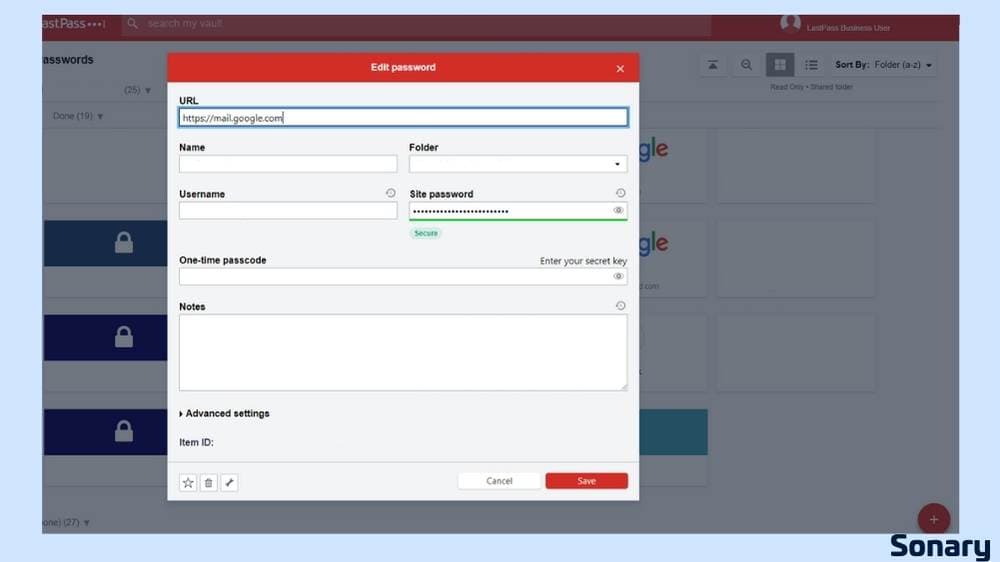
How to Choose the Right Password Manager for Your Business
Here are some key factors to consider when selecting a password manager:
1. Understand Your Business Needs
- Team size and structure: Choose a password manager that scales with your team, offering secure sharing and role-based access.
- Business-specific features: Look for centralized management, reporting tools, and strong password policy enforcement.
2. Focus on Security Features
- Strong encryption and 2FA: Opt for a password manager with AES-256 encryption and two-factor authentication for added security.
- Dark web monitoring: Select a tool that monitors the dark web for compromised credentials and alerts you immediately.
3. Check Compatibility and Integration
- Device and platform support: Ensure compatibility across all devices and platforms your business uses, including key business tools.
- Single sign-on (SSO) integration: If using SSO, choose a password manager that integrates seamlessly for easier logins.
4. Evaluate Ease of Use and Onboarding
- User-friendly interface: Pick a password manager that is simple for all employees to use, regardless of technical skill.
- Onboarding and support: Opt for solutions with strong onboarding resources and customer support tailored to small businesses.
5. Consider Pricing and Value
- Cost-effective plans: Compare affordable plans that include essential features like multi-device sync and administrative controls.
- Free trials and money-back guarantees: Test features through free trials or guarantees before committing to a paid plan.
6. Assess Customer Support and Reliability
- 24/7 support: Choose a password manager with reliable 24/7 customer support.
- Reputation and reviews: Check password manager reviews from other users to gauge reliability and effectiveness.
Tips for Successful Implementation of a Password Manager
Here are some tips to ensure a smooth and effective rollout:
1. Start with a Pilot Program
Begin by implementing the password manager with a small group of employees. This allows you to test the tool, gather feedback, and address any issues before a full-scale rollout.
2. Provide Comprehensive Training
Offer training sessions to ensure all employees understand how to use the password manager effectively. Cover essential features like password generation, secure sharing, and two-factor authentication.
3. Establish Clear Policies
Set clear guidelines for password management, including how to create strong passwords, when to update them, and how to securely share credentials. Make sure all employees understand and adhere to these policies.
4. Leverage Administrative Tools
Use the password manager’s administrative features to monitor password usage, enforce security policies, and manage access rights. This helps maintain security standards across your organization.
5. Communicate the Benefits
Explain the benefits of the password manager to your team, emphasizing how it will improve security and make their daily tasks easier. Highlight the importance of adopting the tool to protect both business and personal information.
6. Monitor and Adjust
Review how the password manager is being used within your business regularly. Gather feedback from employees and make adjustments as needed to ensure the tool meets your security needs and is user-friendly.
7. Plan for Continuous Support
Ensure ongoing support is available for employees, especially during the initial phase. This could include having a dedicated point of contact for questions, providing access to help resources, or scheduling follow-up training sessions.
By carefully selecting and implementing a top-rated password manager, such as those highlighted in password manager reviews, you can enhance your business's security and efficiency, ensuring that all sensitive information is protected within a secure password vault.
See also
- Vaults sit beside ticketing, asset and access tooling, so see how best IT service management software handles provisioning and offboarding as one flow.
- A small team can run the service desk side at no cost, and the trade-offs are compared in best free ITSM tools.
- Shared credentials and remote network access are separate controls, and best free VPN for business covers the tunnel rather than the vault.
- Access should be granted and revoked with the hire and leaver process, which is where employee onboarding software fits.
Final Thoughts
Implementing a password manager in your small business is one of the smartest moves you can make to protect your digital assets and streamline daily operations.
With the right password manager, you can securely store and manage all your passwords, reduce the risk of cyber threats, and give your team the tools they need to work efficiently. The key is to choose a solution that fits your business’s specific needs, integrates seamlessly with the tools you already use, and offers comprehensive security features.
If you’re still on the fence, consider starting with a trial or free version to see how it fits into your workflow. Once you experience the peace of mind that comes with knowing your passwords are secure, you’ll wonder how you ever managed without it.
Here’s to a safer, more productive future for your business.
FAQs
Q: What are the main benefits of using a password manager for my small business?
A: A password manager securely stores and manages all your passwords, generates strong, unique passwords, and simplifies access for your team. This reduces the risk of cyber threats and improves overall efficiency.
Q: Can I integrate a password manager with other tools my business uses?
A: Yes, most password managers integrate with tools like SSO platforms, MFA tools, IAM systems, cloud storage services, and collaboration tools, helping to enhance security and streamline your business operations.
Q: Is it expensive to implement a password manager in my business?
A: Costs vary depending on the plan and features you choose. However, many password managers offer affordable plans designed for small businesses, with options for both free and premium features.
Q: How do I ensure my team uses the password manager effectively?
A: Provide comprehensive training, establish clear usage policies, and offer ongoing support to ensure your team understands the benefits and uses the password manager correctly.