
Last updated: September 2026
Veed.io is an online video editing platform that allows beginners and experienced users to create professional videos using simple editing tools combined with incredible AI features. Veed.io offers a free plan by default. However, it’s only for trial purposes and is very limited in terms of features and video export length. Paid plans, on the other hand, offer a very wide variety of tools, features, and export options. The Veed.io platform is an ideal solution for content creators, first of all, because it’s very simple to use, and secondly, because of the incredible AI features it includes.
Plans & Pricing
- 720p export quality
- 2GB storage
- 10 minutes video export length
- Includes watermark
- Everything in the Free plan plus:
- 1080p video export quality
- 5GB storage
- No watermark
- Unlimited stock audio and video
- Various AI tools
- Everything in the Basic plan plus:
- 1080p video export quality
- 20GB storage
- 2 hour video export length
- iOS app available
- 180,000 Credit
- 4k video export quality
- 50GB storage
- Custom templates
- Brand kit
- Custom AI Credits
- Centrally manage teams and data
- Review mode for videos
- Privacy controls
* Featured prices can be updated and free offers may include additional terms.
Is Veed.io worth it?
Yes for creators and small marketing teams who need browser-based video editing with strong AI features (auto-subtitles, translation, AI avatars). Veed Pro at ~$21/month is faster on the web than CapCut, offers better team collaboration than Premiere Pro, and has AI subtitle accuracy among the best in its class. No software install needed.
Best for: remote teams, agencies, podcasters needing fast subtitle + clip workflows
Skip if: you need offline editing or advanced color grading (DaVinci Resolve fits better)
- Free: Great for testing or occasional, simple video editing, trimming clips, adding music/text, small edits. But videos have a watermark, only 720p export quality, and a short video length cap.
- Lite: A good step up for businesses or creators who want clean, presentable videos without a watermark, ideal for social media posts, ads, or short promotional clips. 1080p quality and unlimited uploads make this a step toward professional content.
- Pro: Designed for regular content creation, marketing videos, ads, tutorials, training, and social posts. Pro gives high-quality exports (even 4K), brand control, advanced AI features that save time (subtitles, voiceovers, background cleanup), and access to a rich media library. Perfect if video is a regular part of your marketing or content strategy.
- Enterprise/Business: For agencies, marketing teams, or businesses producing lots of video content — multiple users, team workflows, brand consistency across campaigns, large storage and export capacity, custom workflows, analytics, and support.
Which plan should your business pick?
- Just starting or experimenting: Use the Free plan. It’s ideal if you want to test whether Veed fits your workflow — for occasional social clips, test videos, or learning the platform.
- Small business, social media, or light marketing: Lite is the most budget-friendly way to move beyond hobby-level output. It removes the watermark and gives good quality for ads, product promos, or social posts.
- Growing content needs: regular videos, marketing, brand videos: Pro is the sweet spot. For consistent video production (YouTube, social media, tutorials, ads), Pro delivers flexibility, quality, automation, and brand consistency.
- Marketing agency, multi-team setup, or heavy video use: Enterprise/Business plan makes sense when multiple people need access, you have large video volume, require advanced control, or need video analytics and team management.
Is Veed.io good?
Veed.io is a strong choice for business owners who want fast, professional video creation without dealing with complicated software. It works in the browser, so you can edit from any device, and the interface is simple enough for beginners while still offering advanced features like AI captioning, background removal, templates, and brand kits.
The platform is especially useful for marketing teams, agencies, trainers, and entrepreneurs who need to turn raw footage into polished videos quickly. Veed’s automatic subtitles are accurate, its AI tools save time, and its export quality is reliable. It is not the cheapest option, but the speed, ease of use, and workflow automation make it a solid value for most small and mid-sized businesses looking to create consistent, professional video content.
Is VEED free in 2026 (and what is actually included on the free plan)?
Yes, VEED is free in 2026, but the free plan adds a small VEED watermark to every export, caps exports at 10 minutes per video, and limits AI feature usage to about 30 minutes of source video per month. Paid plans start at $10/month for VEED Pro and go up to $35/month for the studio plan. The catch: VEED's free auto-captioning and basic editing are genuinely useful, but the watermark makes the free plan unsuitable for client work or branded content. You will outgrow free within two weeks if you publish regularly.
What can you actually do on VEED's free plan in 2026?
On VEED's free plan in 2026, you can record screen + webcam, trim and stitch clips up to 10 minutes per export, auto-caption up to 30 minutes of source video per month, and export at 720p , all with a small VEED watermark in the corner.
Why is this the right fit?
The free plan is a genuinely useful tool for one-off internal videos, quick Loom-style updates, and testing whether VEED fits your workflow. The 30 minutes of monthly AI captions covers about 4 short videos.
How much does this cost?
Free forever. No credit card required to sign up.
What does this look like in practice?
The HR coordinator at a 40-person SaaS company in Boston who records weekly 5-minute 'state of the company' videos for the team. She uses VEED free, posts the videos to internal Slack, and has never needed to upgrade because the 10-minute cap covers her use case and the watermark doesn't matter internally.
When should you pick something else?
Skip VEED free the moment you need to publish to clients, social, or anywhere with brand standards. The watermark is small but visible and reads as 'amateur' on external channels.
Is VEED Business at $59/month worth it over Pro?
VEED Business at $59/month is worth the $41 jump over Pro when you need 5 team seats, brand-kit controls, and centralized billing for an agency or in-house marketing team.
Why is this the right fit?
Business adds team seats, brand-kit centralization (fonts, colors, logo, intros), team folders, and 500 GB of cloud storage. For a 3-person social agency, Business is roughly the cost of Pro for one freelancer.
How much does this cost?
$59/month billed annually ($708/year) or $70/month billed monthly.
What does this look like in practice?
The 4-person social agency in Berlin that manages 11 client accounts. They run a single VEED Business workspace with one brand kit per client. Onboarding a new client team member to VEED takes 3 minutes because the brand kit is already configured. Their per-client production cost dropped 22% in the first quarter.
When should you pick something else?
Skip Business if your team is 2 people or fewer; two Pro seats at $36/month are cheaper than one Business seat.
Expert Score
Pros
- Ease of use
- Useful AI features
- Cloud-based workspace
- Brand kit available
Cons
- Limited free plan
- Lack of customer support options
- Limited video export length
Customer Support
Although Veed.io offers its users incredible features and possibilities, its support system isn’t quite as extensive as it could be. Users with free subscription plans can get support only by searching the website and browsing the blog or FAQ sections. In contrast, users with paid subscription plans can get support via online chat features.
Email support is available 24/7 for all queries.
24/7 Help & Support
24/7 support is accessible through the online chat feature
FAQ
Comprehensive FAQ section on the support site.
Blog
There is a blog on their official website.
Video Tutorials
There are numerous video tutorials on the Veed.io YouTube channel
Ease of Use
Even with the numerous possibilities that Veed.io offers, it’s one of the easiest online video editing platforms to use.
Creating an account is the first step in using the Veed.io platform. This process is straightforward and takes just a few minutes. By default, new accounts include the free plan; however, upgrading to one of the paid subscription plans is as easy as it gets.
Once users choose their subscription plan, creating content can begin almost immediately. The platform uses a simple drag-and-drop system, and no matter how complex the features might sound at first, even users with no experience can create professional content. It can be done with a simple click, Whether text-to-speech, adding a voiceover, subtitles, or any other element.
Performance
One of this video editing platform's greatest assets is its incredible performance. The downside is that its performance depends on internet speed. However, users with a stable internet connection can quickly create transitions and use even the most complex AI features within seconds.
When it comes to online video editing platforms, complex features usually take time, but with Veed.io, the waiting time is minimal. Even exporting videos is done pretty quickly.
Features & Functionality
Veed.io is packed with great features that can make everyday content creation a breeze. Aside from including simple video editing features, it consists of a variety of advanced tools that can significantly improve the outcome of any video.
Video Editor
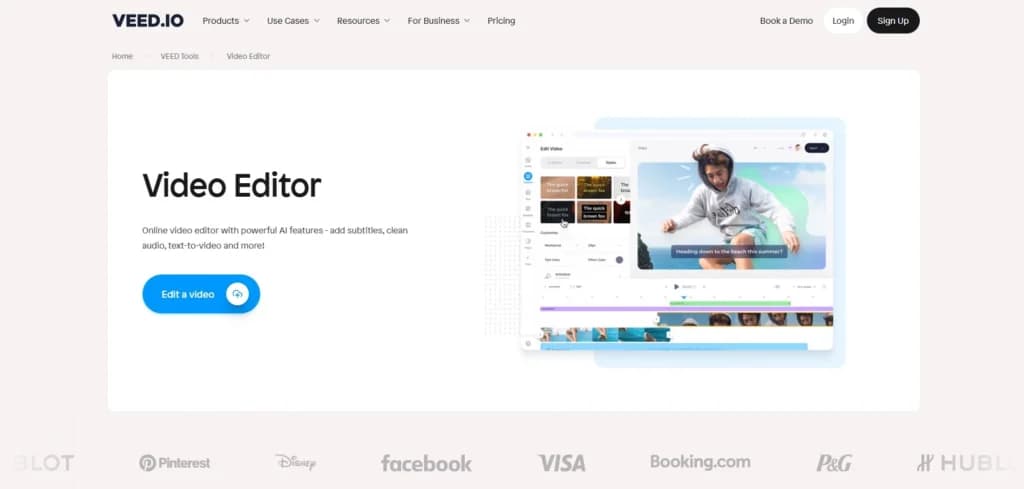
The video editor is the main feature, and it’s where users can use their own media, add effects, voiceovers, transitions, subtitles, and much more. The platform uses a simple drag-and-drop system that even beginners can use.
In-App Video Recorder
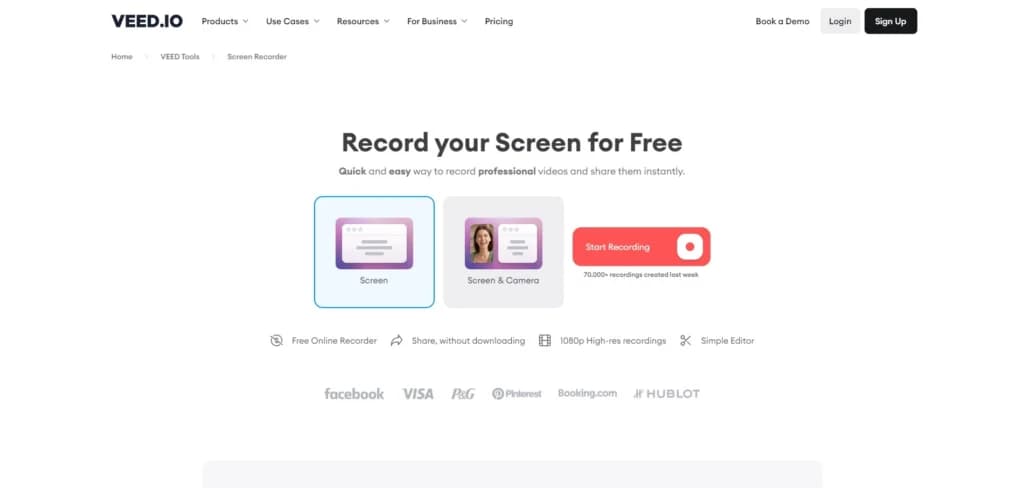
One of the most useful features of Veed.io is the video recorder within the platform. This allows video creators to choose whether the recorded video will contain media from the camera, from the screen, or both. This feature eliminates the need for complicated software while recording reaction videos or creating how-to videos.
Eye Contact Correction
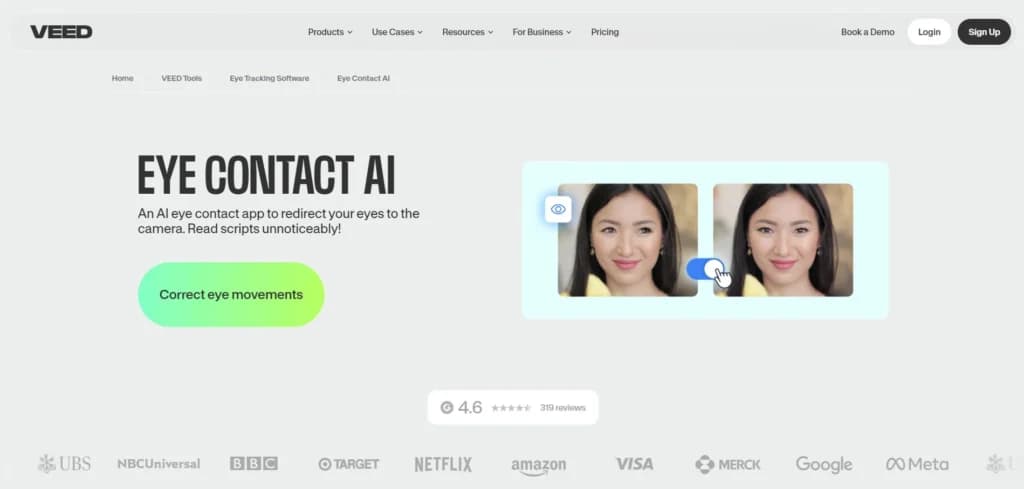
When it comes to the eye correction feature, Veed.io is among the few video editing platforms that do it well. This feature uses AI to make the person on the video look right at the camera even if the person is reading the lines from the script. This is an incredibly useful tool for explainer videos where presenters need to learn a large block of text while looking at the camera. Instead of recording the narration in numerous takes, this AI speeds up the process significantly.
Work with a wide range of file types for maximum compatibility.
Choose from various plans to suit your creative needs.
Accessible on multiple platforms for versatile use.
Edit with precision using powerful professional-grade tools.
Easily share projects and export them in desired formats.
Support for diverse export options to meet specific requirements.
Features
- Video Editing Capabilities
- MP4
- Free Trial
- Monthly subscription
- Annual subscription
- iOS
- Web
- Filters and Effects
- Layer Support
- Color Correction
Verdict
It’s a no-brainer that Veed.io is an amazing video editing platform for content creators. The abundance of AI features and simple user interface make it a great asset, no matter the level of experience.
The platform offers a variety of features that will satisfy the needs of users. However, I must address the elephant in the room - the limited video export length in the free and basic plans.
Even small content creators sometimes require their videos to be longer than 25 minutes, which requires them to get the pro plan. The problem is that the difference between the basic and pro plans is the video export length and price. Other features are the same in both plans. Video is one channel out of many, and our rundown of the best marketing tools for small business covers the rest of the stack.
Veed.io Alternatives

Starting from: $0/month
Free
$0
seat/month
Pros
- Ease of use
- Useful AI features
- Cloud-based workspace
- Brand kit available
Cons
- Limited free plan
- Lack of customer support options
- Limited video export length
Starting from: $19.99/month
Students and Teachers
$19.99
seat/month
Pros
- Advanced editing features such as color correction, multi-cam editing, and VR support
- A vast library of video and audio effects
- Auto-Reframe tool automatically adjusts aspect ratios for different platforms
- Incredible customer support
Cons
- Mastering all the advanced features can take time
- Expensive if paid monthly
- Requires powerful hardware to run smoothly

Starting from: $10/month
Monthly
$10
seat/month
Pros
- Projects are immediately stored, even while editing
- Ability to see and use other creator's templates
- Uses the latest AI tools in the industry
- User-friendly timeline
Cons
- Not supported on Windows or Mac
- Prices are on the high-end
- Watermark on the final outcome of the free version
FAQs
Does VEED have a free plan?
Are VEED captions free?
Is a VEED subscription worth it?
Is VEED a safe site?
How does VEED AI work?
Users Reviews
Be the first to write a review
Share your experience with Veed and help others choose the right software.