

Last updated: September 2025
AutoCAD is a go-to tool for professionals in architecture, engineering, construction, and manufacturing. Developed by Autodesk, it’s been the industry standard for years, helping users create precise 2D drafts and detailed 3D models. It’s great for designing buildings, machines, and electrical plans while making the process faster and more accurate. AutoCAD also automates repetitive tasks, saving time and reducing errors. Many businesses rely on it to boost productivity and keep projects on track. In this AutoCAD review, I'll discuss features, performance, customer service, and pricing.
Plans & Pricing
* Featured prices can be updated and free offers may include additional terms.
AutoCAD offers a free trial that lasts for 30 days. After that, you’ll have to choose from three packages with different price ranges that you can choose from depending on your budget and needs. The subscription can be monthly, yearly, or 3-yearly. There’s also the AutoCAD Flex option, a pay-as-you-go solution for casual or infrequent users. Each of these comes with a 30-day money-back guarantee.

Expert Score
Pros
- 3D rendering + 2D drafting
- High performing platform
- Time-saving features
- A wealth of learning resources available
Cons
- Complex interface
- Steep learning curve
- Relatively high cost for casual users
Customer Support
Autodesk offers several resources for AutoCAD help and support, but the responsiveness varies depending on your specific problem and support plan. Paid support plans generally provide faster response times and more direct assistance. However, wait times can still occur, depending on the specific issue and workload of the support team. Support options range from a vast collection of guides and forums to phone calls/chats with AutoCAD specialists.
Phone Support
Available during local work hours
Online support request
FAQ
Extensive FAQ page
Blog
Blog for guides and updates
Live Online Chat
Available
Video Tutorials
On the website and other video resources
Ease of Use
AutoCAD has a robust feature set but has a steep learning curve. It’s not the best software for beginners. Still, if you're committed to learning a professional design tool, the extensive resources and transferable skills make AutoCAD a worthwhile investment in the long run. AutoCAD also has a more complex interface compared to similar programs. Autodesk, the maker of AutoCAD, offers a vast library of tutorials, guides, and courses to help navigate this. There's also a large community of users that shares tips and tricks, but mastering AutoCAD takes time and practice.

Customization Tailor menus, toolbars, and keyboard shortcuts to fit your workflow. There's also a vast ecosystem of third-party add-ons that extend functionality for specific industries.AutoLISP and Visual Basic for Applications (VBA) allow for extensive customization. Macros and script programming to automate repetitive tasks. Industry-specific tool sets for architecture, engineering, manufacturing, etc.
Features & Functionality
2D and 3D rendering
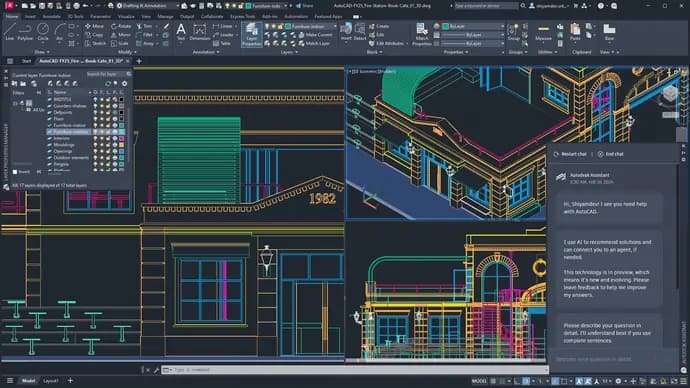
AutoCAD offers a comprehensive set of design tools for creating 2D drawings and 3D models. These allow you to create realistic models of your designs. This is crucial for visualizing projects, identifying potential issues early on, and creating compelling presentations.
Parametric Drawing
This is a useful one. AutoCAD lets you establish and manipulate relationships between different elements in your design. For example, adjusting the dimensions of a wall with doors and windows also adjusts the dimensions of the doors and windows. This saves time, reduces errors, and makes revisions a breeze.
Annotation Tools
AutoCAD goes beyond just creating drawings. It provides a robust set of annotation tools for adding dimensions, text, symbols, and other elements. This ensures clear communication and helps others understand your designs.https://sonary.com/cad/
AutoCAD plays well with others. It can import and export files in various formats due to DWG file format compatibility. This is essential for projects involving multiple disciplines.
Support for cloud-based collaboration and real-time co-editing
Integrated file management and version control
Simultaneous mobile and web access
Transform designs into real-world projects with construction-oriented features.
Features
- Visualizing
- Rendering
- Drawing
- Editing
- Sequence Steps
- Modeling
- Dynamic Updating
- File Import
- Push/Pull
- Views
Verdict
AutoCAD reigns supreme as the industry standard for CAD software. It boasts powerful features like parametric drawing and 3D modeling, along with excellent file compatibility for seamless collaboration.
Extensive customization and a vast knowledge base make it a powerhouse in the right hands. However, the steeper learning curve and subscription costs can be barriers for beginners. Overall, for professional designers seeking a scalable and industry-recognized tool, AutoCAD offers unmatched benefits, justifying the investment in time and resources.
Users Reviews
Be the first to write a review
Share your experience with AutoCAD and help others choose the right software.