

Bill.com Review 2026: Accounts Payable, Accounting Software, Bookkeeping, Online Invoicing, Accounts Receivable
Overall Rating
3.7
Last updated: July 2026
BILL is an excellent accounting software for small to medium businesses. They offer data pulling when uploading invoices for your expenses and bills and are quick to receive and make payments. BILL also provides an automatic approval process to save time when approving bill payments.
Plans & Pricing
Essentials
$45
seat/
month
- Centralized inbox
- 360-degree vendor info
- ACH, check, credit card, & international wire transfers
- Six standard user roles
- Invoice data capture
- Unlimited document storage
- Standard approval policies
- Customized invoice templates
- Single or recurring invoices
- Payment-status tracking
Team
$55
seat/
month
- Everything in the Essentials plan
- Integrates with QuickBooks online, QuickBooks pro/premier, and Xero
- Custom user roles
* Featured prices can be updated and free offers may include additional terms.
BILL has two plan options to manage how your business gets paid and makes payments. The essentials plan is $45/mo for each user, and the team plan is $55/mo for each user. Bill.com also has a corporate plan option for $79/mo for each user.
Expert Score
Pros
- Low wire and credit card processing charges
- Reports cover a wide variety of statistics
- Tax compliant and has audit trial support
Cons
- The interface is harder to navigate than some of its competitors
Customer Support
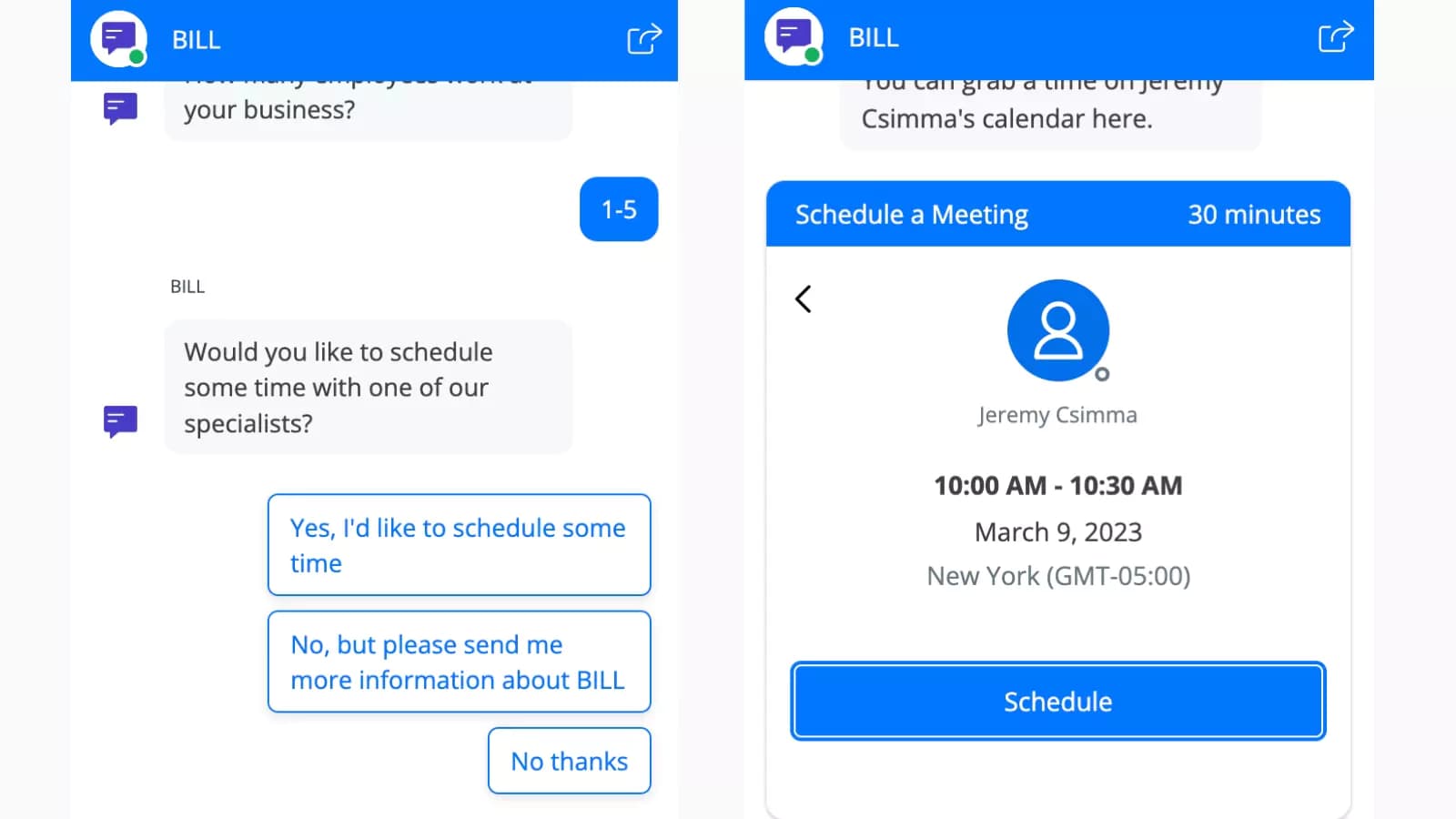
BILL claims to have live customer support Monday-Friday, however in order to get in touch with a specialist or an actual person instead of an automated system you have to submit a call request or schedule a 30-min meeting time slot to speak to a support specialist.
Email Support
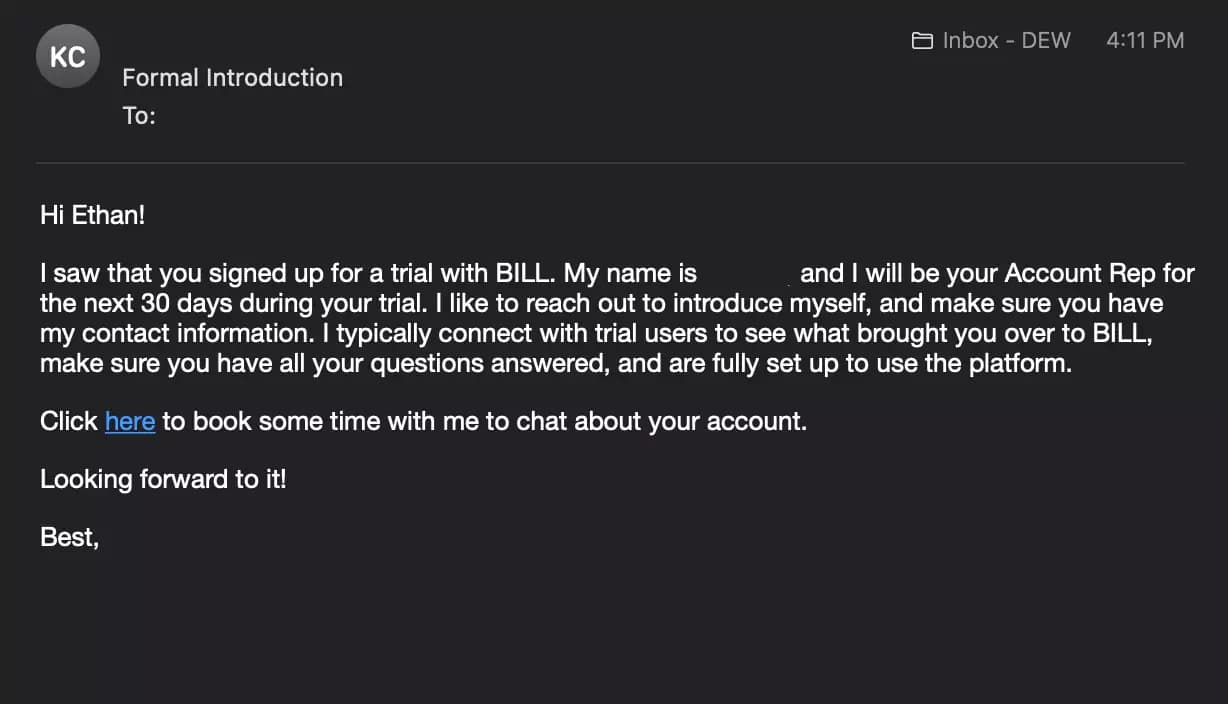
After signing up for a 30-day free trial, I was greeted by an account representative that made himself available to any queries or issues I might have when using the platform. It was a nice welcome, especially as a free-trial user.
Chat Bot
I contacted BILL’s support via the live chat option and asked some questions about the software. They were helpful and answered my questions. They can only answer simple questions through the live chat automated system. You have to schedule a time to speak to a specialist, but unfortunately, there was no available time to speak to a specialist within the next two days.
Video Tutorials
BILL has many tutorial and demo videos on its youtube channel. They are very informative in explaining how the software works and how to perform the features and functionalities the software offers. They walk you through performing functions step by step with a video of their screen operations, which is easy to follow.
Overall Experience
The customer support at BILL was very informative and helpful in answering all of my questions. I was quickly put in touch with a specialist through the live chat option on the website and the customer support phone number.
Phone Support
Use chatbot support to schedule a call
Provided after signing up for a free trial
FAQ
Recently asked Q&A with answers from the support team
Video Tutorials
A dedicated YouTube channel
Ease of Use
Overall Experience
BILL.com was fairly easy to use. However it's not the easiest to find all the features and functions on the platform until you familiarize yourself with the software. Overall my experience with BILL was positive, and the functions offered by BILL operate as needed.
Use Cases
Searching and paying vendors is easy in the BILL platform. It was not difficult to schedule future payments and approve payments. BILL has customized reports but it was a little challenging to find at first.
Setup BILL Account
BILL’s sign-up process is simple and requires your email, password, name, business name, and address, as well as other information about your business. They also send you a text message with a 4-digit verification code to finalize account setup. Bill is a great accounting software that integrates with other software to help you manage and maintain your business expenses and payments. It also has integrated pull data for uploading invoices. This video will show the easy setup process on Bill:
Dashboard
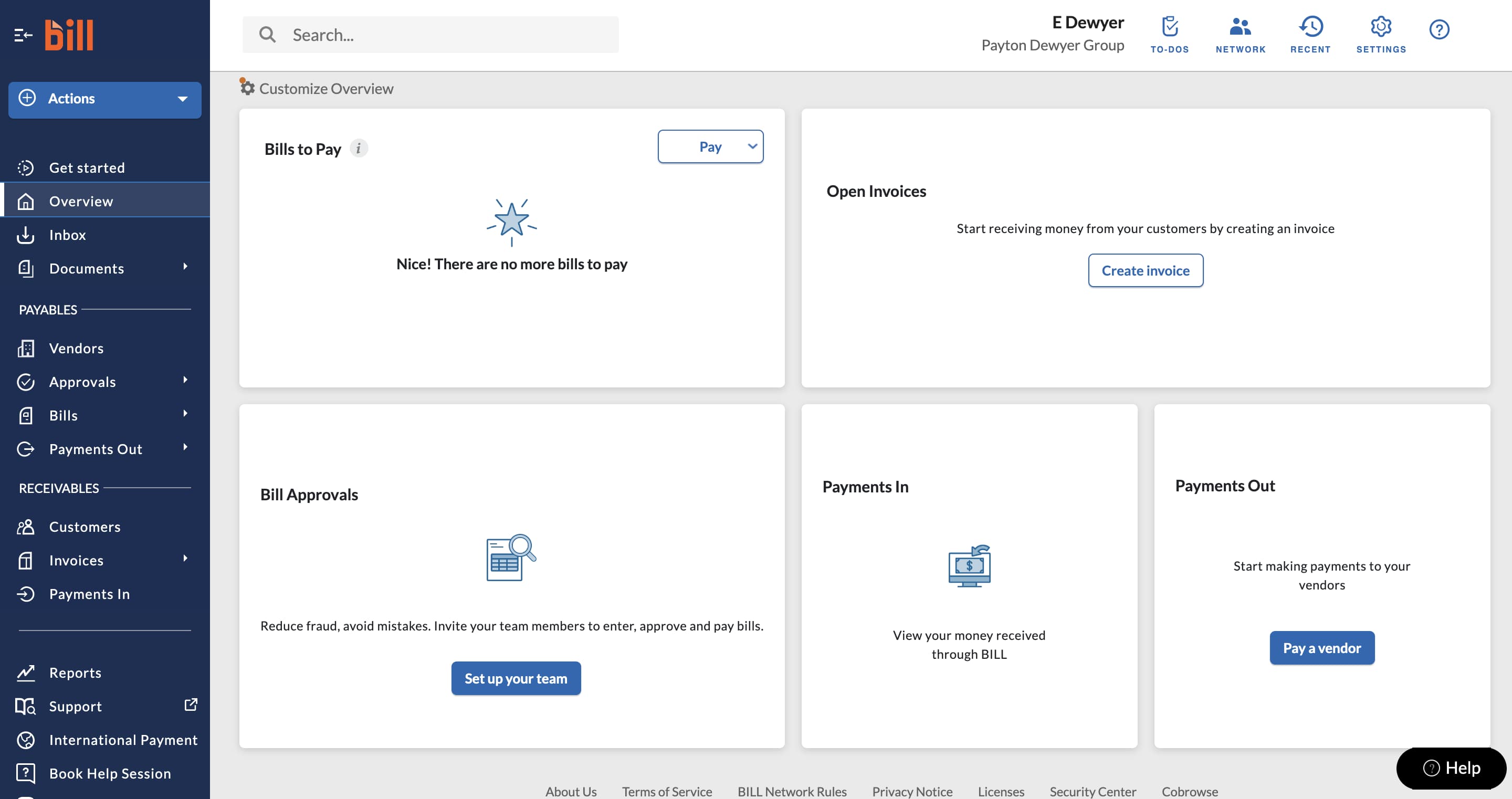
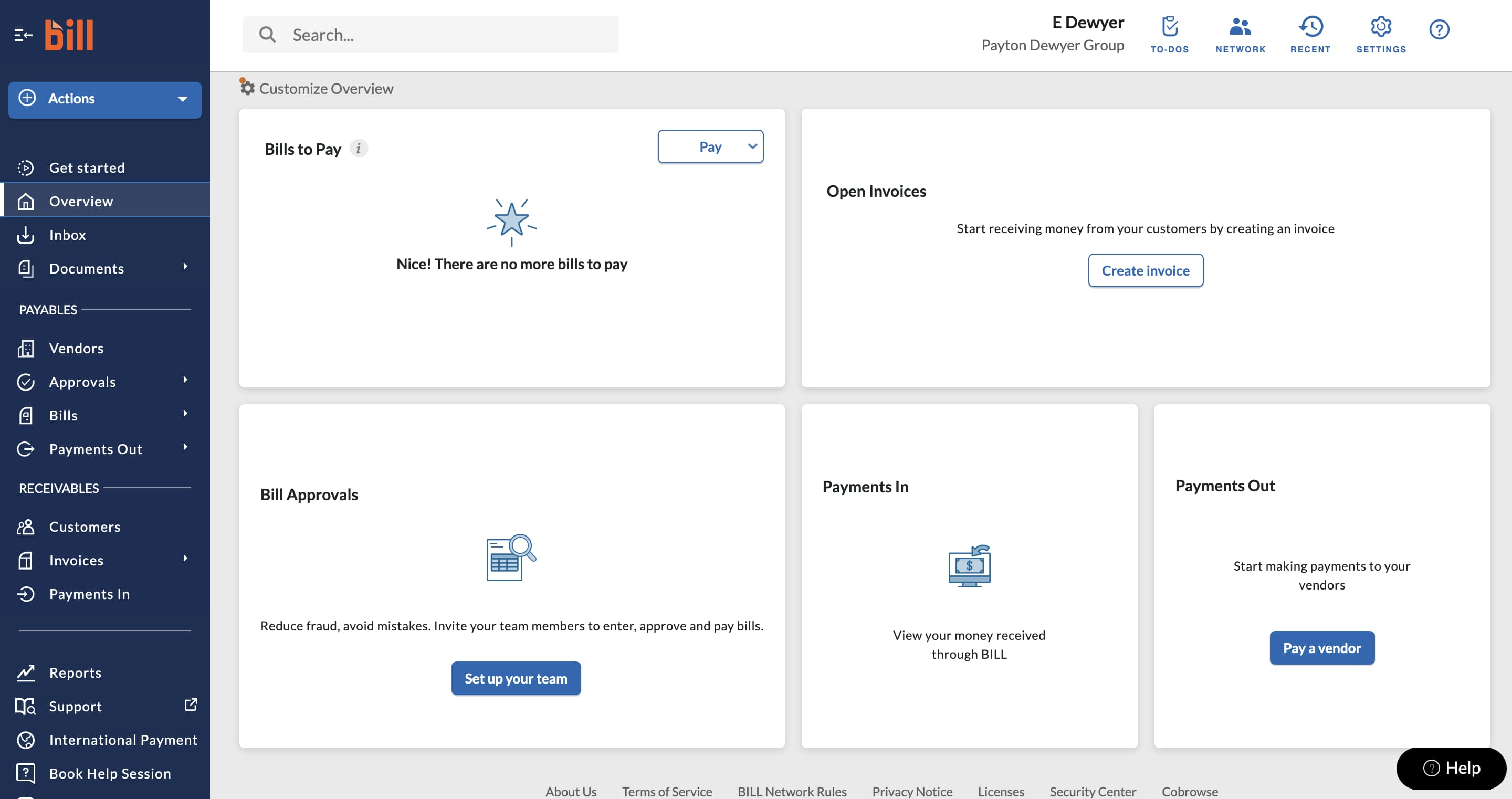
The dashboard on BILL is easy to use and payables and receivables are segmented in the platform. Its also easy to find and use the software's many integrations. You can upload invoices, add vendors, and send bills or invoices to clients as well as view your reports from the dashboard.
Features & Functionality
Accounts Payable
Account Dashboard
BILL's account dashboard has a user-friendly layout with well-placed links to all features. It's also very easy to navigate and find what you're looking for.
Integrations
BILL integrates with QuickBooks Online, QuickBooks pro/premier, and Xero. They have many integrated features such as a centralized inbox, invoice data capture, invoice templates, unlimited document storage, auto-charge and auto-pay, and automated email reminders.
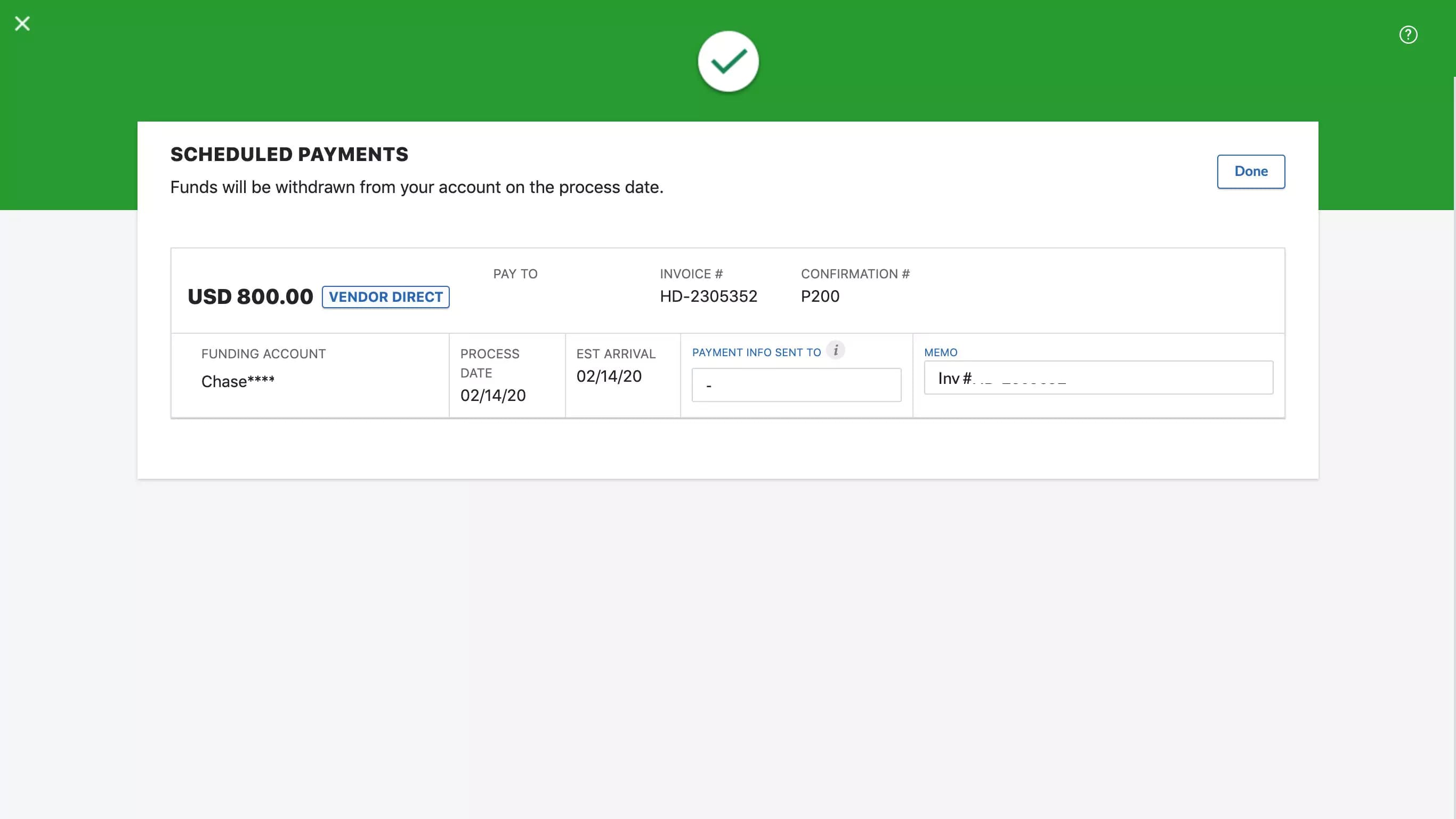
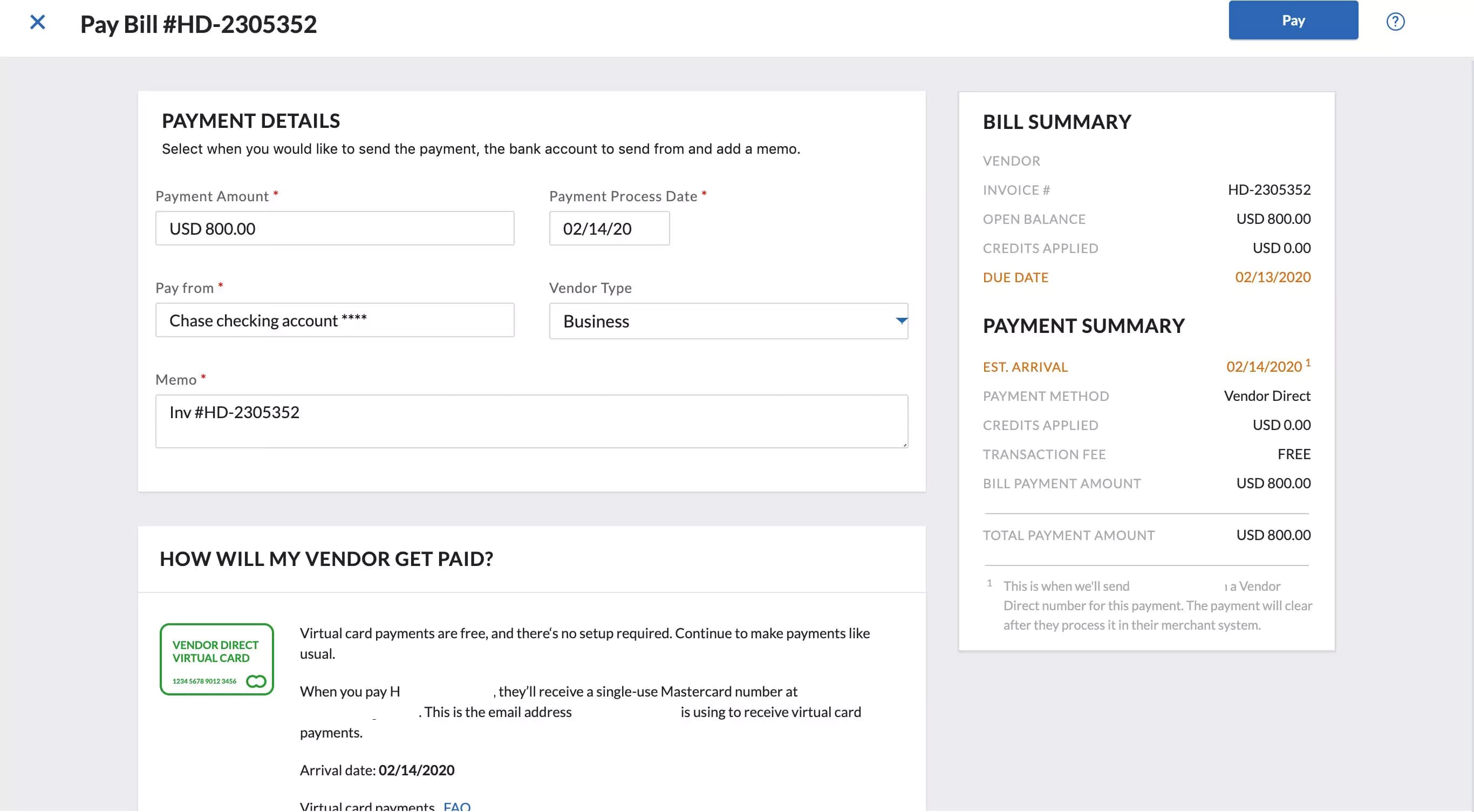
Making payments through through BILL is easy, and you can pay overseas vendors in US dollars or in their local currency. You can link either a credit card, debit card, or bank account to make payments on BILL. You can set automated payment approvals and also schedule payments at future dates. You can also upload, save invoices and pay them later, or email invoices to your account on BILL for easy filing.
Invoice Importing
You can easily email invoices to your account on BILL, where it will file them for you in one location. “Iva,” the AI integration also captures information on your uploaded or emailed invoices like date, amount, bill information, and vendor information.
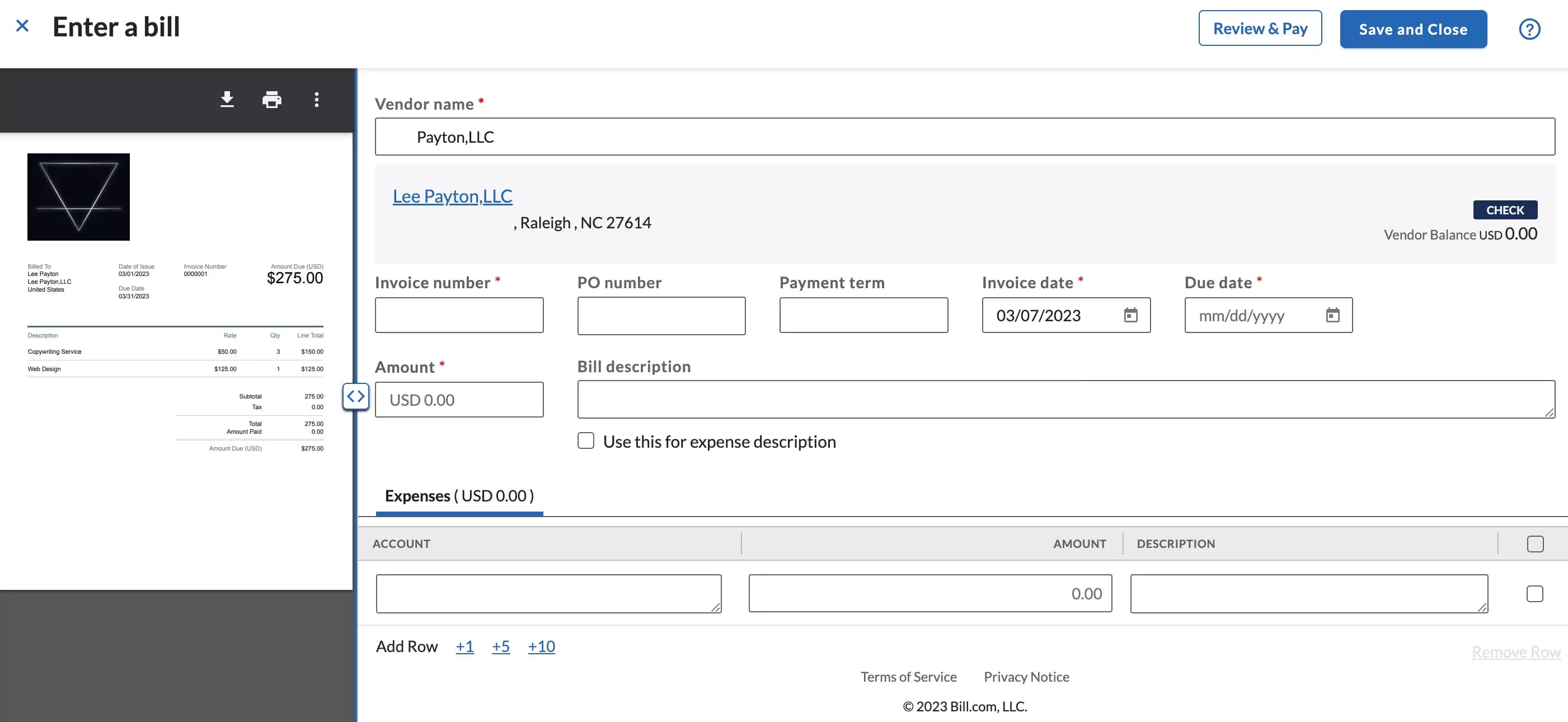
You can also import invoices on BILL, and the software will pull data from your invoices to keep a record of expenses and bills for your company. The pulled data integration built into the BILL software works well and can organize your bills and expenses. With BILL it's also easy to set up your account and auto-pay your bills. You can save them and pay one (or multiple invoices) on the spot or schedule them for a future time.
Here’s a video showing you how:
https://youtu.be/o8Gc45Vr6cI
Reports
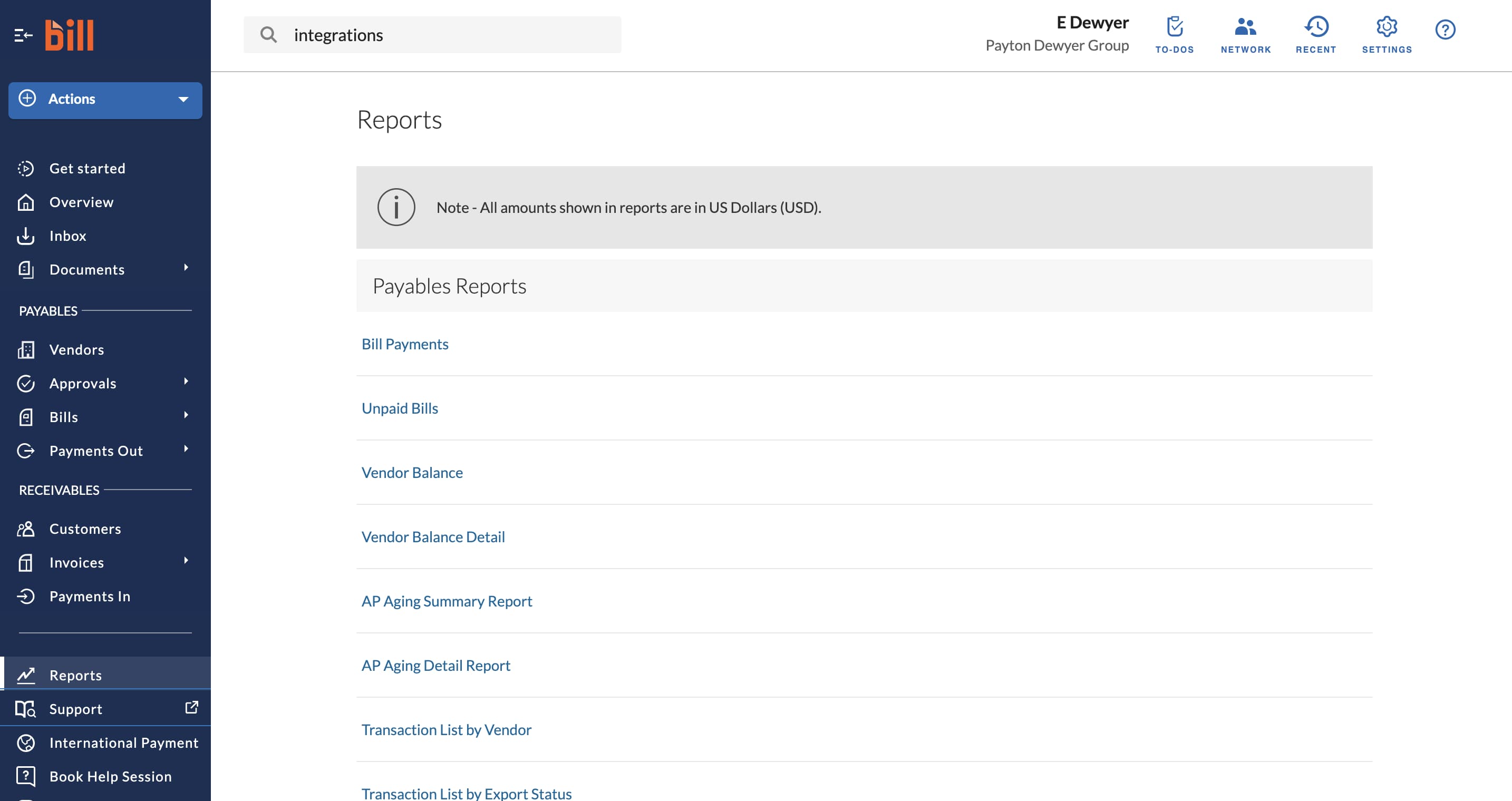
Payable reports available include bill payments, unpaid bills, vendor balance, vendor balance detail, AP aging summary report, AP aging detailed report, transaction list by vendor, transaction list by export status, bill approval audit, funds transfer for BILL payments, unrealized foreign exchange gain or loss, & foreign currency paid gain or loss.
Accounting Software
Like most other financial software, Bill.com has specific features that foster business transactions. They are:
• Accounts payable operations
• Accounts receivable operations
• Automated invoice capturing
• Vendor data management
• ACH and credit cards payments
• User-friendliness
• Foreign payment and foreign currency support
• Exclusive financial reports
• Document management
User-Friendliness
One impressive feature of Bill.com is that it is easy to use. It is also cloud-based and does not require any installations before use. You only need to access the internet to have Bill.com manage your financial operations for you. You can access it via its mobile application (for Apple and Android) or the latest versions of any internet browser.
Automated Invoice Capturing
Under accounts receivable, Bill.com makes invoicing operations extremely easy for businesses. On signing into your account, you'll be greeted with all your invoices – sent, overdue and in progress. You also get three customizable invoice templates that can be automatically entered for you. And instead of going through the stress of scanning and mailing invoices all the time, this software automates invoice sending and receipt.
Foreign Payment and Foreign Currency Support
Most businesses widely patronize international transactions. It will make sense if an accounting software affords its users the convenience of making and receiving payments from their international partners or vendors. Fortunately, Bill.com supports international transactions and in multiple currencies too.
Vendor Data Management
Managing vendor data has been made relatively easier on this platform. Bill.com features an effortless vendor data entry process, making it easy to change and monitor transaction records with each of your vendors.
Bill.com's Business Payment Network also allows businesses to look up and connect with vendors who use the software. Users can also send requests to vendors who are yet to sign up on Bill.com. And when those vendors eventually sign up, their details are automatically synced into the requesting user's system.
Monitor and categorize expenses for accurate financial tracking.
Automate repetitive accounting tasks to boost efficiency.
Unlike most low-budget software, Bill.com allows users to sync financial data from a wide range of other platforms like:
- Sage Intacct
- QuickBooks (Online, Pro, Premium and Enterprise)
- Oracle NetSuite
- Xero
- Microsoft Dynamics
These integrations foster the synchronization of various transactions across all integrated platforms. Businesses can easily match orders and invoices and also make payments without delays. By supporting integration with other accounting and financial solutions, Bill.com also afford its users a convenient way to improve efficiency. These integrations also minimize data entry errors, making reconciliation less difficult.
Access accounting tools seamlessly across various devices.
Bookkeeping
Like most other financial software, Bill.com has specific features that foster business transactions. They are:
• Accounts payable operations
• Accounts receivable operations
• Automated invoice capturing
• Vendor data management
• ACH and credit cards payments
• User-friendliness
• Foreign payment and foreign currency support
• Exclusive financial reports
• Document management
User-Friendliness
One impressive feature of Bill.com is that it is easy to use. It is also cloud-based and does not require any installations before use. You only need to access the internet to have Bill.com manage your financial operations for you. You can access it via its mobile application (for Apple and Android) or the latest versions of any internet browser.
Automated Invoice Capturing
Under accounts receivable, Bill.com makes invoicing operations extremely easy for businesses. On signing into your account, you’ll be greeted with all your invoices – sent, overdue and in progress. You also get three customizable invoice templates that can be automatically entered for you. And instead of going through the stress of scanning and mailing invoices all the time, this software automates invoice sending and receipt.
Foreign Payment and Foreign Currency Support
Most businesses widely patronize international transactions. It will make sense if an accounting software affords its users the convenience of making and receiving payments from their international partners or vendors. Fortunately, Bill.com supports international transactions and in multiple currencies too.
Vendor Data Management
Managing vendor data has been made relatively easier on this platform. Bill.com features an effortless vendor data entry process, making it easy to change and monitor transaction records with each of your vendors.
Bill.com’s Business Payment Network also allows businesses to look up and connect with vendors who use the software. Users can also send requests to vendors who are yet to sign up on Bill.com. And when those vendors eventually sign up, their details are automatically synced into the requesting user’s system.
Simplify and optimize tax filing with expert features and tools.
Automate repetitive tasks to improve efficiency and productivity.
Unlike most low-budget software, Bill.com allows users to sync financial data from a wide range of other platforms like:
- Sage Intacct
- QuickBooks (Online, Pro, Premium and Enterprise)
- Oracle NetSuite
- Xero
- Microsoft Dynamics
These integrations foster the synchronization of various transactions across all integrated platforms. Businesses can easily match orders and invoices and also make payments without delays. By supporting integration with other accounting and financial solutions, Bill.com also afford its users a convenient way to improve efficiency. These integrations also minimize data entry errors, making reconciliation less difficult.
Access and use on a variety of compatible devices.
Flexible pricing structures tailored to different needs and budgets.
Online Invoicing
Like most other financial software, Bill.com has specific features that foster business transactions. They are:
• Accounts payable operations
• Accounts receivable operations
• Automated invoice capturing
• Vendor data management
• ACH and credit cards payments
• User-friendliness
• Foreign payment and foreign currency support
• Exclusive financial reports
• Document management
User-Friendliness
One impressive feature of Bill.com is that it is easy to use. It is also cloud-based and does not require any installations before use. You only need to access the internet to have Bill.com manage your financial operations for you. You can access it via its mobile application (for Apple and Android) or the latest versions of any internet browser.
Automated Invoice Capturing
Under accounts receivable, Bill.com makes invoicing operations extremely easy for businesses. On signing into your account, you’ll be greeted with all your invoices – sent, overdue and in progress. You also get three customizable invoice templates that can be automatically entered for you. And instead of going through the stress of scanning and mailing invoices all the time, this software automates invoice sending and receipt.
Foreign Payment and Foreign Currency Support
Most businesses widely patronize international transactions. It will make sense if an accounting software affords its users the convenience of making and receiving payments from their international partners or vendors. Fortunately, Bill.com supports international transactions and in multiple currencies too.
Vendor Data Management
Managing vendor data has been made relatively easier on this platform. Bill.com features an effortless vendor data entry process, making it easy to change and monitor transaction records with each of your vendors.
Bill.com’s Business Payment Network also allows businesses to look up and connect with vendors who use the software. Users can also send requests to vendors who are yet to sign up on Bill.com. And when those vendors eventually sign up, their details are automatically synced into the requesting user’s system.
Process payments seamlessly with integrated systems.
Track time spent on projects for accurate billing.
Keep a close eye on expenses for better financial management.
Available on multiple devices for accessibility.
Affordable pricing to fit varied business needs.
Accounts Receivable
Bill.com provides several features to help individuals and businesses streamline their financial processes. One of the main benefits is Smart Automatic Data Entry, which saves time by eliminating the need for manual data entry. Additionally, the platform offers Smart Detection, which can detect duplicate entries and prevent human data entry errors.
Another key feature is the cloud service, which provides real-time information about financial transactions. Payment flexibility is also available through ACH, virtual cards, and more. Users can also schedule and record bill payments, as well as send email invoices and reminders.
Bill.com also provides detailed training and learning modules to help users navigate and set up their accounting processes.
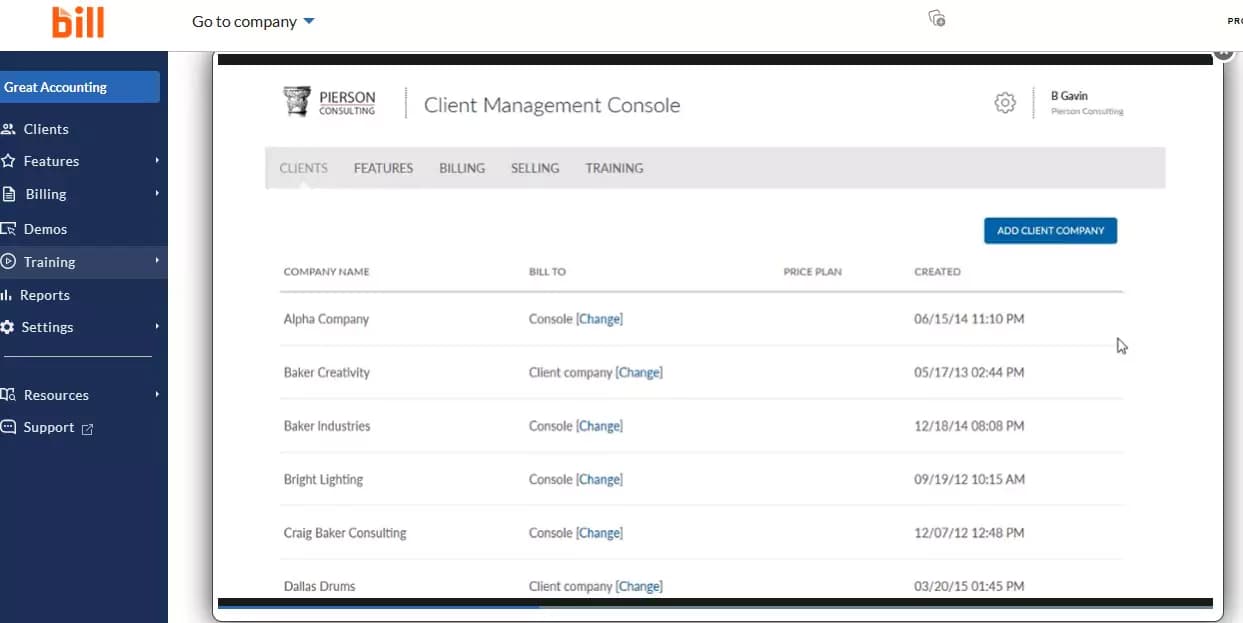
Bill.com offers automated tools for sending invoices, following up on past due payments, receiving payments, and paying suppliers. Businesses can create and send invoices directly from the platform, and customers can make payments online through various payment methods.
Additionally, Bill.com can automate payment reminders and provide real-time updates on payment status, allowing businesses to stay on top of their cash flow. On the supplier side, Bill.com enables businesses to easily track and manage their bills, schedule payments, and automate approvals.
Bill.com is a platform that enables users to manage their financial transactions, including electronically managing all payments and receipts. As part of its features, Bill.com provides users with the ability to export data in CSV format. Once a user has set their preferences on the platform, they can easily extract data on payments and transactions and convert it into a CSV file format, which can be useful for accounting and financial analysis.
Bill.com helps users monitor their business operations by providing detailed reports, timely, cloud-based invoicing services, while accepting multiple forms of payment. The software utilizes automation and online payments which can also increase profitability as a long-term strategy.
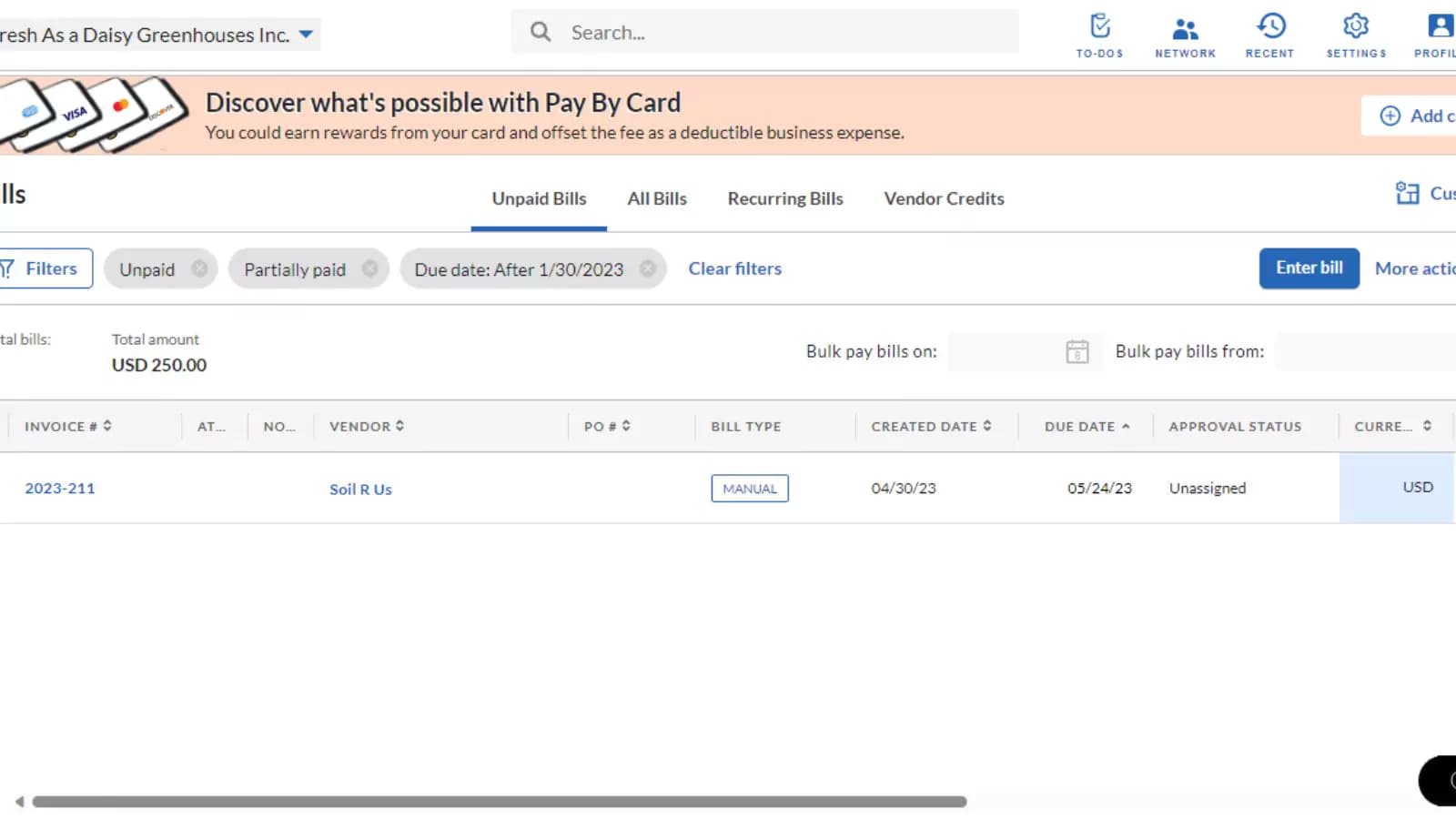
Bill.com offers automatic two-way sync that enhances efficiency by ensuring that your accounting system and BILL have current and accurate information. With automatic sync, you can avoid manual errors that may arise from double entry, as payments made in BILL are synced automatically. This feature saves you time and minimizes the possibility of errors.
Additionally, syncing critical payment data with matching invoices enables faster reconciliation, and you can access transparent remittance information for all transactions.
Features
- Multi-Currency Support
- Mobile App Access
- Automated Reminders & Notifications
- Tax Compliance
- Purchase Order Tracking
- Advanced Security
- Audit Trail and Compliance Support
- Data Import and Export
- Accounting Software Integration
- Automated Payment Scheduling
Verdict
BILL is great for any small to mid-size company looking for accounts payable software with all the features necessary for tracking your business at an affordable monthly rate. BILL integrates with QuickBooks, and has approval workflows, making it easy to control your payables and avoid fraud. Another plus, BILL takes care of all check mailing and ACH payment processing. Overall, BILL is one of the better quality accounts payable softwares, and provides a wide variety of features at an affordable rate.
https://youtu.be/vJfw205s_5w
Users Reviews
Be the first to write a review
Share your experience with Bill Com and help others choose the right software.