

Last updated: October 2026
The Bluehost website builder is a basic site editor built on top of WordPress with over 300 design templates for SMB owners to build interactive websites for their businesses. An embedded WordPress plugin integration feature allows you to install WordPress-enabled apps that will boost your website performance.
Bluehost is a company that needs no introduction in the website hosting space. It serves small and medium businesses with its suite of tools.
Plans & Pricing
* Featured prices can be updated and free offers may include additional terms.
While the integrated admin dashboard in the Bluehost WordPress Website Builder offers exclusive features and functionality similar to the WordPress admin dashboard, the company doesn’t offer a free plan to help users familiarize themselves with the solution. Instead, the company offers a 30-day free trial with a money-back guarantee.
The lowest plan is pretty expensive for what it offers when you compare it with other builders. Its access to over 300 website templates and an easy-to-use, drag-and-drop editor make designing a website fun.
Known for its hosting experience, Bluehost directly hosts all websites built on its platform. As one of the world’s best hosting providers, the company ensures users enjoy industry-standard performance for their websites. However, your chosen plan will determine the functionality and storage space you can use for your website.
Bluehost has multiple hosting plans that focus on the features you get instead of usage limits. It has four plans and all of them come with hosting, a free domain for the first year, and an SSL certificate. When considering everything together, Bluehost is competitive in the website hosting market.
Expert Score
Pros
- Deep integration with WordPress
- Inexpensive to get started
- Round the clock customer support
- Hundreds of templates to choose from
Cons
- It’s not as flexible as some of the popular site builders
- The eCommerce store is lacking some advanced functionality
Customer Support
Bluehost has been around for almost two decades and has been able to establish multiple channels for customer support during that time. There’s 24/7 support and the majority of support reps have a deep understanding of the product so they can solve most issues during the initial conversation.
The Bluehost team makes it a priority to help users resolve any technical issues they encounter while using their software. They offer several support channels to make this possible, including email and live chat options.
Furthermore, you can place a direct phone call to the support team to discuss with a real person in real-time. There are multiple numbers to call.
These support channels are designed to cater to the varying needs of customers, including other products offered by Bluehost beyond the website builder.
In my experience, the support efforts are impressive and are worth the hype.
Bluehost Resource Center
Working with a website builder for the first time can be overwhelming. Finding your way around the software and ensuring that your website comes out the way you’ve imagined it can only be done with substantial guidance.
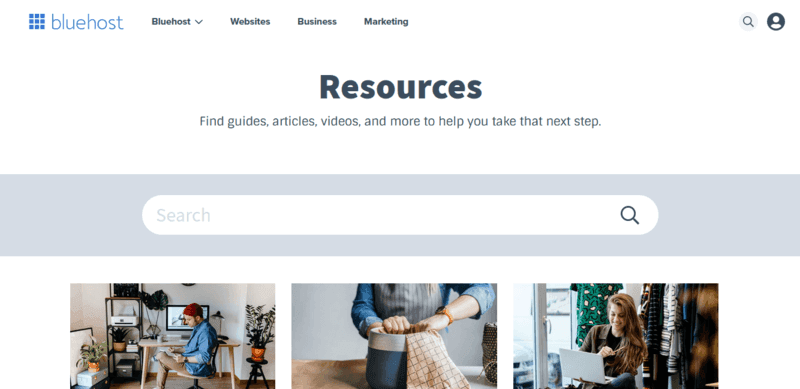
The Bluehost resource center is filled with ample materials to guide you every step of the way as you build a responsive website for your business.
In the Resource Center, there are materials that cover other Bluehost services. So, should you consider using the Bluehost professional email services or some extra hosting alongside your website building endeavors, you can rest assured that this resource center has all the information you need to navigate multiple complex products in one go.
Bluehost Knowledge Base
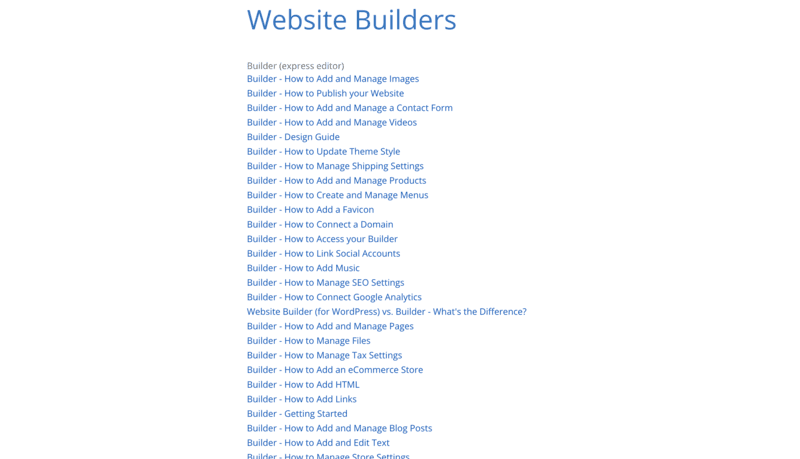
New users and potential customers often have dozens of concerns. Many of these concerns are unique to each user but some are common across board. These common concerns are addressed by Bluehost Knowledge Base.
The website builder category of the Knowledge Base is populated with several guides, findings, and advice on how you can best use the software to your maximum advantage. Interestingly, each of these bits of knowledge is skimmable and straight to the point.
Bluehost Blog
The Bluehost blog contains crucial information that can help you transform your website into a magical sales and marketing tool. Also, the blog is a repository for new updates regarding the website builder and all other products offered by Bluehost. You can learn about certain security information on how you can protect your website and business from potential risks on the internet.
The content of the Bluehost Blog is grouped into three categories. One focuses on customers’ insights about the brand. The second one is the “News” category, which focused mainly on updates on the product. The third is meant to communicate product updates to users in a timely fashion. The blog has a search function. So, you can easily find whatever information you’re looking for.
Email Support
Bluehost does have relatively weird email support. Immediately after signing up, a representative reached out to me via email to verify my identity. It’s the first time I’ve had to provide my ID to sign up for a paid service like this.
Nevertheless, the representative was very responsive. She responded to my emails in less than 7 minutes and we got the ID verification out of the way almost immediately. Subsequent email support was similar. Lightning speed responses and very comprehensive solutions offered.
Live Chat Support
Bluehost offers one of the most responsive live chat support features in the industry. Once you make it to the contact page and hit the “Chat Now” button, you will be connected with a rep in about 2 minutes.
With the look of their prompt response and timely follow-ups, each support specialist is dedicated to serving one customer at a time. In my experience, multitasking can create a lag in response.
Nicely enough, this support feature is available to everyone. It doesn’t matter if you are a paid user or just checking out the products and would like to connect with a representative to answer some of your questions.
Phone Support
Bluehost has its support phone number plastered on its website footer. You can also find it boldly written on the contact page header. This support phone is a toll-free line but if you’re calling in from outside the United States, you may have to pay international phone charges.
Like the live chat, using the phone feature gets you connected to a real human in less than 2 minutes. So, you don’t have to wait in line longer than you need to.
Ease of Use
The Bluehost website builder is a window into WordPress and, as you might already know, is quite easy to use, although the setup can be a bit frustrating.
However, I complained to the support about the frustrating setup and they assured me that it was a temporary issue, arising from an upgrade being done by the technical team at that time. I’m confident it’s better but here’s my experience using the builder.
Setup
Once you have a paid Website Builder package, Bluehost redirects you to the website dashboard upon login. On this dashboard, all your websites will be displayed, but since I was just starting out, I only got a prompt for me to create my first website.
Once I clicked the “Create a New Site” button, I had to answer a few questions from their interactive setup pages, and I was provided a series of templates to choose from.
It was a very smooth process. Once I chose a template, all I had to do was begin customizing it to suit my brand message, color, and style.
Designing
The design experience is a pretty seamless one. However, it could be an intensely creative endeavor if you choose to build your website from scratch. Choosing a template can ease the job significantly. All you need to do is edit the elements (texts, buttons, forms, and images) and style them to fit your brand tone and style.
Text Styling
Font styles, colors, and sizes matter on a website just as images and logos do. And ensuring the uniformity of these texts across the website can be a daunting task.
On the Bluehost website builder, you can easily style texts by selecting the block of text that you wish to style. The styling options are always above the highlighted texts. From here, you can easily choose how you want a given set of text to appear on your website with relative ease.

Form Customization
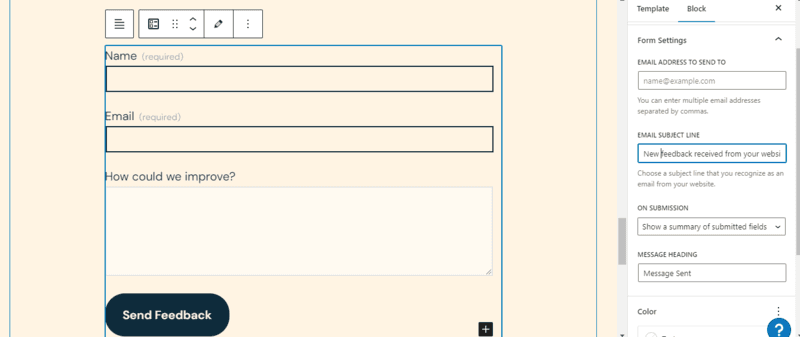
Forms are essential tools to obtain personal information from your visitors. With the Bluehost drag-and-drop website editor, you can add a customizable form anywhere on your website.
While there are several form templates to choose from, you have the complete freedom to design your form from scratch.
When you choose to work with a template, you can swiftly customize it to suit your taste. All you need to do is select the form and click the edit icon on the top left corner of the form block.
Button Design
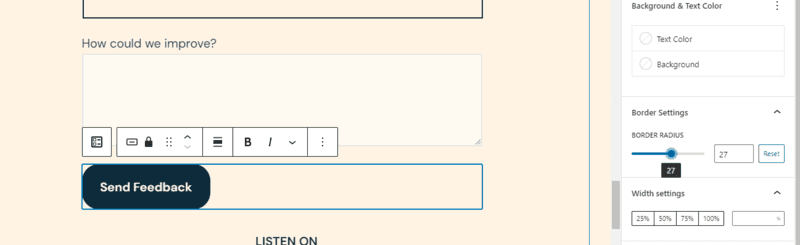
Buttons are the best way to drive visitors to take action on your website. When you strategically place them, it is nearly impossible for your target audience to miss them. Due to the impact of buttons, the Bluehost website builder, with its access to WordPress customizations, makes it easy to design buttons to match your brand identity and catch visitors’ attention.
With the features offered by the website editor, you can customize the text and color of the button. You can also get creative with the contour of every button on your website.
App Integration
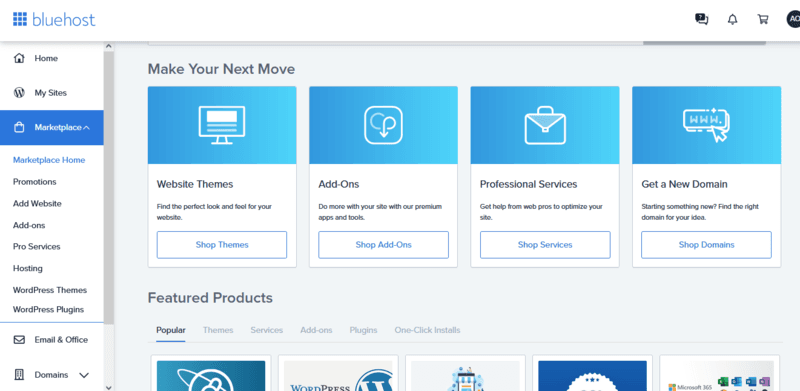
The Bluehost website builder allows you to integrate with thousands of apps (both paid and free). Integrating these apps is super easy. All you have to do is navigate to the marketplace, search for the app you want to integrate, and simply push the “install” button.
Remember that Bluehost builder is a window to WordPress. So, alternatively, you can use your WordPress dashboard to install apps as plugins. It’s an easy 4-step process here. Just go to the plugins section from your WordPress dashboard, select “Add New”, search for the app you wish to integrate and click “install”.
Easy-peasy, coconut-breaky!
Bluehost Uniqueness
Bluehost is one of the world’s top 20 web hosting providers, powering over 2 million websites. Its website builder boasts robust hosting servers with 99.98% uptime and ultra-high performance. Bluehost is the best place to start and grow a successful WordPress website.
Think of Bluehost as the perfect companion to WordPress that’s designed to make it easier for website owners to build good-looking sites. The emphasis is on ease of use, and it has done a good job of giving users the tools they need without adding complexity. The tradeoff is that it’s not as customizable as some website builders like Wix. As mentioned earlier, this isn’t a problem for most users. The major features can be mastered in s single day, the page options have been laid out in a thoughtful manner, and there are many helpful resources users can take advantage of. Though the learning curve isn’t steep, you should still dedicate some time to learning how to use it.
Performance
Despite the energy you put into designing the best website for your business, poor performance can make users and search engines frown upon your efforts. Bluehost understands this. So, they have designed a website builder for you to worry very little about performance in two specific areas.
Site and Page Speed
A quick loading website is essential for seamless user experience and optimum conversion rate. For one, search engine rankings are indirectly affected by website page speed. Here’s how.
When websites load too slowly, most visitors would leave for competitor sites very quickly. This is known as the bounce. Google’s algorithms may interpret a high bounce rate as an indicator of low relevance, as such will rank a website below its competitors.
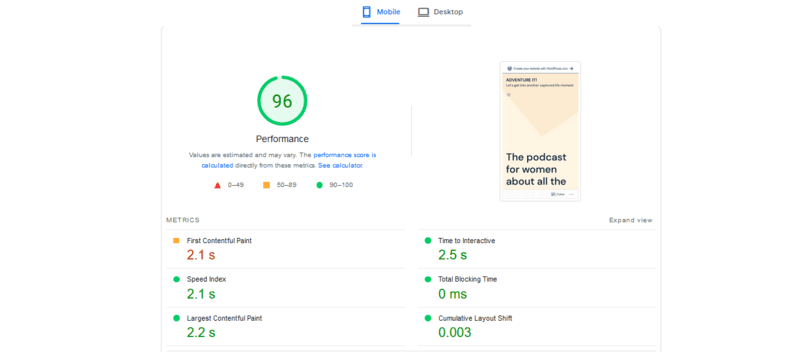
According to Google, there is a 90% chance that a visitor will bounce from your website if the load speed goes from 2 seconds to 5. So, for optimum performance, you need to maintain a load speed below 5 seconds on your web pages.
When working with the Bluehost website builder, load speeds and performance shouldn’t be a major problem. My website, powered by Bluehost, has a stellar performance with a score of 96%, according to Google’s PageSpeed Insight. The load time of all content on the website was approximately 2.5 seconds and that gives me a high chance of avoiding bounces.
Website Uptime
Again, Bluehost is an industry-leading web hosting provider. All websites built using the Bluehost website builder are hosted on their reliable servers which have been recorded to have 99.98% uptime. This means that your website will be running and accessible to visitors more than 99.9% of the time.
Features & Functionality
Despite being a window into the WordPress universe, the Bluehost website builder offers a truckload of features, some of which are standout features not offered by other WordPress-enabled website builders. Some of these stand-out features are highlighted below.
Blue sky web design features
Blue Sky is a professional website design service offered by Bluehost. If you are having a hard time building your website and need a professional designer to handle the entire process for you from start to finish, you can just sign up for Blue Sky with ease.
When you do this, the expert can either guide you while building your website or build it for you entirely. Depending on what you want the experts to handle, you can either improve your website skills or free up more time to handle what matters to your business.

SEO Setup
The SEO Setup offered by the Bluehost website builder makes it easy for search engines to crawl websites and rank them easily.
However, the website builder provides only basic SEO settings that every website administrator can understand and implement. You can set up page titles and meta descriptions for each page on your website to enhance search engine visibility.
You can check in the marketplace to find advanced SEO apps to integrate into your website and ensure that all your content is optimized for search engines. Nevertheless, you will need a proper SEO strategy to beat the competition.
Bluehost Marketplace
The Bluehost Marketplace contains dozens of apps, themes, professional services, plugins, and more. Website administrators can utilize the options available in the marketplace to supercharge their website and give visitors an experience of a week’s time.
Bluehost eCommerce Tools
If you plan to own an online store where you can sell digital or physical products, the Bluehost website builder provides exceptional eCommerce functionalities. For one, every website built using the “Online Store” and “Online Store + Marketplace” packages has pre-installed WooCommerce functions in them.
With this eCommerce functionality, you can upload an unlimited number of products, process payments, and manage your inventory all in one place. WooCommerce also offers a subscription option that helps users automate recurring payments with ease.
Professional Services
Bluehost Professional Services are designed for users of all categories. The Pro Services pair users with technical experts to help with website challenges, including
- Full-Service Website (designing, marketing, and content creation assistance on user )
- SEO Services (to enhance your search engine visibility through objective keyword research and effective SEO strategies).
- Pay-Per-Click Services (to leverage standard, cutting-edge digital ad practices to target high-quality targets from search engine result pages.)
- Website Migration (ensuring that user websites are migrated smoothly between hosting providers without any distortion in the elements of the website.)
Mobile Responsiveness
While this may not be a standout feature, it is crucial to the success of any business. With more than 60% of internet traffic coming through mobile devices, websites must be optimized for mobile devices for them to serve most customers.
All 300+ website templates offered by Bluehost are designed to be mobile responsive. However, editing these templates aggressively can distort the mobile interfaces. The Bluehost website builder is designed to compress website content to fit perfectly into mobile screens regardless of the size of the mobile device (tablets and smartphones).
Enhance visibility with integrated marketing tools.
Reliable hosting solutions to support your site.
Incorporate videos, images, and more for dynamic websites.
Ideal for small businesses, individuals, and enterprises.
Features
- Website Builder
- Shared Hosting
- Dedicated Hosting
- VPS Hosting
- WordPress Hosting
- 100+ Templates
- Add HTML code
- Blog Templates
- Portfolio
- Drag & Drop Editor
Verdict
Bluehost got its start nearly two decades ago as a hosting service for small and medium businesses. Today, it has a suite of products for many aspects of business operations. Its website builder is one of the new editions and is designed to make the most of WordPress while delivering an experience that’s easy for beginners to master. It has a large collection of templates, supports eCommerce stores, provides email collection forms and built-in email marketing, and even provides tools for appointment booking. It’s a complete website builder.
With that being said, it’s not perfect. The ease of use comes at the expense of design flexibility. If you need a pixel-perfect design then this may not be the best choice for you – though it will meet the needs of 99% of customers. The responsive customer support, fair pricing, and added marketing features make this a website builder worth checking out for small and medium businesses.
Users Reviews
Write a review
Leave a review, help others get it right the first time.
2 Reviews
Anurag P
Best solution for domain name and shared hosting
I can say that Bluehost has has 99.9% uptime, they have cheap plans and you have 24/7 support!
- You can buy domain name at a good price, good support.
- Renewal charges for domain are a bit high.
Sheraz B
A great professional hosting platform
Its a great platform that offers VPS, Shared and Dedicated hosting.
- It allows you to make many software scripts for your website.
- It would be better if a monthly plan would be available and not only annual plan.