

Fincent Accounting Software Review For 2026
Overall Rating
4.0
Last updated: July 2026
Fincent is a robust tool designed to simplify financial management for small and medium-sized businesses and freelancers, catering specifically to non-accountants. With its user-friendly interface and a suite of features, including effortless and organized bookkeeping, one-click tax-ready reports, effortless invoicing, perennial tax support, and more, Fincent has gained immense popularity in just three years and serves thousands of users.
Plans & Pricing
Basic
$189
seat/
month
Book a demo
- Dedicated bookkeeper, dashboard, Financial Insight reports, live support desk, free Quickbooks Essentials a/c
- 3 bank account and credit card connections
- 1 additional integration with Quickbooks (Stripe, Gusto, and more)
- Monthly Profit and Loss statements, Balance Sheet, and Cash Flow statements
- Up to 1 hour/month of call support, in addition to your dedicated bookkeeper with turnaround time of 1 day
- Detailed categorization and expansion of your expenses and income
- Make payments, send invoices, store receipts, and schedule payments from the Fincent software
Power
$429
seat/
month
Book a demo
- Everything in the Core plan plus:
- Inventory and Ecommerce
* Featured prices can be updated and free offers may include additional terms.
Fincent is highly efficient software that offers personalized bookkeeping and financial management services for your business needs. You can book a free demo to explore and understand all its features. However, Fincent does not offer any free trial. Although it provides a range of pricing plans that adapt to the user's monthly expenses, offering adaptable options that align with the financial activity of businesses or individuals.
Expert Score
Pros
- Offers multi-currency invoicing for seamless transactions and accounting
- A dedicated bookkeeper to update records and compile your financial reports
- Affordable as compared to other competitors
- Secure integration with financial tools, apps, and institutions
Cons
- Web portal works better than mobile app
- Feature add-ons have a separate cost
Customer Support
Fincent offers pretty quick and unlimited support. Users can contact their bookkeepers on the platform for a swift response to their queries. However, users can also contact the Fincent support team for more assistance and get assured resolution within 24 hours, as they have a 24-hour resolution policy. There is also a support page and YouTube tutorials where Fincent has provided resolutions for almost every query related to their services and use cases.
Email support is available 24/7 for all queries.
24/7 Help & Support
Fincent offers 24/7 help and support.
FAQ
The company has a comprehensive FAQ section.
Blog
Users can find various helpful and insightful blogs on Fincent's
Video Tutorials
Users can find various video tutorials on YouTube.
Ease of Use
It is not quantum physics to get on board with Fincent. You only have to share your business details. The platform's setup is pretty quick. You'll begin by setting up and providing information about your company. After entering the company details, you also get an intuitive interface with easy-to-understand options and a left-hand side navigation bar for quick access. A Get Help option is available at the bottom of the navigation bar, where you can seek help, support, or assistance. You do not need to be an accountant to understand the Fincent dashboard. Overall, the learning curve to efficiently use Fincent is pretty straight, justifying its tagline 'The financial management platform for non-accountants.' However, if you still need help, you can go through the training material on YouTube, read the help articles on the site, or contact support.
Features & Functionality
Catchup Bookkeeping (Expense-Based Plans)
Let your dedicated bookkeeper efficiently update your records and compile your financial reports. Ease worries about overdue books and remain focused on business growth. Catchup Bookkeeping costs $239/month (for expenses up to $10K).
Tax Prep and Filing
Fincent alleviates tax-related stress, covering S Corp, C Corp, 1099, federal tax, state income tax, and franchise tax. It offers real-time financial data and informs users about yearly taxes. Tax Prep and Filing features on Fincent cost $125/month (for expenses up to $10K).
Invoicing Assistance
Leverage Fincent's Invoicing Assistance feature to streamline accounts payable and receivable. Entrust your dedicated bookkeeper with tasks like managing invoice creation, sending, tracking, and overseeing upcoming or overdue bills. You can get a customized cost upon request for Invoicing Assistance.
Project Tracking
Effectively manage invoices and bills across diverse clients and projects while seamlessly monitoring project profitability using Fincent's Project Tracking feature. It costs $150 per month (for expenses up to $10K).
Visual Financial Snapshot:
Fincent offers a comprehensive dashboard with a complete visual depiction of users' financial well-being. It illuminates details regarding income, expenses, profits, accounts payable, and accounts receivable, delivering a concise and transparent portrayal of the company's financial standing.
Invoicing and Payment Management:
Users can seamlessly generate, distribute, and monitor invoices with simple clicks. Additionally, Fincent simplifies the viewing and tracking of customer and vendor accounts, payment histories, and subscriptions, all within a single interface.
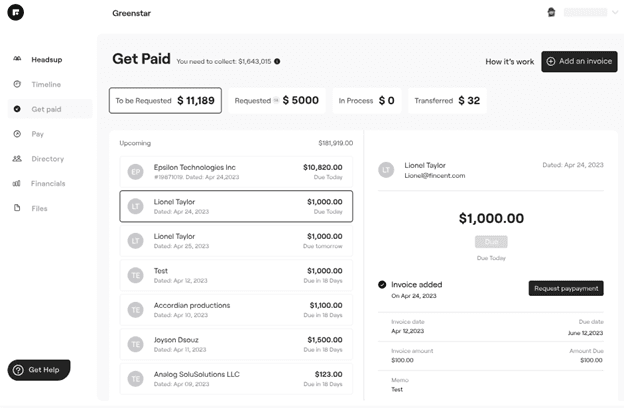
Real-time Tax Ready Reports:
Fincent provides real-time financial updates, allowing you access to the most current information. Furthermore, it produces tax-ready reports and various financial documents, streamlining the complexities of tax preparation processes.
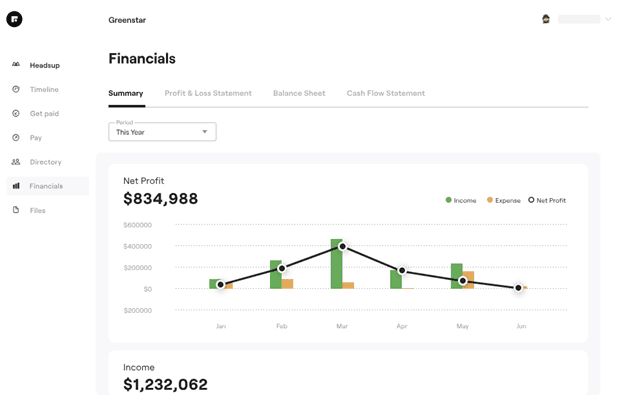
Fincent Pay
The financial management software introduces the pay feature to help users securely view, track, and pay bills within the platform, ensuring transparency and ease of payment.
Automatic Categorization
Fincent offers an innovative expense-tracking tool that helps users automatically categorize and track their expenses. The automatic categorization tool helps to identify potential saving opportunities.
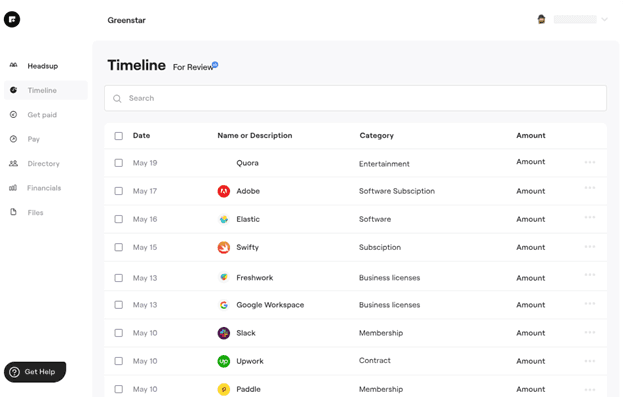
Fincent is a comprehensively designed finance management tool. Hence, it offers various add-on and integration options to its users. Below, we have listed some vital integrations and add-ons that Fincent presents to the users:
- Users can import transactions directly from Square, PayPal, bank accounts, credit cards, and other financial institutions.
- Users can link e-commerce platforms like Shopify to track sale transactions and related taxes.
- Allows to link Bill.com so that payment processing gets automated.
- Project-tracking options are available to monitor project profitability seamlessly.
- It integrates with apps and tools like Amazon, Google Play, Cloud Picker, Cloud Uploader, G-Suite, Zapier, Plaid, Quickbooks, and Gusto.
Access accounting tools seamlessly across various devices.
Features
- General Ledger
- Bookkeeping
- Manages Accounts Payable/Receivable
- Income & Expenses Tracking/Management
- Account Reconciliations
- Financial Reporting
- Record Expenses
- Record Mileage
- Generate Invoices
- Recurring Expenses
Verdict
Fincent stands out from the competition due to its user-centered design, providing a robust solution for non-accountants to manage their finances effortlessly and efficiently. As a platform designed for small and medium-sized businesses, it aims to streamline bookkeeping processes and simplify financial management. It offers a range of features to facilitate a comprehensive financial overview. However, compared to some competitors, it might have limitations regarding real-time support and mobile app availability.
Users Reviews
Be the first to write a review
Share your experience with Fincent and help others choose the right software.