

Last updated: October 2026
I've tested Grammarly across grammar checking, plagiarism detection, and AI writing tools. It stands out as a polished, dependable option for writers, students, and teams. Is Grammarly worth it? For most people, yes. The grammar engine is fast and accurate. The AI rewrites improve clarity and tone. It is free to start, and the Pro plan costs $12 per month, billed annually. If you write daily and want cleaner copy without clunky software, Grammarly is a low-risk pick that pays off quickly.
Grammarly is an AI-powered tool that helps users compose bold, clear, and mistake-free writing. It also offers a plagiarism checker that searches billions of web pages and documents to find matching text.
Plans & Pricing
- Basic grammar and spelling check
- Writing suggestions for conciseness
- Advanced grammar and spelling check
- Plagiarism detection
- Tone detection
- Conciseness and clarity suggestions
- Everything in the Premium plan
- Style guide
- Analytics reports
- Priority email support
* Featured prices can be updated and free offers may include additional terms.
Is Grammarly Worth It for Writers, Students, and Teams in 2026? Paying for a full writing suite makes little sense if you only need scanning, and the best free plagiarism checkers roundup covers tools built for just that.
Yes, for the vast majority of writers, students, and teams, Grammarly is worth it, thanks to an accurate grammar engine, useful AI rewrites, and one of the most intuitive interfaces in the category, though its plagiarism checker is more of a bonus than a best-in-class tool. Here's how each area performs in my testing:
Grammar & Plagiarism Checking: Grammarly's grammar and spelling checks are its strongest asset — fast, context-aware, and rarely missing an error, with clear explanations that help you learn as you write. The plagiarism checker is quick (a few seconds for 2,000 words) and catches direct matches and common phrases well, but it works at the surface level and struggles with paraphrased or heavily edited text, and it's locked behind the paid plans.
AI Tools: Grammarly's generative AI writing and rewrite tools are where it shines in 2026, producing high-quality, contextually relevant text and letting you reshape tone from formal to casual with a click. Customization is available, and the app integrations (Microsoft 365, Google Docs, browsers) are seamless, though some advanced features carry a mild learning curve for beginners.
Is Grammarly Still Necessary in the Age of AI?
The short answer is absolutely yes. Even with the rapid advancement of generative AI writing assistants, Grammarly remains the most powerful and dedicated spelling and grammar checker.
One of its biggest advantages over standard AI tools is its incredible ease of use and seamless integration. Thanks to the Google Chrome extension, Grammarly works actively on almost every tab you have open. Whether you are drafting a report in Google Docs, creating a presentation in Google Slides, writing emails, or writing directly inside your website's CMS (Content Management System), Grammarly is right there with you. This native integration is a massive time-saver because it eliminates the tedious, disruptive process of copying your text, pasting it into a separate AI prompt for a grammar check, and then pasting the corrected version back into your workspace.
The Verdict: For anyone who writes a lot of content, especially content writers, marketers, and professionals who need reliable, on-the-fly grammar and spelling correction, Grammarly has not lost its edge. It remains an essential, highly powerful tool that fits perfectly into a modern workflow.
Expert Score
Pros
- Offers rewriting suggestions that can help decrease plagiarism percentage
- Mostly accurate in finding plagiarized sources
- Catches even common phrases
Cons
- Plagiarism checker is not available in the free plan
- Plagiarized sources do not match in some cases
- Not reliable for edited or paraphrased texts
Customer Support
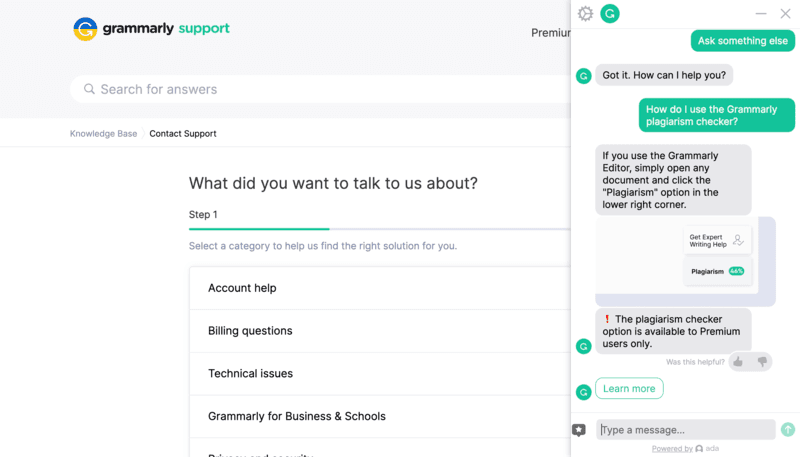
Grammarly’s support section is highly detailed and easy to navigate. The help center has an extensive amount of articles on how to navigate Grammarly’s products. If the knowledge base isn’t enough, you can submit a request or use its 24/7 chat support. There is also priority email support for Business users. The support team will be able to help faster if you attach a screenshot showing the issue. Clicking on the Support button on the dashboard leads to the Grammarly support page. Here, I have three options: 1) search the knowledge base, 2) use the chat widget, or 3) submit a support ticket. Unfortunately, Grammarly doesn’t offer phone support and live chat support, so there are little chances for me to conveniently talk to a human directly. The knowledge base is easy to navigate. I can easily look for topics using the big search bar or browse through categories, including account basics, billing, and tutorials. The chat widget is not immediately available on the knowledge base page. Instead, clicking on “Contact Us” leads to the support ticket submission page, which also contains the chat widget on the lower right. The chat suggests buttons for common queries, but you can also type your concern freely. This prompts the chat to search the knowledge base for related keywords and return a relevant response. Here, I tried using the buttons to ask the chatbot questions. The responses were short and sweet:
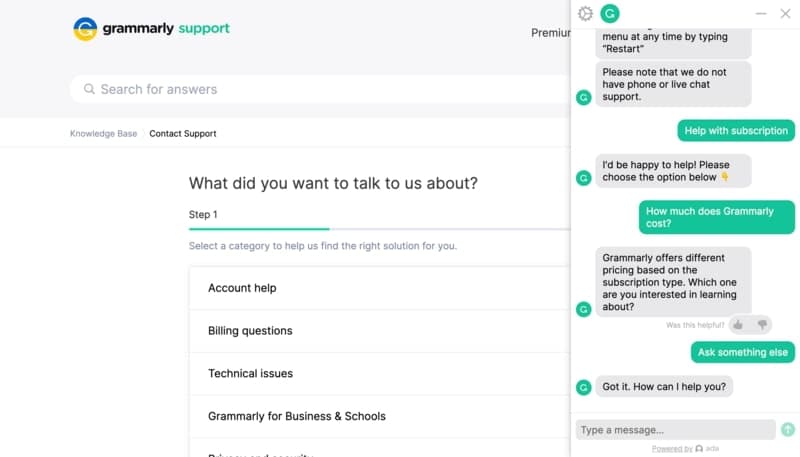
Then, I tried typing a full-sentence question to test the chat bot’s comprehension. It quickly responded again, now with a useful gif to support its answer:
Unfortunately, though available 24/7, Grammarly chat support does not offer live chat integration. Here’s what happened when I requested to talk to a live person:
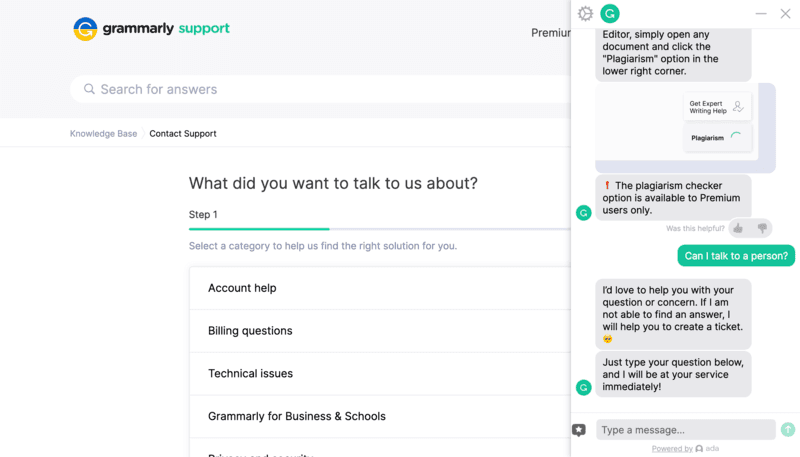
After typing the issue, I was prompted to submit an image that shows my concern so that the team could address it quicker. Then, the bot asked for my email address, where the Grammarly Support Team would reach out to me. The response should be received within 48 hours.
Priority email support is available for Business plan.
24/7 Help & Support
There is 24/7 chat support available for all users.
Blog
The blogs cover writing tips and English language guidelines.
Video Tutorials
Video tutorials can be found within the help topics.
Ease of Use
Compared to other writing tools, Grammarly is one of the most user-friendly. Its user interface is highly intuitive, with all its critical features displayed on one side. Starting from the dashboard, you’re encouraged to upload a document.
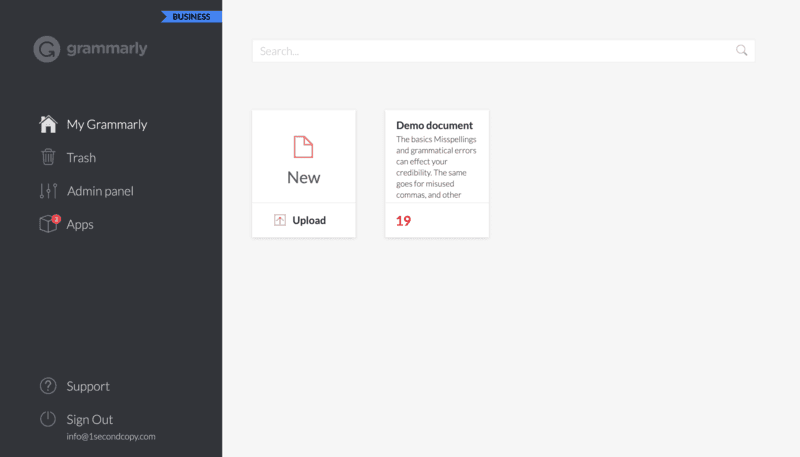
Once there, Grammarly’s writing assistant capabilities, including the plagiarism checker, will be displayed. A short explanation appears when you hover over each feature, making the learning curve quick and easy.
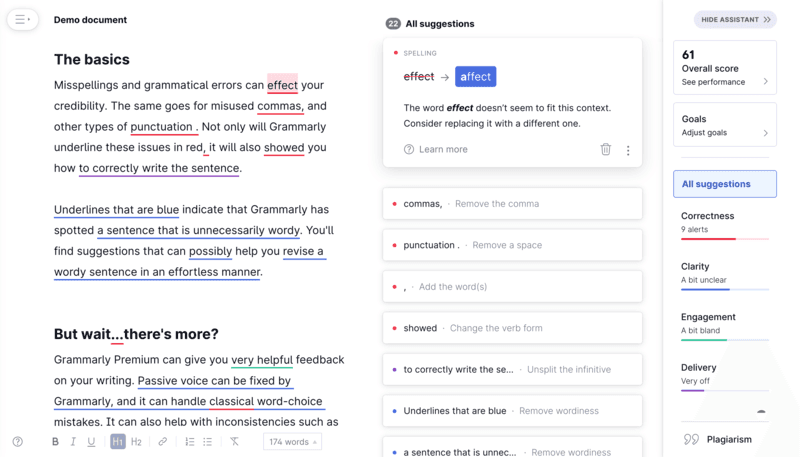
For further convenience, Grammarly can be downloaded as a browser extension for Google Chrome, Firefox, Safari, and Microsoft Edge, or as an app for iOS and Windows. It also has integrations for Google Docs and Microsoft Office. Lastly, a Grammarly Keyboard is available for mobile users to check errors while typing.
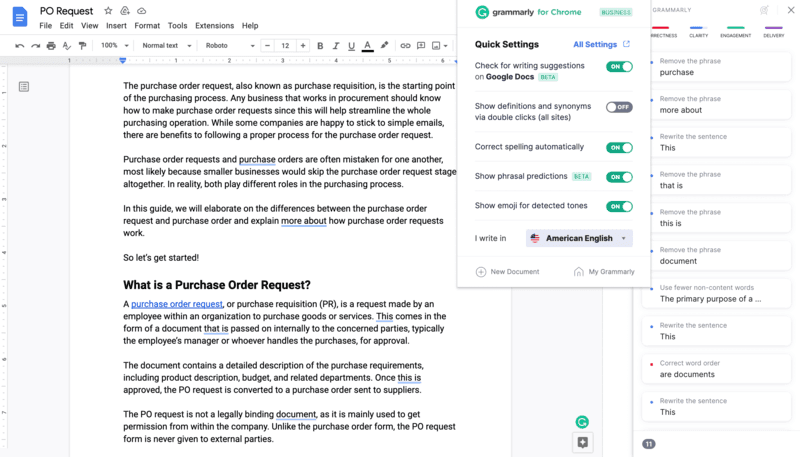
For writers working with Google Docs and Microsoft Office particularly, Grammarly’s plugin is highly intuitive. The tool doesn’t distract you from doing your work. Instead, you can click on Grammarly’s icon once you’re done writing, and only then will it pull up the issues it spotted in your document.
Performance
Grammarly has impressively fast performance. It only takes a few seconds for the tool to analyze the text for errors and plagiarism. This is in contrast with other writing software like ProWritingAid, which notably takes minutes to analyze text.
For concrete examples, the plagiarism checker took only 3 seconds to analyze 949 words. Meanwhile, for 2,100 words, it took 5 seconds. My internet speed at the time of testing was 84.72 mbps.
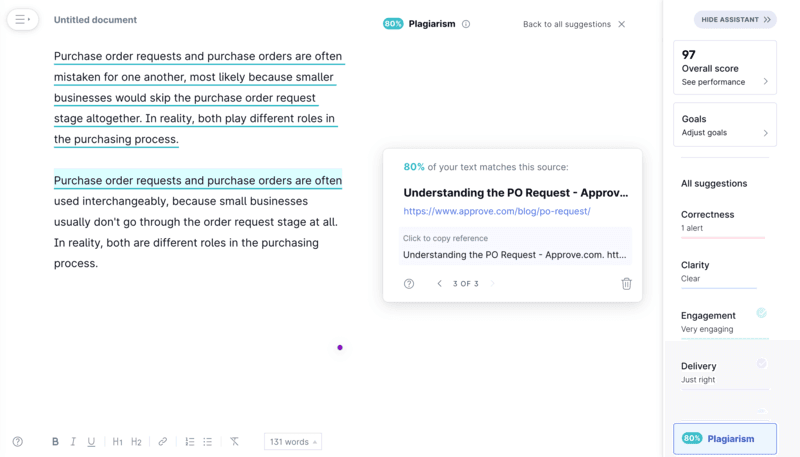
The plagiarism checker is mostly accurate. For this test, I placed a 100% copied paragraph and wrote a slightly edited or paraphrased version under it. The tool was able to catch both instances of plagiarism. However, it was not able to match the text from the paraphrased version.
This means Grammarly’s plagiarism checker would only analyze on the surface level, and look for 100% matches instead of analyzing the context of the surrounding words.
Features & Functionality
Plagiarism Checker
Grammarly is primarily known for its grammar and spelling checking capabilities, so it may not be top of mind when it comes to plagiarism detection. However, it does a good job finding copied content, including overused phrases. On top of that, it can give you writing suggestions that can help you lower your plagiarism score.
Plagiarism Check
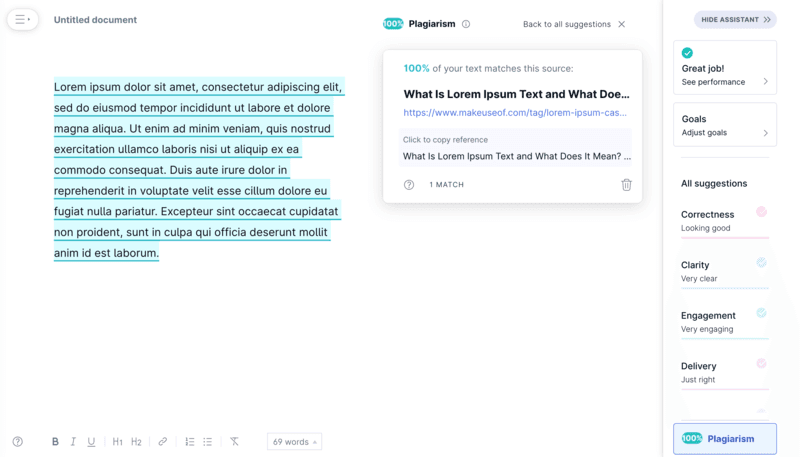
The plagiarism checker feature searches billions of web pages and documents to find matching text. It then generates a report with a plagiarism score and a list of sources where matching text was found.
Content Scan
Grammarly’s plagiarism checker is capable of scanning thousands of words within a few seconds. Simply paste your text on their text editor, click on the Plagiarism option, and it will do the rest. Unlike other plagiarism checkers, it cannot scan text based on links alone.
Text Similarity Detection
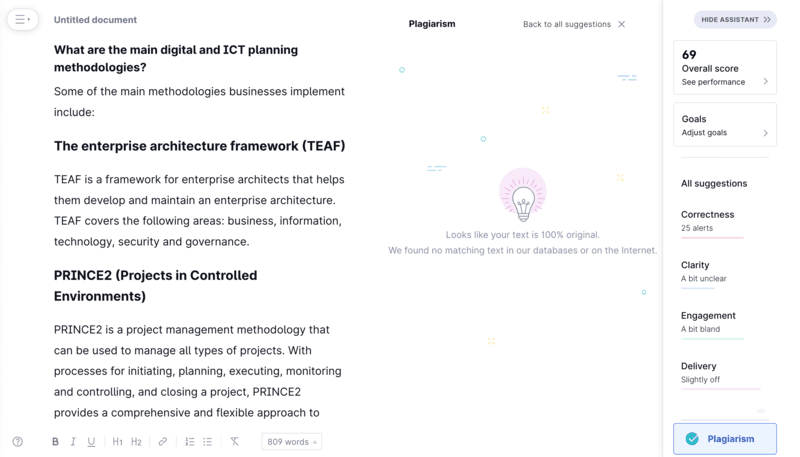
Grammarly’s plagiarism detector performs well above average, as it often matches plagiarized sources and doesn’t skip on commonly used phrases. This is useful for those who like to keep their texts 100% plagiarism-free. Upon checking though, sometimes Grammarly would pull up a different source than the one originally copied from.
Grammar and Spelling Checker
Grammarly scans your text for common and complex grammatical errors, provides context-specific suggestions for improving your writing, and offers a personalized grammar improvement plan. It’s an excellent feature that rarely misses any writing mistakes.
Detection
Grammarly's tone detector is currently in beta mode and is available through the browser extension and mobile and desktop apps. When you compose an email or a text message, for example, Grammarly analyzes your text and provides feedback on the level of formality, politeness, and enthusiasm in your writing.
Style Guide
A feature accessible through the Business plan, the style guide allows users to create and customize writing rules for their team. Analytics reports are also available for admins to check whether team members have improved their writing based on the rules.
Improve writing quality with advanced grammar correction features.
Choose from standalone tools or integrated software options.
Supports various database formats for enhanced functionality.
AI Tools
AI Text Generation Capabilities:
Grammarly excels in generating high-quality text with accurate grammar and style. It provides context-specific suggestions to improve clarity and engagement.
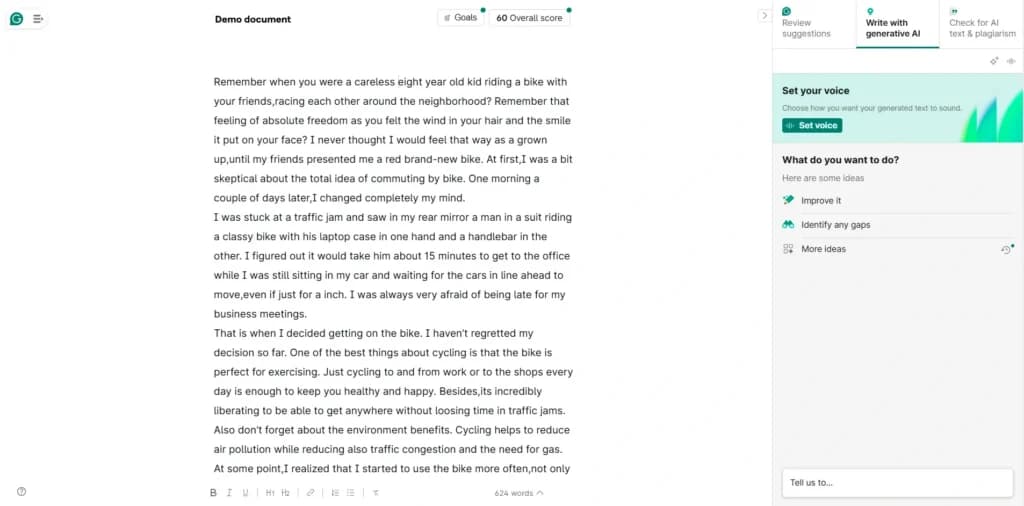
Grammar and Style Checks:
The platform includes robust grammar and style checks that help users refine their content. These tools ensure correctness in grammar, spelling, punctuation, and style consistency.
Grammarly AI's grammar and style checks are designed to enhance writing clarity and effectiveness, making it an invaluable tool for writers of all levels. Its advanced algorithms meticulously scan text for grammatical errors, punctuation mistakes, and contextual inaccuracies, ensuring that every sentence is structurally sound and properly formatted.
Beyond basic corrections, Grammarly AI provides style suggestions tailored to the writing's purpose and audience, whether it's a formal business report, a creative piece, or casual communication.
These recommendations help writers maintain a consistent tone and improve readability. Additionally, the AI's ability to offer real-time feedback allows users to learn and apply writing best practices as they write, fostering continuous improvement in their writing skills.
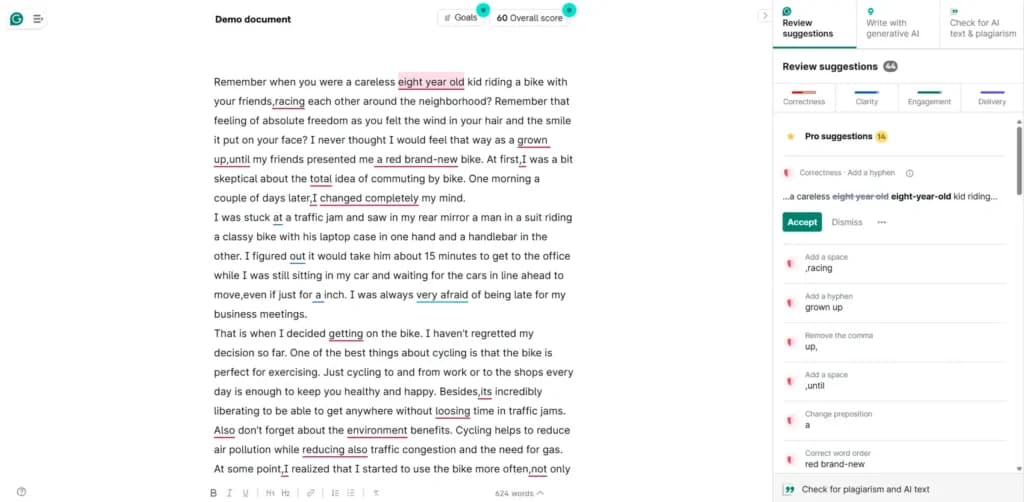
Grammarly AI's tone adjustment capabilities empower writers to tailor their messaging to suit different contexts and audiences, ensuring effective and appropriate communication.
This feature analyzes the text's tone and provides real-time suggestions to align it with the desired emotional impact. Whether aiming for a professional, friendly, formal, or casual tone, Grammarly AI identifies subtle nuances in word choice, sentence structure, and punctuation that influence the text's overall mood.
By offering specific revisions, such as softening overly harsh language or adding warmth to a formal message, Grammarly AI helps writers convey their intended sentiment more accurately. This functionality is especially valuable for business communications, customer interactions, and social media posts, where tone can significantly affect reader perception and engagement.
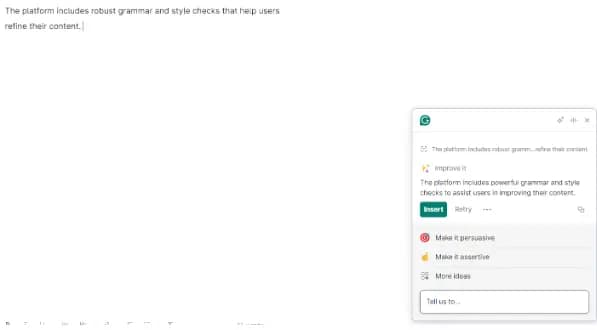
Integration with Apps:
Grammarly AI seamlessly integrates with various apps and platforms to enhance the writing and communication experience.
For example, users can easily insert GIFs from Giphy to add a touch of humor or emphasis to their messages, making interactions more engaging.
Images from Unsplash can be incorporated into documents and presentations, enriching content with high-quality visuals. For project management, Grammarly AI works alongside project management apps like Jira or Asana, enabling users to craft clear and concise task descriptions and updates. Scheduling becomes more efficient with Calendly integration, allowing for well-structured and polite meeting invitations.
Additionally, Grammarly AI integrates with Microsoft 365, offering real-time grammar and style checks within Word and Outlook, ensuring professional and polished documents and emails. These integrations and others shown here make Grammarly AI a versatile tool that not only improves writing quality but also enhances overall productivity and collaboration.
Editing and Proofreading Tools:
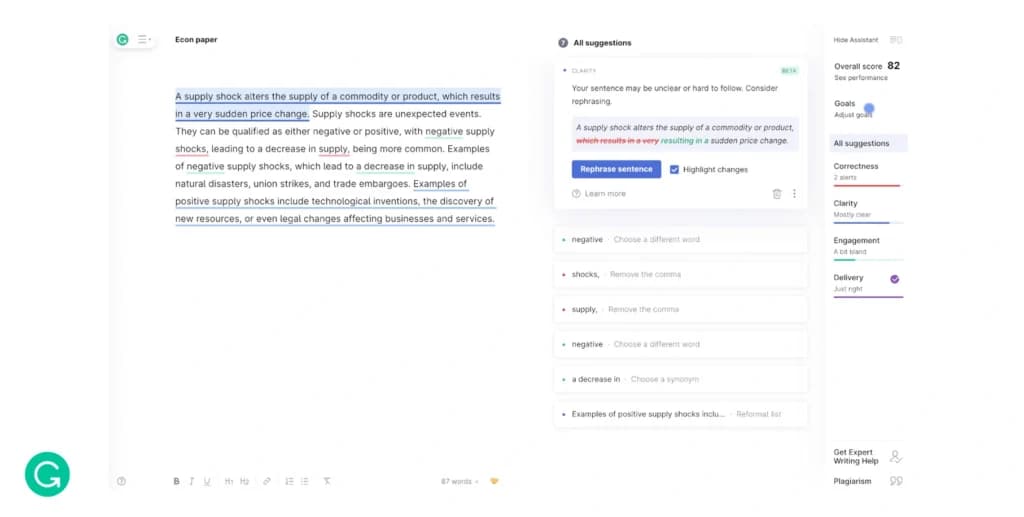
Grammarly’s AI tool offers comprehensive editing and proofreading tools, making it easy to identify and correct errors. It highlights mistakes and provides suggestions for improvement.
Grammarly AI's proofreading and editing tools are designed to elevate the quality of writing by meticulously scanning and refining text. Its advanced algorithms detect and correct a wide array of issues, including grammatical errors, punctuation mistakes, and contextual inaccuracies, ensuring precision and clarity in every sentence. Beyond basic corrections, Grammarly AI offers in-depth suggestions to enhance sentence structure, improve word choice, and eliminate redundancy, making the writing more compelling and coherent.
The tool also provides style recommendations tailored to different writing contexts, such as academic, business, or casual writing, helping users maintain consistency and appropriateness.
By offering real-time feedback and detailed explanations for each correction, Grammarly AI not only polishes the text but also educates users, fostering continuous improvement in their writing skills. This comprehensive approach to proofreading and editing makes Grammarly AI an indispensable assistant for producing clear, effective, and professional content.
Customization and Control Options:
Users can customize their Grammarly AI tool settings to match their writing style and preferences. This includes setting specific goals for clarity, engagement, and delivery. For example, a user may wish to use the AI writing assistant to change the voice or tone of the message, or generally improve the quality of writing.
The software integrates seamlessly with various platforms, including Microsoft Office, Google Docs, and web browsers. This compatibility enhances workflow efficiency and content distribution.
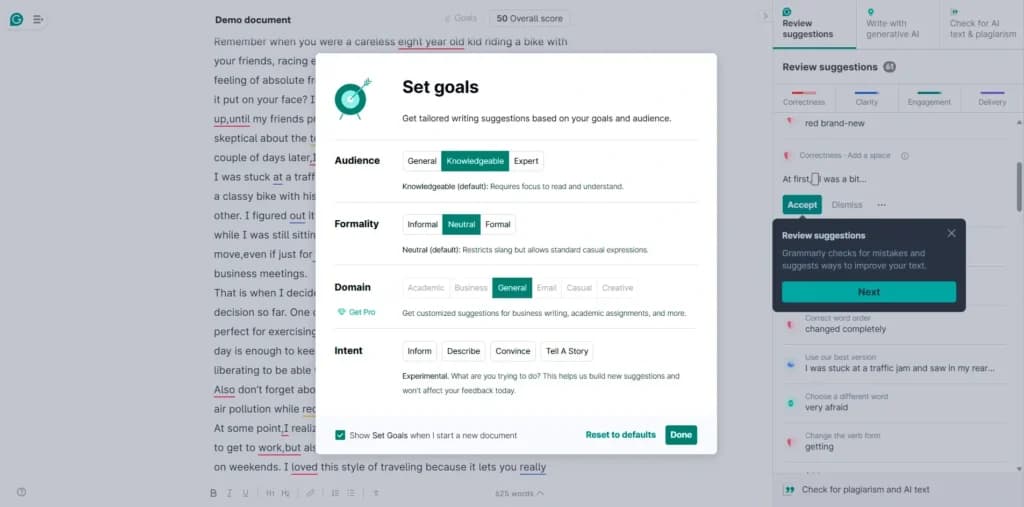
User Interface and Usability:
The user-friendly interface is designed to be intuitive, making it easy for users to navigate and utilize the tool's features effectively. The drag-and-drop functionality simplifies the content creation process.
Content Personalization:
Grammarly allows users to personalize content based on input, ensuring that the generated text meets specific needs and preferences. This feature is particularly useful for targeted marketing campaigns.
Collaboration Features:
Grammarly supports team collaboration, allowing multiple users to work on the same document simultaneously. This feature enhances productivity and ensures consistency across different content pieces.
Scalability:
The AI tool can handle large-scale content creation projects, making it suitable for businesses with extensive content needs. It can generate long-form content and manage multiple assignments simultaneously.
Compliance and Security Measures:
Grammarly ensures compliance with industry standards and implements robust security measures to protect user data. This is crucial for businesses handling sensitive information.
Additional Features:
SEO Optimization:
Grammarly includes SEO optimization tools that help users enhance their content for search engines. This feature ensures that the generated content ranks well and attracts organic traffic.Plagiarism Check:
The plagiarism check feature ensures the originality of the generated content, preventing issues related to duplicate content.Automated Research:
The AI can perform automated research to gather relevant information, enhancing the quality and depth of the generated content.Text Editing and Formatting:
Users can edit and format the generated text within the platform, ensuring that the content meets specific formatting requirements and is ready for publication.Feedback and Improvement Suggestions:
Grammarly provides feedback and suggestions to improve the quality of the content. This feature helps users refine their writing and enhance the overall effectiveness of their content.
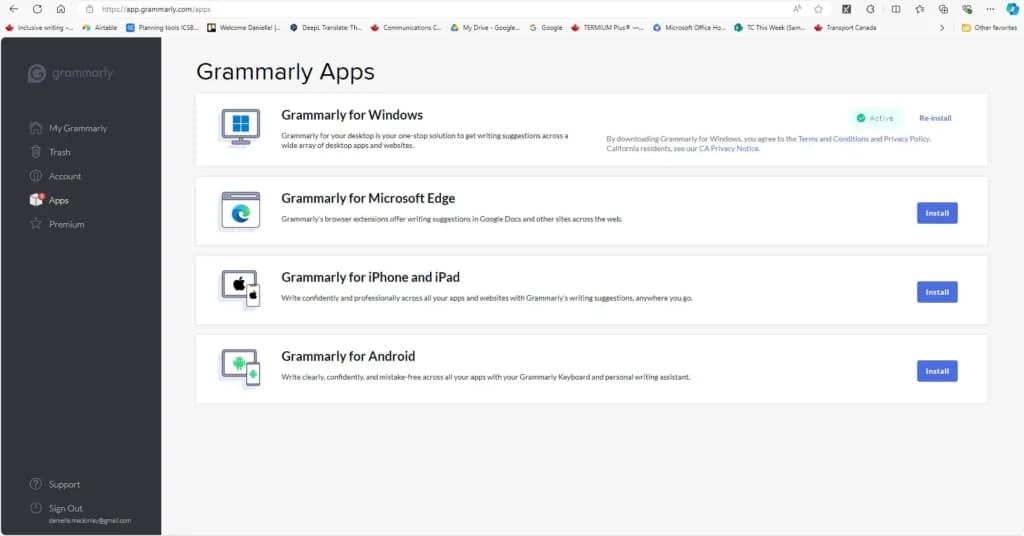
Accessible on multiple platforms for versatile use.
Features
- Plagiarism Check
- Style Editor
- Citation Finder
- Content Scan
- Text Similarity Detection
- Reporting/Analytics
- Multiple File Format Support
- Spell Checker
- Grammar Check
- Tone Check
Verdict
After testing Grammarly across grammar and plagiarism checking and its AI writing tools, it stands out as an exceptionally easy-to-use, high-performing writing assistant that improves clarity, tone, and correctness for almost any kind of writing. The grammar engine and AI rewrites are the real highlights, while plagiarism detection is a solid-but-secondary extra. The tradeoff: you pay a premium versus specialist plagiarism tools, and the main plagiarism and team features sit behind Pro and Business tiers, so the value depends on how much you'll use the wider writing toolkit rather than any single feature.
What works well
✓ Grammar and spelling checks are fast, accurate, and rarely miss errors, with clear explanations
✓ AI writing and rewrite tools produce high-quality, contextually relevant suggestions
✓ One-click tone adjustment tailors formality and warmth to the audience
✓ Intuitive interface plus seamless integrations for Microsoft 365, Google Docs, and browsers
✓ Impressively fast performance, plagiarism scans of 2,000+ words in about five seconds
What to watch out for
✗ Plagiarism checker works on the surface level and misses paraphrased or edited text
✗ Plagiarism detection is locked out of the free plan entirely
✗ Paid plans are pricey compared with tools specialized purely in plagiarism checking
✗ No live phone support, and 'live' chat is handled by a chatbot rather than a person
✗ Some advanced features carry a mild learning curve for first-time users
Use Grammarly if you are…
→ You write daily and want cleaner, clearer copy with minimal effort
→ You're a student or ESL writer who benefits from explained corrections
→ You want AI rewrites and tone control built into the apps you already use
→ You run a team that needs shared style rules and usage analytics
Skip Grammarly if you are…
✗ You need a rigorous, best-in-class plagiarism checker as your priority
✗ You want a fully free tool with no paywalled core features
✗ You require phone or live-agent support
Bottom line: For writers, students, and teams, Grammarly is a polished, reliable writing assistant that delivers standout grammar checking and useful AI rewrites, with plagiarism detection as a capable extra rather than the main event, well worth it if you'll use the broader toolkit.
Grammarly is an all-around excellent writing tool. It is incredibly easy to use, making it an attractive choice for those who want to experience writing software for the first time, especially for those who use English as a second language. It does a good job of explaining your errors and suggesting rewrites. Originality checking is a separate job from grammar, so the best plagiarism checkers comparison is the better reference if that is your main need.
Users Reviews
Be the first to write a review
Share your experience with Grammarly and help others choose the right software.