

Jira Review 2026: Pros, Cons, and Pricing
Overall Rating
4.2
Last updated: September 2026
Built on Jira, Atlassian’s service management solution enables faster, smarter service delivery across development, IT, and business teams. It’s designed to empower high‑velocity teams to resolve requests, incidents, and changes quickly, from a unified, AI‑enhanced platform.
Plans & Pricing
- Free up to 3 agents
- 2GB storage
- Basic ticketing and service requests
- Queues, SLA tracking, knowledge base
- Custom-branded help center
- Everything from Free, plus:
- Unlimited email notifications
- Audit logs and multi-region data residency
- Up to 20,000 agents and unlimited customers
- Everything from Standard, plus:
- Rovo Agents, Search and Chat, for AI-powered service and operations
- Virtual service agent
- Asset and configuration management
- Advanced incident and problem management
- Everything from Premium, plus:
- Cross-product insights with Atlassian Analytics and Data Lake
- Advanced admin control and security
- Enterprise-grade identity and access management
- Unlimited automations
* Featured prices can be updated and free offers may include additional terms.
Expert Score
Pros
- Covers the full IT service lifecycle: requests, incidents, changes, assets, and more
- Clean, customizable queues and request portals
- Powerful automation and AI features to speed up ticket handling
- Strong collaboration tools with Jira Software and Confluence integration
Cons
- Automation rules can have a learning curve for new users
- Mobile app is functional but lacks full desktop capabilities
- No phone or live chat support; ticket-based only
Customer Support
Atlassian offers online (social media) support, email support and phone calls. ● Personal experience with Atlassian support group: To the best of my experience, their user support is very active and responsive. Through this, I could understand the company’s core values of treating each customer especially. They made sure all the issues I raised concerning their software were tackled with immediate effect and I could go on using the software in no time. It was very reassuring to see that the support group was accurately responsive. ● Their additional customer resources include: -Online documentation: these are basic guidelines on how to use Atlassian products. -Support services: this includes enterprise support for large teams, partner support in form of third-party consultants and Atlassian support a hub for teams and admins. -Work-life blog: this is full of helpful information. -Community support: you can also get answers and solutions from other Atlassian users. -Technical Account Management: Atlassian provides enterprise companies with proper TAMs which enables them to make smarter decisions, monitor analytics, upgrade planning and optimize productivity. -Training: they also provide webinars and other forms of training to help users get certified.
FAQ
Extensive FAQ library
Blog
Available with streams of useful information
Live Online Chat
Yes, very responsive
Video Tutorials
Available and very informative
Ease of Use
Unlike its competitors, Atlassian provides all ITSM requirements and is user-friendly. It was quite easy for me to understand and set up the admin panel to my preferred setting for use. The form customization tool met all my complex requirements and it was easy for me to apply. It has a great and welcoming look, which made my experience nice and intuitive. The web user interface and mobile applications make it exceptionally user-friendly. I observed that the post-go-live assistance was very helpful. Immediate chat response and contact escalation made CSI easy to implement.
Features & Functionality
ITSM
Multi-currency support
Jira Service Management does not provide multi-currency support, as it is not designed for billing or financial transaction management. Any currency handling would need to be managed through integrated third-party tools.
Mobile app access
Jira Service Management is accessible through the Jira mobile app for iOS and Android, allowing users to view, update, and manage tickets, leave comments, and receive notifications on the go. This ensures service teams can respond quickly, even away from their desks.
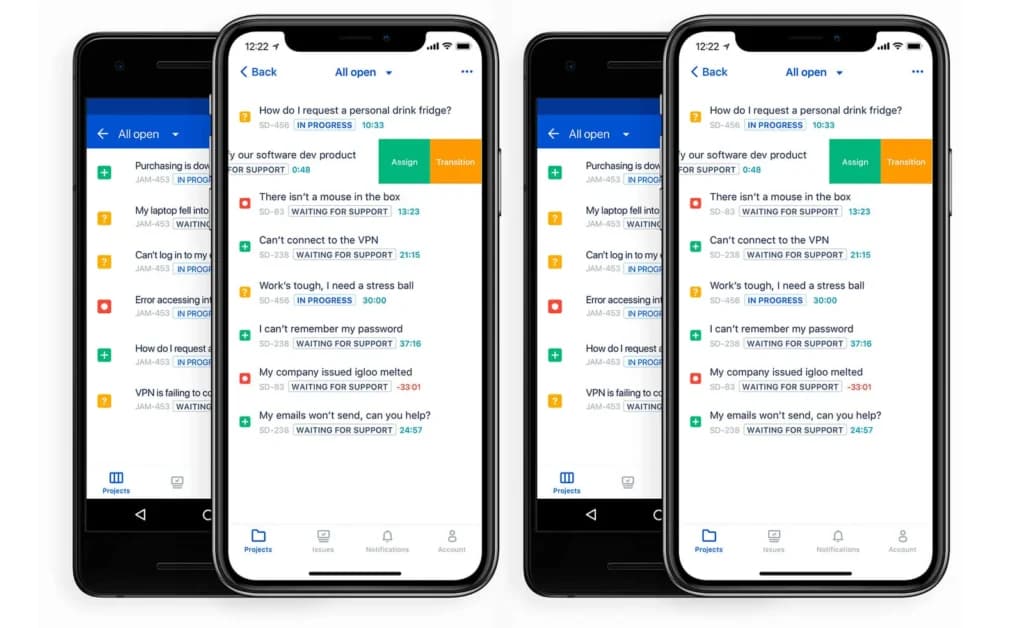
Automated reminders & notifications
The platform includes robust automation features, such as SLA countdowns, custom reminders, and event-triggered notifications. Teams can configure rules to send alerts to agents, escalate overdue issues, and notify stakeholders in real time.
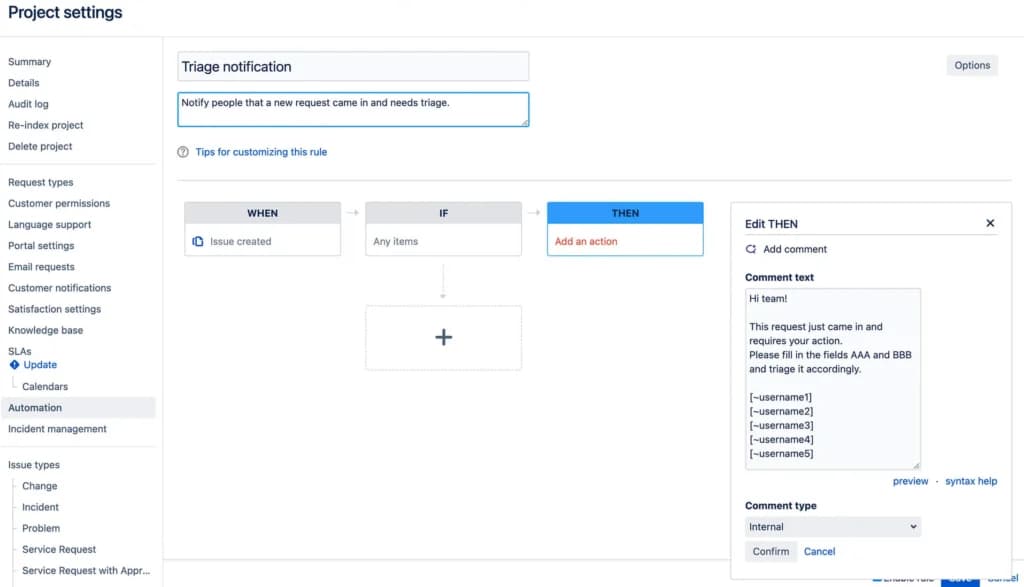
Tax compliance
Tax compliance is not a native function of Jira Service Management. Since the platform is built for service management rather than financial processing, tax-related requirements must be handled through external systems.
Purchase order tracking
Jira Service Management does not offer built-in purchase order tracking. While procurement workflows could be created through custom fields or integrations, this functionality is not part of the core product.
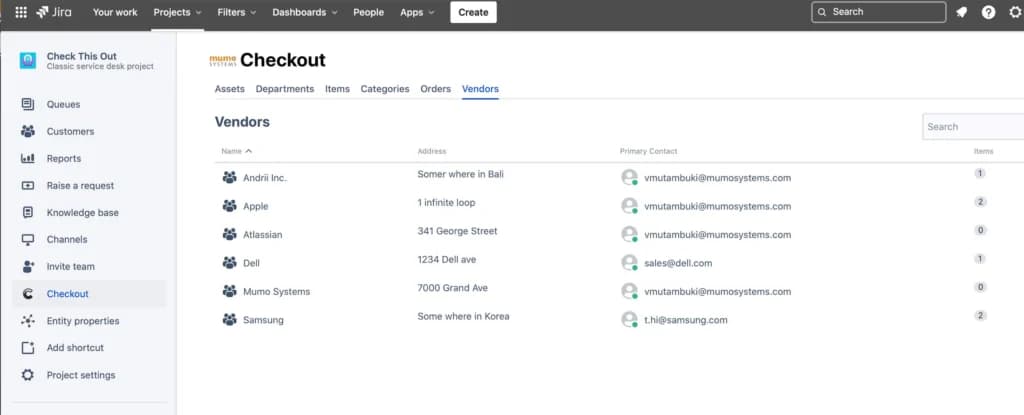
Advanced security
Security is a core focus for Jira Service Management, offering SAML single sign-on, two-step verification, encryption in transit and at rest, and detailed admin controls. Enterprise plans add further protections like centralized user management and IP allowlisting.
Audit trail and compliance support
JSM includes detailed audit logs that track configuration changes, workflow edits, and administrative actions. Atlassian also maintains compliance with standards such as SOC2, ISO 27001, and GDPR, making it suitable for organizations with strict governance needs.
Data import and export
Users can import and export ticket data in CSV format and access Jira Service Management data via REST APIs for bulk operations or integration with external analytics and reporting systems.
Accounting software integration
There are no native accounting integrations in Jira Service Management. However, connections to accounting platforms can be built through Atlassian Marketplace apps or third-party middleware tools.
Major incident management
Jira Service Management includes dedicated tools and workflows for managing major incidents, allowing teams to quickly identify high-priority issues, escalate them to the right responders, and coordinate resolution efforts. Built-in queues and status tracking keep everyone aligned during critical events.
Single-pane agent view
Agents can access all the details they need from one centralized interface, including the incident record, related tickets, linked issues, and asset information. This eliminates the need to jump between multiple screens or tools, speeding up investigation and resolution.
AI-powered insight
Premium plans offer Atlassian Intelligence, which uses AI to summarize incident details, suggest relevant knowledge base articles, and recommend next steps. These insights help agents resolve issues faster and maintain consistent response quality.
Omni-channel notifications
Jira Service Management supports incident notifications through email, in-app alerts, and integrations with collaboration tools like Slack, Microsoft Teams, Opsgenie, and Statuspage. Teams can ensure that critical alerts are delivered through multiple channels to reach the right people quickly.
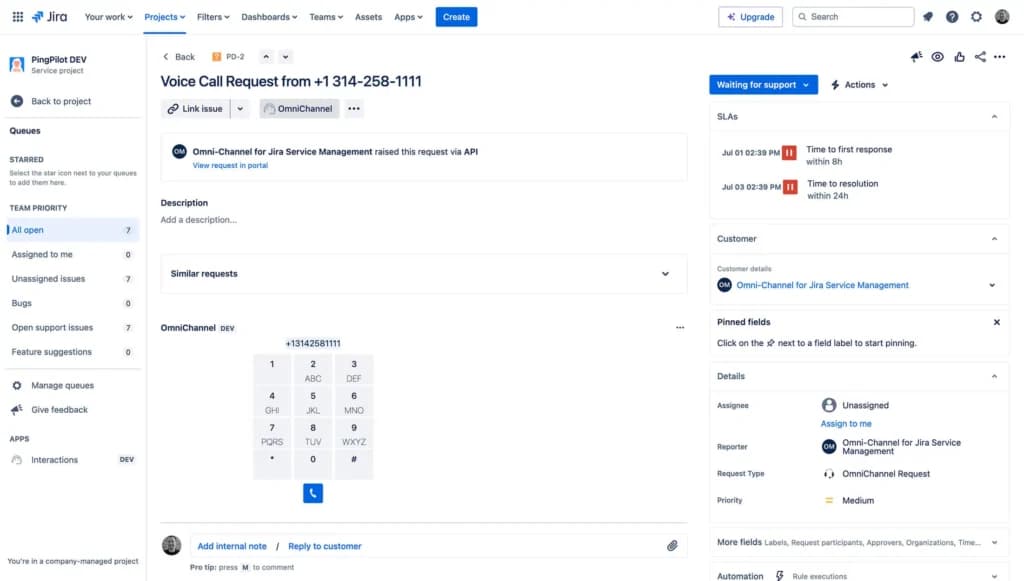
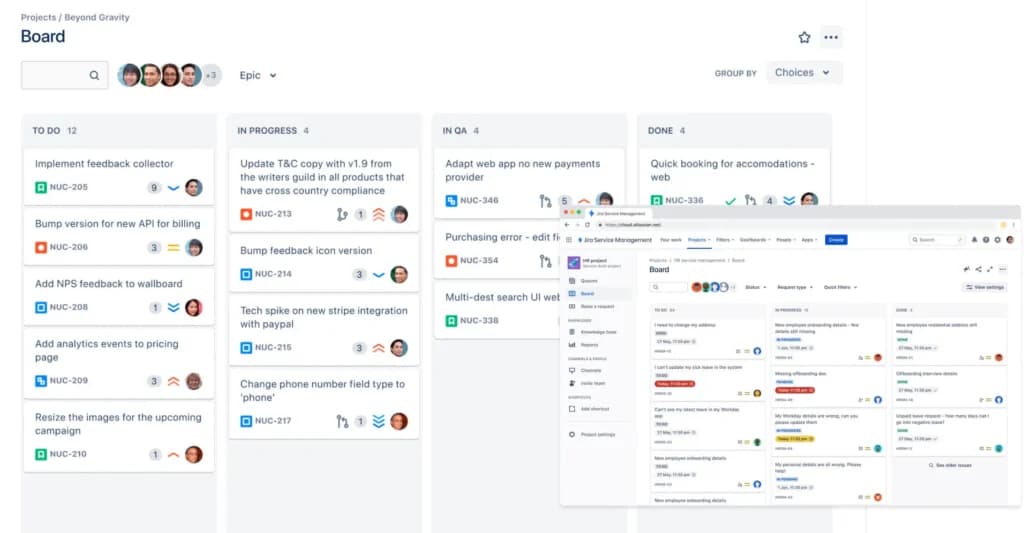
Visual task boards
Incidents can be managed on visual Kanban-style boards, making it easy to track related tasks, monitor progress, and manage handoffs between team members in real time. This view keeps complex incident workflows organized and transparent.
Guided setup
The platform offers preconfigured templates and guided setup flows for incident management, helping teams establish best-practice processes quickly. These tools make it easier for new teams to get started and for experienced teams to standardize their workflows.
Contextual knowledge
Jira Service Management integrates knowledge base articles directly into problem records, giving agents quick access to related documentation, historical issues, and known error databases. This helps teams diagnose recurring problems faster and apply proven solutions.
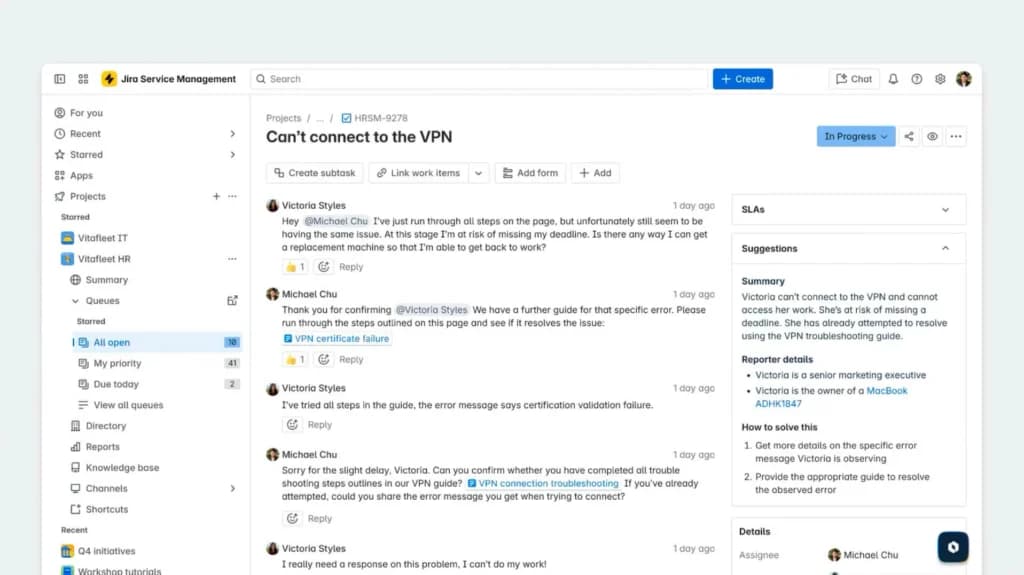
Automated notifications
The platform can trigger automated alerts when a problem record is updated, a workaround is added, or a resolution is deployed. Notifications can be sent via email, in-app alerts, or connected channels like Slack and Microsoft Teams, keeping all stakeholders informed.
Remediation plans
Teams can document detailed remediation steps and link them directly to the related problem or change records. These plans ensure that when an incident or problem reoccurs, the response is consistent, coordinated, and based on prior learnings.
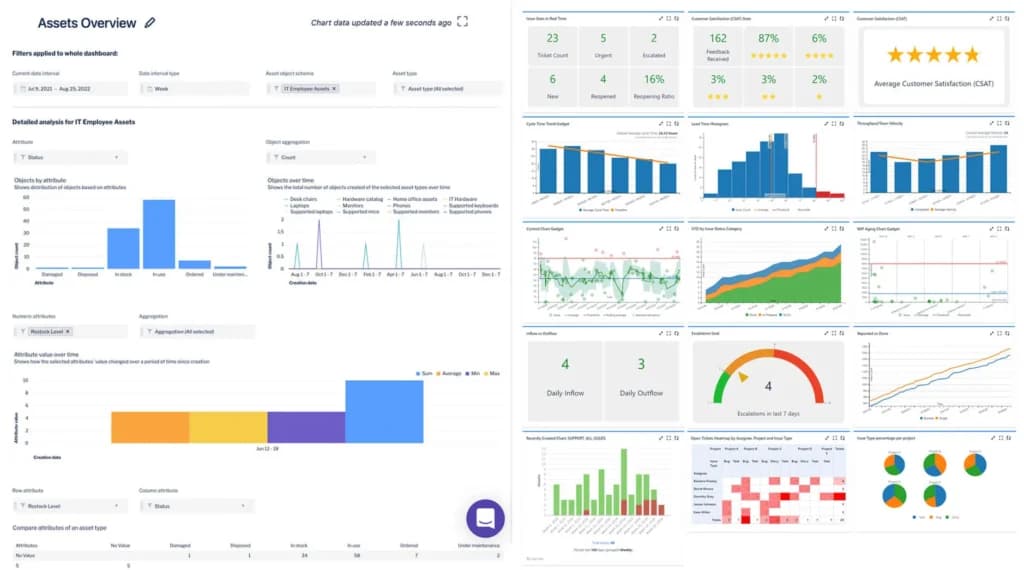
Real-time analytics
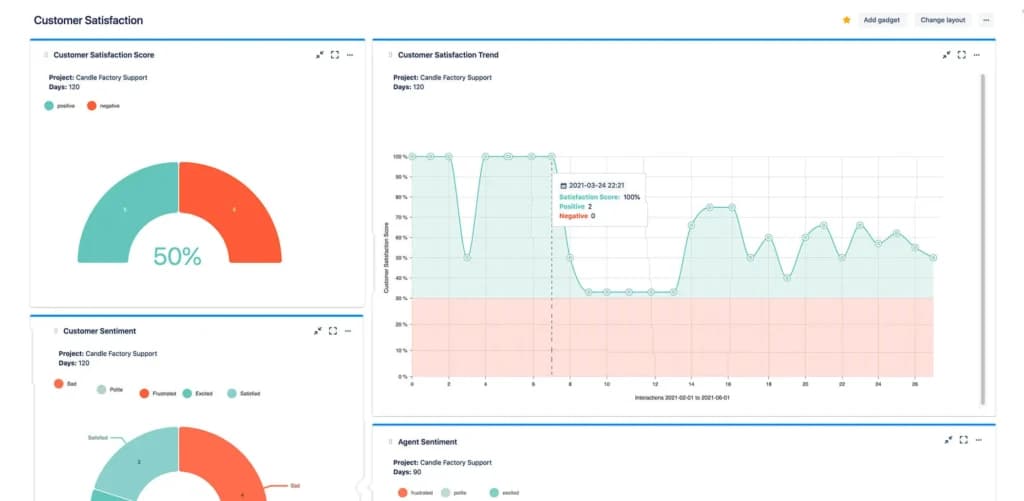
Jira Service Management provides real-time reporting dashboards that track metrics such as problem trends, resolution times, and SLA compliance. These insights help teams identify root causes, measure the effectiveness of remediation efforts, and prioritize improvements.
Multimodal change
Jira Service Management supports different types of change workflows - standard, normal, and emergency, allowing teams to tailor their process based on urgency, risk, and complexity. This flexibility ensures that low-risk changes move quickly, while high-impact ones get the scrutiny they require.
Change success score
The platform tracks change outcomes over time, enabling teams to measure their change success rate. This helps organizations refine processes, reduce deployment failures, and improve long-term reliability.
Change approval policies
Admins can define detailed approval workflows for different change types, assigning specific approvers, setting conditions, and automating escalations. These policies help ensure that every change gets the right level of oversight before implementation.
Risk intelligence
Jira Service Management leverages data from linked Jira Software issues, service history, and assets to evaluate the potential impact of a change. This allows teams to make informed decisions and prioritize work based on actual risk.
Built-in risk assessment and calculation
The platform includes built-in risk assessment tools that score changes according to factors like affected services, historical incident patterns, and deployment complexity. This makes it easier to identify high-risk changes before they cause disruptions.
Chatbot-embedded portals
On Premium plans, Jira Service Management includes an AI-powered virtual agent that can be embedded into the request portal or chat channels like Slack and Microsoft Teams. This allows users to get instant, automated responses, deflect common questions, and create tickets without agent intervention.
Service catalog builder
Teams can create and customize a detailed service catalog, listing all available services and request types in a structured, easy-to-navigate format. Each entry can include forms, required fields, and automated workflows to ensure consistent handling.
Embedded experiences
Request portals and forms can be embedded into intranet pages, websites, or other digital touchpoints. This lets employees or customers submit requests directly from the tools and spaces they already use.
Graphical workflow
The platform features a visual workflow editor for building and modifying request-handling processes. Teams can drag and drop steps, set conditions, and integrate automation rules without needing code.
Two-way notifications
Jira Service Management supports real-time, two-way communication between requestors and agents. Updates, comments, and status changes are sent via email, in-app notifications, or connected chat tools, allowing requestors to respond directly from their channel of choice.
Quick & easy approvals
Approval requests can be sent automatically to designated approvers, who can approve or reject them with a single click via email or directly inside the platform. This speeds up service delivery while keeping an audit trail of all decisions.
Report designer
Jira Service Management allows teams to create custom reports by selecting metrics, filtering data, and choosing visualization formats. Reports can be tailored to track SLA performance, ticket volumes, resolution times, and other key service metrics.
Report administration
Admins can manage report permissions, decide who can view or edit specific reports, and organize reporting assets across projects. This ensures that sensitive performance data is only accessible to authorized users.
Natural language query
The platform does not currently offer natural language search for generating reports. Instead, reporting relies on saved filters, JQL (Jira Query Language), and configuration in dashboards or third-party analytics tools.
Dashboards
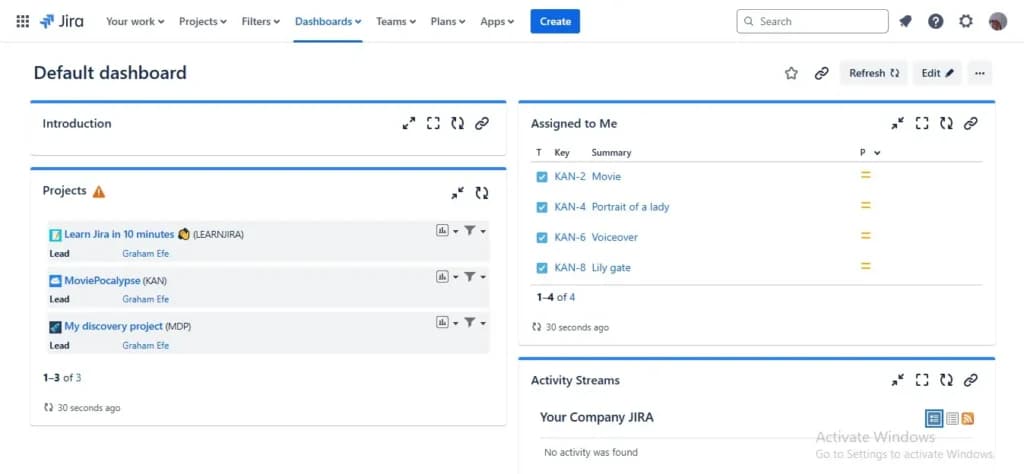
Customizable dashboards display real-time data from across Jira Service Management projects. Widgets and gadgets can visualize metrics, track trends, and monitor team performance, making it easy to keep stakeholders informed at a glance.
Project Management
I was impressed by the sheer selection of project management features that Jira offers. I tested some of them out and will discuss them below:
- Roadmaps
- Outcome Forecasting
- Scrum & Kanban boards
- Capacity & Sprint Planning
- Calendar integration
- Workflow Automation
- User Access and Permissions
- Role-based access control
- Multi-language support
- Risk Analysis
- Reporting and Dashboards
- Customization
- Project planning and scheduling
- Time tracking
- Team collaboration tools
- File sharing and document management
- Customizable dashboards
- Milestone tracking
- Issue and risk management
- Budgeting and expense tracking
- Reporting and analytics
- Notifications and alerts
- Mobile app support
- Third-party integrations (Slack, Google Drive, etc.)
- API access for customization
Project Planning and Scheduling Features
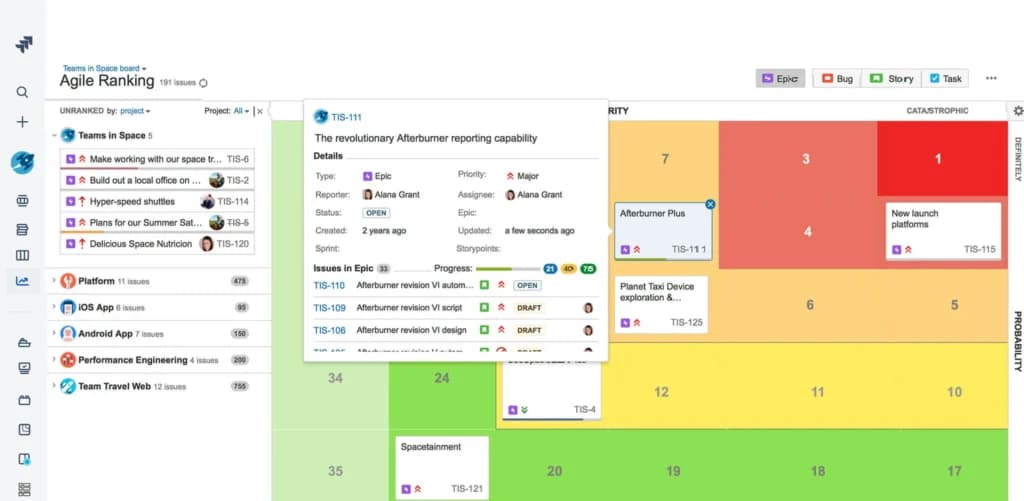
Roadmaps
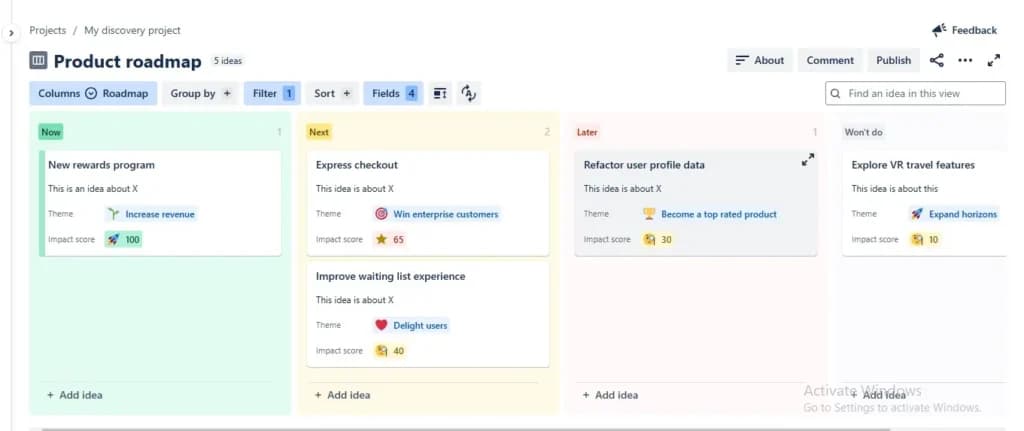
With these I was able to create and visualize project timelines, dependencies, and key milestones in a structured view. Advanced Roadmaps(Premium & Enterprise) support multi-team planning and outcome forecasting which can be crucial for staying on schedule with larger projects.
Agile Boards
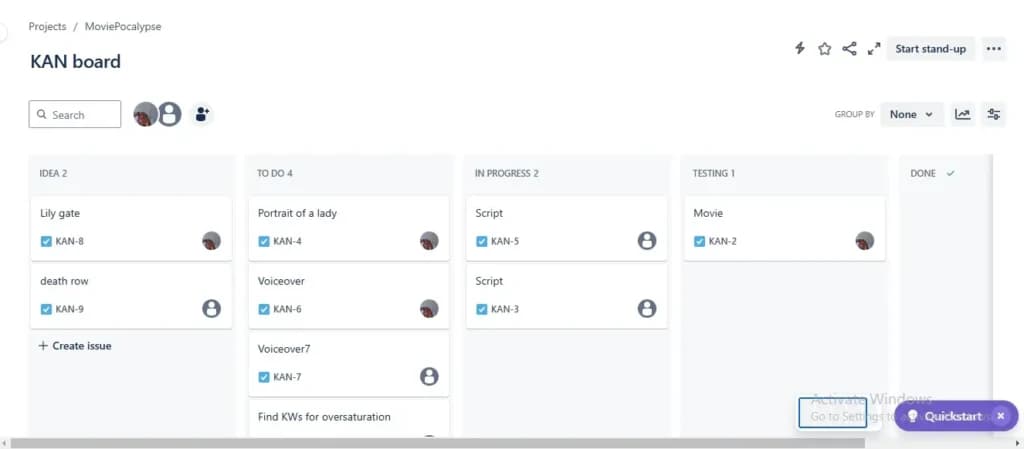
Teams using agile methodologies can use Scrum or Kanban boards to plan and manage sprints, backlogs, and ongoing tasks efficiently. This helps teams stay organized, adapt to changes quickly, and maintain a steady workflow.
Calendars & Scheduling
I found these tools to be incredibly useful. Jira’s calendar view allows you and your team to easily visualize work over time and synchronize goals. You can integrate with your personal calendars to align tasks with deadlines, though native Gantt charts require add-ons. Keeping schedules visible reduces missed deadlines and ensures projects stay on track.
Capacity & Sprint Planning
Balance workloads, estimate effort, and ensure teams are working at optimal capacity. I always find that proper planning helps prevent burnout, allocate resources effectively, and keep productivity high.
Task Management Features
Task Creation and Customization
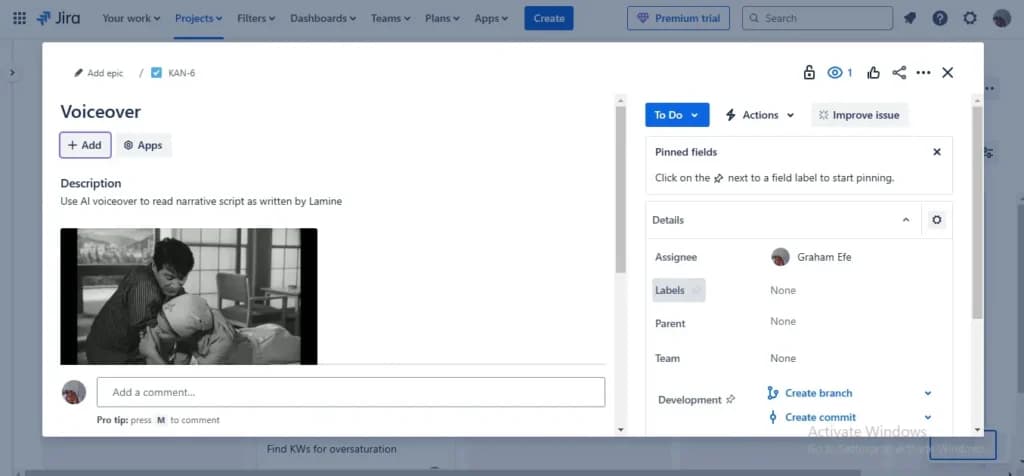
Users can create tasks, sub-tasks, epics (large projects), and stories (smaller units of work). Each task can have a title, description, attachments, priority level, and due date. Custom fields allow teams to tailor tasks to their specific needs. Tasks can then be assigned to individuals or teams, ensuring clear ownership and accountability.
Workflow Automation
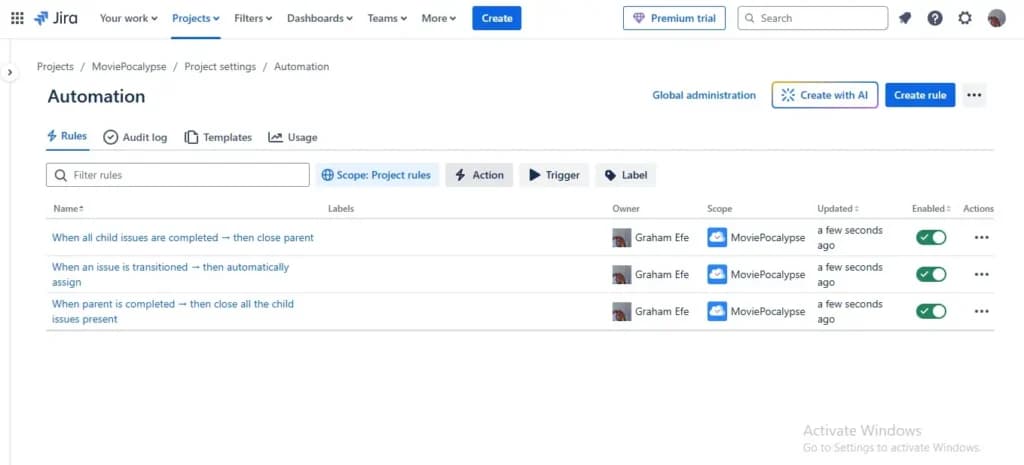
Jira allows users to create custom workflows with automatic transitions to reduce manual work. Automation rules can be set up to assign tasks, send notifications, or update statuses based on triggers. I found that this minimized repetitive tasks, freeing up time for strategic work.
Task Tracking
Tasks and milestones can be tracked in your preferred ways. I’m a Kanban board guy, but the Scrum boards are great. There are also list, timeline and calendar views to track projects throughout the entire life cycle. This flexibility ensures every team member can stay aligned with project goals in their preferred format.
Dependency management
Jira’s dependency map shows you the order in which work needs to get done so you can spot bottlenecks before they become a blocker. You can set rules to notify teams or trigger actions when dependencies are created or resolved. I aways prefer to proactively manage dependencies to ensure seamless workflows and prevents project delays.
Team Collaboration Tools
Native communication tools
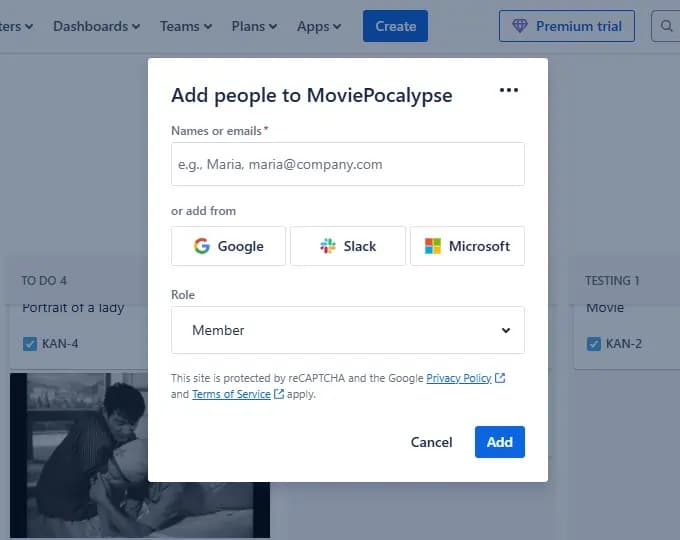
Each Jira member can comment on tasks, tag colleagues using @mentions, and share updates in real-time. Users can also attach files, images, and links for better context. Jira also supports adding additional languages to your service project. This translates the language others receive when they use your portal and help center to their preferred language.
Integration with Communication Tools
Jira updates can be sent to team chat channels like Slack and Microsoft Teams. You can also pool real-time data and information from popular 3rd party apps like Slack, Figma, and GitHub, making Jira your operational core. This centralized communication prevents silos and streamlines information sharing.
Role-Based Access & Permissions
Jira lets you assign predefined or custom roles (e.g., Administrator, Developer, Viewer) to control who can view, edit, or manage tasks. This is useful for cross-functional teams working on different aspects of a project while maintaining data security.
Time tracking
Jira has a native time-tracking feature that lets your team record the time they spend working on project steps. I found this feature to be crucial for more complex projects.
Teams can then define targeted deadlines, plan future sprints and iterations, and resources in the best possible way. Tracking work time improves forecasting and ensures deadlines are realistic.
Notifications & Alerts
Users receive customizable email and in-app notifications for task updates, mentions, and status changes.
Webhooks allow automated alerts to be sent to external apps like Slack or Microsoft Teams. Keeping teams informed in real time reduces delays and improves responsiveness.
Mobile Collaboration
Jira’s mobile app enables teams to track and manage all aspects of your project management software in real time with Jira Cloud mobile. It is available on Android and iOS for both smartphone and tablet.
Reporting and Dashboards
I always find that real-time reporting improves visibility and helps teams make data-driven decisions. Jira has a range of reports that show various types of real-time information to help you track your projects. Dashboards are highly customizable and can contain information from a single or multiple projects.
Third-party integrations
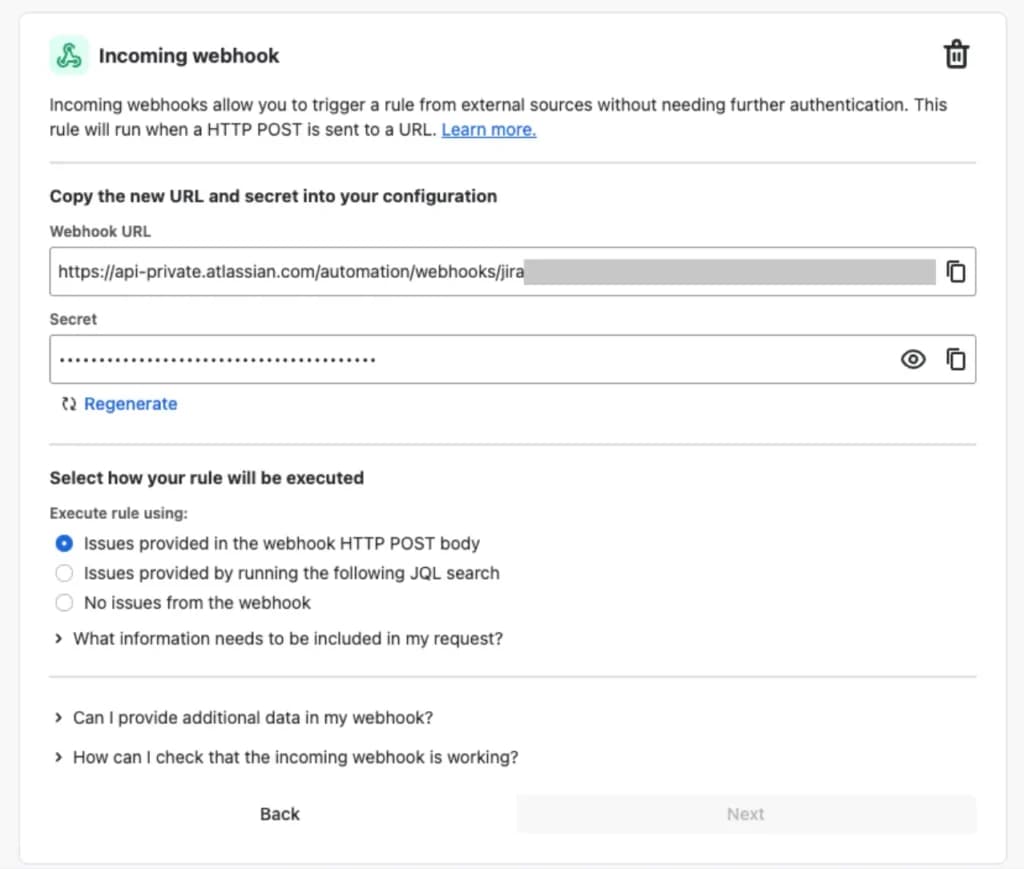
Jira integrates with third-party apps and services very seamlessly. Jira accommodates incoming webhooks, which is a way for a third-party to trigger an automation rule. The webhook can specify issues to act on, or provide real-time data. Outgoing web requests allow you to send arbitrary web requests to integrate with any API. The response can then be used in subsequent actions.
Enhance team collaboration with integrated communication features.
Boost efficiency with tools designed to optimize workflows.
Gain insights with detailed reporting and analytics capabilities.
Features
- Configuration Management
- Incident and Problem Management
- Request Management
- Metrics & Analytics
- BI & Reporting
- Major Incident Management
- Single-Pane Agent View
- AI-Powered Insight
- Omni-Channel Notifications
- Visual Task Boards
Verdict
Atlassian services were very easy to implement and I can say it's the best for any ITSM team. It offers efficient features and allows ease of management of products and services.
Users Reviews
Be the first to write a review
Share your experience with Jira and help others choose the right software.