

Last updated: October 2025
LiveChat offers live chat support, a ticket system, and web analytics, among other features that make it an ideal solution for businesses that want to enhance sales and customer support. LiveChat is used by 35,000+ companies, and it comes with 200+ integrations and 42 language options.
Plans & Pricing
* Featured prices can be updated and free offers may include additional terms.
WeChat comes with a welcome 14-day free trial that lets you try out the platform for free. In the trial, you will have access to the features provided under LiveChat's second-tier package, Team. The free trial is easy to get on the main website, and you won't require a credit card.
You can upgrade to any of LiveChat's four business plans when the free trial expires.
Expert Score
Pros
- Well designed and easy to install & use
- Built-in helpdesk tool
- Lots of advanced features
- Detailed reporting and analytics
Cons
- No ITIL alignment
- Mobile version is very limited
- Only supports website visitors
Customer Support
Being specialists in customer support, you can expect LiveChat to offer superb support. The company offers several support avenues to help solve any issues you face. Live Chat LiveChat provides a live chat support option integrated with ChatBot, another product of the company. The live chat option is found at the bottom of most pages, and you can decide to use the bot to search for resources or go to live chat right away. When testing the support, we got connected to an agent in less than 10 seconds, which was quite impressive. Knowledge Base LiveChat provides a super-rich knowledge base that helps users set up the platform and get answers to various queries. The section is simplified by grouping the content into categories such as agent's guides, Managers guides, Install LiveChat, Get started, Use LiveChat, Apps and integrations, Best practices, and Privacy and security. You'll also find various articles, videos, and FAQs.
Ease of Use
LiveChat prides itself in its ease of use, and you won't really require any assistance to set it up. You can install the platform on your site by simply installing a plugin from your dashboard. Alternatively, you can paste a small piece of code before the closing tag on every page of your website, and you'll be set. You can download the desktop and mobile apps or simply use the web-based platform to use the platform. When you log in, you'll be given a real-time overview of activities. From there, you can simply move to any of the sections provided on the left side, and you'll have access to all the features and functionalities offered by Live Chat. Yes, it's that simple!
Features & Functionality
LiveChat offers lots of features that help you streamline support and customer engagement, and below are some of the main ones.
Real-time traffic monitoring
Real-time monitoring is a useful sales feature. The functionality helps you track your website visitors in real-time, which is quite helpful as some need more attention than others. For example, you can see who is checking out the features, using the shopping cart, or abandoning an order. In the case of the latter, you can immediately send out a customized message to invite them to ask a question or just chat. Real-time monitoring also provides a cool feature that shows a circle on a customer profile. This circle changes in color to let you see the customers that are active on your site, asking a question, or making a purchase.
Customer Engagement
LiveChat has many customer engagement features and functionalities that help keep users satisfied and increase engagement. These include user tracking, a messaging mode, sending eye-catchers, chat buttons, routing rules, ticket forms, chat assignment, chat history, and chat transcripts.
Integrated ticketing system
LiveChat offers an integrated ticketing system that provides help desk capabilities to enhance your support service from a simple live chat functionality. The ticketing system can be used to resolve technical issues, and it also allows visitors to get in touch if your support team is not available. LiveChat's ticketing feature lets you source tickets from chat and emails, tag tickets, and undertake automated follow-ups.
Integrations
LiveChat provides 200+ integration options, the first being the company's other products: helpdesk.com, chatbot.com, and knowledgebase.ai.
Beyond these, you can also integrate:
- Google Analytics
- Salesforce
- Twilio SMS
- TeamViewer
- Slack
- CMS (your choice)
Efficiently handle and resolve IT incidents.
Identify and solve recurring issues with advanced solutions.
Simplify service request processes for IT teams.
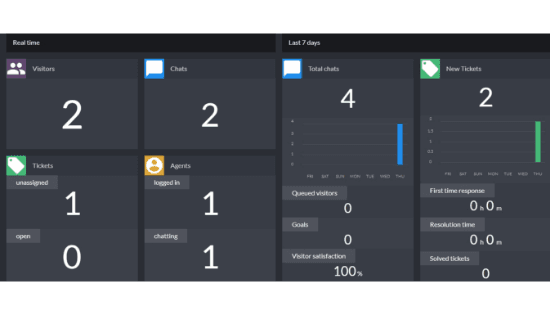
LiveChat provides reports and analytics features that let managers break down and analyze how the support team is performing. This starts with the option to enable user feedback after a check, which can be used to measure customer satisfaction and agent performance. The manager can also see chat durations, ticket response times, agent activity, and staff prediction. This information can then be used to know how each agent is performing and whether the support team is sufficient. It can also be used to make hiring and firing decisions.
Besides the agents, you will also see the number of chats and tickets the company has received over a particular duration. This includes queued visitors, goals, new tickets, solved tickets, customer satisfaction, and response times. There's also a dashboard option that summarizes everything.
Features
- Self-Service Support Desk
- Metrics & Analytics
- Single-Pane Agent View
- Omni-Channel Notifications
- Visual Task Boards
- Guided Setup
- Automated Notifications
- Real-Time Analytics
- Chatbot-Embedded Portals
- Embedded Experiences
Verdict
LiveChat is a powerful and flexible tool that makes it easy for businesses to engage customers and boost sales. The platform integrates a superb live chat solution with a ticketing system, and it takes a proactive approach to support and security. LiveChat offers lots of features that can be helpful even to the largest corporations, but it also allows you to choose the functionalities you want and stay within your budget.
Users Reviews
Be the first to write a review
Share your experience with LiveChat and help others choose the right software.