

Melio Review 2026: Accounting Software, Online Invoicing, Accounts Payable, Accounts Receivable
Overall Rating
4.2
Last updated: July 2026
Melio simplifies invoice payments. Pay every expense and invoice on their platform with multiple payment options while running your business efficiently and automatically. Integrates with Quickbooks and Freshbooks, among others, and its platform is flexible enough for all types of businesses.
Plans & Pricing
- 5 free ACH transfers per month
- 10 free syncs with QuickBooks Online & Xero
- Multiple payment options: Pay by card or bank—send checks, ACH, or instant transfers
- Easy bill management: Upload, scan, or import bills
- Dedicated email for automatic bill capture
- Global payments in USD or local currencies
- Recurring and partial payments
- Instant payments
- Free mobile app (iOS & Android)
- Get paid: Accept payments via custom links
- Everything in Go plan plus:
- Send 20 free ACH transfers/month
- Unlimited 2-way auto-sync with QuickBooks Online & Xero
- Batch-pay multiple bills at once
- Combine payments into one transaction
- Roles, permissions, and user management
- Automated approval workflows
- W-9 collection & auto 1099 sync
- Automatic capturing of bill line items
- Priority support
- Everything in Core plan plus:
- Send 50 free ACH transfers/month
- 2-day delivery for all ACH transfers
- Advanced, custom multi-user workflows
- 2-way auto-sync with QuickBooks Desktop
- Advanced bill attributes (classes & locations)
- Premium customer support
* Featured prices can be updated and free offers may include additional terms.
While Melio does not require any fee for set up, it charges the users 2.9% on every credit card transaction they carry out. Fundamentally, this software features two different plans – the Accountant and Business plans. While the Accountant plan is tailored to meet the needs of accountants who manage other people's finances, the Business plan is designed for business owners who prefer to manage their own disbursements.
Expert Score
Pros
- No monthly fees. ACH bank transfers are free
- Bank transfers & check payments are free of charge
- Pay multiple bills in one go, schedule, set recurring payments
Cons
- Only 85 countries are available for international payments
- Limited integrations other than Xero and QuickBooks
- Limited information about customer support & times
Customer Support
Live chat support Melio offers support via live chat which you can access directly from the platform. Email You can contact Melio support via email at support@meliopayments.com if you have any questions. FAQ and Help Center Melio has a FAQ page with some general questions and answers and an in-depth Help center with answers to more specific questions. Blog Melio’s blog covers various topics related to bookkeeping, payment processing, and small business success.
Users can email Melio at support@meliopayments.com
FAQ
Comprehensive list of frequently asked questions on Melio's site.
Live Online Chat
Live chat is provided through Melio dashboard
Ease of Use
Melio Payments has an easy-to-use interface. You can sign up in seconds, and it doesn’t take long to add vendor details. Afterward, you can easily navigate across the software, and find everything you need to use its features.
Features & Functionality
Accounting Software
The features of Melio are typical of any efficient payment management system. These features and benefits include, but are not limited to:
- Payment approval
- Integration with Xero and QuickBooks Online
- Payment scheduling
- Payment tracking
- Easy to use payment method update
- 1099 forms
- Client profile management
User-Friendliness
Melio Payments is one of the most intuitive digital payment solutions on the market. It allows you to sign up and input your account details and those of your vendors in a matter of minutes. After setting up the relevant data, you'll find that the entire program is relatively easy to navigate.
Payment Handling and Organization
Late payment settlement can have a devastating implication for business relationships. On the other hand, paying too soon reduces your business cash flows, as you will have less money to yield profitable returns on investments. Hence, to enhance efficient business relationships and cash flows, your business will need to harness the power of a reliable payment structure.
Melio Payments help you optimize your payment structures by offering you a stress-free means of scheduling your payments in advance. All you need to do is put in the various payment you need to make, their respective recipients, and due dates. Melio automatically deducts the payment amount from your account at your specified payment dates, disburses the exact amounts to your suppliers and dealers, and then sends you a notification stating when the payment would be completed.
One excellent feature of completing payments with Melio is that you can carry out multiple payments all at once. And all payments will be attended to at their due dates.
Client Profile Management
In addition to offering payment solutions to business owners, Melio is also designed for people who oversee other people's ventures. This software allows accountants to organize and run payments for their different patron companies. Its UI also makes it easy for finance managers to move from one client's financial profile to the other without logging out all the time.
Credit Card Remittance
It is no longer news that some dealers and suppliers are picky when receiving credit card payments. Some accept certain cards and reject some others. Melio helps you navigate transactions with selective suppliers by charging your payment amounts directly from your card (irrespective of the type) and then remitting the specified amounts to your dealers.
Nevertheless, for each credit card transaction you make on Melio, you get to pay a service charge of 2.9% of the transaction value. You can even enjoy charge-free transactions if you qualify for discounts and rewards.
Permissions and Roles
For every growing business, there comes a time when owners will begin to delegate specific responsibilities to third parties. This delegation is so that you can give rapt attention to revenue generation and profit maximization. Coincidentally, payment management happens to be one responsibility that is often assigned to third parties in most businesses.
If you decide to hand over the control of your payments to third parties, Melio has been designed to facilitate such processes. All you need to do is to invite the parties involved and adjust their permissions and roles for your payments.
Bank Transfers
Melio Payments allows for free ACH bank transfers, emphasizing the platform's commitment to providing cost-effective solutions for businesses. There are no subscription fees, making it accessible for businesses of all sizes.
Free Features with Every Melio Account
- Unlimited users: Businesses can invite unlimited users to their account, enhancing collaboration and payment management.
- Accounting software sync: Beyond QuickBooks Online, Melio also syncs with Xero, offering broader compatibility with accounting software.
- Approval workflows: Users can set up roles, permissions, and approval amounts to maintain control over transactions.
- Easy bill capture: Simplifies the process of adding bills to the platform.
- Payment tracking & updates: Offers real-time updates on payment status, ensuring transparency.
- Data & form export: Allows for easy export of data and forms for record-keeping.
- Bills management: Provides tools for efficient management of bills.
- Custom payment requests: Users can customize payment requests to suit their business needs.
Additional Benefits
- Cash flow control + more rewards: Encourages using credit cards for business bills to enjoy rewards and improve cash flow.
- Keep vendors happy: Fast payment options like instant transfer, same-day bank transfer, or fast check help avoid late payments.
- More ways to send payments: Melio supports a variety of payment methods to accommodate different business needs.
Monitor and categorize expenses for accurate financial tracking.
Streamline tax compliance with automated preparation tools.
Automate repetitive accounting tasks to boost efficiency.
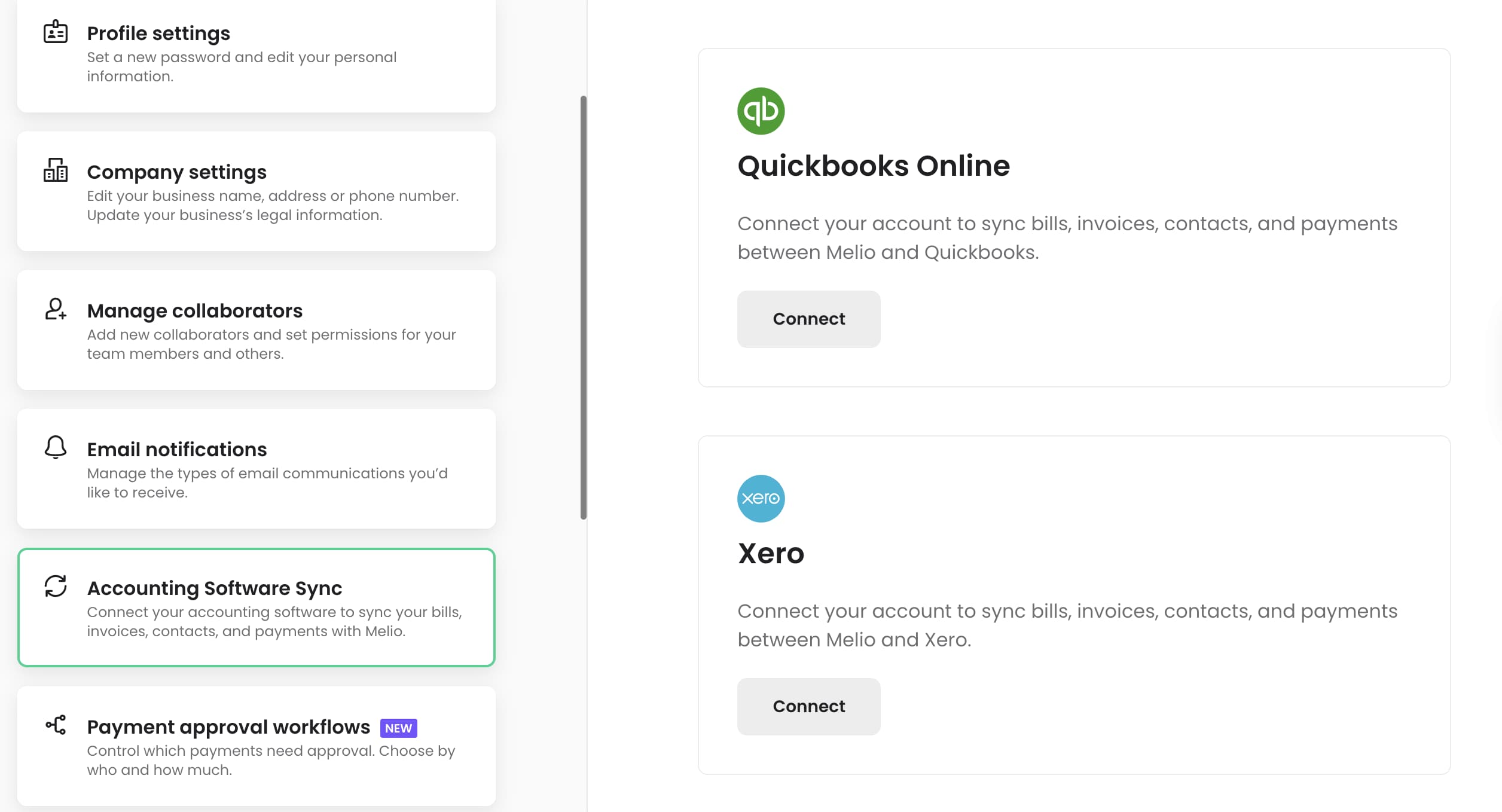
Currently, Xero and QuickBooks Online are the only business programs you can synchronize with Melio payments. This synchronization ensures that your accounting tabs are automatically updated with the information about every payment you make on Melio. Hopefully, Melio will allow the integration of other business solutions at a later time.
Access accounting tools seamlessly across various devices.
Online Invoicing
The features of Melio are typical of any efficient payment management system. These features and benefits include, but are not limited to:
- Payment approval
- Integration with QuickBooks Online
- Payment scheduling
- Payment tracking
- Easy to use payment method update
- 1099 forms
- Client profile management
- User-Friendliness
Melio Payments is one of the most intuitive digital payment solutions on the market. It allows you to sign up and input your account details and those of your vendors in a matter of minutes. After setting up the relevant data, you’ll find that the entire program is relatively easy to navigate.
Payment Handling and Organization
Late payment settlement can have a devastating implication for business relationships. On the other hand, paying too soon reduces your business cash flows, as you will have less money to yield profitable returns on investments. Hence, to enhance efficient business relationships and cash flows, your business will need to harness the power of a reliable payment structure.
Melio Payments help you optimize your payment structures by offering you a stress-free means of scheduling your payments in advance. All you need to do is put in the various payment you need to make, their respective recipients, and due dates. Melio automatically deducts the payment amount from your account at your specified payment dates, disburses the exact amounts to your suppliers and dealers, and then sends you a notification stating when the payment would be completed.
One excellent feature of completing payments with Melio is that you can carry out multiple payments all at once. And all payments will be attended to at their due dates.
Client Profile Management
In addition to offering payment solutions to business owners, Melio is also designed for people who oversee other people’s ventures. This software allows accountants to organize and run payments for their different patron companies. Its UI also makes it easy for finance managers to move from one client’s financial profile to the other without logging out all the time.
Credit Card Remittance
It is no longer news that some dealers and suppliers are picky when receiving credit card payments. Some accept certain cards and reject some others. Melio helps you navigate transactions with selective suppliers by charging your payment amounts directly from your card (irrespective of the type) and then remitting the specified amounts to your dealers.
Nevertheless, for each credit card transaction you make on Melio, you get to pay a service charge of 2.9% of the transaction value. You can even enjoy charge-free transactions if you qualify for discounts and rewards.
Permissions and Roles
For every growing business, there comes a time when owners will begin to delegate specific responsibilities to third parties. This delegation is so that you can give rapt attention to revenue generation and profit maximization. Coincidentally, payment management happens to be one responsibility that is often assigned to third parties in most businesses.
If you decide to hand over the control of your payments to third parties, Melio has been designed to facilitate such processes. All you need to do is to invite the parties involved and adjust their permissions and roles for your payments.
Process payments seamlessly with integrated systems.
Track time spent on projects for accurate billing.
Keep a close eye on expenses for better financial management.
Available on multiple devices for accessibility.
Accounts Payable
Account Dashboard
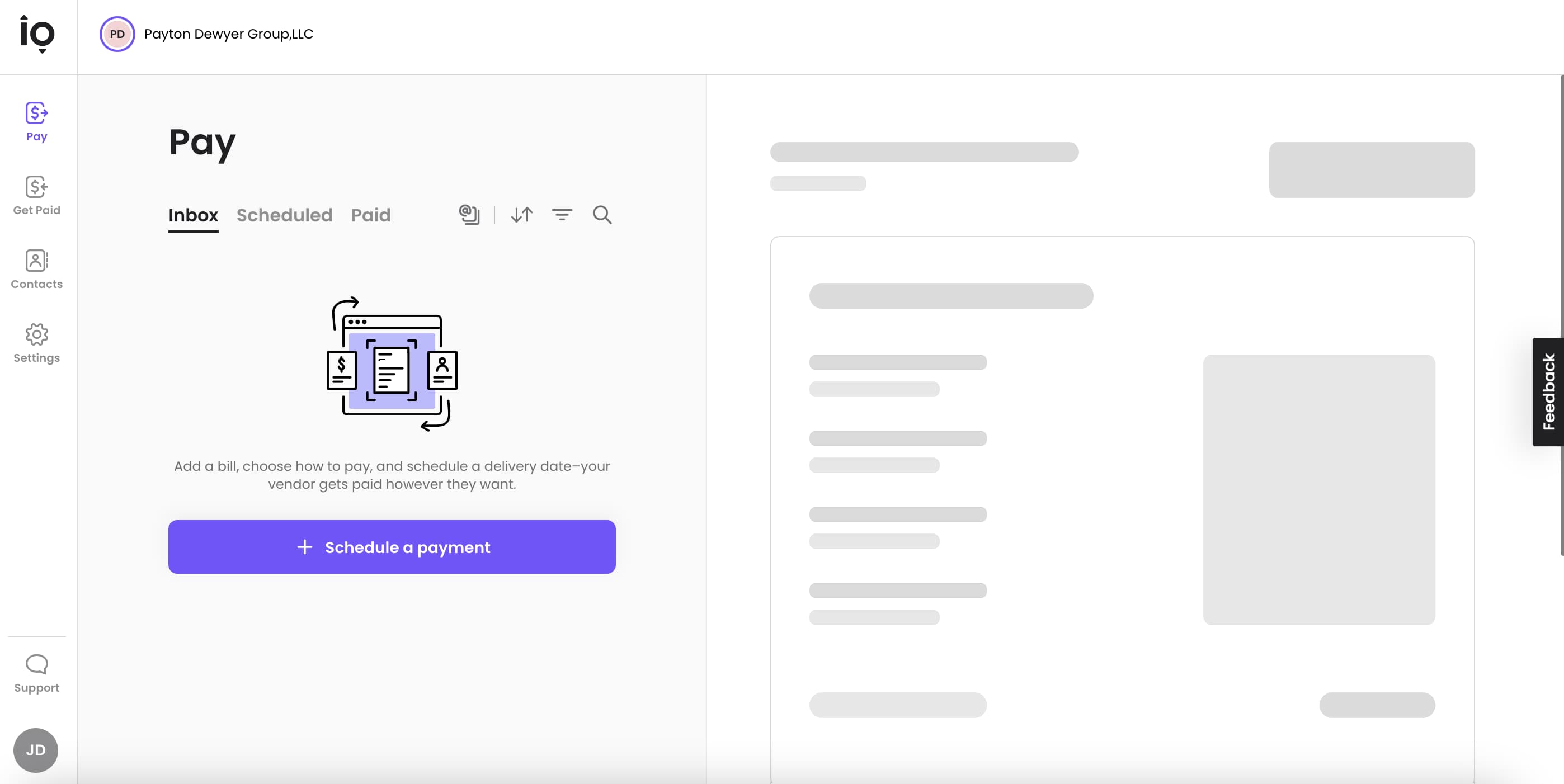
Melio account dashboard is very simple. They offer their software at no cost to the user. The main features include paying vendors or bills, getting paid, and saving contacts.
Integrations
Melio has minimal integrated features available on its platform. They allow for paying vendors and getting paid for products and services. However, they do not automatically pull data from receipts or invoices (unless vendors are saved in your account contacts,) and it must be manually input. They also do not offer a mobile app for download. QuickBooks integrates with Melio as advertised in their support center. Melio integrates with the most widespread accounting software that includes: QuickBooks, FreshBooks, Microsoft dynamic, and Xero.
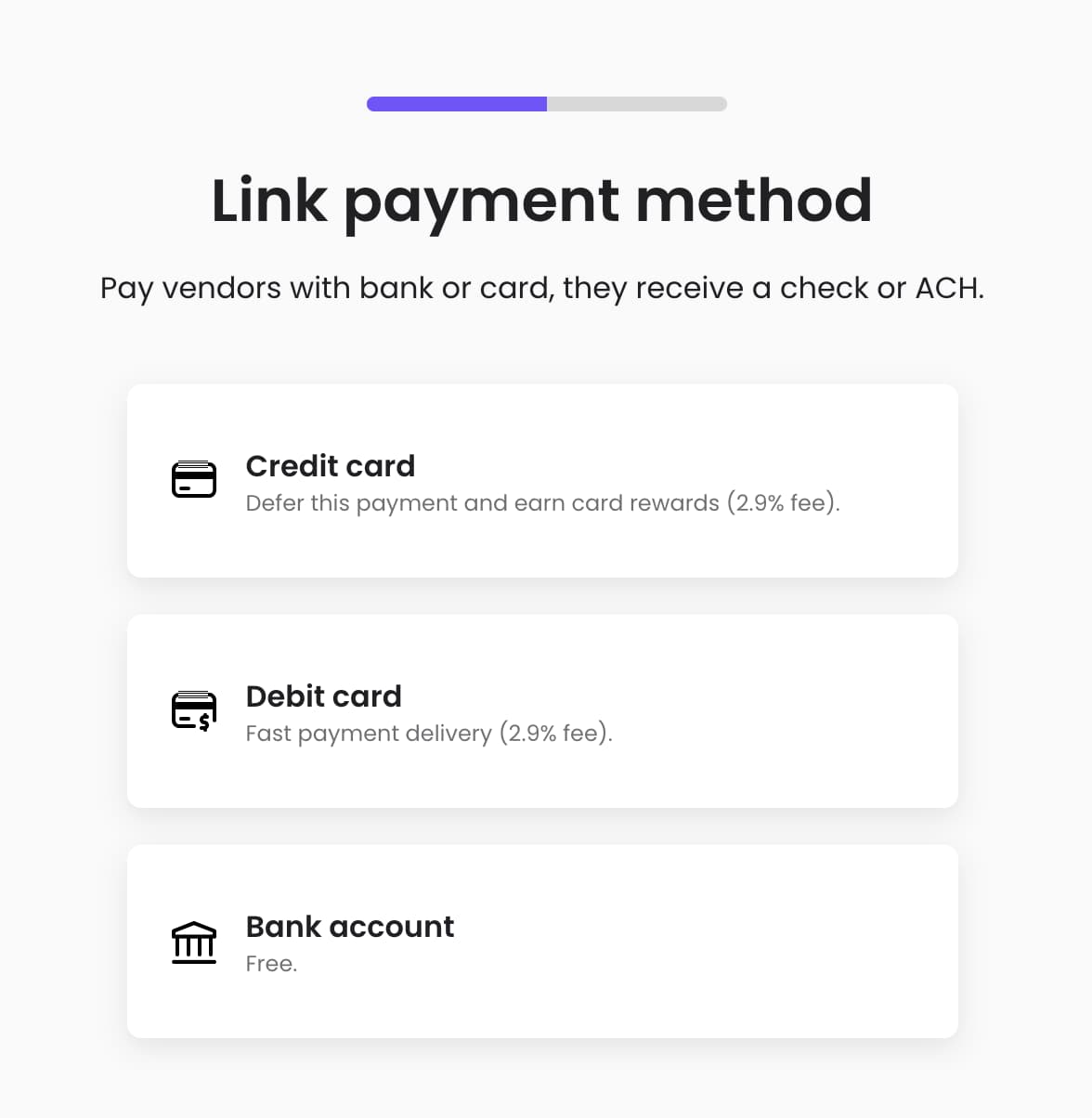
Melio allows you to link a bank account to make payments for free, or you can link a debit or credit card for a 2.9% fee for bill payment. You can only get paid via invoices on Melio and send payment to a linked bank account. You can schedule future payments to vendors for bills or expenses. Melio does not have any integrations for creating invoices. You can use a single-use virtual card to make payments to vendors.
Scheduling Payments
You can schedule future payments to vendors, or bill payment for a specific day, and set up auto approvals for bills.
Multiple Payment Methods
Melio allows you to link a credit card, debit card, or bank account for paying bills and expenses, as shown below. And, it's a simple process to link your payment method to your Melio account.
Invoice Importing
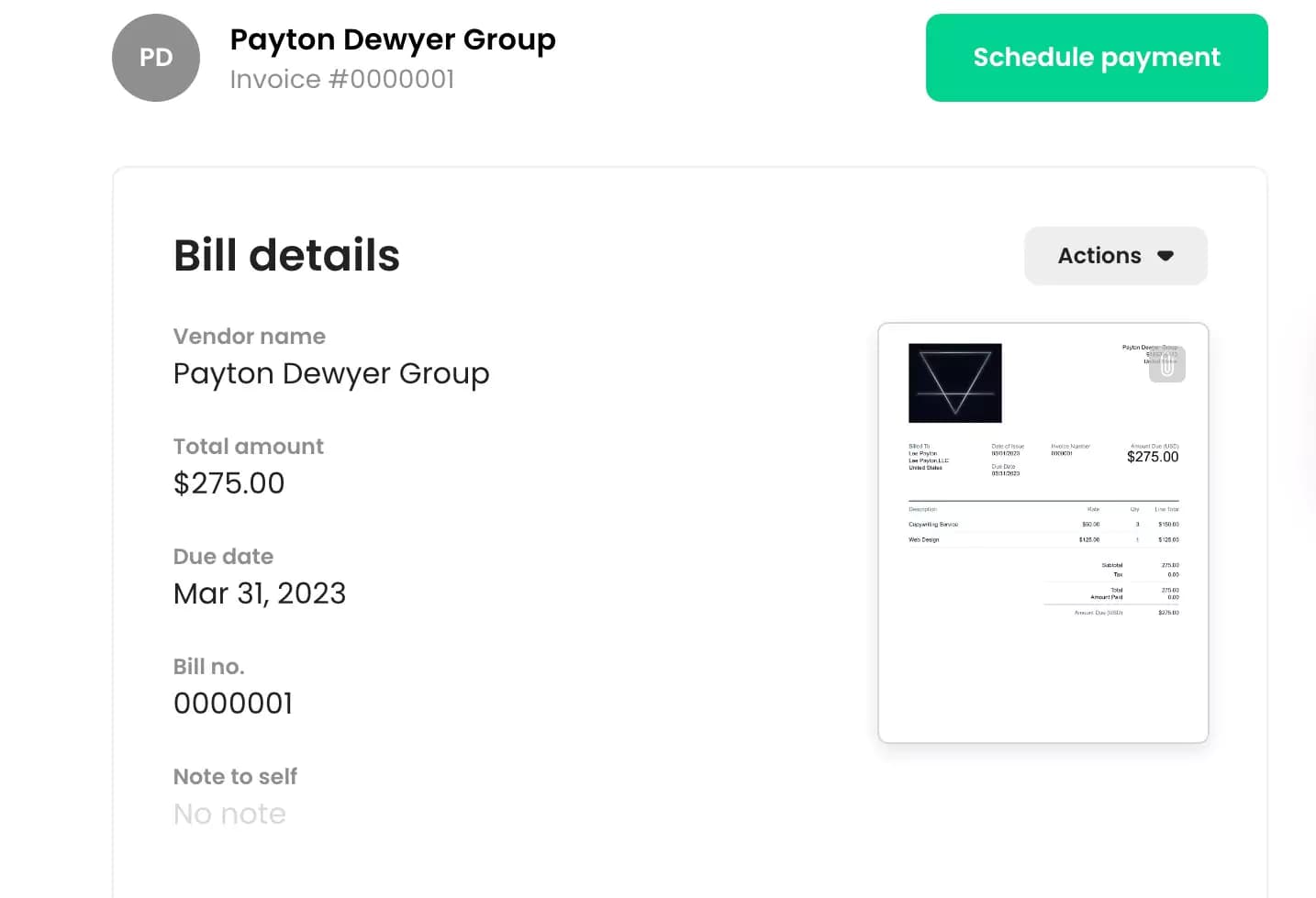
Melio supports importing invoices through their website's account dashboard. They do not have a mobile app. The website only pulls data from your invoices if the vendors are saved in your account contacts. You still have to input the rest of the information manually.
Video of invoice upload process:
https://www.youtube.com/watch?v=b4WQmTAbGV4
Melio offers very simple reporting baked into their software. They auto-track expenses and bills paid and received. Melio requires integrating with another accounting software to get more in-depth report tracking and advanced features offered by other other accounting software.
Payment History Reporting
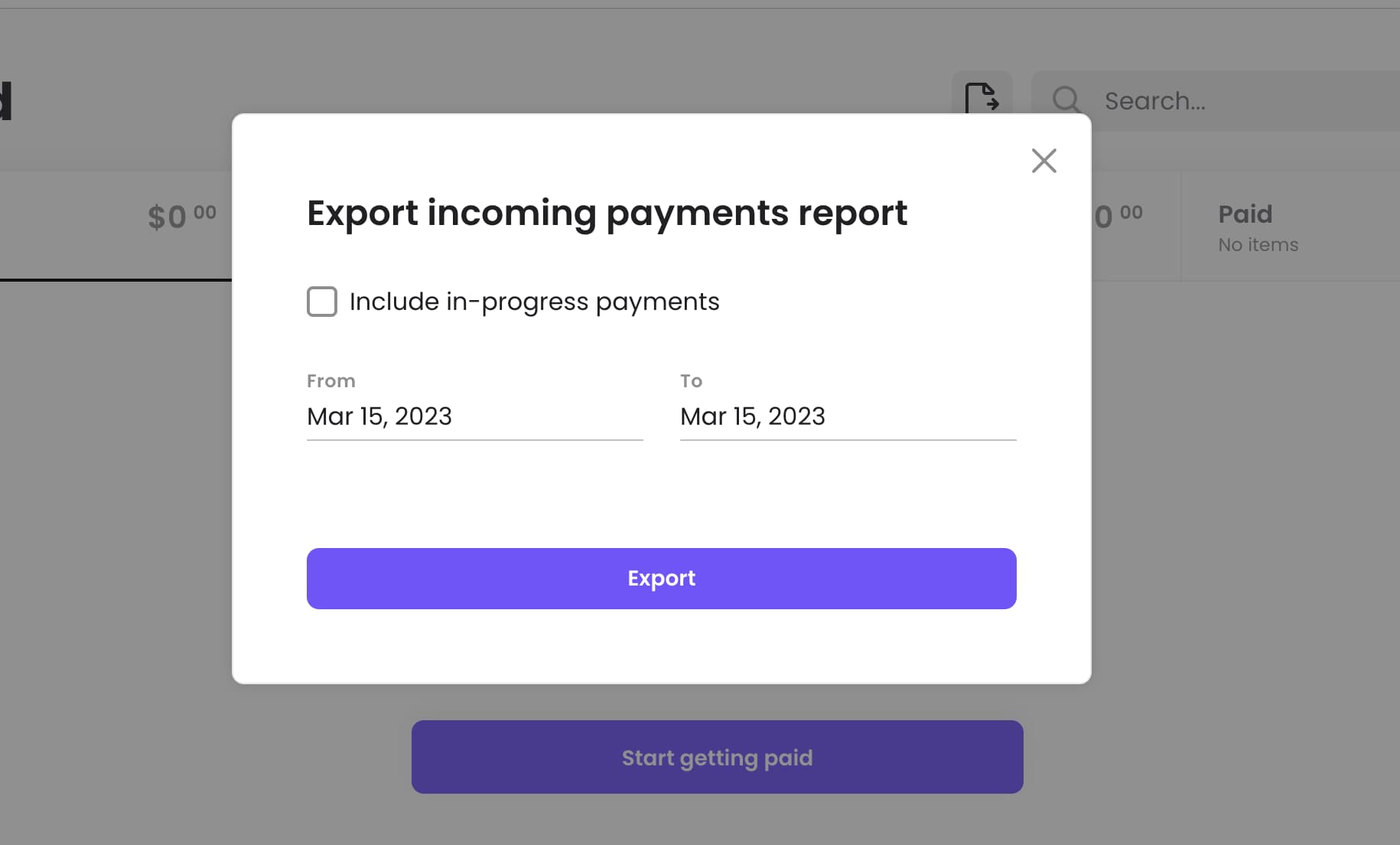
You are able to export your reports from all auto-tracked paid expenses and bills. You can select the specific date range for the report you want to export. And, Melio offers a good feature for filing monthly reports and/or quarterly reports.
Accounts Receivable
Melio offers various automated payment features such as ACH processing, online payment processing, fraud detection, and more. It is an affordable and user-friendly online payment platform catering to small businesses. Melio focuses on automating Accounts Receivable, simplifying payment processes, and empowering small businesses with its transparent and collaborative environment. Its low fees and commitment to the local small business community make it an excellent option for those who value simplicity and efficiency.
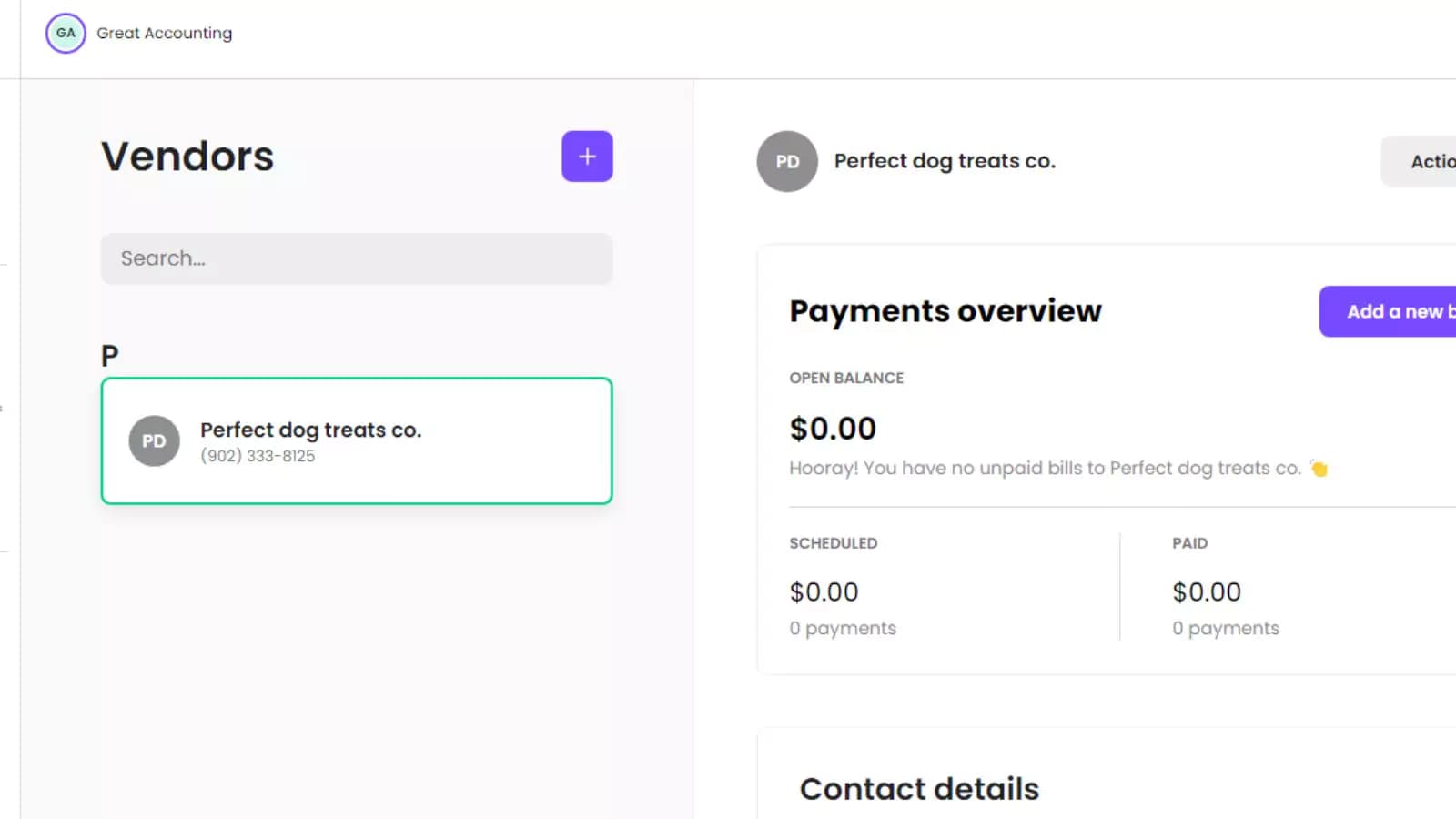
By integrating Melio with Quickbooks, business owners can manage their entire client base from a single platform and automate invoice and payment processes. Additionally, Melio handles tax forms, making it easier for businesses to keep track of their payments, whether they are one-time or recurring. This is particularly useful for those who struggle with managing their payments.
vCita is a platform that enables users to manage their financial transactions, including electronically managing all payments and receipts. As part of its features,{{brand name}} provides users with the ability to export data in CSV format. Once a user has set their preferences on the platform, they can easily extract data on payments and transactions and convert it into a CSV file format, which can be useful for accounting and financial analysis.
With Melio, users have the flexibility to choose the most convenient payment method, and set a schedule for when your payment will be deducted from an account. This ensures timely payments, which Melio will handle on the user’s behalf and without requiring a vendor to sign up for their services, making the process simple and quick.
Melio's services are also free, with only transaction fees charged when sending or receiving money. By using your credit card for payments, you can track payments in real-time and make decisions based on current information, improving your cash flow.
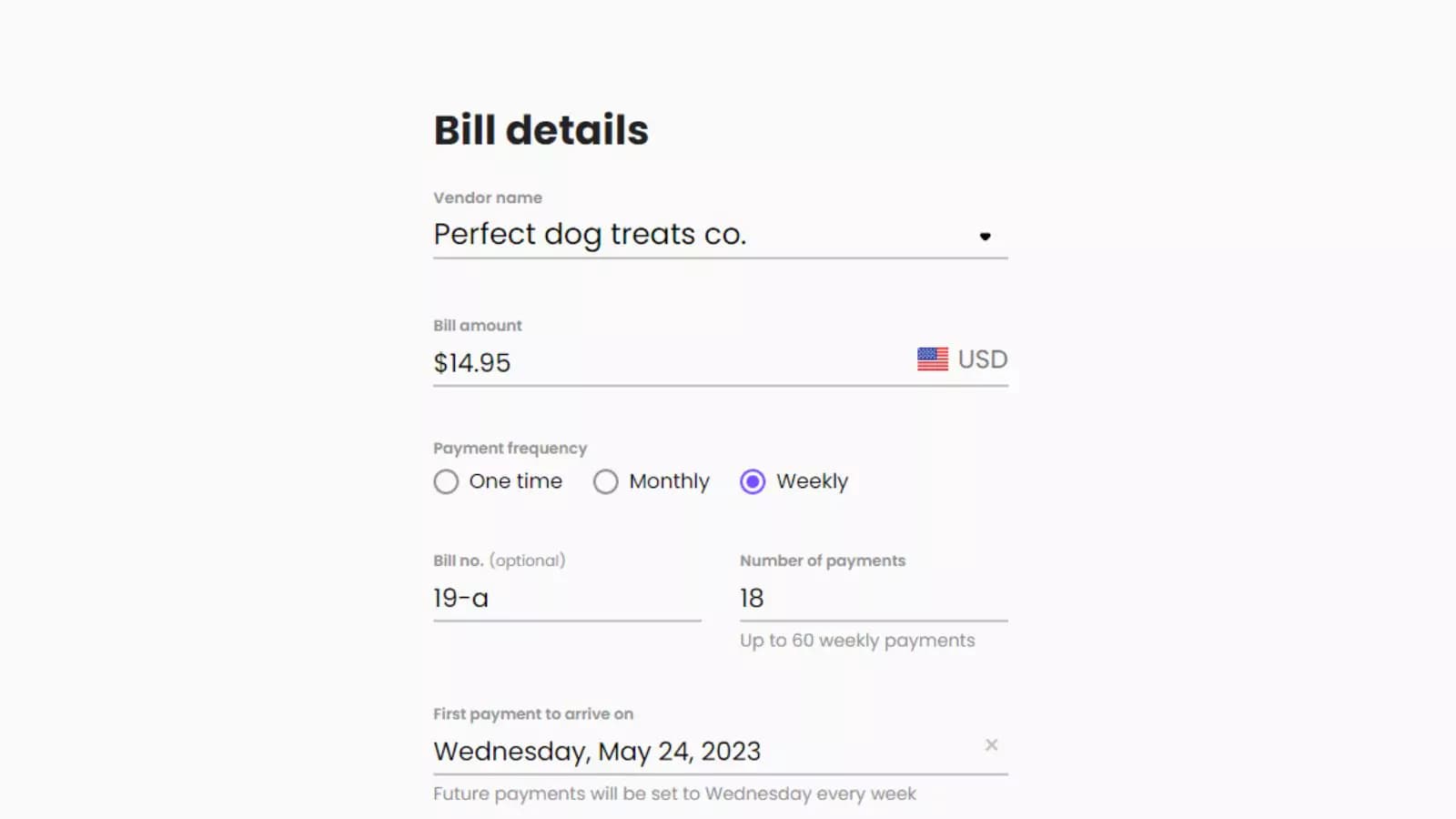
One of the impressive features is Melio's integration with several US banks and QuickBooks. After integrating Melio and QuickBooks, the platform automatically extracts vendor information from QuickBooks, making your workflow more efficient by eliminating the need to enter vendor details manually. Instead, you can simply choose a vendor from the list or type their name to have vendor's information auto-completed. Once a bill payment has been made in Melio, your QuickBooks account will be automatically updated with the payment details.
Features
- Manages Accounts Payable/Receivable
- Account Reconciliations
- Receipt Scanning
- Invoicing
- Generate Invoices
- Accountant-Prep Friendly
- Automation of Invoices/Notifications
- Suggests Transaction Matches
- Payment Processing
- Third-party Integrations
Verdict
Melio Payments is your one-stop platform if you intend to manage all your business payments and receipts from one place. You don't get to spend a dime for your payments, except when you're using credit cards. And even at that, the bonuses and discounts usually offered to Melio users could help wipe off your credit card transaction fees to a great extent.
Melio does not facilitate payments outside the United States and can only sync with Xero and QuickBooks. Nevertheless, if you're out to acquire intuitive software that will ease off your payment burden and won't cost you a fortune, then Melio will be good for you.
Users Reviews
Write a review
Leave a review, help others get it right the first time.
3 Reviews
Cara G
Pleased and satisfied
Overall I've been very pleased with Melio. We currently only use it to pay vendors which is all we need and for that it's perfect. The payments are fast, secure, and easy to set up. I should have signed up for this service long ago!
Rebecca B
At least the customer service is good
I wanted to love it, I wish the system had more options.
Peter W
Love Melio
Easily set up ACH payments for all my vendors with a few clicks (free) Uploading and scanning of invoices Quickbooks integration is a crucial feature!
- Customer service!